How To Sell Wrestling Memorabilia Online | Step by Step (Free Method)

Ideal For: All the pawn shop owner, wrestling memorabilia creators, memorabilia delears, and other merchants can use this method to sell wrestling memorabilia online.
How To Sell Wrestling Memorabilia Online

Why Choose this Method to Sell Wrestling Memorabilia Online?

Unlike any other solution, this method allows you to:

  • List and sell your wrestling memorabilia for FREE. Absolutely no payment required.
  • No need to pay commission on any of your sale.
  • Multiple payment options like PayPal, Credit Card, etc to collect payment from a single place.
  • Sell one time or recurring subscriptions of your wrestling memorabilia.
  • Collect payments & sell products in any currency as per your requirement.
  • Give discounts on your products by offering special coupon codes.
  • Add sales commission agents to help you in selling wrestling memorabilia.

Get Pabbly Subscription Billing for Free

Even 20 years after its inception WWE continues to the most popular form of sports entertainment. Some of the memorabilia like Hulk Hogans WWF 1995 championship belt was sold over a million dollars. Similarly, other pieces like Kane’s mask, Undertaker’s dead man hat has fetched quite a sum over the years. Nowadays due to the advent of the internet, increasingly many pawn store owners have started selling wrestling memorabilia online to get higher prices and businesses from around the world.

Now, in this article, I would like to suggest an incredible software called Pabbly Subscription Billing. The reason is, through this Saas tool, you can create incredible checkout pages to sell wrestling memorabilia online. Other advantages are

  • Unlimited Revenue Generation
  • Revenue Tracking
  • Multiple Billing Models
  • Dedicated Buttons For Marketing
  • Auto Email Alerts
  • Custom Domain

Note: There were many lawsuits concerning the authenticity of such merchandises, hence one should have proper paperwork before selling wrestling memorabilia online.

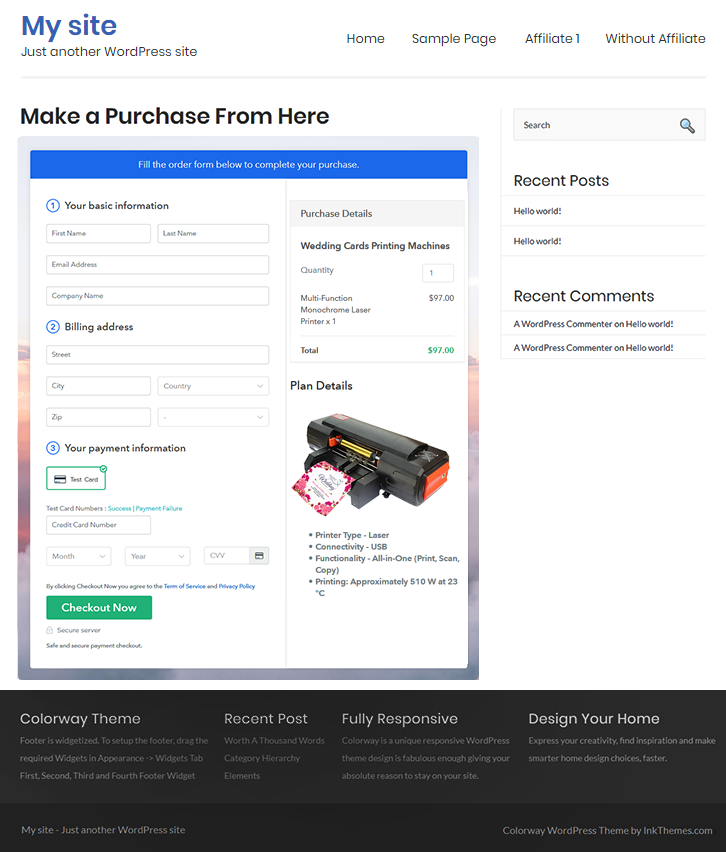
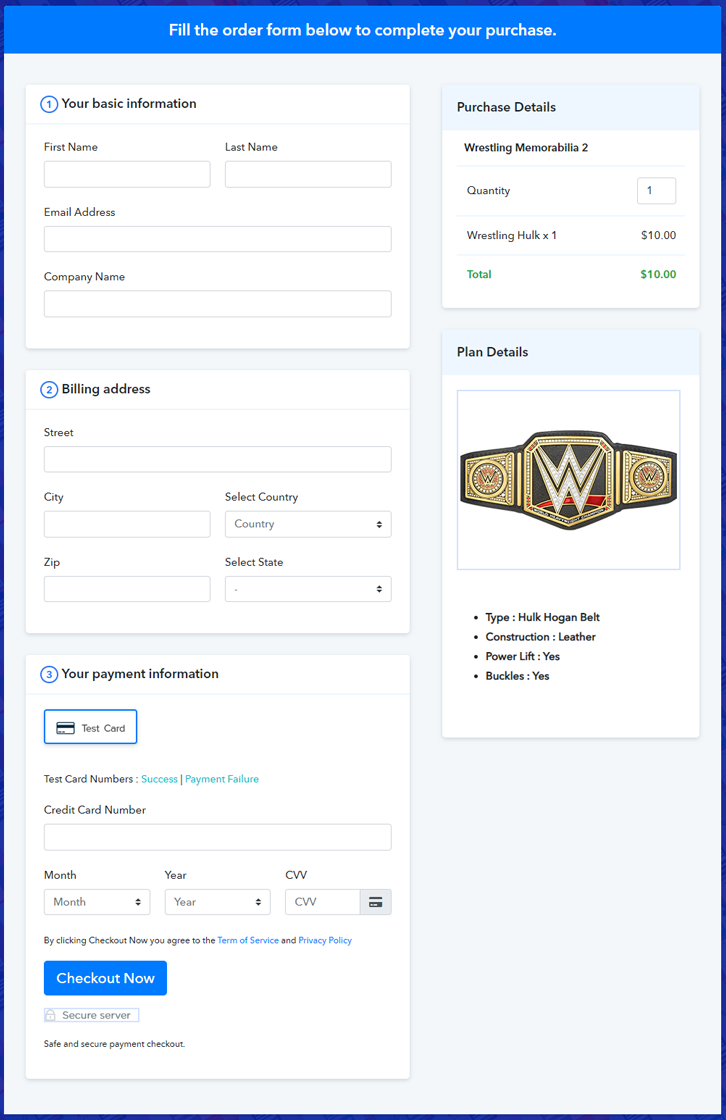
Final View of Checkout Page for your Wrestling Memorabilia Selling Business
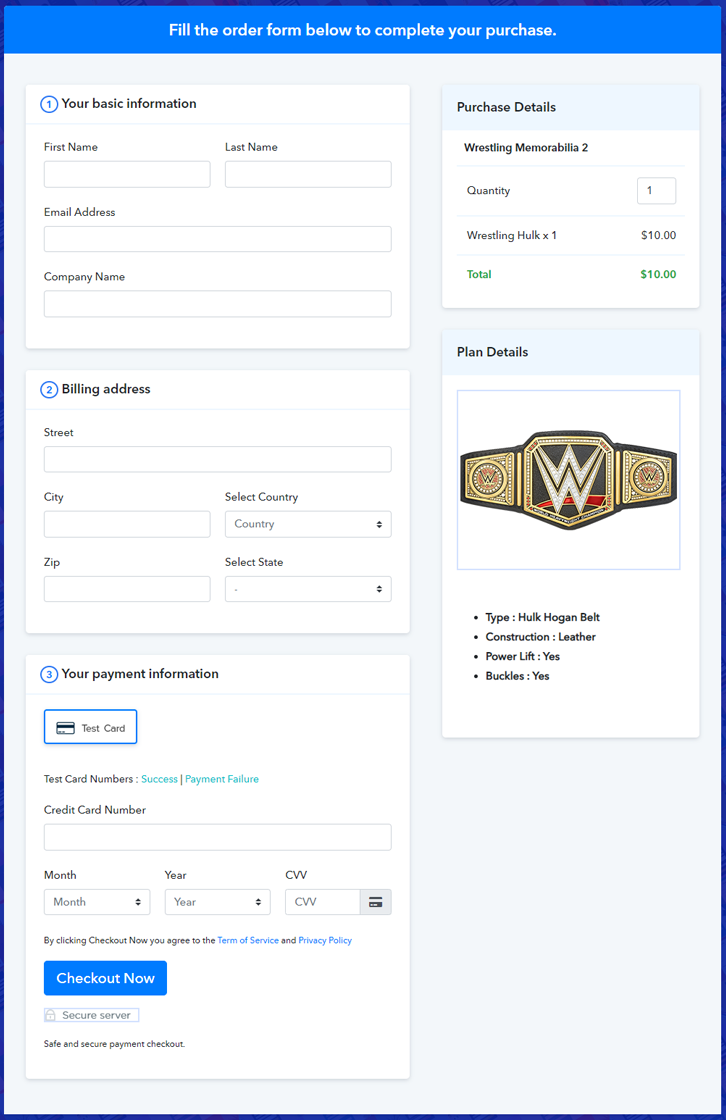
Checkout To Sell Wrestling Memorabilia Online

Preview Checkout Page

Step 1: Log in to Pabbly Subscription Billing
Signup

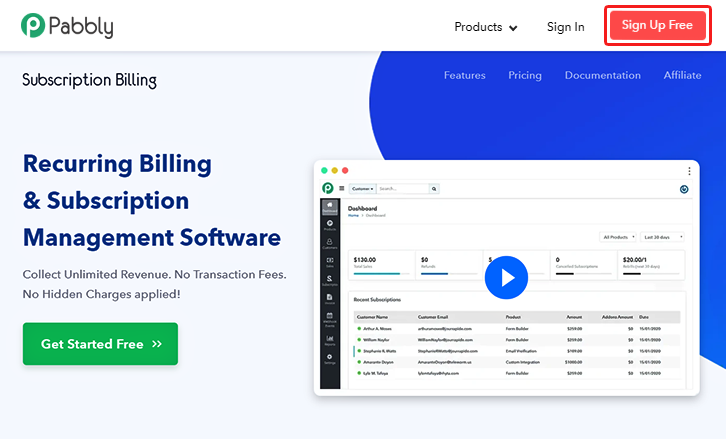
Look in for Pabbly Subscription Billing in your browser. Now, click on the “Sign up Free“ button. Either fill all the information or simply sign in using your Gmail account.

Sign Up For Free!

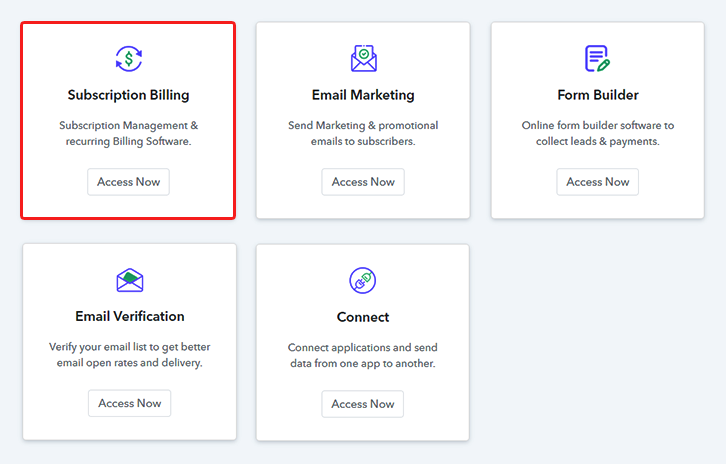
Step 2: Select Subscription Billing

Access Subscription Billing

Step 3: Account Setup
Setup Account

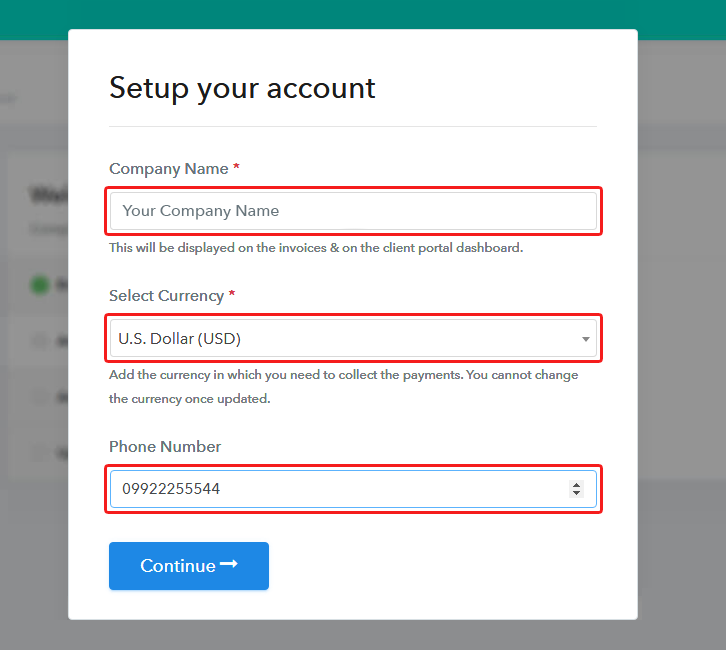
Once you’re done click on the “Access Now” button of Pabbly Subscription Billing, a page will pop-up with details like company name, currency, and contact number. Next, you need to fill those details to go on.

Step 4: Connect Payment Gateways & Start Wrestling Memorabilia Selling Business Online
Connect Payment Gateway

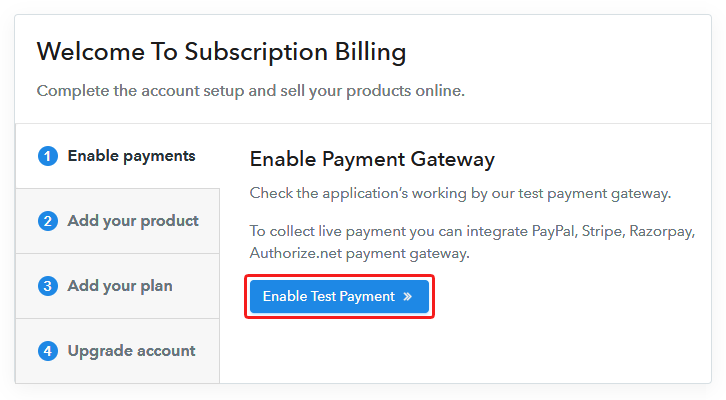
The next step is to understand the payment process using a “Test Payment Gateway”. By pressing this button, you will be having the same payment experience that a customer will have. This will allow you to sort out the glitches and make the transactions seamless. Also, this software allows integrations with payment gateways such as PayPal, Stripe, etc. Furthermore, there are manuals listed below to help you out.

Step 5: Add Product for your Wrestling Memorabilia
Add Product

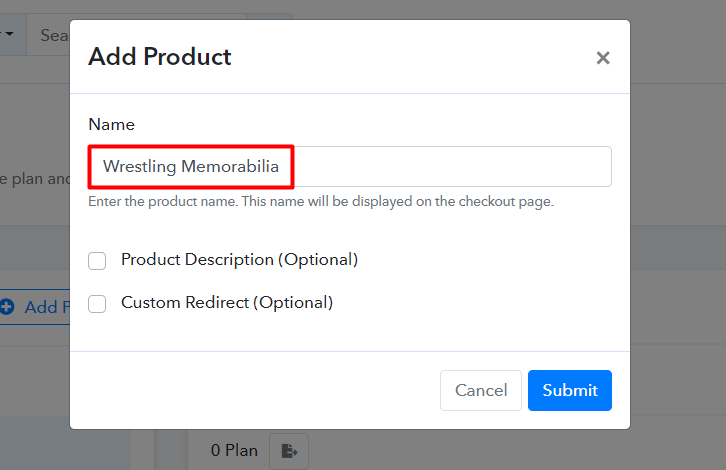
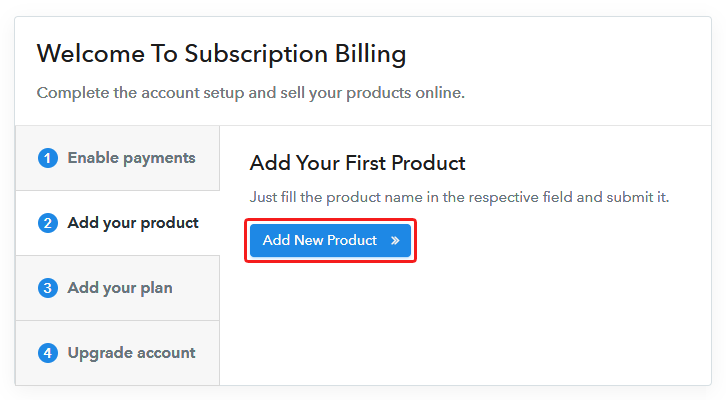
Now we will add products and here beneath the  “Enable Payments” segment there is the “Add your product” section click on it. Also, this will generate a dialog box with a blue button “Add New Product”. Click on it.

Now, here you will add the title which is ‘wrestling memorabilia’

Add Product To Sell Wrestling Memorabilia Online

Fill out all the details like the name of the product and voila your product is created.

Note: Here you can add all the products related to the similar category by creating plans for each of them.

Step 6: Add Plans 

Now let’s create plans for different kinds of wrestling memorabilia available in your store.

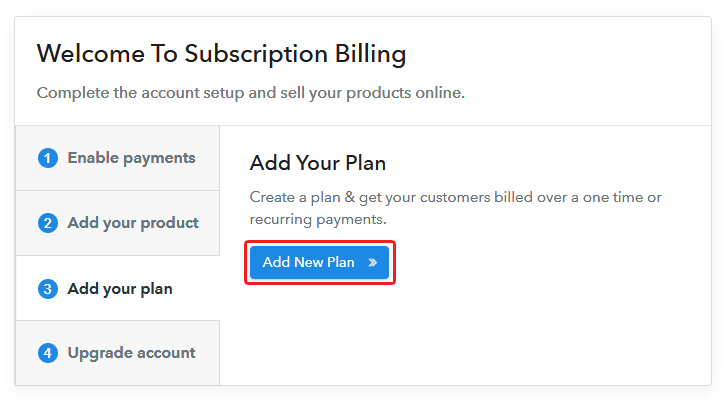
(a) Select Add New Plan

Add Plan

(b) Specify the Plan & Pricing Details
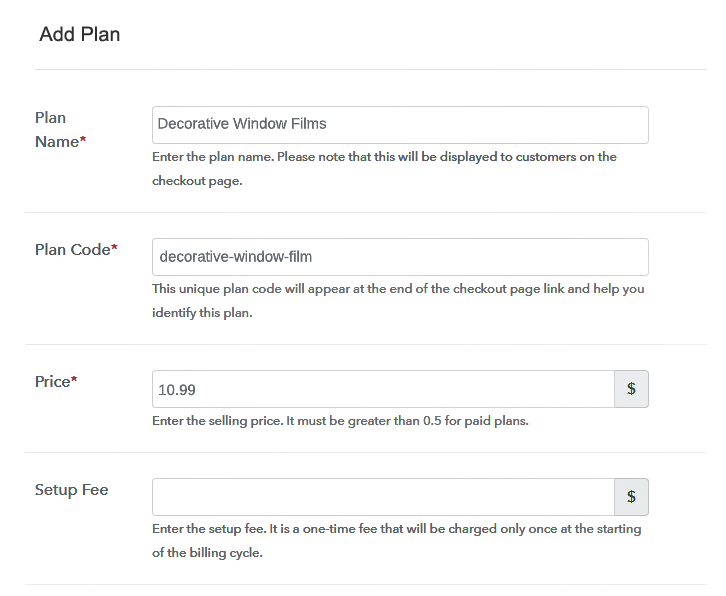
Add Plan To Sell Wrestling Memorabilia Online

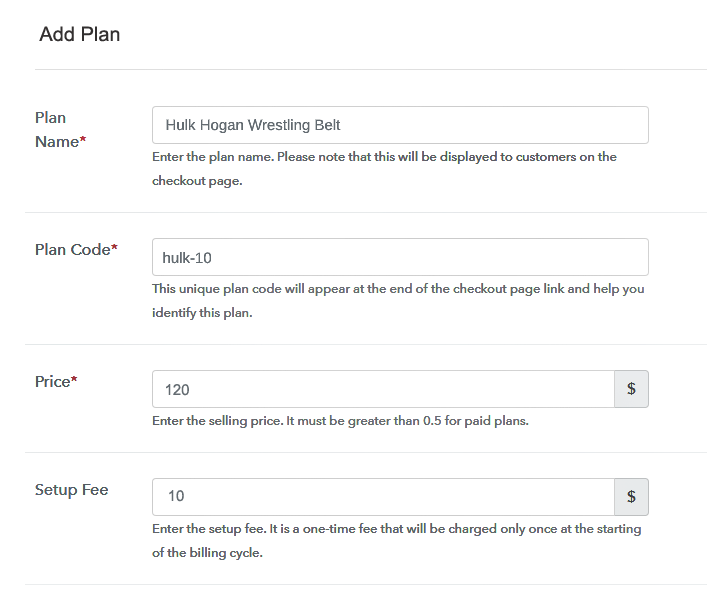
In the plan page, here you have to fill in details like plan name, code, price, setup fees. Moreover, choose your preferred revenue model accordingly and after some time you can even change it according to your choice.

(c) Add Image & Description of Wrestling Memorabilia
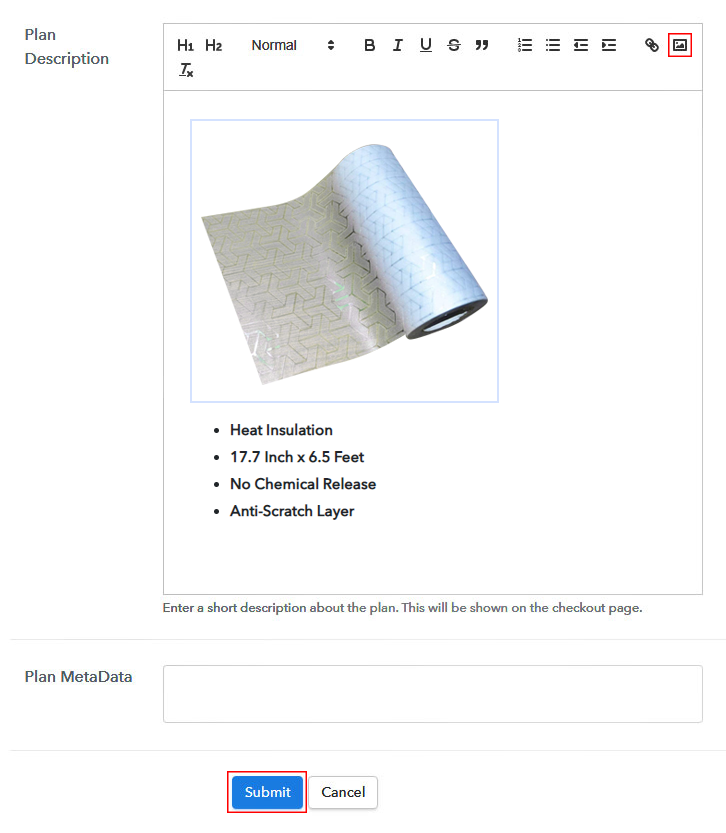
Add Image To Sell Wrestling Memorabilia Online

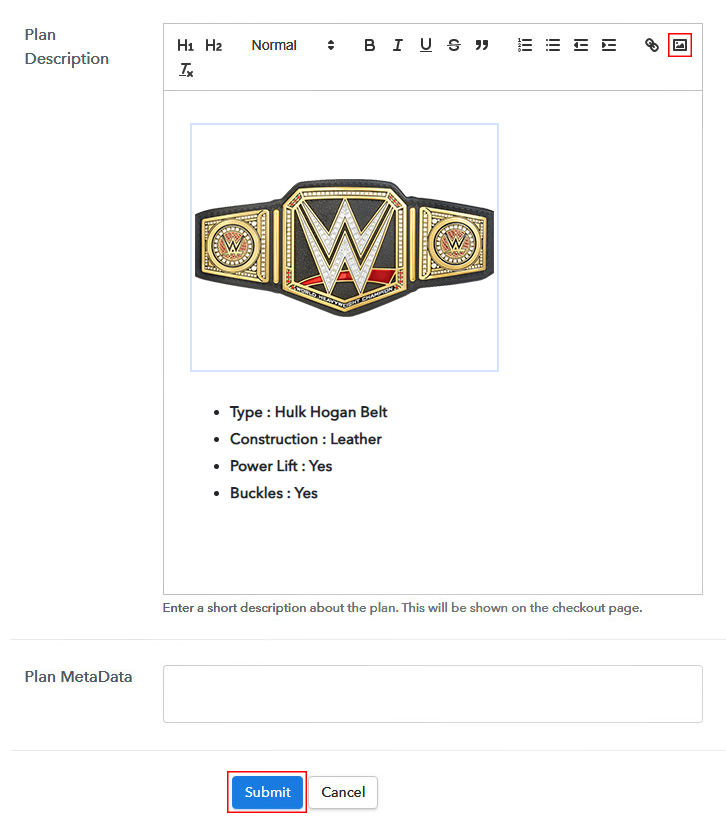
Now, give small info about wrestling memorabilia in bullet points, add images and links too.

Then, on hitting the submit button, your product will be successfully added.

Also, you can create multiple plans and can add all the memorabilia you want to sell online.

Step 7: Share your Checkout Page

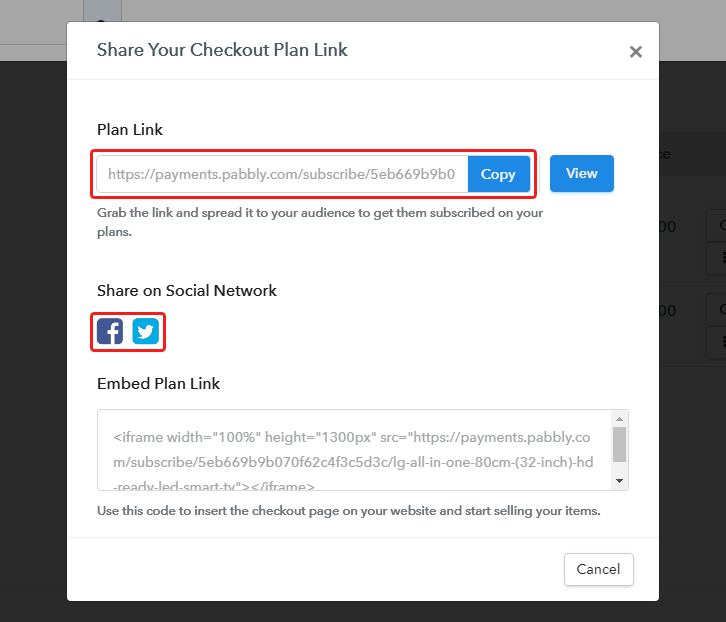
Share Checkout Page on Social Media

Here are some ways, by which you can share the checkout pages through Pabbly Subscription Billing.

  • In this method, you simply just press the respective buttons for Twitter, Facebook and the checkout pages get automatically shared
  • Furthermore, simply paste the checkout pages link on to share it via email and SMS.
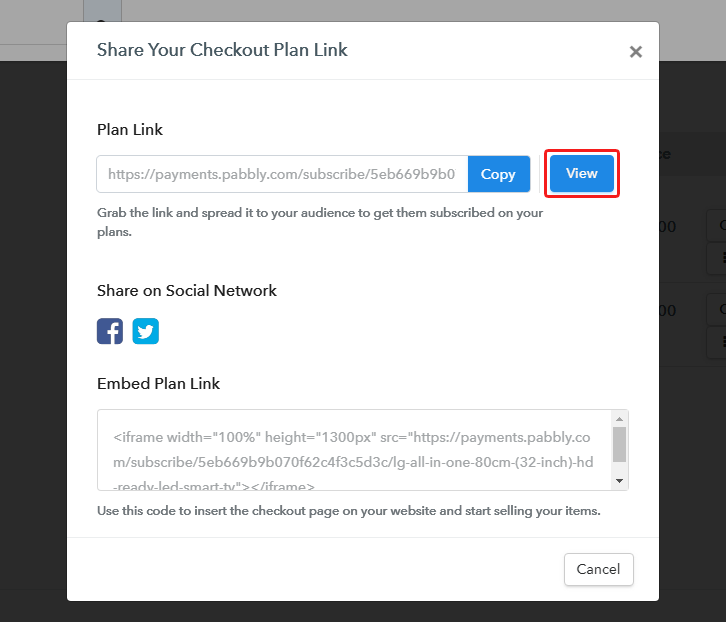
  • Also, you can create buttons on your webpage and paste the checkout links on it. Or you can place it on any anchor text on your website, so the users will be redirected to the checkout page.

Step 8: Preview Checkout Page

Follow up the recommended steps to preview the checkout page:

(a) Click on the View Button

View Checkout Plan

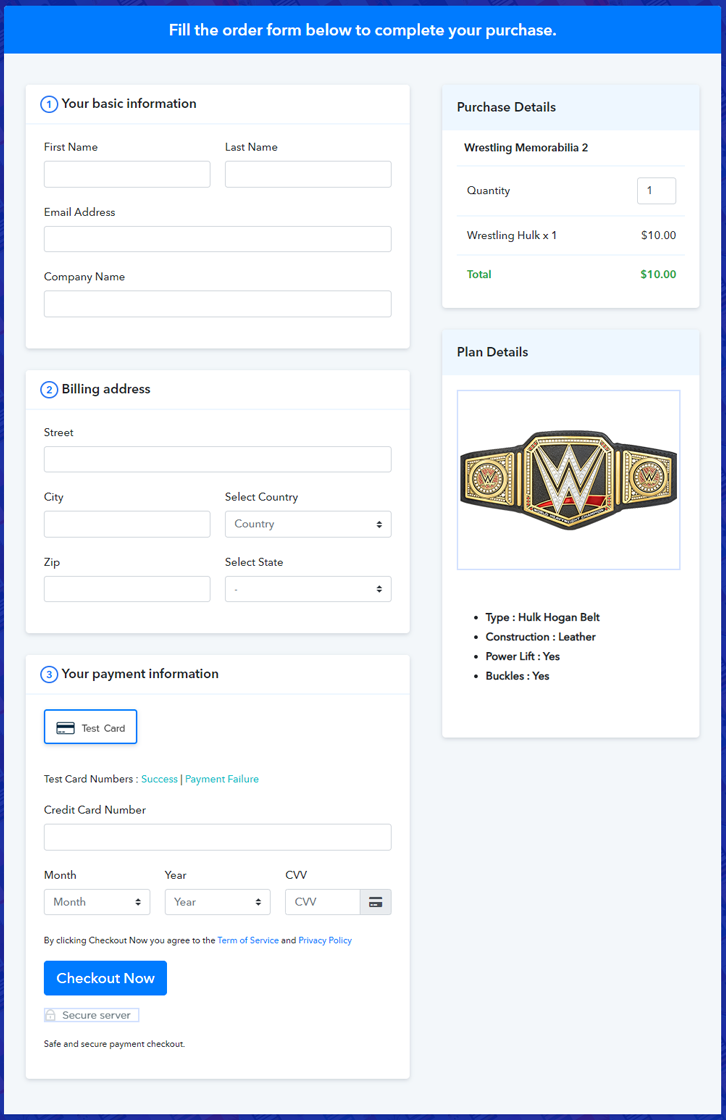
(b) Take a Look at the Checkout Page
Add Checkout To Sell Wrestling Memorabilia Online

Step 9: Embed Checkout Page in Site & Sell Online
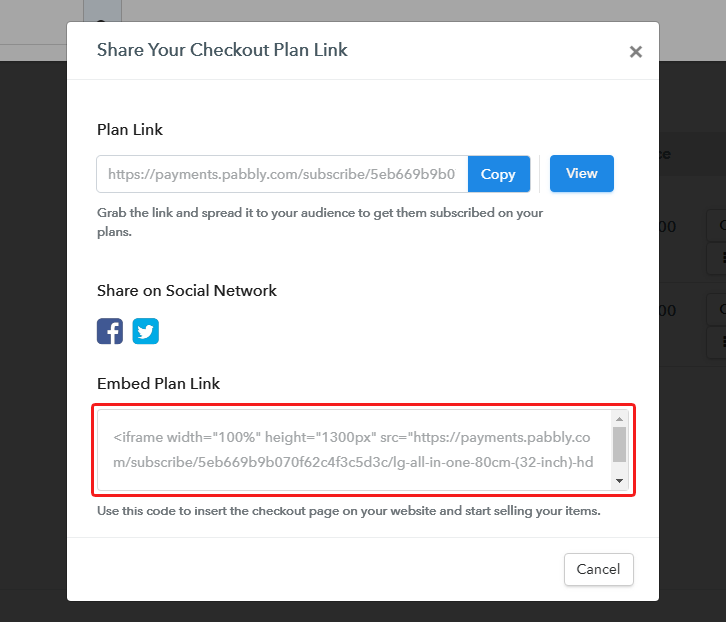
Embed Checkout Page on Website

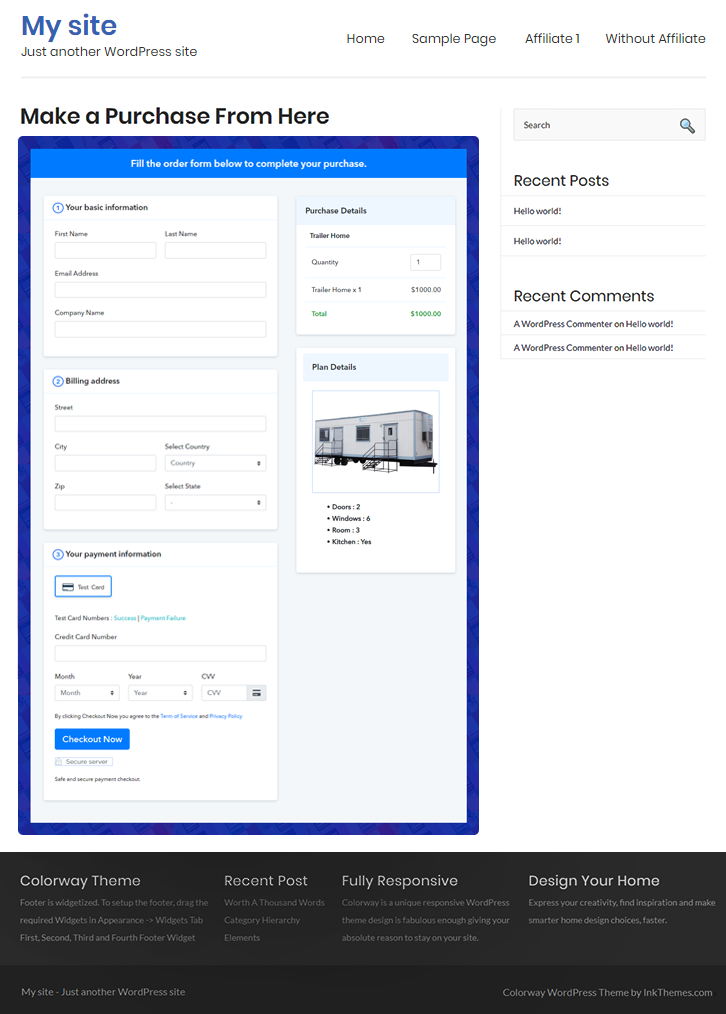
Furthermore, just copy the link and add the checkout page to sell wrestling memorabilia at any suitable place on your WordPress site.

(a) Edit the Page & Paste the Copied Link
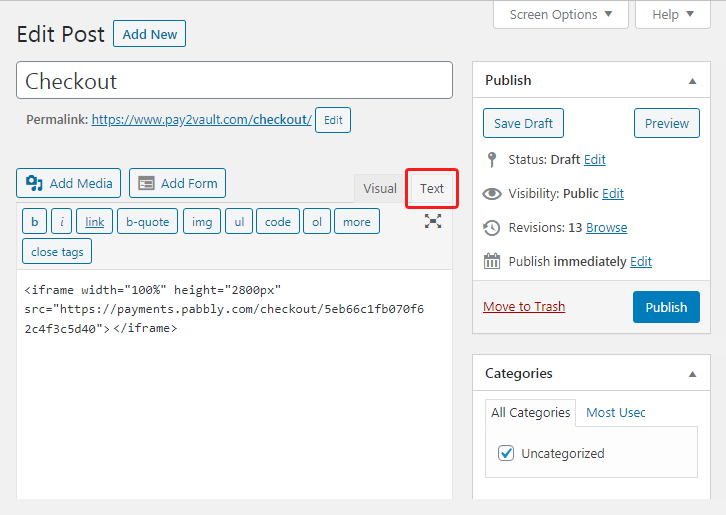
Embed Checkout Page on Website

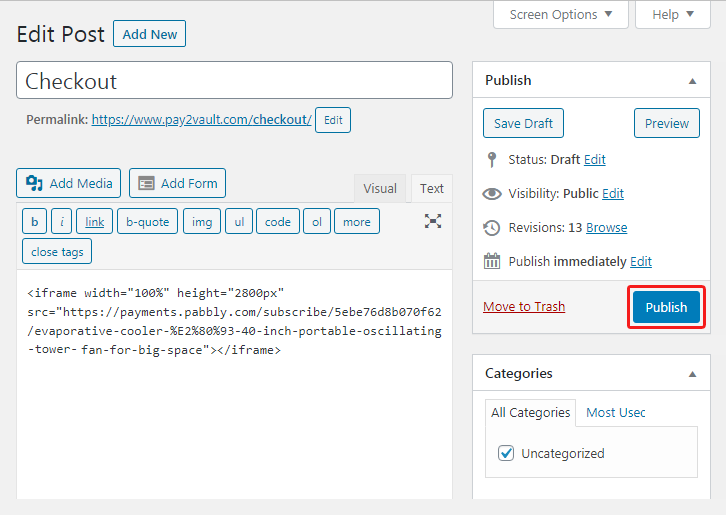
Further, paste the plan link of the wrestling memorabilia on a text editor of the WordPress dashboard.

(b) Save & Publish the Checkout Page

Save_and_Publish

Next, click the “Publish” button, after making changes.

(c) Check out the Final Look of your Checkout Page on WordPress Site
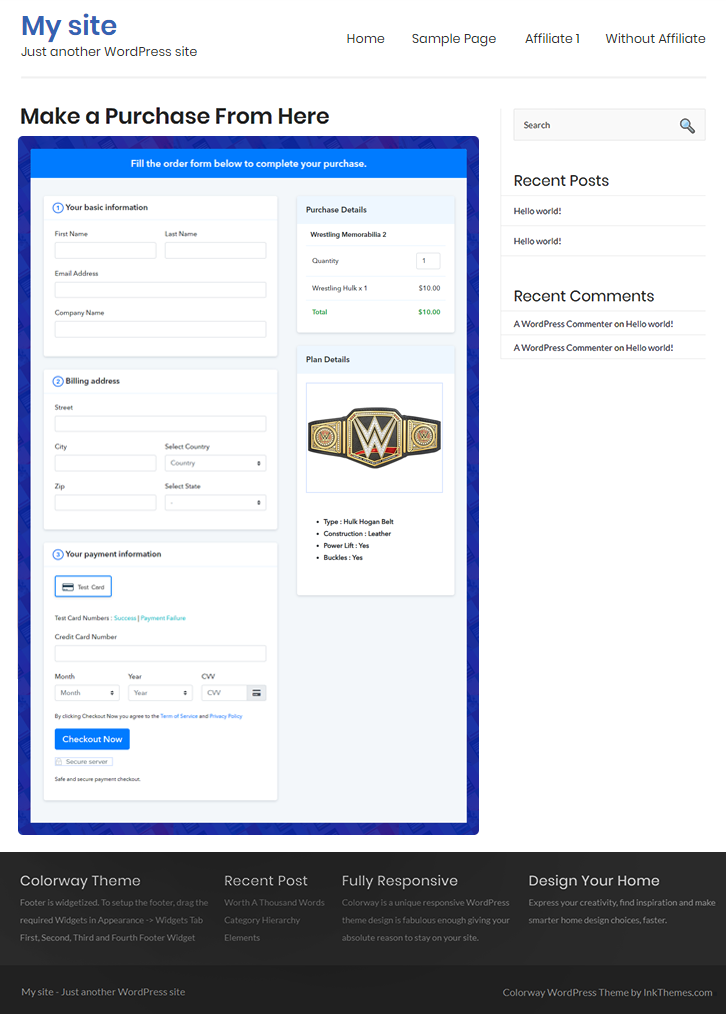
Embed To Sell Wrestling Memorabilia Online

Step 10: Multiplan Checkout Page

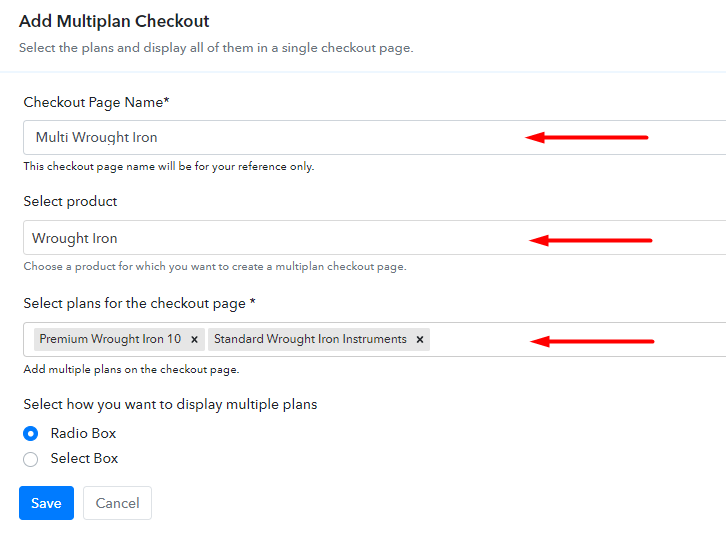
Note: In case you want to sell multiple products via a single checkout page, you can create a multi-plan checkout page otherwise skip this step.

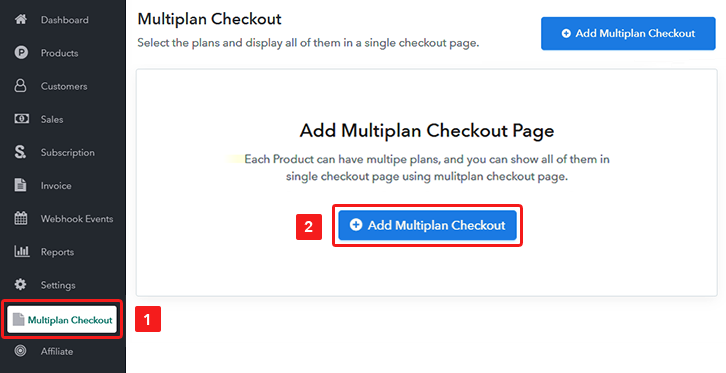
(a) Click on Add Mutiplan Checkout

Multiplan Checkout

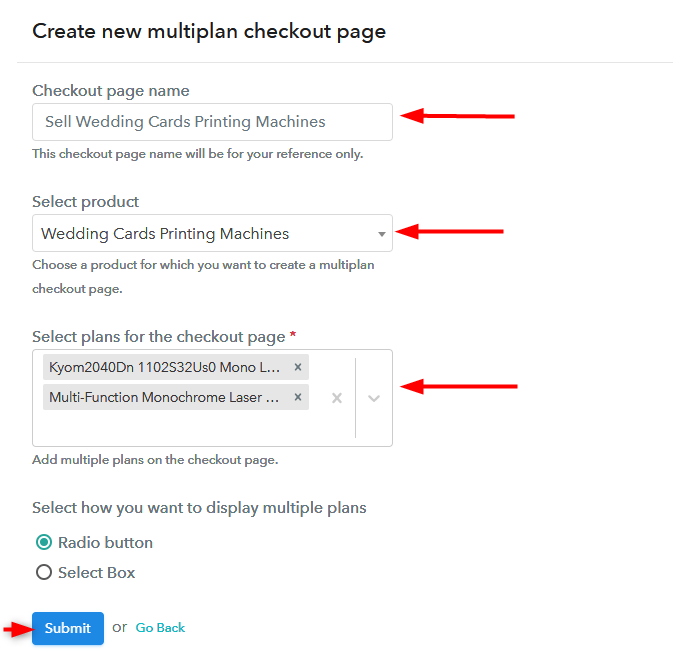
(b) Add Plans to Sell Multiple Wrestling Memorabilia from Single Checkout Page
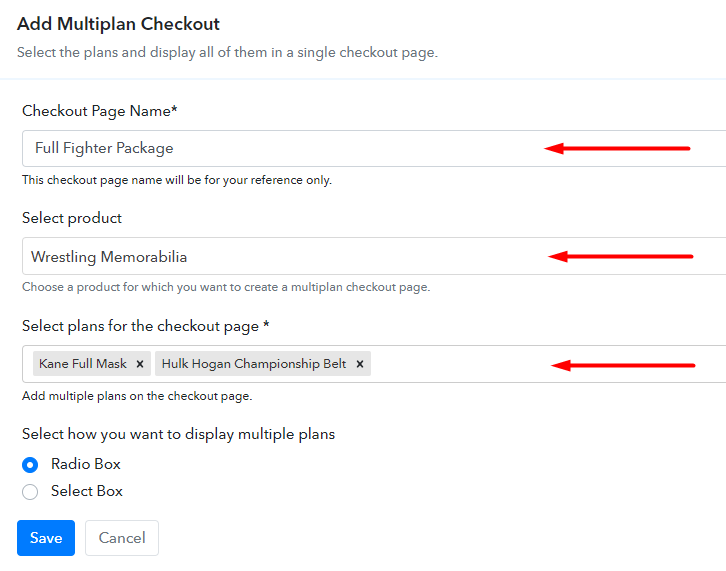
Add Multiplan To Sell Wrestling Memorabilia Online

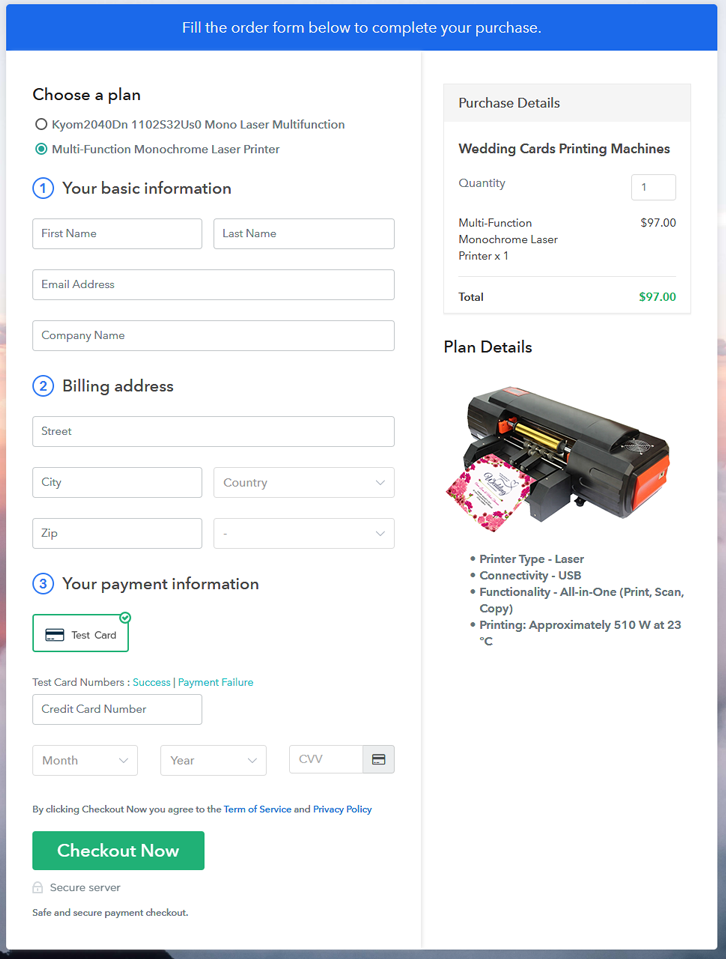
(c) Take a Look at the Checkout Page
Add Multiplan Checkout To Sell Wrestling Memorabilia Online

Preview Checkout Page

Wrapping Up

By 2035 it estimated that nearly 50% of the population will buy stuff directly from the internet. And this checkout page to sell wrestling memorabilia is your first baby step to that future. Do remember there are a ton of features that I haven’t mentioned here, but you got to explore them. Thank You !!

You May Also Like To Read –
How To Sell Wrought Iron Online | Step by Step (Free Method)

Ideal For: All the wrought iron sellers, wrought iron dealers, steel industries owners, scrap collectors and other merchants can use this method to sell wrought iron online.

How To Sell Wrought Iron Online

Why Choose this Method to Sell Wrought Iron Online?

Unlike any other solution, this method allows you to:

  • List and sell your wrought iron for FREE. Absolutely no payment required.
  • No need to pay commission on any of your sale.
  • Multiple payment options like PayPal, Credit Card, etc to collect payment from a single place.
  • Sell one time or recurring subscriptions of your wrought iron.
  • Collect payments & sell products in any currency as per your requirement.
  • Give discounts on your products by offering special coupon codes.
  • Add sales commission agents to help you in selling wrought iron.

Get Pabbly Subscription Billing for Free

The global consumption for wrought iron products has increased over the years. However, the two immediate concerns for any wrought iron seller are lower product mobility and higher space renting charges. But if they manage to sell wrought iron online, they can sort out these two issues easily. That is because there is higher customer participation on the internet which means higher product sales. And you obviously do not need any new renting space for your product on the internet.

Some other additional benefits of selling wrought iron online include disintermediation, auto window dressing, precise cash up, zero cold calls, no hard sell, etc.

Now, in this article, we will work with Pabbly Subscription Billing to sell wrought iron online. This is because with this software’s help you can create awesome checkout pages to sell unlimited wrought iron online. Also, you can collect payment for your wrought iron in both offline/online modes. Some other features worth mentioning are

  • Unlimited Payment Collection
  • Zero Transaction Fees
  • Tracking Sales and Revenues
  • Custom Logo
  • Custom Domain

So, without wasting any more time let’s build our first checkout page with Pabbly Subscription Billing to sell wrought iron online.

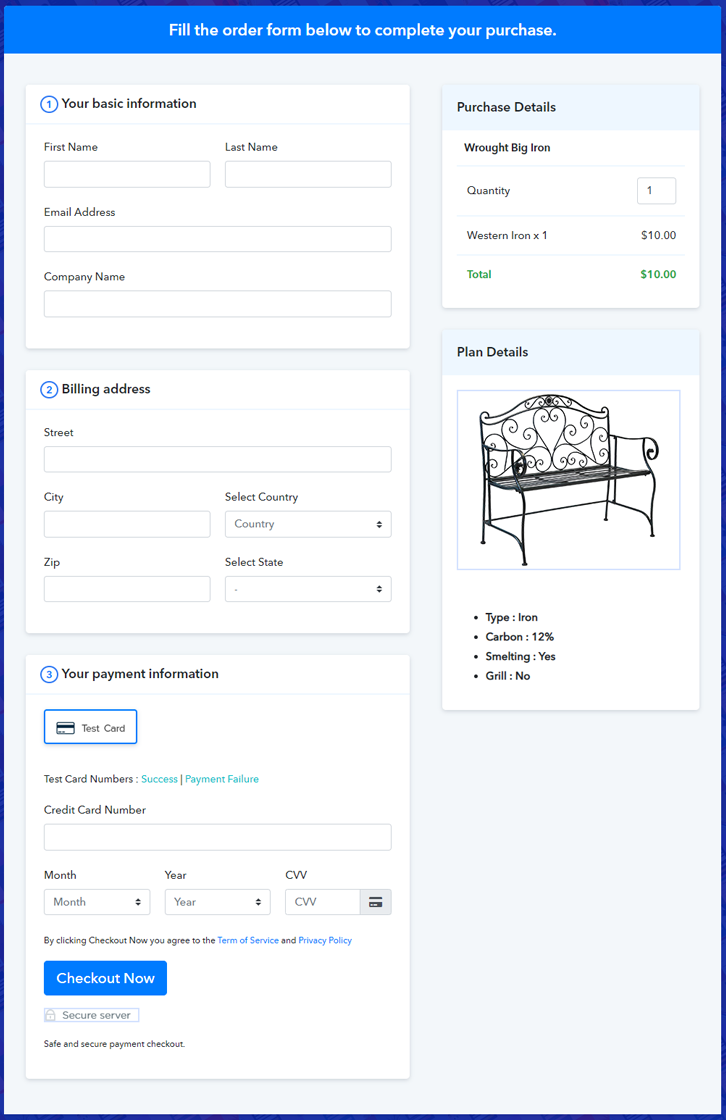
Final View of Checkout Page for your Wrought Iron Selling Business

Checkout To Sell Wrought Iron Online

Preview Checkout Page

Step 1: Log in to Pabbly Subscription Billing

Signup

Navigate to Pabbly Subscription Billing in your browser. Here, you have to click on the “Sign up Free“ button. You may either fill all the information or simply sign in using your Gmail account.

Sign Up For Free!

Step 2: Select Subscription Billing

Access Subscription Billing

Step 3: Account Setup

Setup Account

Click the “Access Now” button of Pabbly Subscription Billing, a page will pop-up with details like company name, currency, and contact number. Next, you need to fill those details to go on.

Step 4: Connect Payment Gateways & Start Wrought iron Selling Business Online

Connect Payment GatewayThis software offers a fake payment gateway where you can dummy test the payment experience in advance. You can do this by clicking on the “Enable Test Payment” option.

Also, the integration of payment gateways is easy with Pabbly Subscription Billing with the help of the articles given below.

Step 5: Add Product for your Wrought Iron

Add Product

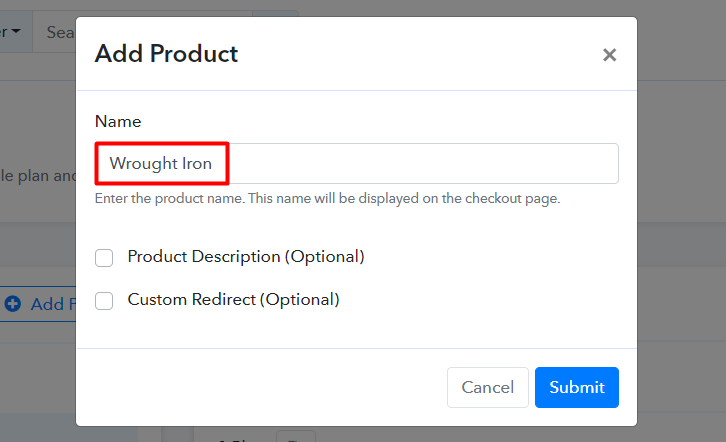
Here on “Add your product” section click on it. Furthermore, this will create a dialogue box with a blue button “Add New Product”. Click on it.

Add Product To Sell Wrought Iron Online


Fill out all the details like the name of the product and voila your product is created.

Note: Here you can add all the products related to the similar category by creating plans for each of them.

Step 6: Add Plans 

Now let’s create plans for different kinds of wrought iron available in your store.

(a) Select Add New Plan

Add Plan

(b) Specify the Plan & Pricing Details

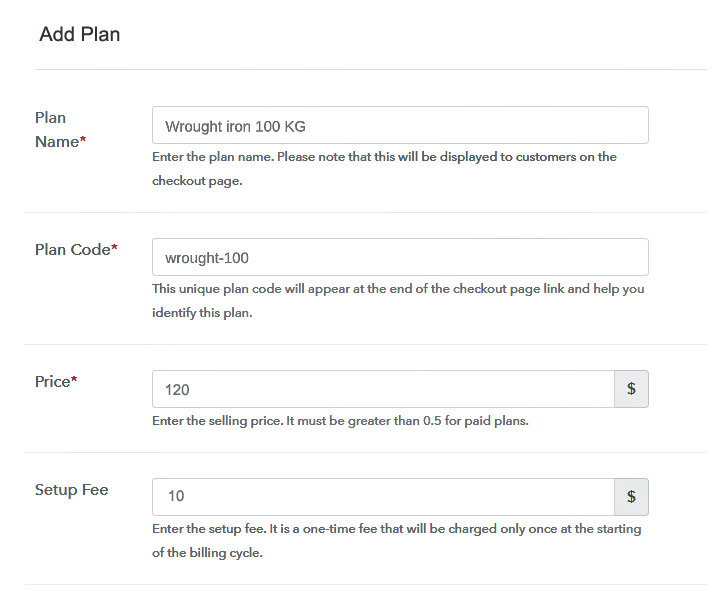
Plan To Sell Wrought Iron Online

In the plan page, here you have to fill in details like plan name, code, price, setup fees.

Now scroll down, and in the section below you can see the choice to change the billing models like one-time payment, recurring, etc.

Furthermore, choose your preferred revenue model accordingly and after some time you can even change it according to your discretions.

(c) Add Image & Description of Wrought Iron

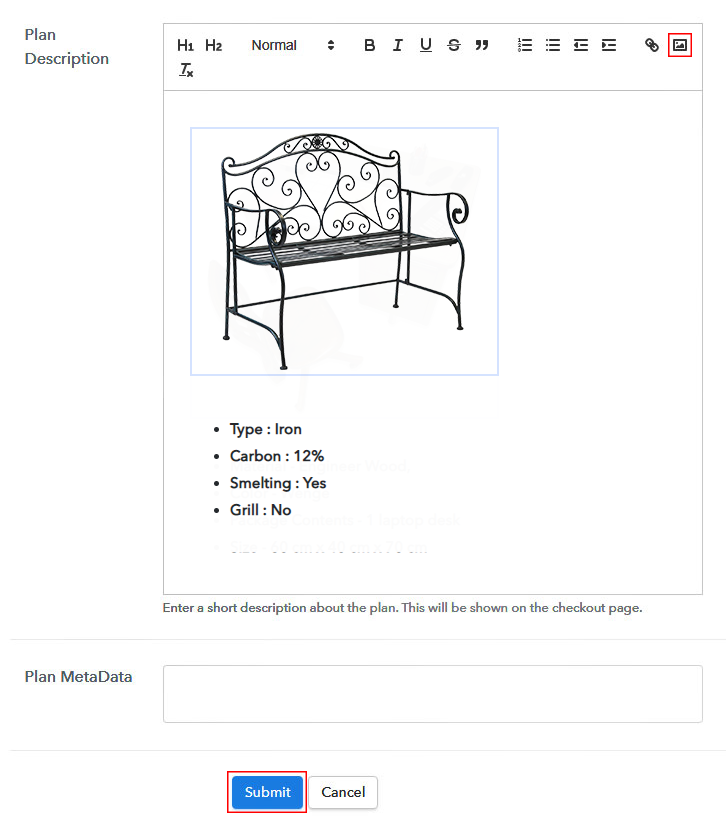
Add Image To Sell Wrought Iron Online

Insert the pictures of wrought iron and then add some information of wrought iron like weight, volume, etc and click ‘submit button’

Also, by using the same method, you can list more products.

Step 7: Share your Checkout Page

Share Checkout Page on Social Media

For the digital marketing of your products, Pabby Subscription Billing provides three streams.

  • Pressing the dedicated button for Twitter & Facebook you can share the checkout pages on these websites.
  • Furthermore, you can always share the checkout pages via email and SMS.
  • For more action, you can create a button on your webpage and paste the checkout links on it. Or you can place it on any anchor text on your website, so the users will be redirected to the checkout page.

Step 8: Preview Checkout Page

Follow up the recommended steps to preview the checkout page:

(a) Click on the View Button

View Checkout Plan

(b) Take a Look at the Checkout Page

Checkout To Sell Wrought Iron Online

Step 9: Embed Checkout Page in Site & Sell Online

Embed Checkout Page on Website

Likewise, just copy the link and add the checkout page to sell wrought iron online at any suitable place on your WordPress site.

(a) Edit the Page & Paste the Copied Link

Embed Checkout Page on Website

Further, paste the plan link of the wrought iron online on a text editor of the WordPress dashboard.

(b) Save & Publish the Checkout Page

Save_and_Publish

Next, click the “Publish” button, after making changes.

(c) Check out the Final Look of your Checkout Page on WordPress Site

Embedd WordPress To Sell Wrought Iron Online

Step 10: Multiplan Checkout Page

Note: In case you want to sell multiple products via a single checkout page, you can create a multi-plan checkout page otherwise skip this step.

(a) Click on Add Mutiplan Checkout

Multiplan Checkout

(b) Add Plans to Sell Multiple Wrought Iron from Single Checkout Page

Multiplan To Sell Wrought Iron Online

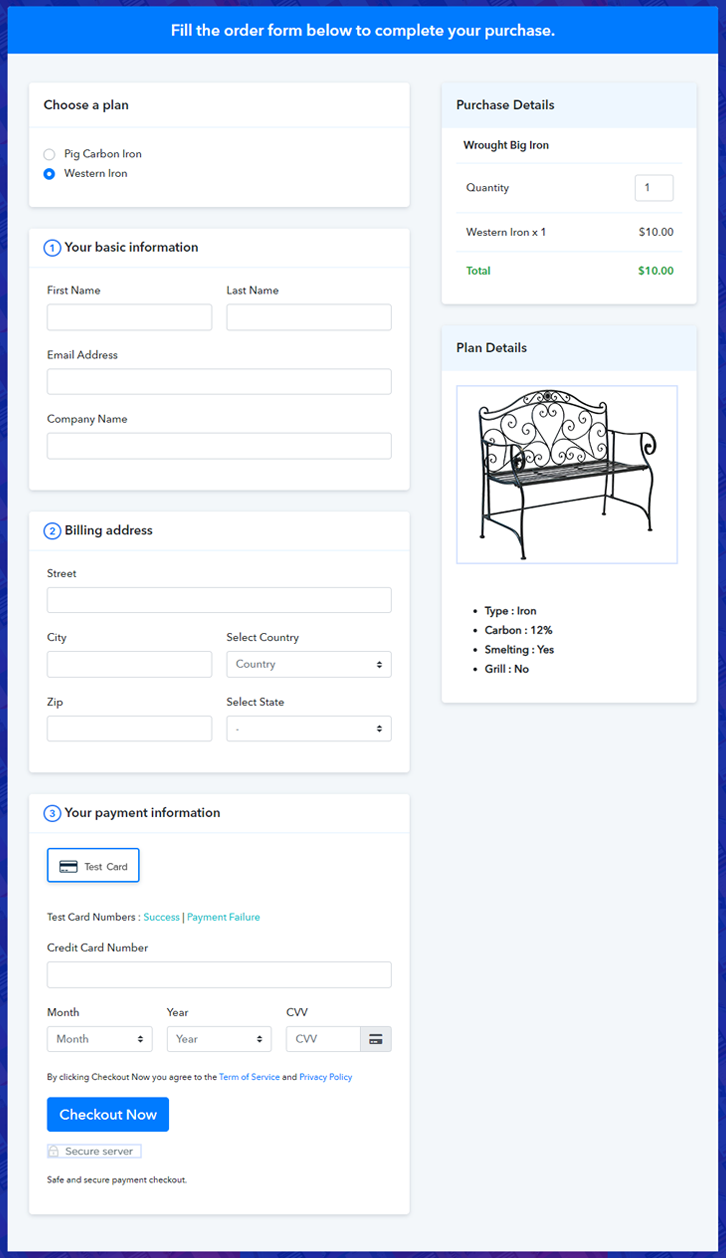
(c) Take a Look at the Checkout Page

Multiplan To Sell Wrought Iron Online

Preview Checkout Page

Wrapping Up

Since the Iron-Age there always has been an ever-growing demand for iron products. But the internet economy can take this ecosystem into the next level. Your checkout page to sell wrought iron online has announced your entry into this ecosystem. So buckle-up as the ride has just started.

You May Also Like To Read –
How to Sell Windows Film Online | Step by Step (Free Method)

How to Sell Window Films Online

Ideal For: All window films suppliers, window film applicators, window film sellers and other merchants can use this method to start selling window films online.

How to Sell Window Films Online

Why Choose this Method To Sell Windows Film Online?

Unlike any other solution, this method allows you to:

  • List and sell your windows film for FREE. Absolutely no payment required.
  • No need to pay commission on any of your sale.
  • Multiple payment options like PayPal, Credit Card, etc to collect payment from a single place.
  • Sell one time or recurring subscriptions of your window films.
  • Collect payments & sell products in any currency as per your requirement.
  • Give discounts on your products by offering special coupon codes.
  • Add sales commission agents to help you in selling window film online.

Get Pabbly Subscription Billing for Free

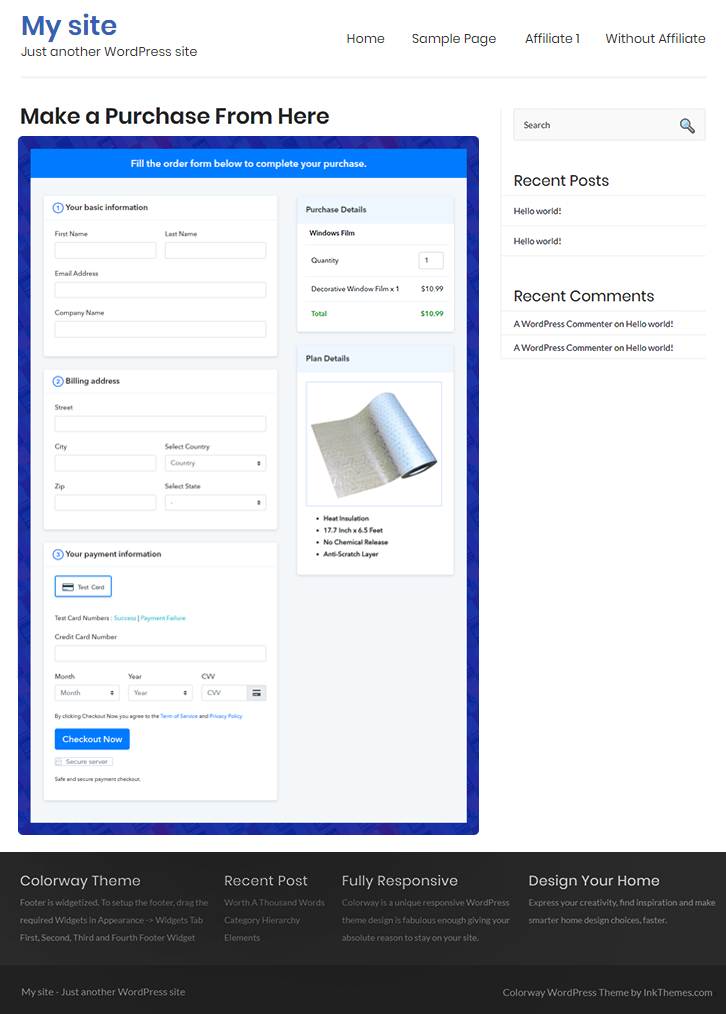
Window glass has become a major design trend for renovating homes and commercial office spaces. And decorative window film enhances the aesthetics of any interior or exterior glass surface. So if you have a business of window glass films and willing to sell windows film online and extend your reach to the internet audience then we can help you get started.

Here in this blog, we have discussed the step by step procedure of creating plan checkout pages for selling window films online via software named Pabbly Subscription Billing. With this, you can create a checkout page to start an online business of windows film. Moreover, you can showcase unlimited products and their details onto it as well as collect unlimited payments through it. Apart from this, it has several features like:

  • Create unlimited products & plans
  • Apply coupons & discounts
  • Tax management
  • Collect online/offline payments

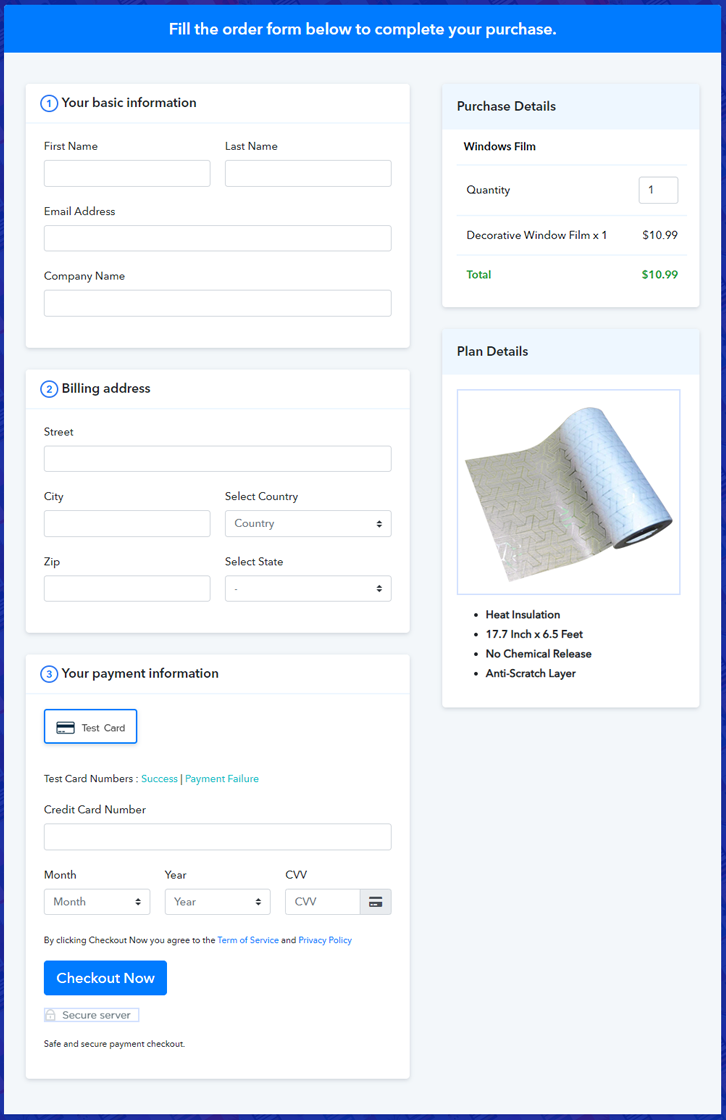
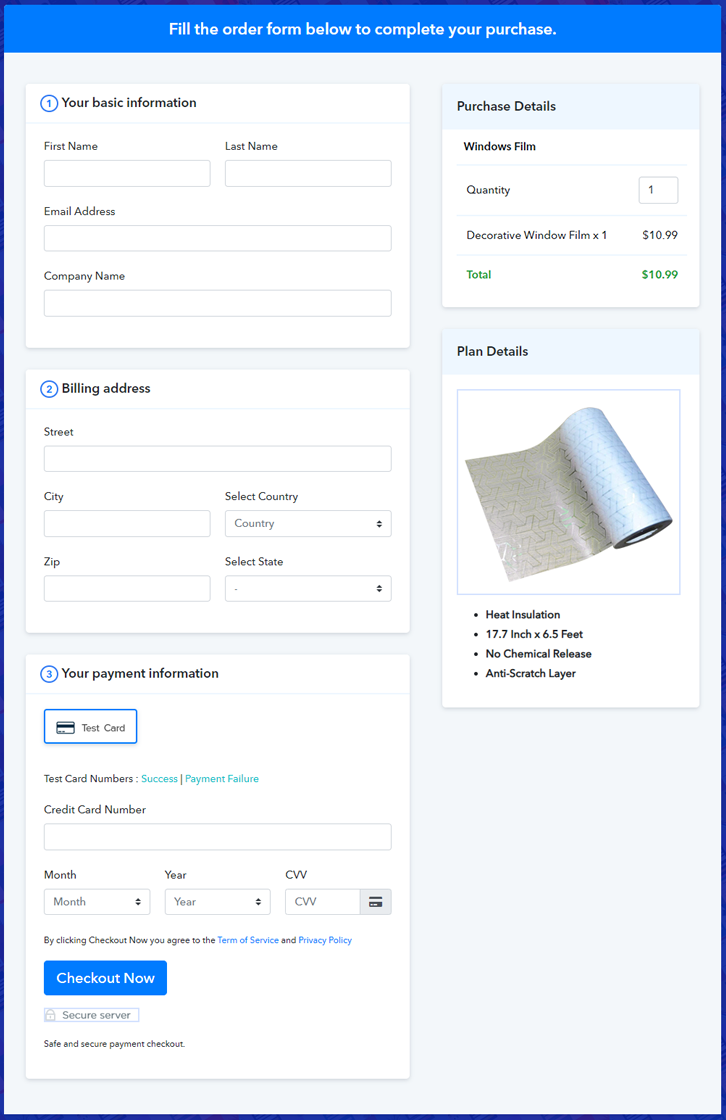
Final View of Checkout Page For Your Window Films Selling Business

Preview Checkout Page - Sell Window Film Online

Preview Checkout Page

Step 1: Log in to Pabbly Subscription Billing

Signup

The process of creating a checkout page starts by visiting the Pabbly Subscription Billing. Later, hit the “Sign up Free“ button. Afterward, you can either manually fill out the details or else sign in using your Gmail account.

Sign Up For Free!

Step 2: Select Subscription Billing

Access Subscription Billing

Step 3: Account Setup

Setup Account

Once you hit on the “Access Now” button of the software, a page will open up. That will ask you to fill the fields like company name, select currency, and phone number. Enter all those details in order to continue creating a checkout page for windows film.

Step 4: Connect Payment Gateways & Start Window Films Selling Business Online

Connect Payment Gateway

In this step, we are going to specify the details of payment procedures using a “Test Payment Gateway”. If you are a beginner you can check payment process of software by enabling the test card payment. Apart from that, this tool offers various payment gateways such as PayPal, Stripe, etc. Further, below are the payment integration guides to help you out.

Step 5: Add Product For Your Window Films

Add Product

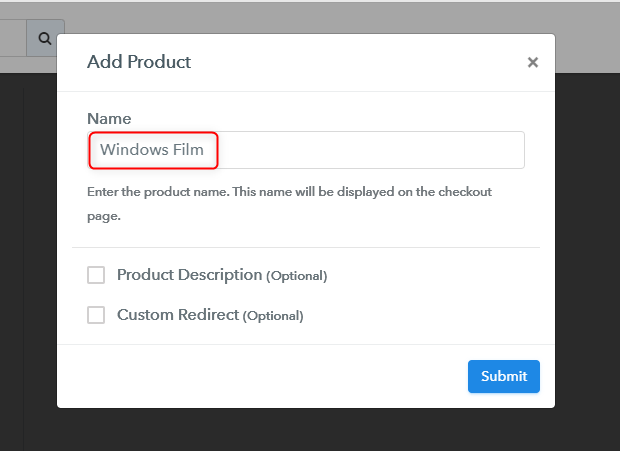
Now add the name, which in our case is “Windows Film”. Here you can specify the type & write a short description of the window films to catch the customer’s attention.

Add Products

After that, just fill out all those details and your product is created.

Note: Here you can add all the products related to the similar category by creating plans for each of them.

Step 6: Add Plans 

Let’s rollout plans for different kinds of window films available in your store.

(a) Select Add New Plan

Add Plan

(b) Specify the Plan & Pricing Details

Add Plan

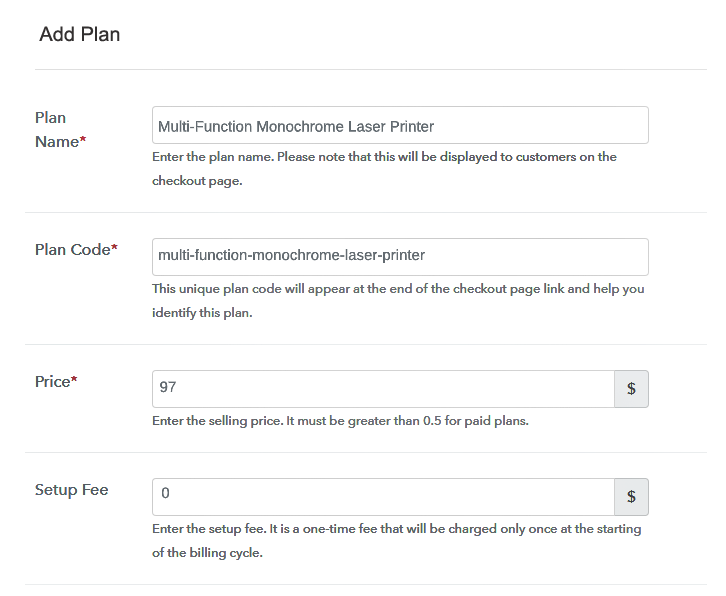
The next thing to do is fill all the details of the window film like plan name, code, price, set-up fee, etc to continue.

(c) Add Image & Description of Windows Films

Add Product Details - Sell Windows Films

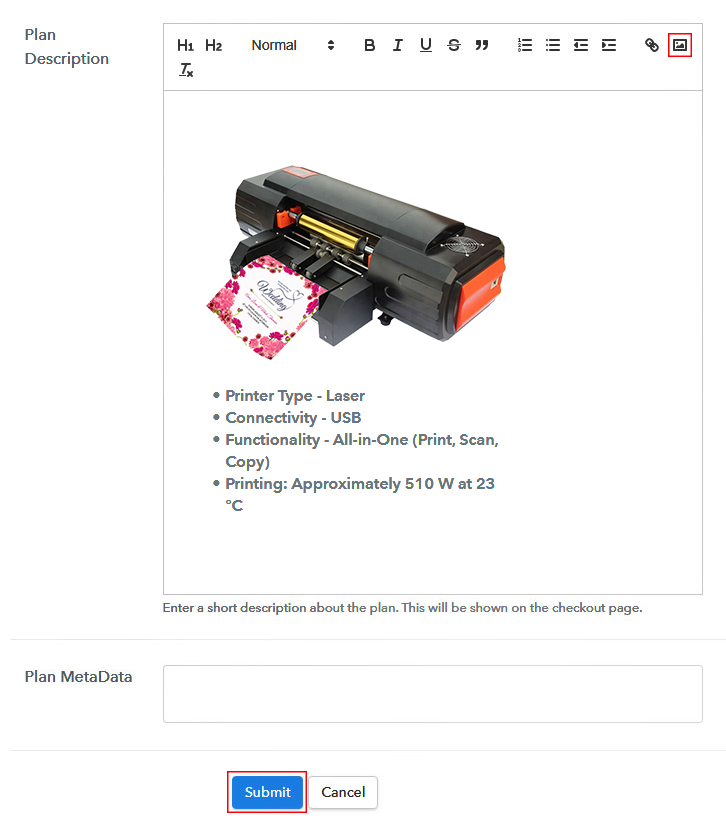
Next, give a brief description of window films with bullets, images, links, etc. Afterward, press the “Submit” button to add the plan for selling window films.

Furthermore, add multiple plans along with types of window film in your product list which you want to sell online.

Step 7: Share your Checkout Page

Share Checkout Page on Social Media

  • Share the checkout page link on social media accounts like Facebook & Twitter.
  • Also, you can share the direct link of the volleyball’s checkout page with your customers via SMS or email marketing.
  • Not only that, but you can also embed the provided plan link in the buttons or any anchor text on your website.

Step 8: Preview Checkout Page

Follow up the recommended steps to preview the checkout page:

(a) Click on the View Button

View Checkout Plan

(b) Take a Look at the Checkout Page

Preview Checkout Page - Sell Window Film Online

Step 9: Embed Checkout Page in Site & Sell Windows Film Online

Embed Checkout Page on Website

Just copy the link and add the checkout page to sell the window films online at any proper place on your WordPress site.

(a) Edit the Page & Paste the Copied Link

Embed Checkout Page on Website

Further, paste the plan link on a text editor of the WordPress dashboard.

(b) Save & Publish the Checkout Page

Save_and_Publish

Next, click the “Publish” button, after making changes.

(c) Check out the Final Look of your Checkout Page on WordPress Site

Preview Checkout Page on WordPress Site

Step 10: Multiplan Checkout Page

Note: In case you want to sell multiple products via a single checkout page, you can create a multi-plan checkout page otherwise skip this step.

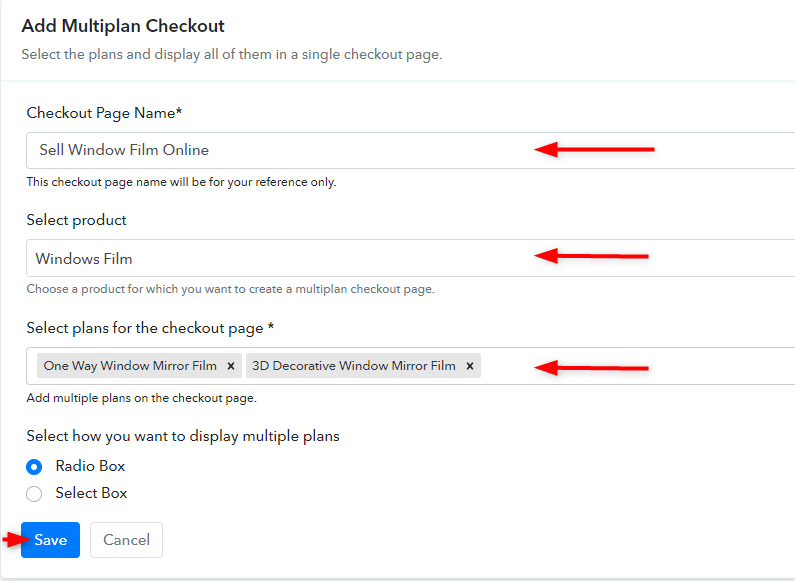
(a) Click on Add Multiplan Checkout

Multiplan Checkout

(b) Add Plans to Sell Multiple Window Films from Single Checkout Page

Create Multiplan Checkout Page

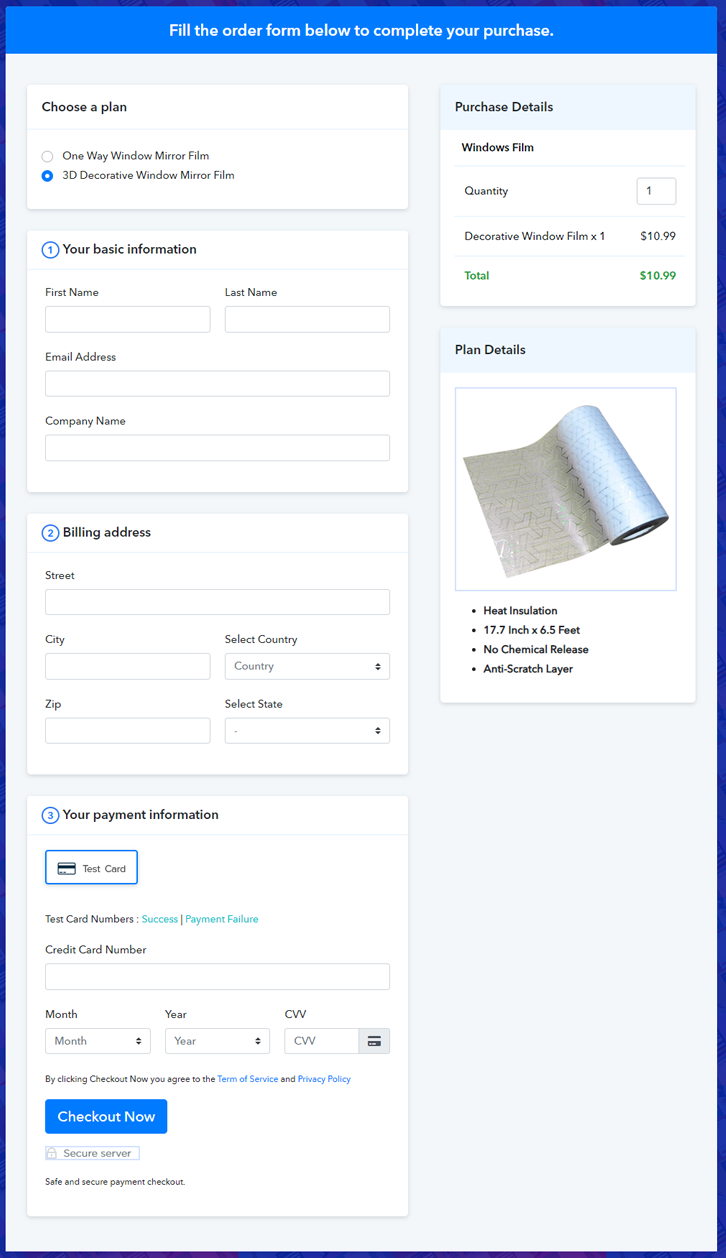
(c) Take a Look at the Checkout Page

Preview Multiplan Checkout Page - Sell Window Films

Preview Checkout Page

Wrapping Up

That’s it!! If you plan to start the business of selling window films online then this article is for you. Just follow these steps, create the checkout page with Pabbly Subscription Billing and start collecting unlimited payments.

If you have any questions, please contact us will be happy to assist you!

You May Also Like To Read –
How to Sell Wedding Card Printers Online | Step by Step (Free Method)

How to Sell Wedding Card Printers Online

Ideal For: All the wedding card printers wholesalers, wedding card machine making suppliers, wedding card printer dealers, and other sellers can use this method to start selling wedding card printer online.

How to Sell Wedding Card Printers Online

Why Choose this Method To Sell Wedding Card Printers Online?

Unlike any other solution, this method allows you to:

  • List and sell your wedding card printers for FREE. Absolutely no payment required.
  • No need to pay commission on any of your sale.
  • Multiple payment options like PayPal, Credit Card, etc to collect payment from a single place.
  • Sell one time or recurring subscriptions of your wedding card machine.
  • Collect payments & sell products in any currency as per your requirement.
  • Give discounts on your products by offering special coupon codes.
  • Add sales commission agents to help you in selling wedding card printers machine online.

Get Pabbly Subscription Billing for Free

These days people give more importance to designing wedding cards for their wedding. They want their wedding invitation to be creative and different. Hence, the demand for wedding card printers is increasing day by day.

So, if you sell wedding card printing machines in your store then why not take your wedding card making machines business online for some extra profit. And, you can do it just by creating the checkout page, share them on your online platforms and you can start collecting payments through them. To sell wedding card printers online via checkout pages, you only need Pabbly Subscription Billing which offers you a free platform to start your online business.

Apart from checkout pages, you also get many other features for your online business such as:

  • Add and sell unlimited products
  • Automatically share invoices with users
  • Collect unlimited one-time or recurring payments
  • You don’t have to pay any transaction fees

Final View of Checkout Page For Your Wedding Card Printers Selling Business

Preview Checkout Page - Sell Wedding Cards Printing Machines

Preview Checkout Page

Step 1: Log in to Pabbly Subscription Billing

Signup

Let’s begin the process by visiting the Pabbly Subscription Billing website and then click on the ”Signup Free” button. After clicking the button, the signup page will open, where you can sign up for free via Gmail or you can also enter your details manually.

Sign Up For Free!

Step 2: Select Subscription Billing

Access Subscription Billing

Step 3: Account Setup

Setup Account

Once you complete the signup process, fill your company details such as company name, currency, phone number in the shown dialogue box.

Step 4: Connect Payment Gateways & Start Wedding Card Printers Selling Business Online

Connect Payment Gateway

Further in this step, we have explained to you about the payment collection process by enabling the “Test Payment” mode. If you wish, you can use this dummy mode to check how the payment collection process works. However, you can connect with other payment gateways such as PayPal, Stripe, etc whichever you prefer. The complete payment gateways integration guide is given below-

Step 5: Add Product For Your Wedding Card Printers

Add Product

After connecting with the payment gateways, now you have to add your product. You can add a wedding card printing machine of different types such as laser printer, black & white printers, etc.

Add Product - Sell Wedding Card Printers Online

Besides, add all the other wedding card printers machines in the same product section by creating different plans for them.

Note: Here you can add all the products related to the similar category by creating plans for each of them.

Step 6: Add Plans 

Let’s rollout plans for different kinds of wedding card printers available in your store.

(a) Select Add New Plan

Add Plan

(b) Specify the Plan & Pricing Details

Add Plan

Now click on the ”Add New Plan” button, the plan page will appear, where you have to add details like plan name, billing cycle, code, price, etc.

(c) Add Image & Description of Wedding Card Printers

Add Product Details - Start Selling Wedding Card Printers Online

Also, you can add a description of the wedding card printers machines that you want to sell along with the product images, links, etc. After filling all the details click on the submit button to add your plan. You can create more plans for all the other card printing machines similarly.

Step 7: Share your Checkout Page

Share Checkout Page on Social Media

  • Share your checkout page on social media like Facebook and Twitter to sell wedding card printers online.
  • Also, copy the mentioned link and send it to your customers through SMS or emails directly.
  • Embed your plan link to your website so that your customers can be landed on the checkout page immediately.

Step 8: Preview Checkout Page

Follow up the recommended steps to preview the checkout page:

(a) Click on the View Button

View Checkout Plan

(b) Take a Look at the Checkout Page

Preview Checkout Page - Sell Wedding Cards Printing Machines

Step 9: Embed Checkout Page in Site & Sell Wedding Cards Printing Machine Online

Embed Checkout Page on Website

Just copy the link and add the checkout page to sell wedding card printing machines online at any preferable place on your WordPress site.

(a) Edit the Page & Paste the Copied Link

Embed Checkout Page on Website

Further, paste the plan link on a text editor of the WordPress dashboard.

(b) Save & Publish the Checkout Page

Save_and_Publish

Next, click the “Publish” button, after making changes.

(c) Check out the Final Look of your Checkout Page on WordPress Site

Preview Checkout Page on WordPress Site

Step 10: Multiplan Checkout Page

Note: In case you want to sell multiple products via a single checkout page, you can create a multi-plan checkout page otherwise skip this step.

(a) Click on Add Multiplan Checkout

Multiplan Checkout

(b) Add Plans to Sell Multiple  from Single Checkout Page

Create Multiplan Checkout Page

(c) Take a Look at the Checkout Page

Preview Multiplan Checkout Page

Preview Checkout Page

Wrapping Up

To conclude, Pabbly Subscription Billing is the key to start your online wedding card printers selling business for free. Now, sell unlimited wedding card printing machines, create discount coupons, share invoices and the list goes on. Therefore, signup now and start selling the wedding card printer online today. For further queries or suggestions, please contact us.

You May Also Like To Read –
How To Sell Weighing Machines Online | Step by Step (Free Method)

Ideal For: All the weighing machine sellers, weighing machine shop owners, manufacturers, and other merchants can use this method to sell weighing machines online.

How To Sell Weighing Machines Online

Why Choose this Method to Sell Weighing Machines Online?

Unlike any other solution, this method allows you to:

  • List and sell your weighing machines for FREE. Absolutely no payment required.
  • No need to pay commission on any of your sale.
  • Multiple payment options like PayPal, Credit Card, etc to collect payment from a single place.
  • Sell one time or recurring subscriptions of your weighing machines.
  • Collect payments & sell products in any currency as per your requirement.
  • Give discounts on your products by offering special coupon codes.
  • Add sales commission agents to help you in selling weighing machines.

Get Pabbly Subscription Billing for Free

Weighing instruments are used across sectors like healthcare, veterinary, laboratories, retail, jewelry, etc. According to Persistent Research, there is a growth of CAGR 5.2% with demands from the Middle East, Asia, Pacific Rim, Americas, and Europe. Therefore manufacturers looking for expansions into these regions have started selling weighing machines online to get more business.

Since this is 2022 there are many tools available to help you sell the weighing machine online. But most of them require some technical know-how to deal with them. That is why in this article, we are suggesting an incredible Saas tool called Pabbly Subscription Billing to sell weighing machines online. This software is very user friendly and there are no hidden charges. Some other advantages of the software are:

  • Unlimited Revenues
  • Custom Logo in all Checkout Pages
  • Tracking Sales
  • Marketing on Facebook, Twitter, Whatsapp, etc
  • Custom Domain
  • Multiple Subscription Models
  • Create Unlimited Coupons, Discounts, Plans

Using these features, you will rule the e-commerce world. So, let me show you how to create a checkout page in Pabbly Subscription Billing to sell weighing machines online.

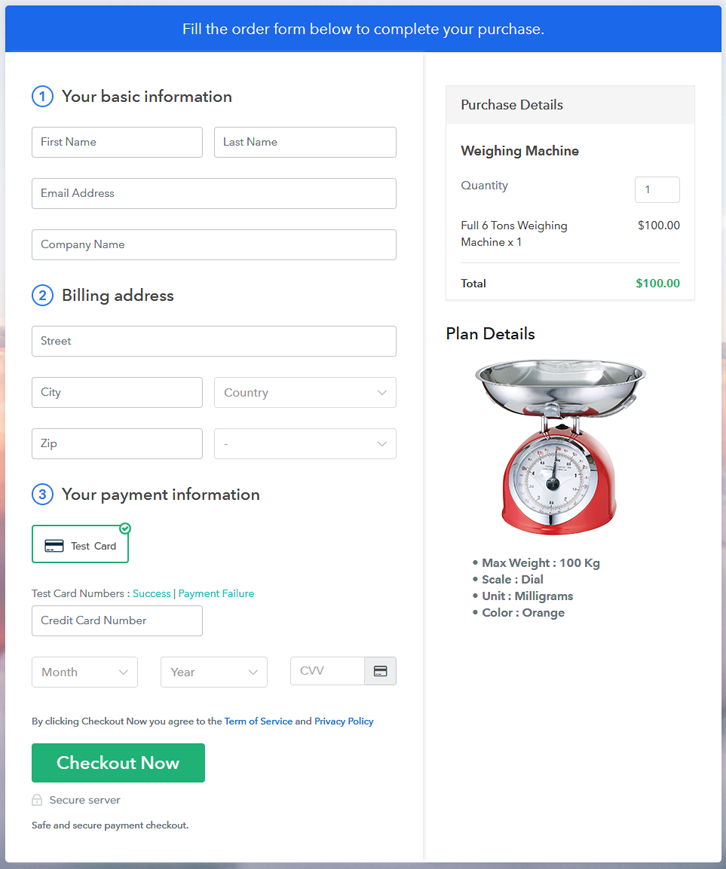
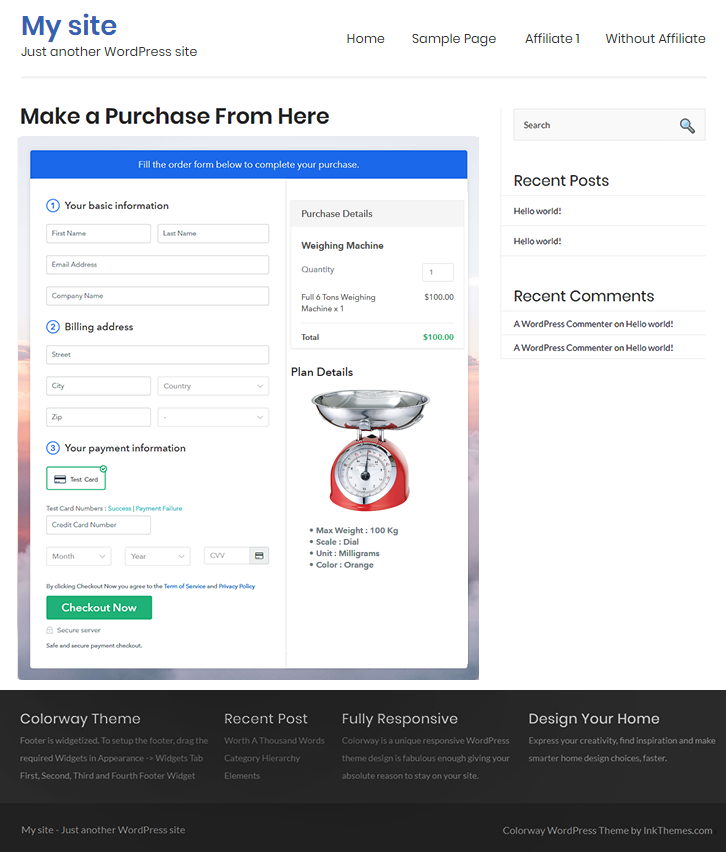
Final View of Checkout Page for your Weighing Machines Selling Business

Checkout To Sell Weighing Machines Online

Preview Checkout Page

Step 1: Log in to Pabbly Subscription Billing

Signup

Check for Pabbly Subscription Billing in your browser. Now, click on the “Sign up Free“ button. Either fill all the information or simply sign in using your Gmail account.

Sign Up For Free!

Step 2: Select Subscription Billing

Access Subscription Billing

Step 3: Account Setup

Setup Account

Now, click on the “Access Now” button of Pabbly Subscription Billing, a page will pop-up with details like company name, currency, and contact number. Next, you need to fill those details to go on.

Step 4: Connect Payment Gateways & Start Weighing Machine Selling Business Online

Connect Payment Gateway

When clicking the ‘Test Payment’ button, you will get the same payment experience of the customer. This will allow you to sort out the glitches and make the transactions serene.

Furthermore, this software allows integrations with payment gateways such as PayPal, Stripe, etc. Furthermore, there are manuals listed below to help you out.

Step 5: Add Product for your Weighing Machines

Add Product

Now we will add products and here beneath the  “Enable Payments” segment there is the “Add your product” section click on it. Also, this will generate a dialog box with a blue button “Add New Product”. Click on it.

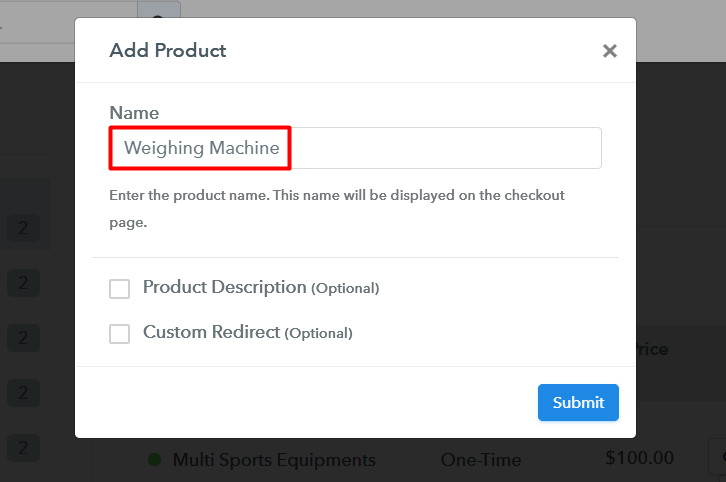
Now, here you will add the title which is ‘weighing machines

Add Product To Sell Weighing Machines Online

Fill out all the details like the name of the product and voila your product is created.

Note: Here you can add all the products related to the similar category by creating plans for each of them.

Step 6: Add Plans 

Now let’s create plans for different kinds of weighing machines available in your store.

(a) Select Add New Plan

Add Plan

(b) Specify the Plan & Pricing Details

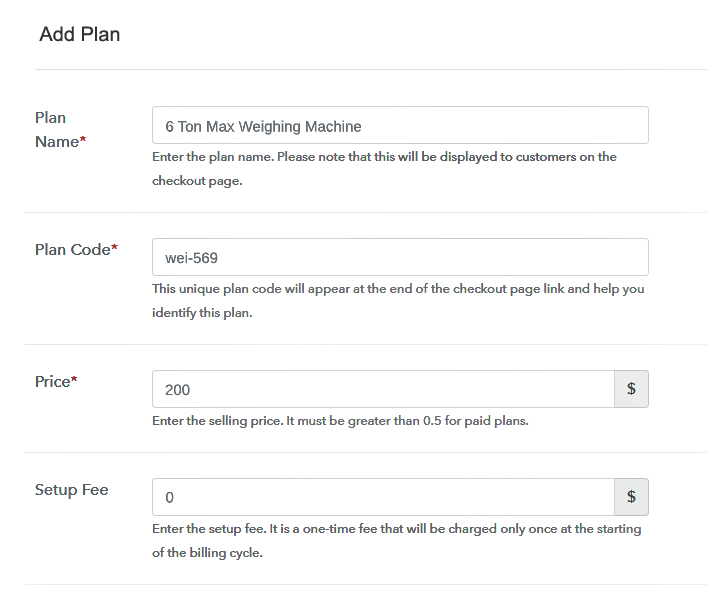
Add Plan To Sell Weighing Machines Online

In the plan page, here you have to fill in details like plan name, code, price, setup fees. Moreover, choose your preferred revenue model accordingly and after some time you can even change it according to your choice.

(c) Add Image & Description of Weighing Machines

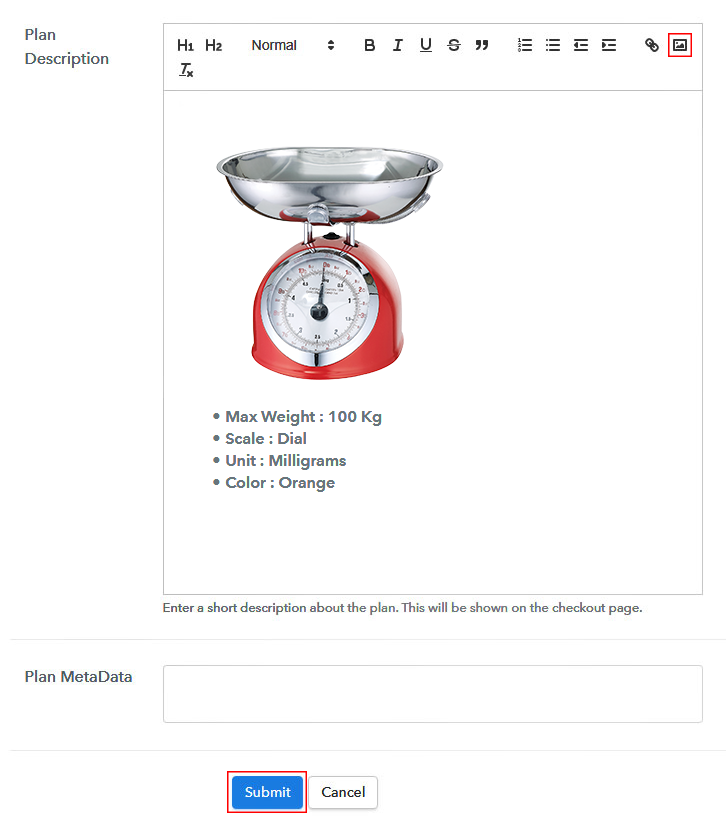
Add Description To Sell Weighing Machines Online

Take some images of weighing machines and upload it

Also, for customer’s delight please give some concise info about the weighing machines in bullet points like build, max weight and color etc, and then press the “Submit” button.

Furthermore, by using the same process, you can list more products.

Step 7: Share your Checkout Page

Share Checkout Page on Social Media

Here are some ways, by which you can share the checkout pages through Pabbly Subscription Billing.

  • In this method, you simply just press the respective buttons for Twitter, Facebook and the checkout pages get automatically shared
  • Furthermore, simply paste the checkout pages link on to share it via email and SMS.
  • Also, you can create buttons on your webpage and paste the checkout links on it. Or you can place it on any anchor text on your website, so the users will be redirected to the checkout page.

Step 8: Preview Checkout Page

Follow up the recommended steps to preview the checkout page:

(a) Click on the View Button

View Checkout Plan

(b) Take a Look at the Checkout Page

Add Checkout To Sell Weighing Machines Online

Step 9: Embed Checkout Page in Site & Sell Online

Embed Checkout Page on Website

Furthermore, just copy the link and add the checkout page to sell the weighing machine at any suitable place on your WordPress site.

(a) Edit the Page & Paste the Copied Link

Embed Checkout Page on Website

Further, paste the plan link of the weighing machine on a text editor of the WordPress dashboard.

(b) Save & Publish the Checkout Page

Save_and_Publish

Next, click the “Publish” button, after making changes.

(c) Check out the Final Look of your Checkout Page on WordPress Site

Add WordPress To Sell Weighing Machines Online

Step 10: Multiplan Checkout Page

Note: In case you want to sell multiple products via a single checkout page, you can create a multi-plan checkout page otherwise skip this step.

(a) Click on Add Mutiplan Checkout

Multiplan Checkout

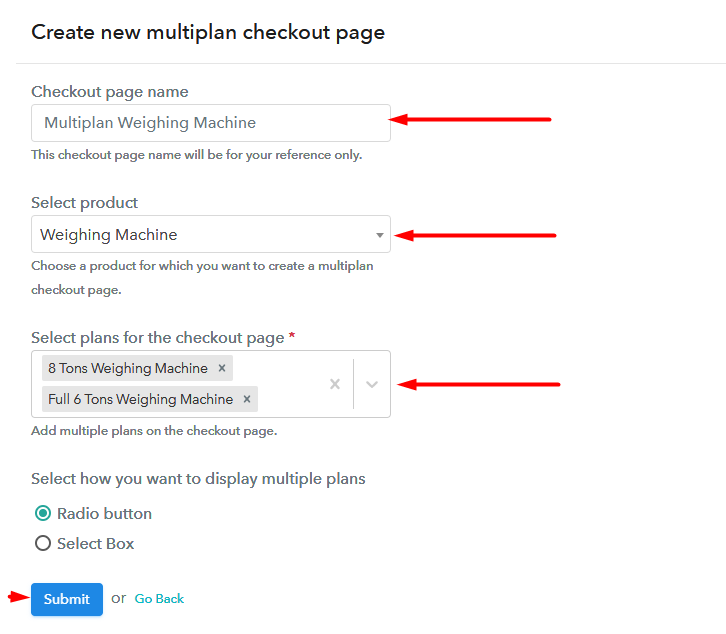
(b) Add Plans to Sell Multiple Weighing Machine from Single Checkout Page

Add Multiplan To Sell Weighing Machines Online

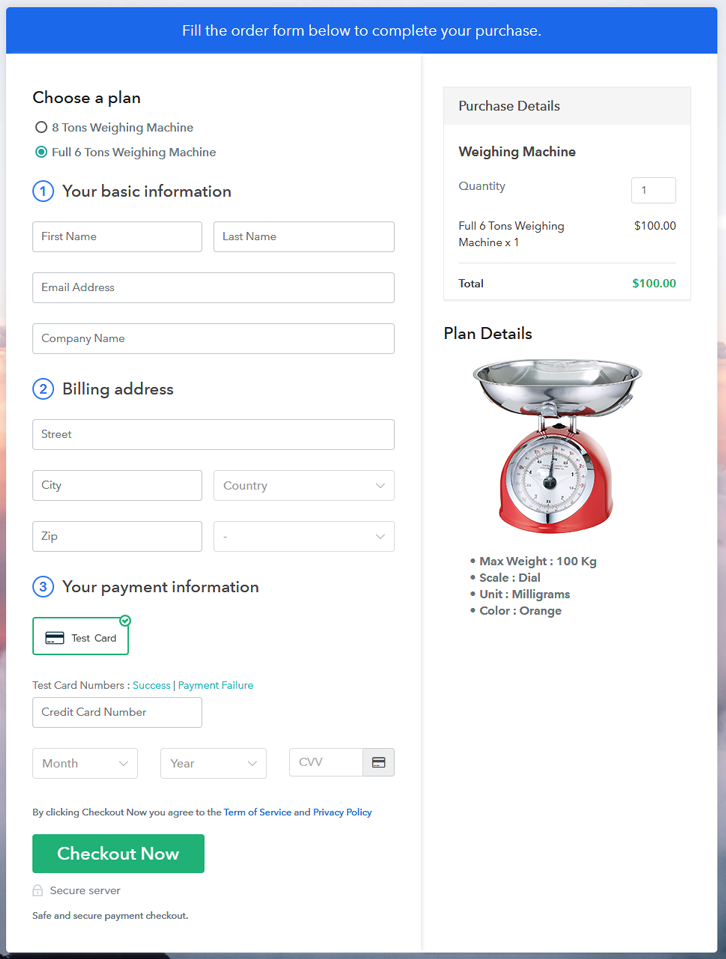
(c) Take a Look at the Checkout Page

Checkout To Sell Weighing Machines Online

Preview Checkout Page

Wrapping Up

So with these 10 easy steps, you have build your checkout page to sell weighing machines online.  Explore all the features and do experiments with them. Also if you have any inputs feel free to give them in the comment section. Thank You

You May Also Like To Read –
How to Sell Wood Products Online | Step by Step (Free Method)

How to Sell Wood Products Online

Ideal For: All the wood product sellers, retail furtinure shop owners, wood products manufacturers, and other merchants can use this method to take their wood products selling business online.

How to Sell Wood Products Online

Why Choose this Method to Sell Wood Products Online?

Unlike any other solution, this method allows you to:

  • List and sell your wood products for FREE. Absolutely no payment required.
  • No need to pay commission on any of your sale.
  • Multiple payment options like PayPal, Credit Card, etc to collect payment from a single place.
  • Sell one time or recurring subscriptions of your wood material.
  • Collect payments & sell products in any currency as per your requirement.
  • Give discounts on your products by offering special coupon codes.
  • Add sales commission agents to help you in selling wood materials online.

Get Pabbly Subscription Billing for Free

Over the last couple of years, homemade or handmade crafts industry has grown from a small niche to a whole industry. If you’re determined to turn your creative, woodworking skills into profit then you should start a wood products business online.  Naturally, making beautiful, hand-crafted wood items to sell is a highly creative and beneficial way to make money.

That’s why, in this article, we will recommend a SaaS tool named Pabbly Subscription Billing. With this, you can create an impressive checkout page to start selling wood products online. Also, it gives many other benefits like:

  • Create Unlimited Products, Plans, Coupons, Discounts, etc
  • Multiple Billing Models
  • Revenue Stats
  • Tax Management
  • Import/Export Clients Data
  • Auto Email Alerts on Card Decline

Let’s get down to create your first checkout to sell wood materials online.

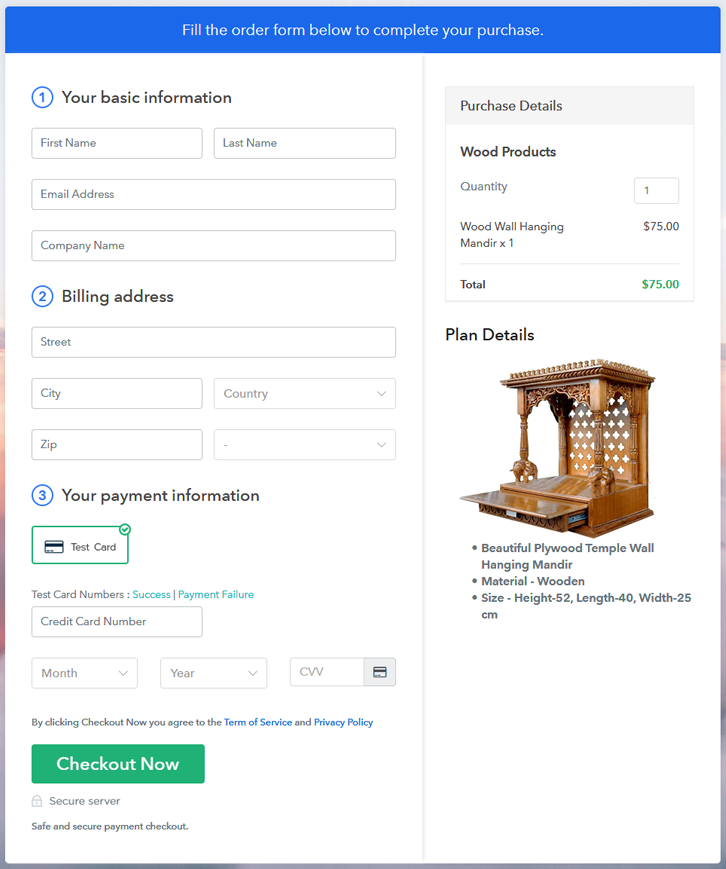
Final View of Checkout Page For Your Wood Products Selling Business

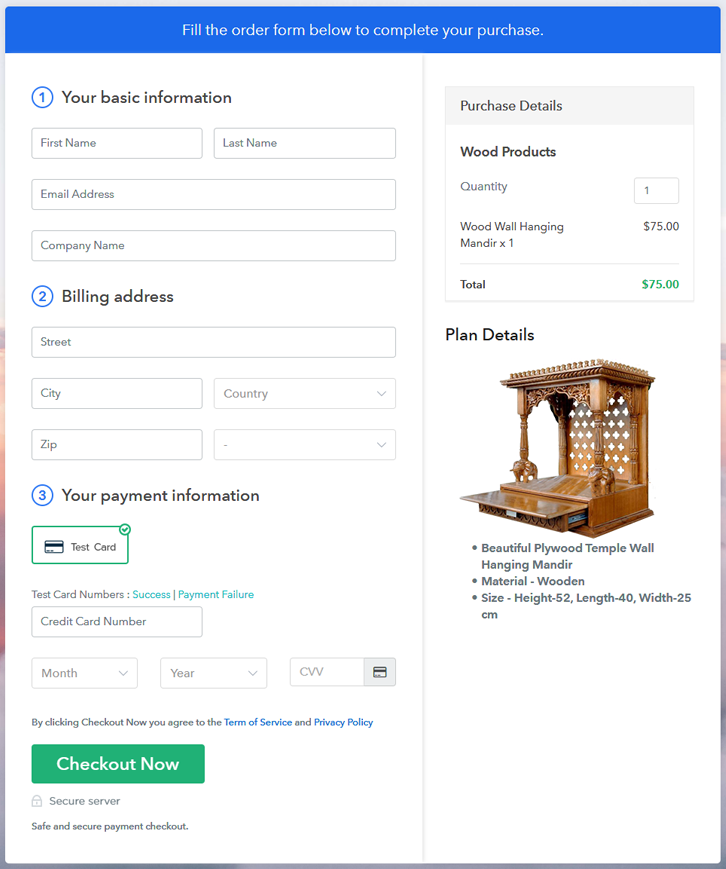
Preview Checkout Page - Sell Wood Products Online

Preview Checkout Page

Step 1: Log in to Pabbly Subscription Billing

Signup

Browse for Pabbly Subscription Billing and here click on  “Sign up Free“. Now, sign in through your, Gmail account or you can fill in fields like name, email address manually.

Sign Up For Free!

Step 2: Select Subscription Billing

Access Subscription Billing

Step 3: Account Setup

Setup Account

Now, click on the “Access Now” button of the software, a page will redirect with fields like company name, select currency, and phone number. Just fill out those details to continue creating a checkout page for wood items.

Step 4: Connect Payment Gateways & Start Wood Products Selling Business Online

Connect Payment Gateway

Pabbly Subscription Billing provides a dummy payment gateway where you can test the entire payment experience of the customer in advance. Additionally, it contains an integration guide for each of the payment gateways like Razorpay, PayPal, etc. Here’s the complete guide for integrating the gateways.

Step 5: Add Product For Your Wood Products

Add Product

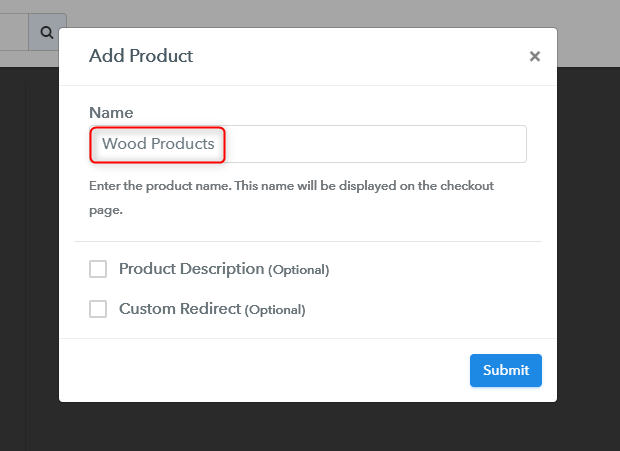
Momentarily, you have to add the required product title, in our case, it is ‘wood products’.

Add Product

Fill up the details and your product is created.

Note: Here you can add all the products related to the similar category by creating plans for each of them.

Step 6: Add Plans 

Let’s rollout plans for different kinds of wood products available in your store.

(a) Select Add New Plan

Add Plan

(b) Specify the Plan & Pricing Details

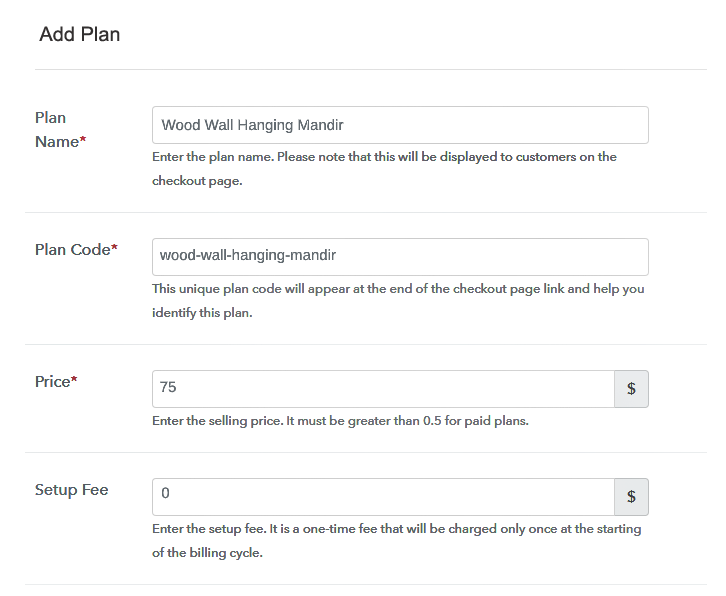
Add Plan - Sell Wood Products Online

After that, add the product and fill in details like plan name, code, price, setup fees, etc. Furthermore, while scrolling down you will find different billing models like one-time payment, recurring, based on cycles, etc. Choose the one that interests you the most. Moreover, you can change it any time you want.

(c) Add Image & Description of Wood Products Your Image Here

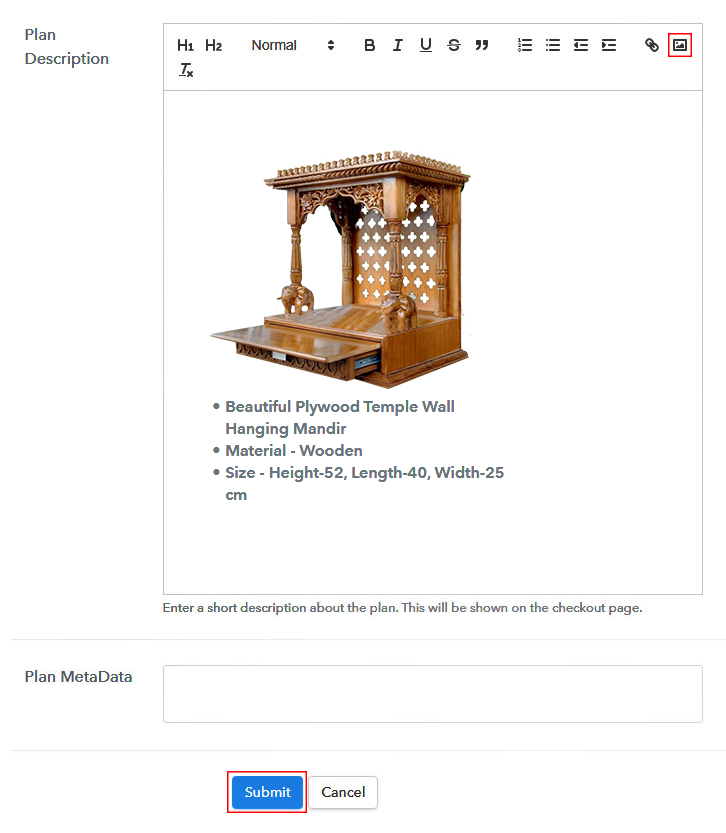
Add Product Image

Upload high-quality images of your wood materials using the image button.

Furthermore, you can also provide details about the wood items like the material type, sheet length, weight, color, etc in bullet points or preferably in numerical points. Then press the “Submit” button.

Moreover, using the same process, you can list more products.

Step 7: Share your Checkout Page

Share Checkout Page on Social Media

  • Directly share the checkout page on social media accounts like Facebook & Twitter to get the customer’s attention.
  • Also, you can share the direct link of the checkout page with your customers via SMS or email marketing.
  • Moreover, insert the link in the buttons or any anchor text on your website.

Step 8: Preview Checkout Page

Follow up the recommended steps to preview the checkout page:

(a) Click on the View Button

View Checkout Plan

(b) Take a Look at the Checkout Page

Preview Checkout Page - Sell Wood Products Online

Step 9: Embed Checkout Page in Site & Sell Wood Products Online

Embed Checkout Page on Website

Just copy the link and add the checkout page to sell wood products online at any preferable place on your WordPress site.

(a) Edit the Page & Paste the Copied Link

Embed Checkout Page on Website

Further, paste the plan link on a text editor of the WordPress dashboard.

(b) Save & Publish the Checkout Page

Save_and_Publish

Next, click the “Publish” button, after making changes.

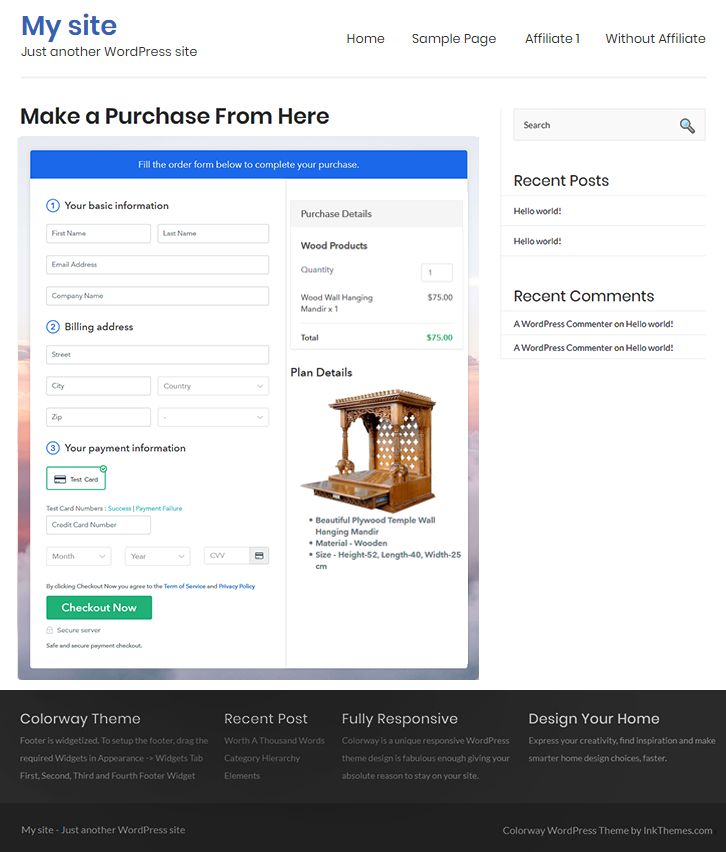
(c) Check out the Final Look of your Checkout Page on WordPress Site

Preview Checkout Page on WordPress Site - Wood Materials

Step 10: Multiplan Checkout Page

Note: In case you want to sell multiple products via a single checkout page, you can create a multi-plan checkout page otherwise skip this step.

(a) Click on Add Multiplan Checkout

Multiplan Checkout

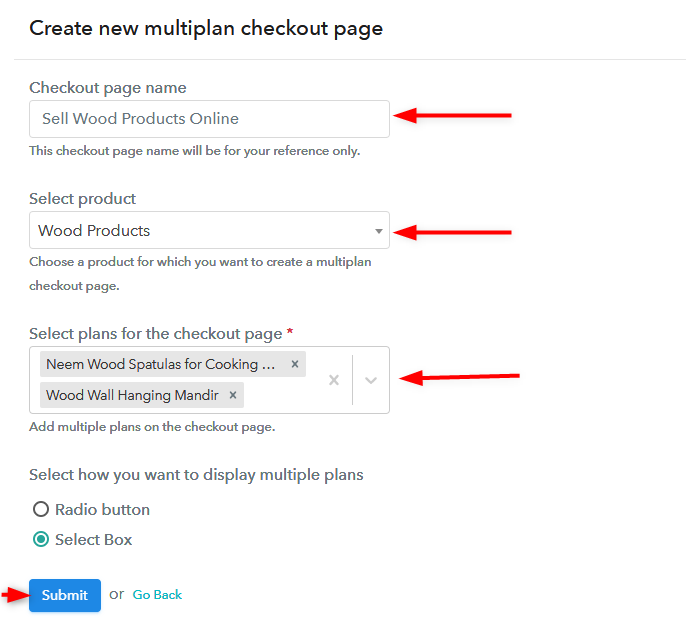
(b) Add Plans to Sell Multiple Wood Products from Single Checkout Page

Create Checkout Page

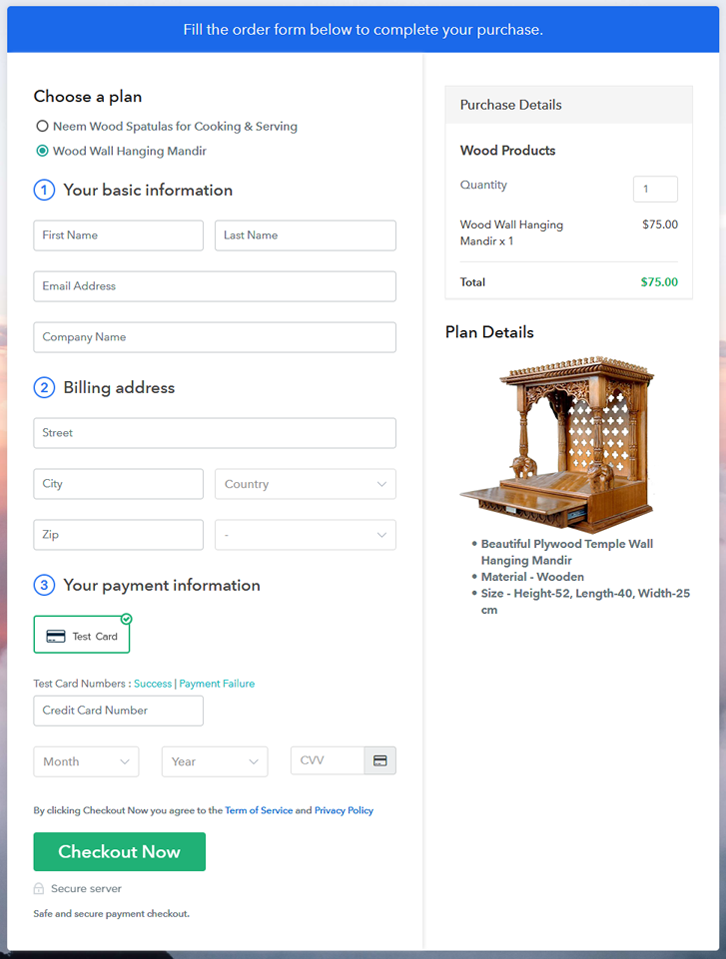
(c) Take a Look at the Checkout Page

Preview Multiplan checkout Page - Sell Wood Items

Preview Checkout Page

Wrapping Up

Well, start selling wood products online by creating the checkout page with Pabbly Subscription Billing. Share and embed the checkout page almost anywhere such as posts, pages, buttons, and texts.

Also, it allows you to sell unlimited wood products online, apply global taxes, and accept payments in almost any currency.

You May Also Like To Read –
How to Sell Wire Making Machines Online | Step by Step (Free Method)

Ideal For: All the machinery sellers, auto part makers, retail wire making machine selling business owners, and other cable making machine merchants can use this method to take their wire making machine selling business online.

How to Sell Wire Making Machines Online

Why Choose this Method To Sell Wire Making Machines Online?

Unlike any other solution, this method allows you to:

  • List and sell your wire making machine for FREE. Absolutely no payment required.
  • No need to pay commission on any of your sale.
  • Multiple payment options like PayPal, Credit Card, etc to collect payment from a single place.
  • Sell one time or recurring subscriptions of your wire making machine.
  • Collect payments & sell products in any currency as per your requirement.
  • Give discounts on your products by offering special coupon codes.
  • Add sales commission agents to help you in selling wire making machine online.

Get Pabbly Subscription Billing for Free

If you have a hard time finding customers for your wire making machine then why don’t you plan to start your own online business. With online business, you can showcase what you have, boost sales, and attract more customers towards your wire making machine business.

Hence for starting the online business of wire making machine, you need various tools for managing the data. But here, in this article, we’ll provide you a single software named Pabbly Subscription that not only helps you to sell wire making machines online but also manages your data, collect payment, and much more. Further, it has some advanced features like:

  • Track of all the payments & refunds
  • Collect offline or online payments
  • Automatic invoicing & billing
  • Apply global taxes
  • Offer discounts & coupons
  • Sell unlimited products and much more.

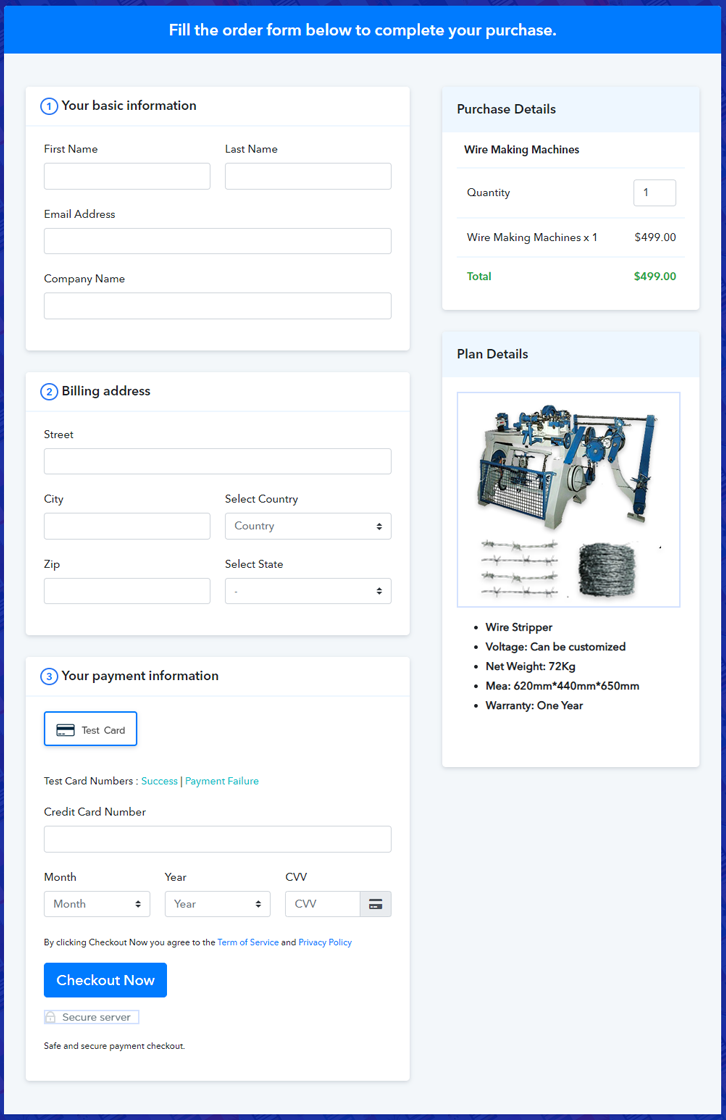
Final View of Checkout Page For Your Wire Making Machine Selling Business

Preview Checkout Page - Sell Wire Making Machine Online

Preview Checkout Page

Step 1: Log in to Pabbly Subscription Billing

Signup

Firstly, you’ll need to visit the Pabbly Subscription Billing website. Click on the “Sign Up Free” button present at the right upper corner of the website. You will land on the login/registration page. Here, either you can directly login with Google or register on the platforms to get into the system.

Sign Up For Free!

Step 2: Select Subscription Billing

Access Subscription Billing

Step 3: Account Setup

Setup Account

Once you are successfully logged into the system, a dialogue box asking the company name, currency, and phone number will pop open. Quickly fill out the details and click on the “Continue” button.

Step 4: Connect Payment Gateways & Start Wire Making Machine Selling Business Online

Connect Payment Gateway

Momentarily, is the time to connect a payment gateway that you rely on to accept payments. This service provides multiple payment gateway options. Moreover, the integration guides for some popular ones are also given below.

Step 5: Add Product For Your Wire Making Machine

Add Product

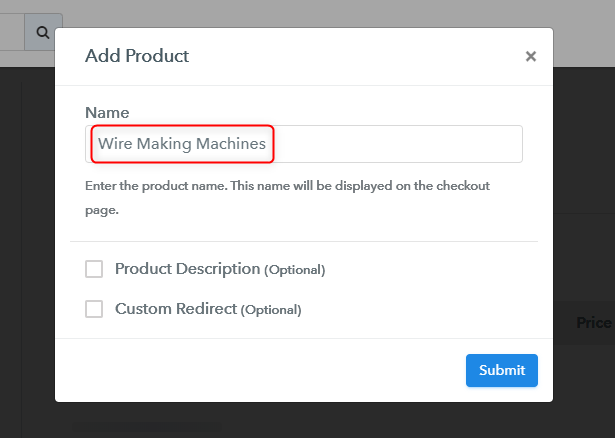
Next is to categorize your wire making machines into categories and name it as products. Click on the “Add New Product” button and a window will open just as shown in the below picture. Specify the category as a product name and the essential details.

Add Product

Click on the “Submit” button and a product will get added.

Note: Here you can add all the products related to the similar category by creating plans for each of them.

Step 6: Add Plans 

Let’s rollout plans for different kinds of wire making machine available in your store.

(a) Select Add New Plan

Add Plan

(b) Specify the Plan & Pricing Details

Add plan

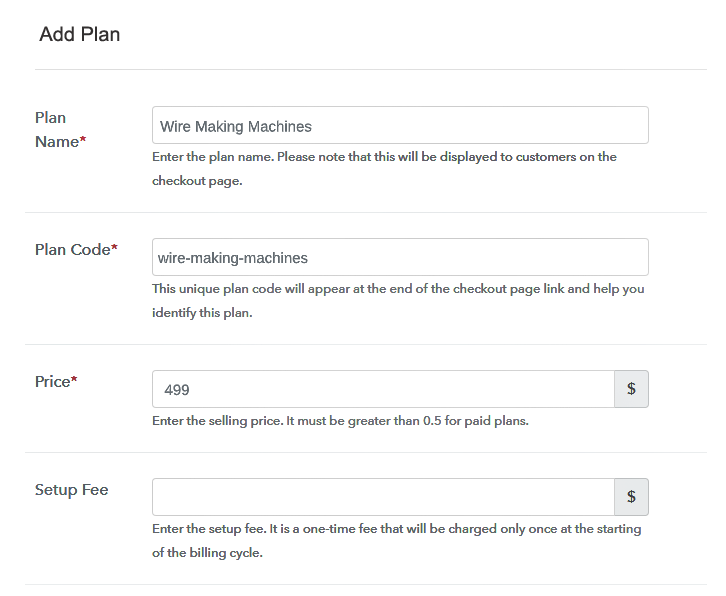
Name the plan as whichever wire making machine you’ll need to sell. Mention its code, price, a setup fee (if required), etc.

(c) Add Image & Description of Wire Making Machine

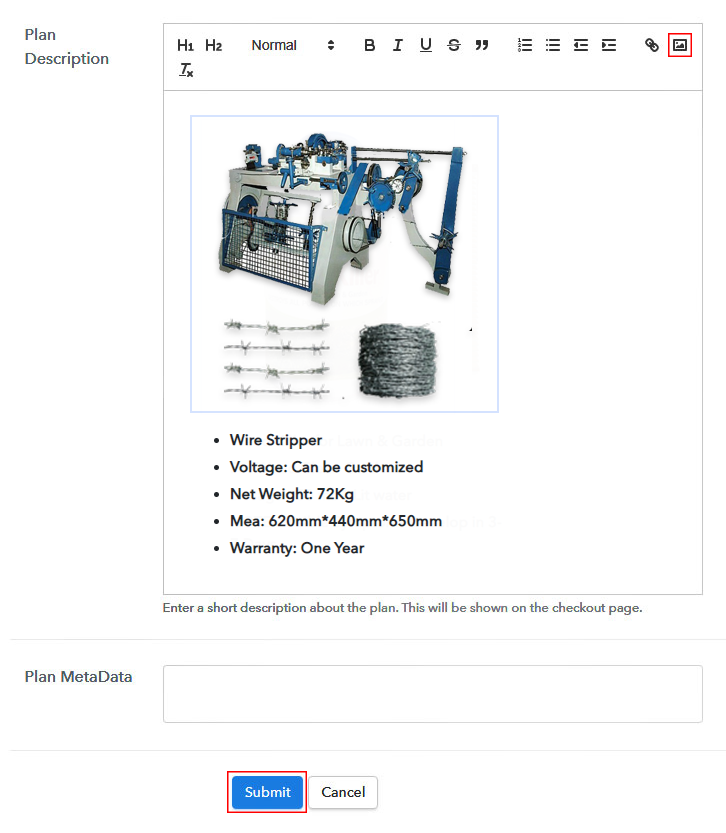
Add Product Image

To add an image and description fill out the section named “Plan Description”. Here you can add an image or text to describing a product. Also, many text formatting tools such as lists, quotes, links, headings etc are available to format the text.

Hit the “Submit” button once you are done with the plan details and an item will get added to sell wire making machines online.

Here to quote, you can create as many plans as you want to sell.

Step 7: Share your Checkout Page

Share Checkout Page on Social Media

There are three different options to share/link the plan.

  • Firstly, share it on social media or emails by sharing the link given under “Plan Link”.
  • Second is you can use this same link under the site buttons & text anchors on your website.
  • For sharing buttons are also visible to share any plan over Facebook & Twitter.

Step 8: Preview Checkout Page

Follow up the recommended steps to preview the checkout page:

(a) Click on the View Button

View Checkout Plan

(b) Take a Look at the Checkout Page

Preview Checkout Page - Sell Wire Making Machine Online

Step 9: Embed Checkout Page in Site & Sell Wire Making Machine Online

Embed Checkout Page on Website

For those who want to embed a checkout page on WordPress, copy the code given under “Embed Plan Link” window.

(a) Edit the Page & Paste the Copied Link

Embed Checkout Page on Website

Further, paste the plan link on a text editor of the WordPress dashboard.

(b) Save & Publish the Checkout Page

Save_and_Publish

Next, click the “Publish” button, after making changes.

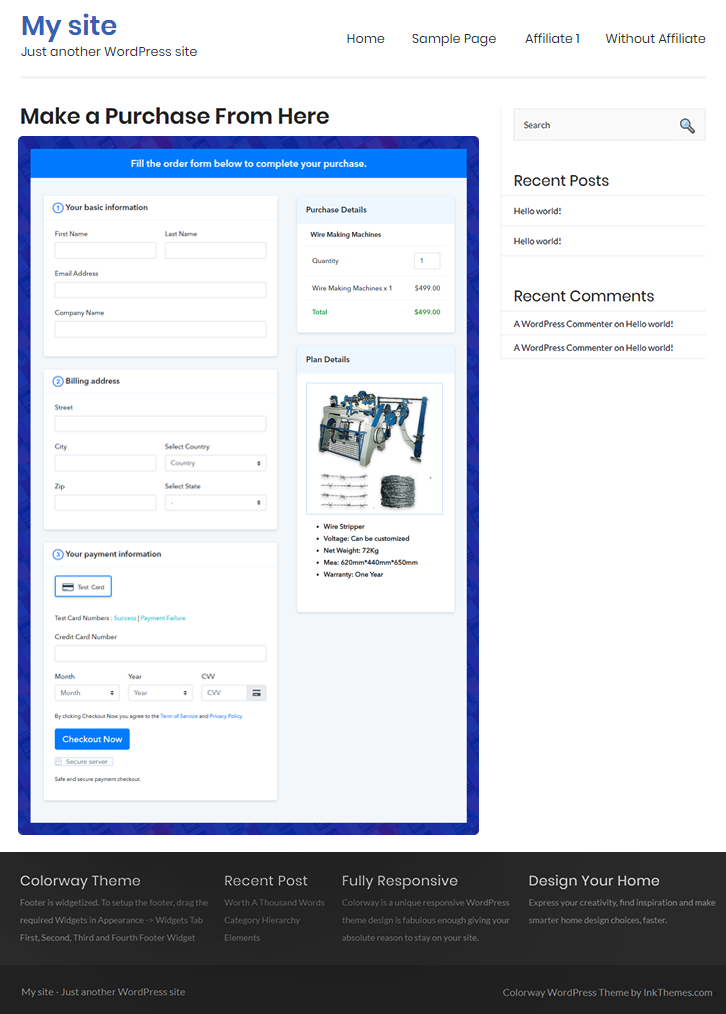
(c) Check out the Final Look of your Checkout Page on WordPress Site

Preview Checkout Page on WordPress Site

Step 10: Multiplan Checkout Page

Note: In case you want to sell multiple products via a single checkout page, you can create a multi-plan checkout page otherwise skip this step.

(a) Click on Add Mutiplan Checkout

Multiplan Checkout

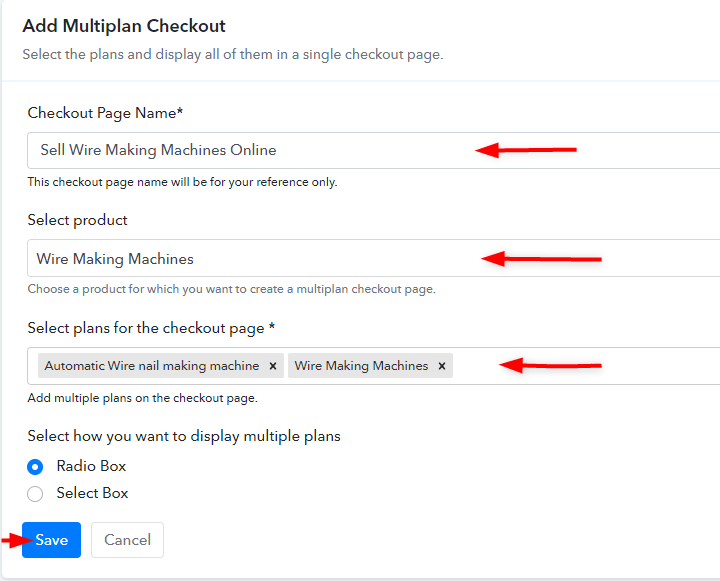
(b) Add Plans to Sell Multiple Wire Making Machine from Single Checkout Page

Create MultiPlan Checkout page

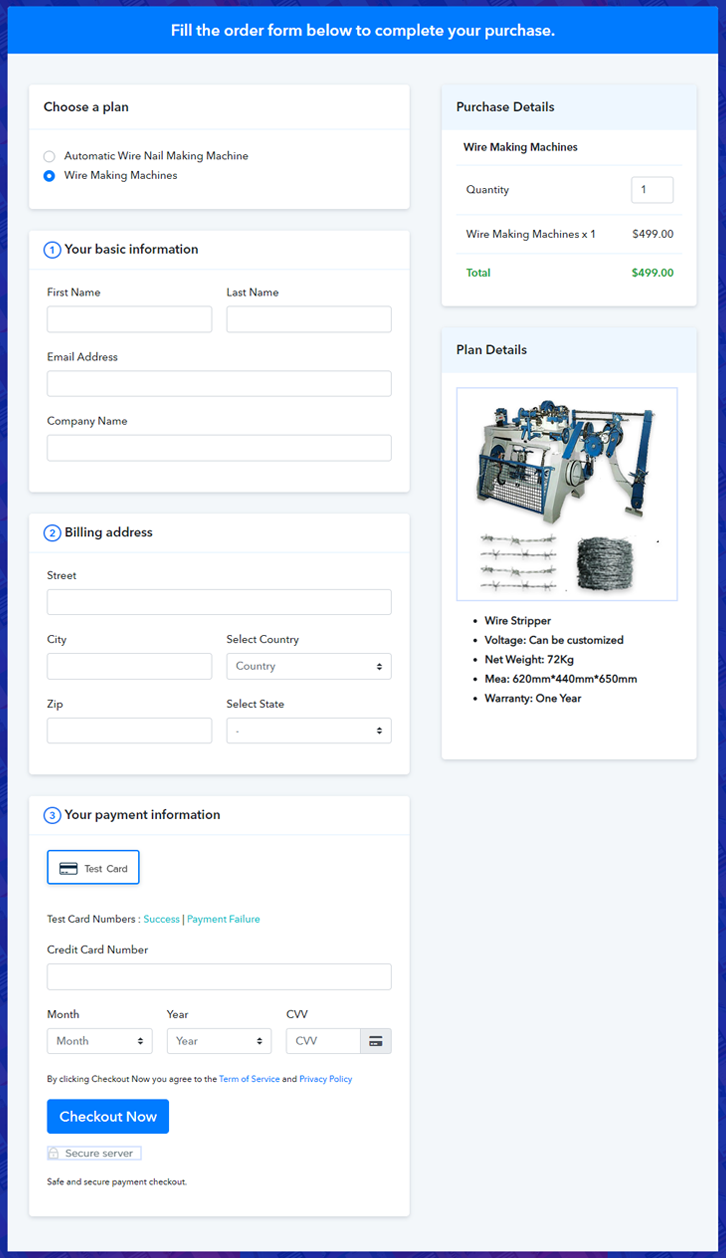
(c) Take a Look at the Checkout Page

Preview Multiplan Checkout Page

Preview Checkout Page

Wrapping Up

This was the easiest procedure available for selling wire making machines online. You can follow the steps by step flow to start an online business.

This service not only manages everything but also enable’s you to accept safe and secure payments using multiple payment gateways.

Good Luck! and do comment your feedback below.

You May Also Like To Read –
How To Sell Window Tints Online | Step by Step (Free Method)

Ideal For: All the window tint sellers, window tint owners, window tint manufacturers, and other merchants can use this method to sell window tints online.

How To Sell Window Tints Online

Why Choose this Method to Sell Window Tints Online?

Unlike any other solution, this method allows you to:

  • List and sell your window tints for FREE. Absolutely no payment required.
  • No need to pay commission on any of your sale.
  • Multiple payment options like PayPal, Credit Card, etc to collect payment from a single place.
  • Sell one time or recurring subscriptions of your window tints
  • Collect payments & sell products in any currency as per your requirement.
  • Give discounts on your products by offering special coupon codes.
  • Add sales commission agents to help you in selling window tints.

Get Pabbly Subscription Billing for Free

Window tints are perfect shields to safeguard a person from sunlight and prying eyes of the world. That is why this segment is rising at a CAGR of 5.2% to be a $2.6 billion industry by 2026. The key areas of growth are in Morocco, Japan, South Korea, etc. Now if any manufacturers want to get business from these areas and others, they should consider selling window tints online.

Here in this article, we prefer using the Saas tool called Pabbly Subscription Billing to sell window tints online. It is because it can list unlimited window tints and sell them through awesome checkout pages. Some other benefits include

  • Custom Domain
  • Higher Revenue Collection
  • Revenue Analysis
  • Custom Logo
  • Social Media Marketing
  • Notifications on Card Failure

Note: Some countries restrict some shades of window tints, please mark the correct shades in standard percentage before you sell window shades online.

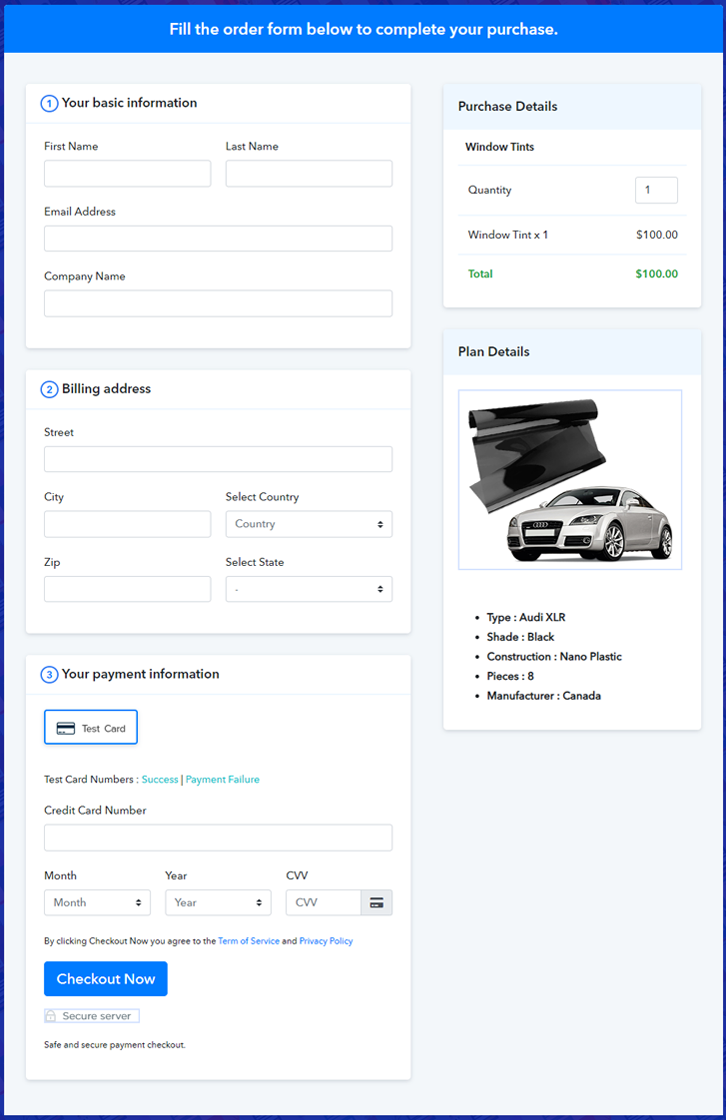
Final View of Checkout Page for your  Selling Business

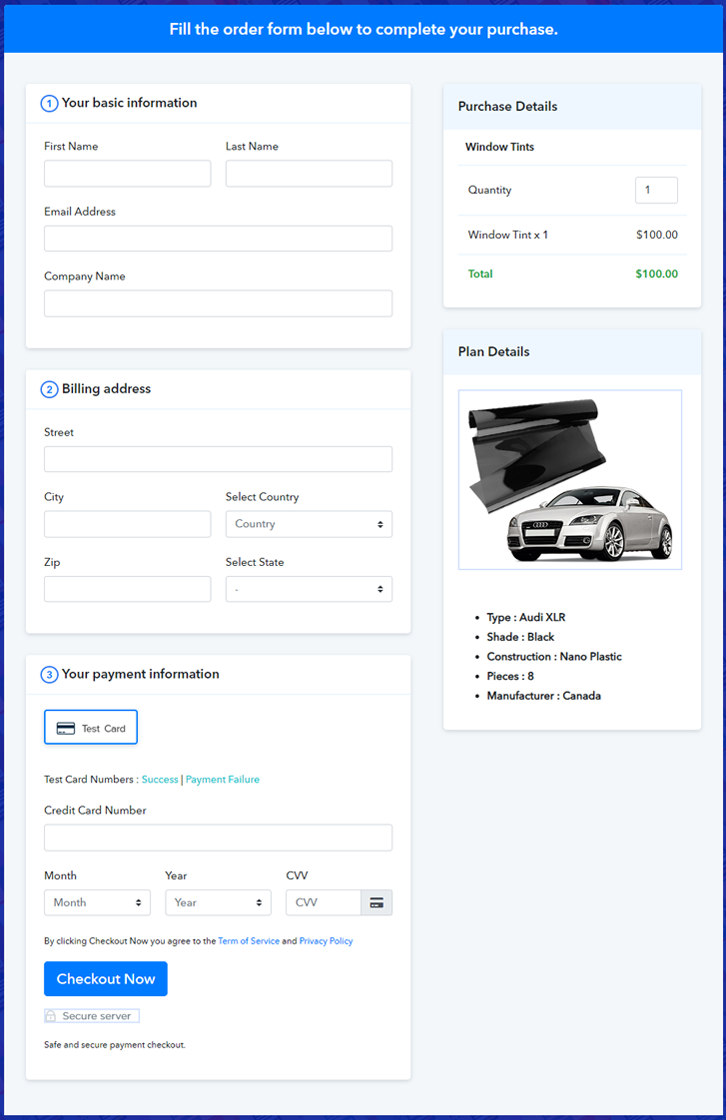
Checkout To Sell Window Tints Online

Preview Checkout Page

Step 1: Log in to Pabbly Subscription Billing

Signup

Check for Pabbly Subscription Billing in your browser. Now, click on the “Sign up Free“ button. Either fill all the information or simply sign in using your Gmail account.

Sign Up For Free!

Step 2: Select Subscription Billing

Access Subscription Billing

Step 3: Account Setup

Setup Account

Now, click on the “Access Now” button of Pabbly Subscription Billing, a page will pop-up with details like company name, currency, and contact number. Next, you need to fill those details to go on.

Step 4: Connect Payment Gateways & Start Window Tints Selling Business Online

Connect Payment Gateway

If you click on the ‘Test Payment’ button, you will experience the same experience as a client during his payment transaction process. This ensures there are no errors while making a payment

Also, you can integrate with payment gateways such as PayPal, Stripe, etc. Moreover, there are manuals listed below to help you out.

Step 5: Add Product for your Window Tints

Add Product

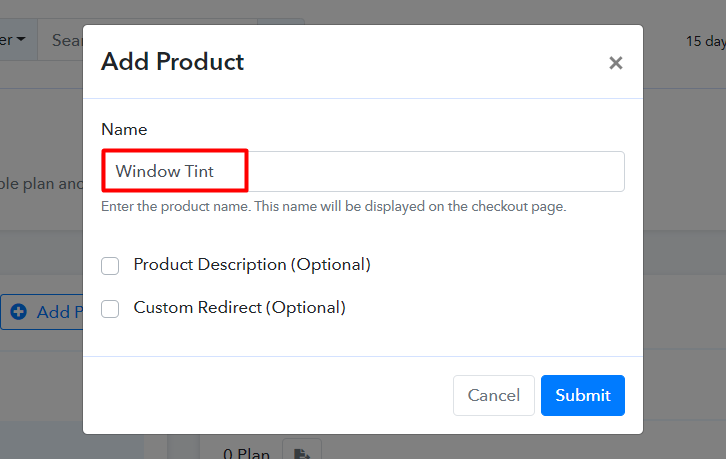
Well, now that you have embedded your payment gateway, its time to add your product. Click on the “Add New Product” button will summon a dialog box. Here you can enter the name of the radio provide a product description, and even redirect to a particular website.

Add Product To Sell Window Tints Online

Fill out all the details like the name of the product and voila your product is created.

Note: Here you can add all the products related to the similar category by creating plans for each of them.

Step 6: Add Plans 

Now let’s create plans for different kinds of window taints available in your store.

(a) Select Add New Plan

Add Plan

(b) Specify the Plan & Pricing Details

Add Plan To Sell Window Tints Online

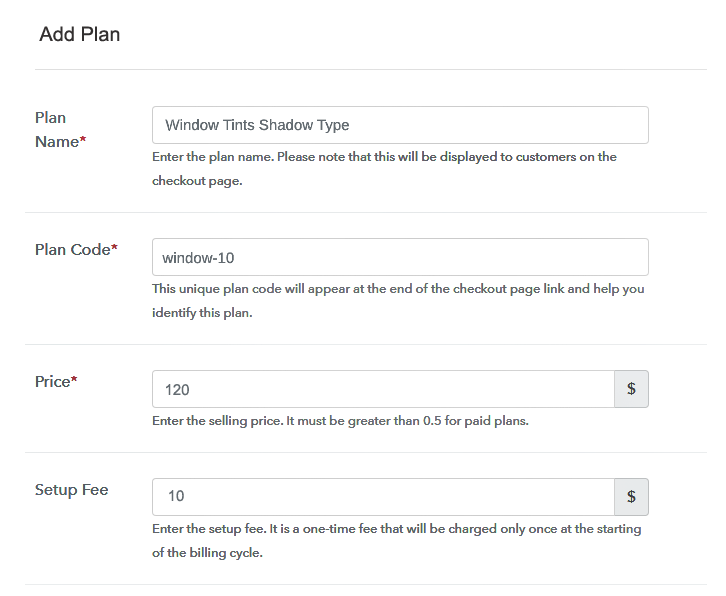
In the plan page, here you have to fill in details like plan name, code, price, setup fees. Moreover, choose your preferred revenue model accordingly and after some time you can even change it according to your choice.

(c) Add Image & Description of Window Tints


Insert good images of window tints using the image button.

To get customer’s attention provide some concise info about the window tints in bullet points like shades, color, thickness, etc, and then press the “Submit” button.

Also, by using the same method, you can list more products.

Step 7: Share your Checkout Page

Share Checkout Page on Social Media

Here are some ways, by which you can share the checkout pages through Pabbly Subscription Billing.

  • In this method, you simply just press the respective buttons for Twitter, Facebook and the checkout pages get automatically shared
  • Furthermore, simply paste the checkout pages link on to share it via email and SMS.
  • Also, you can create buttons on your webpage and paste the checkout links on it. Or you can place it on any anchor text on your website, so the users will be redirected to the checkout page.

Step 8: Preview Checkout Page

Follow up the recommended steps to preview the checkout page:

(a) Click on the View Button

View Checkout Plan

(b) Take a Look at the Checkout Page

Add Checkout To Sell Window Tints Online

Step 9: Embed Checkout Page in Site & Sell Online

Embed Checkout Page on Website

Also, just copy the link and add the checkout page to sell the window tints at any suitable place on your WordPress site.

(a) Edit the Page & Paste the Copied Link

Embed Checkout Page on Website

Further, paste the plan link of the window tints on a text editor of the WordPress dashboard.

(b) Save & Publish the Checkout Page

Save_and_Publish

Next, click the “Publish” button, after making changes.

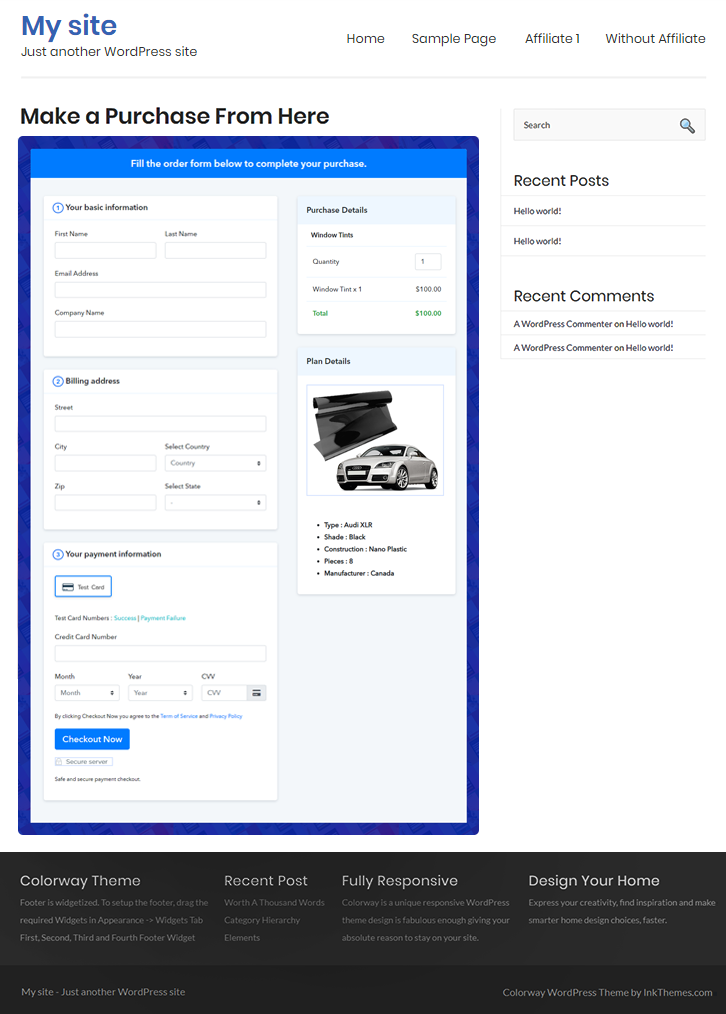
(c) Check out the Final Look of your Checkout Page on WordPress Site

Embed To Sell Window Tints Online

Step 10: Multiplan Checkout Page

Note: In case you want to sell multiple products via a single checkout page, you can create a multi-plan checkout page otherwise skip this step.

(a) Click on Add Mutiplan Checkout

Multiplan Checkout

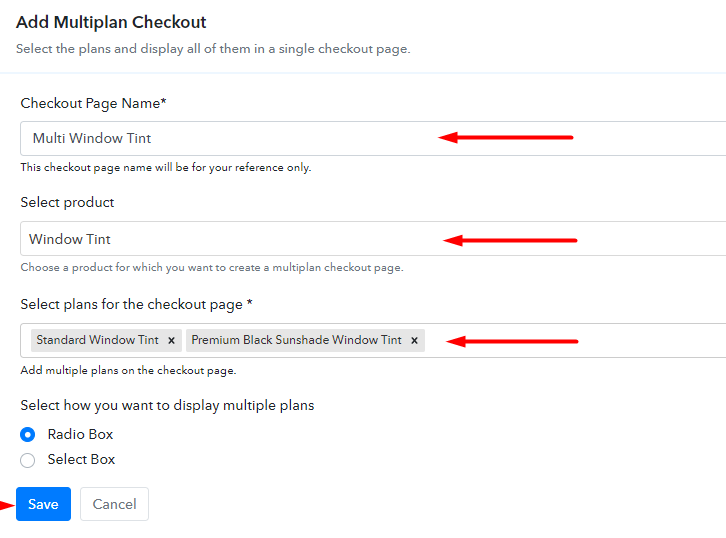
(b) Add Plans to Sell Multiple Window Tints from Single Checkout Page

Embed in WordPress To Sell Window Tints Online

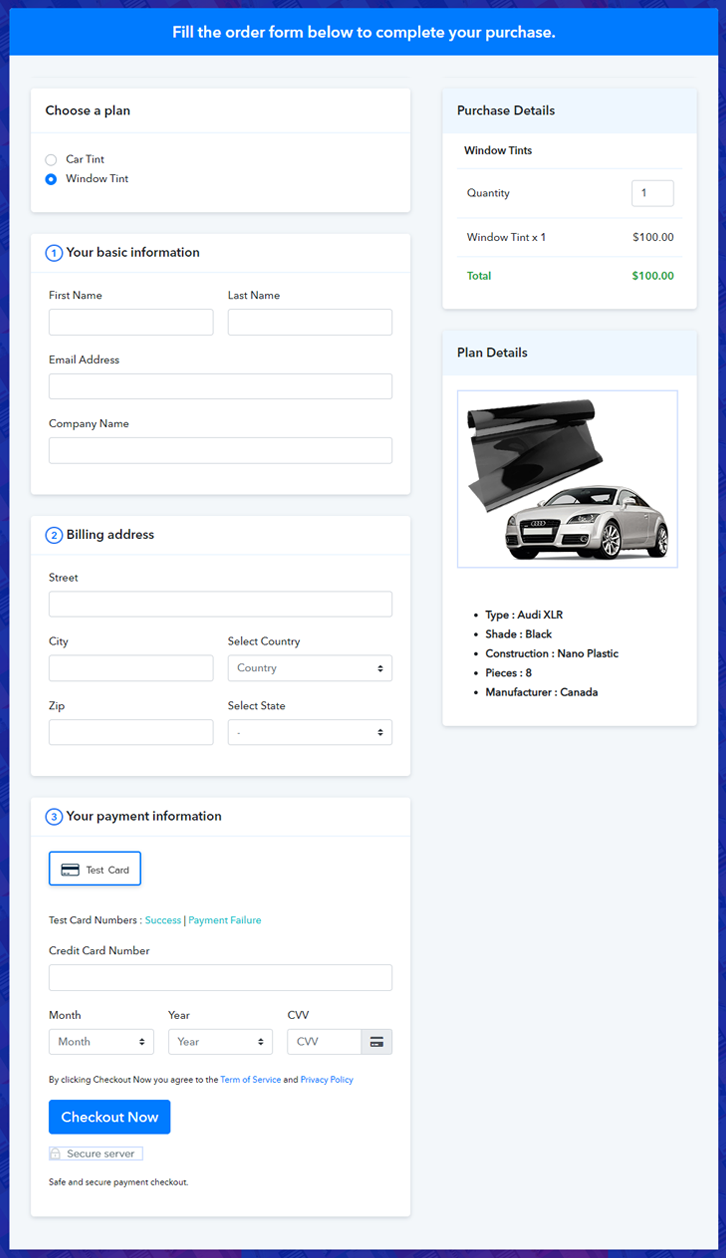
(c) Take a Look at the Checkout Page

Multiplan To Sell Window Tints Online

Preview Checkout Page

Wrapping Up

What should be the word to describe the feeling after seeing this checkout page? I will go with ‘stunned’. Your checkout page to sell window tints is stunningly beautiful. And it is so versatile that with few tweaks here and there you can sell any products online. Do explore all the features and comment in the section below in case of doubts.  Thank You !!

You May Also Like To Read –
How to Sell Wheelchairs Online | Step by Step (Free Method)

How to Sell Wheelchairs Online

Ideal For: All the wheelchair manufacturers, wheelchair sellers, retail wheelchair shop owners, and other merchants can use this method to take their wheelchairs selling business online.

How to Sell Wheelchairs Online

Why Choose this Method to Sell Wheelchairs Online?

Unlike any other solution, this method allows you to:

  • List and sell your wheelchairs for FREE. Absolutely no payment required.
  • No need to pay commission on any of your sale.
  • Multiple payment options like PayPal, Credit Card, etc to collect payment from a single place.
  • Sell one time or recurring subscriptions of your wheelchairs.
  • Collect payments & sell products in any currency as per your requirement.
  • Give discounts on your products by offering special coupon codes.
  • Add sales commission agents to help you in selling wheelchairs online.

Get Pabbly Subscription Billing for Free

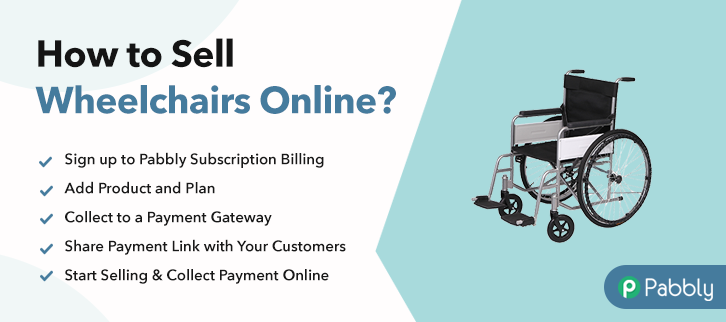
A wheelchair is used when walking becomes difficult for a person. There are many types of powered, manual, pediatric etc wheelchairs available in the market but to find one in the nearest shop is almost impossible. So, people look for them online. And if you are looking for a way to sell wheelchairs online then maybe we can help you with it.

For saving time and managing the sales and items availability you can make use of selling platforms. In this blog, I’m going to discuss the checkout page creation of Pabbly Subscription Billing for selling wheelchairs online.

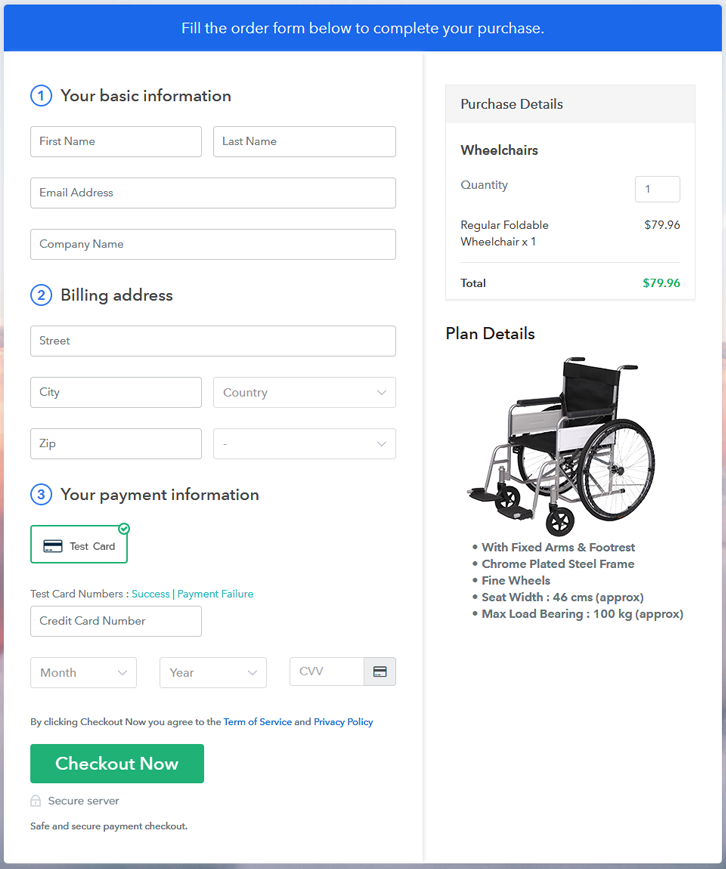
You can use a checkout page to collect payments for the sold wheelchairs, displaying the product to your customers, sharing product details etc.

Final View of Checkout Page for your Wheelchairs Selling Business

Checkout Page Preview to Sell Wheelchairs Online

Preview Checkout Page

Step 1: Log in to Pabbly Subscription Billing

Signup

To sell wheelchairs online, first you’ll have to visit the Pabbly Subscription Billing website. And the site, click on ‘Sign Up Free‘ button & using a Gmail ID or manual sign-up process you can get into the system.

Sign Up For Free!

Step 2: Select Subscription Billing

Access Subscription Billing

Step 3: Account Setup

Setup Account

Next, the system will ask some company details in a pop-up window. Quickly fill in a company name, a phone number & select a currency here.

Step 4: Connect Payment Gateways & Start Wheelchairs Selling Business Online

Connect Payment Gateway

Now, let’s integrate a payment method within the system to secure payments for the sold wheelchairs afterwards. Well, here you can also skip the actual payment gateway integration by selecting the test payment mode. But remember, to receive payments for the sold goods you’ll require to choose and integrate a payments method from the following choices. You can also make use of the gateway integration guides linked.

Step 5: Add Product for your Wheelchairs

Add Product

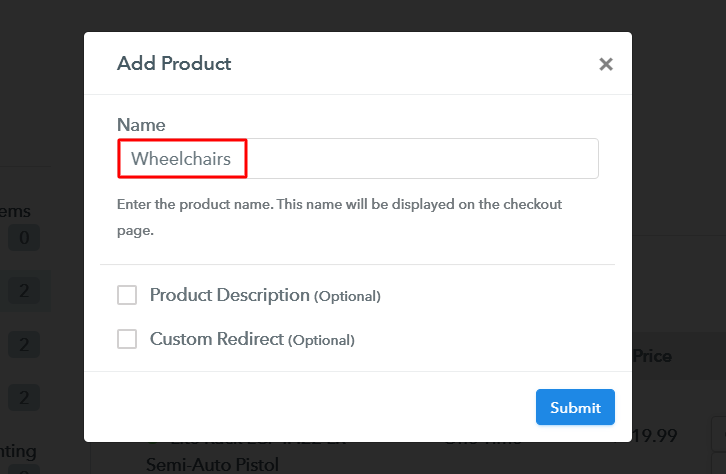
After all the system settings, you can add products. You can name a product much like a category of wheelchairs & we’ll be adding plans to them more further.

Add Product to Sell Wheelchairs Online

Fill out the product details & hit the ‘Submit’ button.

Note: Here you can add all the products related to the similar category by creating plans for each of them.

Step 6: Add Plans 

Now, add all the wheelchair items available in your store to sell as plans.

(a) Select Add New Plan

Add Plan

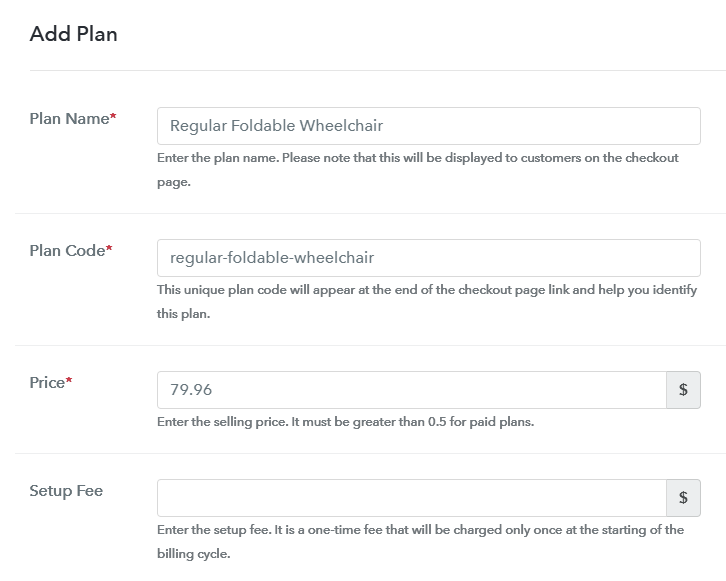
(b) Specify the Plan & Pricing Details

Add Plan to Sell Wheelchairs Online

You can mention a wheelchair’s plan details like name, code, billing cycle, plan status etc on this page.

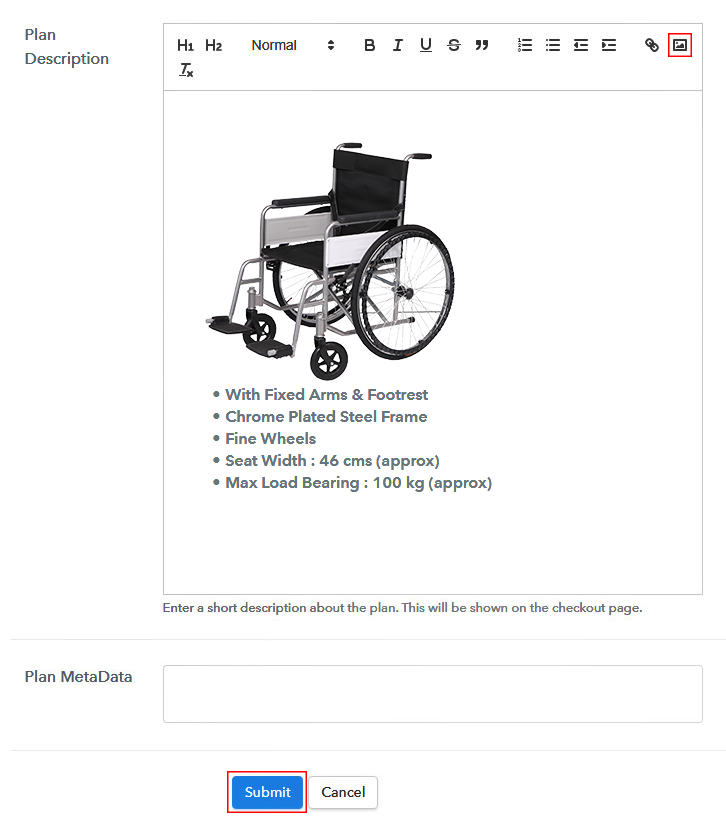
(c) Add Image & Description of Wheelchairs

Add Image & Description to Sell Wheelchairs Online

Moreover, you can also put an image with some specialities of the wheelchair here in the ‘Plan Description’ field.

Click the ‘Submit’ button here & a checkout page will be created to sell wheelchairs online.

Likewise, you can add all the other wheelchairs too.

Step 7: Share your Checkout Page

Share Checkout Page on Social Media

For selling wheelchairs online, you can share/embed a checkout page in the following there ways.

  • You can link the plan link in the buttons and text of a site or app to redirect a customer on the payment page
  • Next, you can directly click the Facebook & Twitter sharing buttons to share a plan checkout page
  • Lastly, you can share the plan checkout page on the other social media & link sharing channels to sell wheelchairs online such as emails, WhatsApp, Messenger, SMS etc

Step 8: Preview Checkout Page

Follow up the recommended steps to preview the checkout page:

(a) Click on the View Button

View Checkout Plan

(b) Take a Look at the Checkout Page

Checkout Page Preview to Sell Wheelchairs Online

Step 9: Embed Checkout Page in Site & Sell Wheelchairs Online

Embed Checkout Page on Website

Just copy the link and add the checkout page to sell wheelchairs online at any preferable place on your WordPress site.

(a) Edit the Page & Paste the Copied Link

Embed Checkout Page on Website

Further, paste the plan link on a text editor of the WordPress dashboard.

(b) Save & Publish the Checkout Page

Save_and_Publish

Next, click the “Publish” button, after making changes.

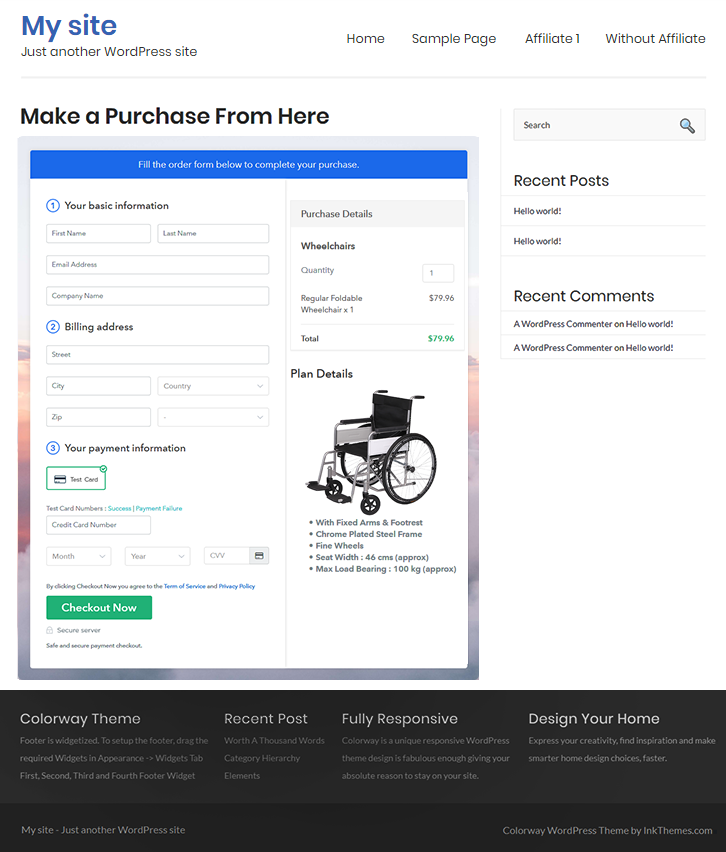
(c) Check out the Final Look of your Checkout Page on WordPress Site

Checkout Page On WordPress Site to Sell Wheelchairs Online

Step 10: Multiplan Checkout Page

Note: In case you want to sell multiple products via a single checkout page, you can create a multi-plan checkout page otherwise skip this step.

(a) Click on Add Mutiplan Checkout

Multiplan Checkout

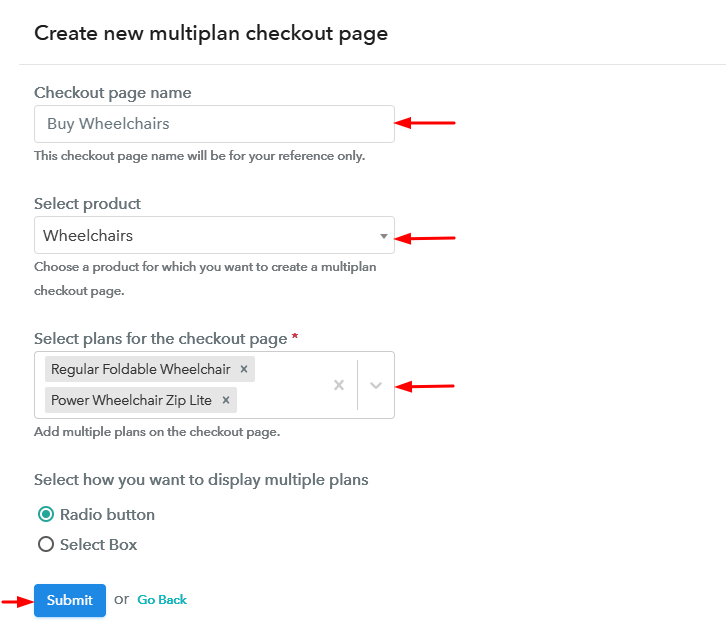
(b) Add Plans to Sell Multiple Wheelchairs from Single Checkout Page

Create Multiplan Checkout to Sell Wheelchairs Online

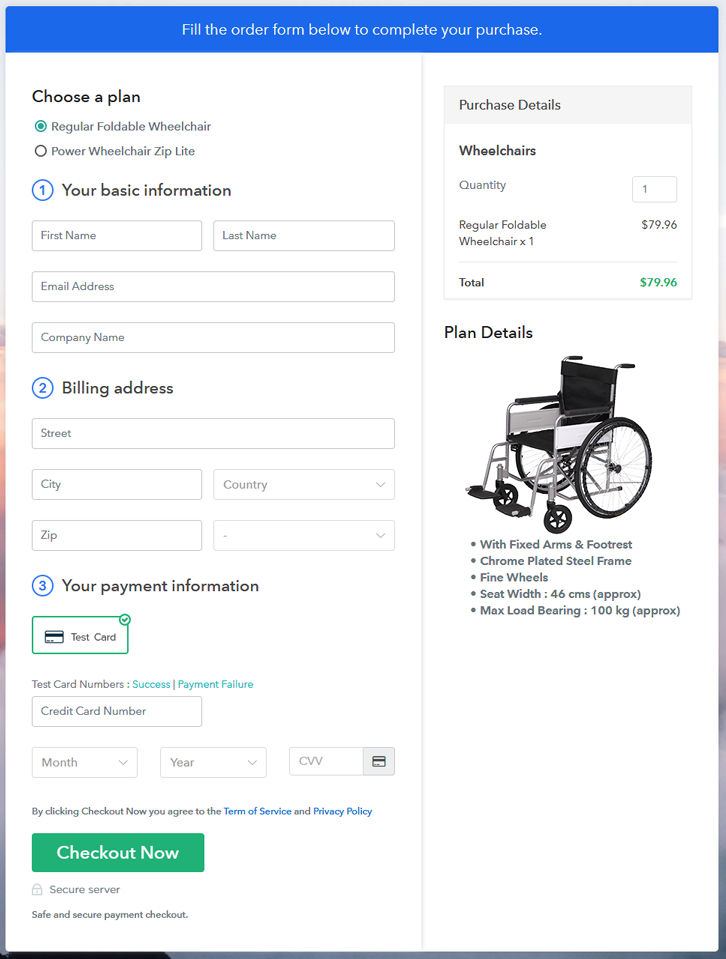
(c) Take a Look at the Checkout Page

Multiplan Checkout Page to Sell Wheelchairs Online

Preview Checkout Page

Wrapping Up

These were the 10 steps for creating checkout pages for selling wheelchairs online. You can see that it’s very simple and easy to perform these steps on your own & you’ll get a well functioning system to start wheelchairs business online. Also, the service dashboard will help you in the management for selling wheelchairs online easily. Besides, you can also automate the billing & invoicing processes.

You May Also Like To Read –
How to Sell Weapons Online | Step by Step (Free Method)

How to Sell Weapons Online

Ideal For: All the weapon manufacturers, weapon sellers, retail weapon shop owners, and other merchants can use this method to take their weapons selling business online.

How to Sell Weapons Online

Why Choose this Method to Sell Weapons Online?

Unlike any other solution, this method allows you to:

  • List and sell your weapons for FREE. Absolutely no payment required.
  • No need to pay commission on any of your sale.
  • Multiple payment options like PayPal, Credit Card, etc to collect payment from a single place.
  • Sell one time or recurring subscriptions of your weapons.
  • Collect payments & sell products in any currency as per your requirement.
  • Give discounts on your products by offering special coupon codes.
  • Add sales commission agents to help you in selling weapons online.

Get Pabbly Subscription Billing for Free

There are not many in the weapons selling business online as its very tricky to carry even in the locale. And if you are planning to extend your reach to an online audience we can help you with a head start.

In this article, I’ve demonstrated the process of checkout page creation for selling weapons online. The checkout pages can help you do the following:

  • You can collect online/offline payments securely
  • Sell weapons globally by applying global taxes easily
  • Manage all the payments and products easily
  • Sell unlimited product
    And more

You can easily share the checkout page on social media platforms like Facebook, WhatsApp, emails etc. Also, you can embed the created checkout pages in the buttons, texts, posts/pages of a website or app.

Final View of Checkout Page for your Weapons Selling Business

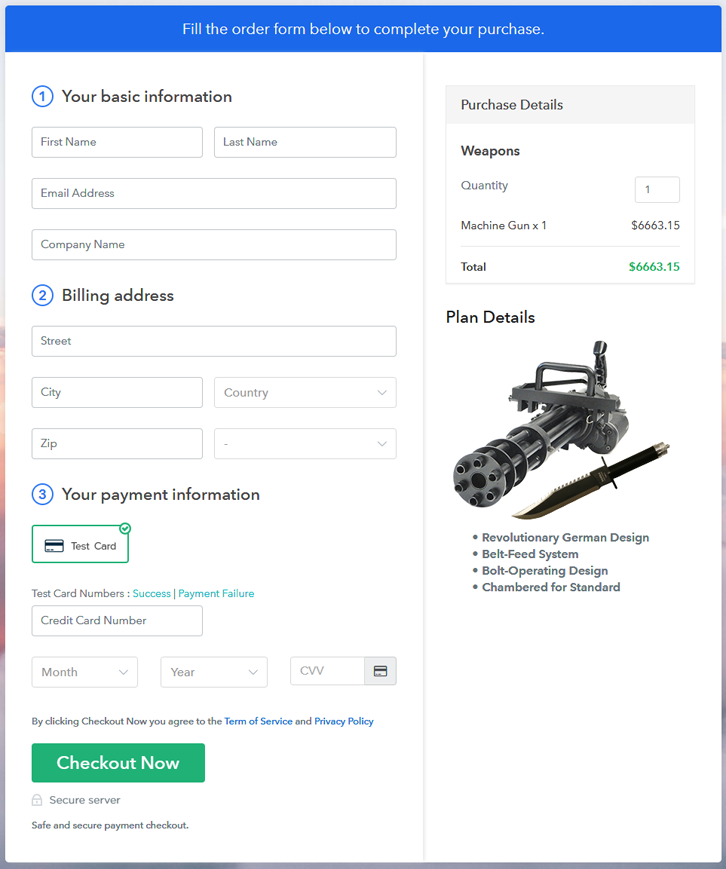
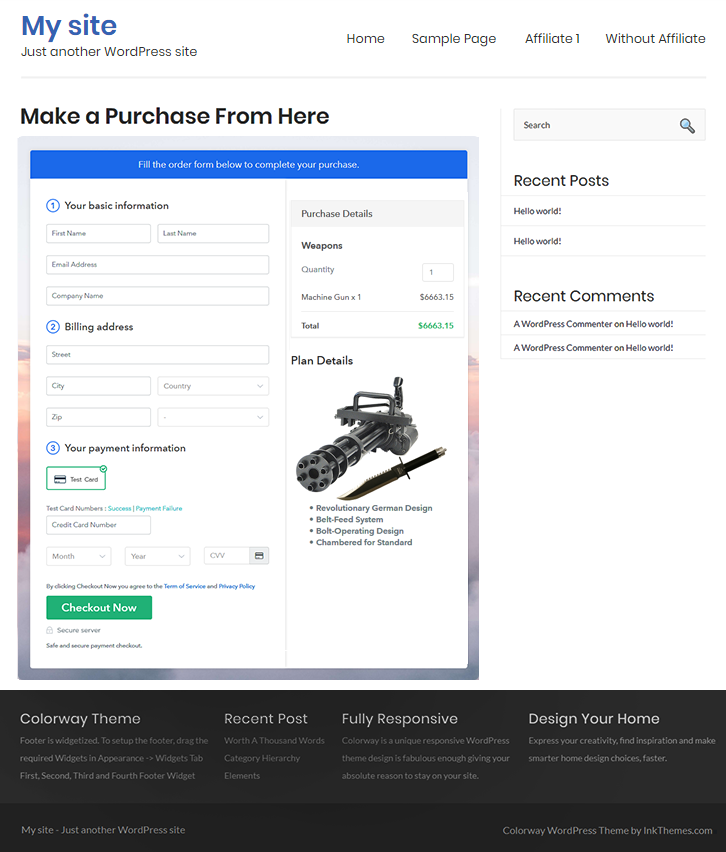
Checkout Page Preview to Sell Weapons Online

Preview Checkout Page

Step 1: Log in to Pabbly Subscription Billing

Signup

To get started with selling weapons online through checkout pages, first visit Pabbly Subscription Billing & then strike the ‘Sign Up Free‘ button there. On the redirect page, you can use an existing Gmail Id or you can also sign-up manually by filling in the form.

Sign Up For Free!

Step 2: Select Subscription Billing

Access Subscription Billing

Step 3: Account Setup

Setup Account

In the third step, you’ll be requested to fill in your company details in a pop-up window. Quickly feed the information asked and click ‘Continue’.

Step 4: Connect Payment Gateways & Start Weapons Selling Business Online

Connect Payment Gateway

Next, you’ll require to integrate a payment gateway method to receive payments. Either you can use the ‘Enable Test Payment’ mode here (for testing the functionality) or you can select a payment gateway from the following alternatives available. Also, the integration guides are linked here for your further reference.

Step 5: Add Product for your Weapons

Add Product

In this step, we’ll be creating a product and you can name a product like a weapon category. We’ll add plans to the product afterwards.

Add Product to Sell Weapons Online

Fill all the primary product details & hit ‘Submit’.

Note: Here you can add all the products related to the similar category by creating plans for each of them.

Step 6: Add Plans 

Now, let’s start appending plans for the various weapons available in your store.

(a) Select Add New Plan

Add Plan

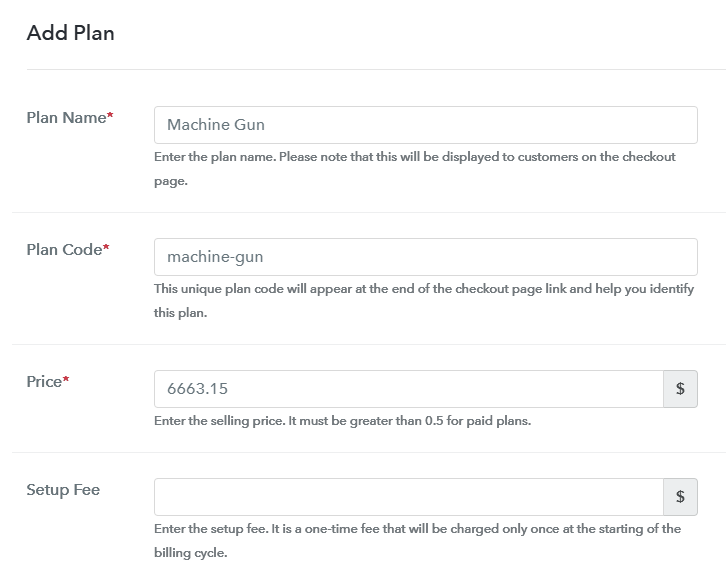
(b) Specify the Plan & Pricing Details

Add Plan to Sell Weapons Online

You can mention the name, price, billing cycle & other details of a weapon in this plan details page.

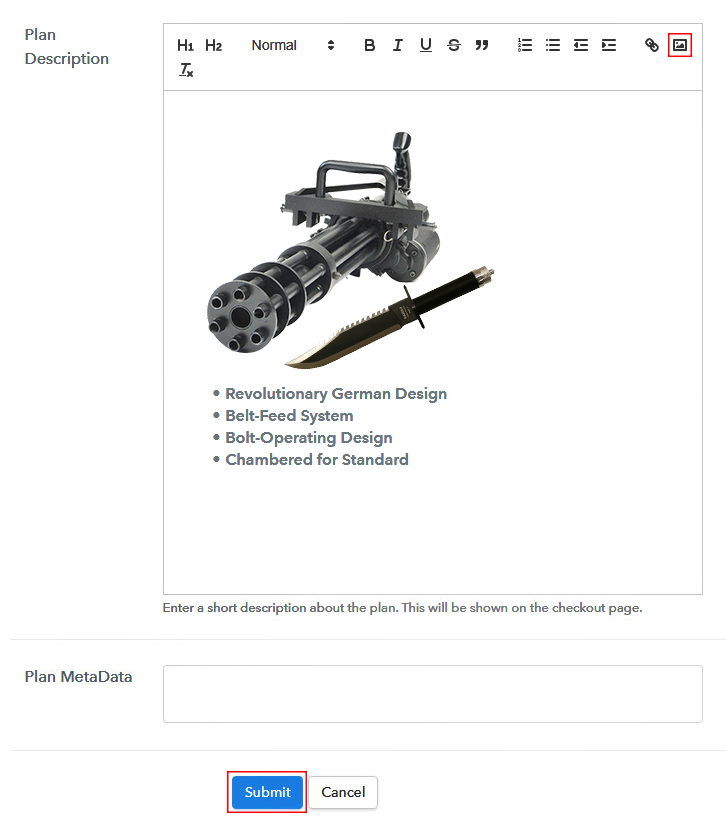
(c) Add Image & Description of Weapons

Add Image & Description to Sell Weapons Online

Besides, if you want to present the image or descriptive feature of the weapons you can mention them in here under ‘Plan Description’ head.

Strike the ‘Submit’ button here and a checkout page will be launched to sell weapons online.

Moreover, you can also add other weapons by repeating this process.

Step 7: Share your Checkout Page

Share Checkout Page on Social Media

To start weapons business online, you can share a plan checkout page & take customers on the payments page. Well, there are three ways to do so.

  • First, you can share the plan link on all the link-sharing channels such as SMS, emails, WhatsApp etc
  • Second, you can tap the Facebook & Twitter sharing buttons to directly share a plan checkout page onto there platforms
  • Third, you can redirect a customer on the checkout pages by linking the plan link URL within the txt anchors and buttons for a site or app

Step 8: Preview Checkout Page

Follow up the recommended steps to preview the checkout page:

(a) Click on the View Button

View Checkout Plan

(b) Take a Look at the Checkout Page

Checkout Page Preview to Sell Weapons Online

Step 9: Embed Checkout Page in Site & Sell Weapons Online

Embed Checkout Page on Website

Just copy the link and add the checkout page to sell weapons online at any preferable place on your WordPress site.

(a) Edit the Page & Paste the Copied Link

Embed Checkout Page on Website

Further, paste the plan link on a text editor of the WordPress dashboard.

(b) Save & Publish the Checkout Page

Save_and_Publish

Next, click the “Publish” button, after making changes.

(c) Check out the Final Look of your Checkout Page on WordPress Site

Checkout Page On WordPress Site to Sell Weapons Online

Step 10: Multiplan Checkout Page

Note: In case you want to sell multiple products via a single checkout page, you can create a multi-plan checkout page otherwise skip this step.

(a) Click on Add Mutiplan Checkout

Multiplan Checkout

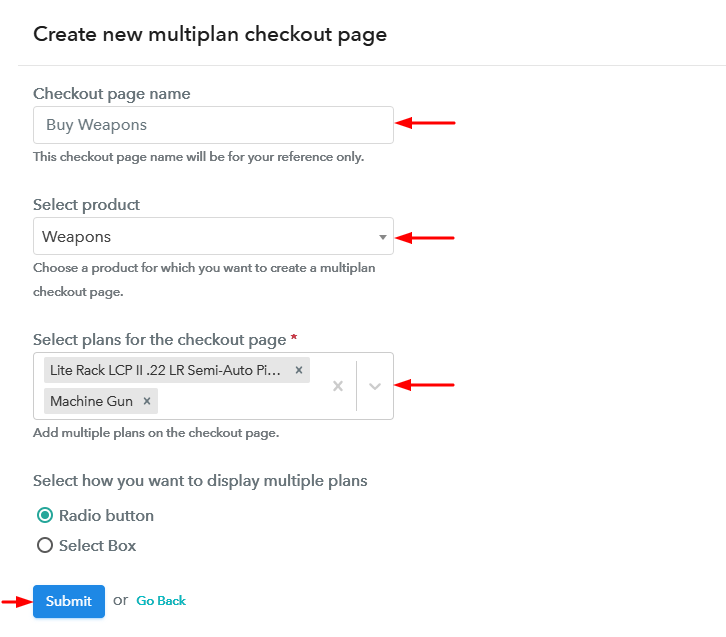
(b) Add Plans to Sell Multiple Weapons from Single Checkout Page

Create Multiplan Checkout Page to Sell Weapons Online

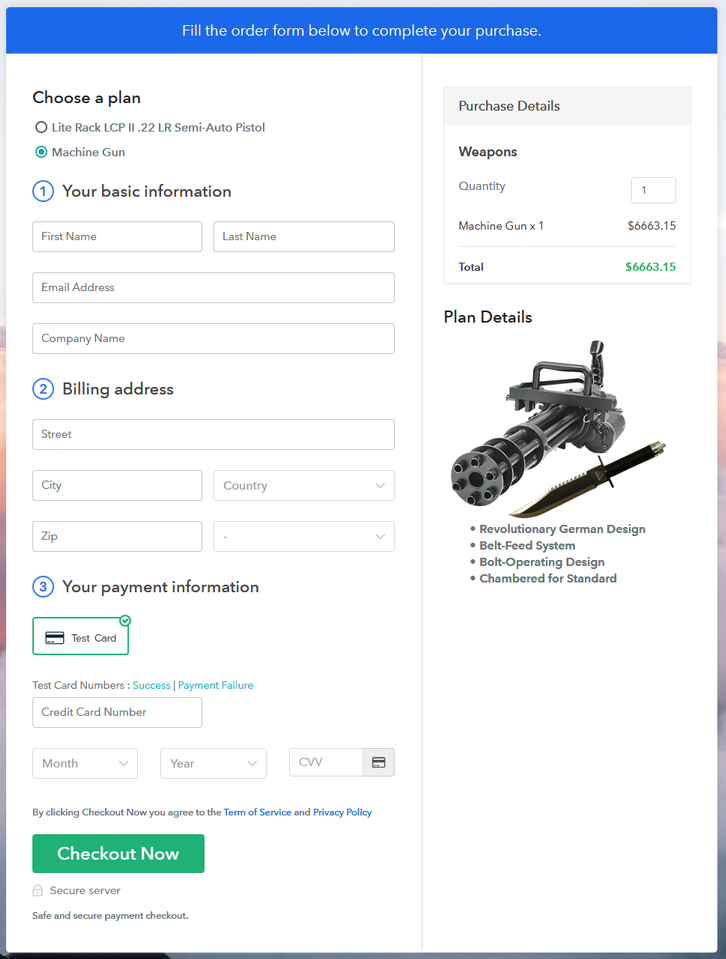
(c) Take a Look at the Checkout Page

Multiplan Checkout Page to Sell Weapons Online

Preview Checkout Page

Wrapping Up

This was the entire procedure for creating checkout pages to sell weapons online. As you can see by yourself that all the steps are pretty simple & even a non-techy person can follow them easily.

Also, you can accept multiple currencies, track the revenue and can sell unlimited products globally.

You May Also Like To Read –