How to Sell Lab Glasswares Online | Step by Step (Free Method)

How to Sell Lab Glasswares Online

Ideal For: All the lab glassware manufacturers, lab glassware sellers, retail lab glassware shop owners, and other merchants can use this method to take their lab glasswares selling business online.
How to Sell Lab Glasswares Online

Why Choose this Method to Sell Lab Glasswares Online?

Unlike any other solution, this method allows you to:

  • List and sell your lab glasswares for FREE. Absolutely no payment required.
  • No need to pay commission on any of your sale.
  • Multiple payment options like PayPal, Credit Card, etc to collect payment from a single place.
  • Sell one time or recurring subscriptions of your lab glasswares.
  • Collect payments & sell products in any currency as per your requirement.
  • Give discounts on your products by offering special coupon codes.
  • Add sales commission agents to help you in selling lab glasswares online.

Get Pabbly Subscription Billing for Free

Nowadays almost every business is extending itself and reaching online. An online business can add up more buyers as well as sales to your lab glassware selling business.

Well, if you are looking for ways to start lab glasswares business online then this could be the end of your search. As we are going to discuss a simple process of checkout page creation to get started with selling lab glasswares online within a few minutes.

Uses of checkout pages:

  • To sell unlimited products and collect online/ office payments easily
  • Showcase single/multiple products with image & feature
  • Offer coupons & discounts
  • Apply global taxes easily
  • Accept multiple currencies
  • Share payment page on social media platforms
  • Embed pages in WordPress post/pages
  • Link pages in buttons & texts for redirection

Final View of Checkout Page For Your Lab Glasswares Selling Business
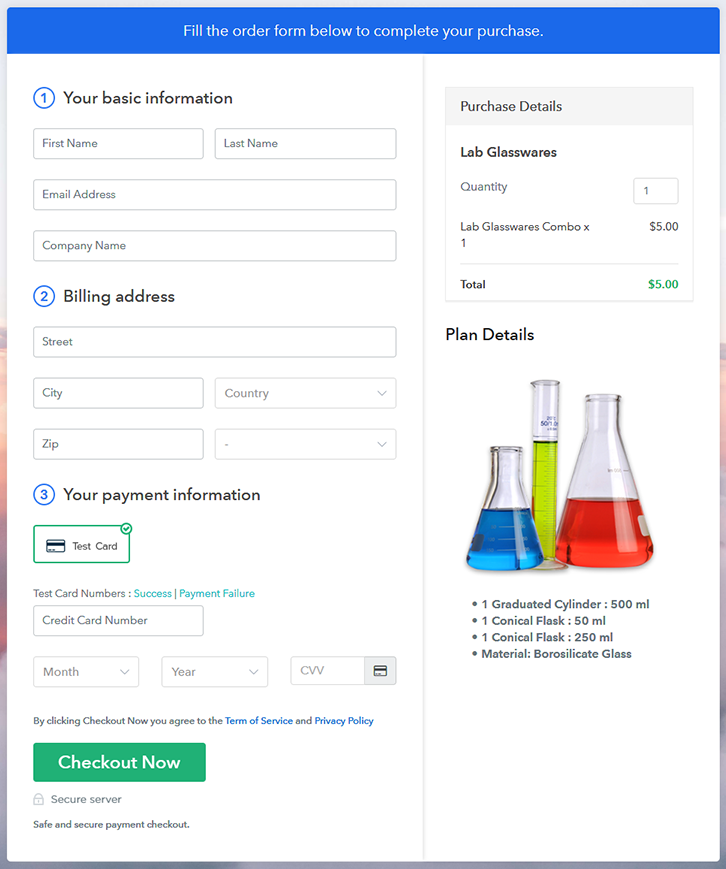
Checkout Page Preview to Sell Lab Glasswares Online

Preview Checkout Page

Step 1: Log in to Pabbly Subscription Billing
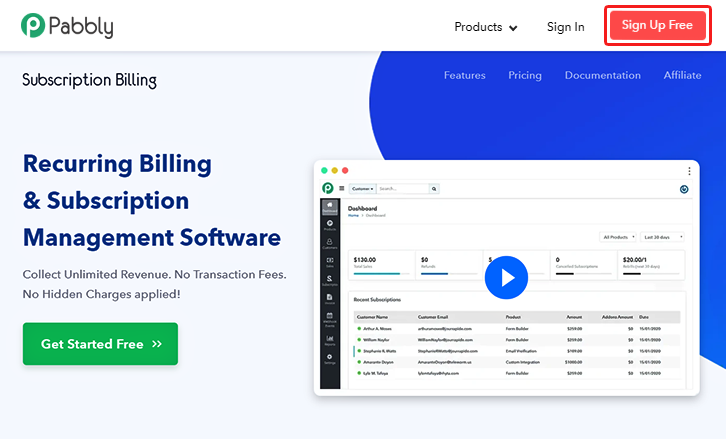
Signup

For getting started with creating a checkout page to sell lab glasswares online first visit Pabbly Subscription Billing website & click on ‘Sign Up Free‘. On the redirected registration page select between Google or manual sign-up.

Sign Up For Free!

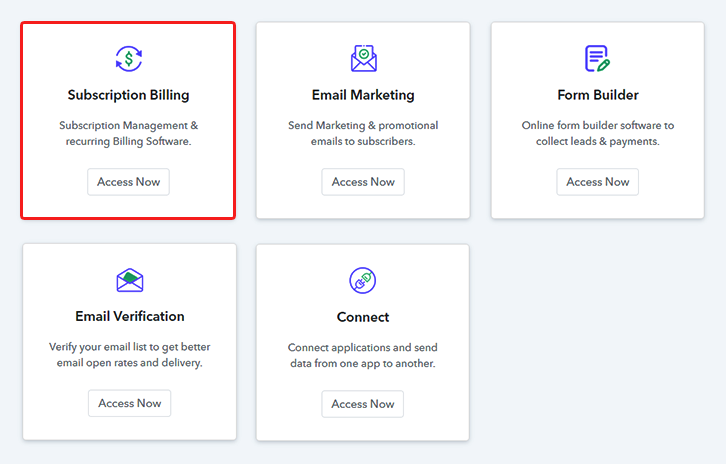
Step 2: Select Subscription Billing

Access Subscription Billing

Step 3: Account Setup
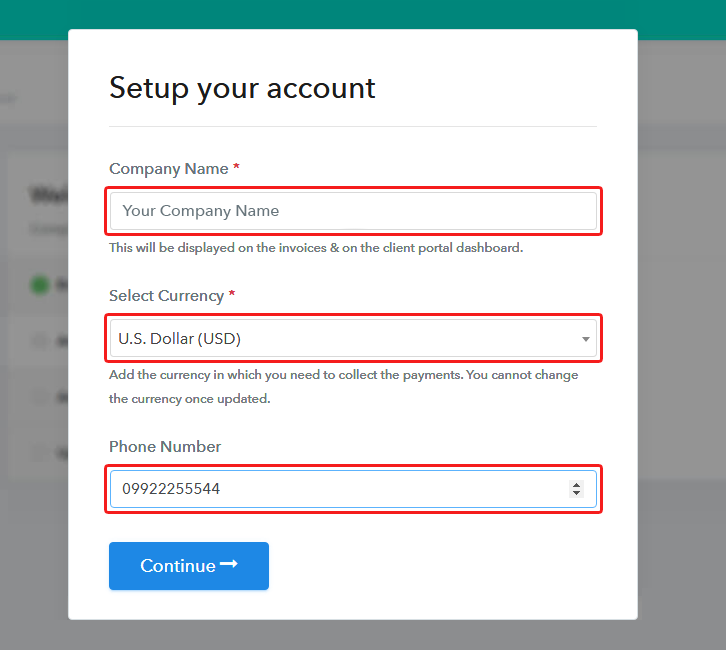
Setup Account

Next, the system will ask you to fill out some company details in a pop-up form. Therefore, quickly fill up a company name, select a currency & provide phone number.

Step 4: Connect Payment Gateways & Start Lab Glasswares Selling Business Online
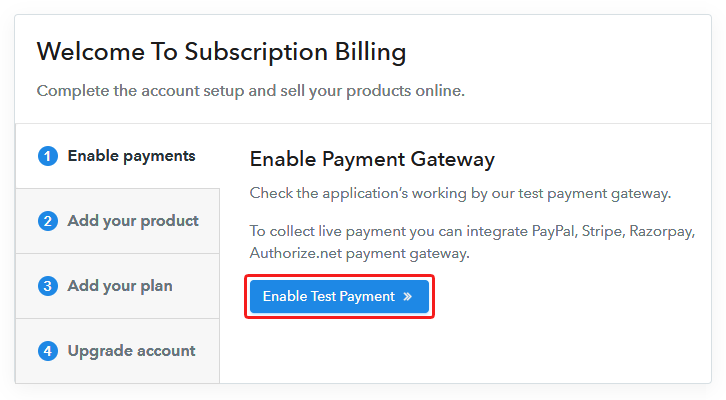
Connect Payment Gateway

Now, you must pay attention to this step as it is an important step. We’ll be integrating a payment method within the system to collect payments for the sold lab glasswares.

You can also enable the optional test payment mode (just for testing). But remember to accept actual payments you’ll need to choose from the following payment methods available.

Step 5: Add Product For Your Lab Glasswares
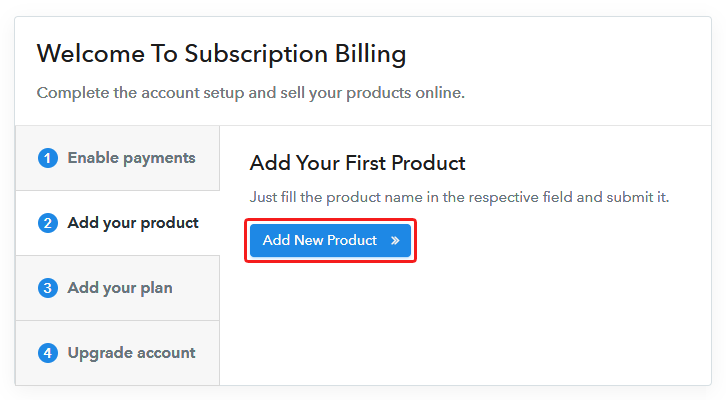
Add Product

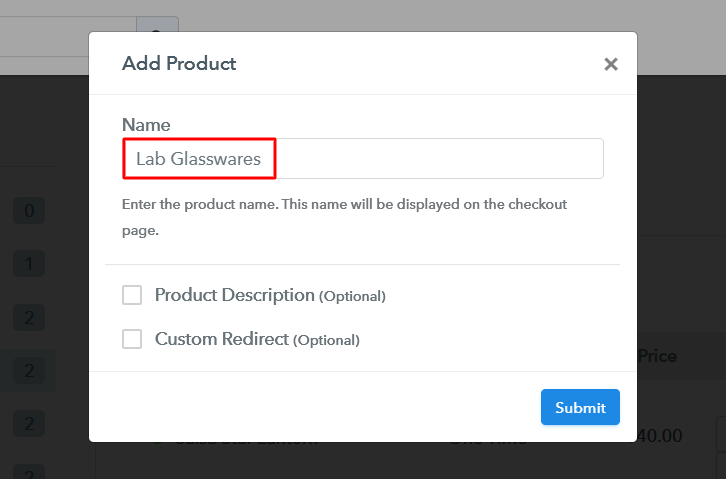
Up to this point, all the system settings are done & you can start adding product categories. Name the product much like a category of lab glasswares as we’ll be adding plans (lab glassware items) to these product categories more further.

Add Product to Sell Lab Glasswares Online

Fill out the required details and hit ‘Submit’ here.

Note: Here you can add all the products related to the similar category by creating plans for each of them.

Step 6: Add Plans 

Now, we’ll add all the lab glasswares items available as plans to sell online.

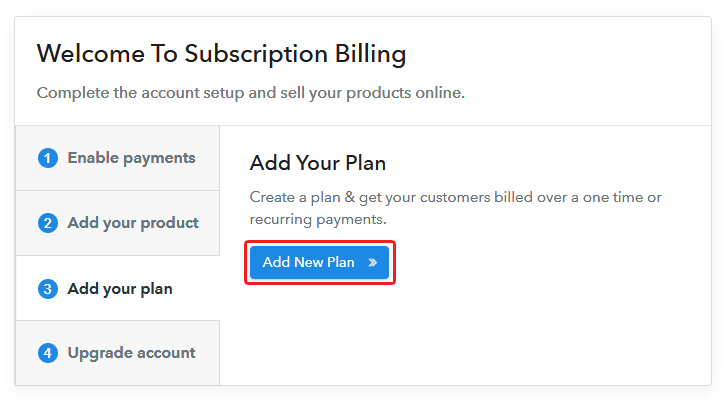
(a) Select Add New Plan

Add Plan

(b) Specify the Plan & Pricing Details
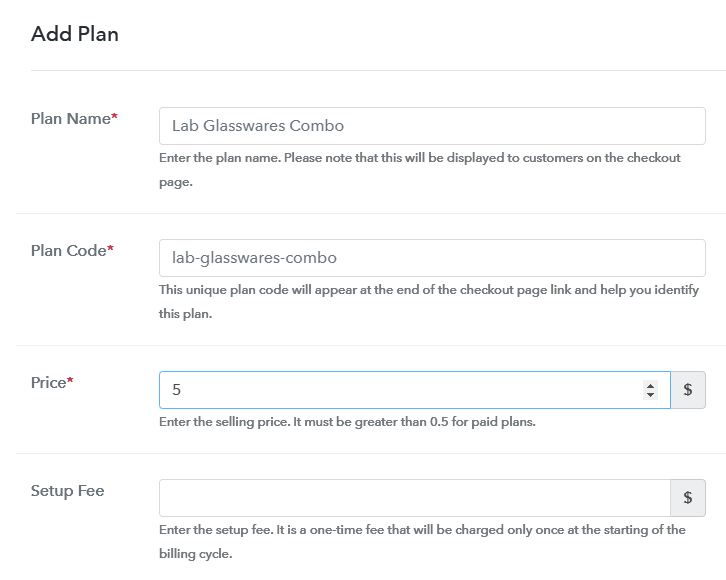
Add Plan to Sell Lab Glasswares Online

You can put details like name, code, billing cycle, plan status for a lab glassware item on the plan details page.

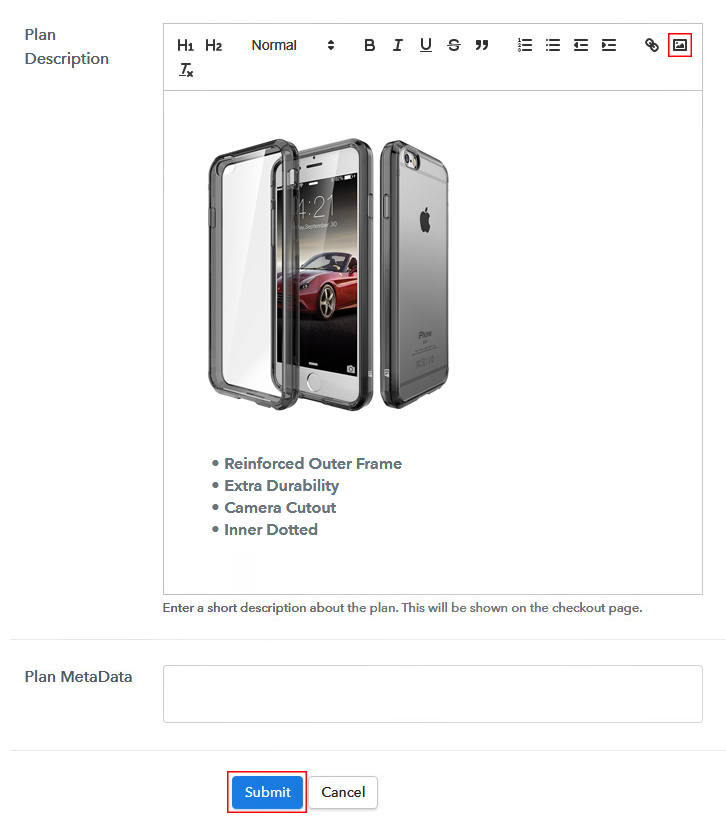
(c) Add Image & Description of Lab Glasswares
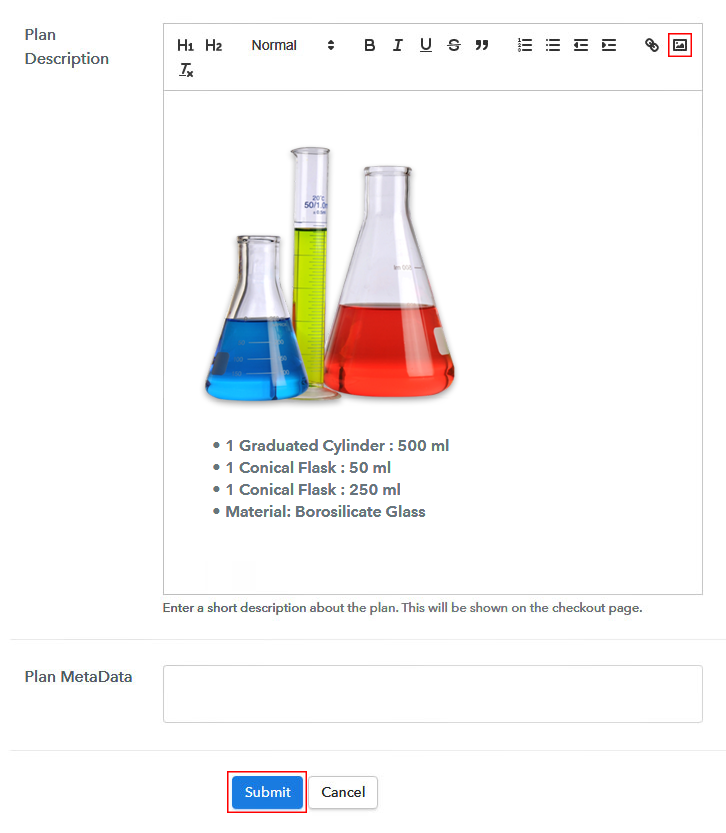
Add Image & Description to Sell Lab Glasswares Online

Moreover, you can also present an image with some specialities/feature of the lab glassware.

Once you hit ‘Submit’ in here a checkout page gets created to sell lab glasswares online.

You can add all the other lab glasswares too in the same way.

Step 7: Share your Checkout Page

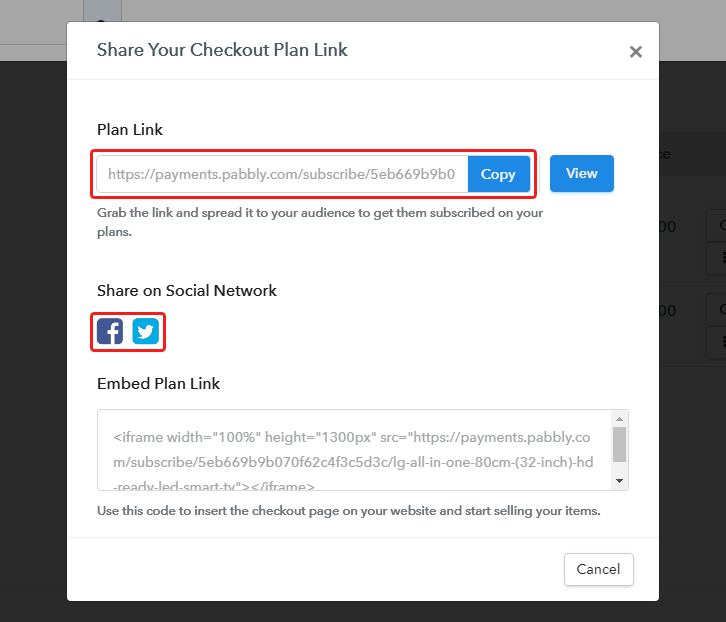
Share Checkout Page on Social Media

For selling lab glasswares online, you can share/embed the checkout pages.

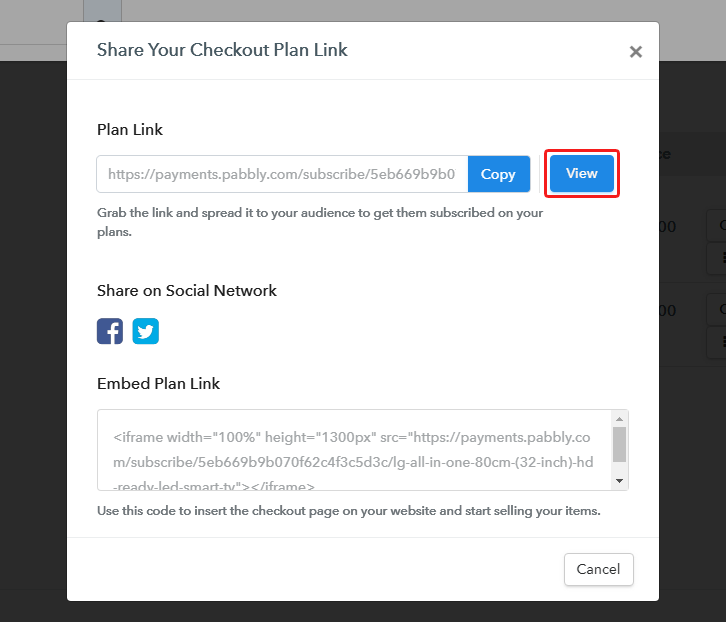
  • You can link the plan link URL within the buttons & texts of a website to redirect a customer on the payment checkout page
  • Next, you can directly share the page on Facebook & Twitter
  • Also, you can share the plan link of a checkout page on other social media & link sharing platform to sell lab glasswares online such as emails, WhatsApp, Messenger, SMS etc

Step 8: Preview Checkout Page

Follow up the recommended steps to preview the checkout page:

(a) Click on the View Button

View Checkout Plan

(b) Take a Look at the Checkout Page

Checkout Page Preview to Sell Lab Glasswares Online

Step 9: Embed Checkout Page in Site & Sell Lab Glasswares Online
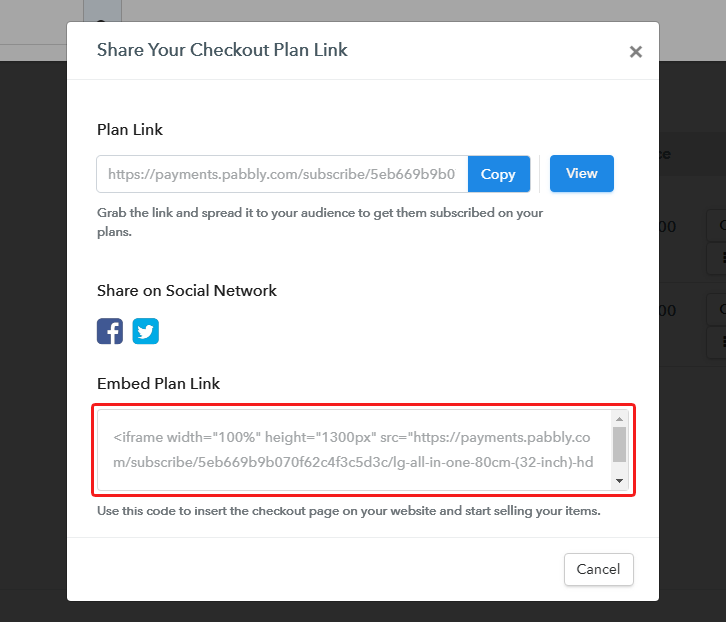
Embed Checkout Page on Website

Just copy the link and add the checkout page to sell lab glasswares online at any preferable place on your WordPress site.

(a) Edit the Page & Paste the Copied Link
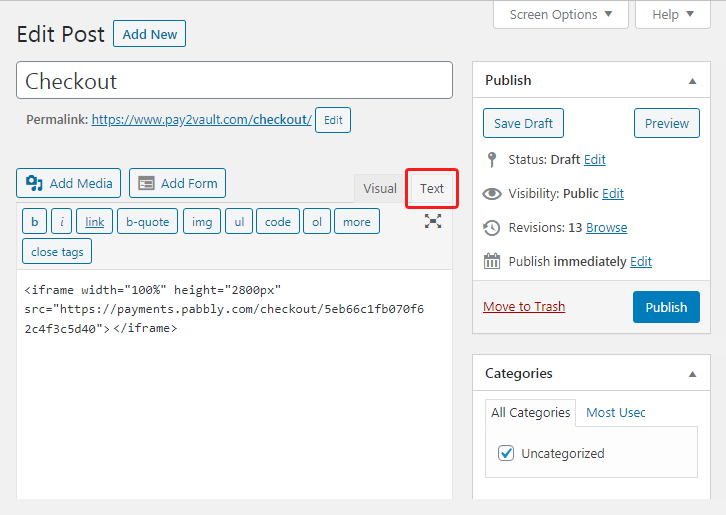
Embed Checkout Page on Website

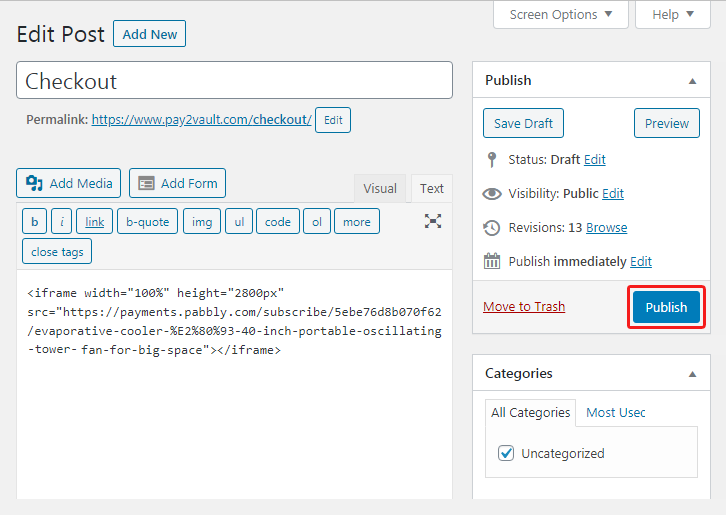
Further, paste the plan link on a text editor of the WordPress dashboard.

(b) Save & Publish the Checkout Page

Save_and_Publish

Next, click the “Publish” button, after making changes.

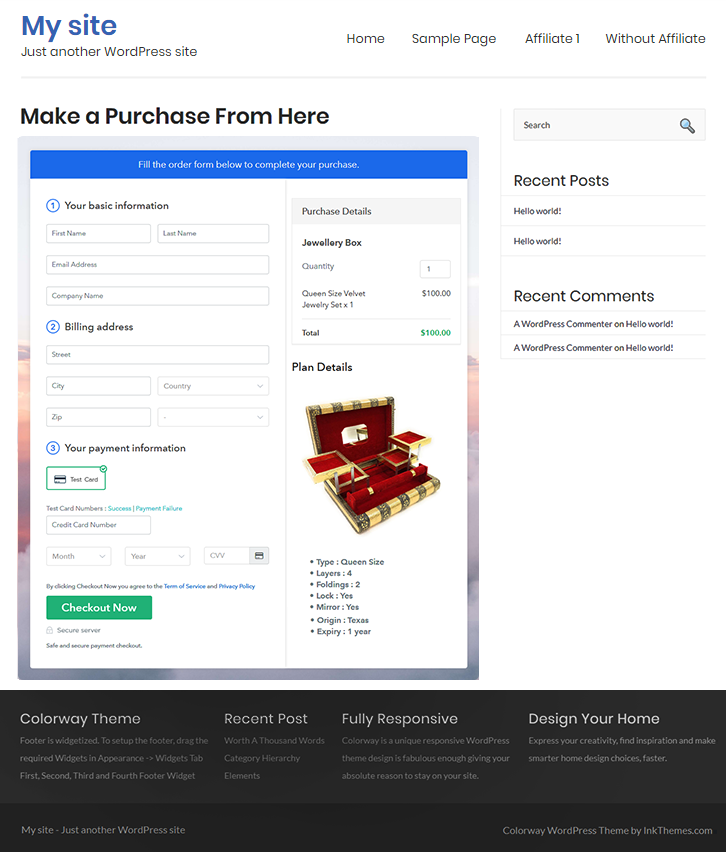
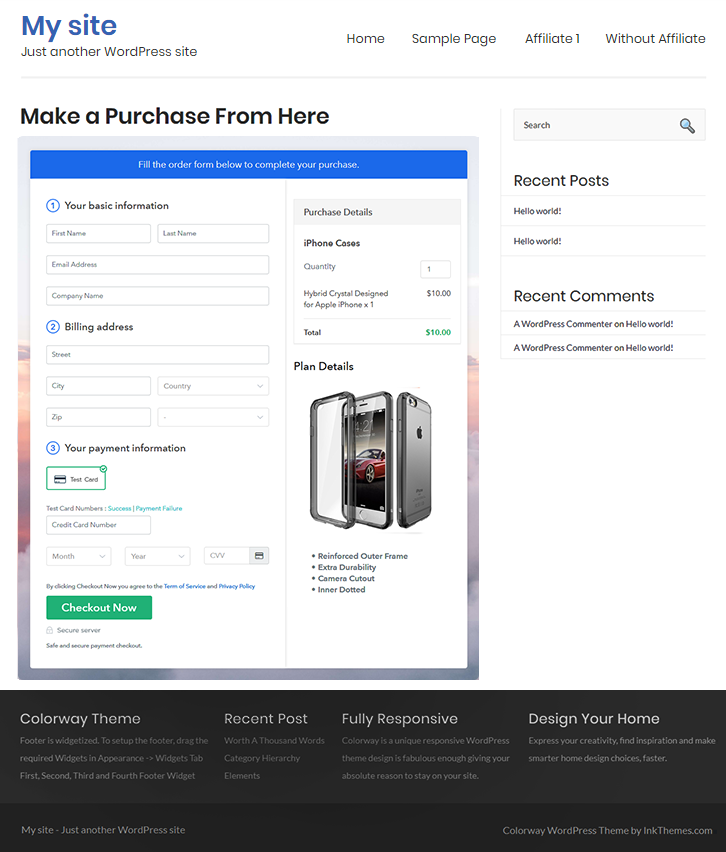
(c) Check out the Final Look of your Checkout Page on WordPress Site
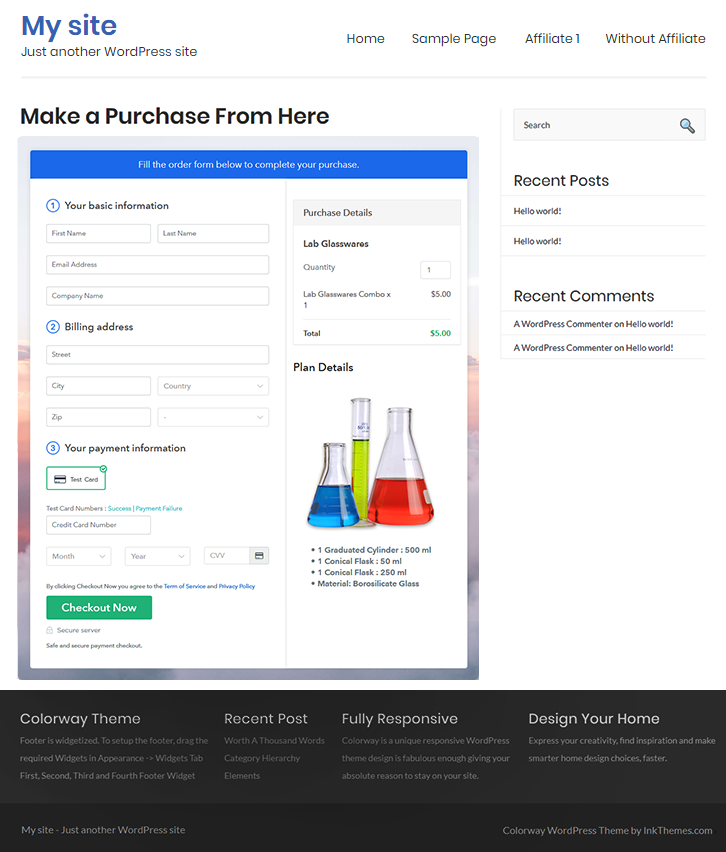
Checkout Page On WordPress Site to Sell Lab Glasswares Online

Step 10: Multiplan Checkout Page

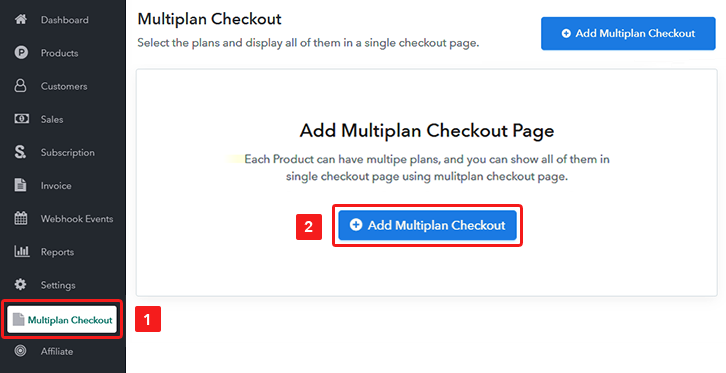
Note: In case you want to sell multiple products via a single checkout page, you can create a multi-plan checkout page otherwise skip this step.

(a) Click on Add Mutiplan Checkout

Multiplan Checkout

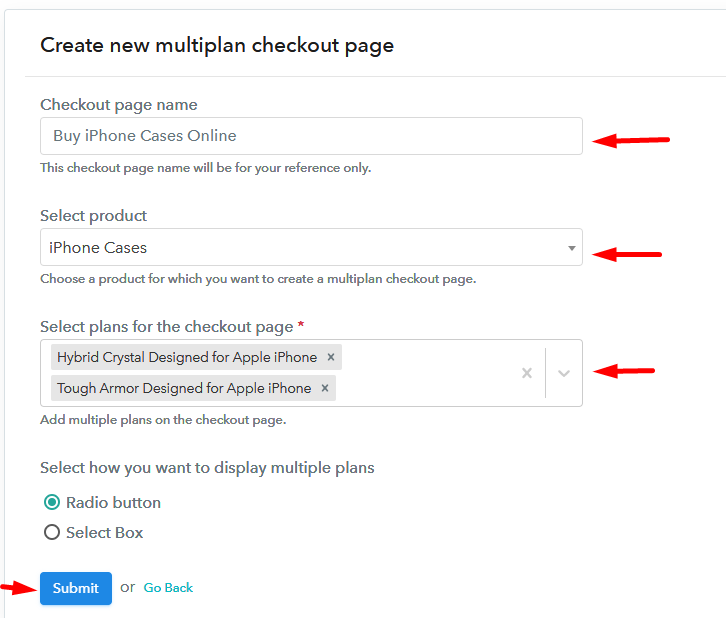
(b) Add Plans to Sell Multiple Lab Glasswares from Single Checkout Page
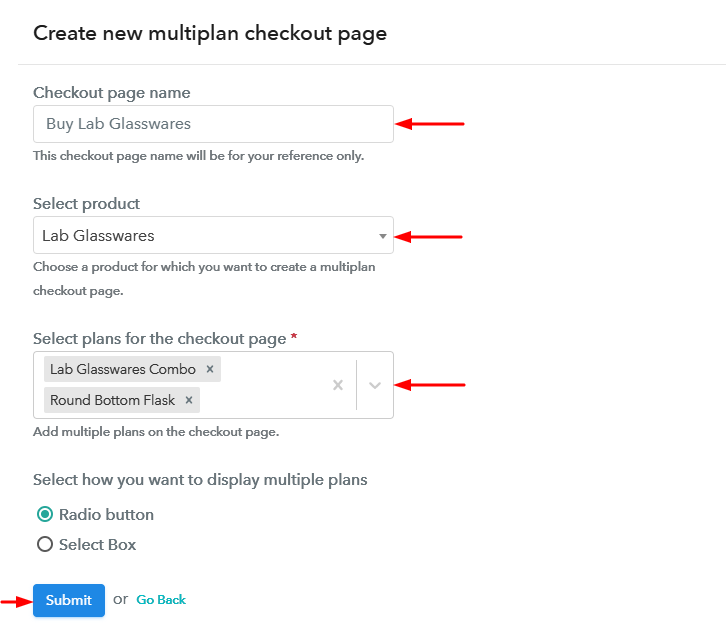
Create Multiplan Checkout Page to Sell Lab Glasswares Online

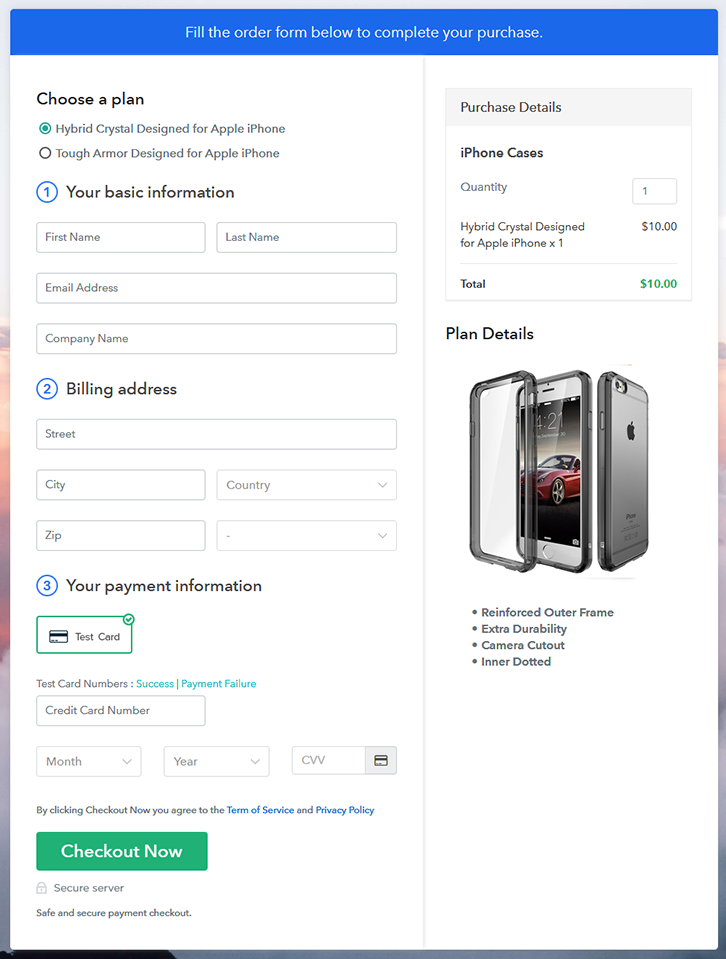
(c) Take a Look at the Checkout Page
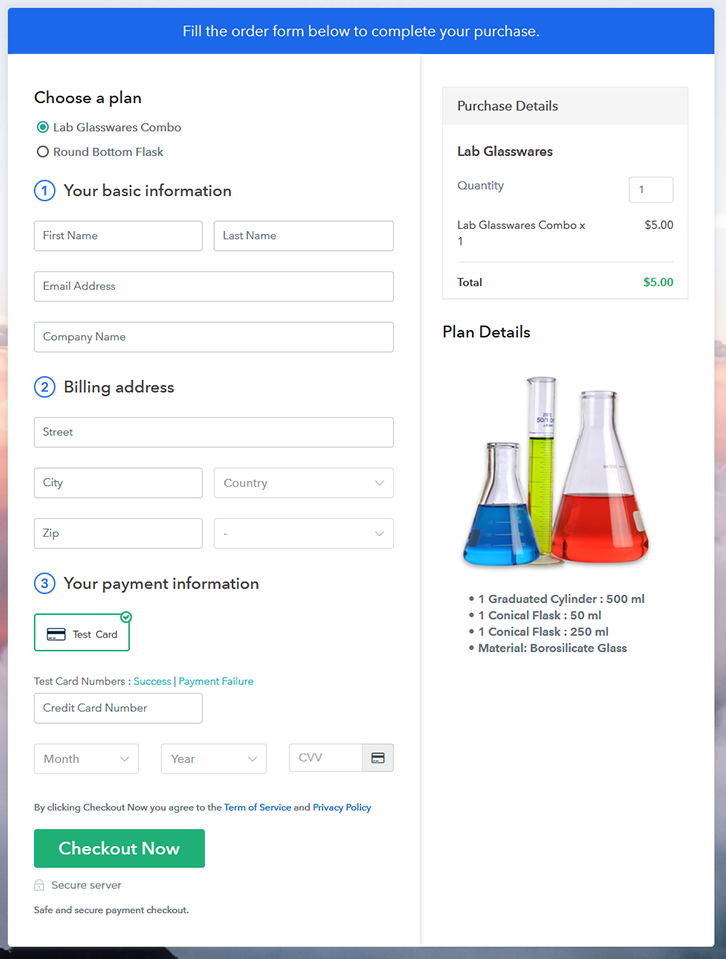
Multiplan Checkout Page to Sell Lab Glasswares Online

Preview Checkout Page

Wrapping Up

These were the 10 steps of creating checkout pages for selling lab glasswares online. You can see by yourself that the step are very simple and easy to perform & at last, you’ll end up getting a well functioning system to start lab glasswares business online.

Also, the centralised dashboard will help you in managing the records for selling lab glasswares online easily. Besides, the billing & invoicing processes are fully automatic and you’ll definitely enjoy it.

You May Also Like To Read –
How to Sell Kettles Online | Step by Step (Free Method)

How to Sell Kettles Online

Ideal For: All the kettle manufacturers, kettle sellers, retail kettle shop owners, and other merchants can use this method to take their kettles selling business online.

How to Sell Kettles Online

Why Choose this Method to Sell Kettles Online?

Unlike any other solution, this method allows you to:

  • List and sell your kettles for FREE. Absolutely no payment required.
  • No need to pay commission on any of your sale.
  • Multiple payment options like PayPal, Credit Card, etc to collect payment from a single place.
  • Sell one time or recurring subscriptions of your kettles.
  • Collect payments & sell products in any currency as per your requirement.
  • Give discounts on your products by offering special coupon codes.
  • Add sales commission agents to help you in selling kettles online.

Get Pabbly Subscription Billing for Free

Kettles are used for making hot beverages all over the world. And if you are thinking to sell them online then you must need a platform that can help you reach the global audience in no time.

Here in this blog, we are going to go through a simple step process of creating checkout pages. These checkout pages can help you do the following:

  • Showcase your product to the audience
  • Collect secure payments globally
  • Send automatic invoices after a purchase
  • One-time & recurring billing
  • Apply global taxes easily
  • Accept multiple currencies
  • Sell unlimited products
    And much more…

Most importantly, it renders a dashboard to keep a record as well as manage almost everything related to selling kettles online. Also, you can share the checkout pages almost anywhere.

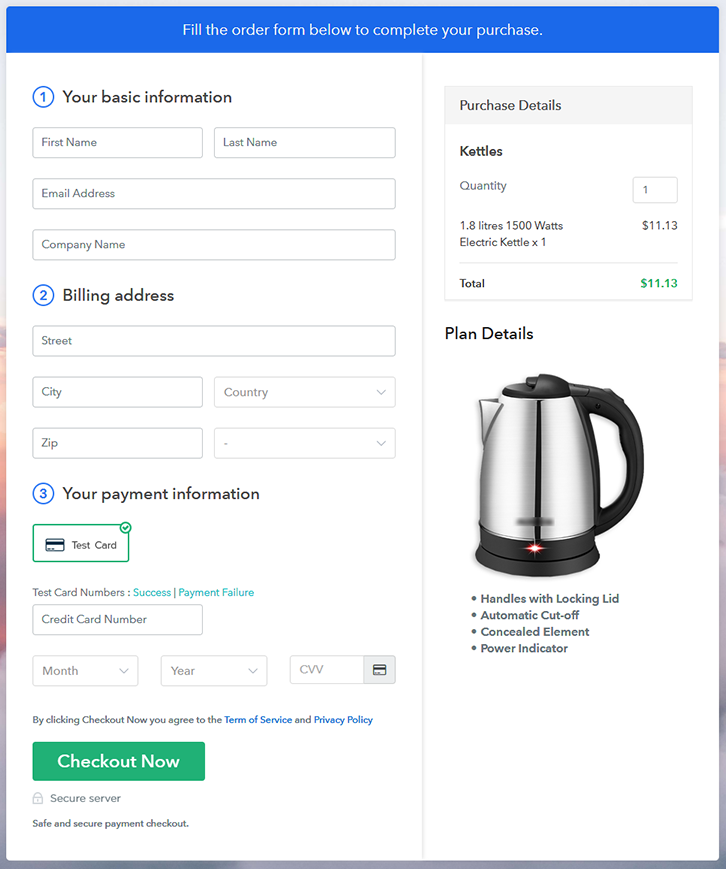
Final View of Checkout Page For Your Kettles Selling Business

Checkout Page Preview to Sell Kettles Online

Preview Checkout Page

Step 1: Log in to Pabbly Subscription Billing

Signup

To start selling kettles online first, visit the Pabbly Subscription Billing official website. On the website, click on ‘Sign Up Free‘ & get into the system using a Google account or fill-up the form manually with a few details.

Sign Up For Free!

Step 2: Select Subscription Billing

Access Subscription Billing

Step 3: Account Setup

Setup Account

Next, you’ll be asked to fill some company information such as your company name, select a currency & mention a phone number. Quickly fill the required details and click ‘Continue’.

Step 4: Connect Payment Gateways & Start Sell Kettles Online Selling Business Online

Connect Payment Gateway

In this step, you have to integrate a payment gateway to collect payments for the sold kettles. You can also enable the test payment option for testing purpose in a similar manner that I’m using now. But, you must integrate a payment gateway from the following choices available to collect payments further. Also, the step by step integration guides are linked for further ease.

Step 5: Add Product For Your Kettles

Add Product

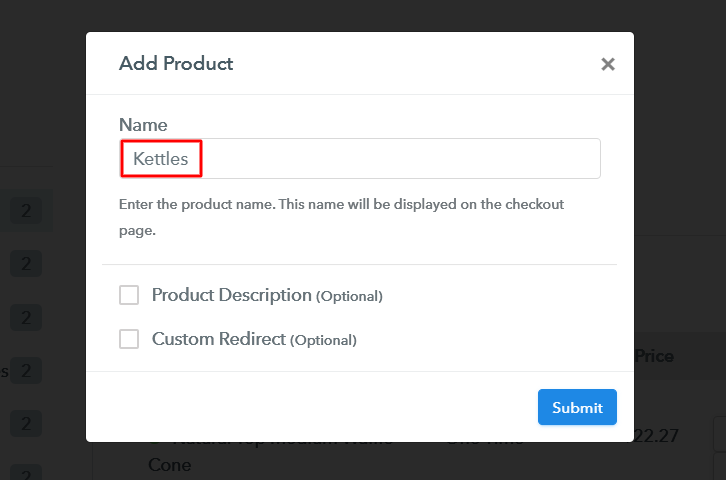
Now, add your product category by clicking on the ‘Add New Product’ button. We’ll add kettles to sell as plans within these product categories more further.

Add Product to Sell Kettles Online

Fill the required product details and hit submit.

Note: Here you can add all the products related to the similar category by creating plans for each of them.

Step 6: Add Plans 

Now, let’s start adding plans for different kinds of kettles available in your store.

(a) Select Add New Plan

Add Plan

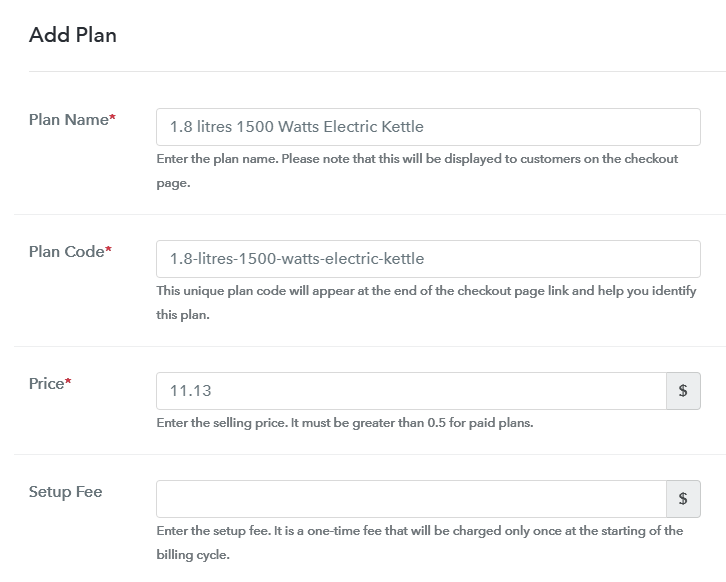
(b) Specify the Plan & Pricing Details

Add Plan to Sell Kettles Online

You can mention a name, code, price, billing cycle etc details in the plan details page to sell kettles online.

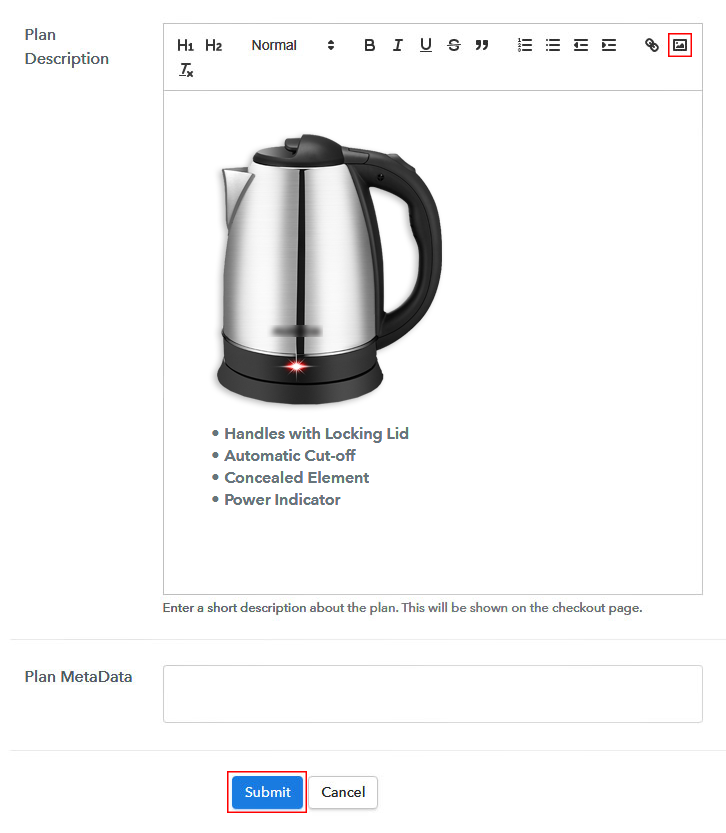
(c) Add Image & Description of Kettles

Add Image & Description to Sell Kettles Online

Also, you can put an image & some points about the kettle in the display for customer’s reference.

Hit ‘Submit’ on this page & a plan will be appended to sell kettles online.

Similarly, you can add other kettles plans in the same way.

Step 7: Share your Checkout Page

Share Checkout Page on Social Media

Now, you’ll need to share or embed this checkout page somewhere to sell kettles online. For this, you can do the following:

  • You can share the page directly on Facebook & Twitter through the sharing buttons
  • Second, you can share the plan link over all the other social media & link sharing platforms like emails, SMS etc
  • You can also embed this pan link within the buttons & texts of a website to redirect your customer on the payment page

Step 8: Preview Checkout Page

Follow up the recommended steps to preview the checkout page:

(a) Click on the View Button

View Checkout Plan

(b) Take a Look at the Checkout Page

Checkout Page Preview to Sell Kettles Online

Step 9: Embed Checkout Page in Site & Sell Kettles Online

Embed Checkout Page on Website

Just copy the link and add the checkout page to sell kettles online at any preferable place on your WordPress site.

(a) Edit the Page & Paste the Copied Link

Embed Checkout Page on Website

Further, paste the plan link on a text editor of the WordPress dashboard.

(b) Save & Publish the Checkout Page

Save_and_Publish

Next, click the “Publish” button, after making changes.

(c) Check out the Final Look of your Checkout Page on WordPress Site

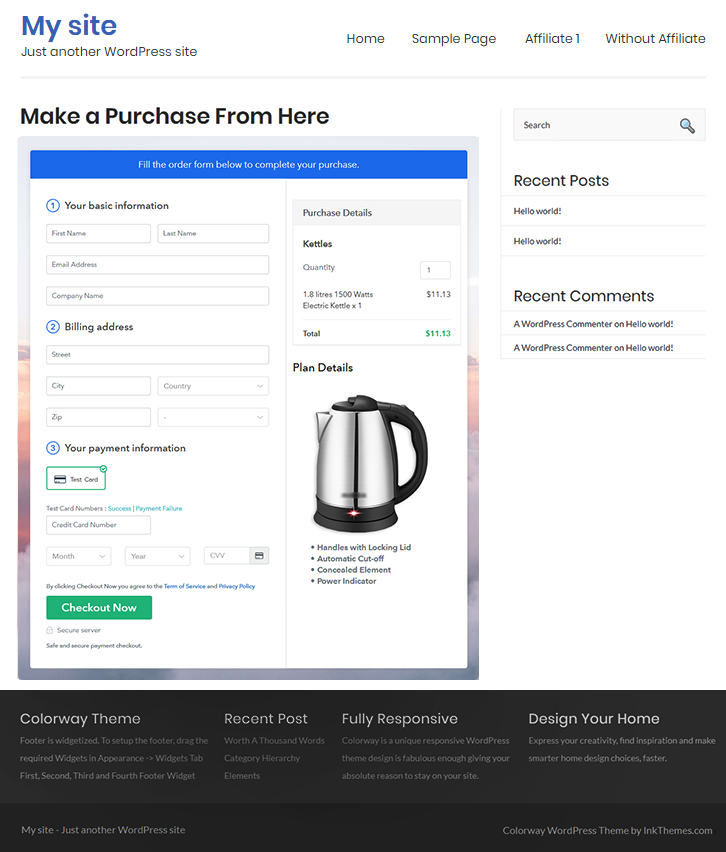
Checkout Page On WordPress Site to Sell Kettles Online

Step 10: Multiplan Checkout Page

Note: In case you want to sell multiple products via a single checkout page, you can create a multi-plan checkout page otherwise skip this step.

(a) Click on Add Mutiplan Checkout

Multiplan Checkout

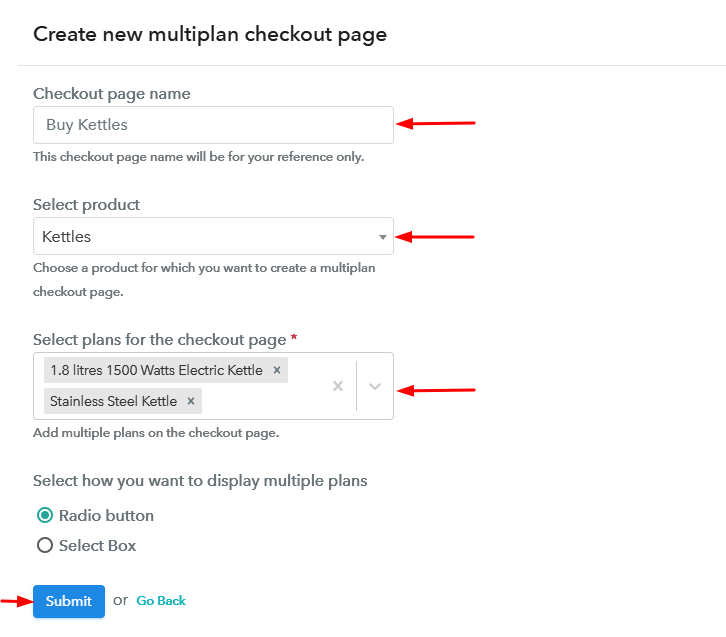
(b) Add Plans to Sell Multiple Kettles from Single Checkout Page

Create Multiplan Checkout Page to Sell Kettles Online

(c) Take a Look at the Checkout Page

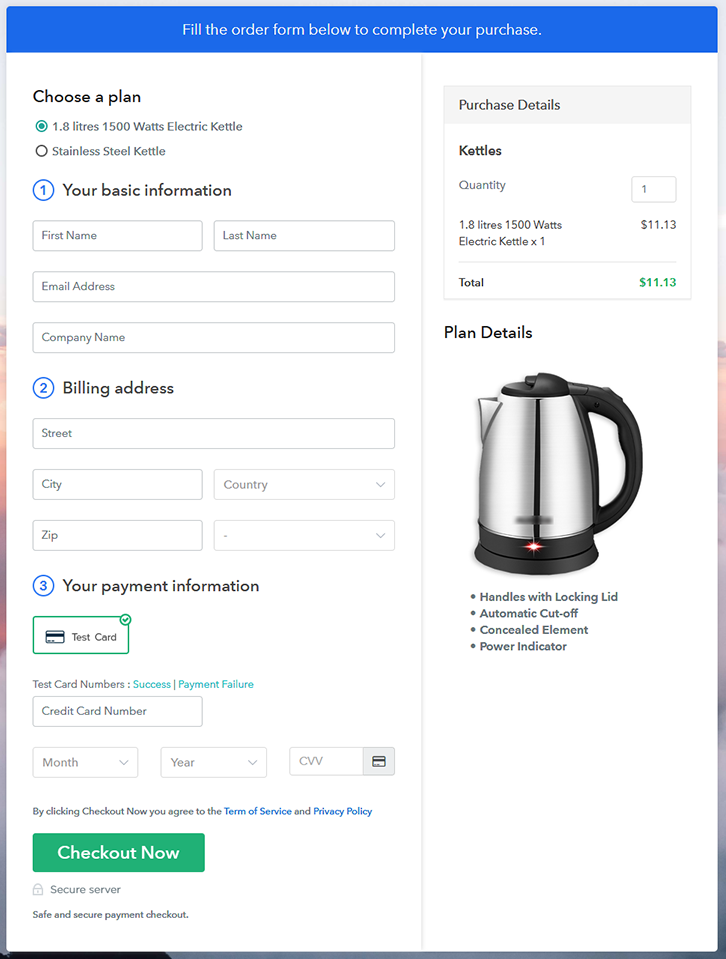
Multiplan Checkout Page to Sell Kettles Online

Preview Checkout Page

Wrapping Up

This was all about the checkout page creation & how to sell kettles online. You can simply follow the steps given in this blog to start kettles business online. The process is very simple & will get you started in just a few minutes.

Besides, the dashboard that came along with it will help you manage as well as keep record of all your payments & items availability.

You May Also Like To Read –
 

How to Sell Jackets Online | Step by Step (Free Method)

How to Sell Jackets Online

Ideal For: All the jacket manufacturers, jacket sellers, jacket dealers, jacket suppliers, jacket shop owners and other merchants can use this method to sell jackets online.

How to Sell Jackets Online

Why Choose this Method to Sell Jackets Online?

Unlike any other solution, this method allows you to:

  • List and sell your jackets for FREE. Absolutely no payment required.
  • No need to pay commission on any of your sales.
  • Multiple payment options like PayPal, Credit Card, etc to collect payment from a single place.
  • Sell one time or recurring subscriptions of your jackets.
  • Collect payments & sell products in any currency as per your requirement.
  • Give discounts on your products by offering special coupon codes.
  • Add sales commission agents to help you in selling jackets online.

Get Pabbly Subscription Billing for Free

Usually, people wear jackets to keep themselves warm during the winter season. But nowadays, wearing jackets have become a new fashion trend too. That is the reason why the demand for jackets never goes out of business. Hence, if you have an offline store, then it is the right time for you to start jackets business online.

Besides, there are countless benefits of selling jackets online such as you can reach out to the worldwide audience, increase your sales, and much more. Apart from that, setting up an online store is way much convenient due to lower maintenance as compared to offline stores.

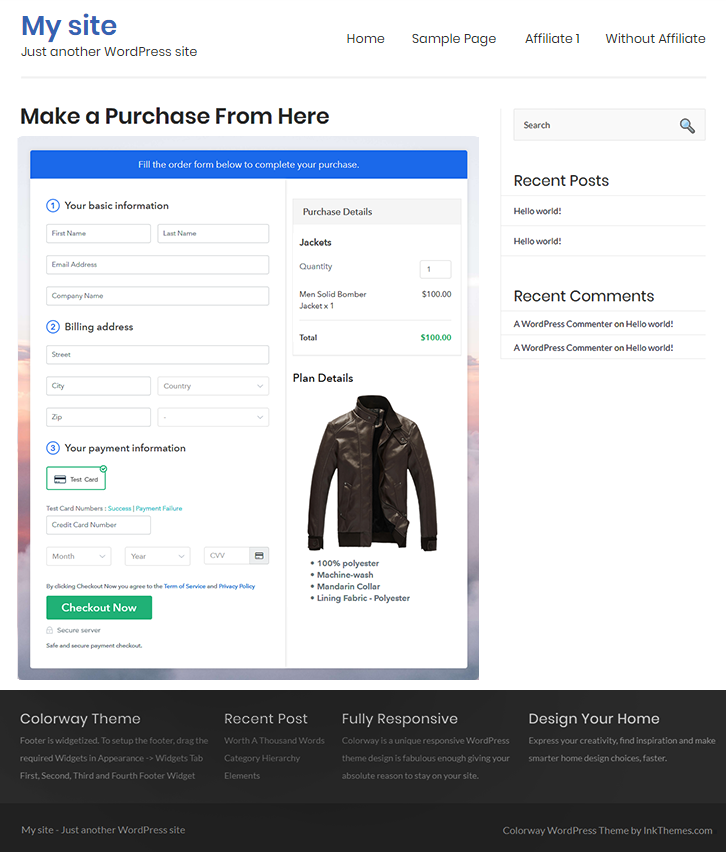
Luckily, we have a software named Pabbly Subscription Billing that can help you take your business online effortlessly. Using this tool, you can easily create checkout pages for selling jackets online that can be shared on websites or social media platforms, etc.

Now, let me tell you those 10 easy steps for creating marvelous checkout pages to sell jackets online with the help of this software.

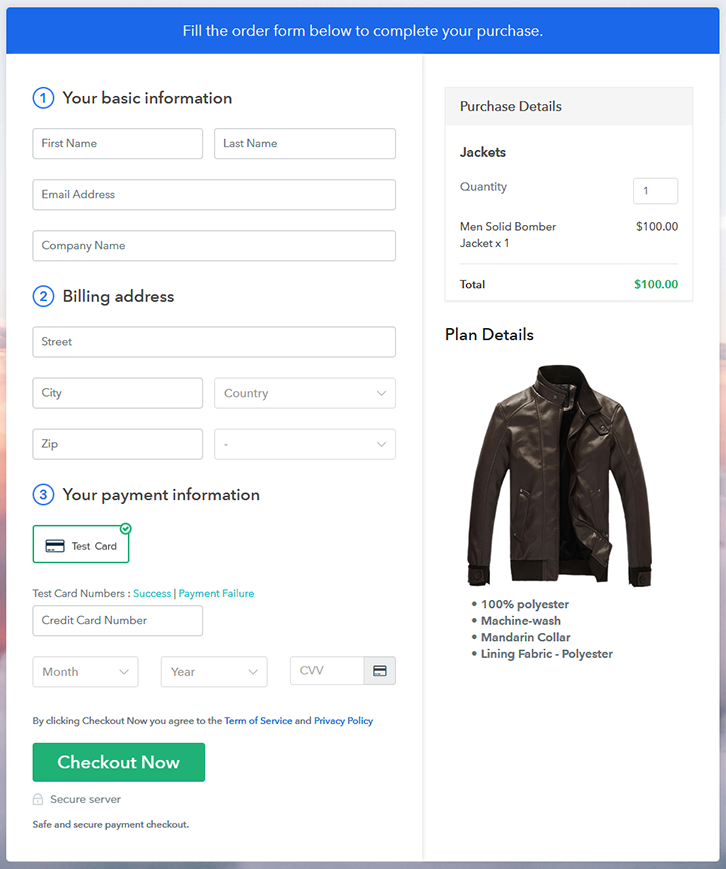
Final View of Checkout Page for your Jackets Selling Business

Final View of Checkout Page for your Jackets Selling Business

Preview Checkout Page

Step 1: Log in to Pabbly Subscription Billing

Signup

Start the process by visiting the Pabbly Subscription Billing in your browser. After that, tap on the “Sign up Free“ button. Moreover, either manually filled out the details or sign in using your Gmail account.

Sign Up For Free!

Step 2: Select Subscription Billing

Access Subscription Billing

Step 3: Account Setup

Setup Account

Furthermore, after pressing on the “Access Now” button of the software, a page will open with fields like company name, select currency, and phone number. Just fill out those details to continue creating a checkout page for jackets.

Step 4: Connect Payment Gateways & Start Jackets Selling Business Online

Connect Payment Gateway

The consequent step is to understand the complete payment procedures using a “Test Payment Gateway”. Here, we will describe the checkout page process for the jackets with the help of a test payment gateway. Apart from that, this software offers various payment gateways such as PayPal, Stripe, etc. Besides, below are the payment integration guides to help you out further.

Step 5: Add Product for your Jackets

Add Product

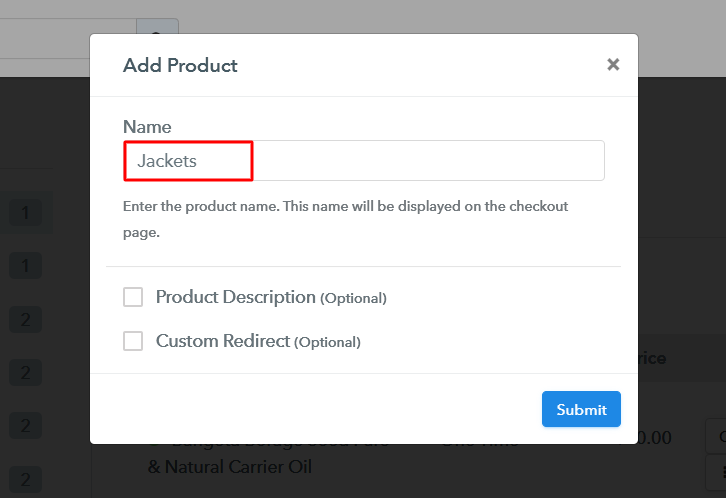
Additionally, add the name, which in our case is “Jackets”. Here you can specify the type and provide a small description of the jackets.

Add Product to Start Selling Jackets Online

Moreover, just fill out all those details and your product is created.

Note: Here you can add all the products related to the similar category by creating plans for each of them.

Step 6: Add Plans 

Let’s unfold out plans for different kinds of jackets available in your store.

(a) Select Add New Plan

Add Plan

(b) Specify the Plan & Pricing Details

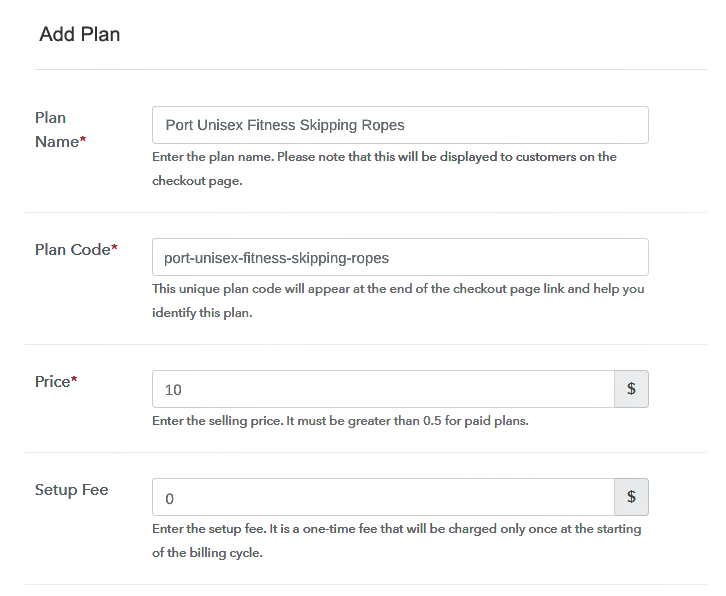
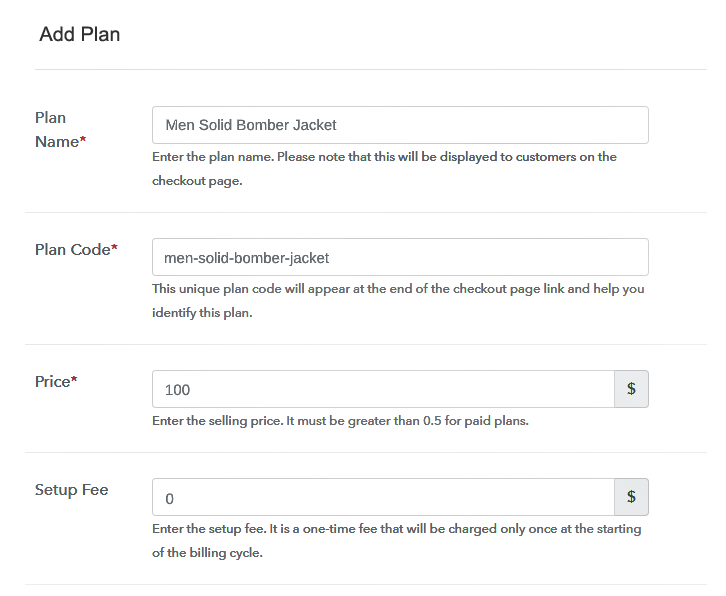
Specify the Plan and Pricing to Sell Jackets Online

The next thing to do is fill all the details of the jackets like plan name, code, price, set-up fee, and much more to continue.

(c) Add Image & Description of Jackets

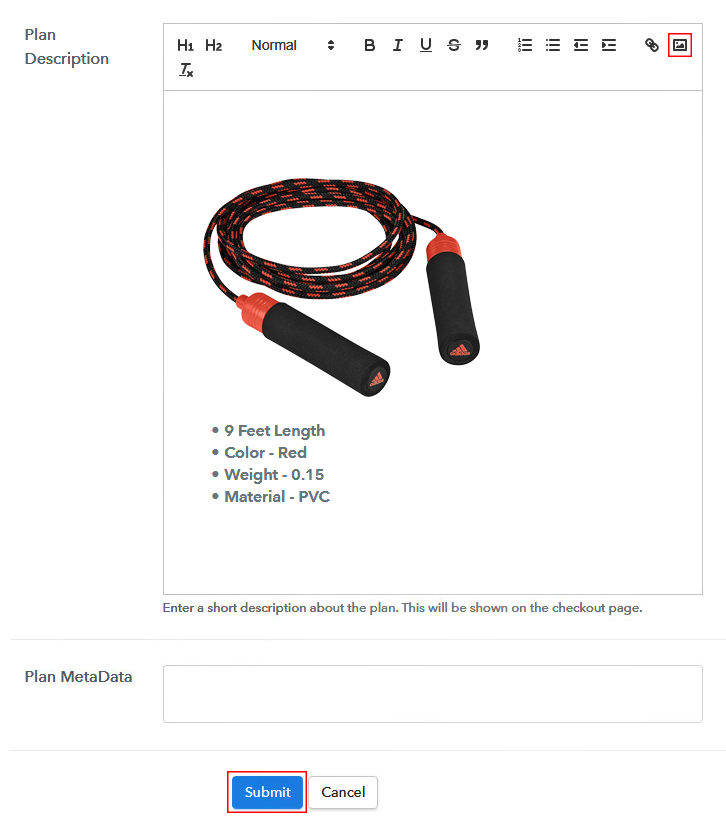
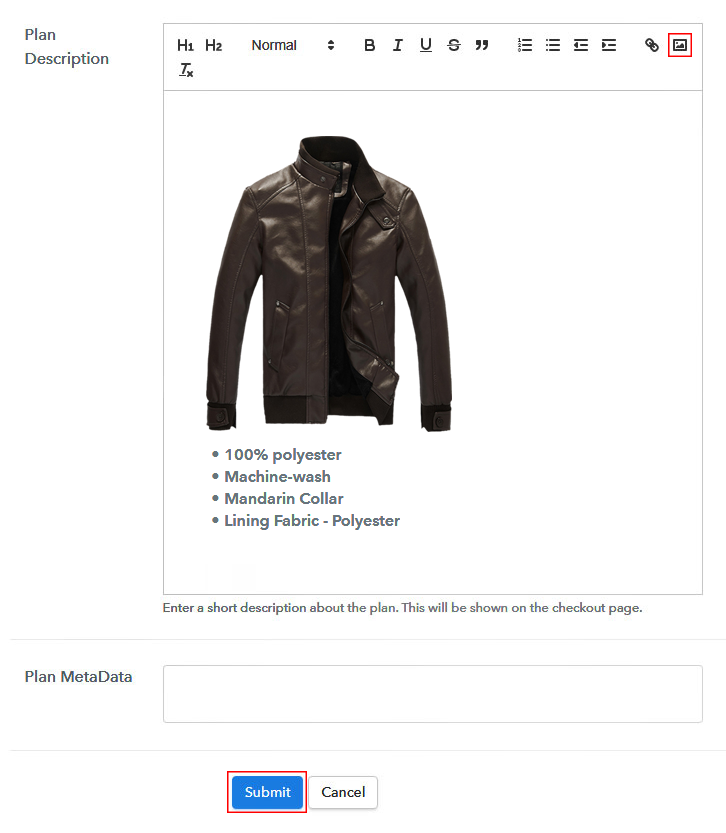
Add Image & Description of Jackets

Additionally, now give a brief description of the jackets using bullets, images, etc, to the checkout page.

Subsequently, tap on the “Submit” button to add the jackets on the checkout page.

Conclusively, you can add multiple plans and kinds of jackets in your product list which you want to sell online.

Step 7: Share your Checkout Page

Share Checkout Page on Social Media

  • Besides, share the checkout page of the jackets on social media accounts like Facebook & Twitter to grab the customer’s attention.
  • Plus, you can share the direct link of the jacket’s checkout page with your customers via SMS or email marketing.
  • Furthermore, embed the provided plan link of the jackets in the buttons or any anchor text on your website.

Step 8: Preview Checkout Page

Follow up the recommended steps to preview the checkout page:

(a) Click on the View Button

View Checkout Plan

(b) Take a Look at the Checkout Page

Final View of Checkout Page for your Jackets Selling Business

Step 9: Embed Checkout Page in Site & Sell Jackets Online

Embed Checkout Page on Website

Just copy the link and add the checkout page to sell jackets online at any proper place on your WordPress site.

(a) Edit the Page & Paste the Copied Link

Paste Link in Text Editor

Further, paste the plan link of jackets on a text editor of the WordPress dashboard.

(b) Save & Publish the Checkout Page

Save_and_Publish

Next, click the “Publish” button, after making changes.

(c) Check out the Final Look of your Checkout Page on WordPress Site

Final Look of your Checkout Page to Sell Jackets Online

Step 10: Multiplan Checkout Page

Note: In case you want to sell multiple products via a single checkout page, you can create a multi-plan checkout page otherwise skip this step.

(a) Click on Add Mutiplan Checkout

Multiplan Checkout

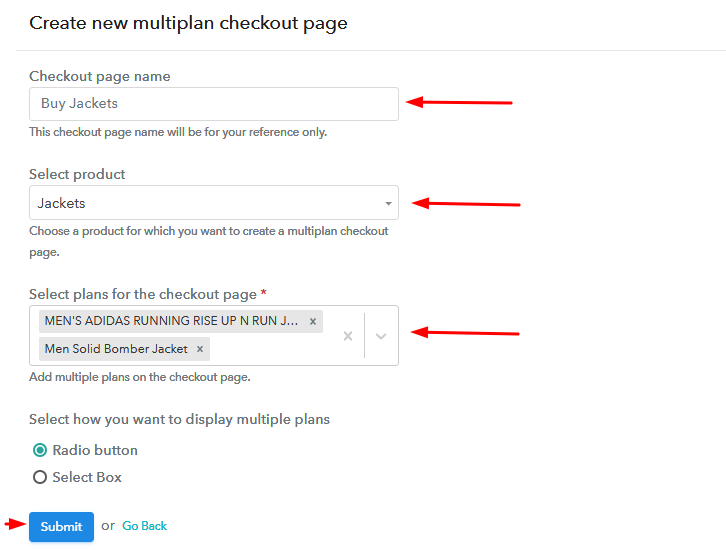
(b) Add Plans to Sell Multiple Jackets from Single Checkout Page

Add Plans to Sell Multiple Jackets from Single Checkout Page

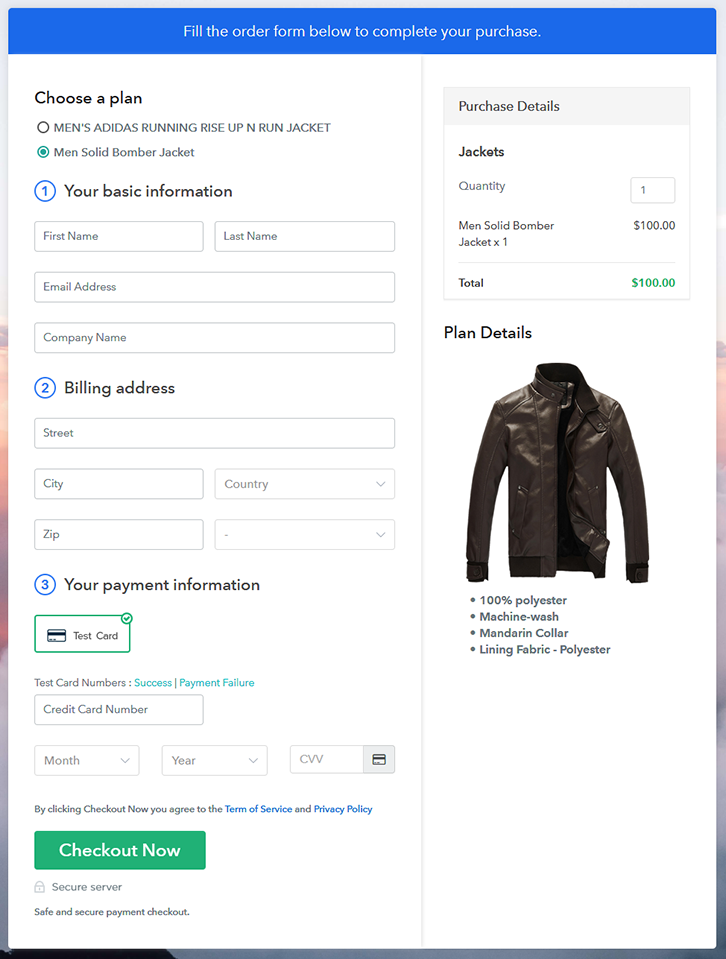
(c) Take a Look at the Checkout Page

Multiplan Checkout Page to Start Selling Jackets Online

Preview Checkout Page

Wrapping Up

Finally! Now you know the secret to start jackets business online using Pabbly Subscription Billing software. Simply go through all the 10 easy steps and nothing else. Moreover, if you have any query or suggestions, write to us in the comment section below, we will get back to you as early as possible.

You May Also Like To Read –
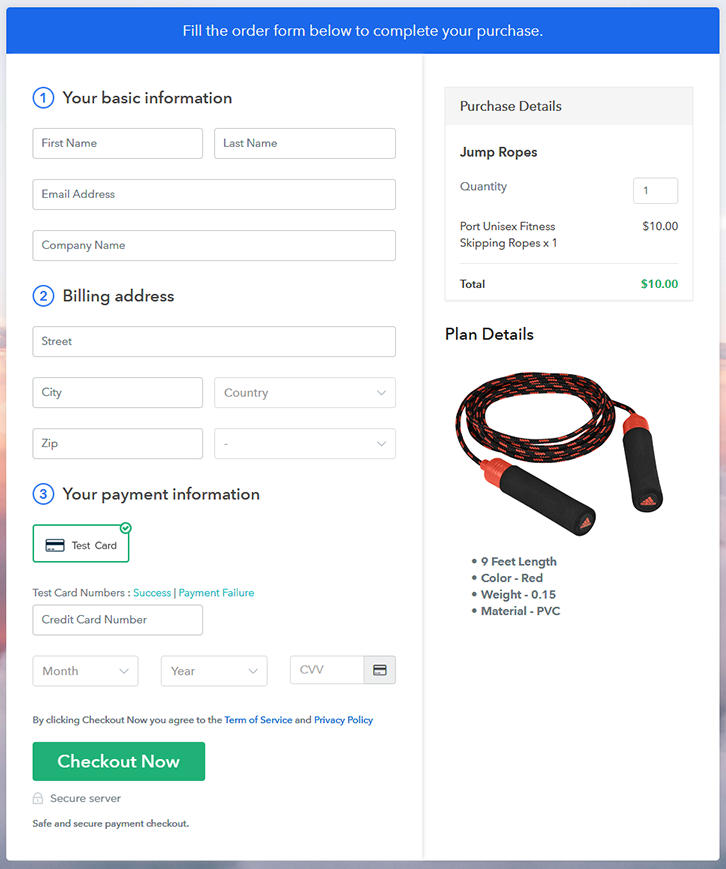
How to Sell Jump Ropes Online | Step by Step (Free Method)

How to Sell Jump Ropes Online

Ideal For: All the jump rope manufacturers, jump rope sellers, jump rope dealers, jump rope suppliers, jump rope shop owners, and other merchants can use this method to sell jump ropes online.

How to Sell Jump Ropes Online

Why Choose this Method to Sell Jump Ropes Online?

Unlike any other solution, this method allows you to:

  • List and sell your jump ropes for FREE. Absolutely no payment required.
  • No need to pay commission on any of your sales.
  • Multiple payment options like PayPal, Credit Card, etc to collect payment from a single place.
  • Sell one time or recurring subscriptions of your jump ropes.
  • Collect payments & sell products in any currency as per your requirement.
  • Give discounts on your products by offering special coupon codes.
  • Add sales commission agents to help you in selling jump rope online.

Get Pabbly Subscription Billing for Free

Jumping ropes are usually considered as a fitness material that is very handy and easy to use. Most children even love playing skipping rope as a game. Thus, by taking jump ropes business online can turn out to be the most profitable business.

Nowadays, people prefer to buy things online as it is more convenient and time-saving. Hence, if you are searching for ways to start your jump rope business online then you have come to the right place. Because, here we have perfect software suggestion for you i.e, Pabbly Subscription Billing that can help you in selling jump rope online without any trouble.

Plus, with the help of this tool, you can create beautiful checkout pages effortlessly. Apart from that, it also gives you the flexibility to share the checkout pages link on your websites, social media accounts, and even through SMS or email marketing. Additionally, here are some of its striking features :

  • Unlimited Plans & Products
  • Multiple Billing Models
  • Numerous Payment Gateways
  • Professional Invoices
  • Tax Management

Now, let’s discuss those 10 steps that you need to follow for creating amazing checkout pages to sell jump ropes online.

Final View of Checkout Page for your Jump Ropes Selling Business

Final View of Checkout Page for Your Jump Ropes Selling Business

Preview Checkout Page

Step 1: Log in to Pabbly Subscription Billing

Signup

First of all,  start the process by going to the Pabbly Subscription Billing website. After that, hit the “Sign up Free“ button. And later, fill out the details either manually or else sign in via Google account.

Sign Up For Free!

Step 2: Select Subscription Billing

Access Subscription Billing

Step 3: Account Setup

Setup Account

Once you press the “Access Now” button, a page will pop up where you need to fill up the fields like company name, select currency, and phone number. Enter all the details in order to continue creating a checkout page for jump rope.

Step 4: Connect Payment Gateways & Start Jump Ropes Selling Business Online

Connect Payment Gateway

Ultimately, its time to specify the details associated with the payment procedures with the help of “Test Payment Gateway”. Here, I am going to give a brief detail on the checkout page payment process for the jump ropes using a “Test Payment Gateway”. Furthermore, this tool provides multiple payment gateways like PayPal, Stripe, etc. Moreover, beneath are their respective payment integration guides to assist you further.

Step 5: Add Product for your Jump Ropes

Add Product

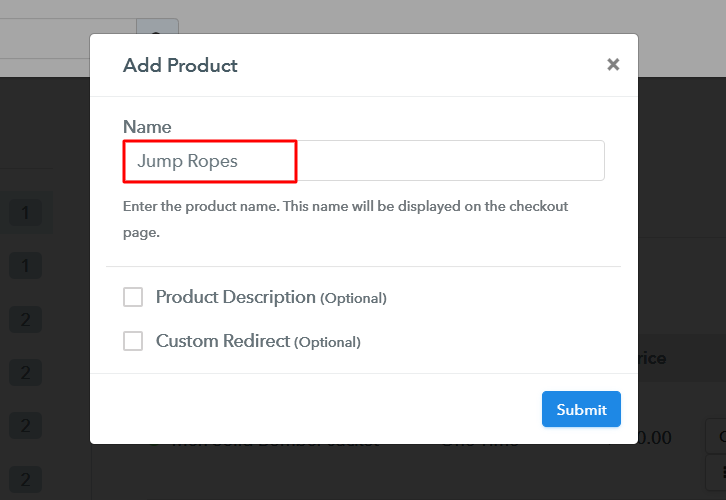
Subsequently, add the name, that is “Jump Ropes” and specify the type along with a short description of the jump ropes to catch the buyer’s attention.

Add Product to Start Selling Jump Ropes Online

Moreover, just fill out all those details and your product is created.

Note: Here you can add all the products related to the similar category by creating plans for each of them.

Step 6: Add Plans 

Let’s cast light on plans for different kinds of jump ropes available in your store.

(a) Select Add New Plan

Add Plan

(b) Specify the Plan & Pricing Details

Specify the Plan and Pricing to Sell Jump Ropes Online

The succeeding step is to fill all the details of the jump ropes like plan name, code, price, set-up fee, and much more to continue.

(c) Add Image & Description of Jump Ropes

Add Image & Description of Jump Ropes

Following the previous step, now give a brief description of jump rope with the help of bullets, images, links, etc.

Consequently, press the “Submit” button in order to add the jump rope on the checkout page.

Eventually, now its time to add multiple plans along with different varieties of jump rope in your product list that you wish to sell online.

Step 7: Share your Checkout Page

Share Checkout Page on Social Media

  • Moreover, share the checkout page of the jump rope on social media platforms like Facebook & Twitter with the help of their respective buttons.
  • Plus, you can even share the jump rope checkout page link with your customers directly using SMS or email marketing.
  • Apart from that, you can also embed the provided plan link of the jump rope in the buttons or any anchor text on your website.

Step 8: Preview Checkout Page

Follow up the recommended steps to preview the checkout page:

(a) Click on the View Button

View Checkout Plan

(b) Take a Look at the Checkout Page

Final View of Checkout Page for Your Jump Ropes Selling Business

Step 9: Embed Checkout Page in Site & Sell Jump Ropes Online

Embed Checkout Page on Website

Just copy the link and add the checkout page to sell jump ropes online at any proper place on your WordPress site.

(a) Edit the Page & Paste the Copied Link

Embed Checkout Page on Website

Further, paste the plan link on a text editor of the WordPress dashboard.

(b) Save & Publish the Checkout Page

Save_and_Publish

Next, click the “Publish” button, after making changes.

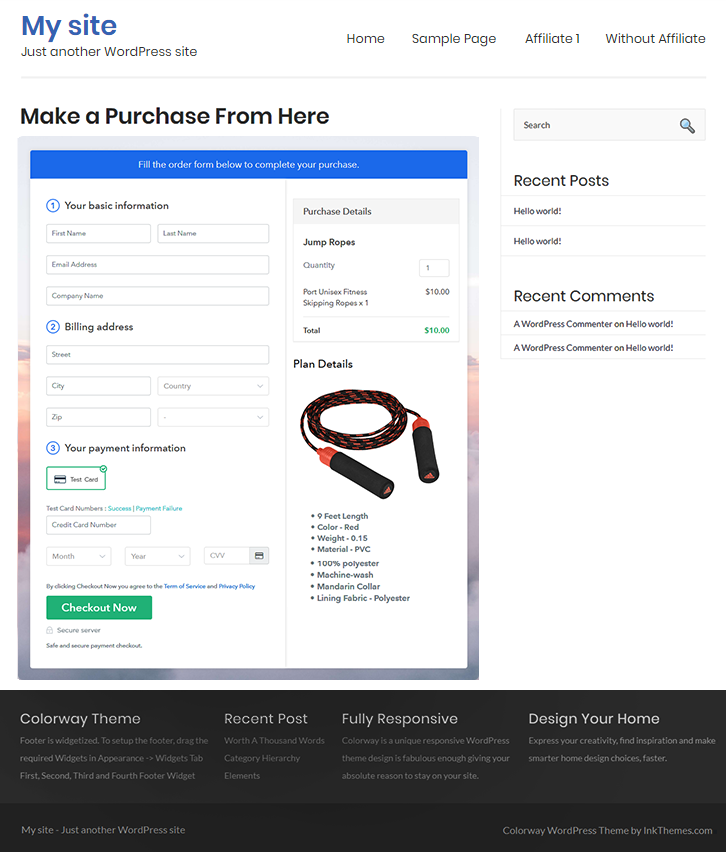
(c) Check out the Final Look of your Checkout Page on WordPress Site

Final Look of your Checkout Page to Sell How to Sell Jump Ropes Online

Step 10: Multiplan Checkout Page

Note: In case you want to sell multiple products via a single checkout page, you can create a multi-plan checkout page otherwise skip this step.

(a) Click on Add Mutiplan Checkout

Multiplan Checkout

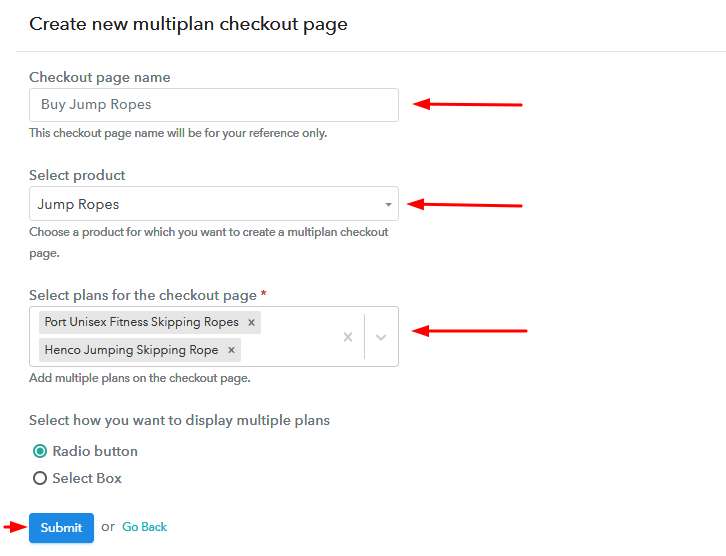
(b) Add Plans to Sell Multiple Jump Ropes from Single Checkout Page

Add Plans to Sell Multiple Jump Ropes from Single Checkout Page

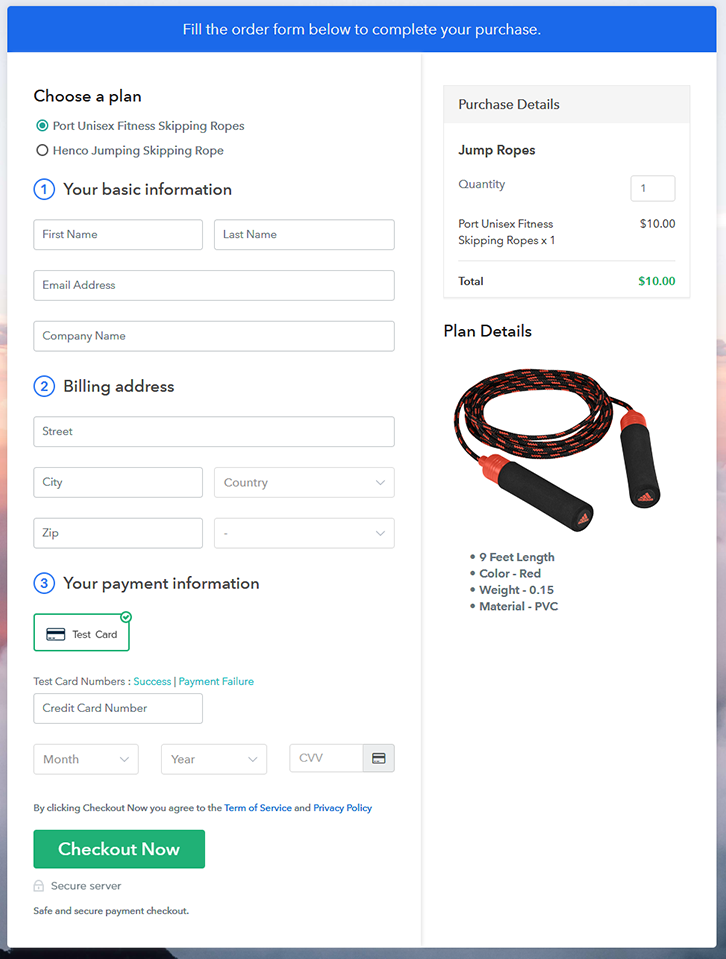
(c) Take a Look at the Checkout Page

Multiplan Checkout Page to Sell How to Sell Jump Ropes Online

Preview Checkout Page

Wrapping Up

That’s all for now!! Now you know how to start jump ropes business online using Pabbly Subscription Billing. All you need to do is follow the 10 easy steps and your business is ready to roll. So, go ahead and log in to Pabbly Subscription Billing to start your online business journey in no time. Thank you!!

You May Also Like To Read –
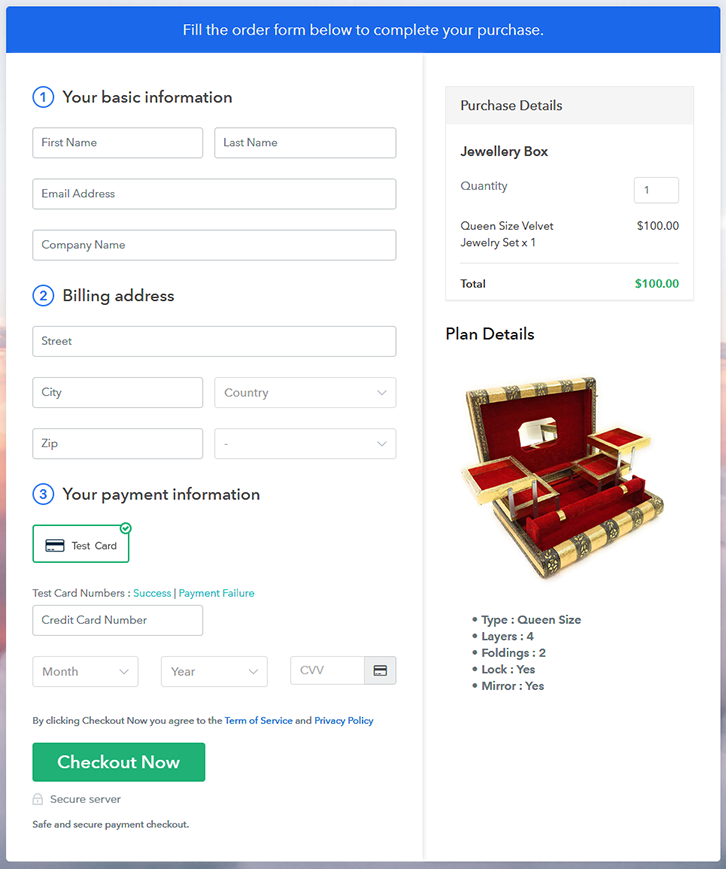
How To Sell Jewelry Boxes Online | Step by Step (Free Method)

Ideal For: All the jewelry box manufacturers, jewelry store owners, pawn store owners, and other merchants can use this method to sell jewelry boxes online.

How To Sell Jewelry Boxes Online

Why Choose this Method to Sell Jewelry Boxes Online?

Unlike any other solution, this method allows you to:

  • List and sell your jewelry boxes for FREE. Absolutely no payment required.
  • No need to pay commission on any of your sale.
  • Multiple payment options like PayPal, Credit Card, etc to collect payment from a single place.
  • Sell one time or recurring subscriptions of your jewelry boxes.
  • Collect payments & sell products in any currency as per your requirement.
  • Give discounts on your products by offering special coupon codes.
  • Add sales commission agents to help you in selling jewelry boxes

Get Pabbly Subscription Billing for Free

One of the prime reasons why you are looking to sell jewelry boxes online is because of local market saturation. Simply put, your brick and mortar store is not getting enough buyers from the immediate vicinity. But this problem will be instantly sorted out when you start selling jewelry boxes online. That is because the internet exposes your product to a global audience, and ensures higher price discovery.

There are other benefits like customers can peruse the products from the comfort of their homes and order them. Furthermore, the operational costs of your business come down significantly, as you don’t need to pay property insurance, utilities, zoning permits, etc. Also, you can even offer a personalized online experience on the basis of customer data.

Now, in this article, we are recommending a Saas tool called Pabbly Subscription Billing that lets you create awesome checkout pages to sell jewelry boxes online. The advantages of using this method are

  • Unlimited Product Listing
  • Insert Customized Logos
  • Transparent Billing
  • Multiple Billing Models
  • Generate Unlimited Revenues
  • Revenue Tracking

So, buck up as we are going to build our first checkout page with Pabbly Subscription Billing to sell jewelry boxes online

Final View of Checkout Page for your Jewelry Boxes Selling Business

Checkout to Sell Jewelry Boxes Online

Preview Checkout Page

Step 1: Log in to Pabbly Subscription Billing

Signup

Look for Pabbly Subscription Billing in the browser. On landing on their website click on the “Sign up Free“ button. You can either manually fill all the information or simply sign in using your Gmail account.

Sign Up For Free!

Step 2: Select Subscription Billing

Access Subscription Billing

Step 3: Account Setup

Setup Account

Once you’re done click on the “Access Now” button of Pabbly Subscription Billing, a page will pop-up with details like company name, currency, and contact number. Next, you need to fill those details to go on.

Step 4: Connect Payment Gateways & Start Jewelry Boxes Selling Business Online

Connect Payment Gateway

We are going to use the test payment mode so that we can understand all about the software’s payment procedure. Also, the Pabbly Subscription Billing allows integration with multiple payment gateways. Below we are mentioning the payment integration guide to help you out.

Step 5: Add Product for your Jewelry Boxes

Add Product

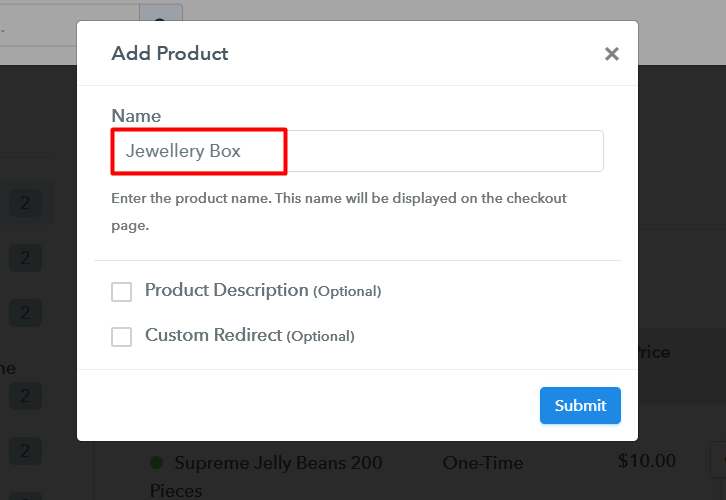
So I hope payment integration went well, now let’s move on to add products. Below “Enable Payments” you will find the section “Add your product” click on it. This will generate a dialog box with a blue button “Add New Product”. Click it.

This will summon a pop-up box and you can fill the required product title like jewelry box then tick on the checkboxes if you want to add product description and custom redirect.

Add product To Sell Jewelry Boxes Online

Fill out all the details like the name of the product and voila your product is created.

Note: Here you can add all the products related to the similar category by creating plans for each of them.

Step 6: Add Plans 

Now let’s create plans for different kinds of jewelry boxes available in your store.

(a) Select Add New Plan

Add Plan

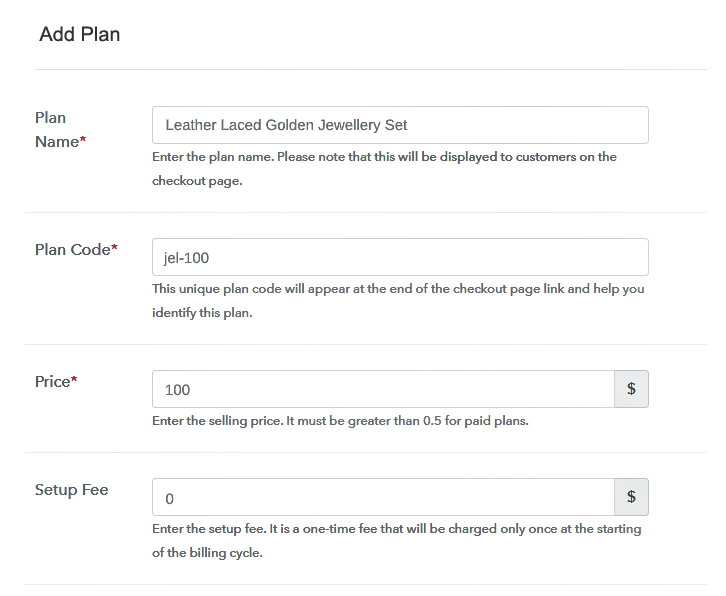
(b) Specify the Plan & Pricing Details

Add Plan To Sell Jewelry Boxes Online

In the plan page, fill in information like plan name, code, price, setup fees, etc. Moreover, while coming down you will find different billing models like one-time payment, recurring, based on cycles, etc. Now, choose the one that interests you the most. Furthermore, you can change it any time you want.

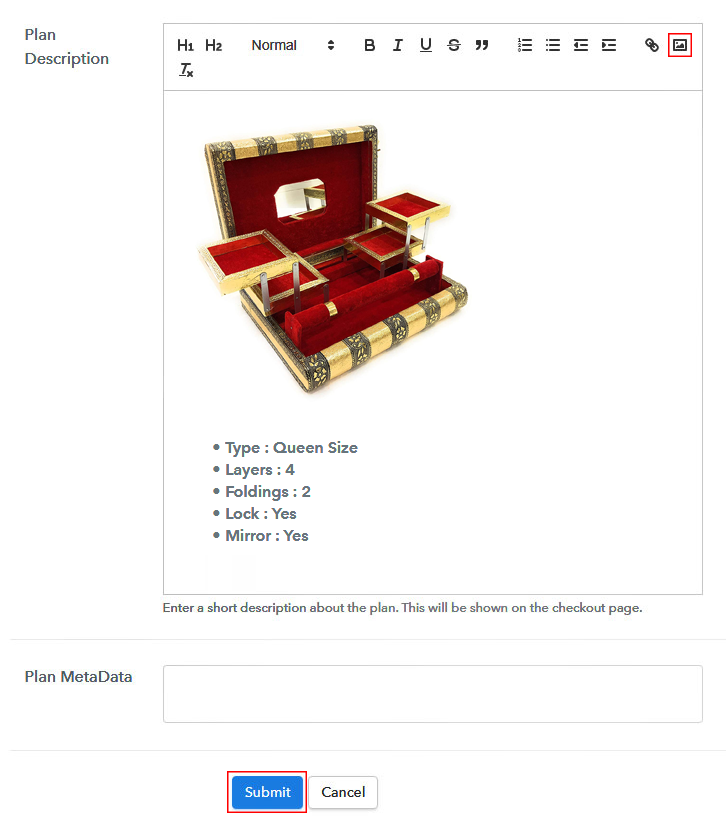
(c) Add Image & Description of Jewelry Boxes

Add Image To Sell Jewelry Boxes Online

Let’s introduce some incredible screenshots of your jewelry boxes and upload it by clicking the image button.

Now under the image place some concise information of your jewelry boxes such as covering, weight, platforms, etc, and then press the “Submit” button.

Afterward, by using the same process, you can list more products

Step 7: Share your Checkout Page

Share Checkout Page on Social Media

  • Also, to create more awareness about your products you can share your checkout page on Twitter & Facebook by just pressing the respective buttons.
  • Moreover, share the checkout pages on email and SMS.
  • Furthermore, you can build buttons on your webpage and paste the checkout links on it. Or you can place it on any anchor text on your website, so the users will be redirected to the checkout page.

Step 8: Preview Checkout Page

Follow up the recommended steps to preview the checkout page:

(a) Click on the View Button

View Checkout Plan

(b) Take a Look at the Checkout Page

Add Checkout To Sell Jewelry Boxes Online

Step 9: Embed Checkout Page in Site & Sell Jewelry Boxes Online

Embed Checkout Page on Website

Furthermore, just copy the link and add the checkout page to sell jewelry boxes online at any suitable place on your WordPress site.

(a) Edit the Page & Paste the Copied Link

Embed Checkout Page on Website

Further, paste the plan link of the jewelry boxes on a text editor of the WordPress dashboard.

(b) Save & Publish the Checkout Page

Save_and_Publish

Next, click the “Publish” button, after making changes.

(c) Check out the Final Look of your Checkout Page on WordPress Site

Add WordPress To Sell Jewelry Boxes Online

Step 10: Multiplan Checkout Page

Note: In case you want to sell multiple products via a single checkout page, you can create a multi-plan checkout page otherwise skip this step.

(a) Click on Add Mutiplan Checkout

Multiplan Checkout

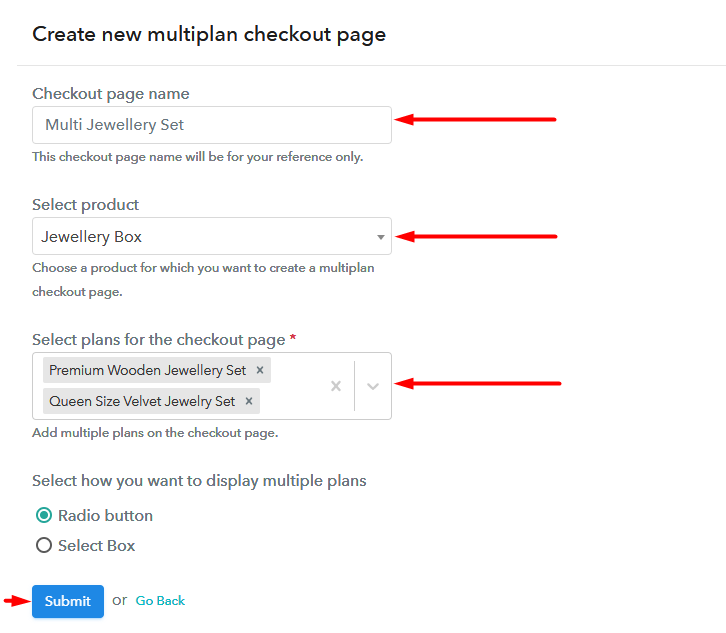
(b) Add Plans to Sell Multiple Jewelry Boxes from Single Checkout Page

Add Multiplan To Sell Jewelry Boxes Online

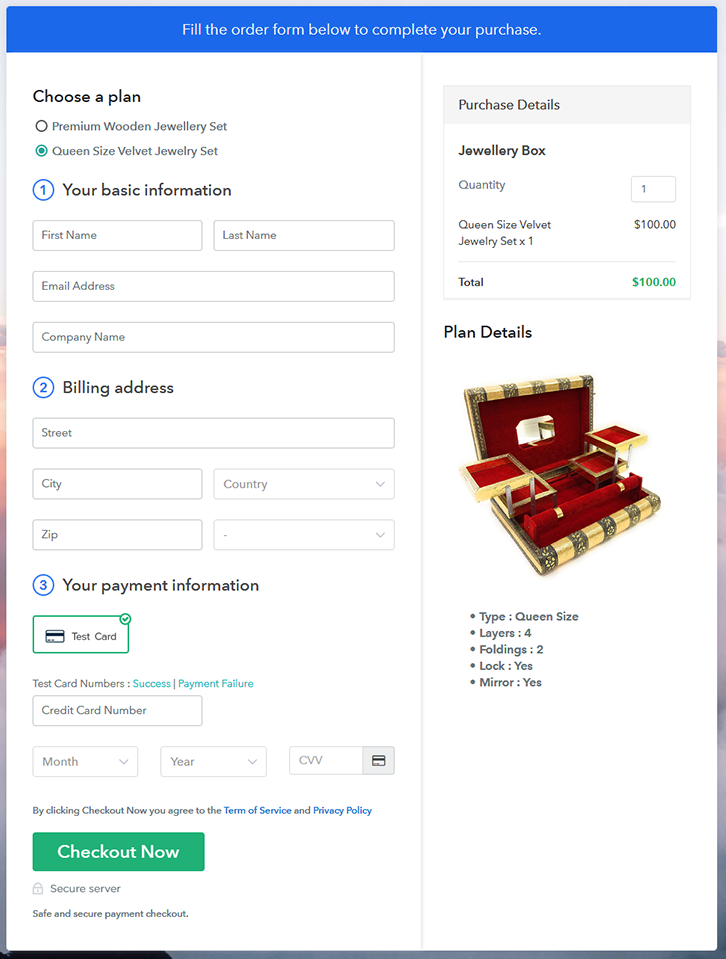
(c) Take a Look at the Checkout Page

Checkout To Sell Jewelry Boxes Online

Preview Checkout Page

Wrapping Up

Congratulations!! You have learned the method to sell jewelry boxes online with Pabbly Subscription Billing. This is perhaps the best, simplest and cheapest method to start jewelry boxes business online. With some time you will definitely ace all the features in this software, with the help of the video tutorials or documentation provided.

Furthermore, if you have any doubts then write your queries in the comment section below. You are awesome!! Thank You

You May Also Like To Read –
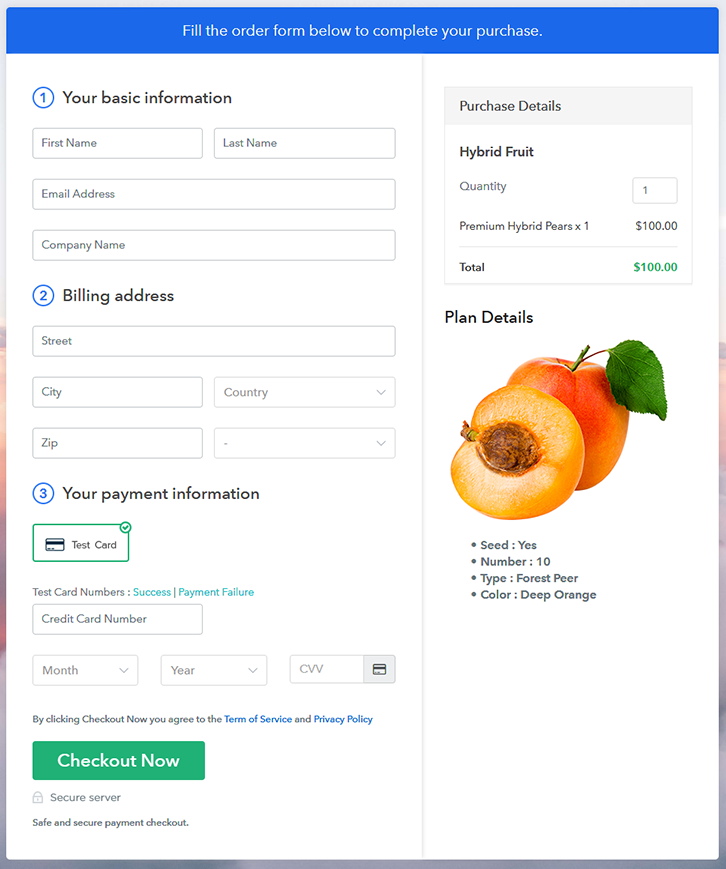
How To Sell Hybrid Fruits Online | Step by Step (Free Method)

Ideal For: All the hybrid fruit farmers, fruit market owners, hybrid fruit owners, cottage industry owners, and other merchants can use this method to sell hybrid fruits online.

How To Sell Hybrid Fruits Online

Why Choose this Method to Sell Hybrid Fruits Online?

Unlike any other solution, this method allows you to:

  • List and sell your hybrid fruits for FREE. Absolutely no payment required.
  • No need to pay commission on any of your sale.
  • Multiple payment options like PayPal, Credit Card, etc to collect payment from a single place.
  • Sell one time or recurring subscriptions of your hybrid fruits.
  • Collect payments & sell products in any currency as per your requirement.
  • Give discounts on your products by offering special coupon codes.
  • Add sales commission agents to help you in selling hybrid fruits.

Get Pabbly Subscription Billing for Free

Let me give you some reasons why you should sell hybrid fruits online. Currently, there are over 1.92 billion digital buyers around the globe and by 2030 there will be more than 3 billion online shoppers. That means half of the world population will be buying stuff online, including fruits thus rendering brick stores a thing of the past.

Now, considering the platforms to sell hybrid fruits online, there are some websites like VegFru, Groffers, Farm2Door, etc. But these websites demand excessive commissions, which may suck your profit margins. So avoiding these platforms, how about you build your own brand, and pay zero commissions?

Well, to help you I am showing you an awesome tool called Pabbly Subscription Billing with which you can create amazing checkout pages to sell hybrid fruits online. In these checkout pages, you can list unlimited products to sell and receive payments in both offline/online modes. Some other advantages are

  • List Unlimited Hybrid Fruits
  • Track Revenues
  • Custom Domain
  • Email Alerts

So, without much wasting time, let’s create our first checkout page to sell hybrid fruits online.

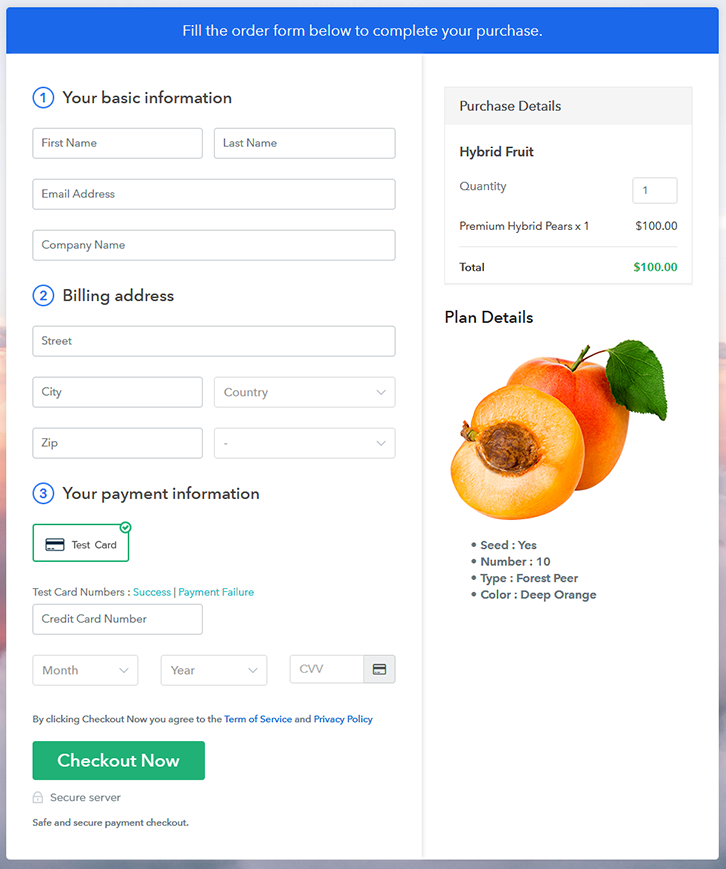
Final View of Checkout Page for your Hybrid Fruits Selling Business

Checkout To Sell Hybrid Fruits Online

Preview Checkout Page

Step 1: Log in to Pabbly Subscription Billing

Signup

In the beginning search for Pabbly Subscription Billing in the browser. On landing on their website click on the “Sign up Free“ button. You can either manually fill all the information or simply sign in using your Gmail account.

Sign Up For Free!

Step 2: Select Subscription Billing

Access Subscription Billing

Step 3: Account Setup

Setup Account

Once you’re done click on the “Access Now” button of Pabbly Subscription Billing, a page will pop-up with details like company name, currency, and contact number. Next, you need to fill those details to go on.

Step 4: Connect Payment Gateways & Start Hybrid Fruits Selling Business Online

Connect Payment Gateway

We are going to use the test payment mode so that we can understand all about the software’s payment procedure. Also, the Pabbly Subscription Billing allows integration with multiple payment gateways. Below we are mentioning the payment integration guide to help you out.

Step 5: Add Product for your Hybrid Fruits

Add Product

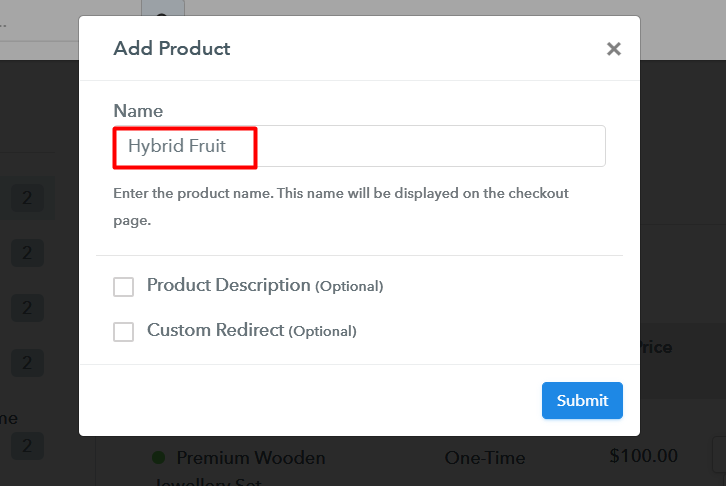
If the payment gateway integration went well, so let’s start adding the products. Beneath the  “Enable Payments” segment there is the “Add your product” section click on it. This will generate a dialog box with a blue button “Add New Product”. Click on it.

You have to add the required product title, in this case, it is ‘hybrid fruits’.

Add Product To Sell Hybrid Fruits Online

Fill out all the details like the name of the product and voila your product is created.

Note: Here you can add all the products related to the similar category by creating plans for each of them.

Step 6: Add Plans 

Now let’s create plans for different kinds of hybrid fruits available in your store.

(a) Select Add New Plan

Add Plan

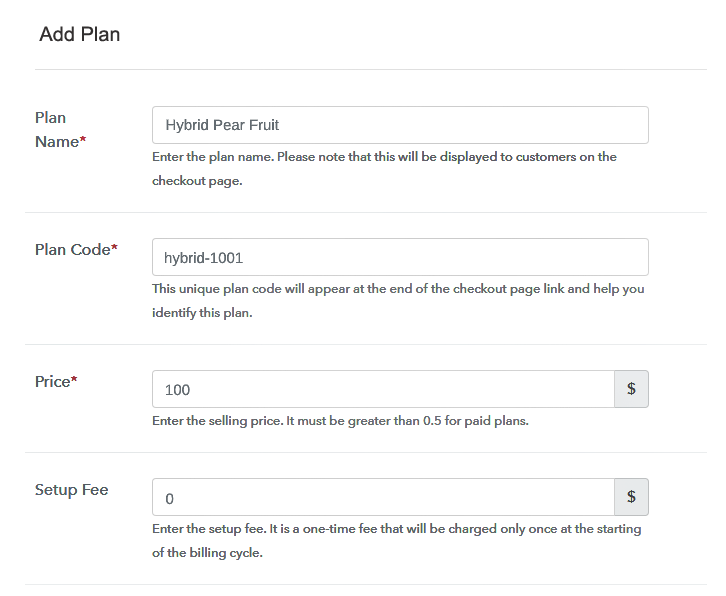
(b) Specify the Plan & Pricing Details

Add Plan To Sell Hybrid Fruits Online

In the plan page, fill in information like plan name, code, price, setup fees, etc. Moreover, while coming down you will find different billing models like one-time payment, recurring, based on cycles, etc. Now, choose the one that interests you the most. Furthermore, you can change it any time you want.

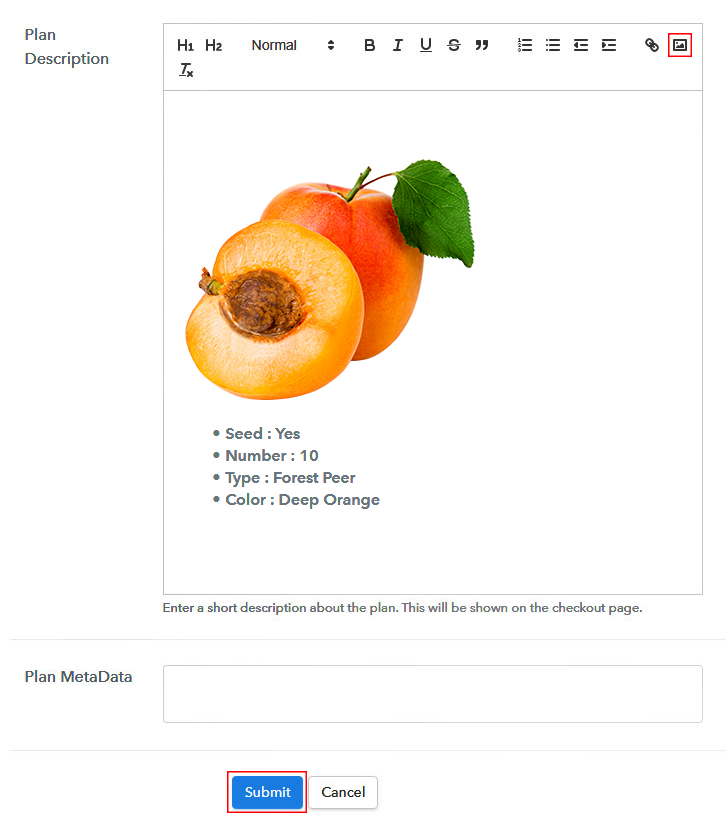
(c) Add Image & Description of Hybrid Fruits

Add Image To Sell Hybrid Fruits Online

Now, give small info about hybrid fruits in bullet points, add images and links too.

Then, on hitting the submit button, your hybrid fruits will be successfully added.

Also, you can create multiple plans and can add all the hybrid fruits you want to sell online.

Step 7: Share your Checkout Page

Share Checkout Page on Social Media

  • Also, to create more awareness about your products you can share your checkout page on Twitter & Facebook by just pressing the respective buttons.
  • Moreover, share the checkout pages on email and SMS.
  • Furthermore, you can build buttons on your webpage and paste the checkout links on it. Or you can place it on any anchor text on your website, so the users will be redirected to the checkout page.

Step 8: Preview Checkout Page

Follow up the recommended steps to preview the checkout page:

(a) Click on the View Button

View Checkout Plan

(b) Take a Look at the Checkout Page

Checkout To Sell Hybrid Fruits Online

Step 9: Embed Checkout Page in Site & Sell Hybrid Fruits Online

Embed Checkout Page on Website

Furthermore, just copy the link and add the checkout page to sell hybrid fruits online at any suitable place on your WordPress site.

(a) Edit the Page & Paste the Copied Link

Embed Checkout Page on Website

Further, paste the plan link of the hybrid fruits on a text editor of the WordPress dashboard.

(b) Save & Publish the Checkout Page

Save_and_Publish

Next, click the “Publish” button, after making changes.

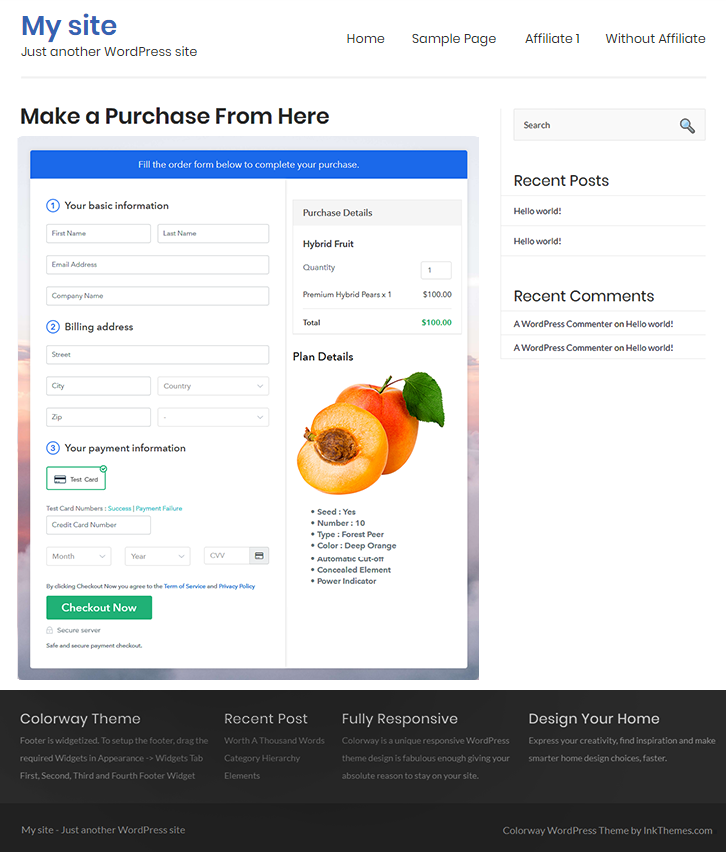
(c) Check out the Final Look of your Checkout Page on WordPress Site

Wordpress To Sell Hybrid Fruits Online

Step 10: Multiplan Checkout Page

Note: In case you want to sell multiple products via a single checkout page, you can create a multi-plan checkout page otherwise skip this step.

(a) Click on Add Mutiplan Checkout

Multiplan Checkout

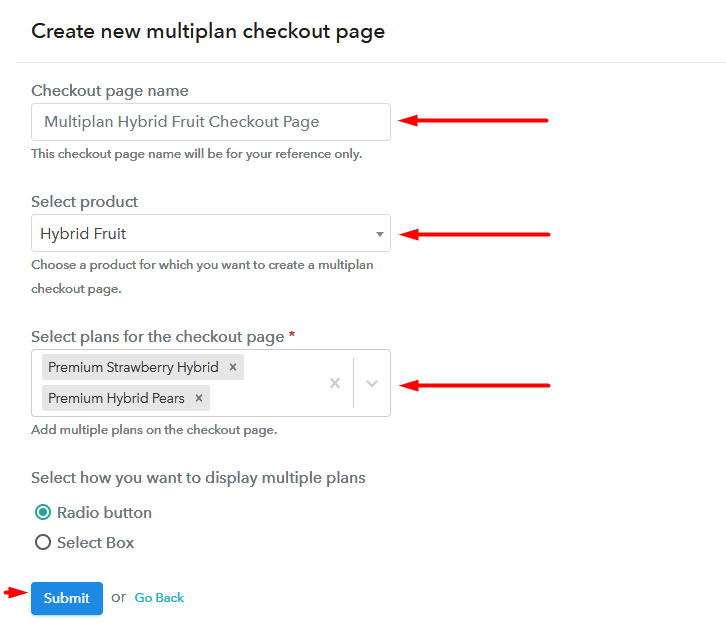
(b) Add Plans to Sell Multiple Hybrid Fruits from Single Checkout Page

Multiplan To Sell Hybrid Fruits Online

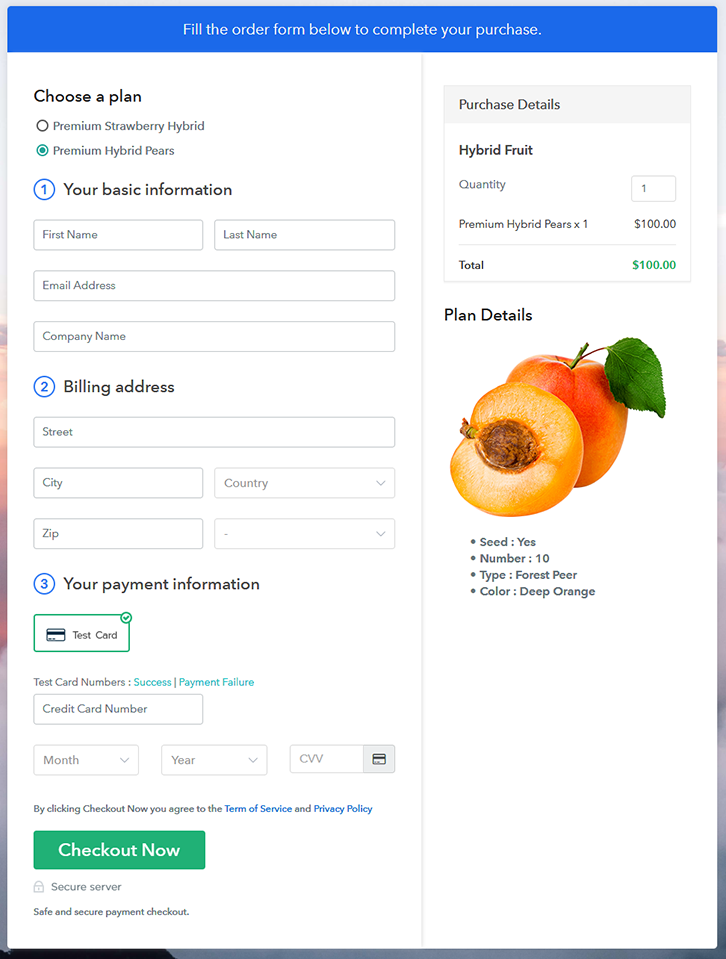
(c) Take a Look at the Checkout Page

Multiplan To Sell Hybrid Fruits Online

Preview Checkout Page

Wrapping Up

With these 10 steps, you have created your first checkout page to sell hybrid fruits online. Not just hybrid fruits, you can sell any physical or digital stuff online easily. But for now, if you have any doubts, please leave it in the comment section below. Thank You !!

You May Also Like To Read –
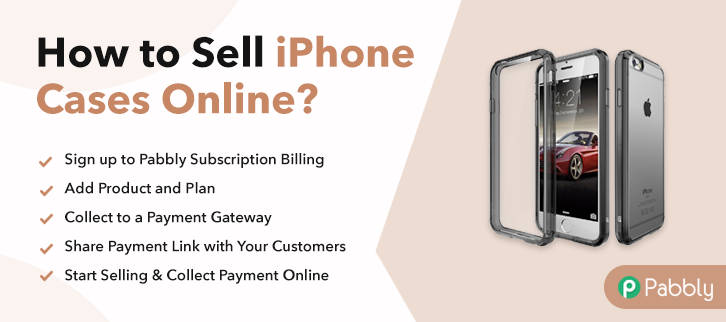
How to Sell iPhone Cases Online | Step by Step (Free Method)

How to Sell iPhone Cases Online

Ideal For: All the phone case manufacturers, iPhone case sellers, designer phone dealers, iPhone case suppliers, customized case shop owners and other merchants can use this method to sell iPhone cases online.

How to Sell iPhone Cases Online

Why Choose this Method to Sell iPhone Cases Online?

Unlike any other solution, this method allows you to:

  • List and sell your iPhone cases for FREE. Absolutely no payment required.
  • No need to pay commission on any of your sales.
  • Multiple payment options like PayPal, Credit Card, etc to collect payment from a single place.
  • Sell one time or recurring subscriptions of your iPhone cases.
  • Collect payments & sell products in any currency as per your requirement.
  • Give discounts on your products by offering special coupon codes.
  • Add sales commission agents to help you in selling iPhone cases online.

Get Pabbly Subscription Billing for Free

Having an iPhone is cool but the fancy iPhone cases make it 100 times better. And, it is hard to deny that there are numerous mobile devices than people in the world. Considering this, it is suitable to start iPhone cases business online to meet the demand.

Starting an online business with a specific niche does wonder, take an instance of Tim Kock’s who build a  “Dropshipping Store” that earned $6,667 within 8 weeks. Amazed? You must be! It can be you. All you need a strong will and software to guide you through the process of starting your own business. Luckily, we have a software named Pabbly Subscription Billing that is actually a great help for entrepreneurs. It allows you to create a checkout page for selling iPhone cases online. Along with that, it keeps you on top of stocks, revenue, invoices, etc.
Some of its remarkable features involve:

  • List various iPhone cases in a single checkout page
  • Add tax and delivery based on the prospect’s location
  • Offer discount and coupon codes to purchasers

So, let’s get started by creating our checkout page with the help of Pabbly Subscription Billing to sell the iPhone cases online.

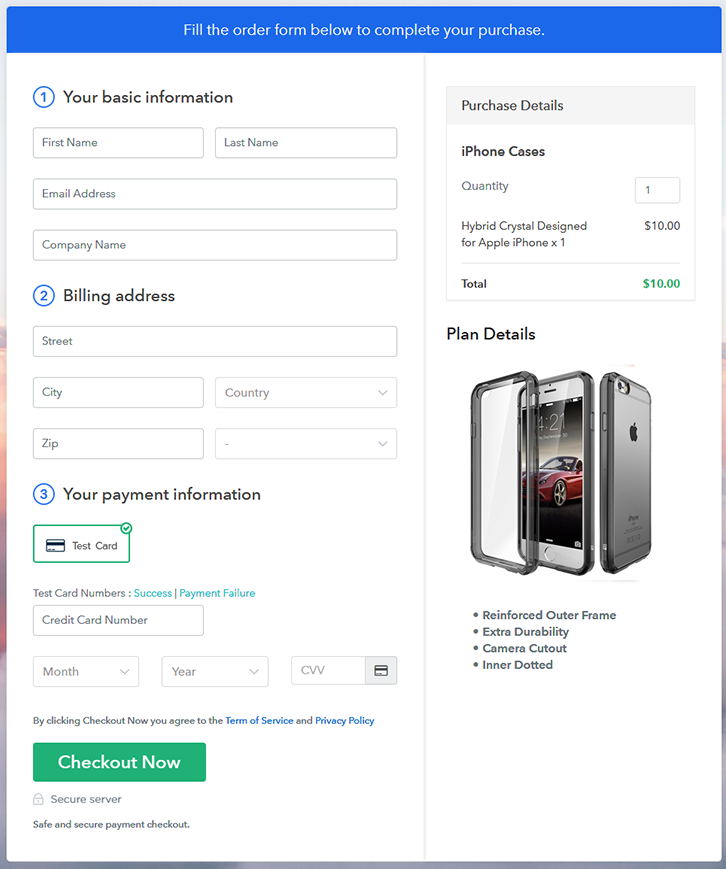
Final View of Checkout Page for your iPhone Cases Selling Business

Checkout Page to Sell iPhone Cases Online

Preview Checkout Page

Step 1: Log in to Pabbly Subscription Billing

Signup

Start the process for creating a checkout page for iPhone cases by visiting the Pabbly Subscription Billing in your browser. After that, click on the “Sign up Free“ button. Moreover, either manually filled out the details or sign in using your Gmail account.

Sign Up For Free!

Step 2: Select Subscription Billing

Access Subscription Billing

Step 3: Account Setup

Setup Account

Besides, after clicking on the “Access Now” button of the software, a page will open with fields like company name, select currency, and phone number. Simply fill out those details to continue creating a checkout page for iPhone cases.

Step 4: Connect Payment Gateways & Start iPhone Cases Selling Business Online

Connect Payment Gateway

The subsequent step is to gaining knowledge about payment procedures using a “Test Payment Gateway”. Here, we will describe the checkout page process for the iPhone cases with the help of a test payment gateway. Besides this, the tool offers various payment gateways such as PayPal, Stripe, etc. Further, below are the payment integration guides to help you out.

Step 5: Add Product for your iPhone Cases

Add Product

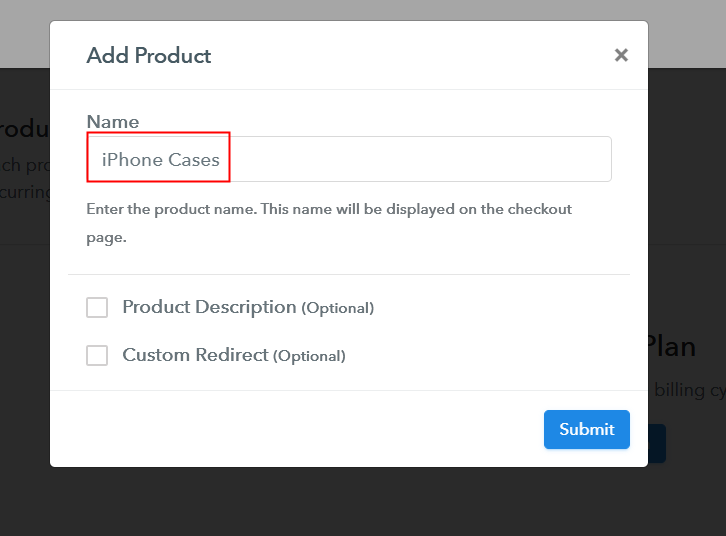
Additionally, add the name, which in our case is “iPhone Cases”. Here you can specify the type like designer iPhone cases, customized iPhone cases, etc. Further, write a short description of the iPhone cases to seize the customer’s attention.

Add Product to Start Selling iPhone Cases Online

Moreover, just fill out all those details and your product is created.

Note: Here you can add all the products related to the similar category by creating plans for each of them.

Step 6: Add Plans 

Let’s expose plans for different kinds of iPhone cases available in your store.

(a) Select Add New Plan

Add Plan

(b) Specify the Plan & Pricing Details

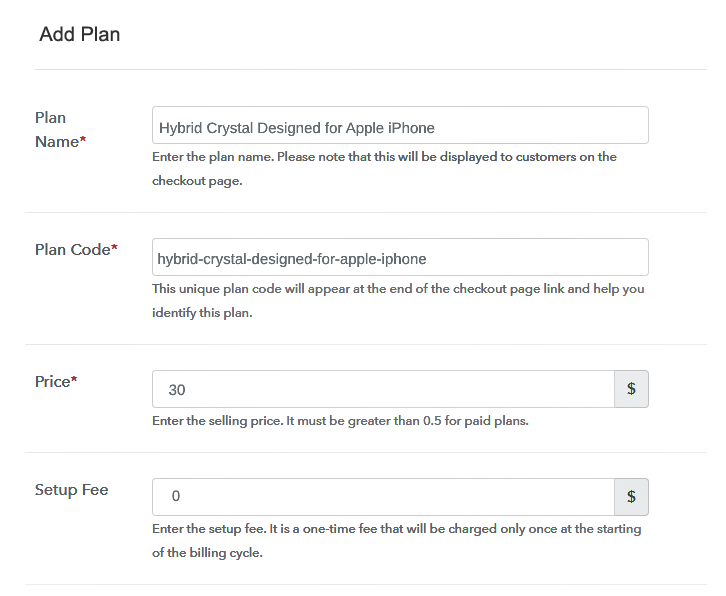
Specify the Plan and Pricing to Sell iPhone Cases Online

The next thing to do is fill all the details of the iPhone cases like plan name, code, price, set-up fee, and much more to continue.

(c) Add Image & Description of iPhone Cases

Add Image & Description to Sell iPhone Cases Online

Furthermore, write a brief description of the iPhone cases using bullets, images, etc, to bring original buyers to the checkout page.

Next, click on the “Submit” button to add the iPhone cases on the checkout page.

Finally, you can add multiple plans and kinds of iPhone cases in your product list which you want to market online.

Step 7: Share your Checkout Page

Share Checkout Page on Social Media

  • Moreover, share the checkout page of the iPhone cases on social media accounts like Facebook & Twitter to grab the customer’s attention.
  • Also, you can share the direct link of the iPhone cases checkout page with your customers via SMS or email marketing.
  • Additionally, embed the provided plan link of the iPhone cases in the buttons or any anchor text on your website.

Step 8: Preview Checkout Page

Follow up the recommended steps to preview the checkout page:

(a) Click on the View Button

View Checkout Plan

(b) Take a Look at the Checkout Page

Checkout Page to Sell iPhone Cases Online

Step 9: Embed Checkout Page in Site & Sell iPhone Cases Online

Embed Checkout Page on Website

Just copy the link and add the checkout page to sell iPhone cases online at any proper place on your WordPress site.

(a) Edit the Page & Paste the Copied Link

Paste Link in Text Editor

Further, paste the plan link of iPhone cases on a text editor of the WordPress dashboard.

(b) Save & Publish the Checkout Page

Save_and_Publish

Next, click the “Publish” button, after making changes.

(c) Check out the Final Look of your Checkout Page on WordPress Site

Final Look of your Checkout Page to Sell iPhone Cases Online

Step 10: Multiplan Checkout Page

Note: In case you want to sell multiple products via a single checkout page, you can create a multi-plan checkout page otherwise skip this step.

(a) Click on Add Mutiplan Checkout

Multiplan Checkout

(b) Add Plans to Sell Multiple iPhone Cases from Single Checkout Page

Add Multiple Products to Start Selling iPhone Cases Online

(c) Take a Look at the Checkout Page

Multiplan Checkout Page to Sell iPhone Cases Online

Preview Checkout Page

Wrapping Up

There you have it! We have hopefully covered all the crucial steps to start iPhone cases selling business online. And don’t just consider us, try this software Pabbly Subscription Billing and raise your sales. Further, it is packed with features like various billing models, revenue tracking, and much more.

So, what are you waiting for? Go and grab a deal.

You May Also Like To Read –
How to Sell Interior Designs Online | Step by Step (Free Method)

How to Sell Interior Designs Online

Ideal For: All the interior designers, architects, interior design professionals, and other merchants can use this method to take their interior designs selling business online.

How to Sell Interior Designs Online

Why Choose this Method To Sell Interior Designs Online?

Unlike any other solution, this method allows you to:

  • List and sell your interior designs for FREE. Absolutely no payment required.
  • No need to pay commission on any of your sales.
  • Multiple payment options like PayPal, Credit Card, etc to collect payment from a single place.
  • Sell one time or recurring subscriptions of your interior designs.
  • Collect payments & sell products in any currency as per your requirement.
  • Give discounts on your products by offering special coupon codes.
  • Add sales commission agents to help you in selling interior designs online.

Get Pabbly Subscription Billing for Free

In this modern world, everyone wants their homes to be beautifully constructed and decorated and for this, they hire an interior designer or simply just buy interior designs. If you want to make expand your business then you should take your interior designs selling business online. By selling interior designs online you can easily get better marketing for business, increased customer reach, and much more.

You can easily start selling interior designs online through checkout pages which help in increasing sales and fuss-free payment collection. Just create checkout pages for your interior designs and share them on online platforms and start collecting payment directly through them. To create checkout pages, we have awesome and free software and that is Pabbly Subscription Billing.

You can also access its other helpful features other than checkout pages like easy invoicing, payment collection, discount coupons creations, etc for your online business. Hence, without wasting any more time, let us start creating your first checkout page.

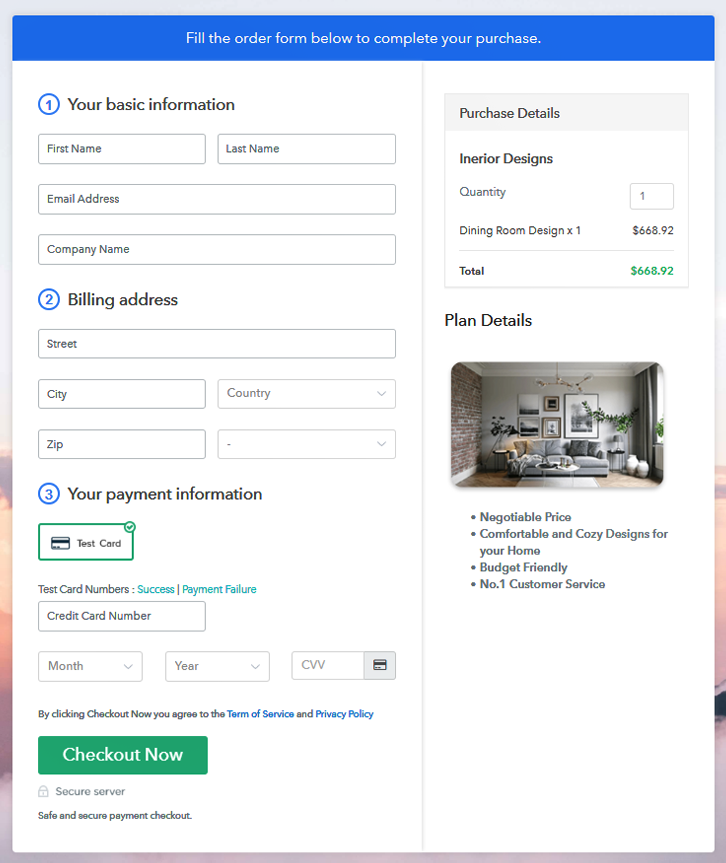
Final View of Checkout Page For Your Interior Designs Selling Business

Preview Checkout Page

Preview Checkout Page

Step 1: Log in to Pabbly Subscription Billing

Signup

Begin with visiting Pabbly Subscription Billing website and then click on the “Signup Free” button. After clicking the button, you will land on the signup, where you can signup for free via Gmail or you can also enter your details manually.

Sign Up For Free!

Step 2: Select Subscription Billing

Access Subscription Billing

Step 3: Account Setup

Setup Account

After the signup process, here you have to fill up your company details like company name, currency, and phone number in the shown dialogue box.

Step 4: Connect Payment Gateways & Start Interior Designs Selling Business Online

Connect Payment Gateway

To experience, the error-free payment collection Pabbly Subscription Billing offers you a “Test Payment” mode. You can also enable it and know how the payment collection process works. Afterwards, you have to connect with other payment gateways like PayPal, Stripe, etc of your preference. The complete payment gateways integration guide is mentioned below-

Step 5: Add Product For Your Interior Designs

Add Product

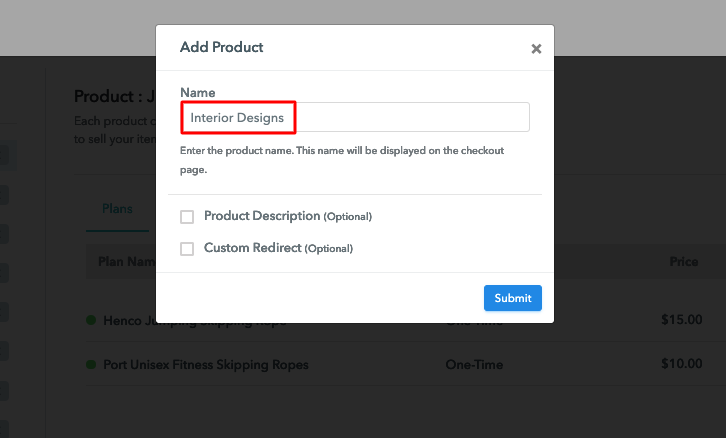
Now, you have to add your first product. Click on the “Add New Product” button then name your product in the appeared box. You can add interior designs of different types such as urban modern design, bohemian design, etc.

Sell Interior Designs Online Product Name

Add all the other types of interior designs in the same product section by creating different plans for them.

Note: Here you can add all the products related to the similar category by creating plans for each of them.

Step 6: Add Plans 

Let’s create plans for different types of interior designs that you want to sell.

(a) Select Add New Plan

Add Plan

(b) Specify the Plan & Pricing Details

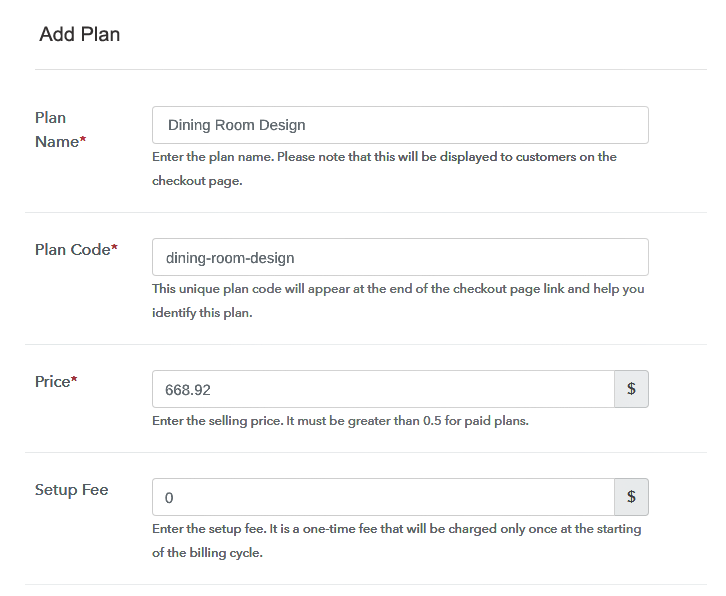
Sell Interior Designs Online Details

Next, you have to click on the “Add New Plan” button and the plan page will appear. Here, you have to fill details about your product such as plan name, plan code, billing cycle, price, etc.

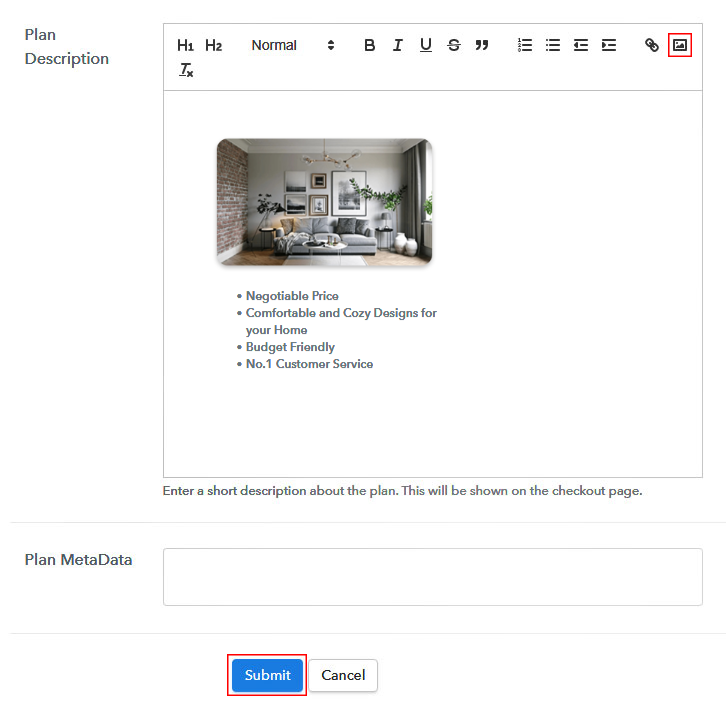
(c) Add Image & Description of Interior Designs

Sell Interior Designs Online Image

Further, you can add a description of the interior designs that you want to sell along with the images, links, etc, and then click on the submit button to add your product. You can also create more plans for all the interior designs in a similar manner.

Step 7: Share your Checkout Page

Share Checkout Page on Social Media

To enhance your sales of interior designs and get better marketing for your products, follow these below steps:

  • Share your checkout page on social media such as Facebook and Twitter.
  • Furthermore, copy the mentioned link and send it to your customers through SMS or emails directly.
  • Embed your plan link on your website so that your customers can be landed on the checkout page directly.

Step 8: Preview Checkout Page

Follow up the recommended steps to preview the checkout page:

(a) Click on the View Button

View Checkout Plan

(b) Take a Look at the Checkout Page

Preview Checkout Page

Step 9: Embed Checkout Page in Site & Sell Interior Designs Online

Embed Checkout Page on Website

Copy the link and add the checkout page to sell interior designs online at any preferable place on your WordPress site.

(a) Edit the Page & Paste the Copied Link

Embed Checkout Page on Website

Further, paste the plan link on a text editor of the WordPress dashboard.

(b) Save & Publish the Checkout Page

Save_and_Publish

Next, click the “Publish” button, after making changes.

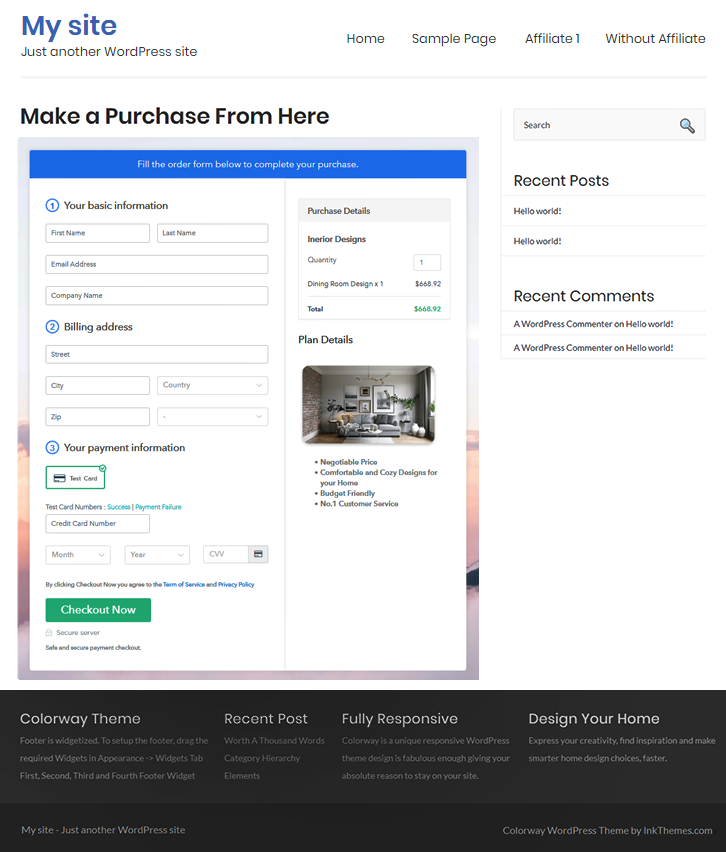
(c) Check out the Final Look of your Checkout Page on WordPress Site

Sell Interior Designs Online W

Step 10: Multiplan Checkout Page

Note: In case you want to sell multiple products via a single checkout page, you can create a multi-plan checkout page otherwise skip this step.

(a) Click on Add Mutiplan Checkout

Multiplan Checkout

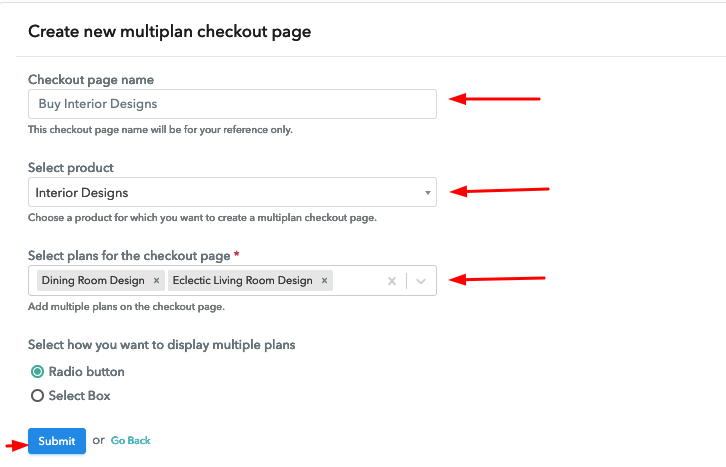
(b) Add Plans to Sell Multiple Interior Designs from Single Checkout Page

Sell Interior Designs Online Multi Details

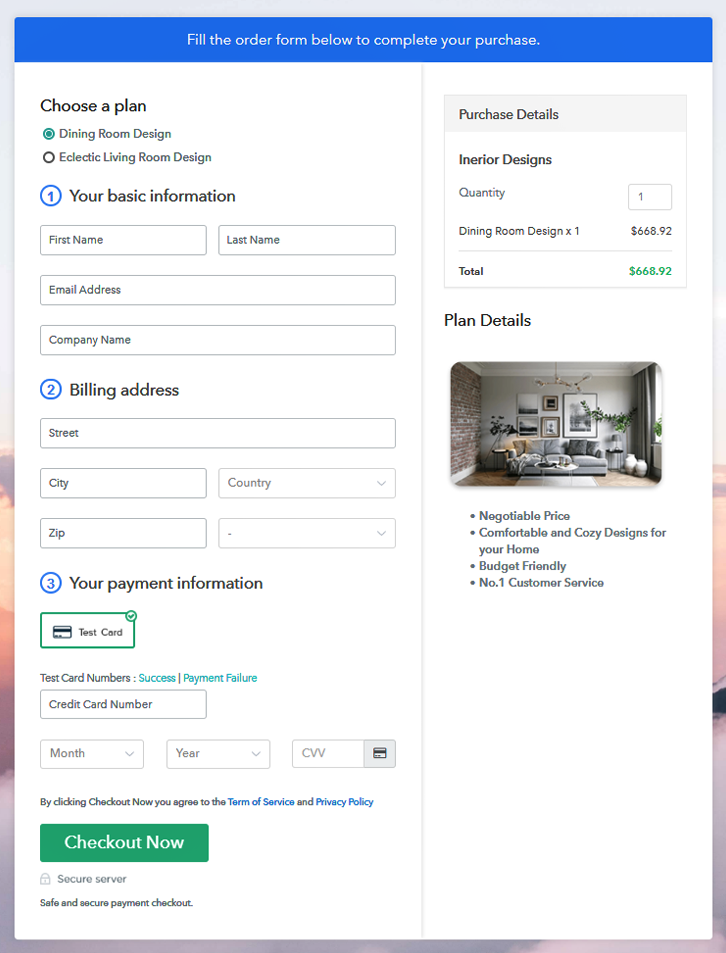
(c) Take a Look at the Checkout Page

Sell Interior Designs Online Multi

Preview Checkout Page

Wrapping Up

Now you can start your online interior designs selling business without any troubles with the help of Pabbly Subscription Billing. Moreover, you can manage all your products easily at the same place along with selling unlimited interior designs, sharing invoices with buyers, collecting payments easily, and much more. Certainly, this service is going to be very helpful and beneficial for you and your business. Therefore, signup and set up your online store now. For further suggestions or queries please write to us.

You May Also Like To Read –
 

How to Sell Inks Online | Step by Step (Free Method)

How to Sell Inks Online

Ideal For: All the ink manufacturers, ink sellers, ink dealers, ink suppliers, stationary shop owners and other merchants can use this method to sell inks online.

How to Sell Inks Online

Why Choose this Method to Sell Inks Online?

Unlike any other solution, this method allows you to:

  • List and sell your inks for FREE. Absolutely no payment required.
  • No need to pay commission on any of your sales.
  • Multiple payment options like PayPal, Credit Card, etc to collect payment from a single place.
  • Sell one time or recurring subscriptions of your inks.
  • Collect payments & sell products in any currency as per your requirement.
  • Give discounts on your products by offering special coupon codes.
  • Add sales commission agents to help you in selling inks online.

Get Pabbly Subscription Billing for Free

Inks are widely used in every sector. But according to some reports, next-generation printing inks like UV-cured, aqueous, and latex-based inks are currently beholding high growth rates. Owing to this, it is a great time to start inks business online.

Well! According to the Grand View Research report, the global printing inks market registering a CAGR of 5.2% over the forecast period. Plus, starting your own inks business online offers various perks like lower set-up cost, no middleman, global audience, etc. Thus to help you out we are suggesting software named Pabbly Subscription Billing that can fire up the online store process. Actually, the software lets you build a single or multiplan checkout page of selling inks online to grab the customer’s attention.

Other than this, it is packed with remarkable features like:

  • Various Payment Gateways
  • Professional Invoices
  • Tax Management

Now, let me walk you through the process of creating amazing checkout pages to sell inks online.

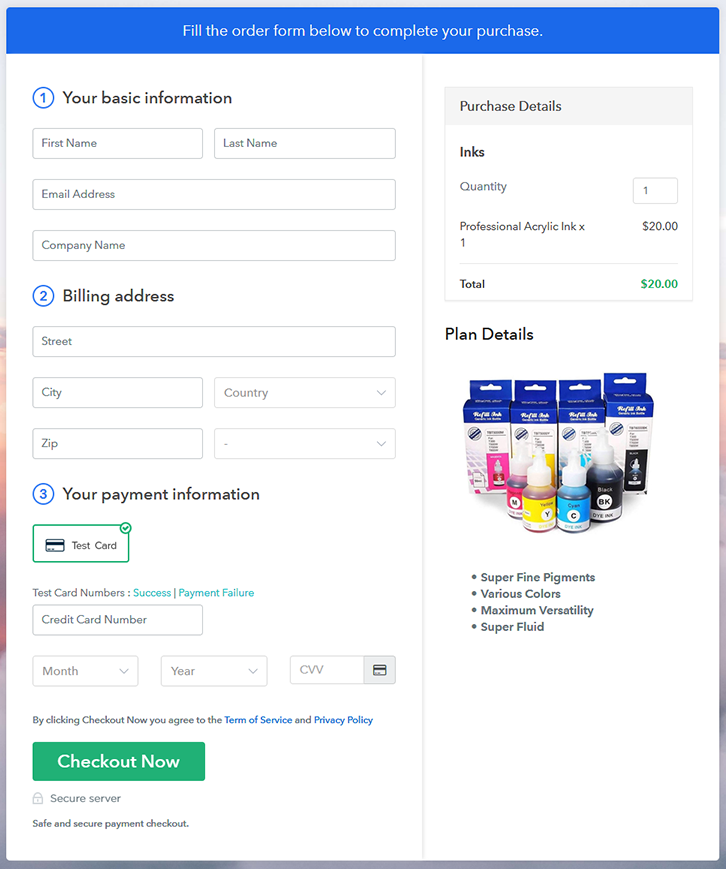
Final View of Checkout Page for your Inks Selling Business

Checkout Page to Sell Inks Online

Preview Checkout Page

Step 1: Log in to Pabbly Subscription Billing

Signup

Start the process for creating a checkout page for inks by visiting the Pabbly Subscription Billing in your browser. After that, click on the “Sign up Free“ button. Moreover, either manually filled out the details or sign in using your Gmail account.

Sign Up For Free!

Step 2: Select Subscription Billing

Access Subscription Billing

Step 3: Account Setup

Setup Account

Besides, after clicking on the “Access Now” button of the software, a page will open with fields like company name, select currency, and phone number. Simply fill out those details to continue creating a checkout page for inks.

Step 4: Connect Payment Gateways & Start Inks Selling Business Online

Connect Payment Gateway

The subsequent step is to gaining knowledge about payment procedures using a “Test Payment Gateway”. Here, we will describe the checkout page process for the inks with the help of a test payment gateway. Besides this, the tool offers various payment gateways such as PayPal, Stripe, etc. Further, below are the payment integration guides to help you out.

Step 5: Add Product for your Inks

Add Product

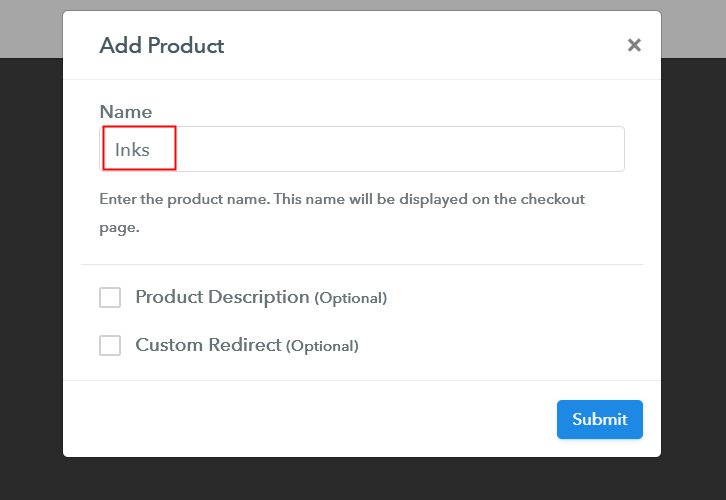
Additionally, add the name, which in our case is “Inks”. Here you can specify the type like UV curved inks, dry sublimation inks, etc. Further, write a short description of the inks to grab the buyer’s attention.

Add Product to Start Selling Inks Online

Moreover, just fill out all those details and your product is created.

Note: Here you can add all the products related to the similar category by creating plans for each of them.

Step 6: Add Plans 

Let’s expose plans for different kinds of inks available in your store.

(a) Select Add New Plan

Add Plan

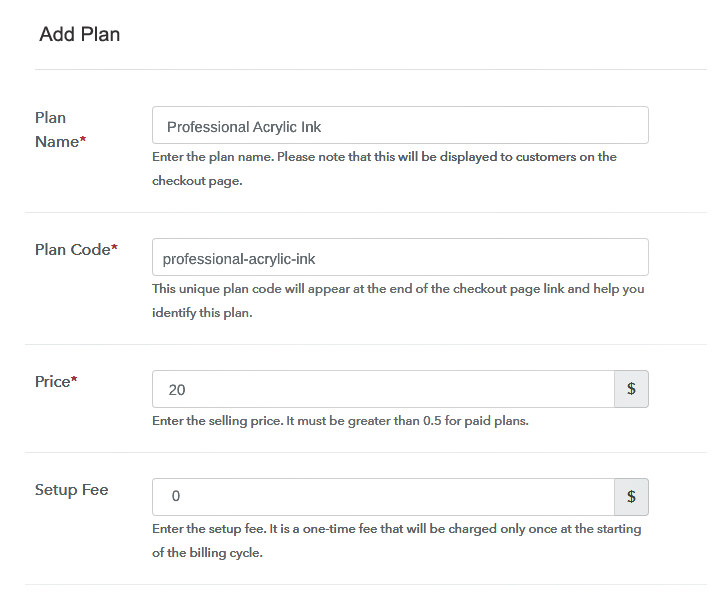
(b) Specify the Plan & Pricing Details

Specify the Plan and Pricing to Sell Inks Online

The next thing to do is fill all the details of the inks like plan name, code, price, set-up fee, and much more to continue.

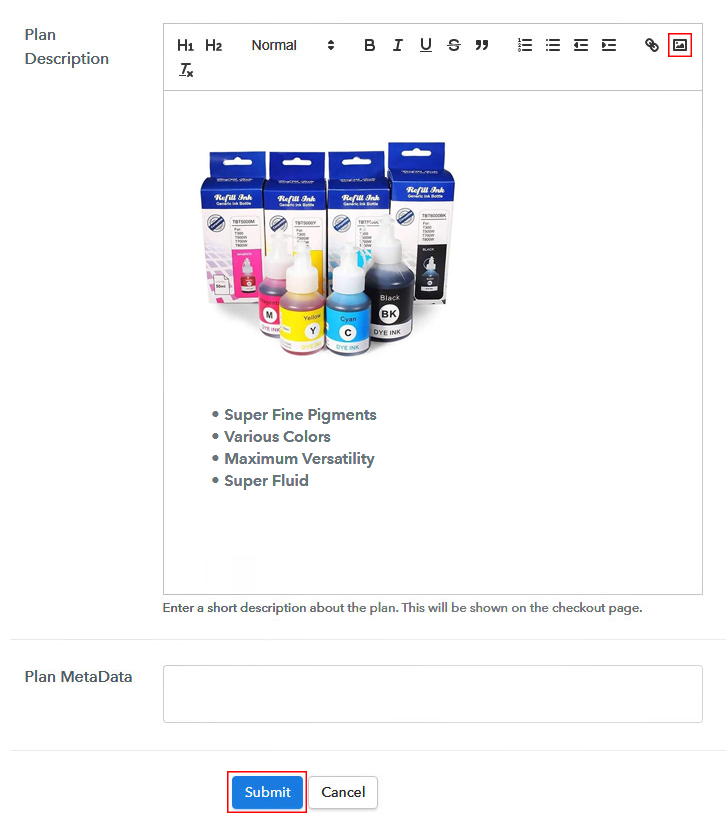
(c) Add Image & Description of Inks

Add Image & Description to Sell Inks Online

Furthermore, write a brief description of the inks using bullets, images, etc, to bring original buyers to the checkout page.

Next, click on the “Submit” button to add the inks on the checkout page.

Finally, you can add multiple plans and kinds of inks in your product list which you want to market online.

Step 7: Share your Checkout Page

Share Checkout Page on Social Media

  • Moreover, share the checkout page of the inks on social media accounts like Facebook & Twitter to grab the customer’s attention.
  • Also, you can share the direct link of the inks checkout page with your customers via SMS or email marketing.
  • Additionally, embed the provided plan link of the inks in the buttons or any anchor text on your website.

Step 8: Preview Checkout Page

Follow up the recommended steps to preview the checkout page:

(a) Click on the View Button

View Checkout Plan

(b) Take a Look at the Checkout Page

Checkout Page to Sell Inks Online

Step 9: Embed Checkout Page in Site & Sell Inks Online

Embed Checkout Page on Website

Just copy the link and add the checkout page to sell inks online at any proper place on your WordPress site.

(a) Edit the Page & Paste the Copied Link

Paste Link in Text Editor

Further, paste the plan link of inks on a text editor of the WordPress dashboard.

(b) Save & Publish the Checkout Page

Save_and_Publish

Next, click the “Publish” button, after making changes.

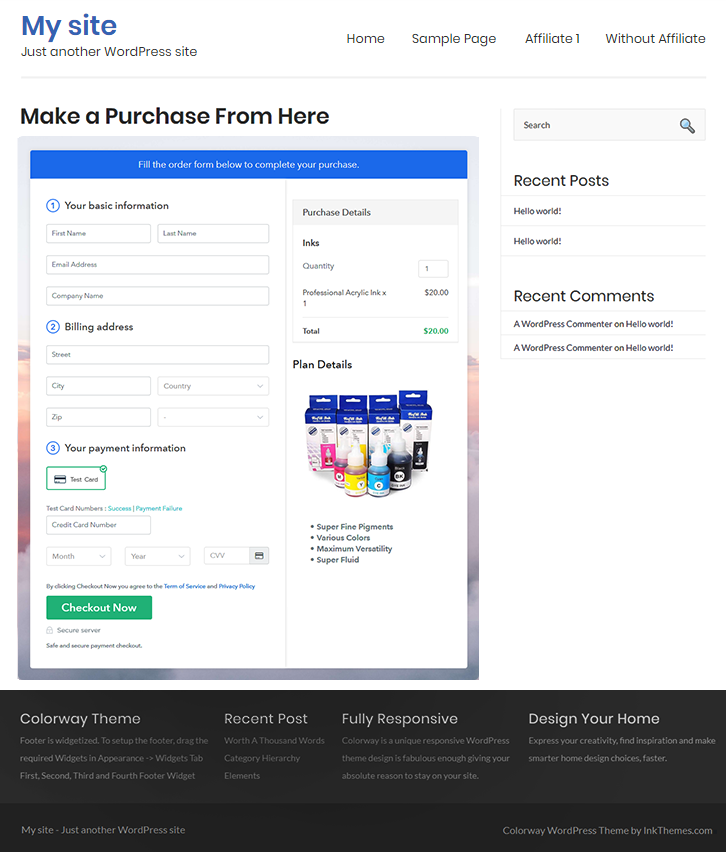
(c) Check out the Final Look of your Checkout Page on WordPress Site

Final Look of your Checkout Page to Sell Inks Online

Step 10: Multiplan Checkout Page

Note: In case you want to sell multiple products via a single checkout page, you can create a multi-plan checkout page otherwise skip this step.

(a) Click on Add Mutiplan Checkout

Multiplan Checkout

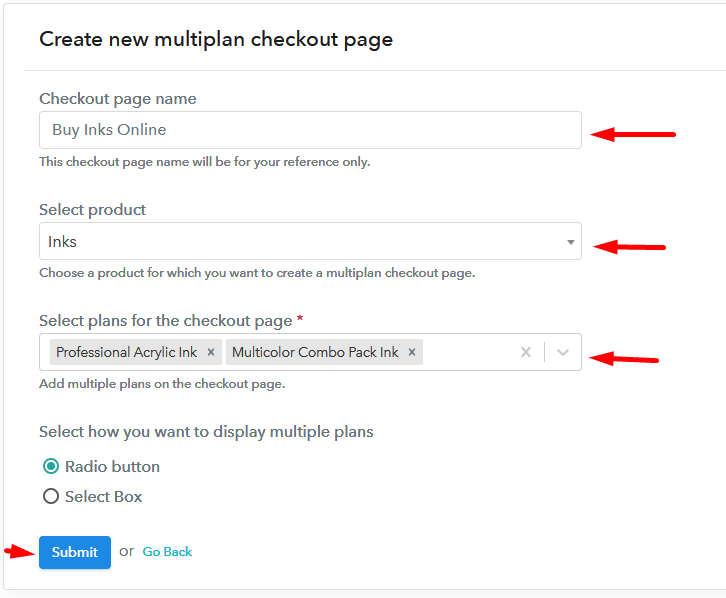
(b) Add Plans to Sell Multiple Inks from Single Checkout Page

Add Multiple Products to Start Selling Inks Online

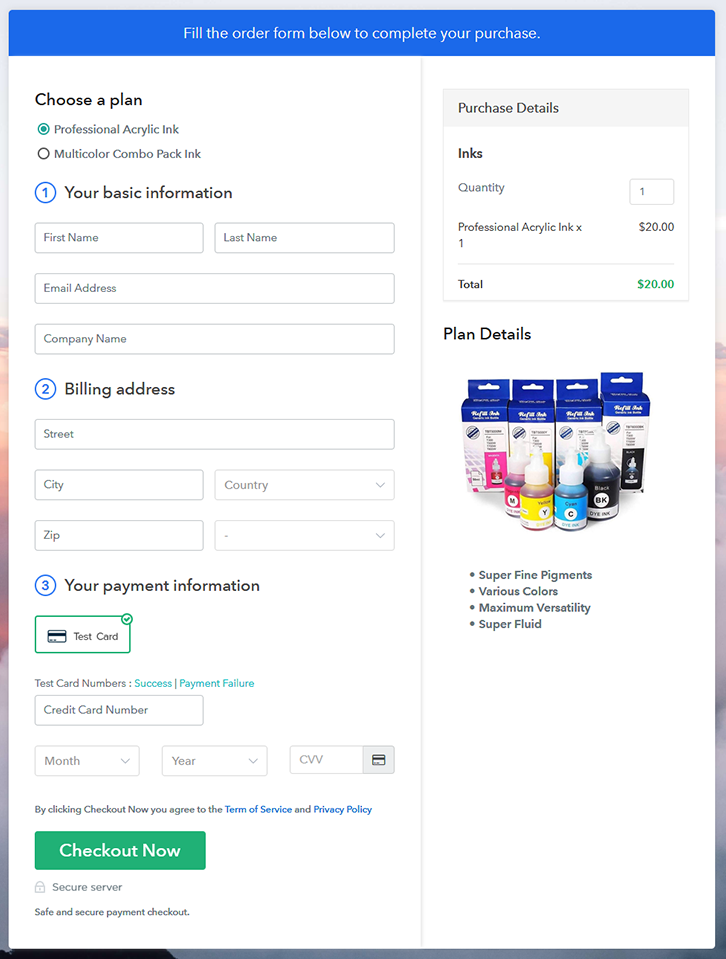
(c) Take a Look at the Checkout Page

Multiplan Checkout Page to Sell Inks Online

Preview Checkout Page

Wrapping Up

Excellent! Now we learned “how to sell inks online” using Pabbly Subscription Billing software. By following all the suggested steps mentioned above, one can create a checkout page for selling inks easily with the help of a tool. Additionally, the software sends a timely alert to customers which helps in building strong customer relationships.

So, don’t wait anymore, go and grab a deal.

You May Also Like To Read –
How to Sell Ice Creams Online | Step by Step (Free Method)

How to Sell Ice Creams Online

Ideal For: All the ice cream manufacturers, ice cream sellers, frozen dessert dealers, vegan ice cream suppliers, ice cream parlour owners and other merchants can use this method to sell ice creams online.

How to Sell Ice Creams Online

Why Choose this Method to Sell Ice Creams Online?

Unlike any other solution, this method allows you to:

  • List and sell your ice creams for FREE. Absolutely no payment required.
  • No need to pay commission on any of your sales.
  • Multiple payment options like PayPal, Credit Card, etc to collect payment from a single place.
  • Sell one time or recurring subscriptions of your ice creams.
  • Collect payments & sell products in any currency as per your requirement.
  • Give discounts on your products by offering special coupon codes.
  • Add sales commission agents to help you in selling ice creams online.

Get Pabbly Subscription Billing for Free

Who doesn’t scream for ice creams? Probably, everyone shouts their lungs out for ice cream. Everybody loves ice cream which is a reason in spite of weather conditions, ice creams always remain in vogue. So, if you have a conventional ice cream store, it is the right time to start ice-cream business online. You must be wondering why?

Although, there are many benefits of starting an ice cream business online like a global audience, better revenue, lower set-up cost, etc. Yet, we are going to allure you with the IMARC Group report which stated that the market is anticipated to grow at a CAGR of 7.8% which is exciting. Isn’t it? Hence, considering all this, we are recommending you software named Pabbly Subscription Billing that can help you start your own online ice cream store.

This software lets you create amazing checkout pages for selling ice creams online. Some of its impressive features include:

  • Generate Invoices
  • Track Revenue
  • Custom Domains

Alright, now that I have got you fascinated with its incredible features, then let’s focus on creating a checkout page to sell ice creams online.

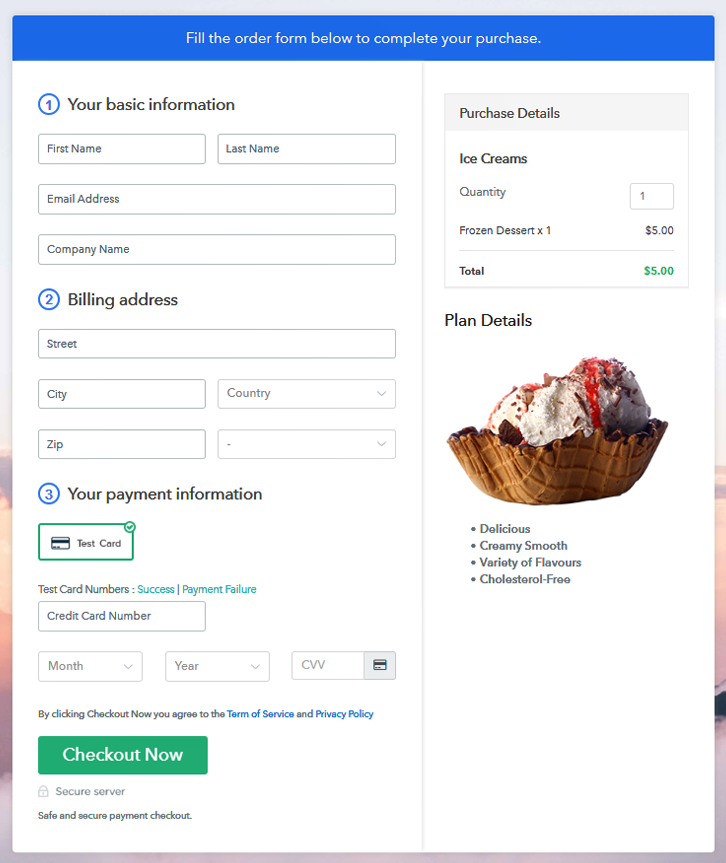
Final View of Checkout Page for your Ice Creams Selling Business

Checkout Page to Sell Ice Creams Online

Preview Checkout Page

Step 1: Log in to Pabbly Subscription Billing

Signup

Begin the process for creating a checkout page for ice creams by visiting the Pabbly Subscription Billing in your browser. After that, click on the “Sign up Free“ button. Moreover, either manually filled out the details or sign in using your Gmail account.

Sign Up For Free!

Step 2: Select Subscription Billing

Access Subscription Billing

Step 3: Account Setup

Setup Account

Besides, after clicking on the “Access Now” button of the software, a page will open with fields like company name, select currency, and phone number. Simply fill out those details to continue creating a checkout page for ice creams.

Step 4: Connect Payment Gateways & Start Ice Creams Selling Business Online

Connect Payment Gateway

The subsequent step is to gaining knowledge about payment procedures using a “Test Payment Gateway”. Here, we will describe the checkout page process for the ice creams with the help of a test payment gateway. Besides this, the tool offers various payment gateways such as PayPal, Stripe, etc. Further, below are the payment integration guides to help you out.

Step 5: Add Product for your Ice Creams

Add Product

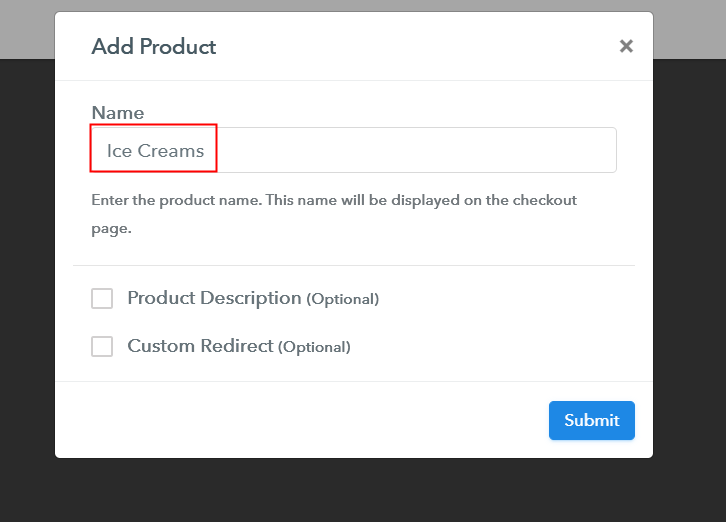
Additionally, add the name, which in our case is “Ice Creams”. Here you can specify the type like chocolate ice creams, vanilla ice creams, etc. Further, write a short description of the ice creams to grab the customer’s attention.

Add Product to Start Selling Ice Creams Online

Moreover, just fill out all those details and your product is created.

Note: Here you can add all the products related to the similar category by creating plans for each of them.

Step 6: Add Plans 

Let’s expose plans for different kinds of ice creams available in your store.

(a) Select Add New Plan

Add Plan

(b) Specify the Plan & Pricing Details

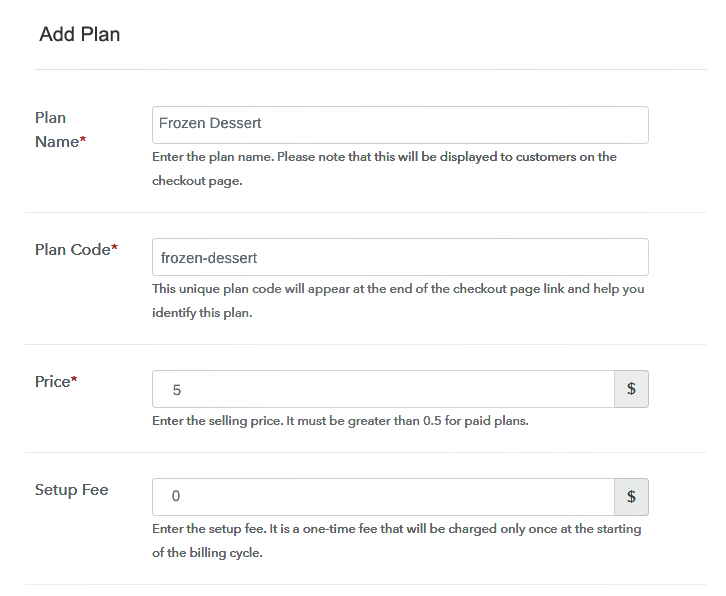
Specify the Plan and Pricing to Sell Ice Creams Online

The next thing to do is fill all the details of the ice creams like plan name, code, price, set-up fee, and much more to continue.

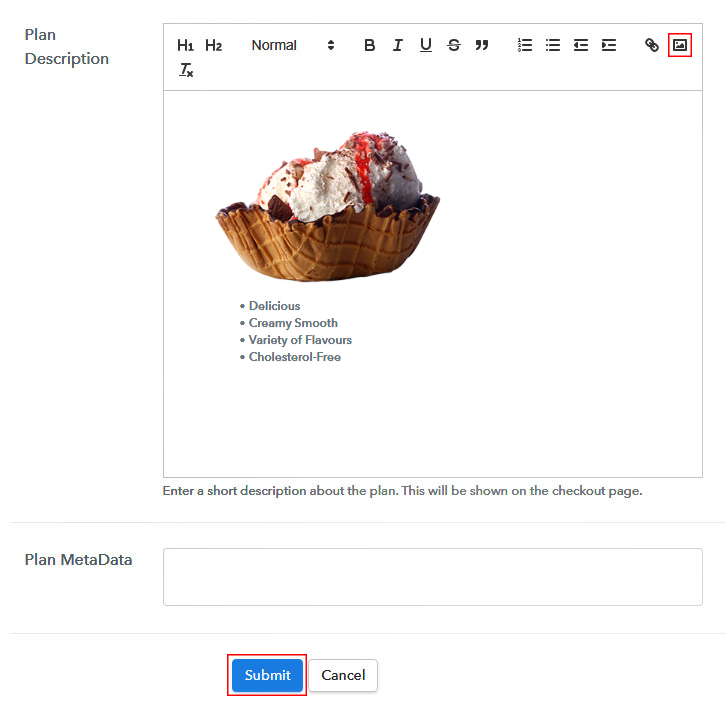
(c) Add Image & Description of Ice Creams

Add Image & Description to Sell Ice Creams Online

Furthermore, write a brief description of the ice creams using bullets, images, etc, to bring original buyers to the checkout page.

Next, click on the “Submit” button to add the ice cream’s on the checkout page.

Finally, you can add multiple plans and kinds of ice creams in your product list which you want to sell online.

Step 7: Share your Checkout Page

Share Checkout Page on Social Media

  • Moreover, share the checkout page of the ice creams on social media accounts like Facebook & Twitter to grab the customer’s attention.
  • Also, you can share the direct link of the ice creams checkout page with your customers via SMS or email marketing.
  • Additionally, embed the provided plan link of the ice creams in the buttons or any anchor text on your website.

Step 8: Preview Checkout Page

Follow up the recommended steps to preview the checkout page:

(a) Click on the View Button

View Checkout Plan

(b) Take a Look at the Checkout Page

Checkout Page to Sell Ice Creams Online

Step 9: Embed Checkout Page in Site & Sell Ice Creams Online

Embed Checkout Page on Website

Just copy the link and add the checkout page to sell ice creams online at any proper place on your WordPress site.

(a) Edit the Page & Paste the Copied Link

Paste Link in Text Editor

Further, paste the plan link of ice creams on a text editor of the WordPress dashboard.

(b) Save & Publish the Checkout Page

Save_and_Publish

Next, click the “Publish” button, after making changes.

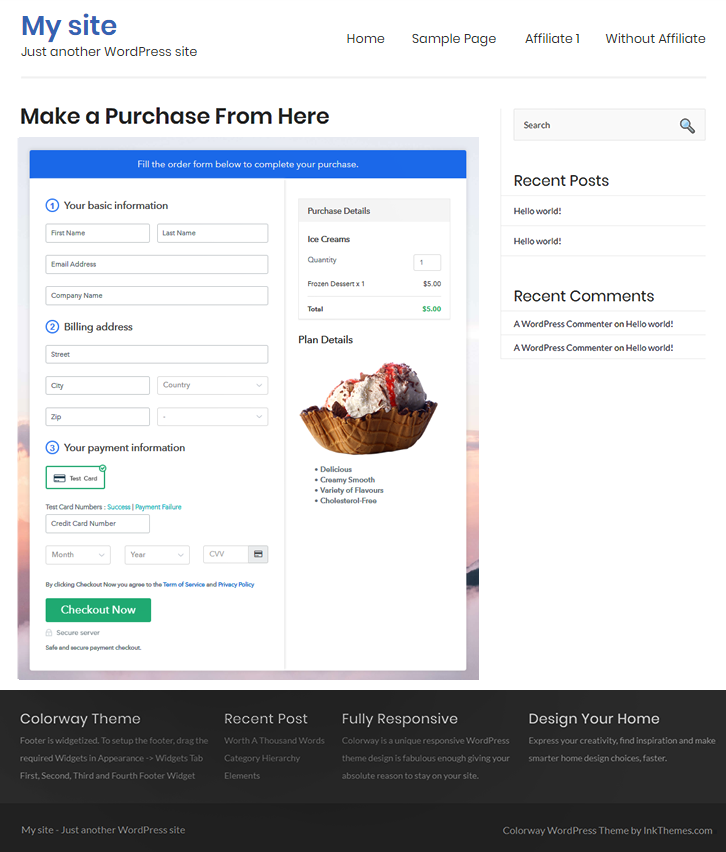
(c) Check out the Final Look of your Checkout Page on WordPress Site

Final Look of your Checkout Page to Sell Ice Creams Online

Step 10: Multiplan Checkout Page

Note: In case you want to sell multiple products via a single checkout page, you can create a multi-plan checkout page otherwise skip this step.

(a) Click on Add Mutiplan Checkout

Multiplan Checkout

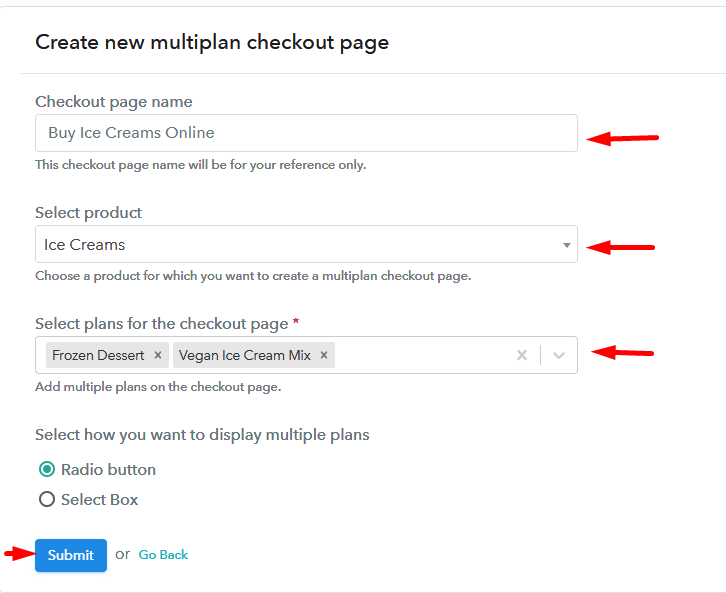
(b) Add Plans to Sell Multiple Ice Creams from Single Checkout Page

Add Multiple Products to Start Selling Ice Creams Online

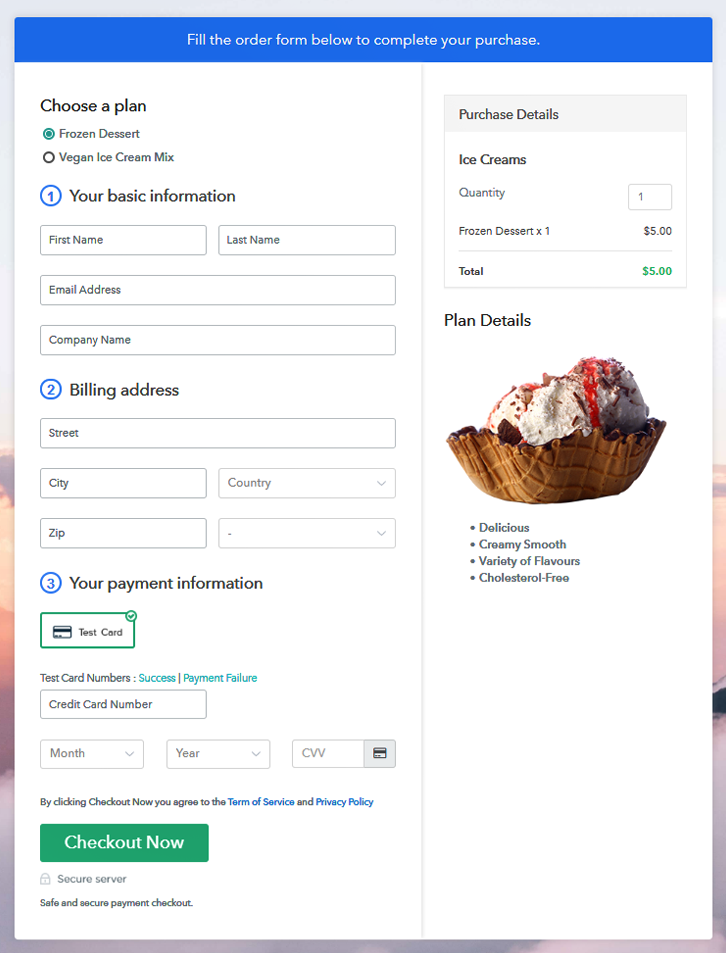
(c) Take a Look at the Checkout Page

Multiplan Checkout Page to Sell Ice Creams Online

Preview Checkout Page

Wrapping Up

That’s it! We all got sweet tooth which makes it difficult to say no to ice creams. Whether it is chocolate ice creams or vegan ice creams you can easily sell it online using Pabbly Subscription Billing software. All you have to do is follow all the above-mentioned steps to create a checkout page for ice creams. Further, it allows you to strengthen a customer relationship as it sends a timely email alert to customers about the product.

You May Also Like To Read –