How to Sell Prawn Crackers Online | Step by Step (Free Method)

How to Sell Prawn Crackers Online

Ideal For: All the prawn cracker makers, prawn cracker sellers, retail prawn cracker shop owners, and other merchants can use this method to take their prawn crackers selling business online.
How to Sell Prawn Crackers Online

Why Choose this Method to Sell Prawn Crackers Online?

Unlike any other solution, this method allows you to:

  • List and sell your prawn crackers for FREE. Absolutely no payment required.
  • No need to pay commission on any of your sale.
  • Multiple payment options like PayPal, Credit Card, etc to collect payment from a single place.
  • Sell one time or recurring subscriptions of your prawn crackers.
  • Collect payments & sell products in any currency as per your requirement.
  • Give discounts on your products by offering special coupon codes.
  • Add sales commission agents to help you in selling prawn crackers online.

Get Pabbly Subscription Billing for Free

Prawn crackers are seafood in the best form that can be transported easily and is loved by all age groups. And if you are planning to sell prawn crackers online we can tell you how.

In this blog, we are going to discuss the checkout page creation process for selling prawn crackers online. The checkout pages will help you display prawn cracker products as well as collect payments for the sold ones.

Also, you can automate the billing and invoicing process. The service provides a dashboard to manage the record for the available items and sales. Furthermore, you can share the checkout pages on any social media or link sharing platforms like WhatsApp, Twitter, Facebook, SMS, emails etc.

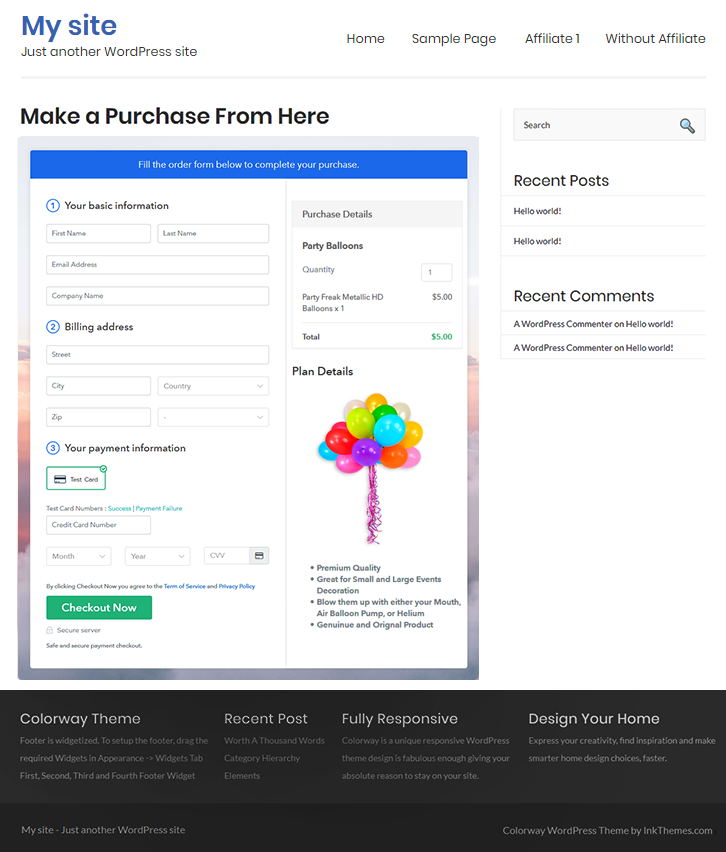
Final View of Checkout Page for your Prawn Crackers Selling Business
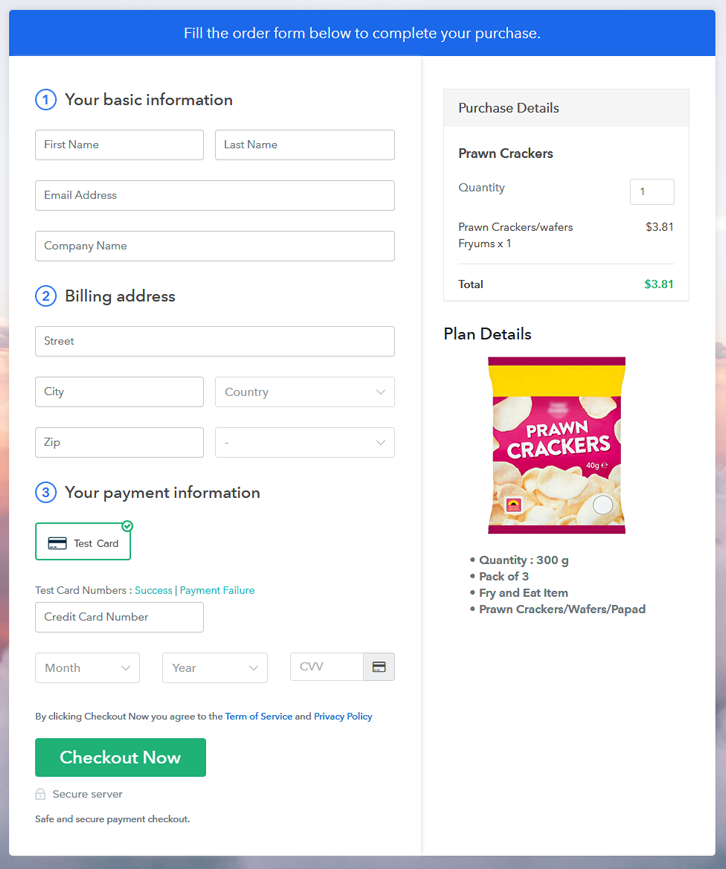
Checkout Page Preview to Sell Prawn Crackers Online

Preview Checkout Page

Step 1: Log in to Pabbly Subscription Billing
Signup

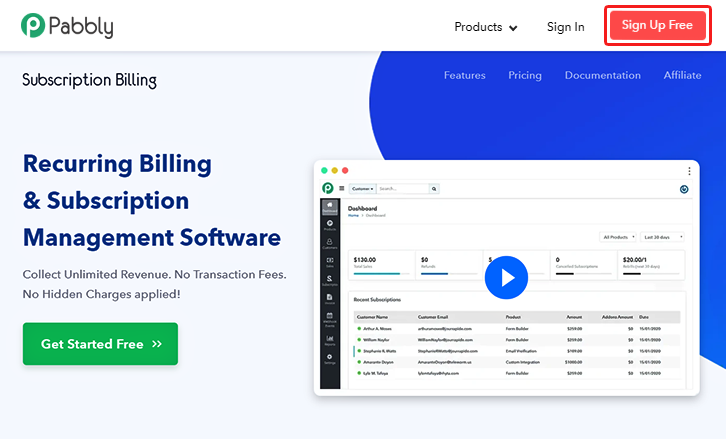
First, go to Pabbly Subscription Billing and click ‘Sign Up Free‘.  On the registration page, either sign-up using an existing Gmail account or do it manually by fill-out the registration form to get started for selling prawn crackers online.

Sign Up For Free!

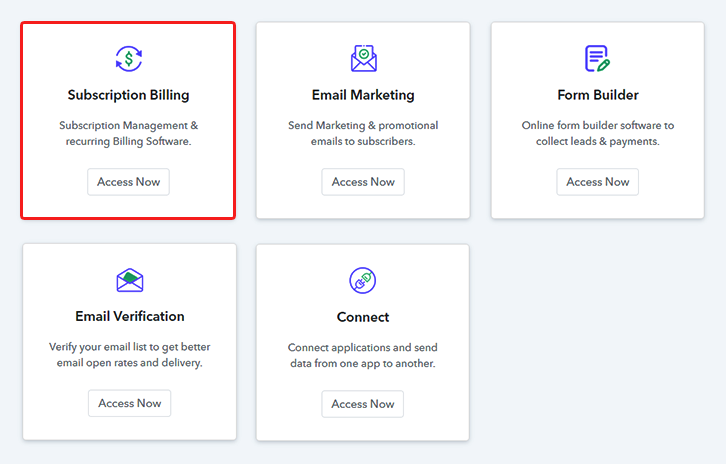
Step 2: Select Subscription Billing

Access Subscription Billing

Step 3: Account Setup
Setup Account

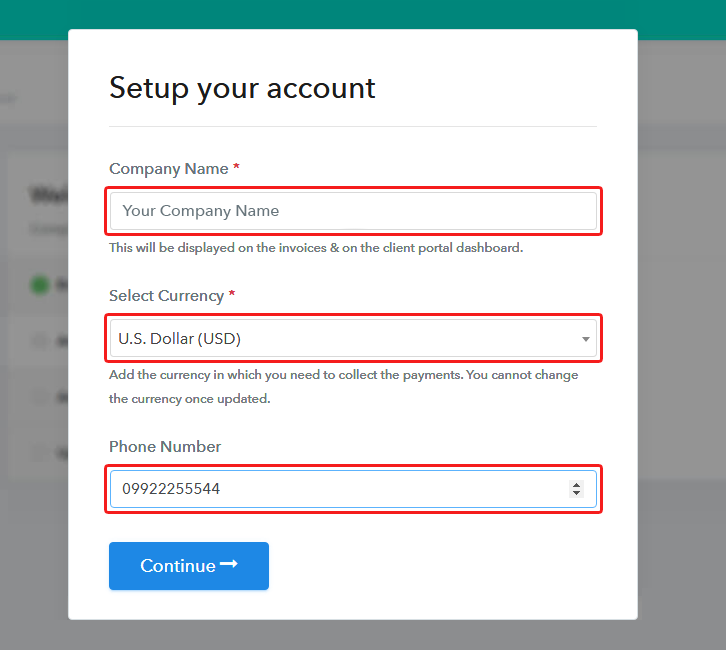
In this step, you’ll be demanded to fill your company details to move forward in the procedure of creating checkout pages to sell prawn crackers online. Quickly fill in all the information & strike ‘Continue’ button.

Step 4: Connect Payment Gateways & Start Prawn Crackers Selling Business Online
Connect Payment Gateway

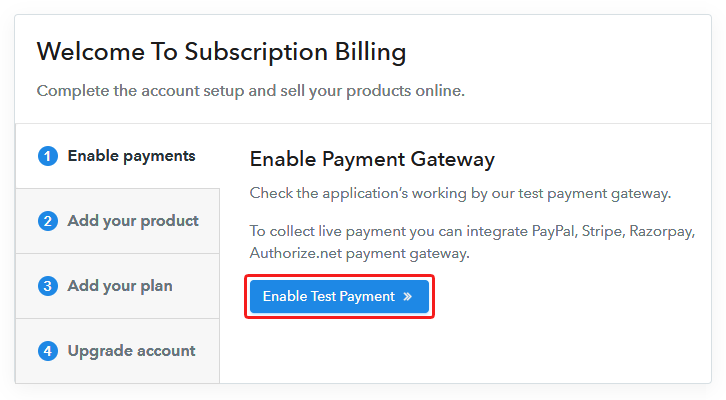
This is an important step and will directly reflect on the success of payment collection for the sold prawn crackers. So, integrate a payment method to accept payments or ‘Enable Test Payment’ option just for testing. To integrate a payment gateway, use the following options. Also, integration guides are linked for your ease.

Step 5: Add Product for your Prawn Crackers
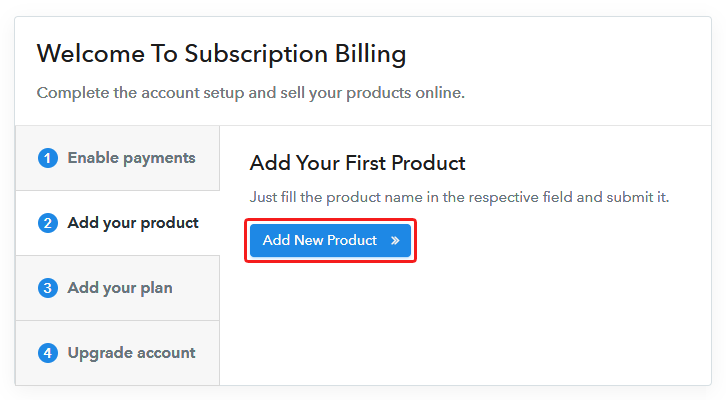
Add Product

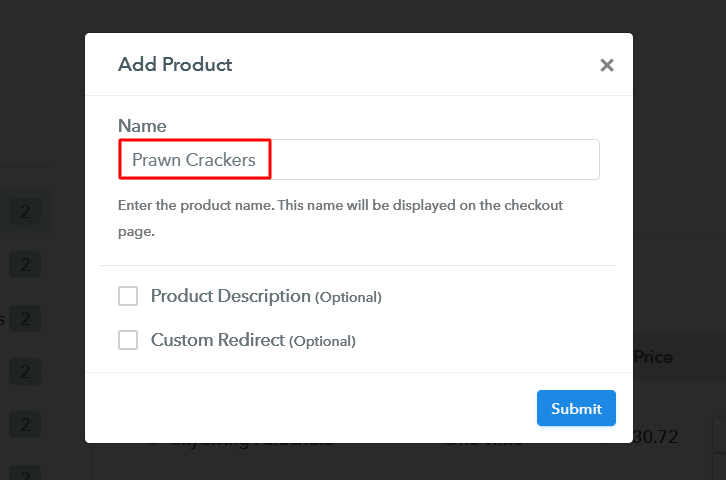
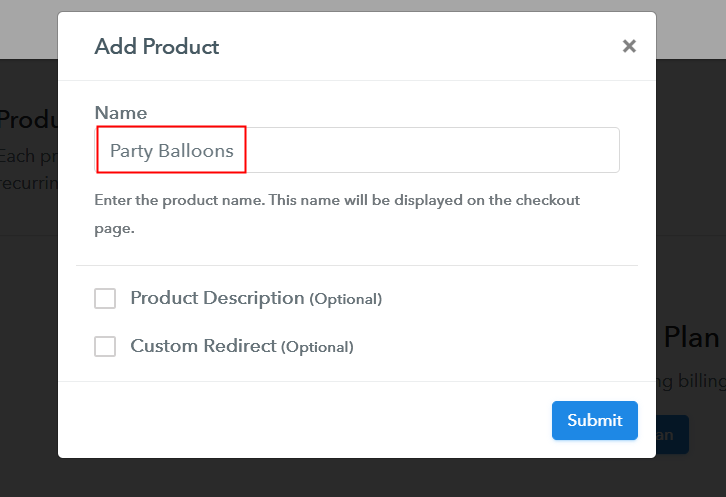
Now, you can start creating products. Mention a product name much like a category of prawn crackers and we’ll add plans (items to sell) to these product categories later on the next step.

Add Product to Sell Prawn Crackers Online

Fill all the essential product details & hit ‘Submit’.

Note: Here you can add all the products related to the similar category by creating plans for each of them.

Step 6: Add Plans 

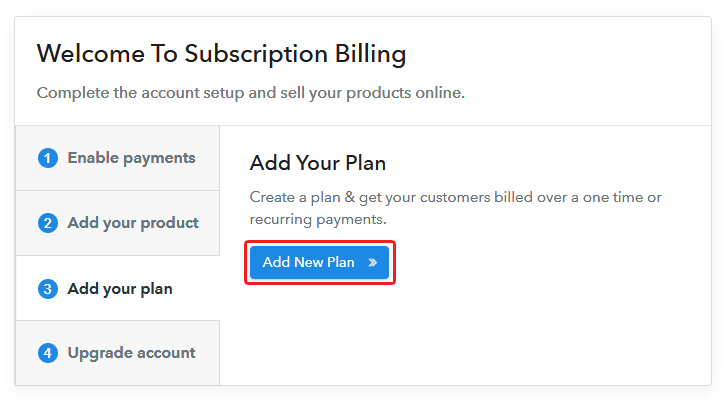
Now, let’s start adding plans for the different kinds of prawn crackers available in your store.

(a) Select Add New Plan

Add Plan

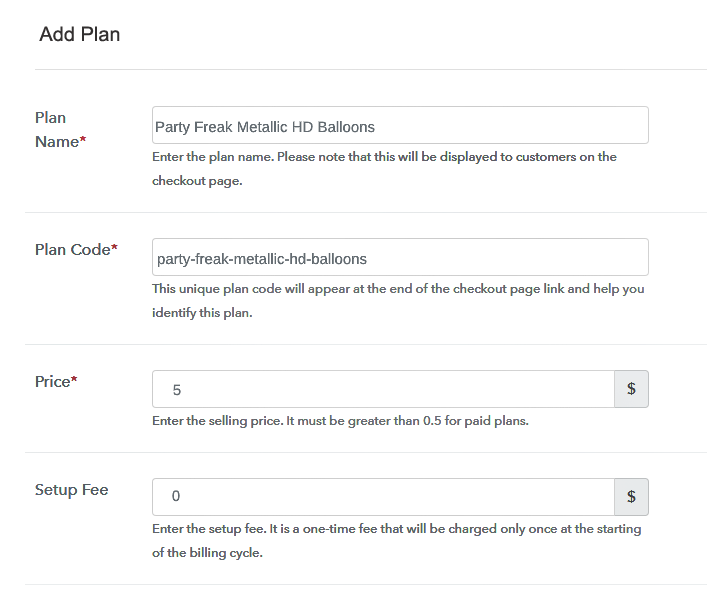
(b) Specify the Plan & Pricing Details
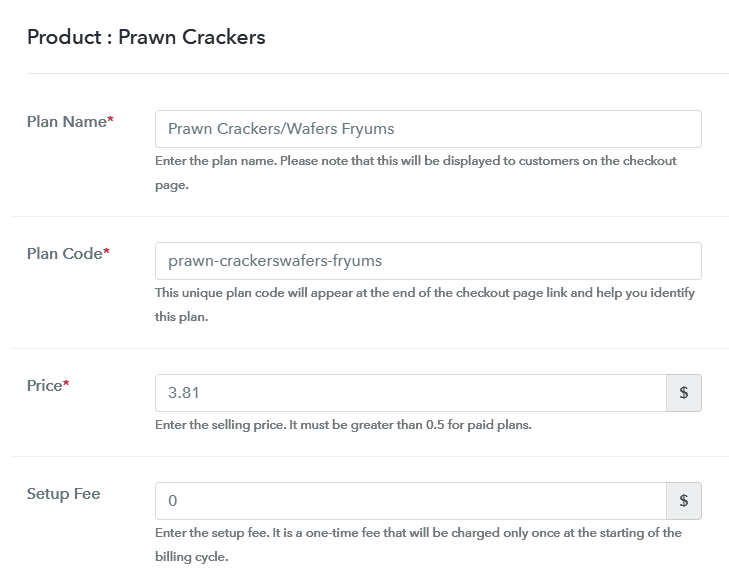
Add Plan to Sell Prawn Crackers Online

You can write a name, price & other details of a prawn cracker product in this plan details page.

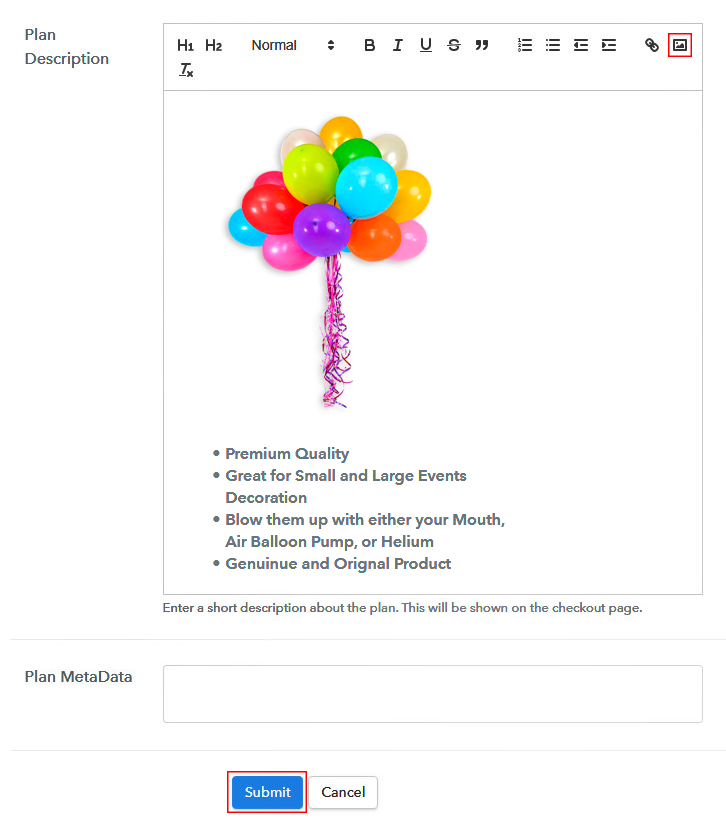
(c) Add Image & Description of Prawn Crackers
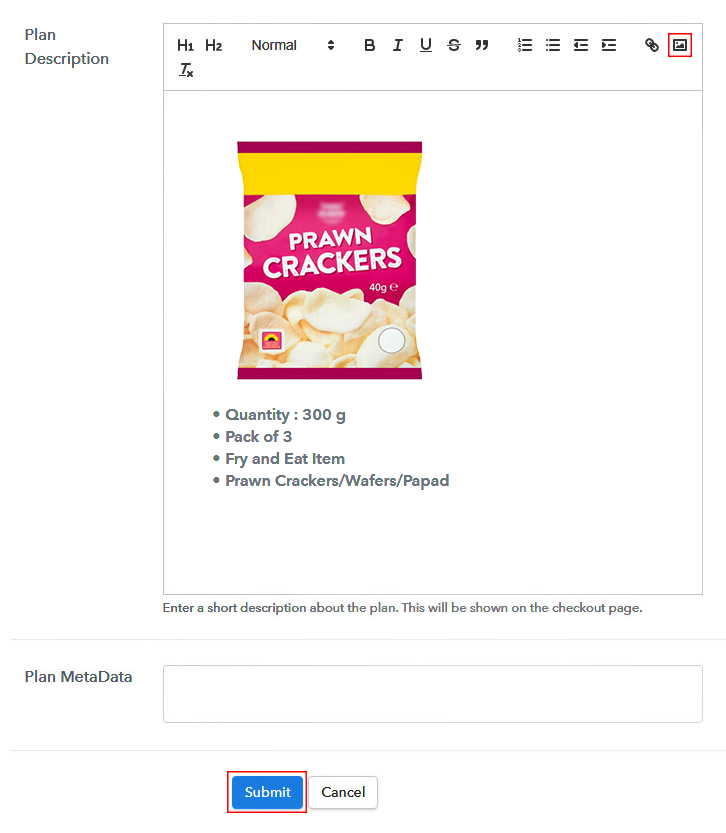
Add Image & Description to Sell Prawn Crackers Online

Besides, if you want to display an image with some descriptive feature of the prawn crackers then you can mention them in there.

Strike ‘Submit’ once you are done filling in the plan details & a plan will be created immediately to sell prawn crackers online.

Also, you can also add other prawn cracker plans.

Step 7: Share your Checkout Page

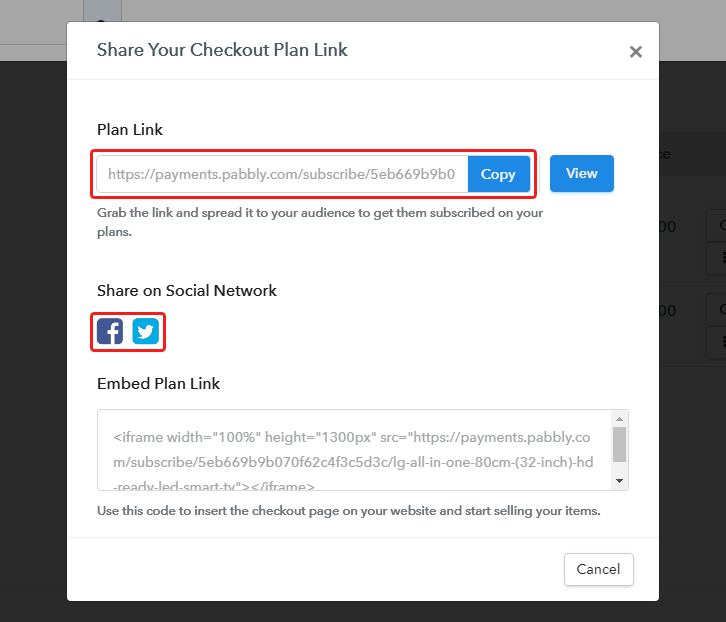
Share Checkout Page on Social Media

To start selling prawn crackers online, you can share a created checkout page. There are three ways to do so.

  • First, you can share the plan link URL of a checkout page on various social media & link sharing channels such as SMS, emails, messengers etc
  • Second, you can strike the buttons to directly share a checkout page over Facebook or Twitter
  • Third, you can redirect a customer on the checkout pages by linking these payment pages with buttons & texts for a website or app

Step 8: Preview Checkout Page

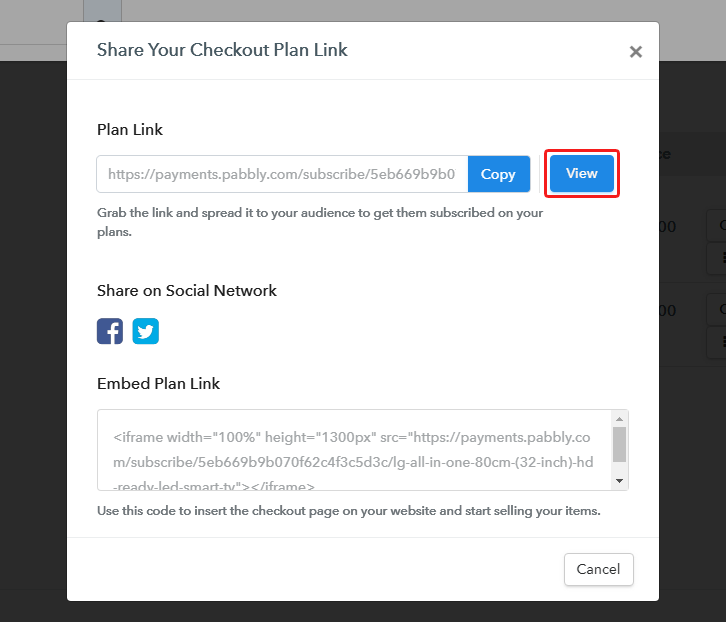
Follow up the recommended steps to preview the checkout page:

(a) Click on the View Button

View Checkout Plan

(b) Take a Look at the Checkout Page

Checkout Page Preview to Sell Prawn Crackers Online

Step 9: Embed Checkout Page in Site & Sell Prawn Crackers Online
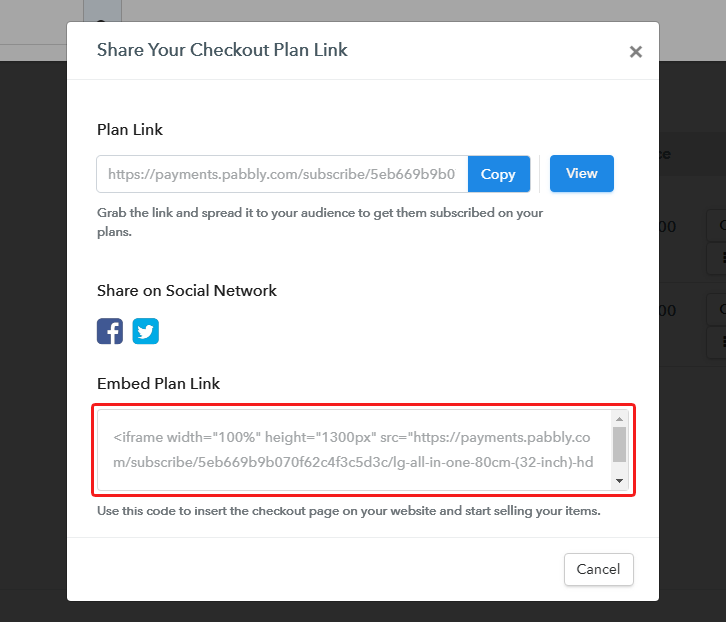
Embed Checkout Page on Website

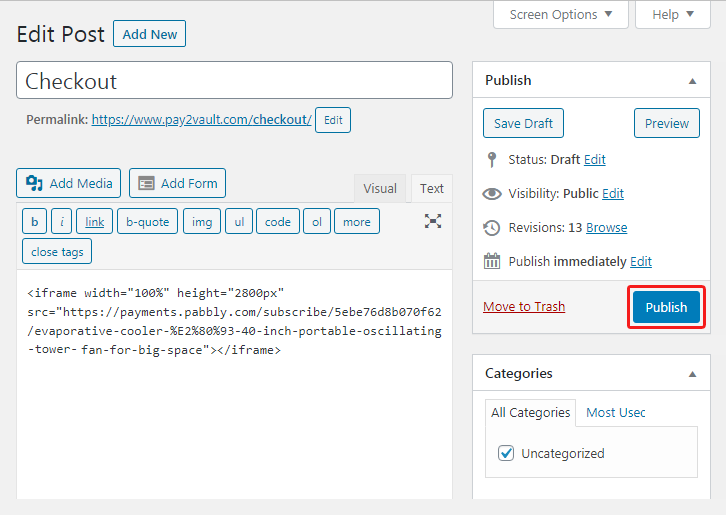
Just copy the link and add the checkout page to sell prawn crackers online at any preferable place on your WordPress site.

(a) Edit the Page & Paste the Copied Link
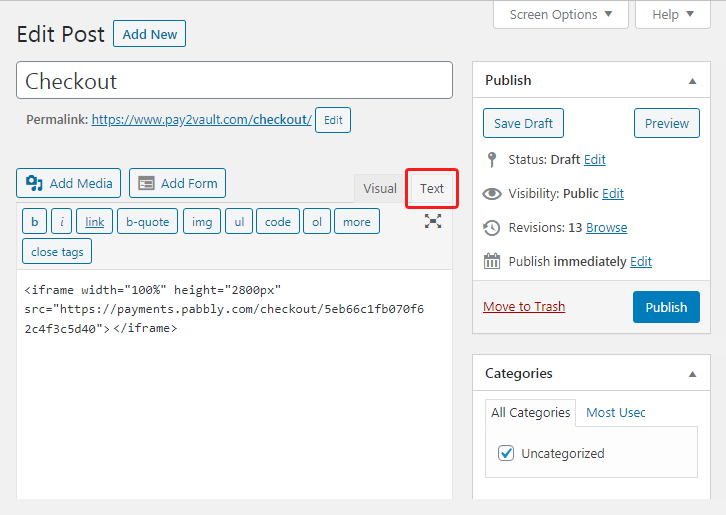
Embed Checkout Page on Website

Further, paste the plan link on a text editor of the WordPress dashboard.

(b) Save & Publish the Checkout Page

Save_and_Publish

Next, click the “Publish” button, after making changes.

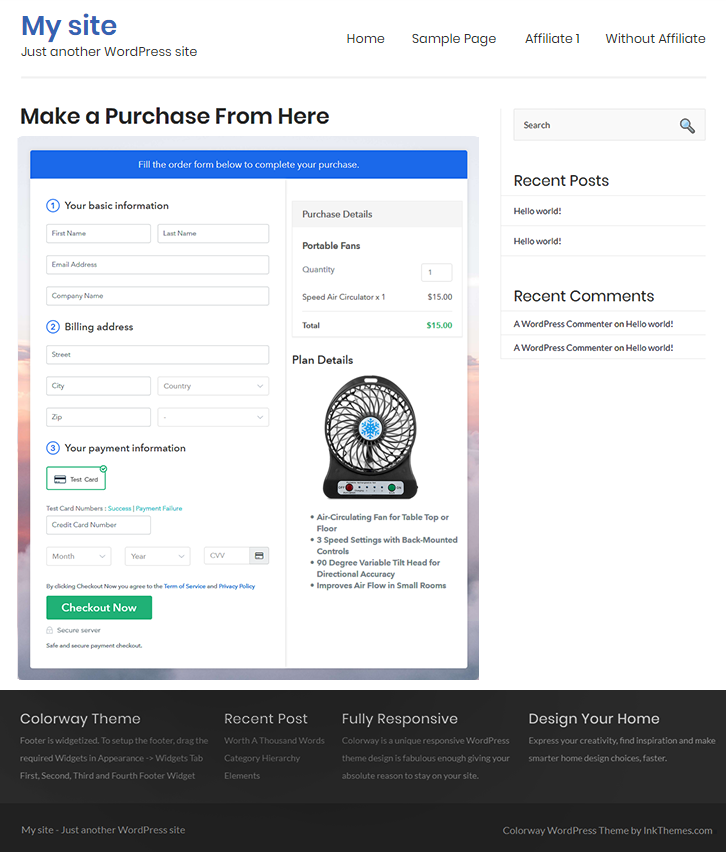
(c) Check out the Final Look of your Checkout Page on WordPress Site
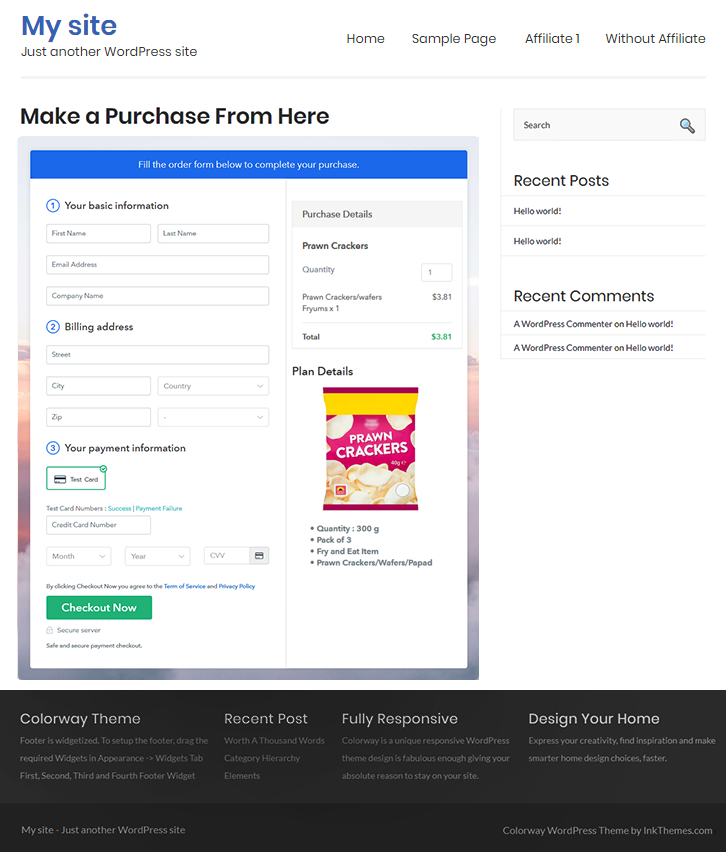
Checkout Page On WordPress Site to Sell Prawn Crackers Online

Step 10: Multiplan Checkout Page

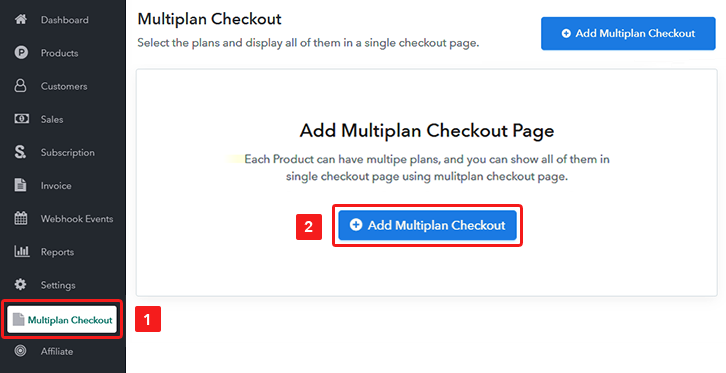
Note: In case you want to sell multiple products via a single checkout page, you can create a multi-plan checkout page otherwise skip this step.

(a) Click on Add Mutiplan Checkout

Multiplan Checkout

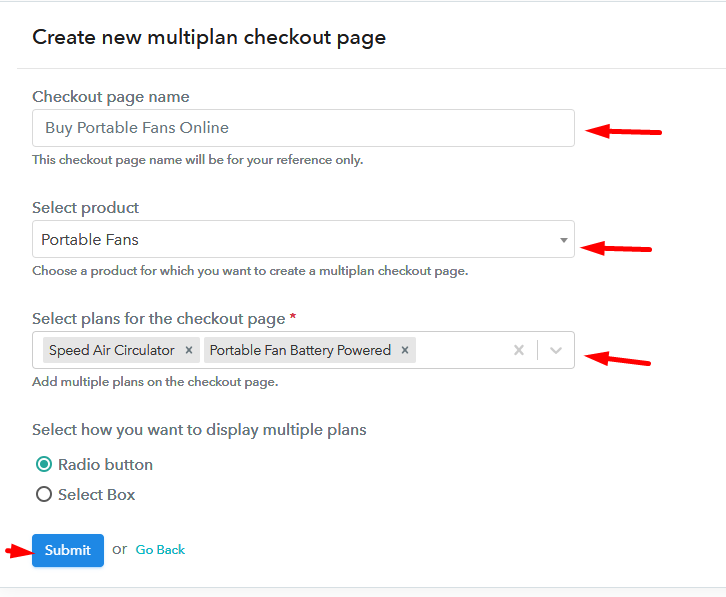
(b) Add Plans to Sell Multiple Prawn Crackers from Single Checkout Page
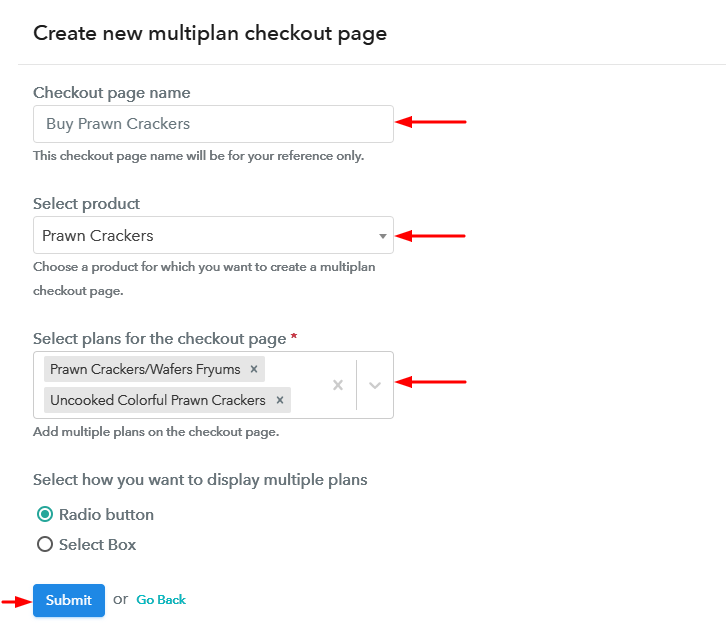
Create Multiplan Checkout to Sell Prawn Crackers Online

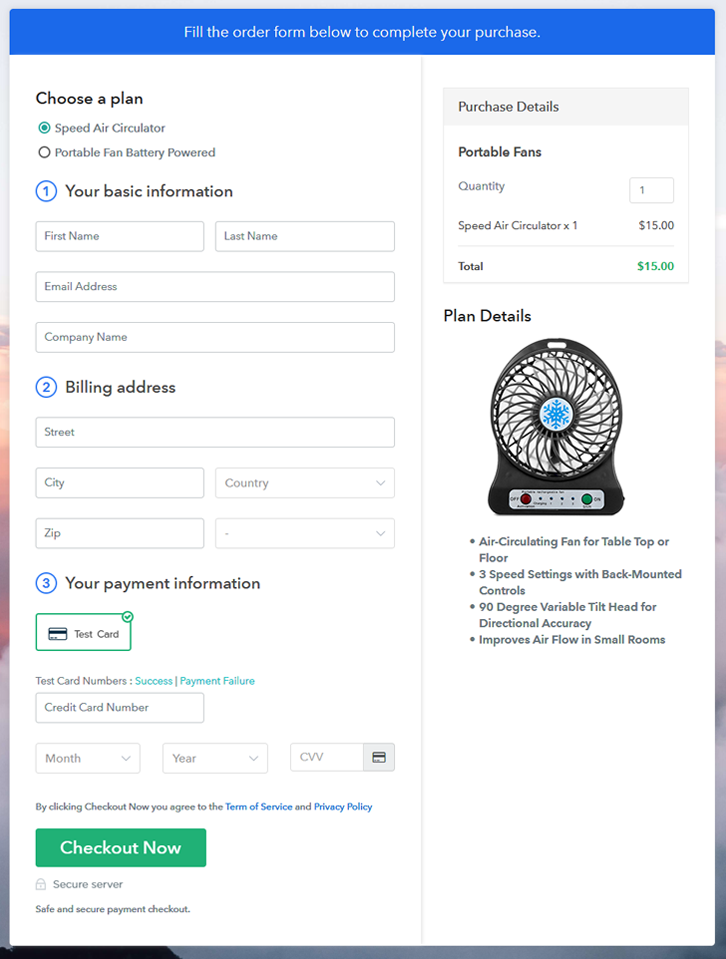
(c) Take a Look at the Checkout Page
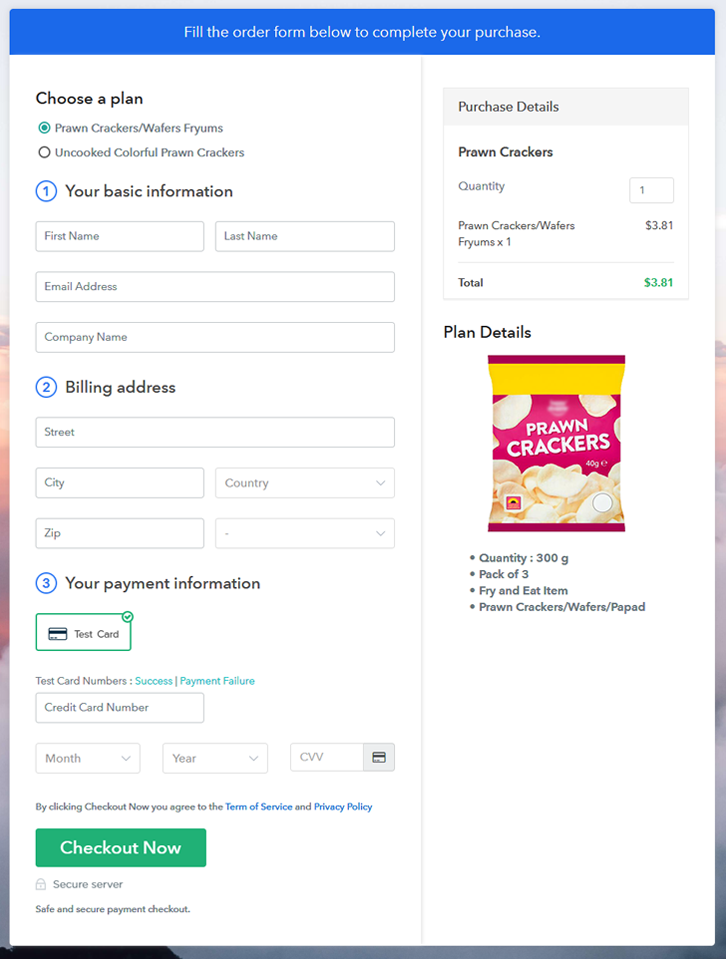
Multiplan Checkout Page to Sell Prawn Crackers Online

Preview Checkout Page

Wrapping Up

This was the entire process for creating checkout pages to sell prawn crackers online. It will take only just a few minutes & you can start accepting secure payments in a well-managed way for your prawn crackers. Also, all the records for sales and products will be there in the dashboard & you can keep track of the revenue generated.

Apart from all that, you can accept multiple currencies & can sell unlimited prawn crackers worldwide.

You May Also Like To Read –
How to Sell Portable Fans Online | Step by Step (Free Method)

How to Sell Portable Fans Online

Ideal For: All the portable fan manufacturers, portable fan sellers, fan dealers, poratable fan suppliers, and other merchants can use this method to sell portable fans online.

How to Sell Portable Fans Online

Why Choose this Method to Sell Portable Fans Online?

Unlike any other solution, this method allows you to:

  • List and sell your portable fans for FREE. Absolutely no payment required.
  • No need to pay commission on any of your sales.
  • Multiple payment options like PayPal, Credit Card, etc to collect payment from a single place.
  • Sell one time or recurring subscriptions of your portable fans.
  • Collect payments & sell products in any currency as per your requirement.
  • Give discounts on your products by offering special coupon codes.
  • Add sales commission agents to help you in selling portable fans online.

Get Pabbly Subscription Billing for Free

According to the Business Wire report, the global portable fan market is expected to grow at a CAGR of 3.3% during the upcoming period. The reason which is supporting the portable fans market growth is the increasing consumption of bladeless portable fans at home, offices, etc. Giving all this a thought, it would be great to start portable fans business online.

To be very honest, dignified and successful online stores doesn’t build itself alone in overnights. It takes huge patience and proper guidance. We know patience you have and guidance we are going to provide you in the form of Pabbly Subscription Billing software. The amazing software lets you build a checkout page for selling portable fans online.

Some of its noble features include:

  • Create Invoices
  • Track Revenue
  • Custom Domains

Now, without any ado let’s create a checkout page for selling portable fans online using this tool.

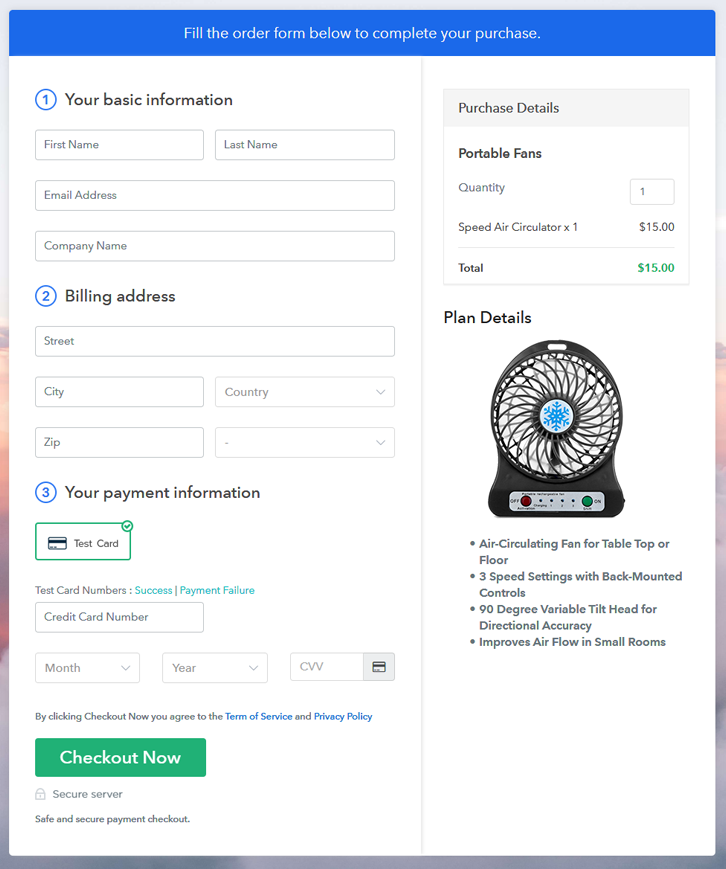
Final View of Checkout Page for your Portable Fans Selling Business

Checkout Page to Sell Portable Fans Online

Preview Checkout Page

Step 1: Log in to Pabbly Subscription Billing

Signup

Start the process for creating a checkout page for portable fans by visiting the Pabbly Subscription Billing in your browser. After that, click on the “Sign up Free“ button. Besides, either manually filled out the details or sign in using your Gmail account.

Sign Up For Free!

Step 2: Select Subscription Billing

Access Subscription Billing

Step 3: Account Setup

Setup Account

Also, after clicking on the “Access Now” button of the software, a page will open with fields like company name, select currency, and phone number. Simply fill out those details to continue creating a checkout page for portable fans.

Step 4: Connect Payment Gateways & Start Portable Fans Selling Business Online

Connect Payment Gateway

The subsequent step is to achieving information about payment procedures using a “Test Payment Gateway”. Here, we will describe the checkout page process for portable fans with the help of a test payment gateway. Besides this, the tool offers various payment gateways such as PayPal, Stripe, etc. Further, below are the payment integration guides to help you out.

Step 5: Add Product for your Portable Fans

Add Product

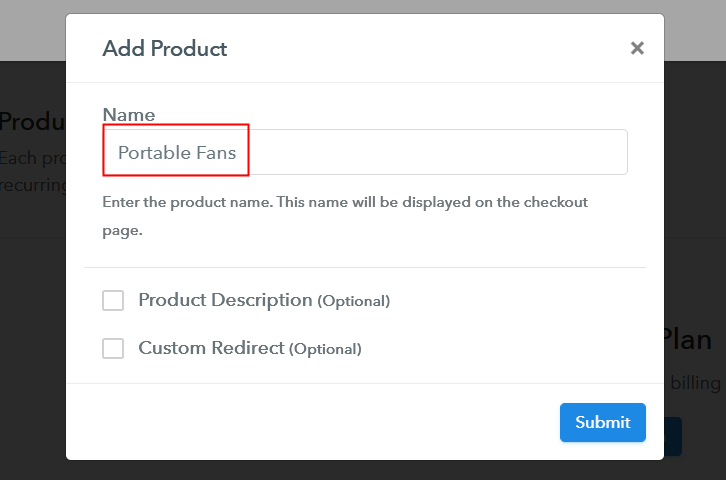
Additionally, add the name, which in our case is “Portable Fans”. Here you can specify the type like table fans, wall-mounted fans, etc. Further, write a short description of the portable fans to captivate the customer’s attention.

Add Product to Start Selling Portable Fans Online

Moreover, just fill out all those details and your product for portable fans is created.

Note: Here you can add all the products related to the similar category by creating plans for each of them.

Step 6: Add Plans 

Let’s unveil plans for different kinds of portable fans available in your store.

(a) Select Add New Plan

Add Plan

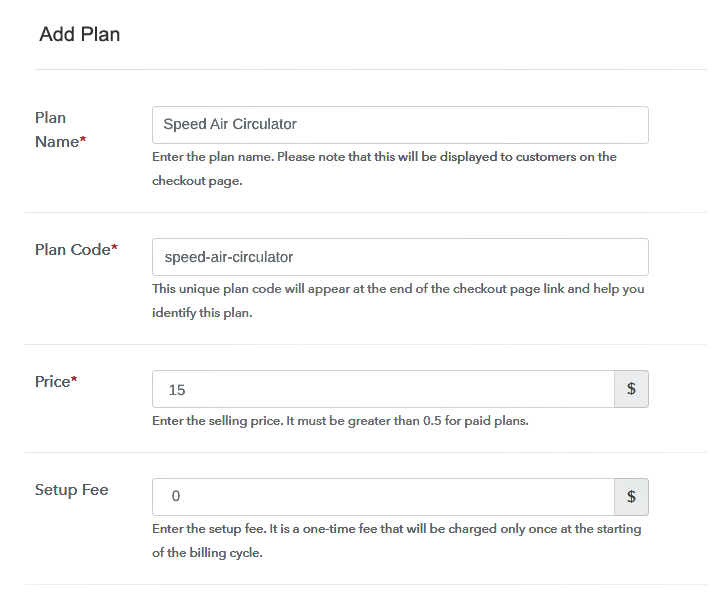
(b) Specify the Plan & Pricing Details

Specify the Plan and Pricing to Sell Portable Fans Online

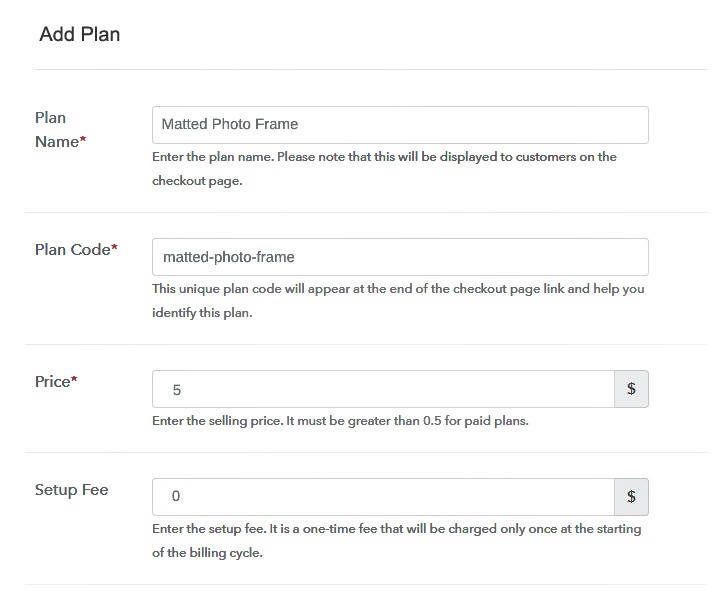
The next thing to do is fill all the details of the portable fans like plan name, code, price, set-up fee, and much more to continue.

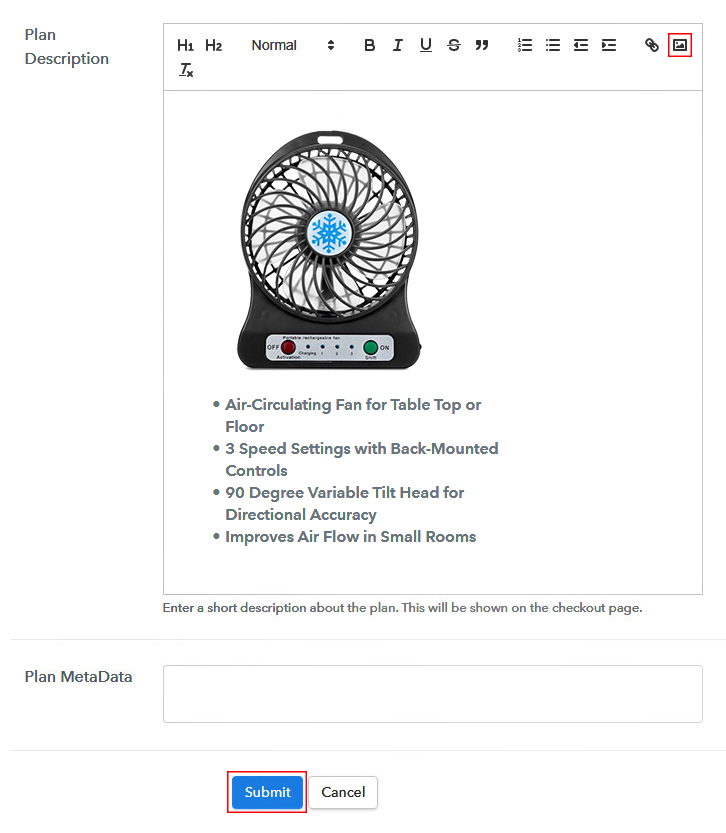
(c) Add Image & Description of Portable Fans

Add Image & Description to Sell Portable Fans Online

Furthermore, write a brief description of the portable fans using bullets, images, etc, to bring original buyers to the checkout page.

Next, click on the “Submit” button to add the portable fans on the checkout page.

Finally, you can add multiple plans and kinds of portable fans in your product list which you want to market online.

Step 7: Share your Checkout Page

Share Checkout Page on Social Media

  • Moreover, share the checkout page of portable fans on social media accounts like Facebook & Twitter to grab the customer’s attention.
  • Also, you can share the direct link of the portable fan’s checkout page with your customers via SMS or email marketing.
  • Additionally, embed the provided plan link of the portable fans in the buttons or any anchor text on your website.

Step 8: Preview Checkout Page

Follow up the recommended steps to preview the checkout page for portable fans:

(a) Click on the View Button

View Checkout Plan

(b) Take a Look at the Checkout Page

Checkout Page to Sell Portable Fans Online

Step 9: Embed Checkout Page in Site & Sell Portable Fans Online

Embed Checkout Page on Website

Just copy the link and add the checkout page to sell portable fans online at any proper place on your WordPress site.

(a) Edit the Page & Paste the Copied Link

Paste Link in Text Editor

Further, paste the plan link of portable fans on a text editor of the WordPress dashboard.

(b) Save & Publish the Checkout Page

Save_and_Publish

Next, click the “Publish” button, after making changes.

(c) Check out the Final Look of your Checkout Page on WordPress Site

Final Look of your Checkout Page to Sell Portable Fans Online

Step 10: Multiplan Checkout Page

Note: In case you want to sell multiple products via a single checkout page, you can create a multi-plan checkout page otherwise skip this step.

(a) Click on Add Mutiplan Checkout

Multiplan Checkout

(b) Add Plans to Sell Multiple Portable Fans from Single Checkout Page

Add Multiple Products to Start Selling Portable Fans Online

(c) Take a Look at the Checkout Page

Multiplan Checkout Page to Sell Portable Fans Online

Preview Checkout Page

Wrapping Up

Hopefully! Now you all know how easy is to start portable fans business online using Pabbly Subscription Billing software. We understand how daunting can be a process of sprouting your individual store. That’s where this software appeared as a savior. All you have to do is follow all the aforementioned steps for creating a checkout page of portable fans and you’re good to go.

You May Also Like To Read –
How to Sell Picture Frames Online | Step by Step (Free Method)

How to Sell Picture Frames Online

Ideal For: All the frame manufacturers, gift item sellers, customized frame dealers, frame suppliers, picture frame sellers, and other merchants can use this method to sell picture frames online.

How to Sell Picture Frames Online

Why Choose this Method to Sell Picture Frames Online?

Unlike any other solution, this method allows you to:

  • List and sell your picture frames for FREE. Absolutely no payment required.
  • No need to pay commission on any of your sales.
  • Multiple payment options like PayPal, Credit Card, etc to collect payment from a single place.
  • Sell one time or recurring subscriptions of your picture frames.
  • Collect payments & sell products in any currency as per your requirement.
  • Give discounts on your products by offering special coupon codes.
  • Add sales commission agents to help you in selling picture frames online.

Get Pabbly Subscription Billing for Free

Picture frames are the flashback of peoples and moments that are nestled deep within our hearts. This is a reason why people keep picture frames at their workstations, homes, etc. So, if you are one who sells customized picture frames then it is time to put a step into the digital world by inaugurating your own picture frames business online.

Well, there are numerous perks of starting your own picture frames store like no middleman, no opening time restriction, no bargaining, etc. Also, the digital store gives you an online presence that every business thrives for. Not to forget online stores are free from constraints like holidays, vacations, etc, the service will be active 24/7. Luckily, we came across software named Pabbly Subscription Billing that can give wings to your business. The software is a bundle box of joy for a startup, small business owners, entrepreneurs, etc. It stays top of stocks, payments, plans, etc. Further, it lets you build a checkout page for selling picture frames online.

Some of its remarkable features which are listed below:

  • Custom Domains
  • Professional Statements
  • Various Billing Modules

Alright, now that I have got you fascinated with its incredible features, then let’s focus on creating a checkout page to sell picture frames online.

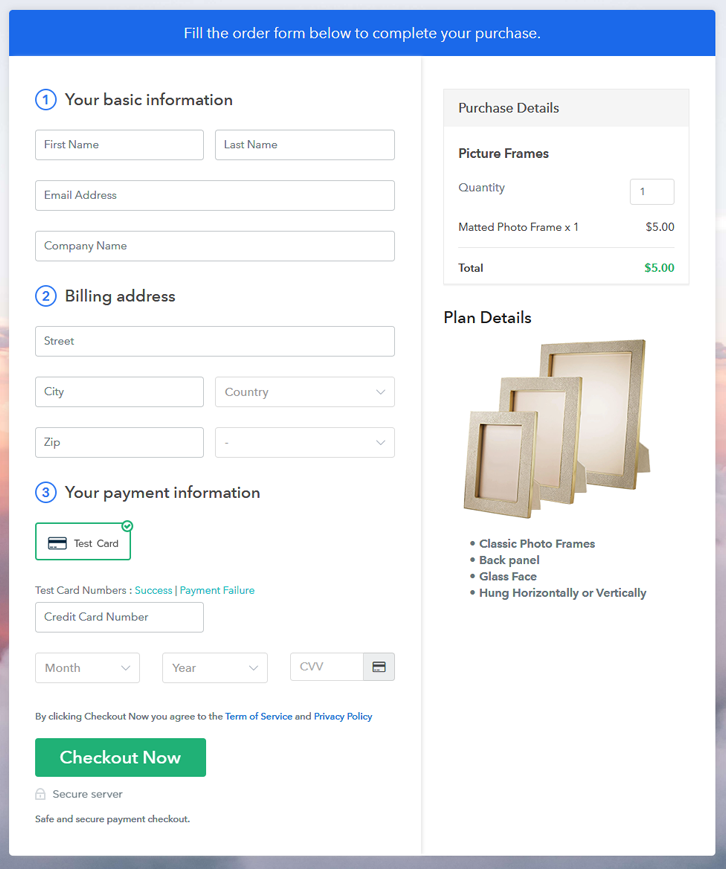
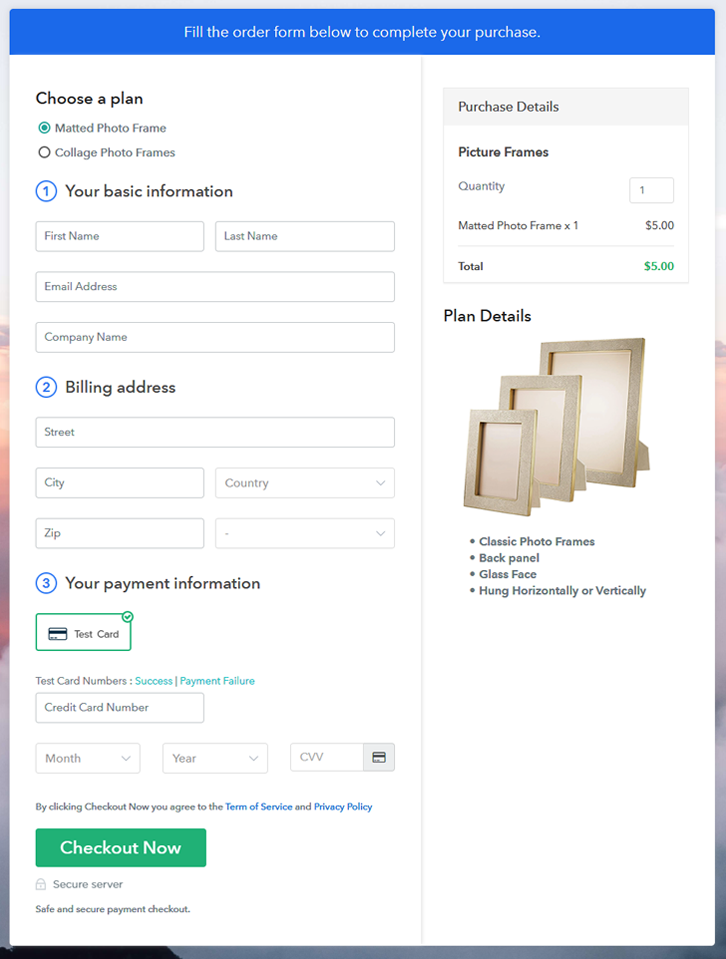
Final View of Checkout Page for your Picture Frames Selling Business

Checkout Page to Sell Picture Frames Online

Preview Checkout Page

Step 1: Log in to Pabbly Subscription Billing

Signup

Start the process for creating a checkout page for picture frames by visiting the Pabbly Subscription Billing in your browser. After that, click on the “Sign up Free“ button. Moreover, either manually filled out the details or sign in using your Gmail account.

Sign Up For Free!

Step 2: Select Subscription Billing

Access Subscription Billing

Step 3: Account Setup

Setup Account

Also, after clicking on the “Access Now” button of the software, a page will open with fields like company name, select currency, and phone number. Just fill out those details to continue creating a checkout page for picture frames.

Step 4: Connect Payment Gateways & Start Picture Frames Selling Business Online

Connect Payment Gateway

The subsequent step is to achieving information about payment procedures using a “Test Payment Gateway”. Here, we will describe the checkout page process for the picture frames with the help of a test payment gateway. Besides this, the tool offers various payment gateways such as PayPal, Stripe, etc. Further, below are the payment integration guides to help you out.

Step 5: Add Product for your Picture Frames

Add Product

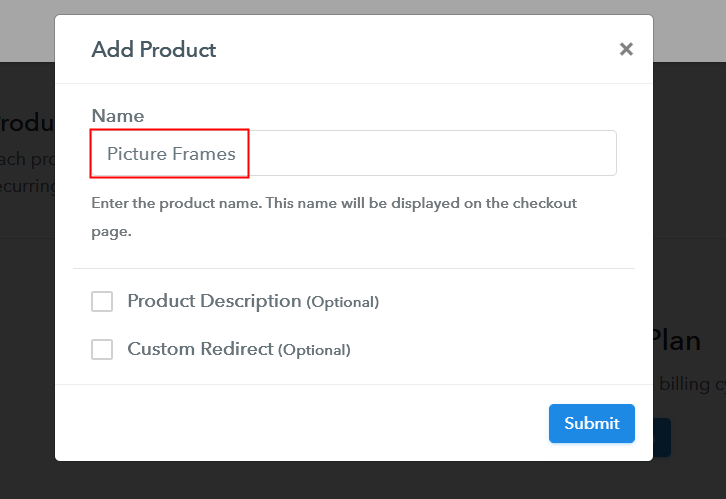
Additionally, add the name, which in our case is “Picture Frames”. Here you can specify the type like floating frames, customized picture frames, etc. Further, write a short description of the picture frames to capture the shopper’s attention.

Add Product to Start Selling Picture Frames Online

Moreover, just fill out all those details and your product for picture frames is created.

Note: Here you can add all the products related to the similar category by creating plans for each of them.

Step 6: Add Plans 

Further, let’s reveal plans for different kinds of picture frames available in your store.

(a) Select Add New Plan

Add Plan

(b) Specify the Plan & Pricing Details

Specify the Plan and Pricing to Sell Picture Frames Online

Subsequently, the next thing to do is fill all the details of the picture frames like plan name, code, price, set-up fee, and much more to continue.

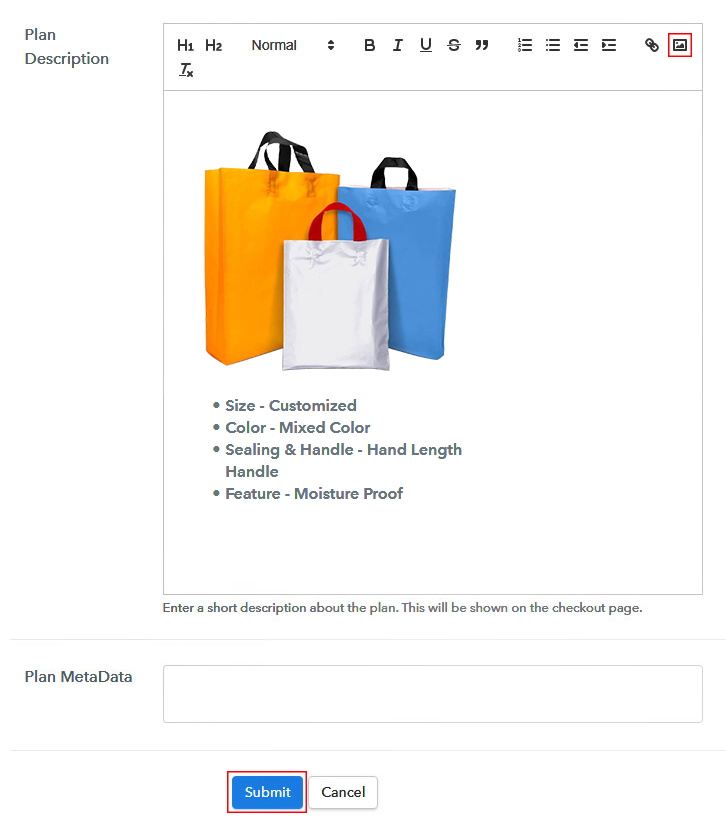
(c) Add Image & Description of Picture Frames

Add Image & Description to Sell Picture Frames Online

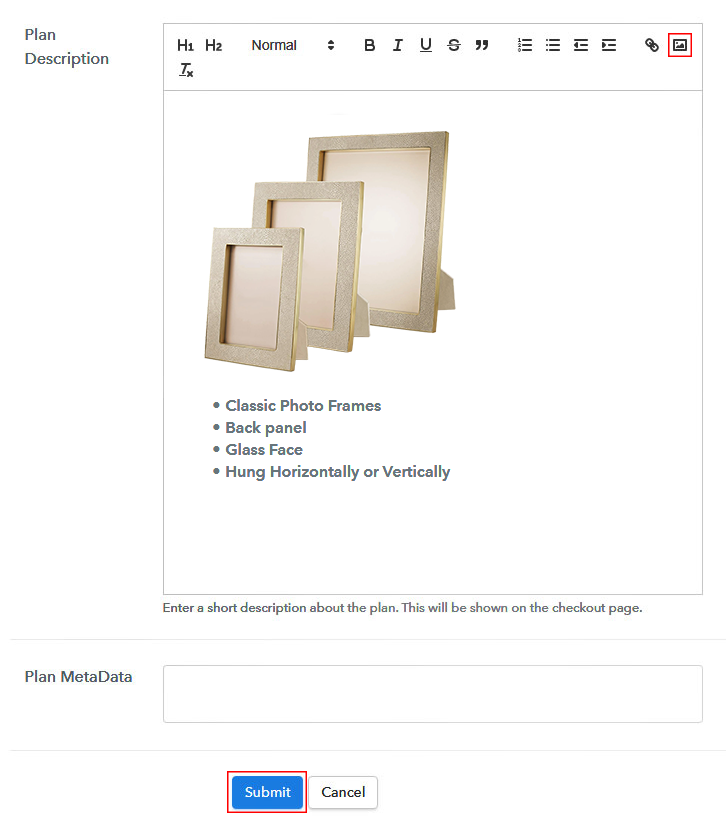
Furthermore, write a brief description of the picture frames using bullets, images, etc, to bring original buyers to the checkout page.

Next, click on the “Submit” button to add the picture frames on the checkout page.

Finally, you can add multiple plans and kinds of picture frames in your product list which you want to market online.

Step 7: Share your Checkout Page

Share Checkout Page on Social Media

  • Moreover, share the checkout page of the picture frames on social media accounts like Facebook & Twitter to grab the customer’s attention.
  • Also, you can share the direct link of the picture frame’s checkout page with your customers via SMS or email marketing.
  • Additionally, embed the provided plan link of the picture frames in the buttons or any anchor text on your website.

Step 8: Preview Checkout Page

Follow up the recommended steps to preview the checkout page for picture frames:

(a) Click on the View Button

View Checkout Plan

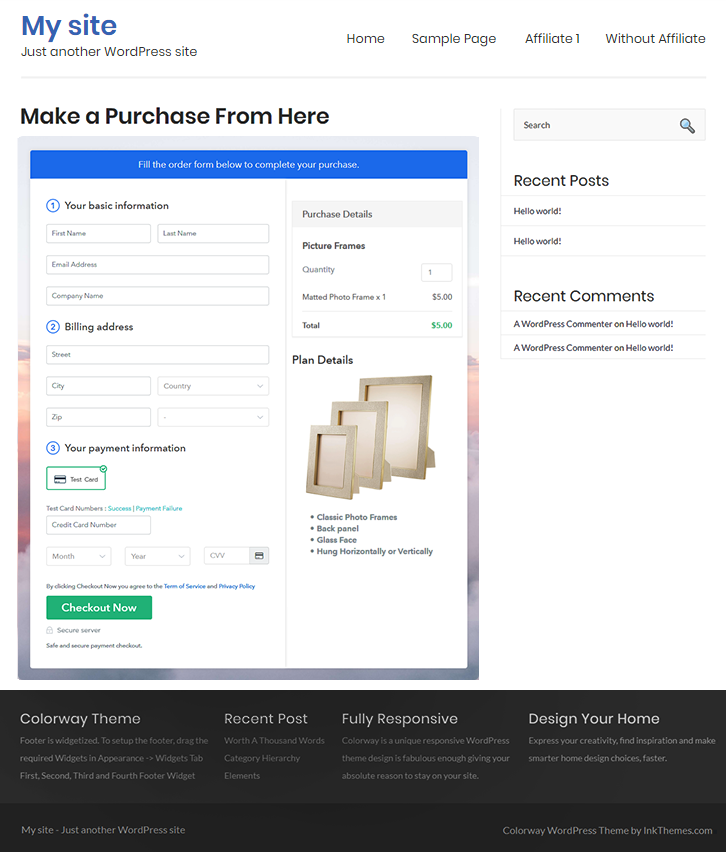
(b) Take a Look at the Checkout Page

Checkout Page to Sell Picture Frames Online

Step 9: Embed Checkout Page in Site & Sell Picture Frames Online

Embed Checkout Page on Website

Moreover, just copy the link and add the checkout page to sell picture frames online at any proper place on your WordPress site.

(a) Edit the Page & Paste the Copied Link

Paste Link in Text Editor

Further, paste the plan link of picture frames on a text editor of the WordPress dashboard.

(b) Save & Publish the Checkout Page

Save_and_Publish

Next, click the “Publish” button, after making changes.

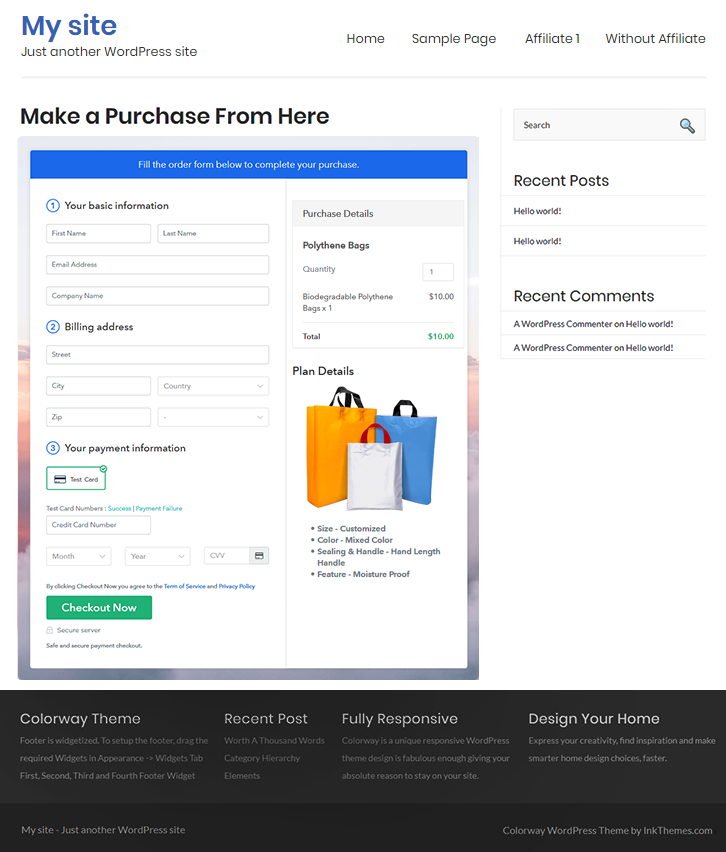
(c) Check out the Final Look of your Checkout Page on WordPress Site

Final Look of your Checkout Page to Sell Picture Frames Online

Step 10: Multiplan Checkout Page

Note: In case you want to sell multiple products via a single checkout page, you can create a multi-plan checkout page otherwise skip this step.

(a) Click on Add Mutiplan Checkout

Multiplan Checkout

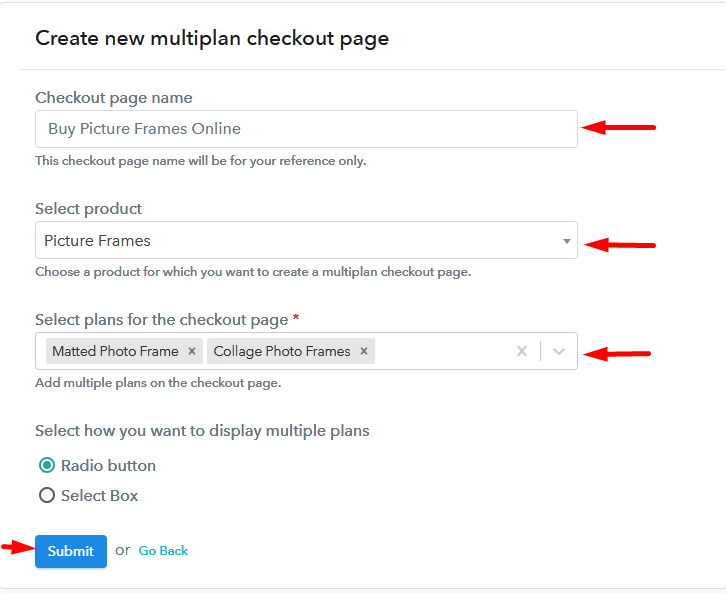
(b) Add Plans to Sell Multiple Picture Frames from Single Checkout Page

Add Multiple Products to Start Selling Picture Frames Online

(c) Take a Look at the Checkout Page

Multiplan Checkout Page to Sell Picture Frames Online

Preview Checkout Page

Wrapping Up

Alright! Picture frames are a way to get back to moments which brings huge curves on your faces. This is exactly why people keep picture frames of their loved ones. So starting picture frames business online is the appropriate idea. Now you are very well aware of how easy is to sell picture frames online using Pabbly Subscription Billing software. Just go through all the maneuvered steps and nothing else.

So, don’t wait anymore, try this software out.

You May Also Like To Read –
How to Sell Polythene Bags Online | Step by Step (Free Method)

How to Sell Polythene Bags Online

Ideal For: All the polythene bag manufacturers, polythene bag sellers, polythene bag dealers, polythene bag suppliers, polythene bag shop owners, and other merchants can use this method to sell polythene bags online.

How

Why Choose this Method to Sell Polythene Bags Online?

Unlike any other solution, this method allows you to:

  • List and sell your polythene bags for FREE. Absolutely no payment required.
  • No need to pay commission on any of your sales.
  • Multiple payment options like PayPal, Credit Card, etc to collect payment from a single place.
  • Sell one time or recurring subscriptions of your polythene bags.
  • Collect payments & sell products in any currency as per your requirement.
  • Give discounts on your products by offering special coupon codes.
  • Add sales commission agents to help you in selling polythene bags online.

Get Pabbly Subscription Billing for Free

Polythene bags are the most important product that everyone use in their daily lives. Be it home, shops, restaurants, usage of polythene never stops and makes its business evergreen. So, if you are thinking to start your polythene bags selling business online then there is no doubt that it is a great idea.

Beisides this, selling polythene bags online is way much convenient for buyers to purchase as it saves the trouble of visiting shops offline. Besides, it comes with peaks like a global audience, easy management, online payment collection, etc.

Keeping all these things in mind, it would be best to start polythene bags selling business online. Luckily, we came across software named Pabbly Subscription Billing that lets us create an amazing checkout page for selling polythene bags online. Some of its remarkable features involve:

  • List various kind of polythene bags in a single checkout page
  • Create professional invoices using software
  • Offer unlimited discounts and coupon codes to customers.

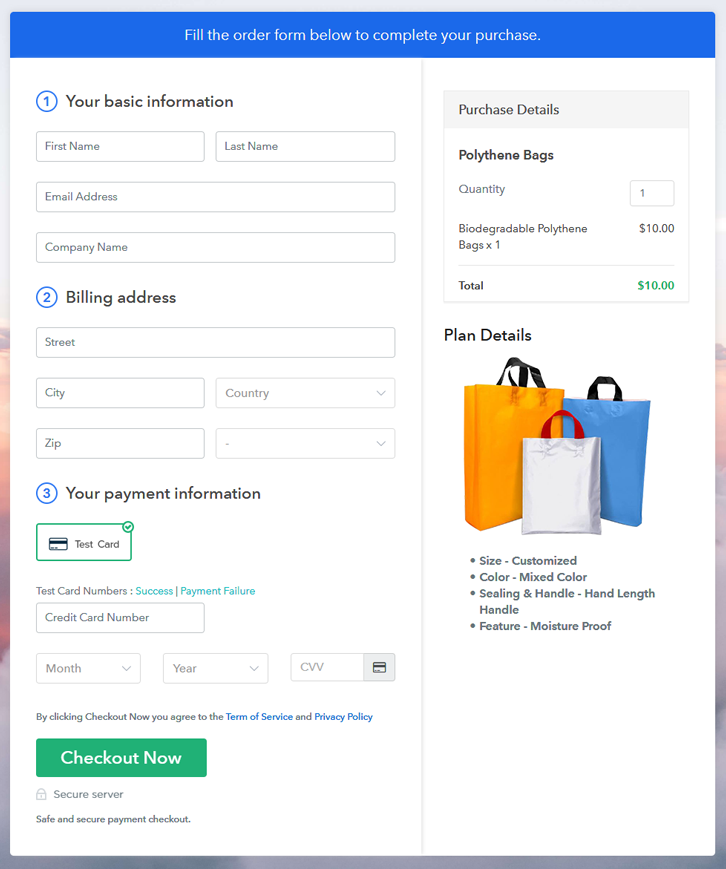
Final View of Checkout Page for your Polythene Bags Selling Business

Checkout Page Sell Polythene Bags Online

Preview Checkout Page

Step 1: Log in to Pabbly Subscription Billing

Signup

The very first step for creating a checkout page for polythene bags is, by visiting the Pabbly Subscription Billing in your browser. After that, click on the “Sign up Free“ button. Further, either manually filled out the details or sign in using your Gmail account.

Sign Up For Free!

Step 2: Select Subscription Billing

Access Subscription Billing

Step 3: Account Setup

Setup Account

Moreover, after clicking on the “Access Now” button of the software, a page will start with fields like company name, select currency, and phone number. Just fill out those details to continue creating a checkout page for polythene bags.

Step 4: Connect Payment Gateways & Start Polythene Bags Selling Business Online

Connect Payment Gateway

The subsequent step is about gathering information regarding payment procedures using a “Test Payment Gateway”. Here, we will explain the checkout page process for the polythene bags with the help of a test payment gateway. Further, this tool offers various payment gateways such as PayPal, Stripe, etc. Also, below are the payment integration guides to help you out.

Step 5: Add Product for your Polythene Bags

Add Product

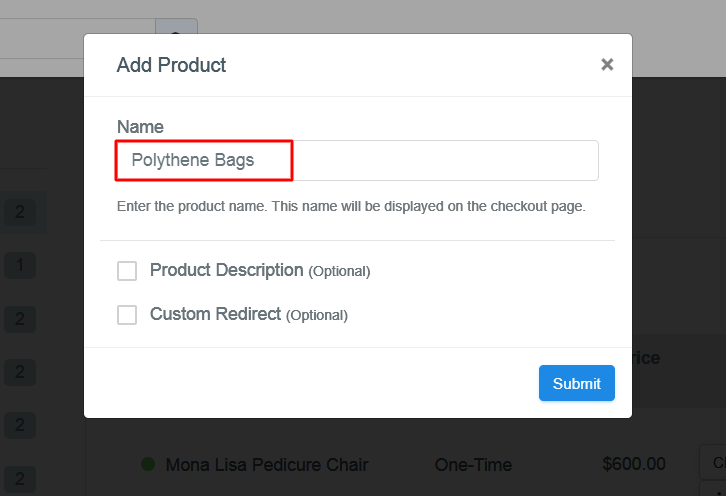
Moreover, add the name, which in our case is “Polythene Bags”. Here you can specify the type like pointed polythene bags, flat polythene bags, etc. Additionally, write a short description of the polythene bags to bind the client’s attention.

Add Product for your Polythene Bags

Furthermore, just fill out all those details and your product is created.

Note: Here you can add all the products related to the similar category by creating plans for each of them.

Step 6: Add Plans 

Let’s discover plans for different kinds of polythene bags available in your store.

(a) Select Add New Plan

Add Plan

(b) Specify the Plan & Pricing Details

Specify the Plan & Pricing Details to Sell Polythene Bags

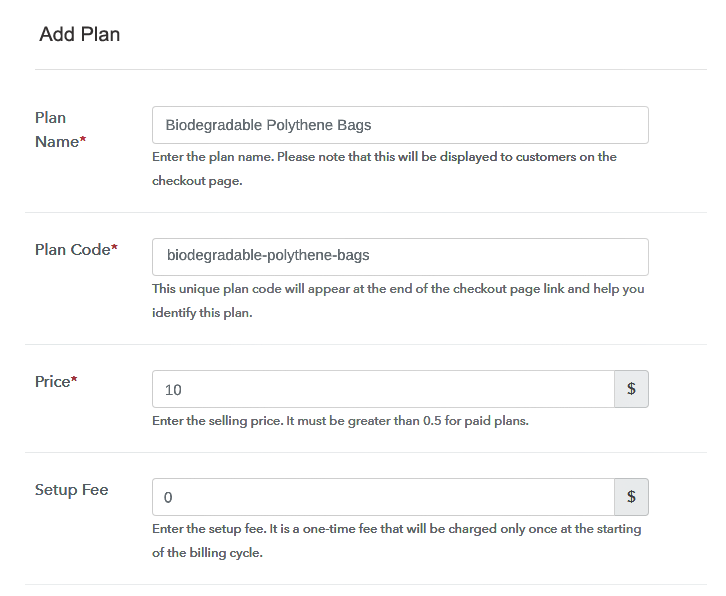
The next thing to do is fill all the details of the polythene bags like plan name, code, price, set-up fee, and much more to continue.

(c) Add Image & Description of Polythene Bags

Add Image & Description of Polythene Bags

Furthermore, it is necessary to write a brief description of polythene bags using bullets, images, etc, to bring original buyers to the checkout page.

Next, click on the “Submit” button to add the polythene bags on the checkout page.

Finally, you can add multiple plans and kinds of polythene bags in your product list which you want to market online.

Step 7: Share your Checkout Page

Share Checkout Page on Social Media

  • Moreover, share the checkout page of the polythene bags on social media accounts like Facebook & Twitter to grab the customer’s attention.
  • Also, you can share the direct link of the polythene bag’s checkout page with your customers via SMS or email marketing.
  • Additionally, embed the provided plan link of the polythene bags in the buttons or any anchor text on your website.

Step 8: Preview Checkout Page

Follow up the recommended steps to preview the checkout page:

(a) Click on the View Button

View Checkout Plan

(b) Take a Look at the Checkout Page

Checkout Page Sell Polythene Bags Online

Step 9: Embed Checkout Page in Site & Sell Polythene Bags Online

Embed Checkout Page on Website

Just copy the link and add the checkout page to sell polythene bags online at any proper place on your WordPress site.

(a) Edit the Page & Paste the Copied Link

Embed Checkout Page on Website

Further, paste the plan link of polythene bags on a text editor of the WordPress dashboard.

(b) Save & Publish the Checkout Page

Save_and_Publish

Next, click the “Publish” button, after making changes.

(c) Check out the Final Look of your Checkout Page on WordPress Site

Embed Checkout Page in Site & Sell Polythene Bags Online

Step 10: Multiplan Checkout Page

Note: In case you want to sell multiple products via a single checkout page, you can create a multi-plan checkout page otherwise skip this step.

(a) Click on Add Mutiplan Checkout

Multiplan Checkout

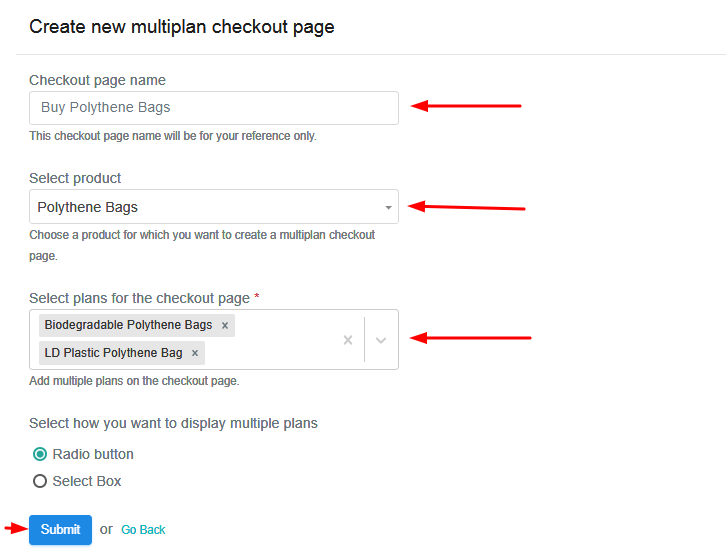
(b) Add Plans to Sell Multiple Polythene Bags from Single Checkout Page

Add Plans to Sell Multiple Polythene Bags from Single Checkout Page

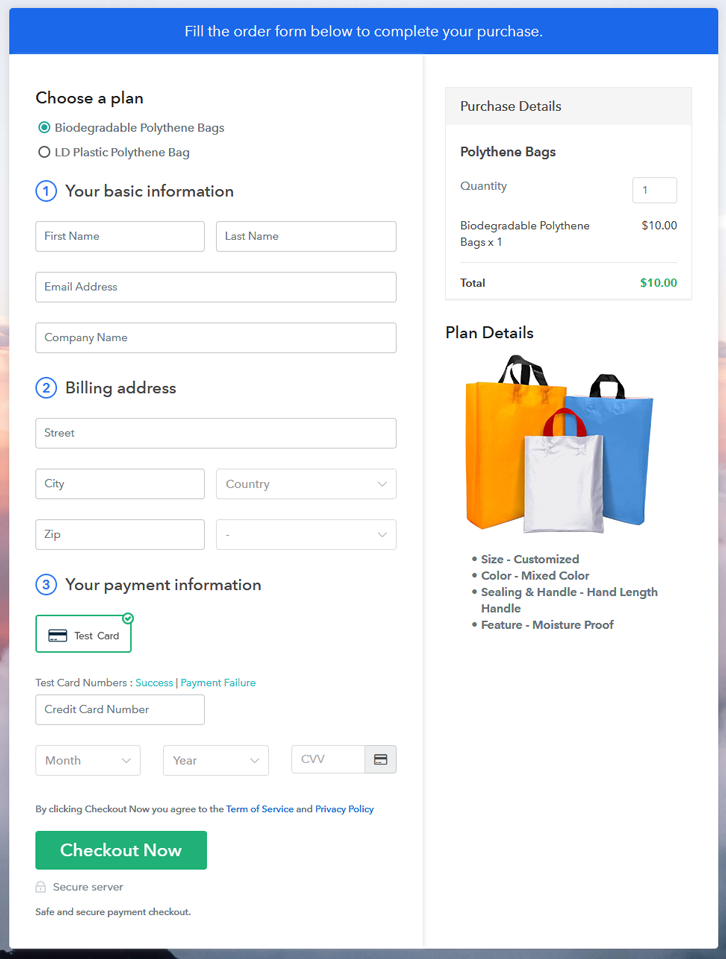
(c) Take a Look at the Checkout Page

Multiplan Checkout Page to Sell How to Sell Polythene Bags Online

Preview Checkout Page

Wrapping Up

That’s it!! So, this was the process of ‘how to sell polythene bags online using checkout pages’. Polythene bags are being used from centuries and it is not going out of trend any time soon. Then go ahead, and start your own polythene bags selling business online using Pabbly Subscription Billing software. Furthermore, if have any advice or inquiry, ping us in the comment section below. We will get back to you ASAP. Thank you!!

You May Also Like To Read –
How to Sell Party Balloons Online | Step by Step (Free Method)

How to Sell Party Balloons Online

Ideal For: All the balloon manufacturers, decorative material sellers, balloon dealers, party material suppliers, party balloon sellers, and other merchants can use this method to sell party balloons online.

How to Sell Party Balloons Online

Why Choose this Method to Sell Party Balloons Online?

Unlike any other solution, this method allows you to:

  • List and sell your party balloons for FREE. Absolutely no payment required.
  • No need to pay commission on any of your sales.
  • Multiple payment options like PayPal, Credit Card, etc to collect payment from a single place.
  • Sell one time or recurring subscriptions of your party balloons.
  • Collect payments & sell products in any currency as per your requirement.
  • Give discounts on your products by offering special coupon codes.
  • Add sales commission agents to help you in selling party balloons online.

Get Pabbly Subscription Billing for Free

According to the report it has been claimed that around 71% of people love celebrating their birthday apart from age. And, birthdays are lame without party balloons. This is exactly why there is a huge demand for party balloons. Having a conventional decorating store is good but there is no harm in starting party balloons business online.

By doing so, you can be in touch with all types of party freaks across the globe. Plus, online stores offer many opportunities like better marketing, revenue, improved sales, etc. Thinking of starting your own party balloons store but wondering about what step to take next? Then not to worry at all as we had done all the heavy works. Here we are recommending the amazing software named Pabbly Subscription Billing that can really be a big help. The software lets you build an amazing checkout page for selling party balloons online. Plus, it keeps you on top of assets, bills, purchases. Also, offers ways to obtain recurring or one-time payment through its checkout page.

Some of its impressive features include:

  • Generate Invoices
  • Track Revenue
  • Custom Domains

Now, without any ado let’s create a checkout page for selling party ballons online using this tool.

Final View of Checkout Page for your Party Balloons Selling Business

Checkout Page to Sell Party Balloons Online

Preview Checkout Page

Step 1: Log in to Pabbly Subscription Billing

Signup

Start the process for creating a checkout page for party balloons by visiting the Pabbly Subscription Billing in your browser. After that, click on the “Sign up Free“ button. Furthermore, either manually filled out the details or sign in using your Gmail account.

Sign Up For Free!

Step 2: Select Subscription Billing

Access Subscription Billing

Step 3: Account Setup

Setup Account

Also, after clicking on the “Access Now” button of the software, a page will open with fields like company name, select currency, and phone number. Just fill out those details to continue creating a checkout page for party balloons.

Step 4: Connect Payment Gateways & Start Party Balloons Selling Business Online

Connect Payment Gateway

The following step is to attaining awareness about payment procedures using a “Test Payment Gateway”. Here, we will describe the checkout page process for the party balloons with the help of a test payment gateway. Besides this, the tool offers various payment gateways such as PayPal, Stripe, etc. Further, below are the payment integration guides to help you out.

Step 5: Add Product for your Party Balloons

Add Product

Additionally, add the name, which in our case is “Party Balloons”. Here you can specify the type like solid LED balloons, multicolor balloons, etc. Further, write a short description of the party balloons to seize the customer’s attention.

Add Product to Start Selling Party Balloons Online

Moreover, just fill out all those details and your product for party balloons is created.

Note: Here you can add all the products related to the similar category by creating plans for each of them.

Step 6: Add Plans 

Let’s display plans for different kinds of party balloons available in your store.

(a) Select Add New Plan

Add Plan

(b) Specify the Plan & Pricing Details

Specify the Plan and Pricing to Sell Party Balloons Online

The next thing to do is fill all the details of the party balloons like plan name, code, price, set-up fee, and much more to continue.

(c) Add Image & Description of Party Balloons

Add Image & Description to Sell Party Balloons Online

Furthermore, write a brief description of the party balloons using bullets, images, etc, to bring original buyers to the checkout page.

Next, click on the “Submit” button to add the party balloons on the checkout page.

Finally, you can add multiple plans and kinds of party balloons in your product list which you want to market online.

Step 7: Share your Checkout Page

Share Checkout Page on Social Media

  • Moreover, share the checkout page of the party balloons on social media accounts like Facebook & Twitter to grab the customer’s attention.
  • Also, you can share the direct link of the party balloon’s checkout page with your customers via SMS or email marketing.
  • Additionally, embed the provided plan link of the party balloons in the buttons or any anchor text on your website.

Step 8: Preview Checkout Page

Follow up the recommended steps to preview the checkout page for party balloons:

(a) Click on the View Button

View Checkout Plan

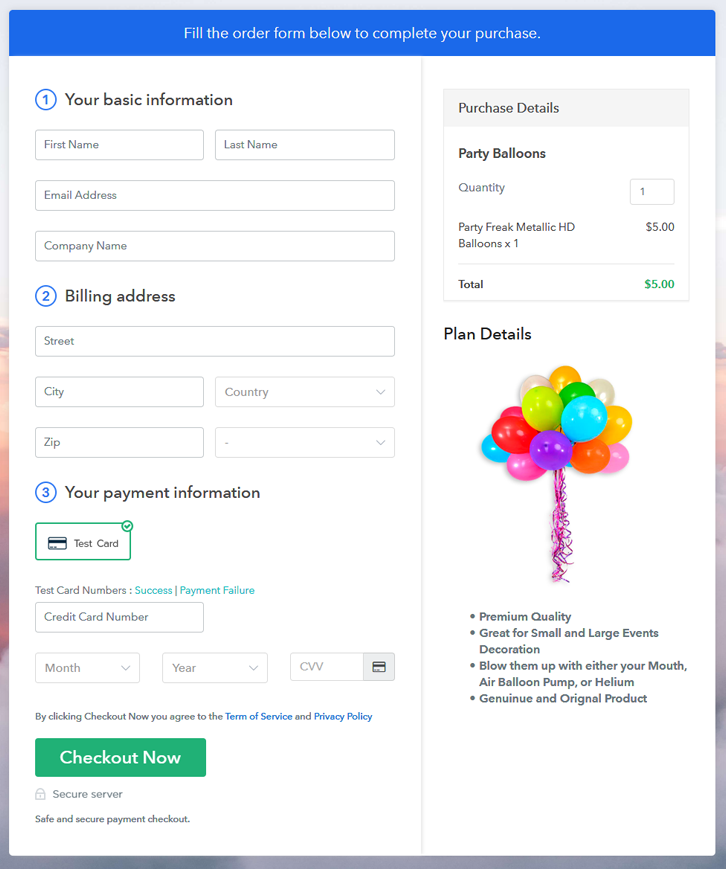
(b) Take a Look at the Checkout Page

Checkout Page to Sell Party Balloons Online

Step 9: Embed Checkout Page in Site & Sell Party Balloons Online

Embed Checkout Page on Website

Just copy the link and add the checkout page to sell party balloons online at any proper place on your WordPress site.

(a) Edit the Page & Paste the Copied Link

Paste Link in Text Editor

Further, paste the plan link of party balloons on a text editor of the WordPress dashboard.

(b) Save & Publish the Checkout Page

Save_and_Publish

Next, click the “Publish” button, after making changes.

(c) Check out the Final Look of your Checkout Page on WordPress Site

Final Look of your Checkout Page to Sell Party Balloons Online

Step 10: Multiplan Checkout Page

Note: In case you want to sell multiple products via a single checkout page, you can create a multi-plan checkout page otherwise skip this step.

(a) Click on Add Mutiplan Checkout

Multiplan Checkout

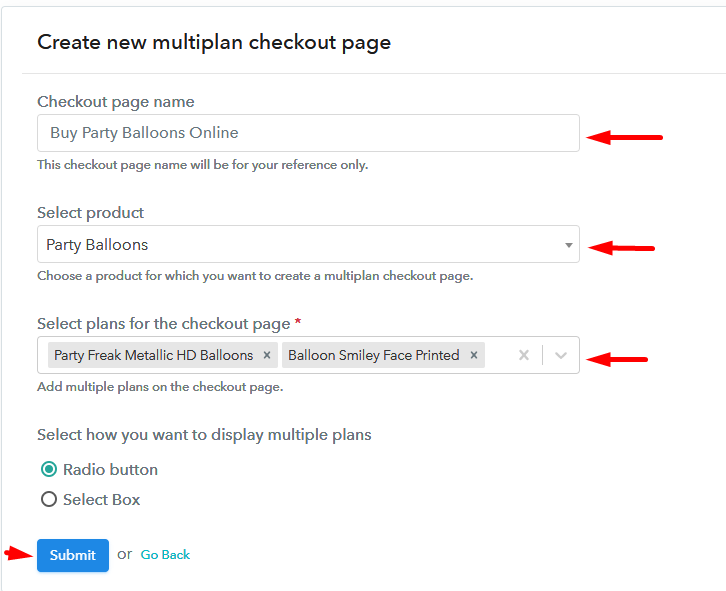
(b) Add Plans to Sell Multiple Party Balloons from Single Checkout Page

Add Multiple Products to Start Selling Party Balloons Online

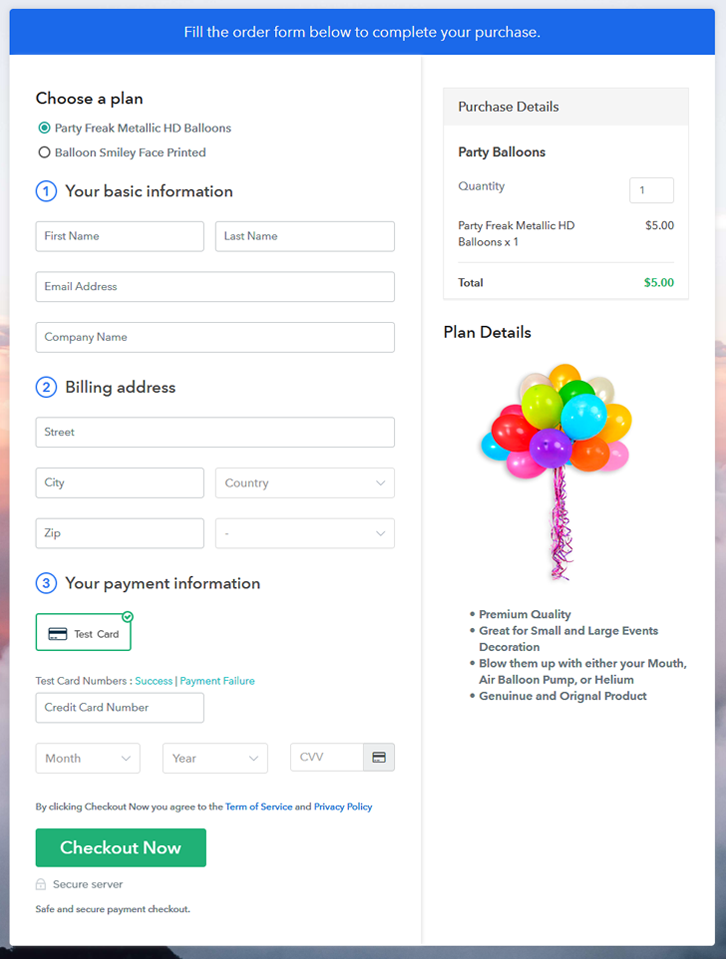
(c) Take a Look at the Checkout Page

Multiplan Checkout Page to Sell Party Balloons Online

Preview Checkout Page

Wrapping Up

Hereby, we are concluding this blog with a thought that you must have gained the knowledge of starting your own party balloons business using Pabbly Subscription Billing software. Whether it is a birthday celebration or any grand gesture, party balloons never go out. And, selling party balloons online with the help of software is a walk in the park.

So, don’t wait anymore, go, and grab a deal.

You May Also Like To Read –
How to Sell Office Essentials Online | Step by Step (Free Method)

How to Sell Office Essentials Online

Ideal For: All the office supply shops, office supply stores, office supply wholesalers, office supply retailers, and other sellers can use this method to take their office essentials selling business online.

How to Sell Office Essentials Online

Why Choose this Method To Sell Office Essentials Online?

Unlike any other solution, this method allows you to:

  • List and sell your office essentials for FREE. Absolutely no payment required.
  • No need to pay commission on any of your sales.
  • Multiple payment options like PayPal, Credit Card, etc to collect payment from a single place.
  • Sell one time or recurring subscriptions of your office essentials.
  • Collect payments & sell products in any currency as per your requirement.
  • Give discounts on your products by offering special coupon codes.
  • Add sales commission agents to help you in selling office essentials online.

Get Pabbly Subscription Billing for Free

Are you thinking to widen your office essentials selling business for extra money? Ever wondered about selling office essentials online? Naturally, by taking your office essentials selling business online you can get a wider customer reach plus an increased profit.

You just have to create checkout pages for your office essentials and share their links on online platforms so that people can buy your products directly through these links. To create checkout pages and start your online business there is an amazing and free tool, i.e, Pabbly Subscription Billing. With this service, you can kick start your business in a few minutes.

Also, Pabbly Subscription Billing offers you many great features:

  • Create and share invoices of office essentials automatically with users
  • Collect one-time or recurring payments of office essentials through offline or online modes
  • Integrate it with your website to increase your sales
  • Create discount coupons for your buyers

Now that you are excited to set up your business online, let’s start creating your first checkout page.

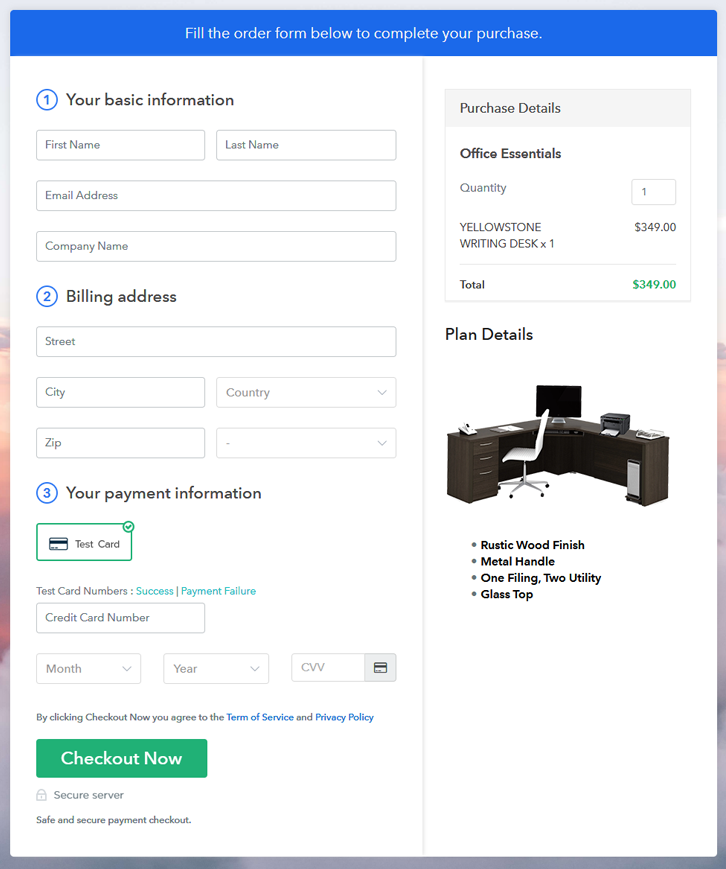
Final View of Checkout Page for your Office Essentials Selling Business

Preview Checkout Page

Preview Checkout Page

Step 1: Log in to Pabbly Subscription Billing

Signup

Begin with visiting Pabbly Subscription Billing website and then click on the “Sign Up Free” button. After clicking the button, you will land on the signup page, where you can create your account in few seconds with Gmail or manually enter your details.

Sign Up For Free!

Step 2: Select Subscription Billing

Access Subscription Billing

Step 3: Account Setup

Setup Account

When you are done with the signup process, now you have to fill up your company details i.e. company name, currency, and contact number in the appeared dialogue box.

Step 4: Connect Payment Gateways & Start Office Essentials Selling Business Online

Connect Payment Gateway

After setting up your account, here, we are showing you the payment collection process by enabling the ‘Test Payment’ mode. Thereafter, you can connect with other payment gateways like PayPal, Razorpay, etc whichever you prefer. The complete integration guides for payment gateways are provided below-

Step 5: Add Product for your Office Essentials

Add Product

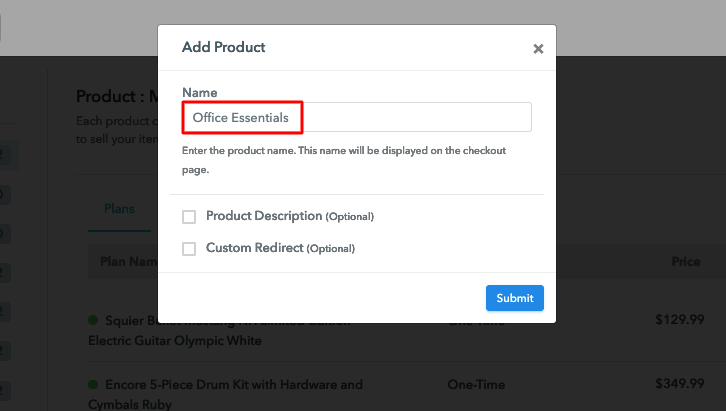
In this step, you have to add your first product. You can add office essentials from different categories such as desks, chairs, etc.

Sell Office Essentials Online Product Name

Add all other types of office essentials in the same product by creating different plans.

Note: Here you can add all the products related to the similar category by creating plans for each of them.

Step 6: Add Plans 

Let’s create plans for different kinds of office essentials available in your store.

(a) Select Add New Plan

Add Plan

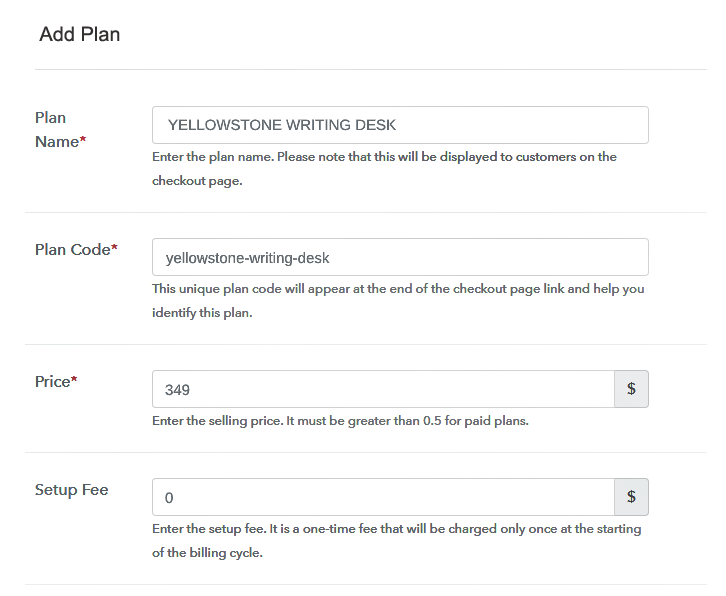
(b) Specify the Plan & Pricing Details

Sell Office Essentials Online Details

When you will click on the “Add New Plan” button, you will be redirected to the plan page, here you will have to fill the plan details such as plan name, code, billing cycle, price, etc.

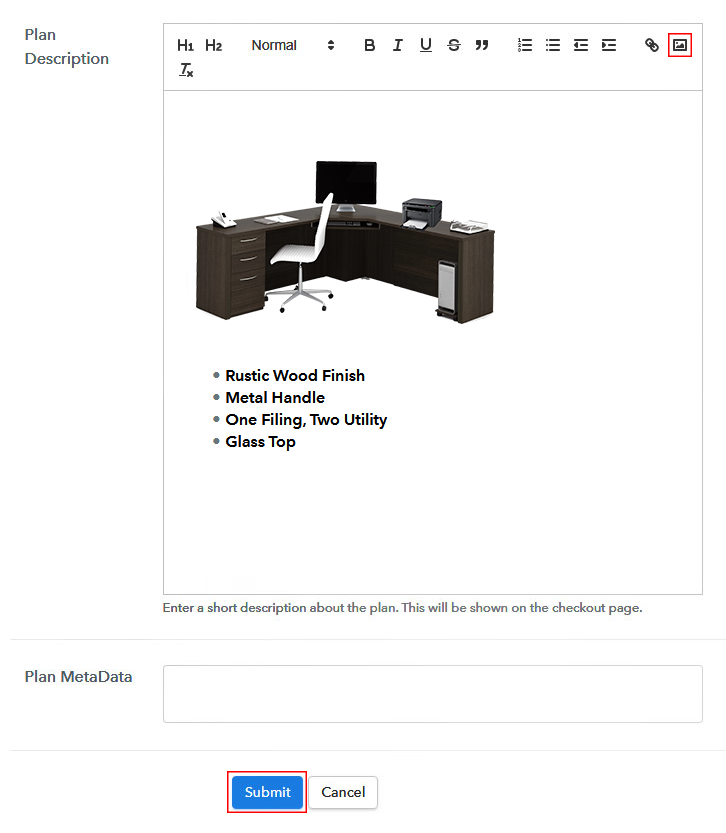
(c) Add Image & Description of Office Essentials

Sell Office Essentials Online Image

Also, describe the office essentials that you want to sell along with the product links, images, etc, and then click on the “Submit” button to add your plan.

You can create more plans for all the other office essentials similarly.

Step 7: Share your Checkout Page

Share Checkout Page on Social Media

To improve your online sales of office essentials, follow the given steps:

  • You can share your checkout page on social media like Facebook and Twitter.
  • Furthermore, copy the mentioned link and send it to your customers through SMS or emails directly.
  • Also, embed your plan link to your website so that your customers can be landed on the checkout page directly.

Step 8: Preview Checkout Page

Follow up the recommended steps to preview the checkout page:

(a) Click on the View Button

View Checkout Plan

(b) Take a Look at the Checkout Page

Preview Checkout Page

Step 9: Embed Checkout Page in Site & Sell Office Essentials Online

Embed Checkout Page on Website

To sell office essentials online, just copy the provided plan embedding link and embed the checkout page to your WordPress site.

(a) Edit the Page & Paste the Copied Link

Embed Checkout Page on Website

Further, paste the plan link on a text editor of the WordPress dashboard.

(b) Save & Publish the Checkout Page

Save_and_Publish

Next, click the “Publish” button, after making changes.

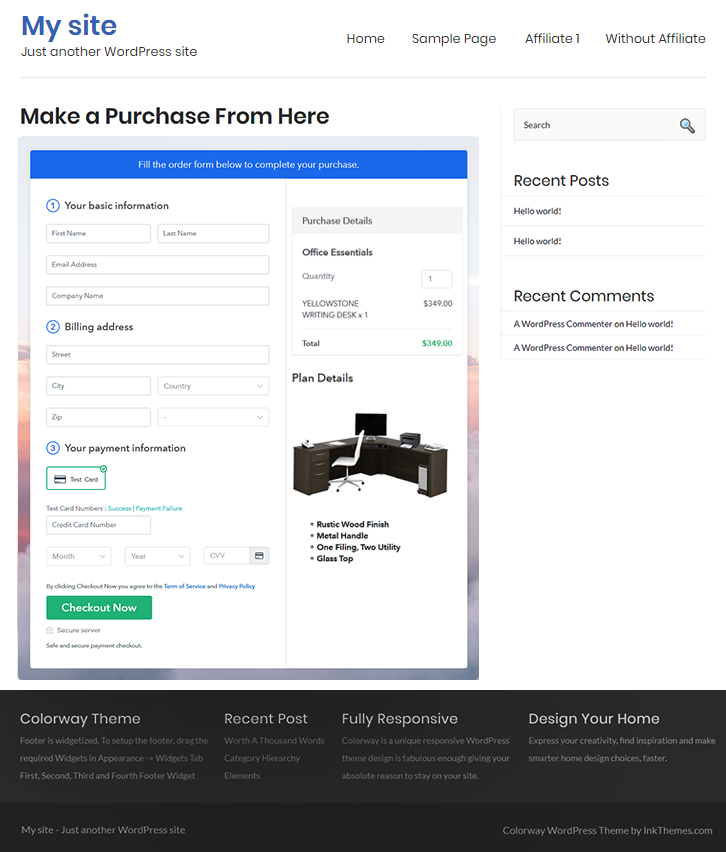
(c) Check out the Final Look of your Checkout Page on WordPress Site

Sell Office Essentials Online W

Step 10: Multiplan Checkout Page

Note: In case you want to sell multiple products via a single checkout page, you can create a multi-plan checkout page otherwise skip this step.

(a) Click on Add Mutiplan Checkout

Multiplan Checkout

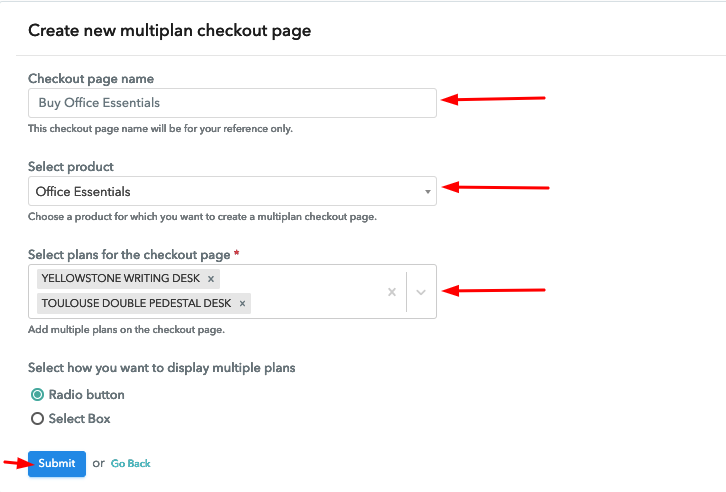
(b) Add Plans to Sell Multiple Office Essentials from Single Checkout Page

Sell Office Essentials Online Multi Details

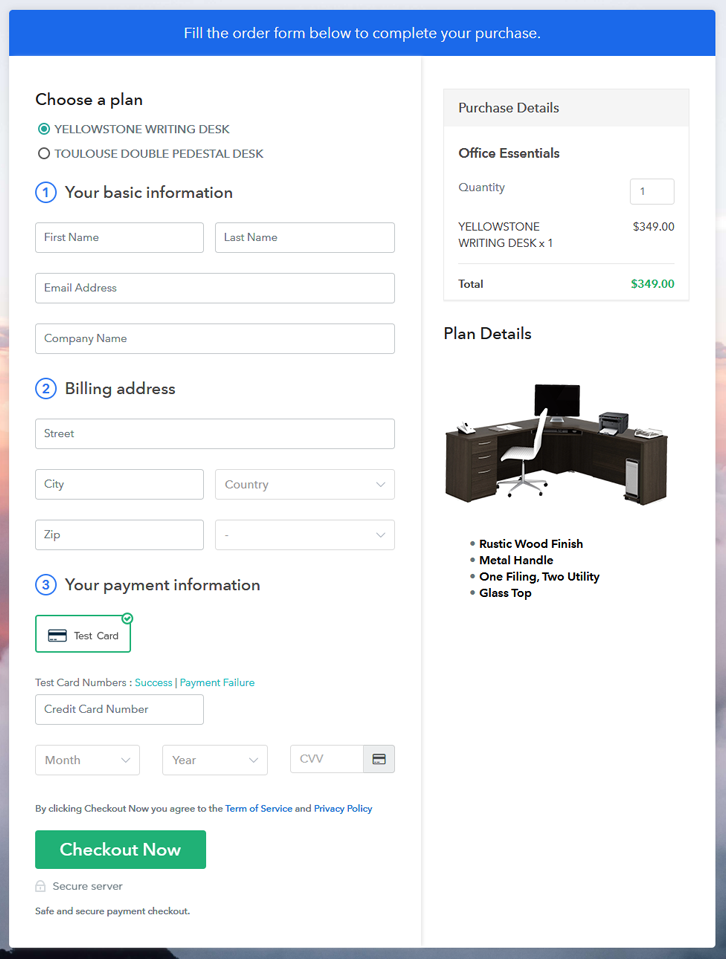
(c) Take a Look at the Checkout Page

Sell Office Essentials Online Multi

Preview Checkout Page

Wrapping Up

One last note, Pabbly Subscription Billing is going to help you so much in setting up your online office essentials selling business. With its amazing features, you can boost up your business and take it to heights of success. Moreover, you can easily collect payments, share invoices, create discount coupons, and whatnot. Therefore, stop thinking and start selling.
For further queries or suggestions, please write to us.

You May Also Like To Read –
How to Sell Musical Instruments Online | Step by Step (Free Method)

How to Sell Musical Instruments Online

Ideal For: All the musical instrument shops, musical instrument stores, musical instrument wholesalers, musical instrument suppliers, musical instrument dealers, and other sellers can use this method to take their musical instruments selling business online.

How to Sell Musical Instruments Online

Why Choose this Method To Sell Musical Instruments Online?

Unlike any other solution, this method allows you to:

  • List and sell your musical instruments for FREE. Absolutely no payment required.
  • No need to pay commission on any of your sales.
  • Multiple payment options like PayPal, Credit Card, etc to collect payment from a single place.
  • Sell one time or recurring subscriptions of your musical instruments.
  • Collect payments & sell products in any currency as per your requirement.
  • Give discounts on your products by offering special coupon codes.
  • Add sales commission agents to help you in selling musical instruments online.

Get Pabbly Subscription Billing for Free

Selling musical instruments offline might be giving you some profit but taking your business online will definitely provide you a large customer base and a larger profit margin.

Now you must be thinking about which service to choose for the online business. Pabbly Subscription Billing is your answer, as its checkout page is very helpful in collecting one-time or recurring payments. You just have to create checkout pages with the help of Pabbly Subscription Billing for your musical instruments that you want to sell and share their links on any online platform so that your customers can make purchases directly through them.

Apart from the checkout page, Pabbly Subscription Billing also provides numerous great features:

  • Collect one-time or recurring payments via online or offline modes
  • Generate and share invoices with customers automatically
  • Add and sell unlimited musical instruments online
  • Generate unlimited revenue

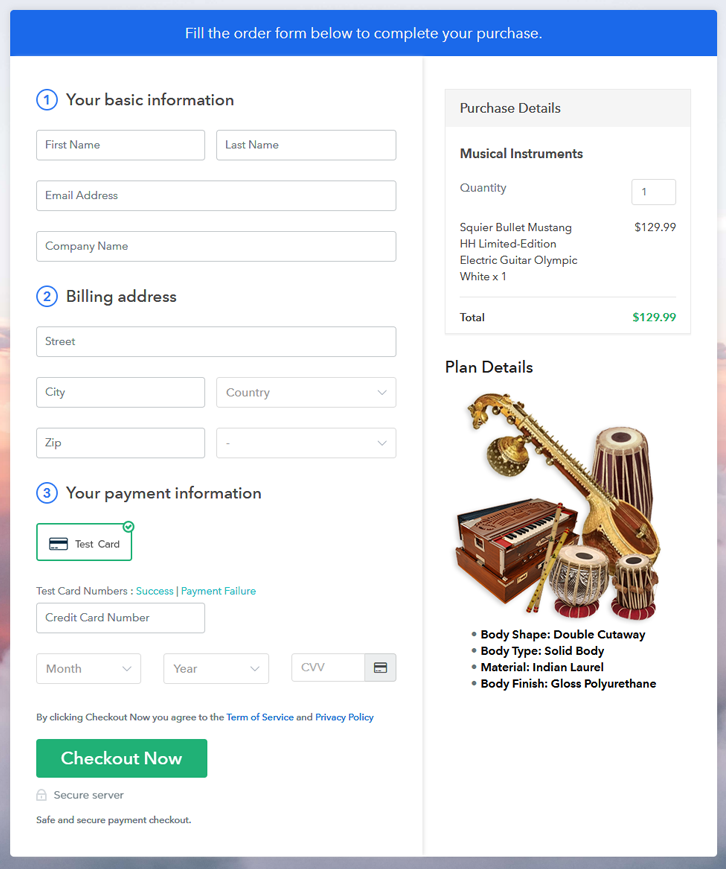
Final View of Checkout Page for your Musical Instruments Selling Business

Preview Checkout Page

Preview Checkout Page

Step 1: Log in to Pabbly Subscription Billing

Signup

In the first step, you have to visit Pabbly Subscription Billing website and then click on the “Sign Up Free” button. On clicking the button, you will reach to the signup page, where you can create your account automatically with your Gmail or manually enter your details.

Sign Up For Free!

Step 2: Select Subscription Billing

Access Subscription Billing

Step 3: Account Setup

Setup Account

Once the signup process is completed, now fill up your company details i.e. company name, currency, and contact number in the appeared dialogue box.

Step 4: Connect Payment Gateways & Start Musical Instruments Selling Business Online

Connect Payment Gateway

In this step, the payment collection process is described by enabling the ‘Test Payment’ mode. Later, you can connect other payment gateways of your choice such as PayPal, Razorpay, etc. The complete integration guide for payment gateways is provided below-

Step 5: Add Product for your Musical Instruments

Add Product

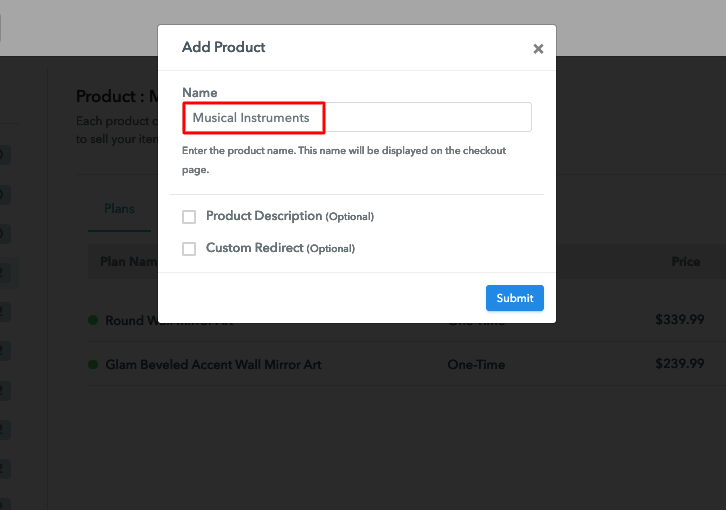
After the payment mode is enabled, then you have to add your first product. You can add musical instruments of different categories for example guitars, drums, etc.

Sell Musical Instruments Online Product Name

Add all other types of musical instruments in the same product by creating different plans.

Note: Here you can add all the products related to the similar category by creating plans for each of them.

Step 6: Add Plans 

Let’s rollout plans for different kinds of musical instruments available in your store.

(a) Select Add New Plan

Add Plan

(b) Specify the Plan & Pricing Details

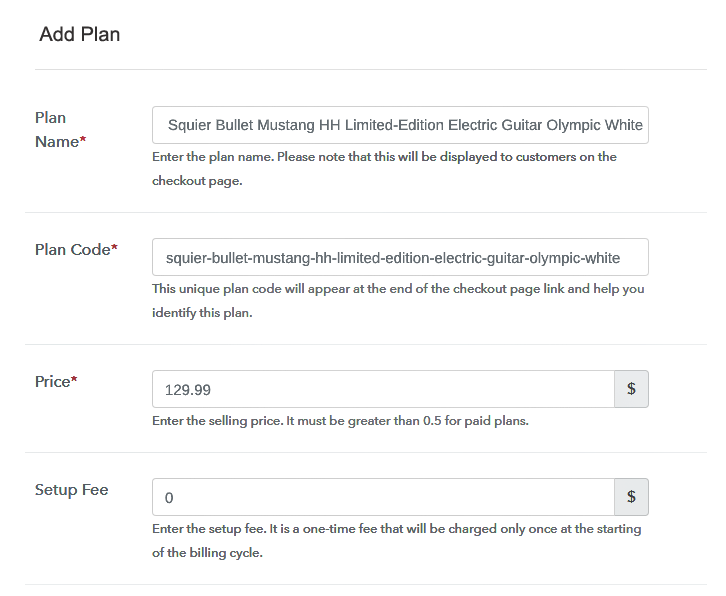
Sell Musical Instruments Online Details

On clicking add new plan, you will be redirected to the plan page, here you will have to fill the plan details such as plan name, code, billing cycle, price, etc.

(c) Add Image & Description of Musical Instruments

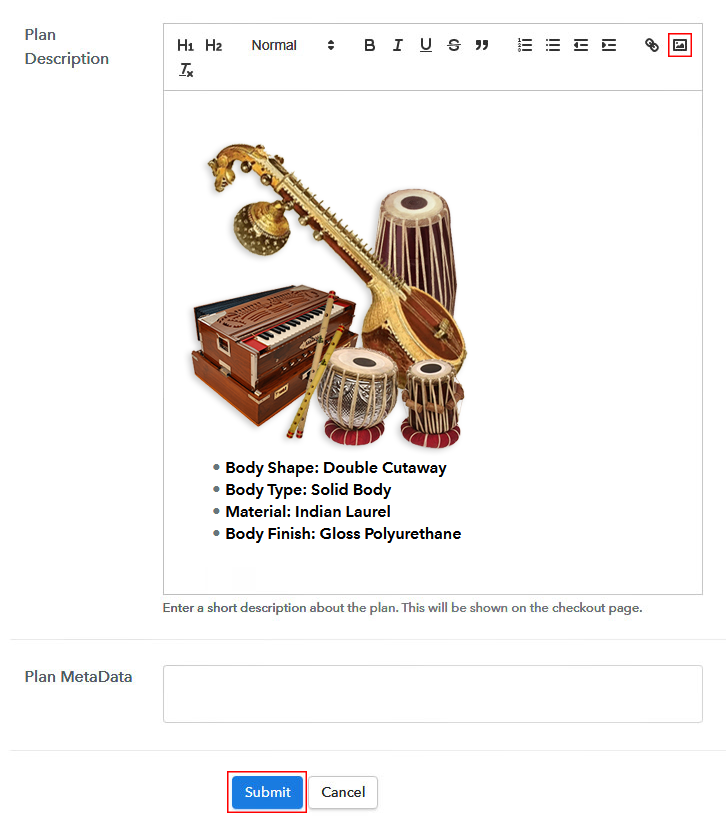
Sell Musical Instruments Online Image

Also, add a description of the musical instruments that you want to sell along with the product links, images, etc, and then click on the “Submit” button to add your plan.

You can create more plans for all the musical instruments in a similar manner.

Step 7: Share your Checkout Page

Share Checkout Page on Social Media

  • Share your checkout page on social media like Facebook and Twitter to increase your sales of musical instruments.
  • Copy the mentioned link and send it to your customers through SMS or emails directly.
  • Embed your plan link to your website so that your customers can be landed on the checkout page directly.

Step 8: Preview Checkout Page

Follow up the recommended steps to preview the checkout page:

(a) Click on the View Button

View Checkout Plan

(b) Take a Look at the Checkout Page

Preview Checkout Page

Step 9: Embed Checkout Page in Site & Sell Musical Instruments Online Online

Embed Checkout Page on Website

Just copy the provided plan link and embed the checkout page to your WordPress site to sell musical instruments online.

(a) Edit the Page & Paste the Copied Link

Embed Checkout Page on Website

Further, paste the plan link on a text editor of the WordPress dashboard.

(b) Save & Publish the Checkout Page

Save_and_Publish

Next, click the “Publish” button, after making changes.

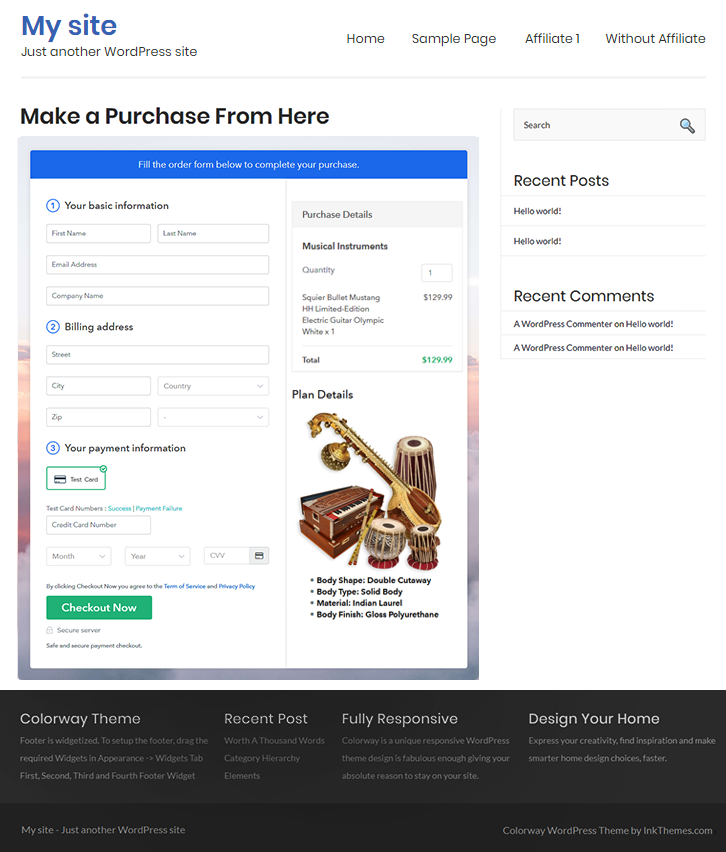
(c) Check out the Final Look of your Checkout Page on WordPress Site

Sell Musical Instruments Online W

Step 10: Multiplan Checkout Page

Note: In case you want to sell multiple products via a single checkout page, you can create a multi-plan checkout page otherwise skip this step.

(a) Click on Add Mutiplan Checkout

Multiplan Checkout

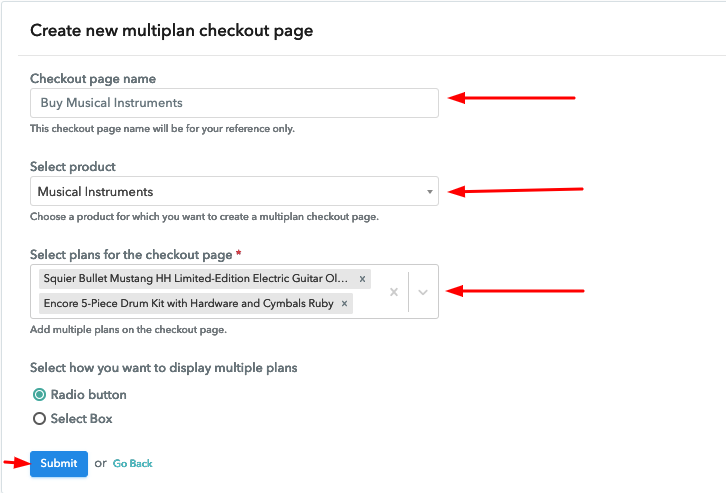
(b) Add Plans to Sell Multiple Musical Instruments from Single Checkout Page

Sell Musical Instruments Online Multi Details

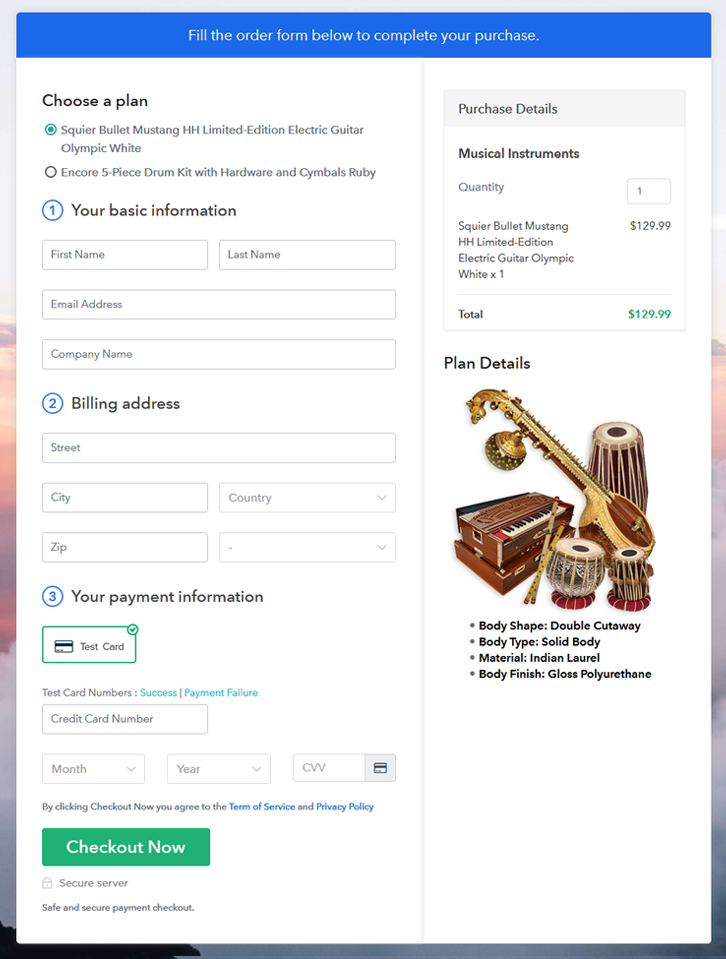
(c) Take a Look at the Checkout Page

Sell Musical Instruments Online Multi

Preview Checkout Page

Wrapping Up

Lastly, we hope that this blog was helpful for you in starting your musical instruments selling business online. Pabbly Subscription Billing is an amazing service to start an online business as its free, easy to use, offers so many great features such as invoicing, payment collection, checkout pages, and so much more. So start building up your online business for free with Pabbly Subscription Billing. For further queries or suggestions, please leave your comments below.

You May Also Like To Read –
How to Sell Rack Shelves Online | Step by Step (Free Method)

How to Sell Rack Shelves Online

Ideal For: All the rack shelve manufacturers, rack shelve sellers, retail rack shelve shop owners, and other merchants can use this method to take their rack shelves selling business online.

How to Sell Rack Shelves Online

Why Choose this Method to Sell Rack Shelves Online?

Unlike any other solution, this method allows you to:

  • List and sell your rack shelves for FREE. Absolutely no payment required.
  • No need to pay commission on any of your sale.
  • Multiple payment options like PayPal, Credit Card, etc to collect payment from a single place.
  • Sell one time or recurring subscriptions of your rack shelves.
  • Collect payments & sell products in any currency as per your requirement.
  • Give discounts on your products by offering special coupon codes.
  • Add sales commission agents to help you in selling rack shelves online.

Get Pabbly Subscription Billing for Free

There has been remarkable growth in the online home/office utility items market within the past few years. So, we can say that this business could be promising in terms of customer and revenue growth. And if you are planning to start rack shelves business online then we can give you a head start.

You can make use of the Pabbly Subscription Billing’s checkout pages for selling rack shelves online. This is the fastest method available online and you can get started in a few minutes. The checkout pages are used to display the products to customers as well as collect payments for the same.

Moreover, there are many other advantages too.

  • You can sell unlimited products as there is no limit over the number of sales
  • Sell products globally with easy global taxes
  • Offer discounts and coupons over rack shelves
  • You’ll get a dashboard to keep track of the payments and item availability
  • Automatic invoicing & billing facility
  • Share every product globally using the separate plan link URLs
  • Sell single/multiple rack shelves from a single plan page
    And more…

Let’s create a checkout page for selling rack shelves online, step by step.

Final View of Checkout Page for your Rack Shelves Selling Business

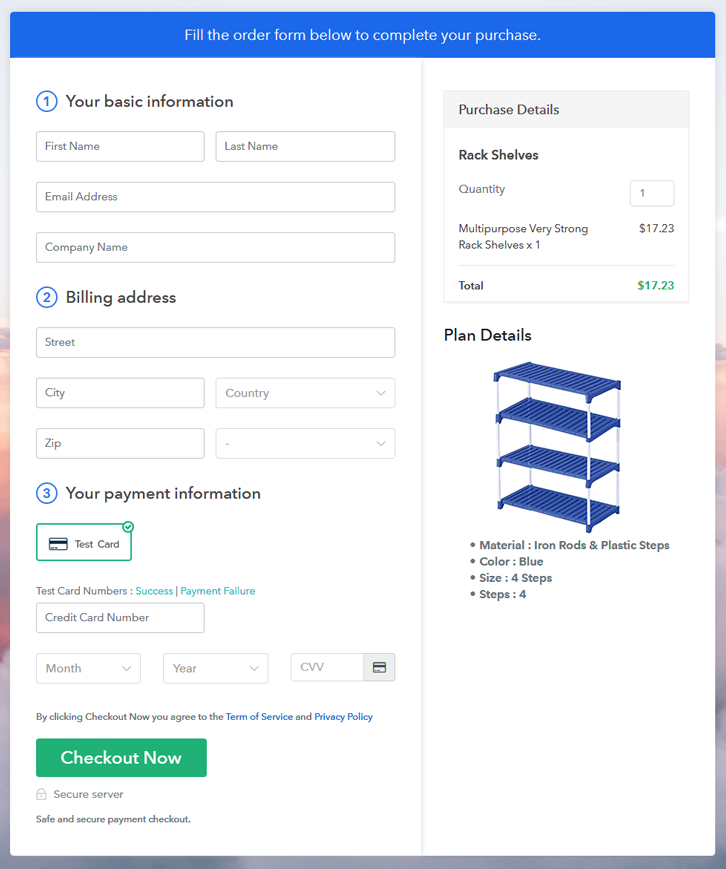
Checkout Page Preview to Sell Rack Shelves Online

Preview Checkout Page

Step 1: Log in to Pabbly Subscription Billing

Signup

To get started with selling rack shelves online start, the process by visiting Pabbly Subscription Billing. On the website hit ‘Sign Up Free‘ & choose a sign-up choice to get into the system. Either you can manually fill out the registration form or can use a Gmail account to get in.

Sign Up For Free!

Step 2: Select Subscription Billing

Access Subscription Billing

Step 3: Account Setup

Setup Account

Next, a pop-up pane will open up asking for your company details. Mention the required details like your company name, the currency you wanna deal in & a phone number.

Step 4: Connect Payment Gateways & Start Rack Shelves Selling Business Online

Connect Payment Gateway

Now, integrate a payment gateway for collecting payments for the sold rack shelves. Also, there is an option of enabling the test payment mode for testing. Nevertheless, you’ll need to select a method from the following choices available to start collecting payments. Also, the step by step integration manual are attached below.

Step 5: Add Product for your Rack Shelves

Add Product

In this step, you can add products to sell rack shelves online. These products are like the categories of the rack shelves you want to sell like wooden rack shelves, hanging, portable etc. Further, we’ll add plans to each product category.

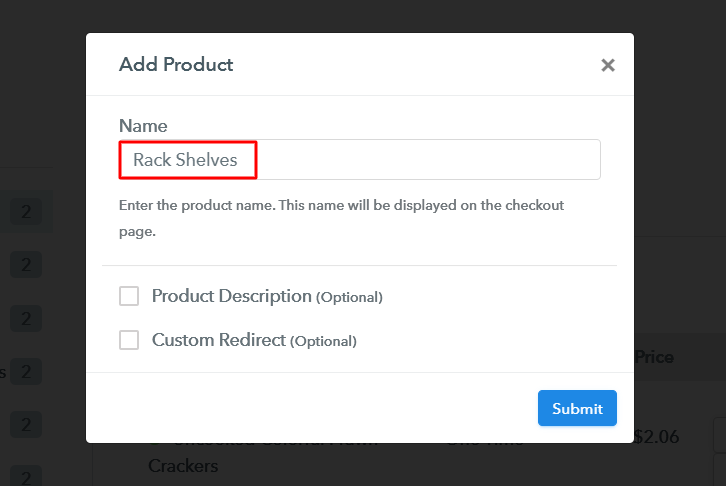
Add Product to Sell Rack Shelves Online

Push the ‘submit’ button, once you are done filling the product details.

Note: Here you can add all the products related to the similar category by creating plans for each of them.

Step 6: Add Plans 

Let’s start adding plans for the different types of rack shelves available in your store.

(a) Select Add New Plan

Add Plan

(b) Specify the Plan & Pricing Details

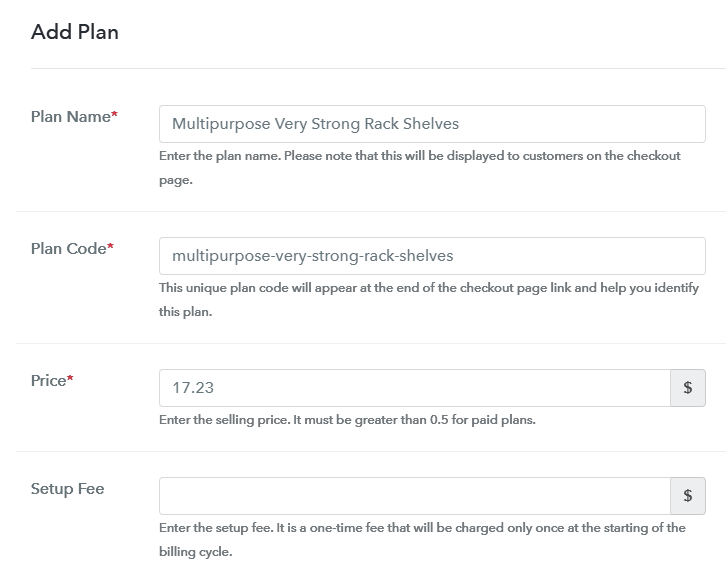
Add Plan to Sell Rack Shelves Online

To sell a rack shelve online, you can mention a name, code, its price, set-up fee, billing cycle etc details in the plan page.

(c) Add Image & Description of Rack Shelves

How

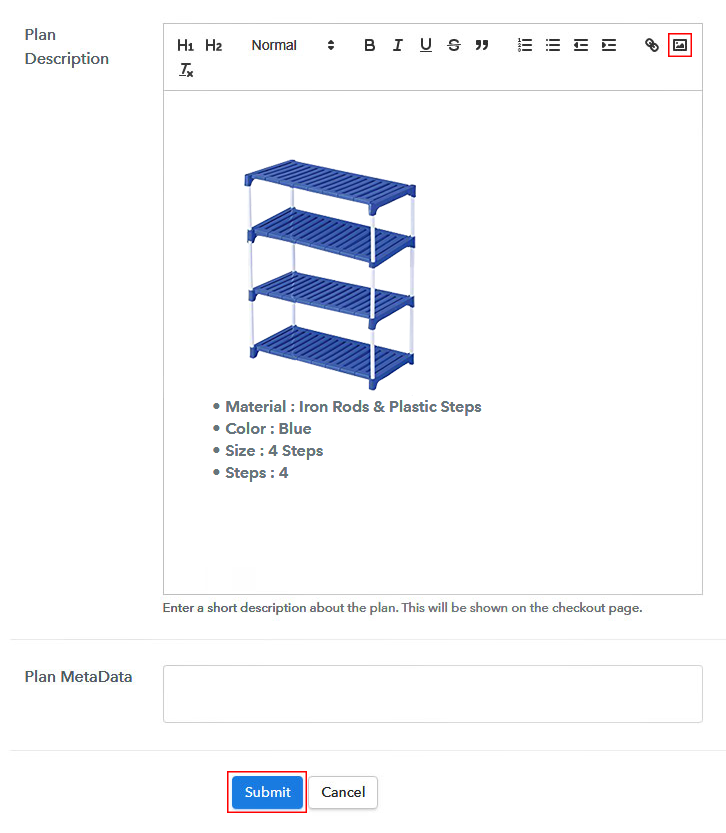
Additionally, you can also place an image & some descriptive text about the rack shelves that you wanna sell.

Strike the ‘submit’ button once you are done & a plan will be added immediately.

Thus, you can add other rack shelves in a similar way to sell online.

Step 7: Share your Checkout Page

Share Checkout Page on Social Media

You can share a checkout page with the buyers in three ways to sell rack shelves online.

  • Directly hit the sharing buttons to share a checkout page on Facebook or Twitter
  • Share the plan link URL with your customers over emails, SMS, and other link sharing platform
  • Associate the plan link URL with any website’s buttons & texts to redirect a customer on the checkout page

Step 8: Preview Checkout Page

Follow up the recommended steps to preview the checkout page:

(a) Click on the View Button

View Checkout Plan

(b) Take a Look at the Checkout Page

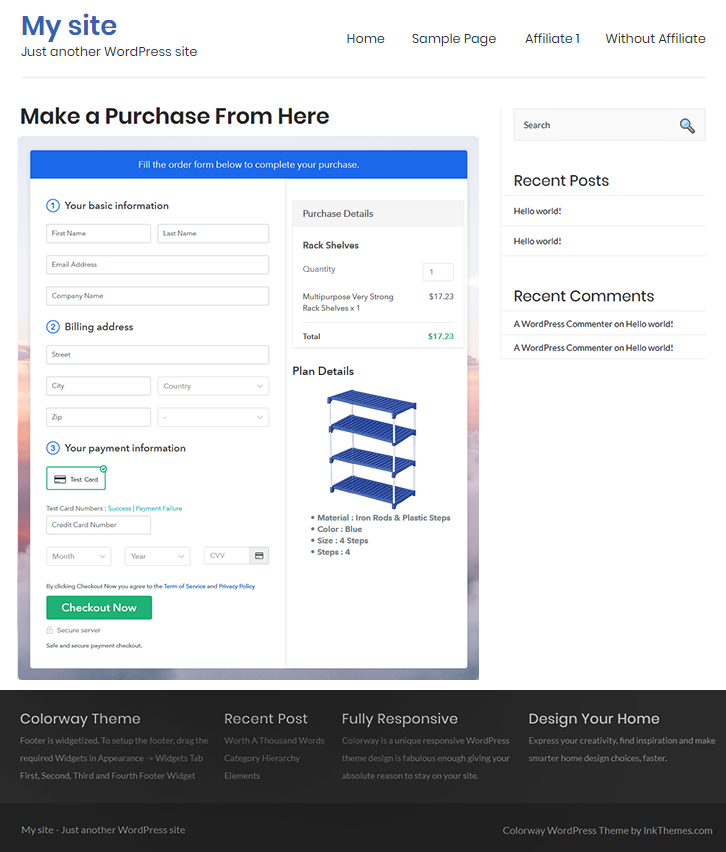
Checkout Page Preview to Sell Rack Shelves Online

Step 9: Embed Checkout Page in Site & Sell Rack Shelves Online

Embed Checkout Page on Website

Just copy the link and add the checkout page to sell rack shelves online at any preferable place on your WordPress site.

(a) Edit the Page & Paste the Copied Link

Embed Checkout Page on Website

Further, paste the plan link on a text editor of the WordPress dashboard.

(b) Save & Publish the Checkout Page

Save_and_Publish

Next, click the “Publish” button, after making changes.

(c) Check out the Final Look of your Checkout Page on WordPress Site

Checkout Page On WordPress Site to Sell Rack Shelves Online

Step 10: Multiplan Checkout Page

Note: In case you want to sell multiple products via a single checkout page, you can create a multi-plan checkout page otherwise skip this step.

(a) Click on Add Mutiplan Checkout

Multiplan Checkout

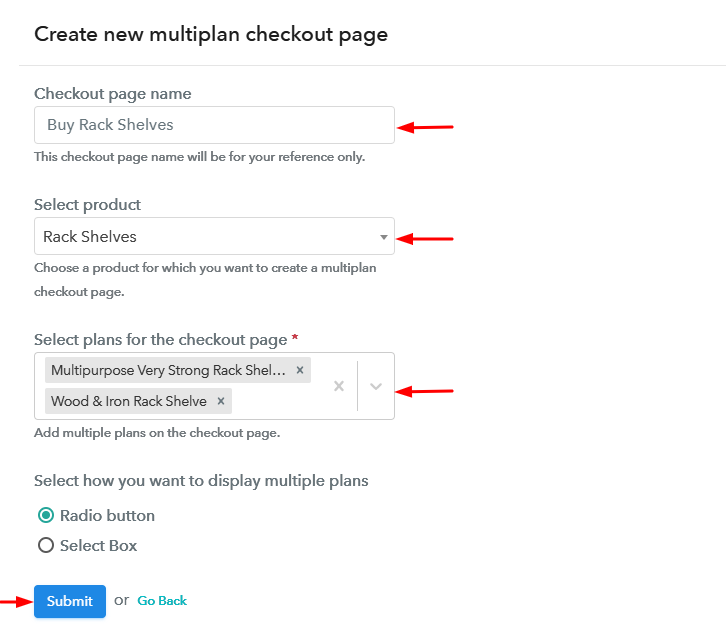
(b) Add Plans to Sell Multiple Rack Shelves from Single Checkout Page

Create Multiplan Checkout to Sell Rack Shelves Online

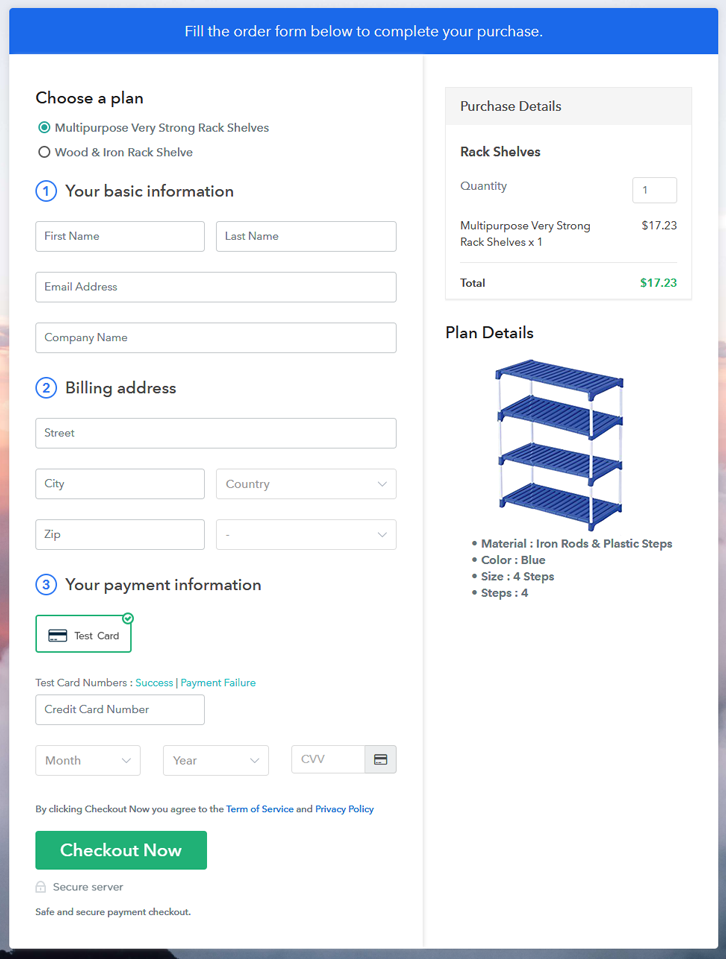
(c) Take a Look at the Checkout Page

Multiplan Checkout Page to Sell Rack Shelves Online

Preview Checkout Page

Wrapping Up

These were the 10 steps to start rack shelves business online in no time. You can sell rack shelves online throughout the globe & can choose to collect any currency. Moreover, all the payment gateway options are very reliable and you can choose amongst PayPal, Stripe, Authorize.Net etc.

Apart from the payments, you’ll get a Pabbly Subscription Billing dashboard from where you can keep tracks of the materials availability, payments & refunds.

You May Also Like To Read –
How to Sell Parachutes Online | Step by Step (Free Method)

How to Sell Parachutes Online

Ideal For: All the parachute manufacturers, parachute sellers, retail parachute shop owners, and other merchants can use this method to take their parachutes selling business online.

How to Sell Parachutes Online

Why Choose this Method to Sell Parachutes Online?

Unlike any other solution, this method allows you to:

  • List and sell your parachutes for FREE. Absolutely no payment required.
  • No need to pay commission on any of your sale.
  • Multiple payment options like PayPal, Credit Card, etc to collect payment from a single place.
  • Sell one time or recurring subscriptions of your parachutes.
  • Collect payments & sell products in any currency as per your requirement.
  • Give discounts on your products by offering special coupon codes.
  • Add sales commission agents to help you in selling parachutes online.

Get Pabbly Subscription Billing for Free

Parachutes are very hard to find in localities so skydiver, parachutist and BASE jumpers used to buy them online. There are many varieties of parachutes such as round, cruciform, ram-air parachutes etc available in the online marketplace. So, if you want to sell parachutes online & finding a way to start parachutes business online then we can help you get started in no time.

Well, you can make use of a selling service named Pabbly Subscription Billing. Using this service you can create checkout pages to showcase your parachute’s details as well as collect payments for selling parachutes online.

Moreover, the service is extremely easy to use and 10 simple steps are explained further in this article. Also, there are many other advantages in tagged with this service that are very handy.

  • Dashboard to keep track of product availability & payment records
  • Automatic billing & invoicing
  • Apply global taxes very easily
  • Offer coupons & discounts
  • Sell single/multiple products from a single checkout page
  • Sell unlimited products
  • Collect one -time or recurring payments
    And much more

Final View of Checkout Page for your Parachutes Selling Business

Checkout Page Preview to Sell Parachutes Online

Preview Checkout Page

Step 1: Log in to Pabbly Subscription Billing

Signup

To start selling parachutes online begin with visiting Pabbly Subscription Billing. On the website, click on ‘Sign Up Free‘ button & get into the system using a Gmail account or fill-up the registration form manually with a few details.

Sign Up For Free!

Step 2: Select Subscription Billing

Access Subscription Billing

Step 3: Account Setup

Setup Account

Next, you’ll be asked to fill your company’s information such as the company name, select a currency & mention a contact number. Quickly fill the required company details and click ‘Continue’.

Step 4: Connect Payment Gateways & Start Parachutes Selling Business Online

Connect Payment Gateway

Here in this step, you can integrate a payment gateway to collect payments for the sold parachutes. Also, you can enable the test payment option available for testing purpose. But here to mention, you must integrate a payment method from the following available choices to collect payments more further. Additionally, the step by step integration guides are also linked for further ease.

Step 5: Add Product for your Parachutes

Add Product

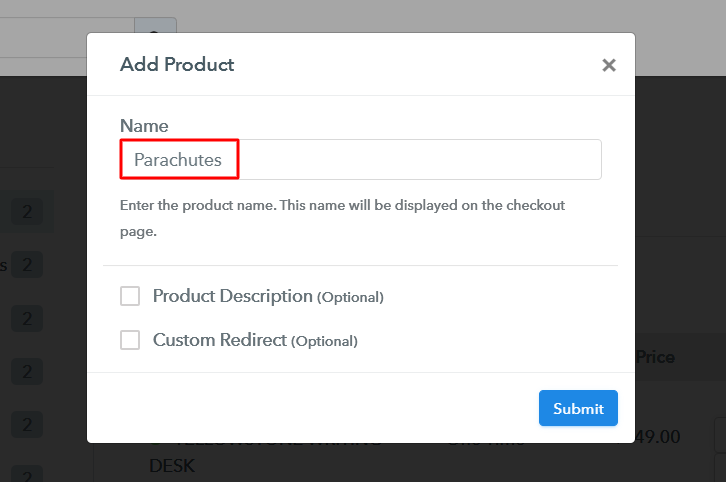
Now, add a product category by clicking on the ‘Add New Product’ button and mention a product name such as round, rectangle, ram air etc.

Add Product to Sell Parachutes Online

Fill the required product details & hit the ‘submit’ button in here.

Note: Here you can add all the products related to the similar category by creating plans for each of them.

Step 6: Add Plans 

Now, let’s start adding plans for the different categories of parachutes available in your store.

(a) Select Add New Plan

Add Plan

(b) Specify the Plan & Pricing Details

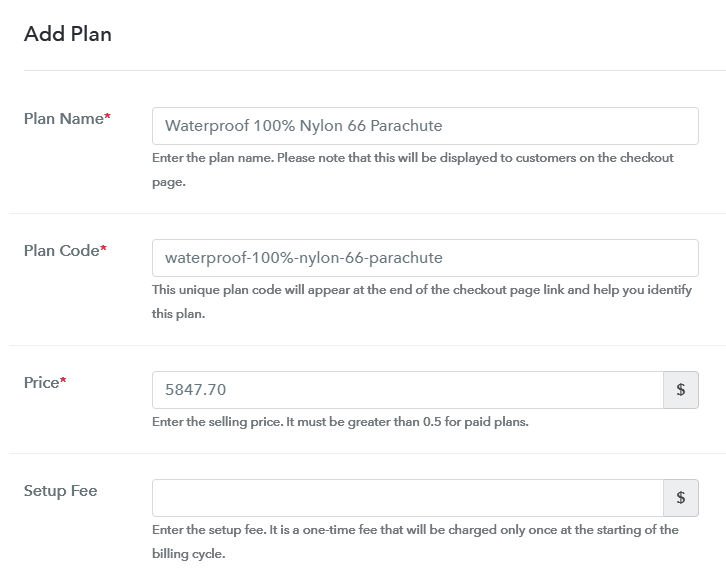
Add Plan to Sell Parachutes Online

You can mention a name, code, pricing details, billing cycle etc in the plan details page to sell parachutes online.

(c) Add Image & Description of Parachutes

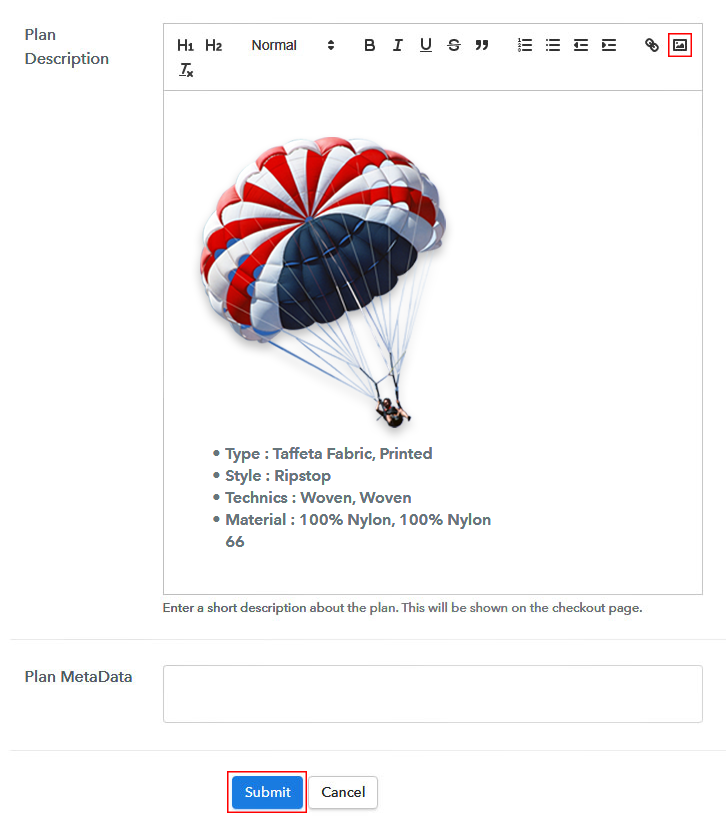
Add Image & Description to Sell Parachutes Online

Also, you can insert an image & some points about the parachute for customer’s reference.

Strike ‘Submit’ on this plan details page & a plan will be appended to sell parachutes online.

Similarly, you can add other parachutes.

Step 7: Share your Checkout Page

Share Checkout Page on Social Media

Next, you’ll need to share or embed the checkout pages somewhere else to sell parachutes online. For this, you can do the following:

  • You can share the checkout page directly on Facebook & Twitter through the sharing buttons available
  • Second, you can share the plan link URL over all the social media or link sharing platforms such as emails, SMS etc
  • Lastly, you can embed a plan link within the buttons & texts of a site to redirect a customer on the payment’s page

Step 8: Preview Checkout Page

Follow up the recommended steps to preview the checkout page:

(a) Click on the View Button

View Checkout Plan

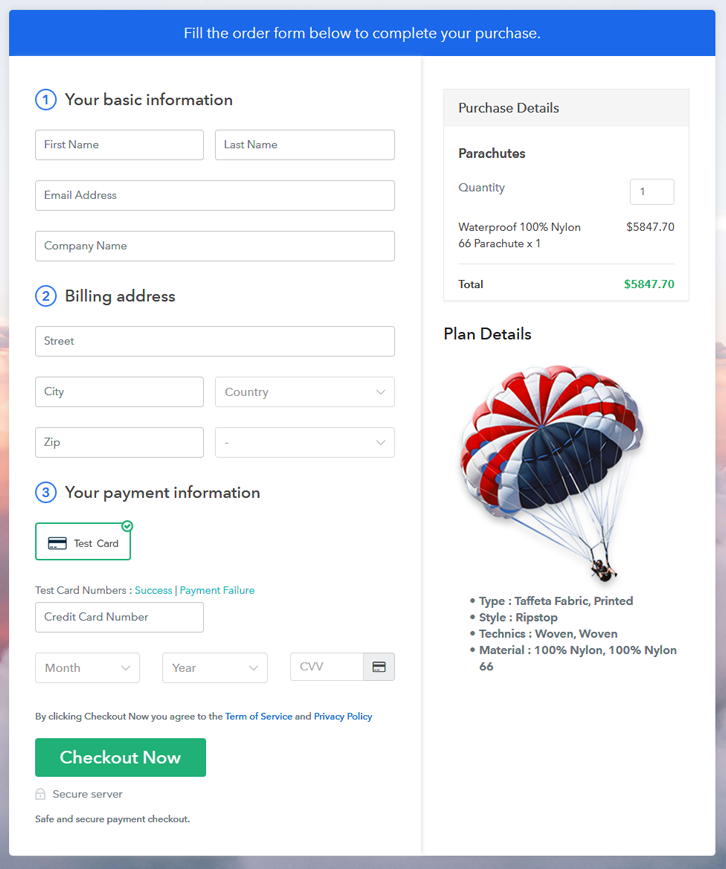
(b) Take a Look at the Checkout Page

Checkout Page Preview to Sell Parachutes Online

Step 9: Embed Checkout Page in Site & Sell Parachutes Online

Embed Checkout Page on Website

Just copy the link and add the checkout page to sell parachutes online at any preferable place on your WordPress site.

(a) Edit the Page & Paste the Copied Link

Embed Checkout Page on Website

Further, paste the plan link on a text editor of the WordPress dashboard.

(b) Save & Publish the Checkout Page

Save_and_Publish

Next, click the “Publish” button, after making changes.

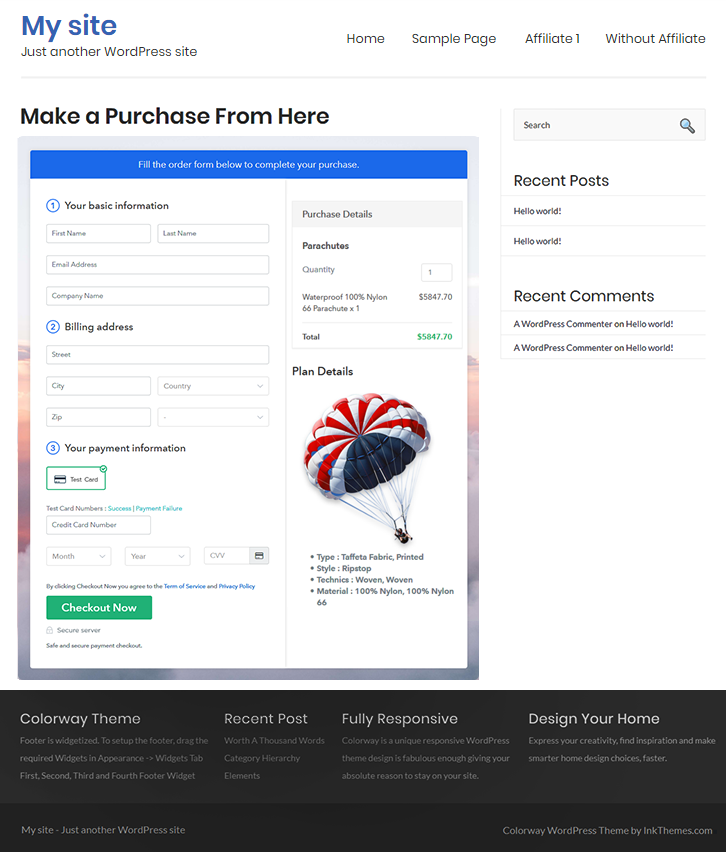
(c) Check out the Final Look of your Checkout Page on WordPress Site

Checkout Page On WordPress Site to Sell Parachutes Online

Step 10: Multiplan Checkout Page

Note: In case you want to sell multiple products via a single checkout page, you can create a multi-plan checkout page otherwise skip this step.

(a) Click on Add Mutiplan Checkout

Multiplan Checkout

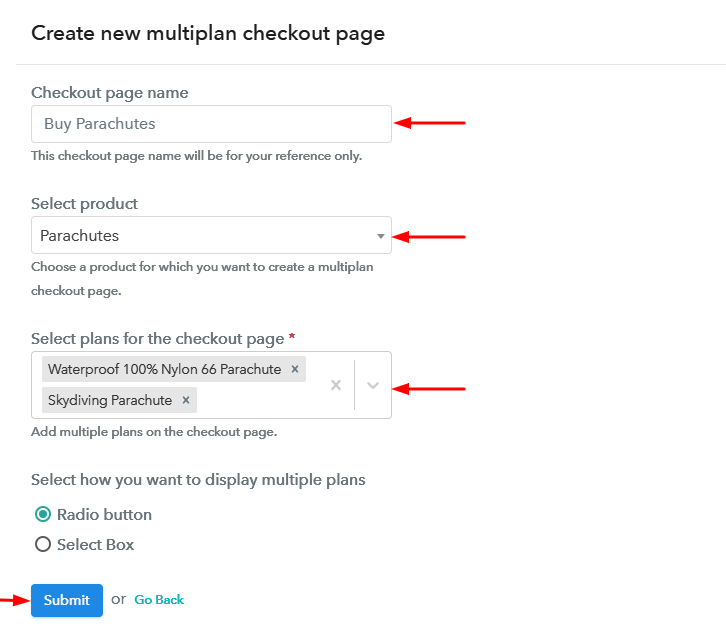
(b) Add Plans to Sell Multiple Parachutes from Single Checkout Page

Create Multiplan Checkout Page to Sell Parachutes Online

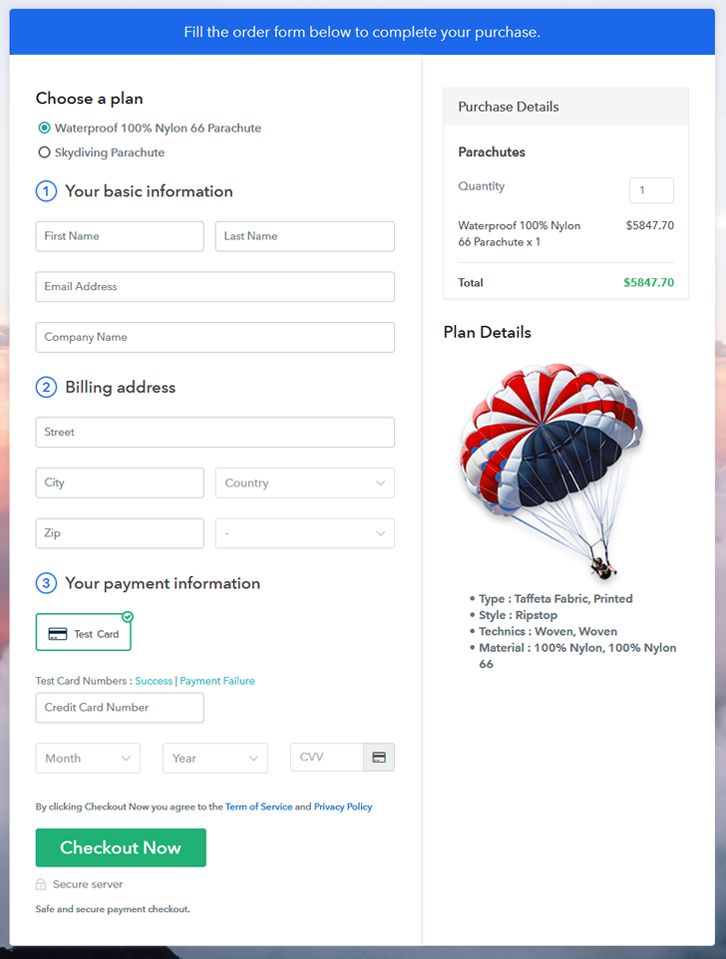
(c) Take a Look at the Checkout Page

Multiplan Checkout Page to Sell Parachutes Online

Preview Checkout Page

Wrapping Up

This was all about the steps to create checkout pages & how to sell parachutes online. You can easily follow the steps given in this article to start parachutes business online. Besides it, the dashboard that came along with this service will benefit you in managing as well as keeping records of all your payments & items availability.

You May Also Like To Read –
How To Sell Old Newspapers Online | Step by Step (Free Method)

Ideal For: All the newspaper sellers, pawn shop owners, newspaper industry owners, and other merchants can use this method to sell old newspapers online.

How To Sell Old Newspapers Online

Why Choose this Method to Sell Old Newspapers Online?

Unlike any other solution, this method allows you to:

  • List and sell your old newspapers for FREE. Absolutely no payment required.
  • No need to pay commission on any of your sale.
  • Multiple payment options like PayPal, Credit Card, etc to collect payment from a single place.
  • Sell one time or recurring subscriptions of your old newspapers.
  • Collect payments & sell products in any currency as per your requirement.
  • Give discounts on your products by offering special coupon codes.
  • Add sales commission agents to help you in selling old newspapers.

Get Pabbly Subscription Billing for Free

Did you know The New York Post from April 15, 1865, heralding the death of Abraham Lincoln usually sells above $1000!!. Similarly, the old newspapers mentioning the sinking of Titanic, Pearl Harbor 1942, Challenger Disaster, etc can easily fetch a 100x than their original face value. Obviously, there are many collectors for these old newspapers but they are spread out across the globe and cant reach you out. Therefore, the only possible way out from this quagmire is you start selling old newspapers online.

Now, there are many software available to help you sell newspapers online. But many of these software demands some rudimentary technical skills to work with them. Also, some of them charge an exorbitant commission per transaction, which will drain your pocket. So, in this article, we are recommending an incredible Saas tool called Pabbly Subscription Billing to sell newspapers online. This software is very user friendly and there are no ridiculous transaction fees. Some other advantages of the software are:

  • Unlimited Revenues
  • Multiple Subscription Models
  • Create Unlimited Coupons, Discounts, Plans
  • Custom Logo in all Checkout Pages
  • Tracking Sales
  • Custom Domain
  • Marketing on Facebook, Twitter, Whatsapp, etc

With these features, you will definitely dominate the online market. So, let me show you how to create a checkout page in Pabbly Subscription Billing to sell newspapers online.

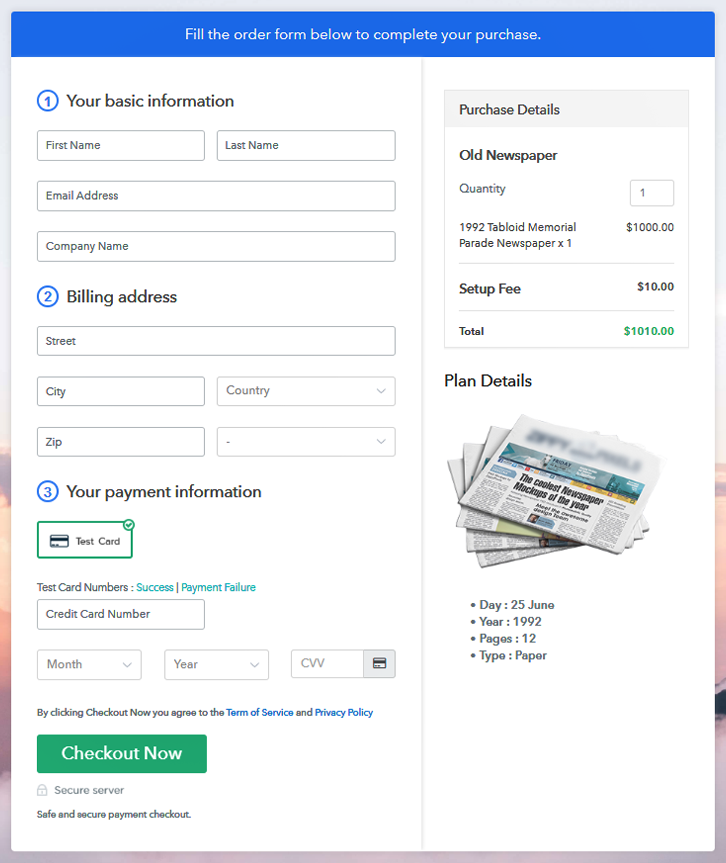
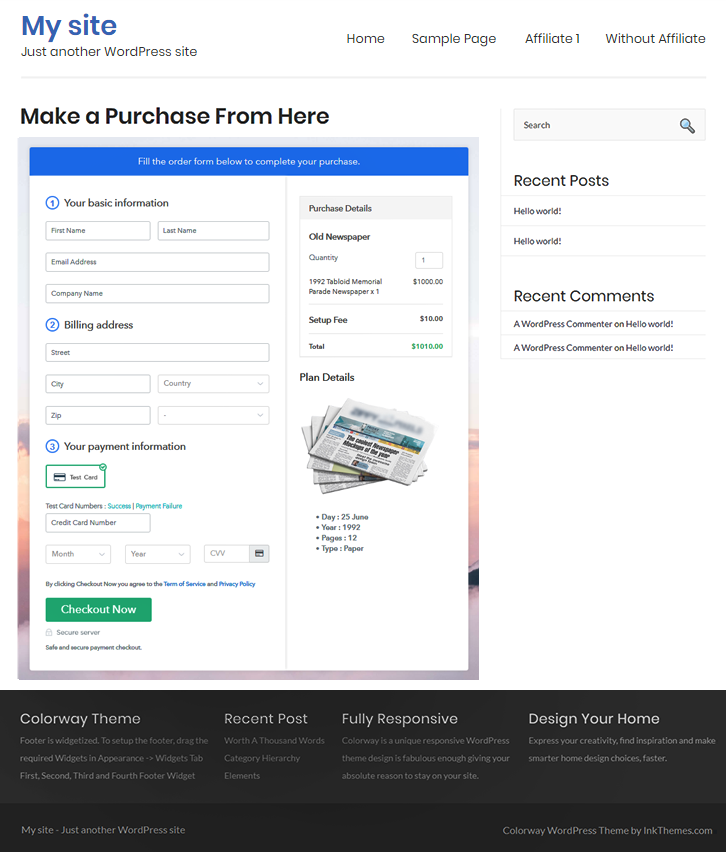
Final View of Checkout Page for your Old Newspapers Selling Business

Checkout To Sell Old Newspapers Online

Preview Checkout Page

Step 1: Log in to Pabbly Subscription Billing

Signup

In the beginning look for Pabbly Subscription Billing in your browser. Here, click on the “Sign up Free“ button. You can either manually fill all the information or simply sign in using your Gmail account.

Sign Up For Free!

Step 2: Select Subscription Billing

Access Subscription Billing

Step 3: Account Setup

Setup Account

Once you’re done click on the “Access Now” button of Pabbly Subscription Billing, a page will pop-up with details like company name, currency, and contact number. Next, you need to fill those details to go on.

Step 4: Connect Payment Gateways & Start Old Newspapers Selling Business Online

Connect Payment GatewayPabbly Subscription Billing provides for pilot testing the whole payment experience of a customer using dummy payment gateways. You can do this by clicking on the “Enable Test Payment” option. These payment gateways can be easily integrated using the help of the articles given below.

Step 5: Add Product for your Old Newspapers

Add Product

If the payment gateway integration went well, so let’s start adding the products. Also, beneath the  “Enable Payments” segment there is the “Add your product” section click on it. This will generate a dialog box with a blue button “Add New Product”. Click on it.

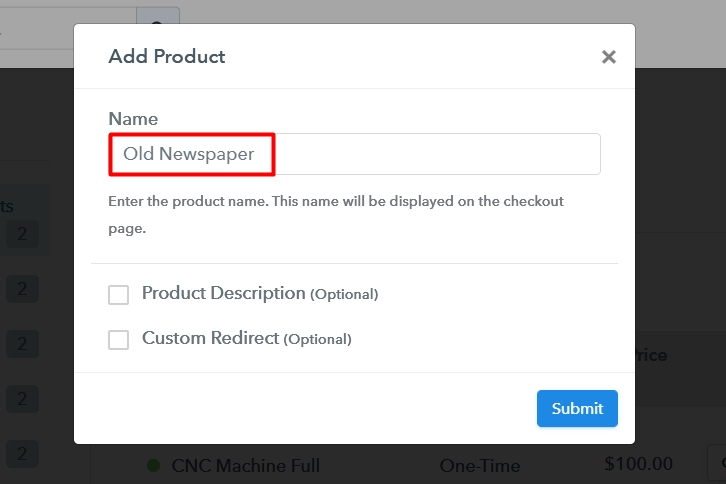
Also, you have to add the required product title, in this case, it is an ‘old newspaper’.

Add Product To Sell Old Newspapers Online

Fill out all the details like the name of the product and voila your product is created.

Note: Here you can add all the products related to the similar category by creating plans for each of them.

Step 6: Add Plans 

Now let’s create plans for different kinds of the old newspapers available in your store.

(a) Select Add New Plan

Add Plan

(b) Specify the Plan & Pricing Details

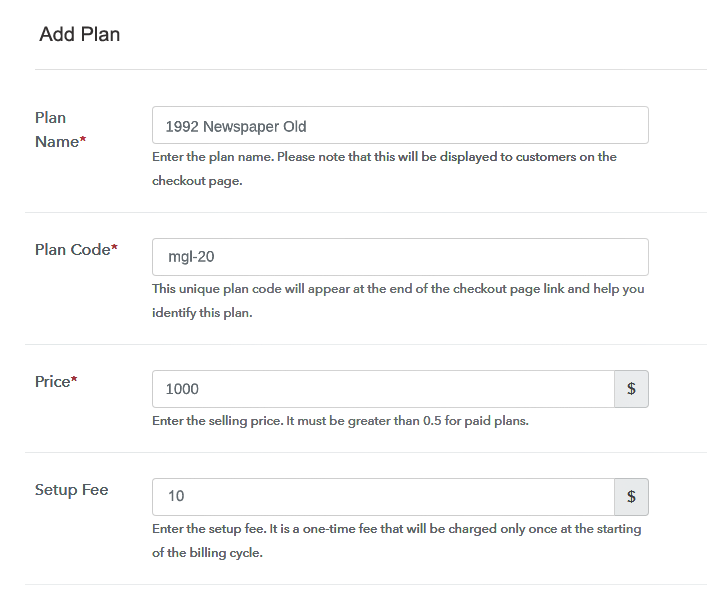
Add Plan To Sell Old Newspapers Online

Later, you will reach the plan page, here you have to fill in details like plan name, code, price, setup fees. Now scroll down, and in the section below you can see the choice to change the billing models like one-time payment, recurring, etc. Decide the revenue model, and of course, you can change it any time

(c) Add Image & Description of Old Newspaper

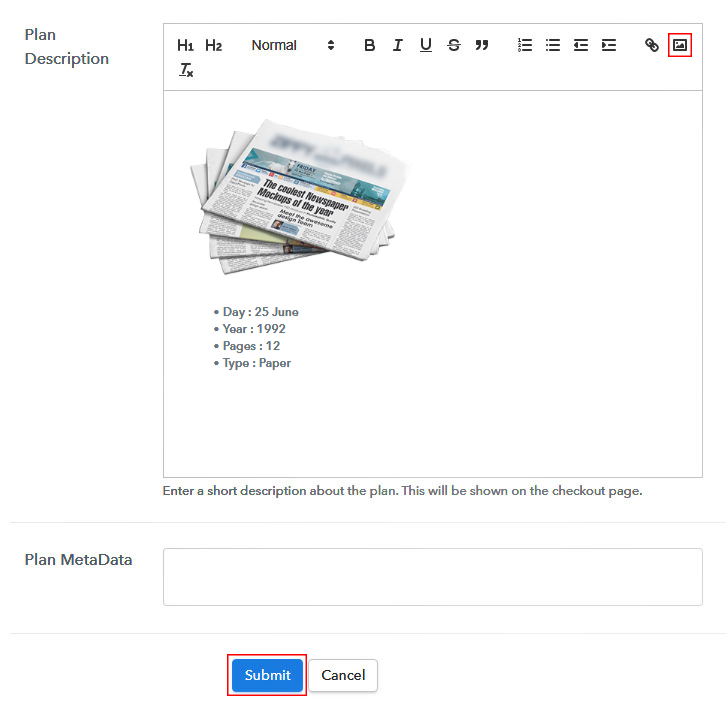
Add Image To Sell Old Newspapers Online

Also, let’s take some incredible screenshots of your newspapers, and upload it by clicking the image button.

Furthermore, now under the image place some concise information about your newspaper like the date, year, and pages, etc, and then press the “Submit” button.

Moreover, later, by using the same process, you can list more products.

Step 7: Share your Checkout Page

Share Checkout Page on Social Media

  • Also, to create more awareness about your products you can share your checkout page on Twitter & Facebook by just pressing the respective buttons.
  • Moreover, share the checkout pages via email and SMS.
  • Furthermore, you can build buttons on your webpage and paste the checkout links on it. Or you can place it on any anchor text on your website, so the users will be redirected to the checkout page.

Step 8: Preview Checkout Page

Follow up the recommended steps to preview the checkout page:

(a) Click on the View Button

View Checkout Plan

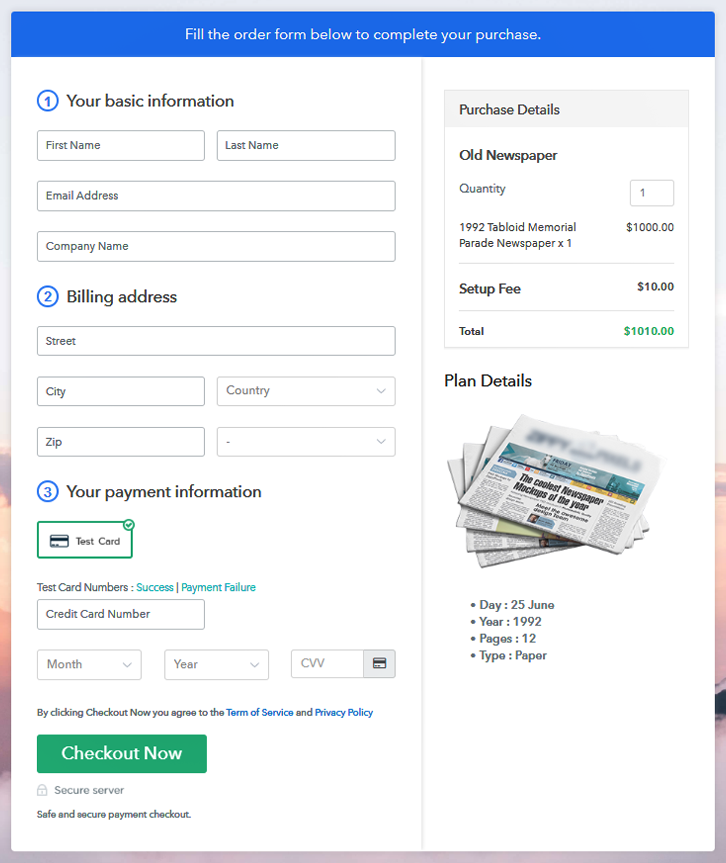
(b) Take a Look at the Checkout Page

Add Checkout To Sell Old Newspapers Online

Step 9: Embed Checkout Page in Site & Sell Online

Embed Checkout Page on Website

Furthermore, just copy the link and add the checkout page to sell old newspapers online at any suitable place on your WordPress site.

(a) Edit the Page & Paste the Copied Link

Embed Checkout Page on Website

Further, paste the plan link of the old newspaper on a text editor of the WordPress dashboard.

(b) Save & Publish the Checkout Page

Save_and_Publish

Next, click the “Publish” button, after making changes.

(c) Check out the Final Look of your Checkout Page on WordPress Site

Wordpress To Sell Old Newspapers Online

Step 10: Multiplan Checkout Page

Note: In case you want to sell multiple products via a single checkout page, you can create a multi-plan checkout page otherwise skip this step.

(a) Click on Add Mutiplan Checkout

Multiplan Checkout

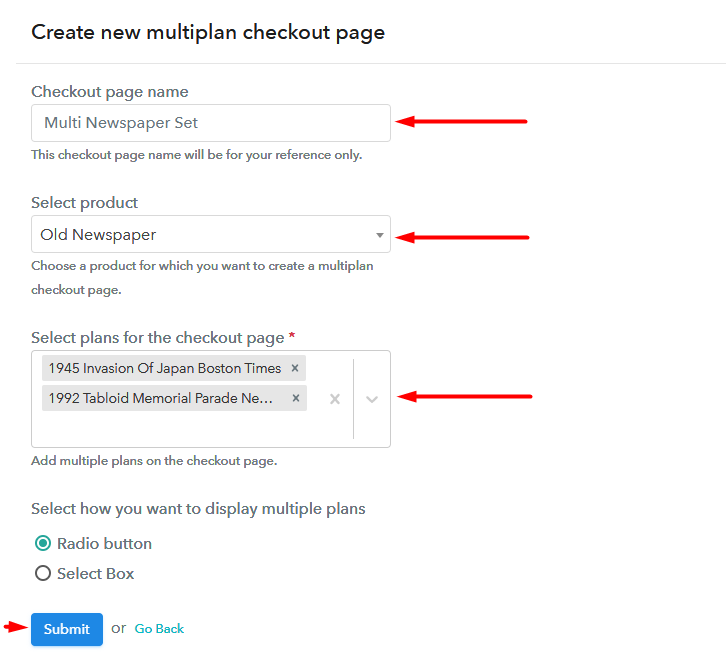
(b) Add Plans to Sell Multiple Old Newspapers from Single Checkout Page

Add Multiplan To Sell Old Newspapers Online

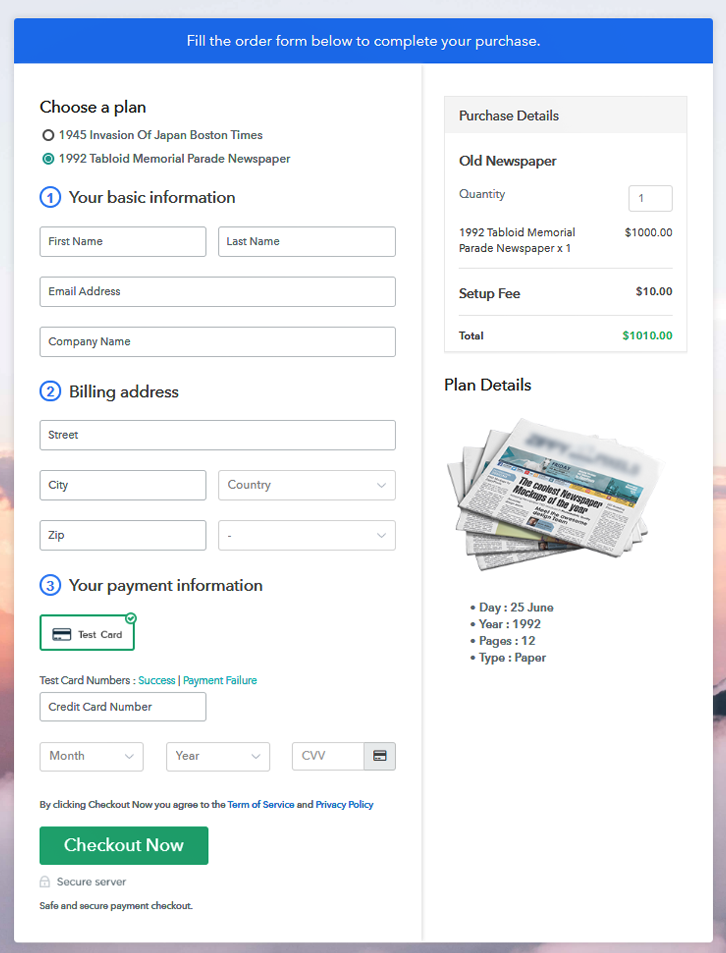
(c) Take a Look at the Checkout Page

Multiplan To Sell Old Newspapers Online

Preview Checkout Page

Wrapping Up

Yippe!! With these 10 simple steps, you have created your first checkout page to sell old newspapers online. Obviously, there are many more features in Pabbly Subscription Billing for you to explore and experiment with. With some effort, you will be able to master all the features of Pabbly Subscription Billing and own the market. But for now, if you have any doubts, please leave it in the comment section below. Thank You !!

You May Also Like To Read –