How to Sell Toothpastes Online | Step by Step (Free Method)

Ideal For: All the toothpaste manufacturers, toothpaste sellers, retail toothpaste shop owners, and other merchants can use this method to take their toothpastes selling business online.
How to Sell Toothpastes Online

Why Choose this Method to Sell Toothpastes Online?

Unlike any other solution, this method allows you to:

  • List and sell your toothpastes for FREE. Absolutely no payment required.
  • No need to pay commission on any of your sale.
  • Multiple payment options like PayPal, Credit Card, etc to collect payment from a single place.
  • Sell one time or recurring subscriptions of your toothpastes.
  • Collect payments & sell products in any currency as per your requirement.
  • Give discounts on your products by offering special coupon codes.
  • Add sales commission agents to help you in selling toothpastes online.

Get Pabbly Subscription Billing for Free

Dentists suggest teeth cleaning twice a day for maintaining oral hygiene. And there are many varieties of toothpastes available online like teeth-whitening, sensitive, herbal etc. To be a player and start toothpastes business online, you need to be faster and well-managed. For you help, in this blog, we came up with the fastest and efficient way possible for selling toothpastes online.

You can create plan checkout pages in no time to sell toothpaste online. And within there checkout pages you can beautifully showcase your product along with its best feature. These checkout pages are capable of collecting checkout pages. Also, you can share the checkout pages on social media platforms and embed them in the buttons, texts, blogs, & pages of websites for selling toothpastes online.

Moreover, you can also automate the invoicing and billing process and can manage the payments and other records from the dashboard.

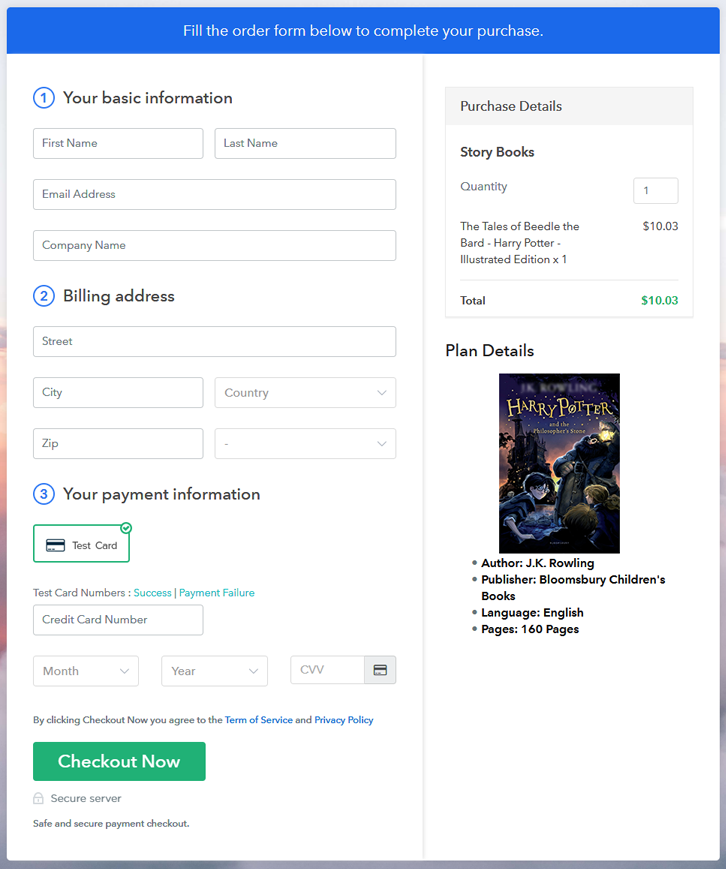
Final View of Checkout Page for your Toothpastes Selling Business
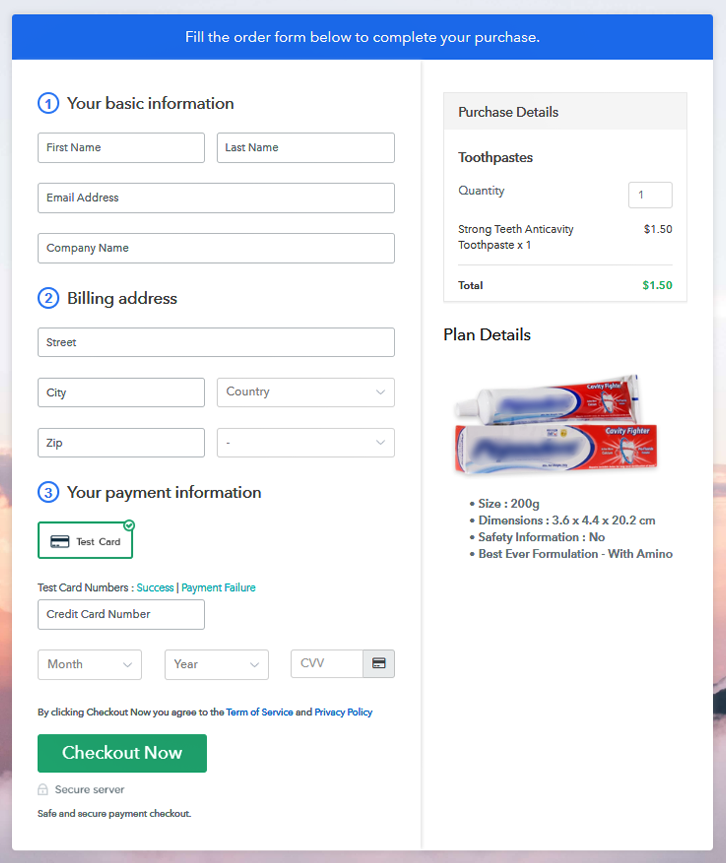
Checkout Page Preview to Sell Toothpastes Online

Preview Checkout Page

Step 1: Log in to Pabbly Subscription Billing
Signup

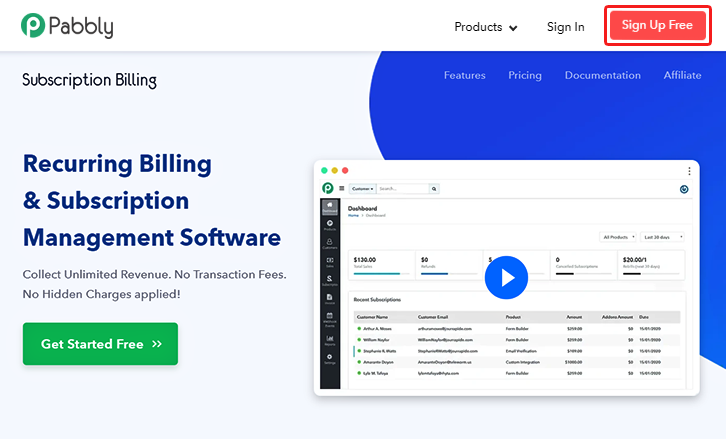
To start selling toothpastes online begin by visiting Pabbly Subscription Billing. On the site, hit the ‘Sign Up Free‘ button & use a Gmail ID to directly get into the system or fill-up the registration form manually.

Sign Up For Free!

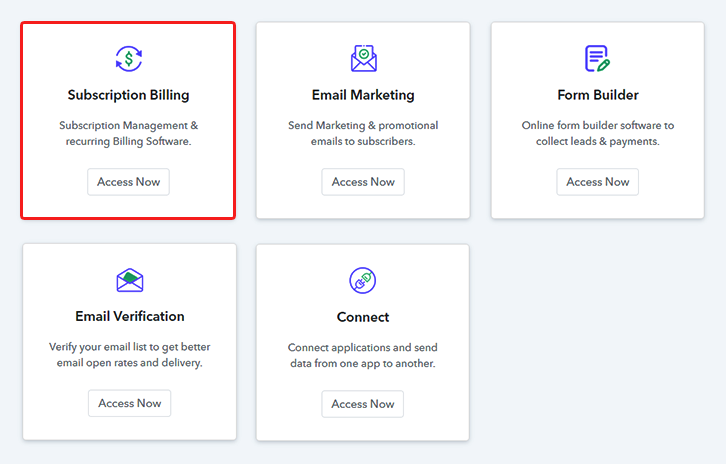
Step 2: Select Subscription Billing

Access Subscription Billing

Step 3: Account Setup
Setup Account

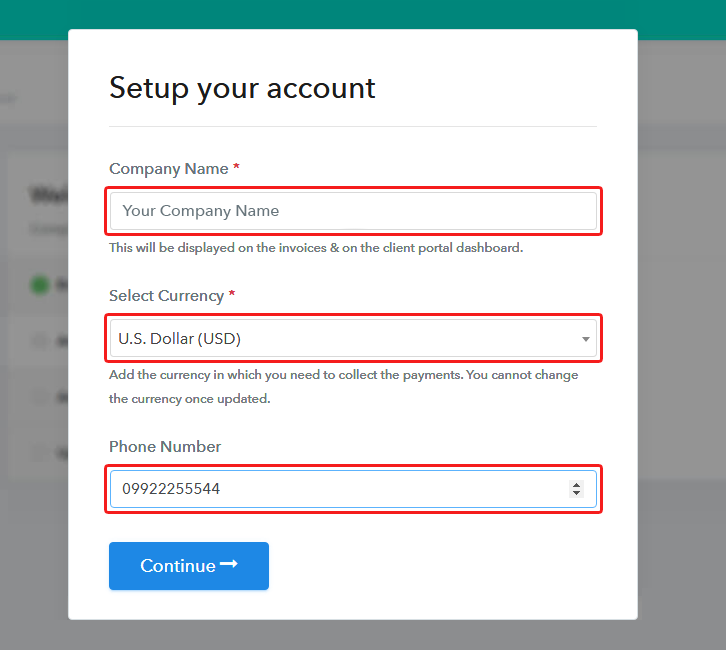
Next, the system will require your company’s information to complete the setup. Quickly fill your company name, mention a contact number & select a currency.

Step 4: Connect Payment Gateways & Start Toothpaste Selling Business Online
Connect Payment Gateway

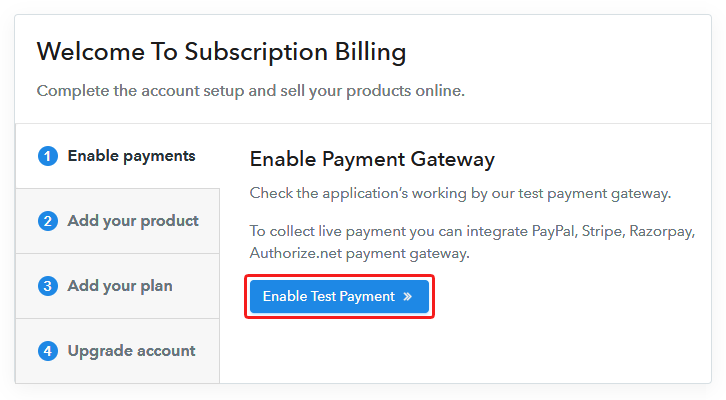
Now, integrate a payment gateway to collect payments for selling toothpastes online afterwards. For now, you can also enable the test payment mode available for testing purpose. Yet here to mention, you must integrate a payment gateway from the following selections to collect payments more further. Moreover, the gateway integration guides are also linked for your ease.

Step 5: Add Product for your Toothpaste
Add Product

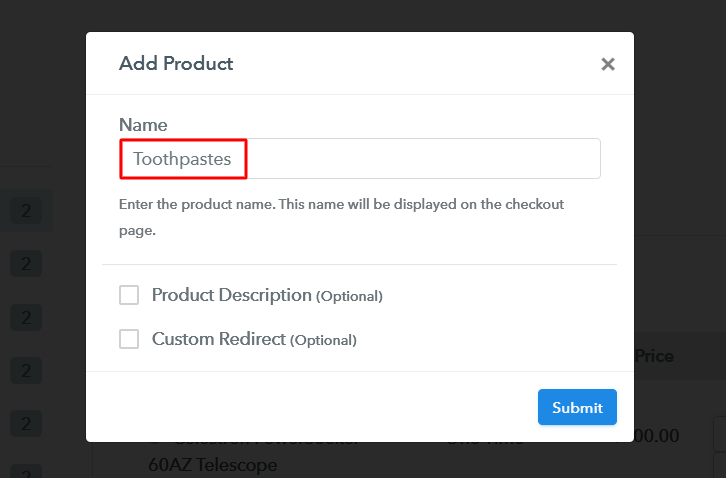
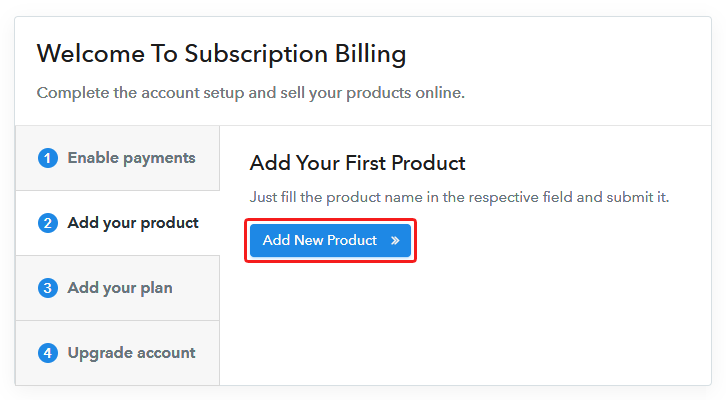
Now, add a product category by striking the ‘Add New Product’ button. Mention a product name like a toothpaste category such as for kids, sensitive, herbal etc.

Add Product to Sell Toothpastes Online

Fill in the product details & tap the ‘submit’ button.

Note: Here you can add all the products related to the similar category by creating plans for each of them.

Step 6: Add Plans 

Now, let’s start making plans for the different categories of toothpastes available in your store.

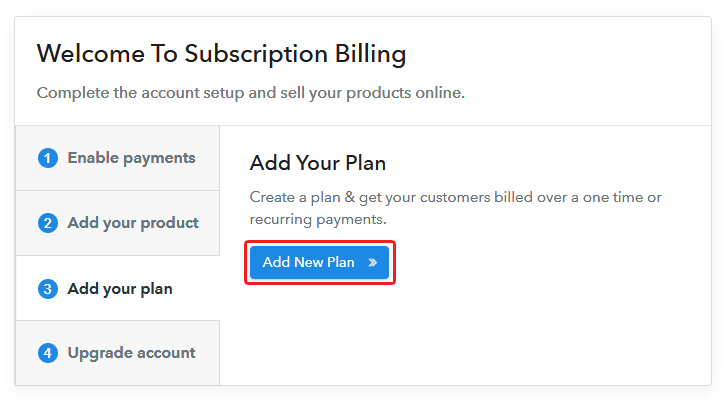
(a) Select Add New Plan

Add Plan

(b) Specify the Plan & Pricing Details
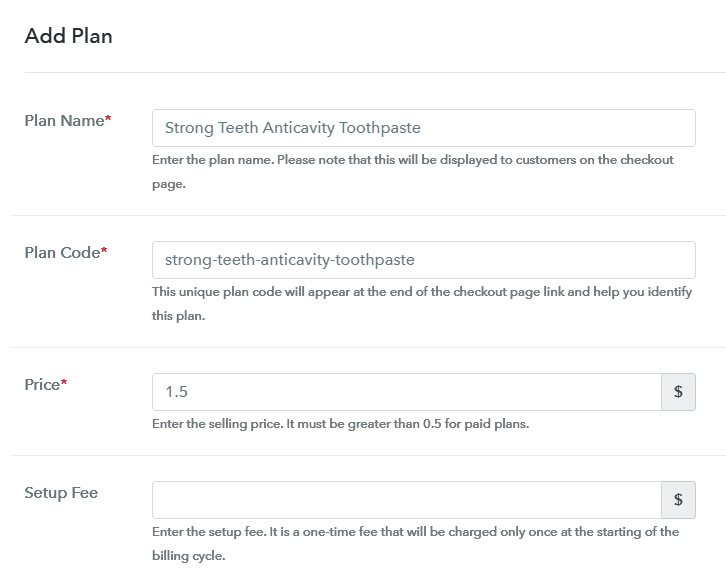
Add Plan to Sell Toothpastes Online

You can wire down a name, code, pricing details and set billing cycle etc in the plan details page to sell toothpastes online.

(c) Add Image & Description of Toothpaste
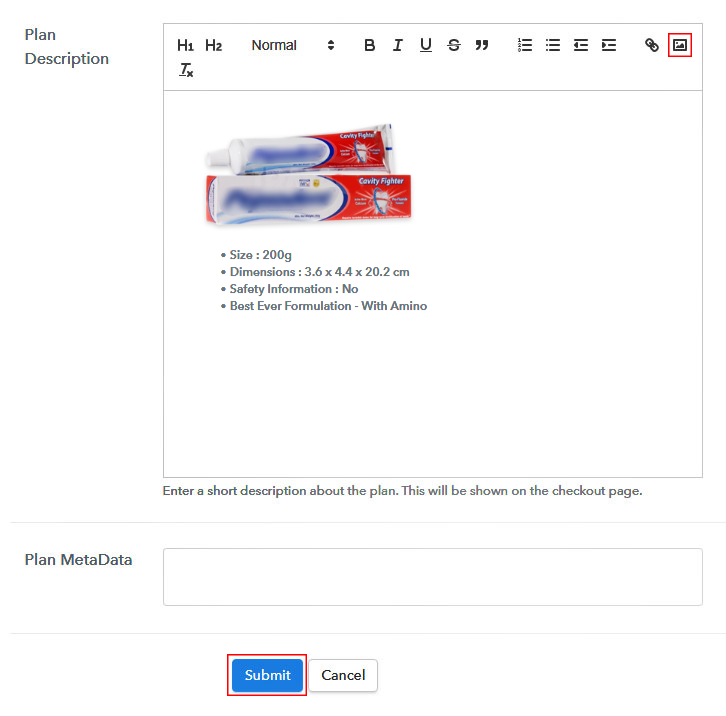
Add Image & Description to Sell Toothpastes Online

Plus, you can include an image & some points about the toothpastes for customer’s reference.

Strike ‘Submit’ on this page & a plan will be generated to sell toothpastes online.

Furthermore, you can add other toothpastes.

Step 7: Share your Checkout Page

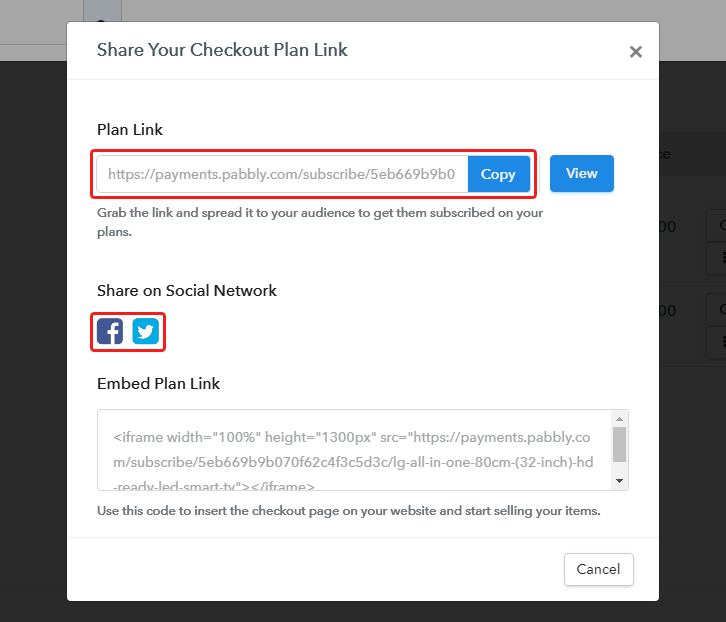
Share Checkout Page on Social Media

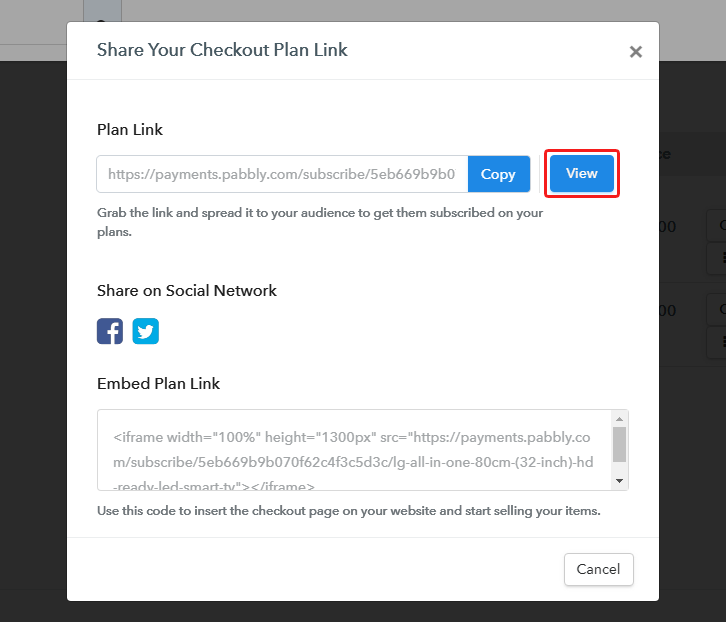
Besides, you’ll need to share or embed the plan checkout pages somewhere else to sell toothpastes online. For this, you can do the following:

  • You can share the plan checkout page directly on Facebook & Twitter
  • Second, you can share the plan link URL over all the other social media & link sharing channels such as emails, SMS etc
  • Lastly, you can embed a plan link URL within the buttons & texts of a site to redirect a client on the payment’s page

Step 8: Preview Checkout Page

Follow up the recommended steps to preview the checkout page:

(a) Click on the View Button

View Checkout Plan

(b) Take a Look at the Checkout Page

Checkout Page Preview to Sell Toothpastes Online

Step 9: Embed Checkout Page in Site & Sell Toothpastes Online
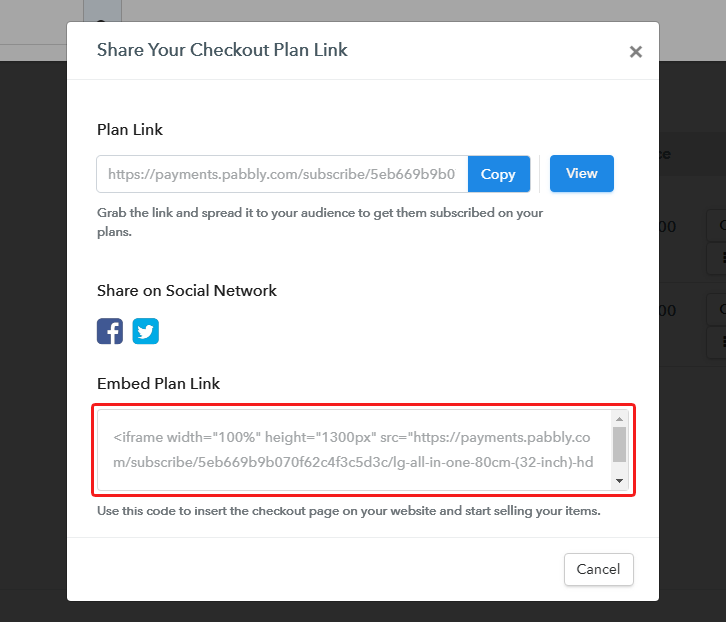
Embed Checkout Page on Website

Just copy the link and add the checkout page to sell toothpastes online at any preferable place on your WordPress site.

(a) Edit the Page & Paste the Copied Link
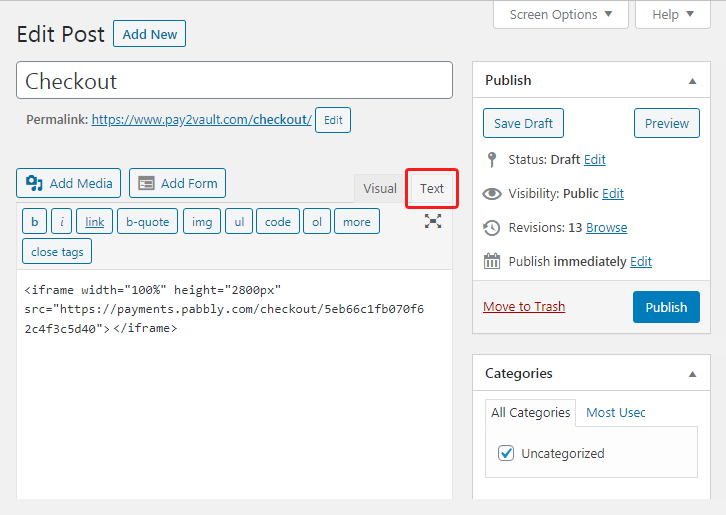
Embed Checkout Page on Website

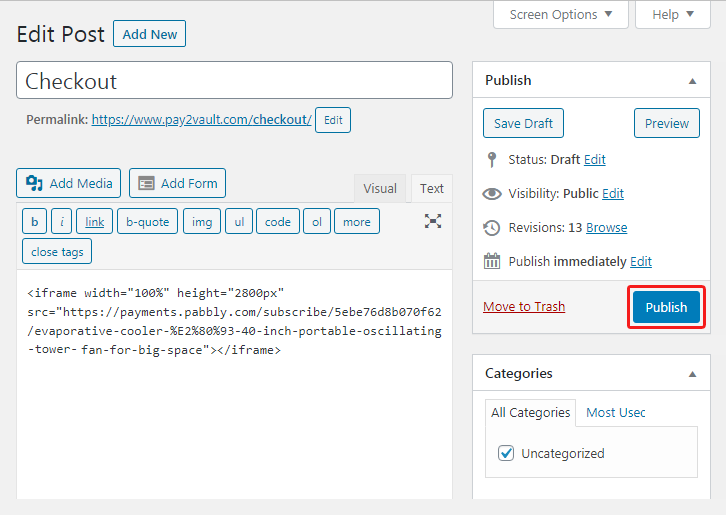
Further, paste the plan link on a text editor of the WordPress dashboard.

(b) Save & Publish the Checkout Page

Save_and_Publish

Next, click the “Publish” button, after making changes.

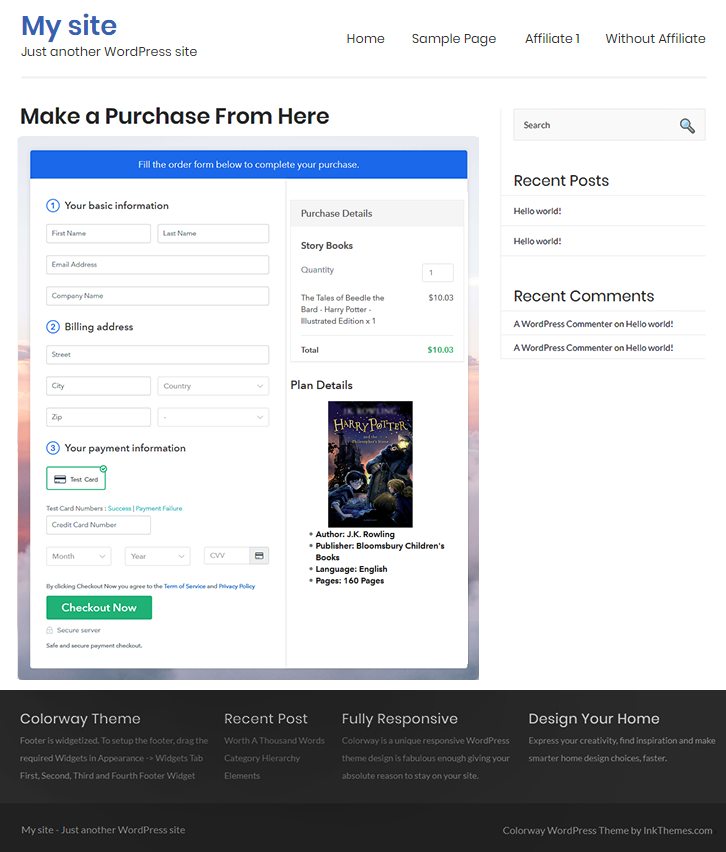
(c) Check out the Final Look of your Checkout Page on WordPress Site
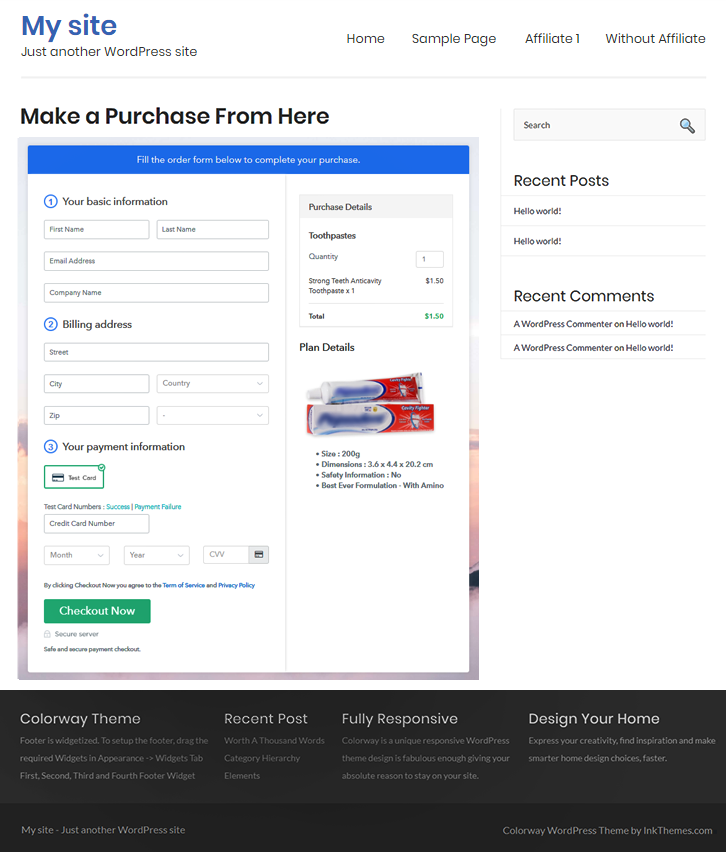
Checkout Page On WordPress Site to Sell Toothpastes Online

Step 10: Multiplan Checkout Page

Note: In case you want to sell multiple products via a single checkout page, you can create a multi-plan checkout page otherwise skip this step.

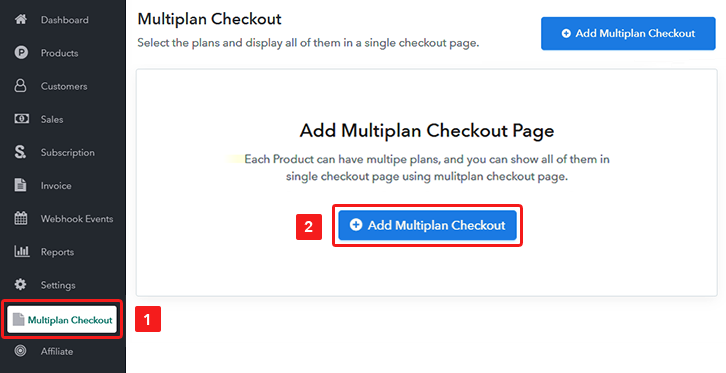
(a) Click on Add Mutiplan Checkout

Multiplan Checkout

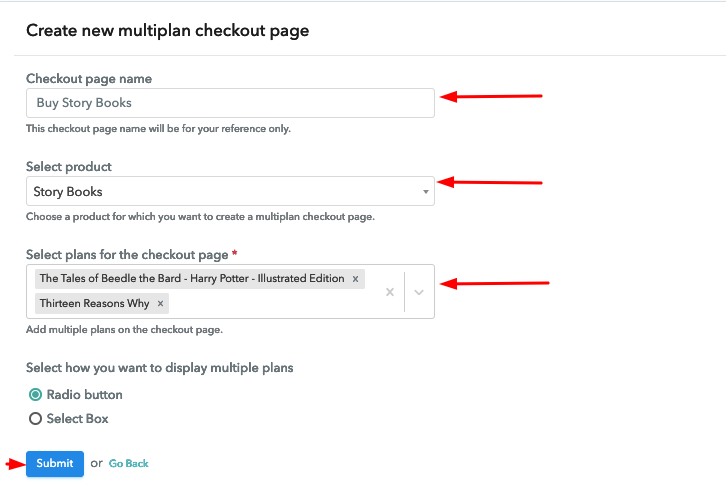
(b) Add Plans to Sell Multiple Toothpaste from Single Checkout Page
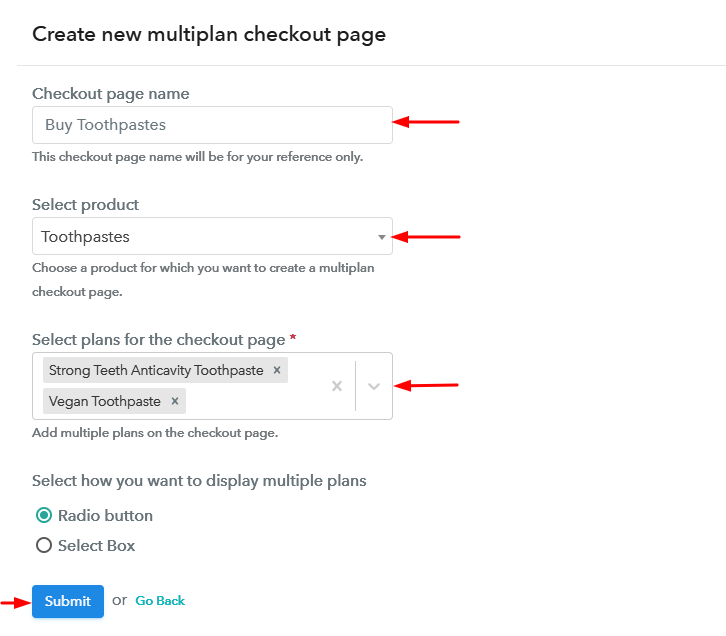
Create Multiplan Checkout to Sell Toothpastes Online

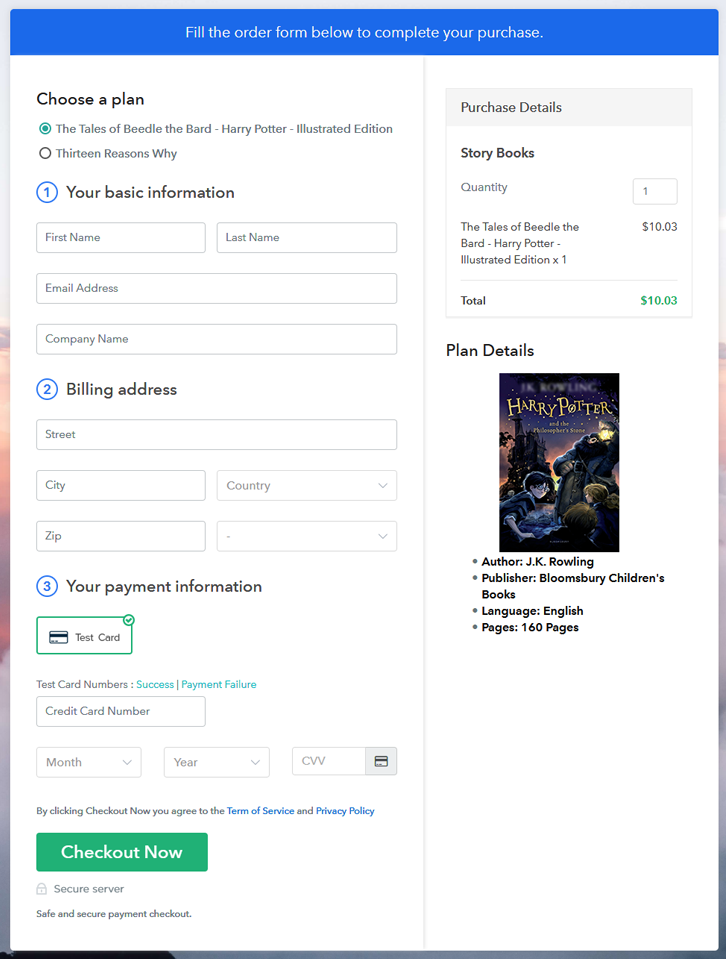
(c) Take a Look at the Checkout Page
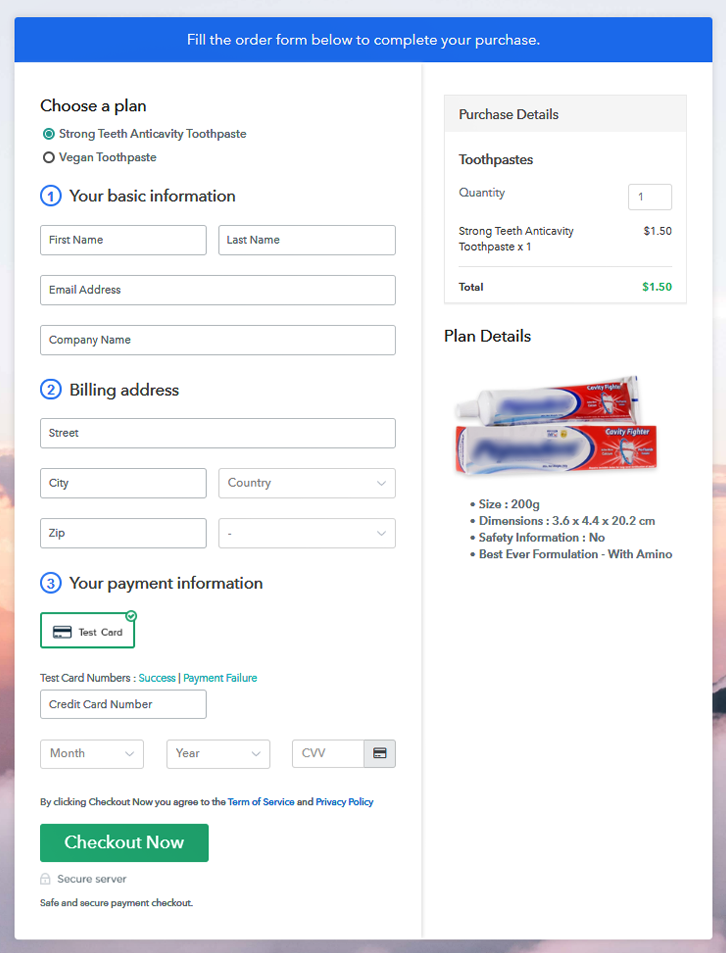
Multiplan Checkout Page to Sell Toothpastes Online

Preview Checkout Page

Wrapping Up

This was all about the ‘How to sell toothpastes online’. You can easily follow the steps within this article to start toothpastes business online. Moreover, the service dashboard will help you in the management as well as in keeping a record of all your payments & items in stock.

You May Also Like To Read –
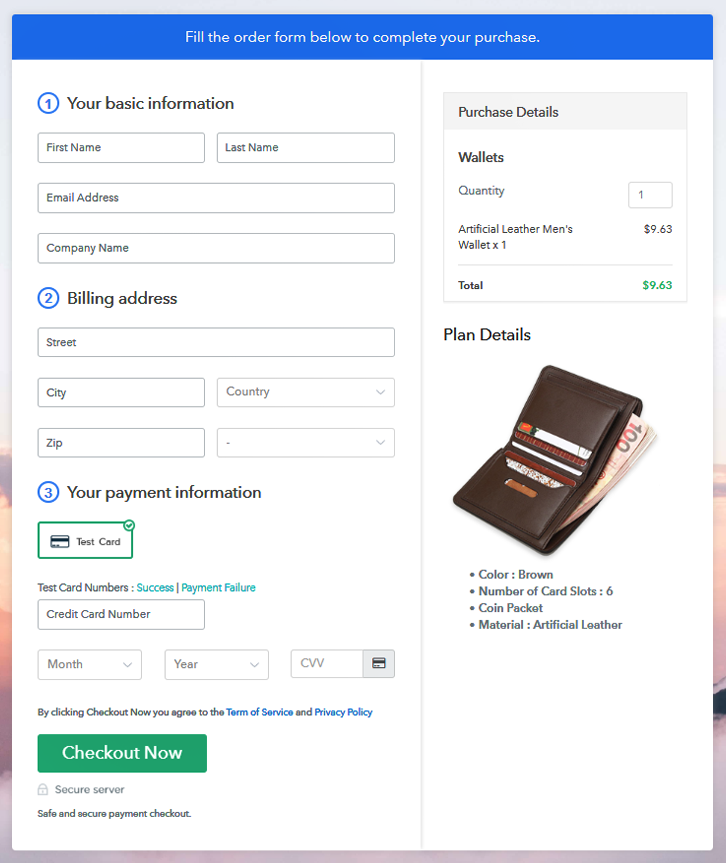
How to Sell Wallets Online | Step by Step (Free Method)

How to Sell Wallets Online

Ideal For: All the wallet makers, gift shops, wallet sellers, retail wallet shop owners, and other merchants can use this method to take their wallets selling business online.

How to Sell Wallets Online

Why Choose this Method to Sell Wallets Online?

Unlike any other solution, this method allows you to:

  • List and sell your wallets for FREE. Absolutely no payment required.
  • No need to pay commission on any of your sale.
  • Multiple payment options like PayPal, Credit Card, etc to collect payment from a single place.
  • Sell one time or recurring subscriptions of your wallets.
  • Collect payments & sell products in any currency as per your requirement.
  • Give discounts on your products by offering special coupon codes.
  • Add sales commission agents to help you in selling wallets online.

Get Pabbly Subscription Billing for Free

A wallet is a very important accessory to carry as it can contain personal belongings, travel documents, money, cards etc and can help to define your style. So if you are planning to sell wallets online then you must offer a nice collection for the buyers as the customers in here could be very picky sometimes.

In this article, I’ve explained the 10 steps to create checkout pages for selling wallets online. Well, there are multiple uses of using the checkout pages to sell wallets online they are:

  • You can sell limitless items online
  • Collect online/offline payments
  • Display your product and related details efficiently
  • Offer coupons & discounts
  • Apply global taxes easily
  • Automate billing & invoicing
    etc

Also, you can share these checkout pages on social media and link sharing channels for selling wallets online. The unique plan link URLs for the different plans can also be embedded in buttons and text anchors of any website or app.

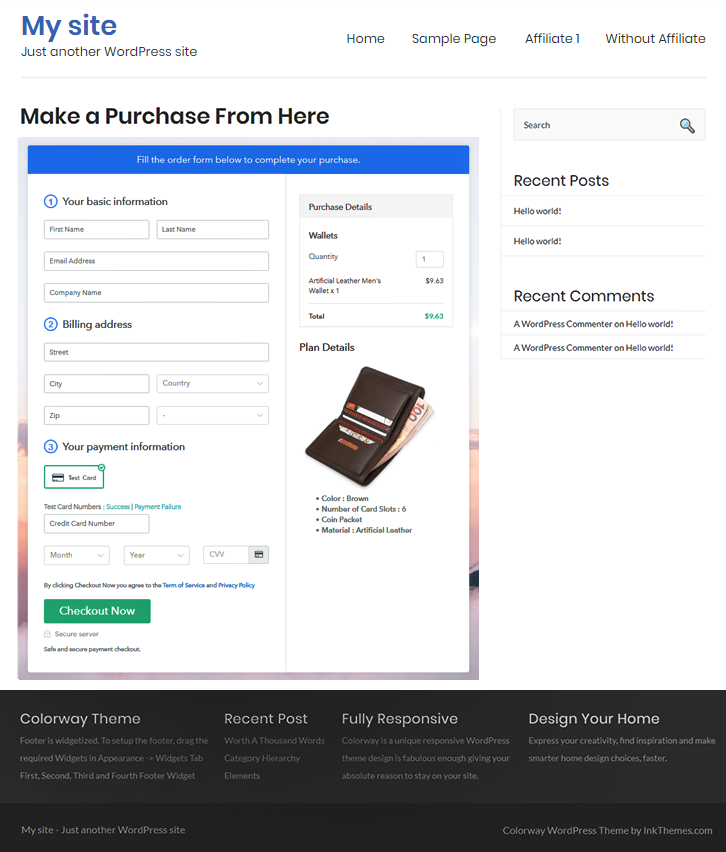
Final View of Checkout Page for your Wallets Selling Business

Checkout Page Preview to Sell Wallets Online

Preview Checkout Page

Step 1: Log in to Pabbly Subscription Billing

Signup

To initiate selling wallets online visit Pabbly Subscription Billing & hit ‘Sign Up Free‘ there. On the registration page, use a Gmail Id or fill the form to register manually by providing a few details.

Sign Up For Free!

Step 2: Select Subscription Billing

Access Subscription Billing

Step 3: Account Setup

Setup Account

Here in this pop-up window, fill in your company details such as your company name, phone number & select a currency.

Step 4: Connect Payment Gateways & Start Wallets Selling Business Online

Connect Payment Gateway

In this step, you’ve to integrate a payment method to prepare the system for collecting payments for the sold wallets afterwards. You can also enable the test payment mode for testing. Nonetheless, integrate a payment gateway from the following choices liked with their integration guides.

Step 5: Add Product for your Wallets

Add Product

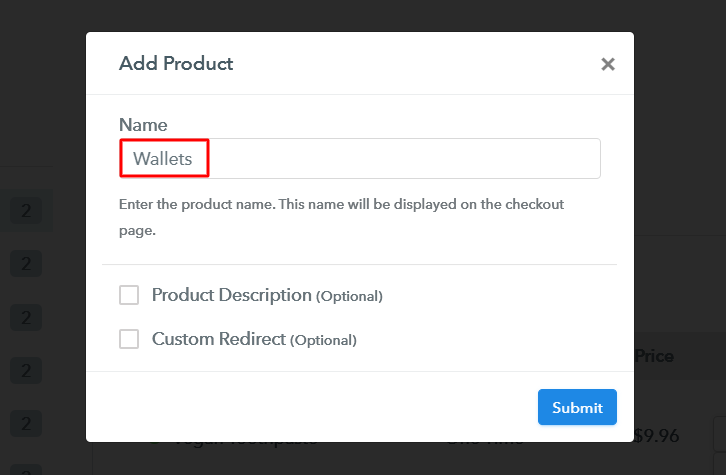
Now, add a product by clicking on the ‘Add New Product’ button. We’ll add wallets (items) to sell as plans within these wallet categories more further.

Add Product to Sell Wallets Online

Fill the required product details & click submit.

Note: Here you can add all the products related to the similar category by creating plans for each of them.

Step 6: Add Plans 

Now, let’s start adding plans for varied kinds of wallets available in your store.

(a) Select Add New Plan

Add Plan

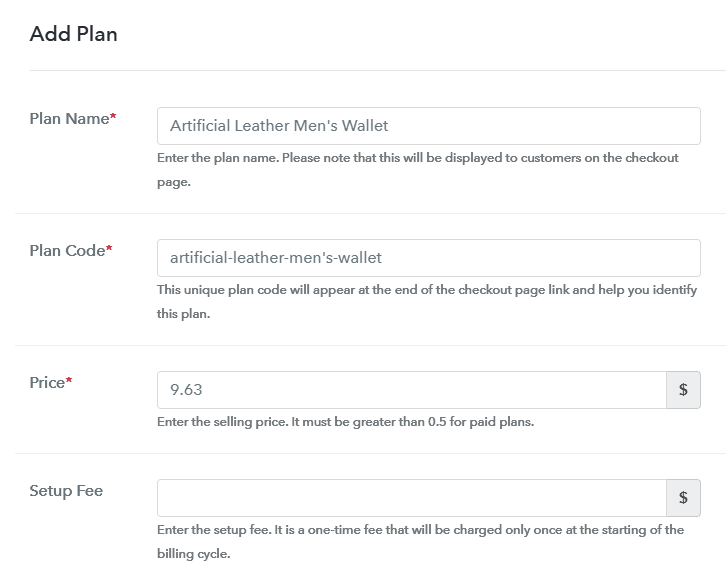
(b) Specify the Plan & Pricing Details

Add Plan to Sell Wallets Online

You can specify a name, code, price, billing cycle etc wallet details in the plan details page to sell wallets online.

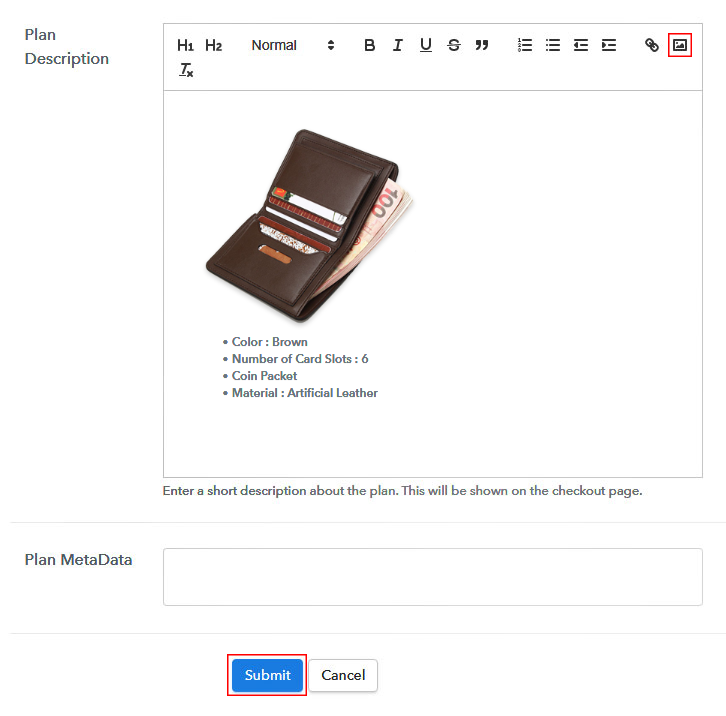
(c) Add Image & Description of Wallet

Add Image & Description to Sell Wallets Online

Moreso, you can put an image & some peculiarities about the wallets in the display for your customer’s reference.

Click the ‘Submit’ button in here & a plan will be added to sell wallets online.

Similarly, you can add other wallets plans too.

Step 7: Share your Checkout Page

Share Checkout Page on Social Media

You’ll need to share or embed the plan checkout pages to sell wallets online. For this, you can do the following:

  • You can share the plan checkout page directly on Facebook & Twitter using the sharing buttons here
  • Second, you can share the plan link URL over the other ink sharing & social media platforms alike emails, SMS etc
  • Lastly, you can embed the plan link within the texts & buttons of a website to redirect your buyer on the payment pages

Step 8: Preview Checkout Page

Follow up the recommended steps to preview the checkout page:

(a) Click on the View Button

View Checkout Plan

(b) Take a Look at the Checkout Page

Checkout Page Preview to Sell Wallets Online

Step 9: Embed Checkout Page in Site & Sell Wallets Online

Embed Checkout Page on Website

Just copy the link and add the checkout page to sell wallets online at any preferable place on your WordPress site.

(a) Edit the Page & Paste the Copied Link

Embed Checkout Page on Website

Further, paste the plan link on a text editor of the WordPress dashboard.

(b) Save & Publish the Checkout Page

Save_and_Publish

Next, click the “Publish” button, after making changes.

(c) Check out the Final Look of your Checkout Page on WordPress Site

Checkout Page On WordPress Site to Sell Wallets Online

Step 10: Multiplan Checkout Page

Note: In case you want to sell multiple products via a single checkout page, you can create a multi-plan checkout page otherwise skip this step.

(a) Click on Add Mutiplan Checkout

Multiplan Checkout

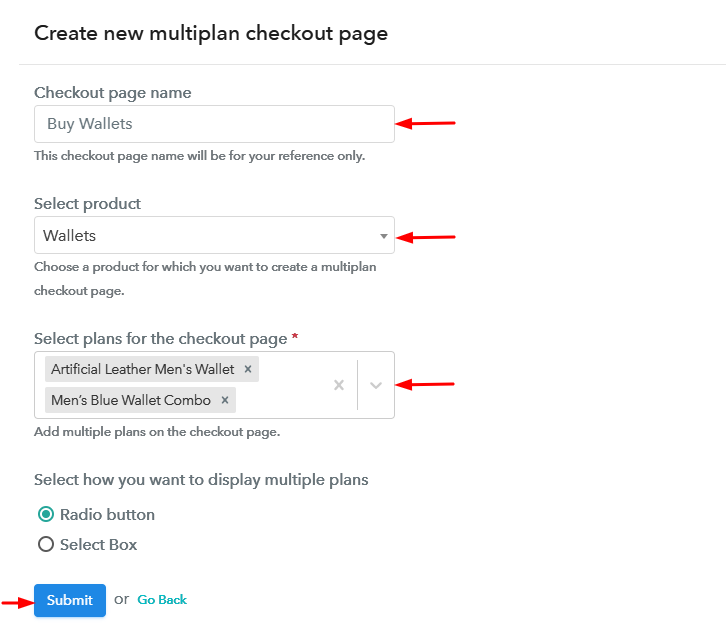
(b) Add Plans to Sell Multiple Wallets from Single Checkout Page

Create Multiplan Checkout Page to Sell Wallets Online

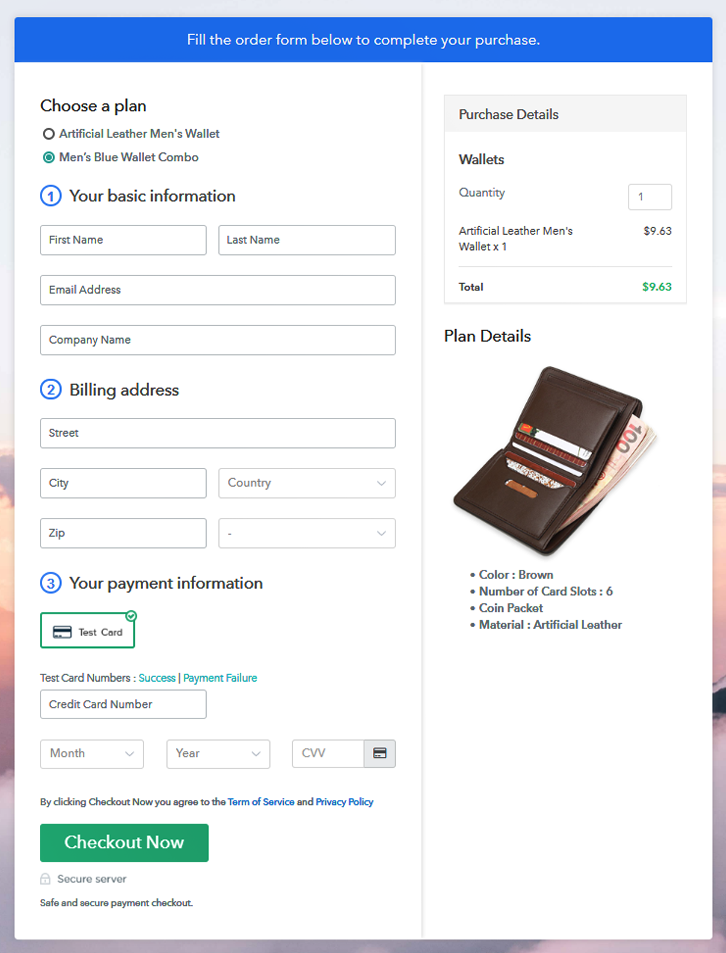
(c) Take a Look at the Checkout Page

Multiplan Checkout Page to Sell Wallets Online

Preview Checkout Page

Wrapping Up

This was all about the checkout page creation & how to sell wallets online. To start wallets business online, you’ll need to carry out these 10 steps and you can share the checkout page. Additionally, the dashboard will help you manage & track the sales & items availability.

You May Also Like To Read –
How to Sell Tea Bags Online | Step by Step (Free Method)

How to Sell Tea Bags Online

Ideal For: All the tea bag manufacturers, tea bag sellers, retail tea bag shop owners, and other merchants can use this method to take their tea bags selling business online.

How to Sell Tea Bags Online

Why Choose this Method to Sell Tea Bags Online?

Unlike any other solution, this method allows you to:

  • List and sell your tea bags for FREE. Absolutely no payment required.
  • No need to pay commission on any of your sale.
  • Multiple payment options like PayPal, Credit Card, etc to collect payment from a single place.
  • Sell one time or recurring subscriptions of your teabags.
  • Collect payments & sell products in any currency as per your requirement.
  • Give discounts on your products by offering special coupon codes.
  • Add sales commission agents to help you in selling tea bags online.

Get Pabbly Subscription Billing for Free

Tea is the second most-consumed beverage in the world & around 273 billion litres of it are consumed every year and increasing. So, it could be a promising business and if you want to sell tea bags online then maybe we can suggest you the best selling platform.

Well, a selling platform can help you save time in the manual management of records & you can collect payments securely. And as there are many in the market, so for your ease we’ve come up with the best here. The service’s name is Pabbly Subscription Billing and it has only a single task for you to carry out for selling tea bags online i.e, checkout page creation.

In this blog, I’ve explained the process of creating a checkout page. This checkout page will help you in displaying an image, pricing & other product details. Also, it enables you to collect online/offline payments globally.

To start tea bags business online, you only have to share the plan checkout pages over social media platforms like Facebook, WhatsApp, email etc. Moreover, you can also embed these checkout pages within buttons, text anchors, posts, and pages of websites.

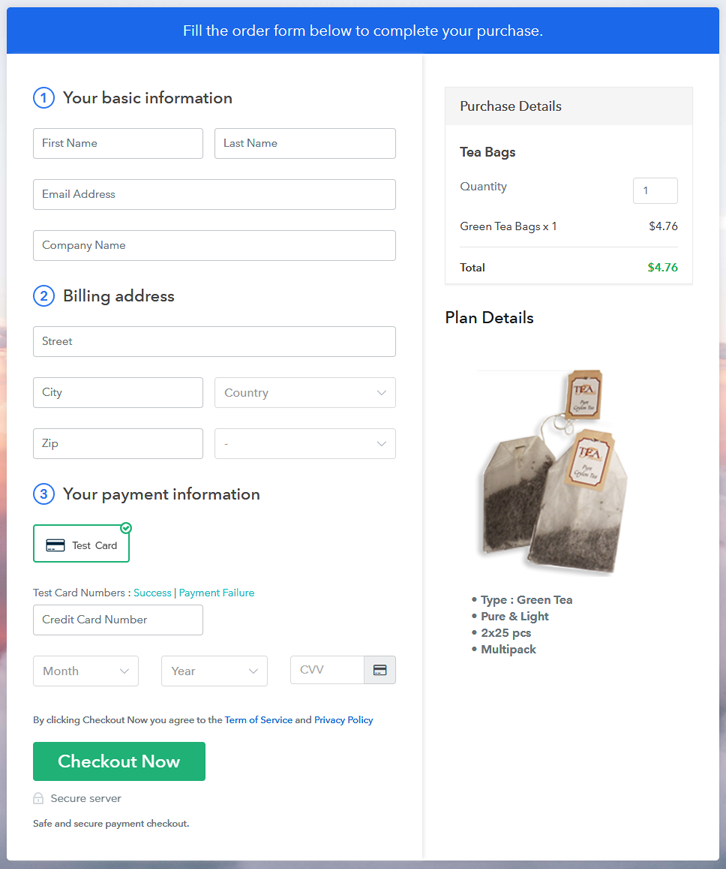
Final View of Checkout Page for your Tea Bags Selling Business

Checkout Page Preview to Sell Tea Bags Online

Preview Checkout Page

Step 1: Log in to Pabbly Subscription Billing

Signup

Begin the process by visiting Pabbly Subscription Billing & then hit the ‘Sign Up Free‘ button there. Next on the registration page, either use your Gmail ID or sign-up manually to get started.

Sign Up For Free!

Step 2: Select Subscription Billing

Access Subscription Billing

Step 3: Account Setup

Setup Account

In this step, the system will need some of your company details to complete the setup. Therefore, quickly fill in the information asked such as your company name, contact number & also select a currency you wanna deal in.

Step 4: Connect Payment Gateways & Start Tea Bags Selling Business Online

Connect Payment Gateway

Now, integrate a payment method or enable the test payment method available for testing. However, to collect actual payments pick as well as integrate a method from the following choices available with integration guides.

Step 5: Add Product for your Tea Bags

Add Product

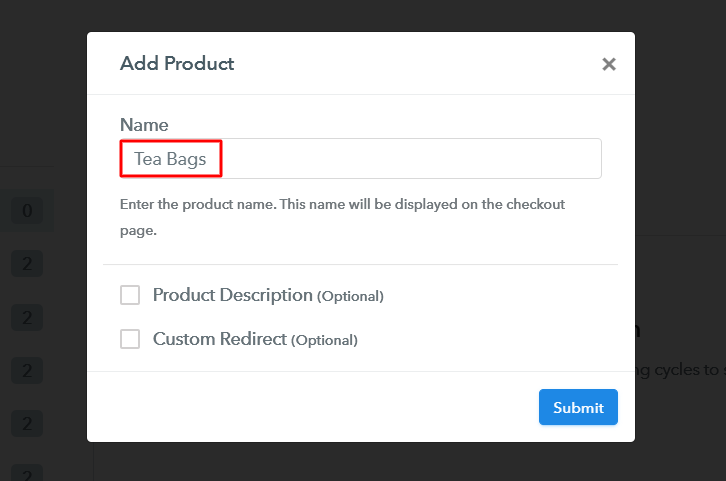
Next step is adding a product, for this hit the ‘Add New Product’ button. Assign a product name as a category of teabags. More further, we’ll add tea bag items to sell under these created product categories.

Add Product to Sell Tea Bags Online

Fill in the required details & a product category will be appended.

Note: Here you can add all the products related to the similar category by creating plans for each of them.

Step 6: Add Plans 

Now, make plans for the different types of tea bags available in your store.

(a) Select Add New Plan

Add Plan

(b) Specify the Plan & Pricing Details

Add Plan to Sell Tea Bags Online

You can mention plan details like a name, code, pricing etc for the tea bags on this page.

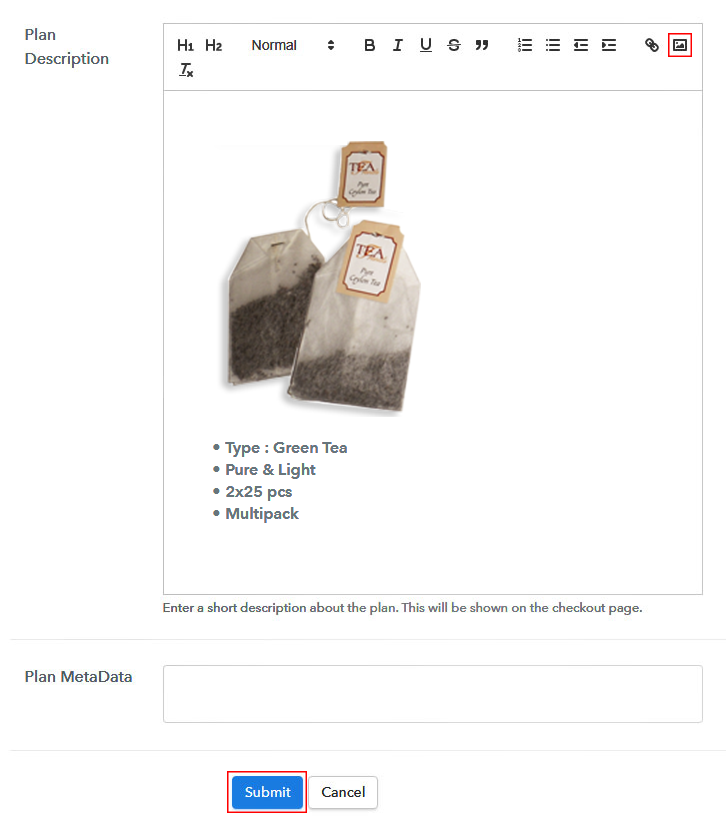
(c) Add Image & Description of Tea Bags

Add Image & Description to Sell Tea Bags Online

Additionally, you can display an image of the tea bags with some description.

Hit the ‘Submit’ button in here & a plan checkout page to sell tea bags online will be generated automatically.

Further, you can also add other teabags items in the same way.

Step 7: Share your Checkout Page

Share Checkout Page on Social Media

To sell tea bags online, you can share a plan checkout page using its plan link.

  • Share the plan link with your consumers over SMS, emails, other social media & link sharing platforms for accepting payments and showing your product
  • Also, you can embed the plan link within the buttons & text anchors of a website to redirect a customer onto the payment checkout pages
  • Lastly, you can directly share the plan checkout pages over Facebook & Twitter through the given buttons

Step 8: Preview Checkout Page

Follow up the recommended steps to preview the checkout page:

(a) Click on the View Button

View Checkout Plan

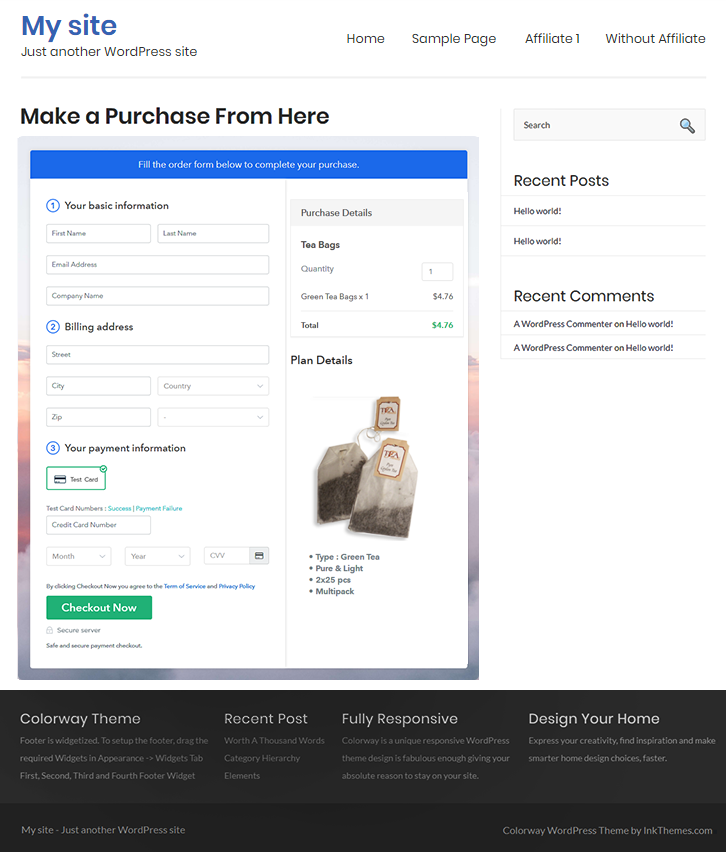
(b) Take a Look at the Checkout Page

Checkout Page Preview to Sell Tea Bags Online

Step 9: Embed Checkout Page in Site & Sell Tea Bags Online

Embed Checkout Page on Website

Just copy the link and add the checkout page to sell tea bags online at any preferable place on your WordPress site.

(a) Edit the Page & Paste the Copied Link

Embed Checkout Page on Website

Further, paste the plan link on a text editor of the WordPress dashboard.

(b) Save & Publish the Checkout Page

Save_and_Publish

Next, click the “Publish” button, after making changes.

(c) Check out the Final Look of your Checkout Page on WordPress Site

Checkout Page On WordPress Site to Sell Tea Bags Online

Step 10: Multiplan Checkout Page

Note: In case you want to sell multiple products via a single checkout page, you can create a multi-plan checkout page otherwise skip this step.

(a) Click on Add Mutiplan Checkout

Multiplan Checkout

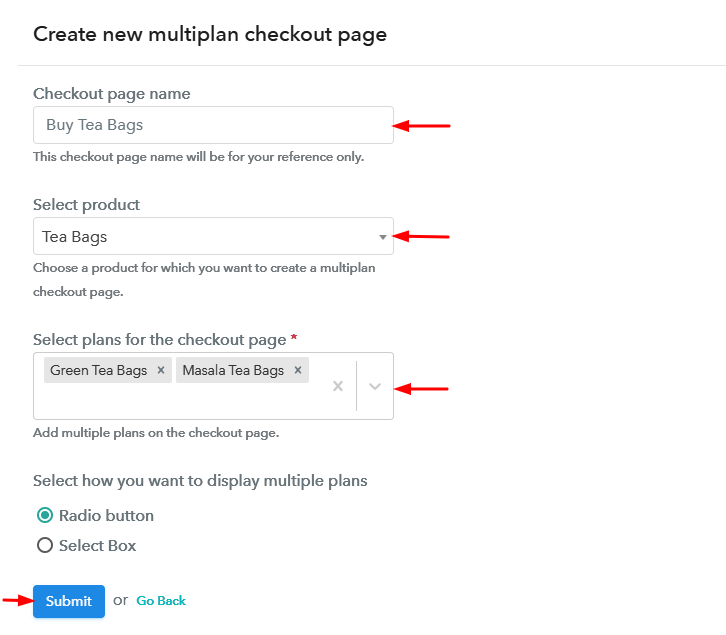
(b) Add Plans to Sell Multiple Tea Bags from Single Checkout Page

Create Multiplan Checkout Page to Sell Tea Bags Online

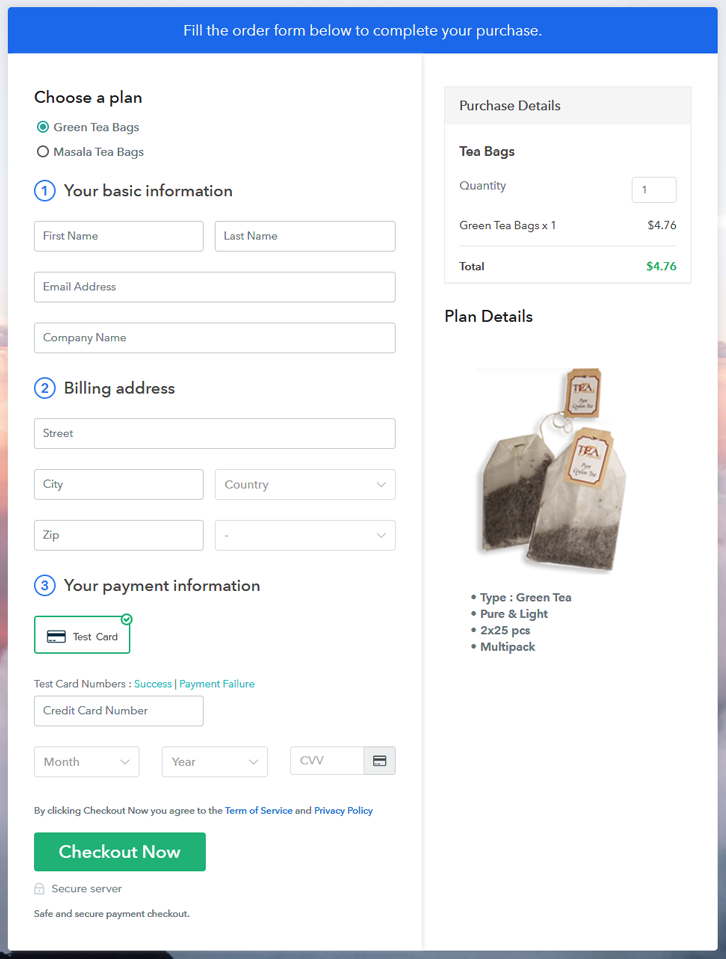
(c) Take a Look at the Checkout Page

Multiplan Checkout Page to Sell Tea Bags Online

Preview Checkout Page

Wrapping Up

Till now, you can say that this process of selling tea bags online is very easy to implement, everything is pretty simple. Both the checkout page creation & records go hand in hand very evenly that there is no room for confusion in here. Also, no limit over product’s sales adds up scalability for small & large businesses.

You May Also Like To Read –
How to Sell Spray Paints Online | Step by Step (Free Method)

How to Sell Spray Paints Online

Ideal For: All the spray paint manufacturers, spray paint sellers, spray paint dealers, spray paint suppliers, paint shop owners and other merchants can use this method to sell spray paints online.

How to Sell Spray Paints Online

Why Choose this Method to Sell Spray Paints Online?

Unlike any other solution, this method allows you to:

  • List and sell your spray paints for FREE. Absolutely no payment required.
  • No need to pay commission on any of your sales.
  • Multiple payment options like PayPal, Credit Card, etc to collect payment from a single place.
  • Sell one time or recurring subscriptions of your spray paints.
  • Collect payments & sell products in any currency as per your requirement.
  • Give discounts on your products by offering special coupon codes.
  • Add sales commission agents to help you in selling spray paints online.

Get Pabbly Subscription Billing for Free

Have an eye for graffiti? Then you must be interested in spray paints. Spray paints can take art to another level which is why every second person looks over the internet for spray paints. According to the Grand View Research report, the global aerosol market size is anticipated to register the CAGR of 6.5% in terms of revenue during the upcoming times.

So starting your own spray paint business is worth a try. Plus, online stores offer various perks like a global audience, no bargaining, lower set up costs. Luckily we have a tool that can make starting your spray paint business journey 100 times betters. The software we are recommending is Pabbly Subscription Billing which lets you build an amazing checkout page for selling spray paints online.

Other than this, it offers some remarkable features like:

  • Infinite Discount & Coupons
  • Revenue Tracking
  • One Time and Recurring Billing

Subsequently, now let me show you 10 easy steps that you need to follow for creating checkout pages for selling spray paints online.

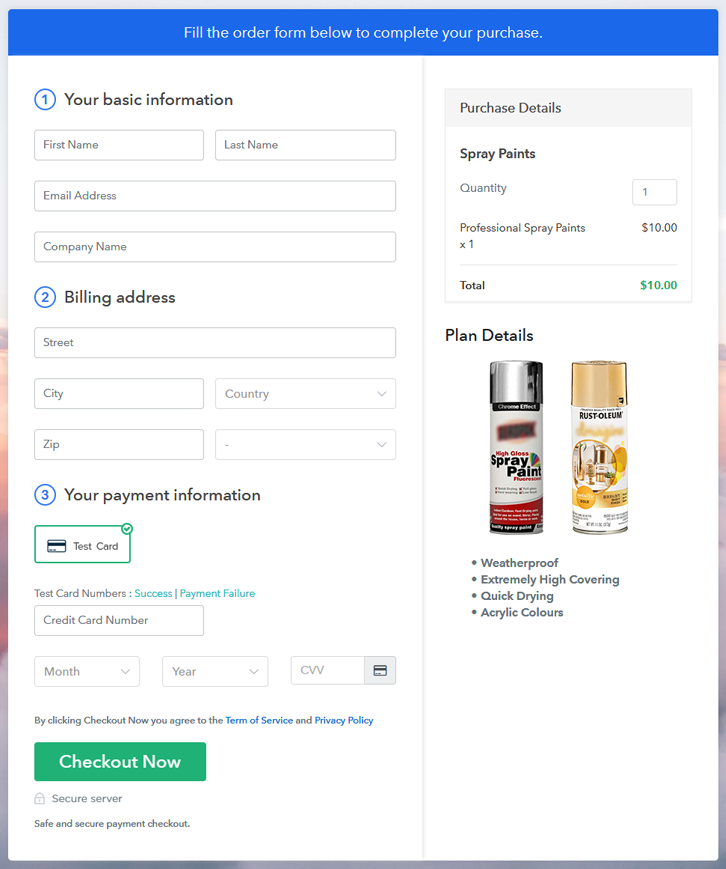
Final View of Checkout Page for your Spray Paints Selling Business

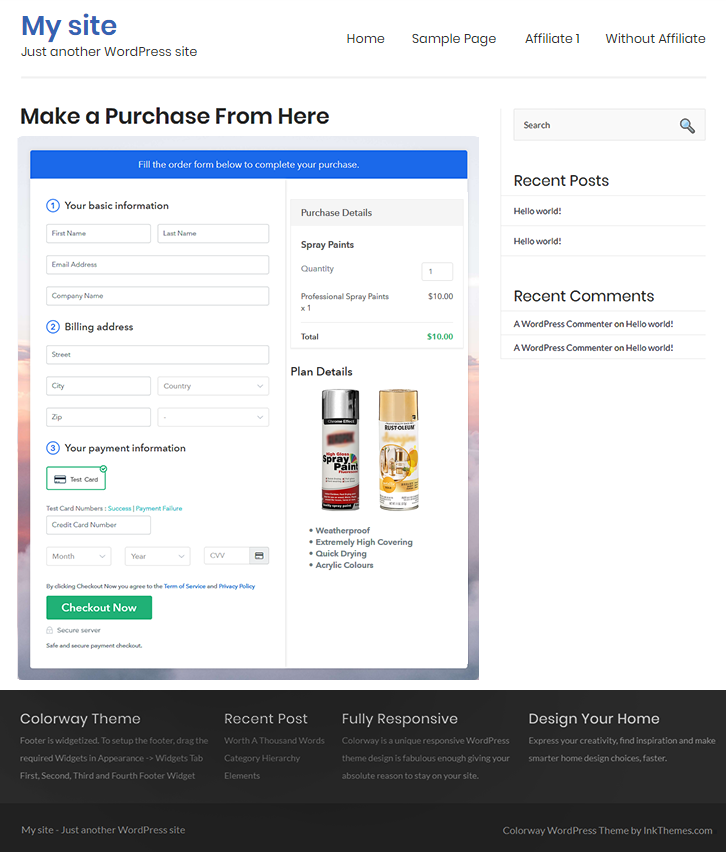
Checkout Page to Sell Spray Paints Online

Preview Checkout Page

Step 1: Log in to Pabbly Subscription Billing

Signup

Begin the process for creating a checkout page for spray paints by visiting the Pabbly Subscription Billing in your browser. After that, click on the “Sign up Free“ button. Moreover, either manually filled out the details or sign in using your Gmail account.

Sign Up For Free!

Step 2: Select Subscription Billing

Access Subscription Billing

Step 3: Account Setup

Setup Account

Besides, after clicking on the “Access Now” button of the software, a page will open with fields like company name, select currency, and phone number. Simply fill out those details to continue creating a checkout page for spray paints.

Step 4: Connect Payment Gateways & Start Spray Paints Selling Business Online

Connect Payment Gateway

The succeeding step is to growing consciousness about payment procedures using a “Test Payment Gateway”. Here, we will describe the checkout page process for the spray paints with the help of a test payment gateway. Besides this, the tool offers various payment gateways such as PayPal, Stripe, etc. Further, below are the payment integration guides to help you out.

Step 5: Add Product for your Spray Paints

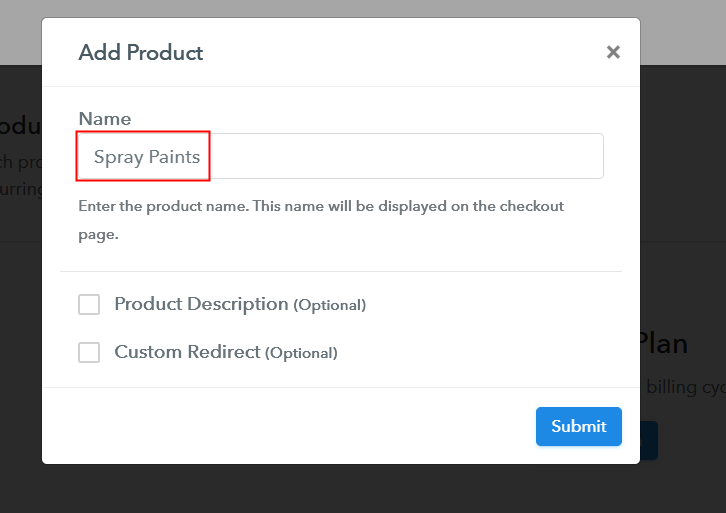
Add Product

Additionally, add the name, which in our case is “Spray Paints”. Here you can specify the type like general purpose spray paints, plastic and specialty spray paint, etc. Further, write a short description of the spray paints to seize the customer’s attention.

Add Product to Start Selling Spray Paints Online

Moreover, just fill out all those details, and your product for spray paints is created.

Note: Here you can add all the products related to the similar category by creating plans for each of them.

Step 6: Add Plans 

Let’s expose plans for different kinds of spray paints available in your store.

(a) Select Add New Plan

Add Plan

(b) Specify the Plan & Pricing Details

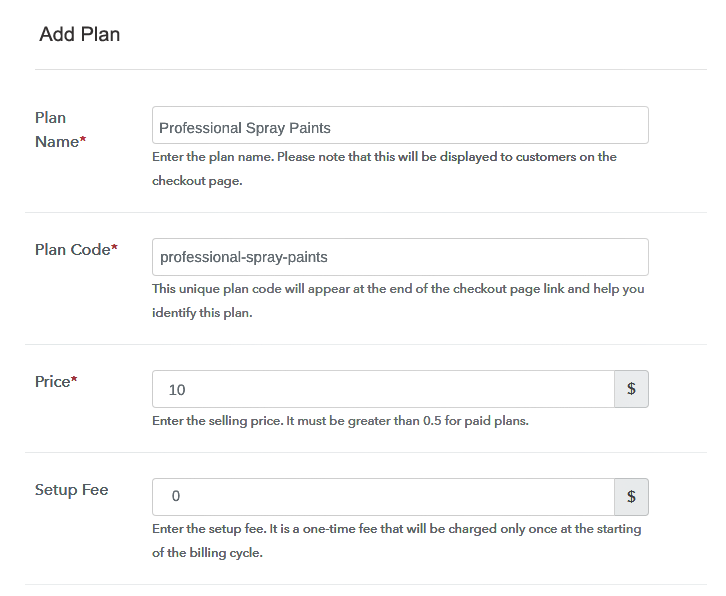
Specify the Plan and Pricing to Sell Spray Paints Online

The next thing to do is fill all the details of the spray paints like plan name, code, price, set-up fee, and much more to continue.

(c) Add Image & Description of Spray Paints

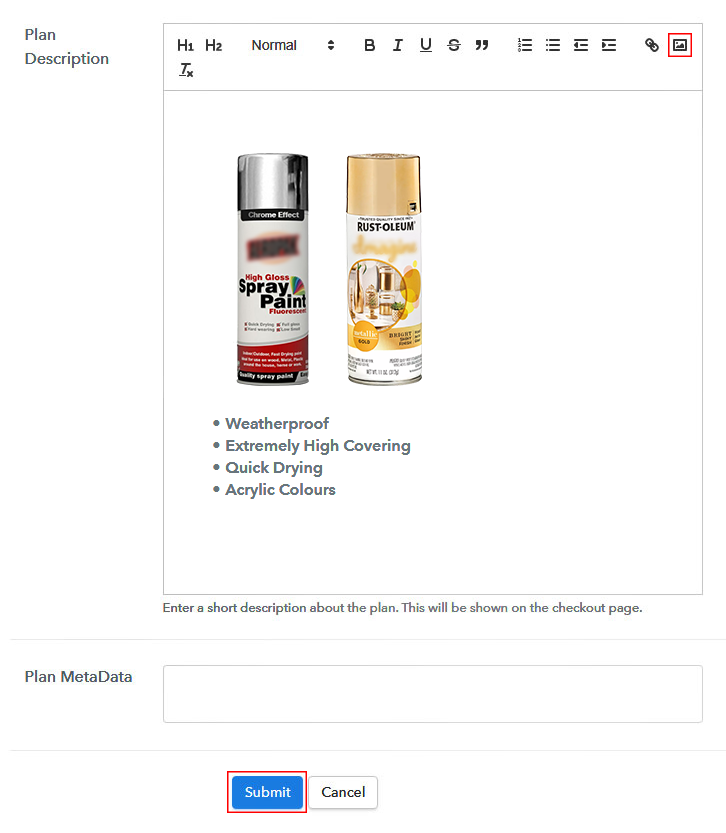
Add Image & Description to Sell Spray Paints Online

Furthermore, write a brief description of the spray paints using bullets, images, etc, to bring original buyers to the checkout page.

Next, click on the “Submit” button to add the spray paints on the checkout page.

Finally, you can add multiple plans and kinds of spray paints in your product list which you want to market online.

Step 7: Share your Checkout Page

Share Checkout Page on Social Media

  • Moreover, share the checkout page of the spray paints on social media accounts like Facebook & Twitter to grab the customer’s attention.
  • Also, you can share the direct link of the spray paint’s checkout page with your customers via SMS or email marketing.
  • Additionally, embed the provided plan link of the spray paints in the buttons or any anchor text on your website.

Step 8: Preview Checkout Page

Follow up the recommended steps to preview the checkout page for spray paints:

(a) Click on the View Button

View Checkout Plan

(b) Take a Look at the Checkout Page

Checkout Page to Sell Spray Paints Online

Step 9: Embed Checkout Page in Site & Sell Spray Paints Online

Embed Checkout Page on Website

Just copy the link and add the checkout page to sell spray paints online at any proper place on your WordPress site.

(a) Edit the Page & Paste the Copied Link

Paste Link in Text Editor

Further, paste the plan link of spray paints on a text editor of the WordPress dashboard.

(b) Save & Publish the Checkout Page

Save_and_Publish

Next, click the “Publish” button, after making changes.

(c) Check out the Final Look of your Checkout Page on WordPress Site

Final Look of your Checkout Page to Sell Spray Paints Online

Step 10: Multiplan Checkout Page

Note: In case you want to sell multiple products via a single checkout page, you can create a multi-plan checkout page otherwise skip this step.

(a) Click on Add Mutiplan Checkout

Multiplan Checkout

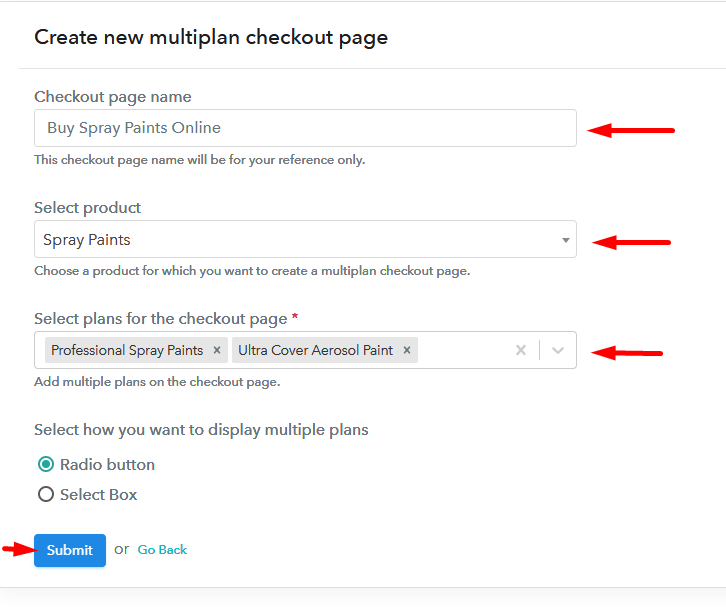
(b) Add Plans to Sell Multiple Spray Paints from Single Checkout Page

Add Multiple Products to Start Selling Spray Paints Online

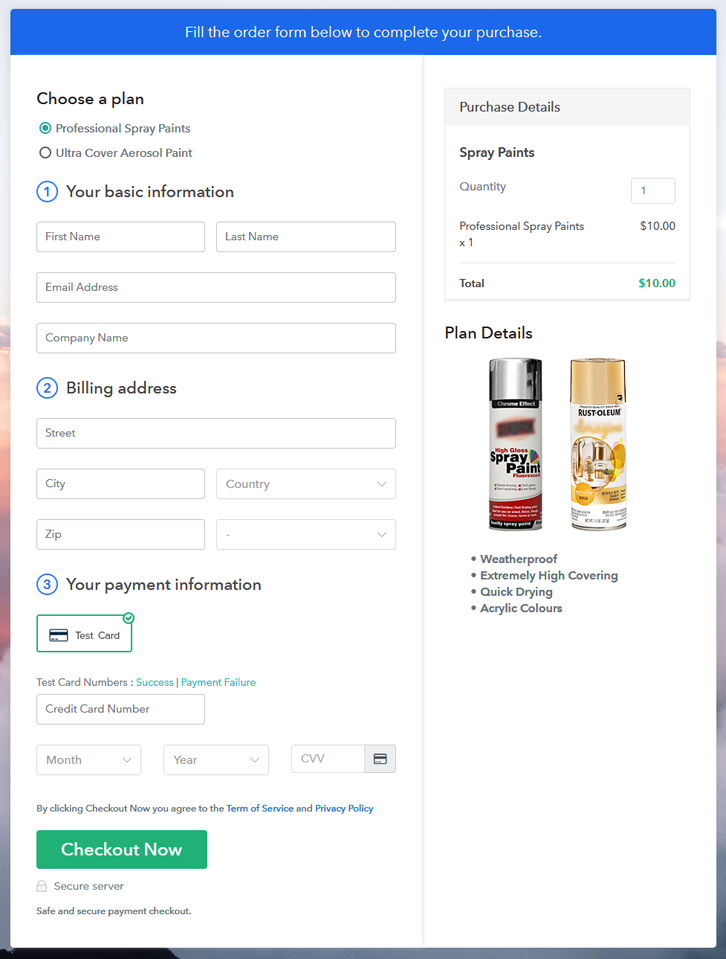
(c) Take a Look at the Checkout Page

Multiplan Checkout Page to Sell Spray Paints Online

Preview Checkout Page

Wrapping Up

There you have it! We have probably covered all the crucial steps to start spray paints selling business online. And don’t just consider us, try this software Pabbly Subscription Billing and boost your sales. Moreover, it is jammed with incredible features like several billing models, revenue tracking, and much more.

So, what are you waiting for? Go and try this software out

You May Also Like To Read –
How to Sell Stainless Steels Online | Step by Step (Free Method)

How to Sell Stainless Steels Online

Ideal For: All the stainless steel manufacturers, stainless steel sellers, stainless steel dealers, stainless steel suppliers, utensil shop owners and other merchants can use this method to sell stainless steels online.

How to Sell Stainless Steels Online

Why Choose this Method to Sell Stainless Steels Online?

Unlike any other solution, this method allows you to:

  • List and sell your stainless steels for FREE. Absolutely no payment required.
  • No need to pay commission on any of your sales.
  • Multiple payment options like PayPal, Credit Card, etc to collect payment from a single place.
  • Sell one time or recurring subscriptions of your stainless steels.
  • Collect payments & sell products in any currency as per your requirement.
  • Give discounts on your products by offering special coupon codes.
  • Add sales commission agents to help you in selling stainless steels online.

Get Pabbly Subscription Billing for Free

Stainless steels are widely used in the market because of its high durability, exceptional strength retention, and easy fabrication. This is a reason why the demand for stainless steel never goes downhill. But having a brick and mortar store can’t fill the demand alone, so it is better to start stainless steel business online.

One of the major perks of starting stainless steel business online is lower set up cost. And, most importantly online store offers endless freedom like no time restrictions, no middleman, etc. Thus, it is better to headstart your own stainless steels store online. Hence, here we are recommending Saas based software named Pabbly Subscription Billing that can help you in the process of starting your own stainless steel business.

Not only, it keeps you on top of stocks, bills, purchases but also offers ways to get recurring or one-time payment through the checkout page. Further, you can create a single or multiplan checkout page for selling stainless steel online.

Some of its extraordinary features involve:

  • List various stainless steels in a single checkout page
  • Add taxation charges if any
  • Collect money via online and offline mode

So, let’s get started by creating our checkout page with the help of Pabbly Subscription Billing to sell the stainless steels online.

Final View of Checkout Page for your Stainless Steels Selling Business

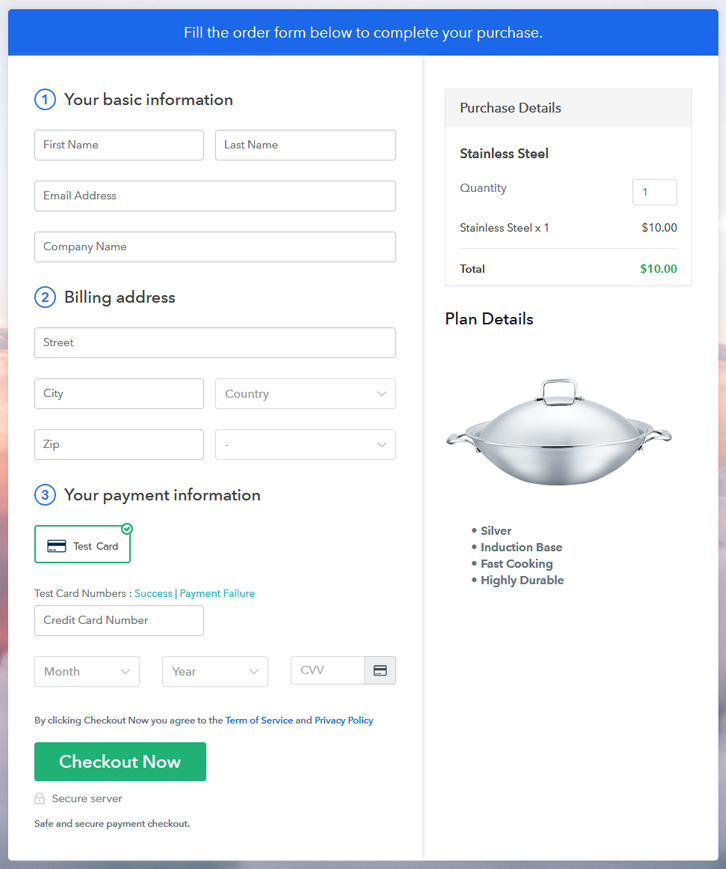
Checkout Page to Sell Stainless Steels Online

Preview Checkout Page

Step 1: Log in to Pabbly Subscription Billing

Signup

Begin the process for creating a checkout page for stainless steels by visiting the Pabbly Subscription Billing in your browser. After that, click on the “Sign up Free“ button. Moreover, either manually filled out the details or sign in using your Gmail account.

Sign Up For Free!

Step 2: Select Subscription Billing

Access Subscription Billing

Step 3: Account Setup

Setup Account

Besides, after clicking on the “Access Now” button of the software, a page will open with fields like company name, select currency, and phone number. Simply fill out those details to continue creating a checkout page for stainless steels.

Step 4: Connect Payment Gateways & Start Stainless Steels Selling Business Online

Connect Payment Gateway

The subsequent step is to gaining knowledge about payment procedures using a “Test Payment Gateway”. Here, we will describe the checkout page process for the stainless steels with the help of a test payment gateway. Besides this, the tool offers various payment gateways such as PayPal, Stripe, etc. Further, below are the payment integration guides to help you out.

Step 5: Add Product for your Stainless Steels

Add Product

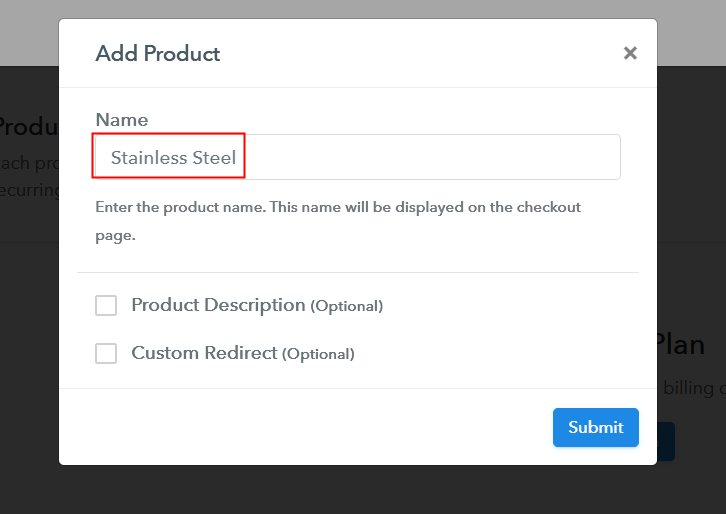
Additionally, add the name, which in our case is “Stainless Steels”. Here you can specify the type like ferritic stainless steels, martensitic stainless steels, etc. Further, write a short description of the stainless steels to capture the client’s attention.

Add Product to Start Selling Stainless Steels Online

Moreover, just fill out all those details, and your product for stainless steels is created.

Note: Here you can add all the products related to the similar category by creating plans for each of them.

Step 6: Add Plans 

Let’s expose plans for different kinds of stainless steels available in your store.

(a) Select Add New Plan

Add Plan

(b) Specify the Plan & Pricing Details

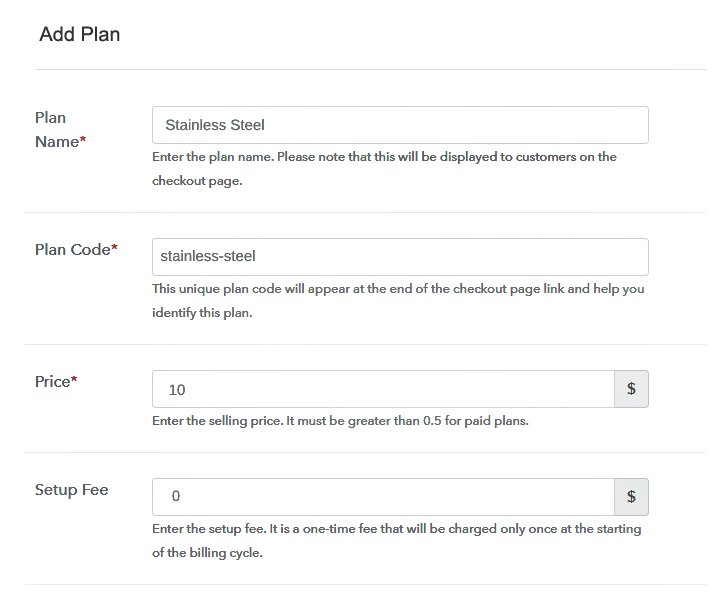
Specify the Plan and Pricing to Sell Stainless Steels Online

The next thing to do is fill all the details of the stainless steels like plan name, code, price, set-up fee, and much more to continue.

(c) Add Image & Description of Stainless Steels

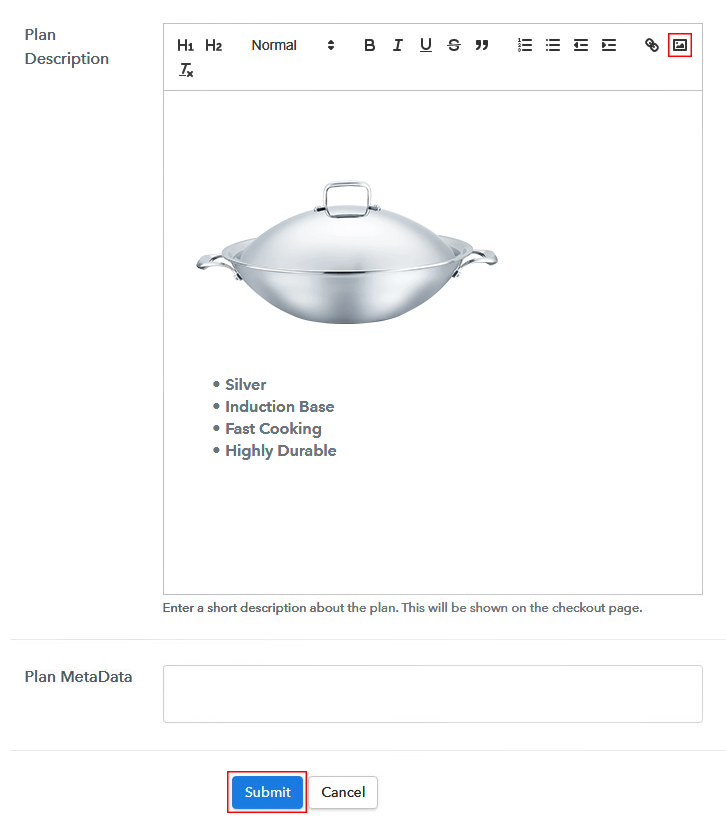
Add Image & Description to Sell Stainless Steels Online

Furthermore, write a brief description of the stainless steels using bullets, images, etc, to bring original buyers to the checkout page.

Next, click on the “Submit” button to add the stainless steels on the checkout page.

Finally, you can add multiple plans and kinds of stainless steels in your product list which you want to market online.

Step 7: Share your Checkout Page

Share Checkout Page on Social Media

  • Moreover, share the checkout page of the stainless steels on social media accounts like Facebook & Twitter to grab the customer’s attention.
  • Also, you can share the direct link of the stainless steel’s checkout page with your customers via SMS or email marketing.
  • Additionally, embed the provided plan link of the stainless steels in the buttons or any anchor text on your website.

Step 8: Preview Checkout Page

Follow up the recommended steps to preview the checkout page for stainless steels:

(a) Click on the View Button

View Checkout Plan

(b) Take a Look at the Checkout Page

Checkout Page to Sell Stainless Steels Online

Step 9: Embed Checkout Page in Site & Sell Stainless Steels Online

Embed Checkout Page on Website

Just copy the link and add the checkout page to sell stainless steels online at any proper place on your WordPress site.

(a) Edit the Page & Paste the Copied Link

Paste Link in Text Editor

Further, paste the plan link of stainless steels on a text editor of the WordPress dashboard.

(b) Save & Publish the Checkout Page

Save_and_Publish

Next, click the “Publish” button, after making changes.

(c) Check out the Final Look of your Checkout Page on WordPress Site

Final Look of your Checkout Page to Sell Stainless Steels Online

Step 10: Multiplan Checkout Page

Note: In case you want to sell multiple products via a single checkout page, you can create a multi-plan checkout page otherwise skip this step.

(a) Click on Add Mutiplan Checkout

Multiplan Checkout

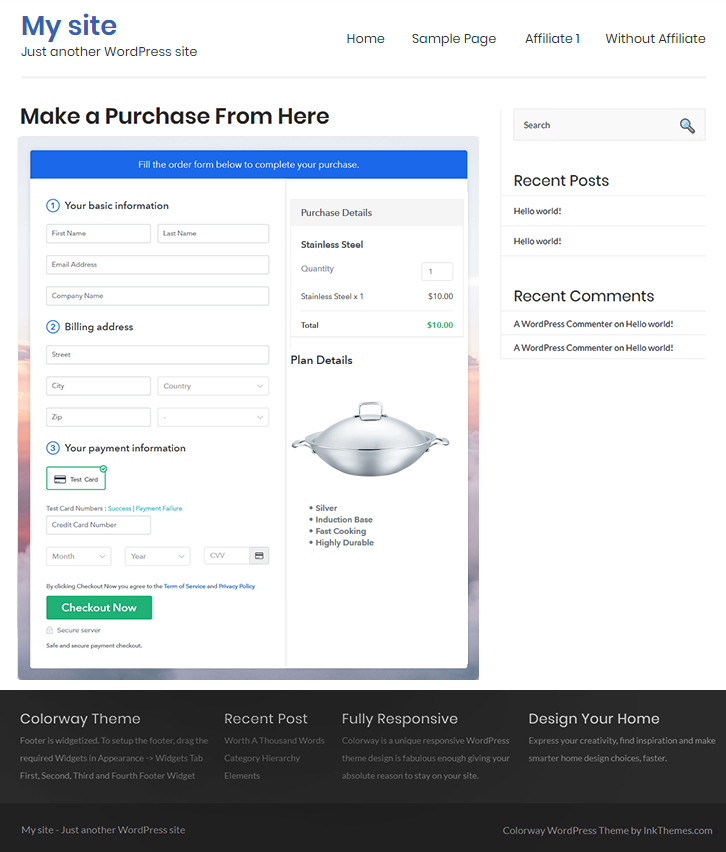
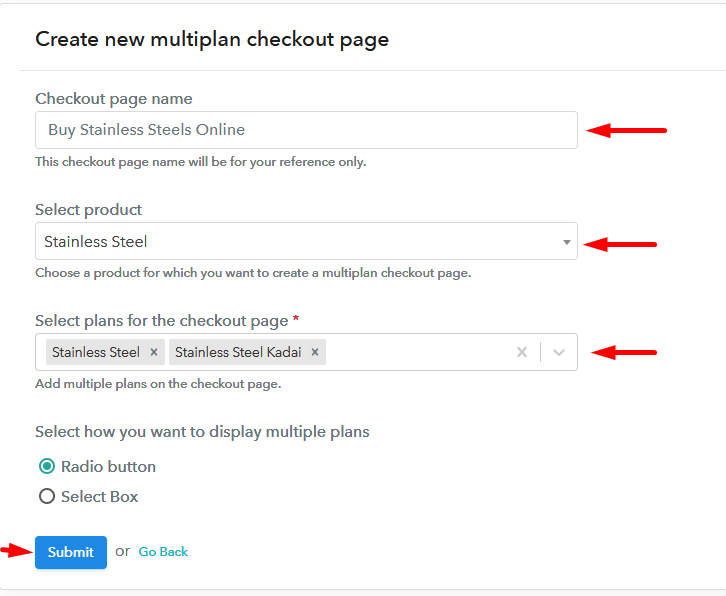
(b) Add Plans to Sell Multiple Stainless Steels from Single Checkout Page

Add Multiple Products to Start Selling Stainless Steels Online

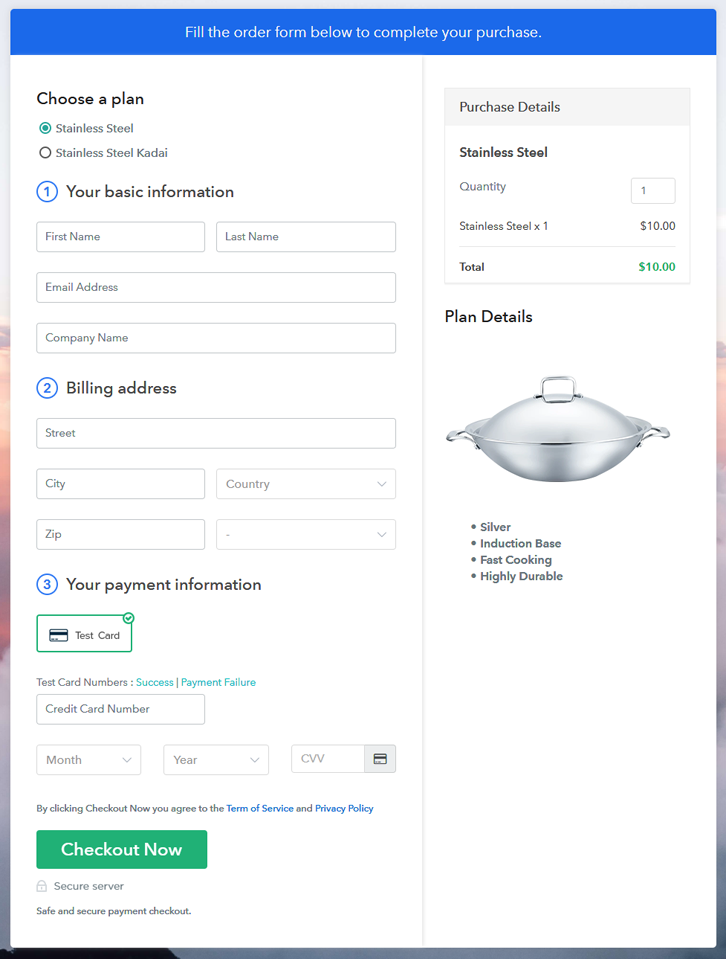
(c) Take a Look at the Checkout Page

Multiplan Checkout Page to Sell Stainless Steels Online

Preview Checkout Page

Wrapping Up

That’s it! This is our depiction of “how to sell stainless steels online” using Pabbly Subscription Billing software. You can headstart stainless steel business online easily with the help of this tool. Just follow all the aforementioned steps and your checkout page for stainless steels is created in minutes.

So, try this software out and let us know what’s your reaction in the comments section.

You May Also Like To Read –
How to Sell Surfboards Online | Step by Step (Free Method)

How to Sell Surfboards Online

Ideal For: All the surfboard stores, beach shops, beach stores, surfboard shops, surfboard dealers, surfboard suppliers, and other sellers can use this method to take their surfboards selling business online.

How to Sell Surfboards Online

Why Choose this Method to Sell Surfboards Online?

Unlike any other solution, this method allows you to:

  • List and sell your surfboards for FREE. Absolutely no payment required.
  • No need to pay commission on any of your sales.
  • Multiple payment options like PayPal, Credit Card, etc to collect payment from a single place.
  • Sell one time or recurring subscriptions of your surfboards.
  • Collect payments & sell products in any currency as per your requirement.
  • Give discounts on your products by offering special coupon codes.
  • Add sales commission agents to help you in selling surfboards online.

Get Pabbly Subscription Billing for Free

As the surfing season is here, surfers are looking forward to showing off their surfing skills but for that, they need the best surfboards. Professionals are willing to pay large sums of money for quality surfboards and if you sell surfboards then let’s take your business online to broaden your customers’ spectrum.

Now you must be thinking about how can you start your online business? Well, you can easily sell your surfboards through checkout pages which you can create on Pabbly Subscription Billing. It offers you an absolutely free platform to start your online surfboards selling business. With this service, you just have to create checkout pages for your surfboards and share their links on online platforms, and people can buy your surfboards directly through those links. It becomes very easy to collect one-time or recurring payments through these checkout pages.

Moreover, Pabbly Subscription Billing also offers so many amazing features other than checkout pages:

  • Create discount coupons for your buyers
  • Add unlimited customers to your list
  • Share invoices of surfboards with customers automatically
  • Sell unlimited surfboards online

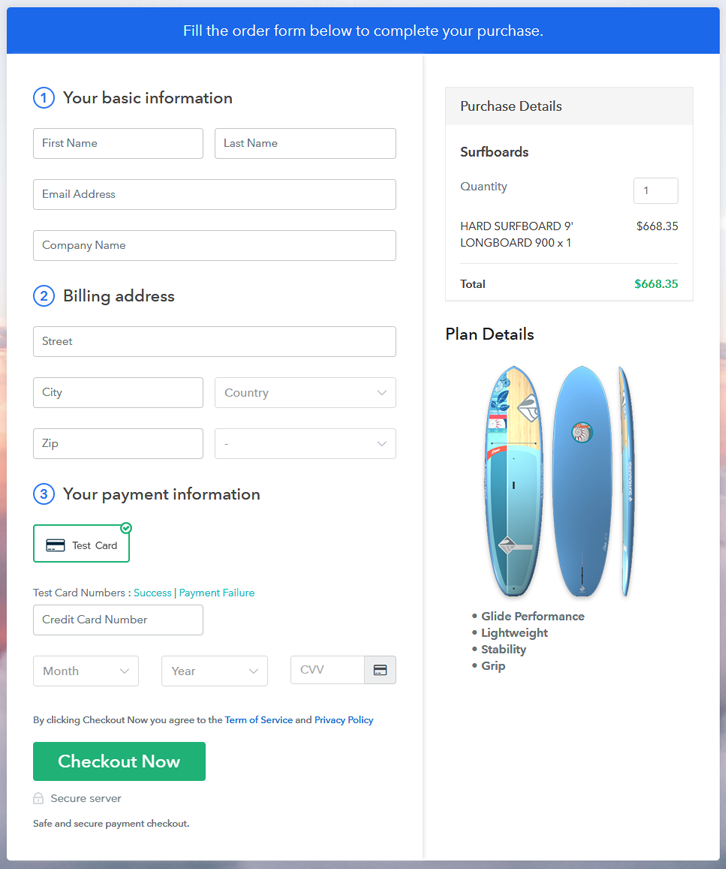
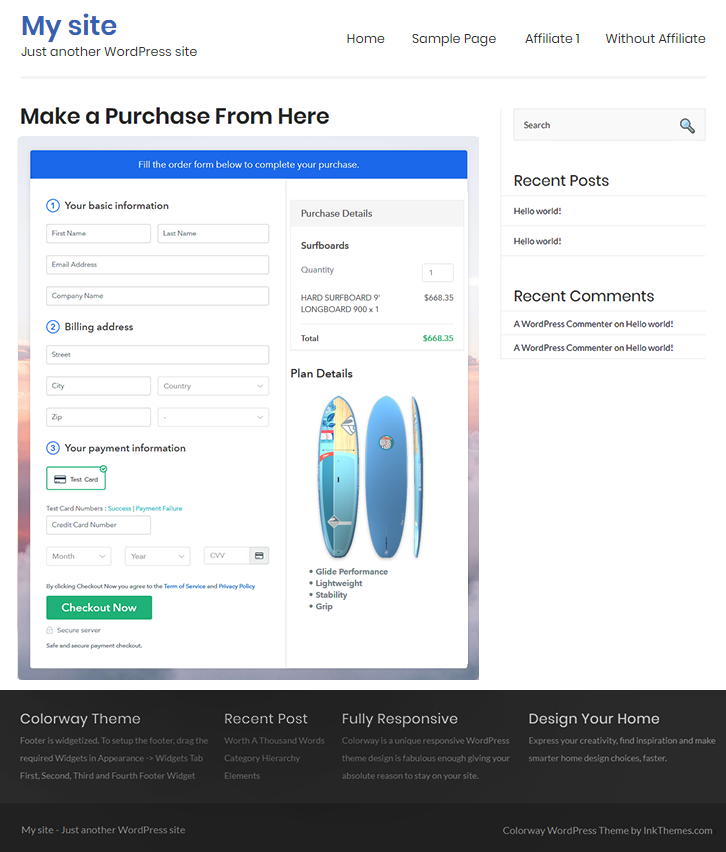
Final View of Checkout Page for your Surfboards Selling Business

Preview Checkout Page

Preview Checkout Page

Step 1: Log in to Pabbly Subscription Billing

Signup

In the beginning, you have to visit Pabbly Subscription Billing website and then click on the “Sign Up Free” button. On clicking the button, you will land on the signup page, where you can create your account automatically through your Gmail or manually enter your details.

Sign Up For Free!

Step 2: Select Subscription Billing

Access Subscription Billing

Step 3: Account Setup

Setup Account

Later, when the signup process is completed, now fill up your company details i.e. company name, currency, and contact number in the appeared dialogue box.

Step 4: Connect Payment Gateways & Start Surfboards Selling Business Online

Connect Payment Gateway

Here, the payment collection process is described by enabling the ‘Test Payment’ mode. Later, you can connect other payment gateways of your choice like PayPal, Stripe, etc. The complete integration guides for payment gateways are provided below-

Step 5: Add Product for your Surfboards

Add Product

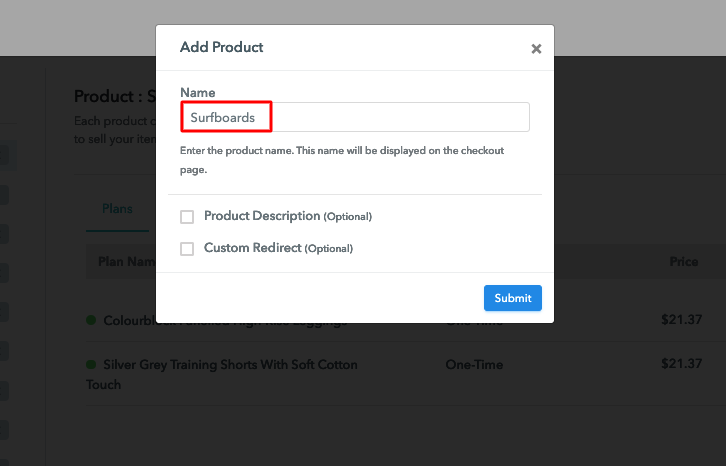
In the next step, you have to add your first product. You can add surfboards of different categories for example foam surfboards, bamboo surfboards, etc.

Sell Surfboards Online Product Name

Add all other types of surfboards in the same product by creating different plans.

Note: Here you can add all the products related to the similar category by creating plans for each of them.

Step 6: Add Plans 

Let’s get started and create plans for different categories of surfboards that you want to sell

(a) Select Add New Plan

Add Plan

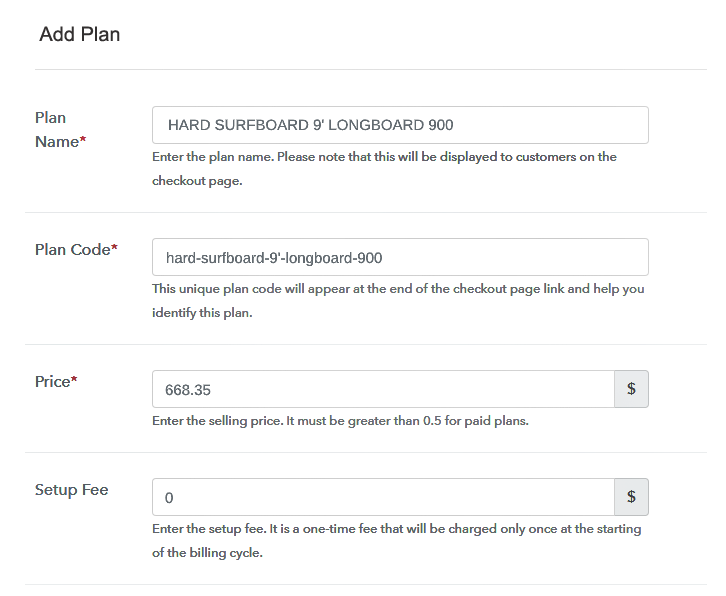
(b) Specify the Plan & Pricing Details

Sell Surfboards Online Details

On clicking add new plan, you will reach to the plan page, here you will have to fill the plan details such as plan name, code, billing cycle, price, etc.

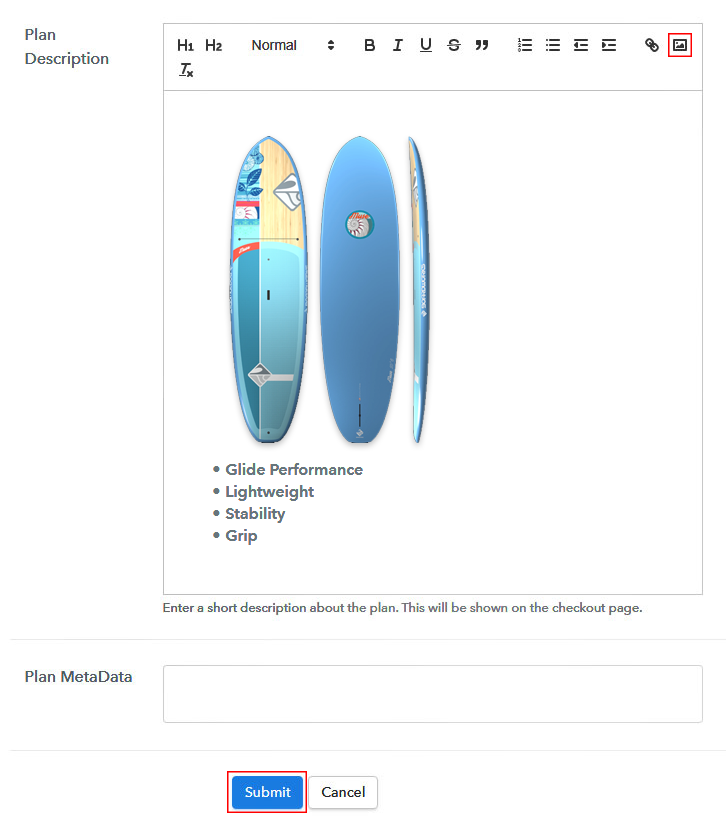
(c) Add Image & Description of Surfboards

Sell Surfboards Online Image

Also, you can write a description of the surfboards that you want to sell along with the product links, images, etc, and click on the “Submit” button to add your plan.

You can create more plans for all the other surfboards in a similar manner.

Step 7: Share your Checkout Page

Share Checkout Page on Social Media

Promote your online business by following the given steps:

  • Share your checkout page on social media such as Facebook and Twitter.
  • Furthermore, copy the mentioned link and send it to your customers through SMS or emails directly.
  • Embed your plan link to your website so that your customers can be landed on the checkout page directly.

Step 8: Preview Checkout Page

Follow up the recommended steps to preview the checkout page:

(a) Click on the View Button

View Checkout Plan

(b) Take a Look at the Checkout Page

Preview Checkout Page

Step 9: Embed Checkout Page in Site & Sell Surfboards Online

Embed Checkout Page on Website

Just copy the provided plan embedding link and embed the checkout page to your WordPress site to sell surfboards online.

(a) Edit the Page & Paste the Copied Link

Embed Checkout Page on Website

Further, paste the plan link on a text editor of the WordPress dashboard.

(b) Save & Publish the Checkout Page

Save_and_Publish

Next, click the “Publish” button, after making changes.

(c) Check out the Final Look of your Checkout Page on WordPress Site

Sell Surfboards Online W

Step 10: Multiplan Checkout Page

Note: In case you want to sell multiple products via a single checkout page, you can create a multi-plan checkout page otherwise skip this step.

(a) Click on Add Mutiplan Checkout

Multiplan Checkout

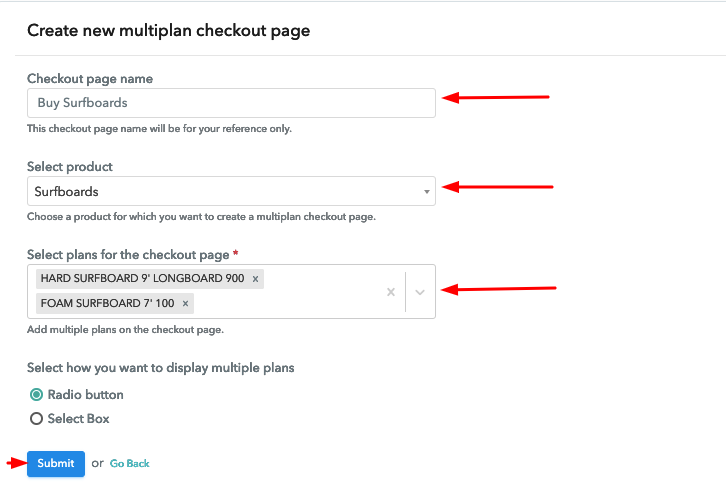
(b) Add Plans to Sell Multiple Surfboards from Single Checkout Page

Sell Surfboards Online Multi Details

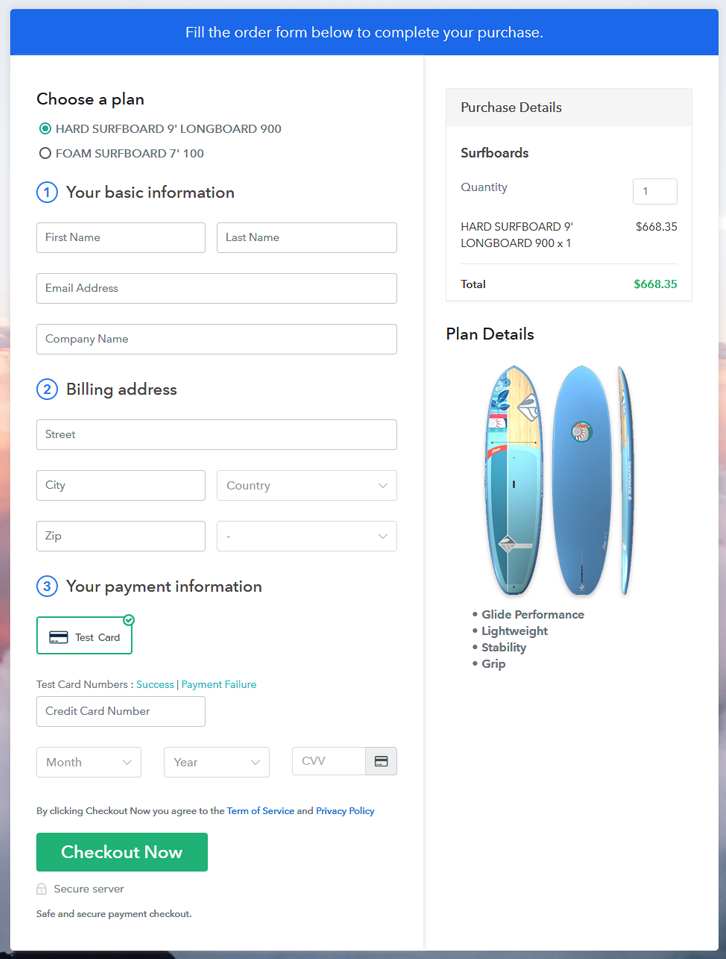
(c) Take a Look at the Checkout Page

Sell Surfboards Online M

Preview Checkout Page

Wrapping Up

Now, at last, we hope that this blog was helpful for you in starting your online surfboards selling business as you won’t find the same service as Pabbly Subscription Billing. With its checkout pages, you can collect payments easily, sell unlimited surfboards, share invoices easily with users, and much more. We can guaranty that you won’t regret it after choosing Pabbly Subscription Billing. For further queries or suggestions, please write to us.

You May Also Like To Read –
How to Sell Story Books Online | Step by Step (Free Method)

How to Sell Story Books Online

Ideal For: All the bookstores, book shops, publishing houses, writers,book wholesalers, and other sellers can use this method to take their story books selling business online.

How to Sell Story Books Online

Why Choose this Method to Sell Story Books Online?

Unlike any other solution, this method allows you to:

  • List and sell your storybooks for FREE. Absolutely no payment required.
  • No need to pay commission on any of your sales.
  • Multiple payment options like PayPal, Credit Card, etc to collect payment from a single place.
  • Sell one time or recurring subscriptions of your storybooks.
  • Collect payments & sell products in any currency as per your requirement.
  • Give discounts on your products by offering special coupon codes.
  • Add sales commission agents to help you in selling storybooks online.

Get Pabbly Subscription Billing for Free

People like reading stories and it can’t get any better than being able to purchase the storybooks from the comfort of their couches, and if you sell storybooks then why not take your business online to serve more people and earn more money.

Today we are telling you how you can set up your online business by creating enticing checkout pages. You just have to create checkout pages for your storybooks and share their links on online platforms so that people can buy your products directly through these links. To create checkout pages and start your storybooks selling online business there is an amazing and free tool, Pabbly Subscription Billing. With this service, you can kick start your online business in a few minutes.

Also, Pabbly Subscription Billing offers you many great features:

  • Share invoices of storybooks automatically with users
  • Collect one-time or recurring payments through offline or online modes
  • Integrate it with your website to increase your sales
  • Sell unlimited storybooks online

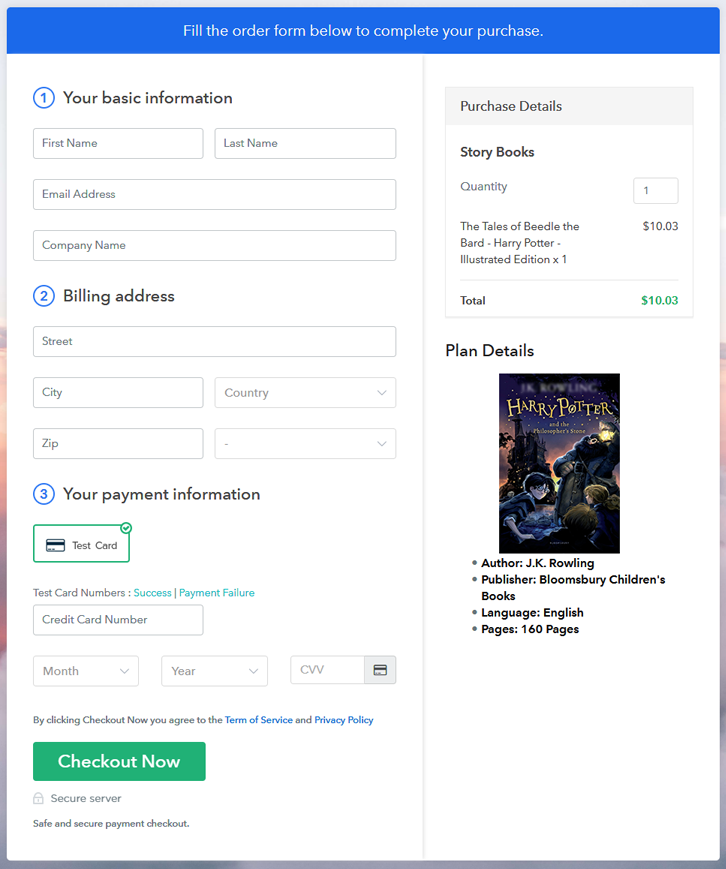
Final View of Checkout Page for your Story Books Selling Business

Preview Checkout Page

Preview Checkout Page

Step 1: Log in to Pabbly Subscription Billing

Signup

The first step is to visit Pabbly Subscription Billing website and then click on the “Sign Up Free” button. On clicking the button, you will land on the signup page, where you can create your account in few seconds with Gmail or manually enter your details.

Sign Up For Free!

Step 2: Select Subscription Billing

Access Subscription Billing

Step 3: Account Setup

Setup Account

After you are done with the signup process, now you have to fill up your company details i.e. company name, currency, and contact number in the appeared dialogue box.

Step 4: Connect Payment Gateways & Start Story Books Selling Business Online

Connect Payment Gateway

After setting up your account, here, we are showing you the payment collection process by enabling the ‘Test Payment’ mode. Thereafter, you can connect with other payment gateways such as Stripe, Razorpay, etc whichever you prefer. The complete integration guides for payment gateways are provided below-

Step 5: Add Product For Your Story Books

Add Product

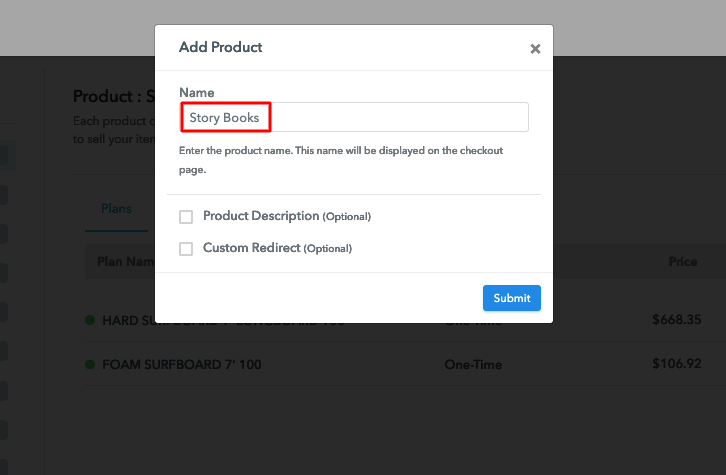
In this step, you have to add your first product. You can add storybooks from different categories such as children’s books, novels, etc.

Sell Story Books Online Product Name

Similarly, add all other types of storybooks in the same product by creating different plans.

Note: Here you can add all the products related to the similar category by creating plans for each of them.

Step 6: Add Plans 

Let’s create plans for different kinds of storybooks available in your store.

(a) Select Add New Plan

Add Plan

(b) Specify the Plan & Pricing Details

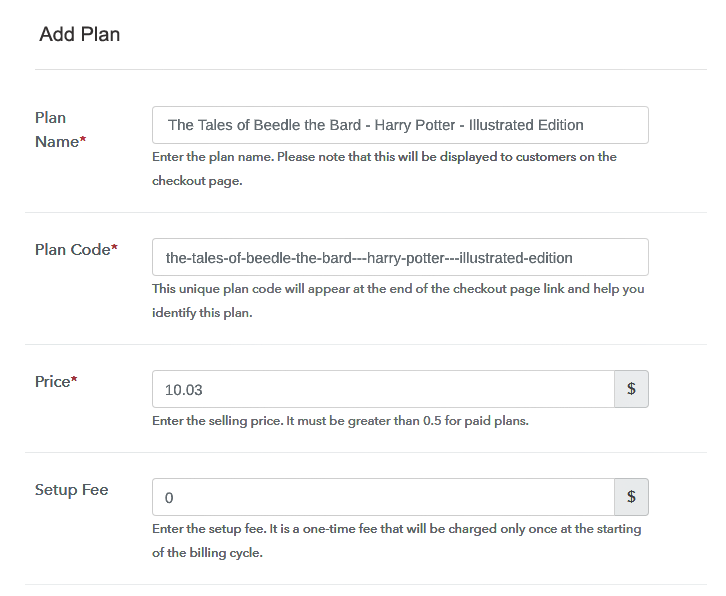
Sell Story Books Online Details

When you will click on the “Add New Plan” button, you will be redirected to the plan page. Here, you will have to fill the plan details such as plan name, code, billing cycle, price, etc.

(c) Add Image & Description of Story Books

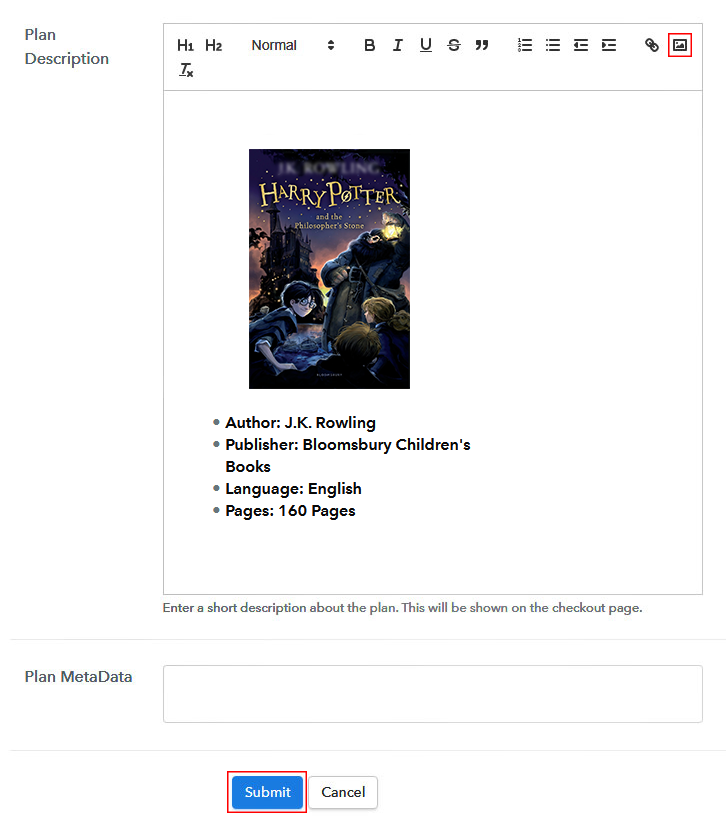
Sell Story Books Online Image

Also, you can describe the storybooks that you want to sell along with the product links, images, etc, and then click on the “Submit” button to add your plan.

You can create more plans for all the storybooks similarly.

Step 7: Share your Checkout Page

Share Checkout Page on Social Media

  • Share your checkout page on social media like Facebook and Twitter to increase your online sales.
  • Furthermore, copy the mentioned link and send it to your customers through SMS or emails directly.
  • Also, embed your plan link to your website so that your customers can be redirected on the checkout page directly.

Step 8: Preview Checkout Page

Follow up the recommended steps to preview the checkout page:

(a) Click on the View Button

View Checkout Plan

(b) Take a Look at the Checkout Page

Preview Checkout Page

Step 9: Embed Checkout Page in Site & Sell Story Books Online

Embed Checkout Page on Website

Simply copy the provided plan embedding link and embed the checkout page to your WordPress site to sell storybooks online.

(a) Edit the Page & Paste the Copied Link

Embed Checkout Page on Website

Further, paste the plan link on a text editor of the WordPress dashboard.

(b) Save & Publish the Checkout Page

Save_and_Publish

Next, click the “Publish” button, after making changes.

(c) Check out the Final Look of your Checkout Page on WordPress Site

Sell Story Books Online W

Step 10: Multiplan Checkout Page

Note: In case you want to sell multiple products via a single checkout page, you can create a multi-plan checkout page otherwise skip this step.

(a) Click on Add Mutiplan Checkout

Multiplan Checkout

(b) Add Plans to Sell Multiple Story Books from Single Checkout Page

Sell Story Books Online Multi Details

(c) Take a Look at the Checkout Page

Sell Story Books Online M

Preview Checkout Page

Wrapping Up

Lastly, Pabbly Subscription Billing is going to help you in setting up your online storybooks selling business. With its amazing features, you can boost up your business and take it to new heights of success. Now, you can easily collect payments, share invoices, create discount coupons, and whatnot. Therefore, stop worrying and set up your online store now.
For further queries or suggestions, please leave your comments below.

You May Also Like To Read –
How to Sell Snowboards Online | Step by Step (Free Method)

How to Sell Snowboards Online

Ideal For: All the snowboard manufacturers, snowboard sellers, snowboard dealers, snowboard suppliers, snowboard makers, and other merchants can use this method to sell snowboards online.

How to Sell Snowboards Online

Why Choose this Method to Sell Snowboards Online?

Unlike any other solution, this method allows you to:

  • List and sell your snowboards for FREE. Absolutely no payment required.
  • No need to pay commission on any of your sales.
  • Multiple payment options like PayPal, Credit Card, etc to collect payment from a single place.
  • Sell one time or recurring subscriptions of your snowboards.
  • Collect payments & sell products in any currency as per your requirement.
  • Give discounts on your products by offering special coupon codes.
  • Add sales commission agents to help you in selling snowboards online.

Get Pabbly Subscription Billing for Free

Snowboard are loved by youth, children and almost everyone as snowboarding is one of the most popular sport. Hence, there is no doubt that people will love to buy it online as it will save their time and hassle of picking the one by visiting every single shop in their locality. Besides, online shops offer them varieties which quite hard to find in local stores.

Thus, if you are searching for ways to start your snowboards business online then this is the right place. Because, here we have a perfect software suggestion for you i.e, Pabbly Subscription Billing that can help you to sell snowboards online without any hassle.

Using this tool, you can create beautiful checkout pages in no time. Along with that, this software also gives you the flexibility to share those checkout pages link on your websites, social media accounts, or through SMS, email marketing. Now, let me take you through the 10 easy steps that you need to follow for creating amazing checkout pages online using this software.

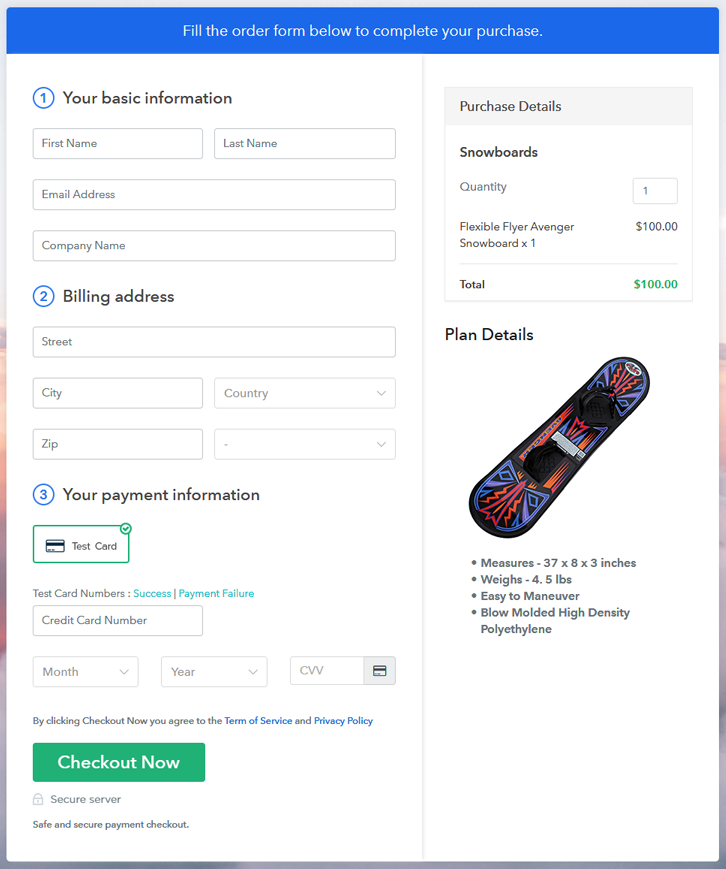
Final View of Checkout Page for your Snowboards Selling Business

Final View of Checkout Page for your Snowboards Selling Business

Preview Checkout Page

Step 1: Log in to Pabbly Subscription Billing

Signup

First of all, we start the process by visiting the Pabbly Subscription Billing website. After that, we hit the “Sign up Free“ button. And later, fill out the details either manually or else sign in via Google account.

Sign Up For Free!

Step 2: Select Subscription Billing

Access Subscription Billing

Step 3: Account Setup

Setup Account

Once you press the “Access Now” button, a page will pop up where you need to fill up the fields like company name, select currency, and phone number. Enter all the details in order to continue creating a checkout page for snowboards.

Step 4: Connect Payment Gateways & Start Snowboards Selling Business Online

Connect Payment Gateway

Eventually, its time to specify the details associated with the payment procedures. Here, I am going to provide a brief detail on the checkout page payment process for the snowboards using a “Test Payment Gateway”. Plus, this tool provides multiple payment gateways like PayPal, Stripe, etc. Further, beneath are their respective payment integration guides to assist you further.

Step 5: Add Product for your Snowboards

Add Product

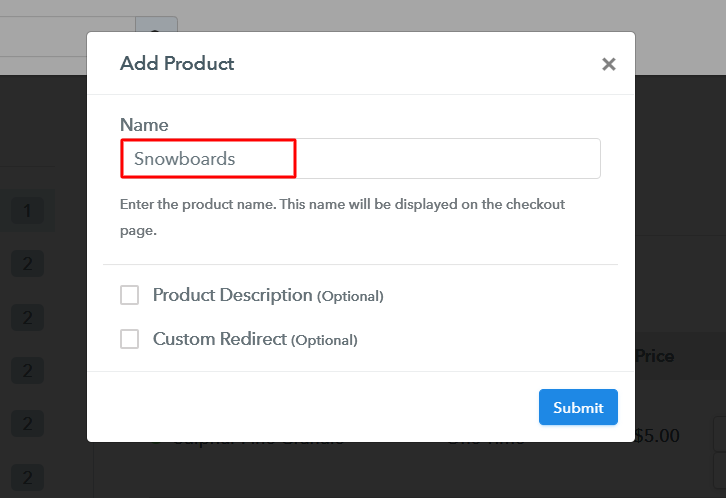
Add the name, that is “Snowboards” and designate the variety along with a short summary of the snowboards to catch the buyer’s attention.

Add Product To Sell Snowboards Online

Moreover, just fill out all those details and your product is created.

Note: Here you can add all the products related to the similar category by creating plans for each of them.

Step 6: Add Plans 

Let’s cast light on plans for different kinds of snowboards available in your store.

(a) Select Add New Plan

Add Plan

(b) Specify the Plan & Pricing Details

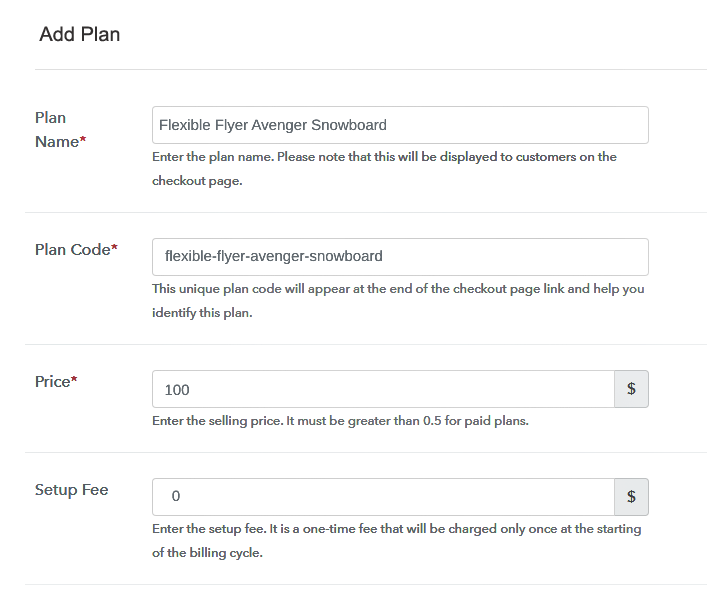
Specify the Plan & Pricing Details to Sell Snowboards Online

The succeeding step is to fill all the details of the snowboards like plan name, code, price, set-up fee, and much more to continue.

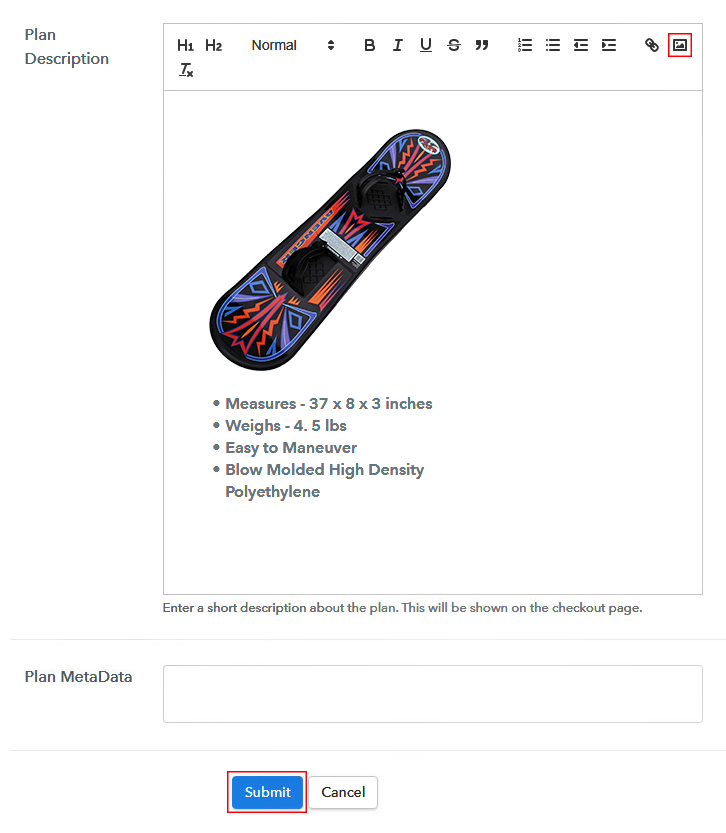
(c) Add Image & Description of Snowboards

Add Image & Description of Snowboards

Following the former step, now give a concise classification of snowboards with the help of bullets, images, links, etc.

Hereafter, press the “Submit” button in order to add the snowboards on the checkout page.

Sequentially, now its time to add multiple plans along with diverse categories of snowboards in your product list that you wish to sell online.

Step 7: Share your Checkout Page

Share Checkout Page on Social Media

  • Furthermore, share the checkout page of the snowboards on social media platforms like Facebook & Twitter with the help of their individual buttons.
  • Also, share the snowboards checkout page link with your customers directly using SMS or email marketing.
  • Including that, you can also embed the provided plan link of the snowboards in the buttons or any anchor text on your website.

Step 8: Preview Checkout Page

Follow up the recommended steps to preview the checkout page:

(a) Click on the View Button

View Checkout Plan

(b) Take a Look at the Checkout Page

Final View of Checkout Page for your Snowboards Selling Business

Step 9: Embed Checkout Page in Site & Sell Snowboards Online

Embed Checkout Page on Website

Just copy the link and add the checkout page to sell snowboards online at any proper place on your WordPress site.

(a) Edit the Page & Paste the Copied Link

Embed Checkout Page on Website

Further, paste the plan link on a text editor of the WordPress dashboard.

(b) Save & Publish the Checkout Page

Save_and_Publish

Next, click the “Publish” button, after making changes.

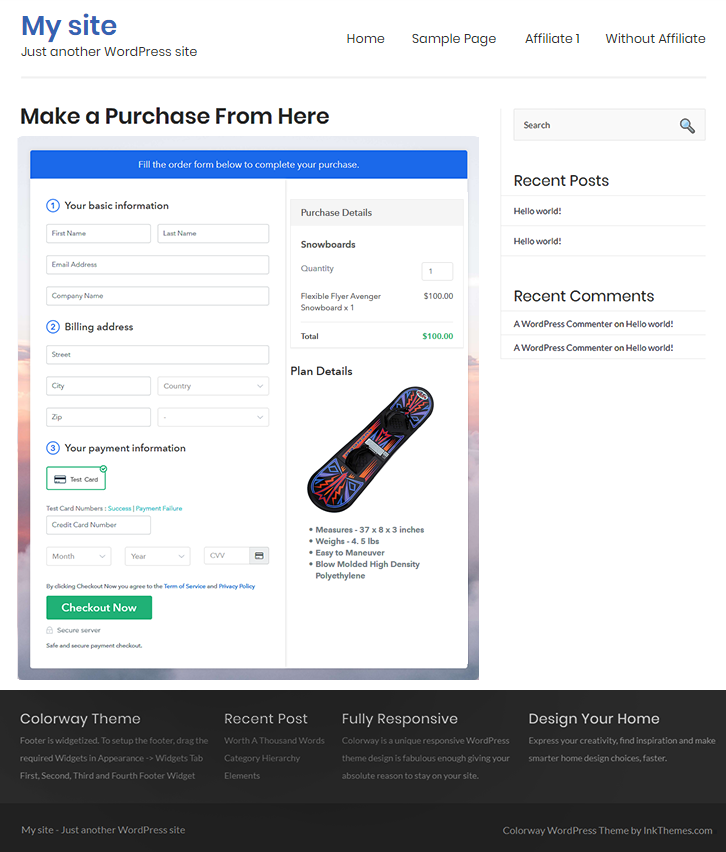
(c) Check out the Final Look of your Checkout Page on WordPress Site

Final Look of your Checkout Page on WordPress Site

Step 10: Multiplan Checkout Page

Note: In case you want to sell multiple products via a single checkout page, you can create a multi-plan checkout page otherwise skip this step.

(a) Click on Add Mutiplan Checkout

Multiplan Checkout

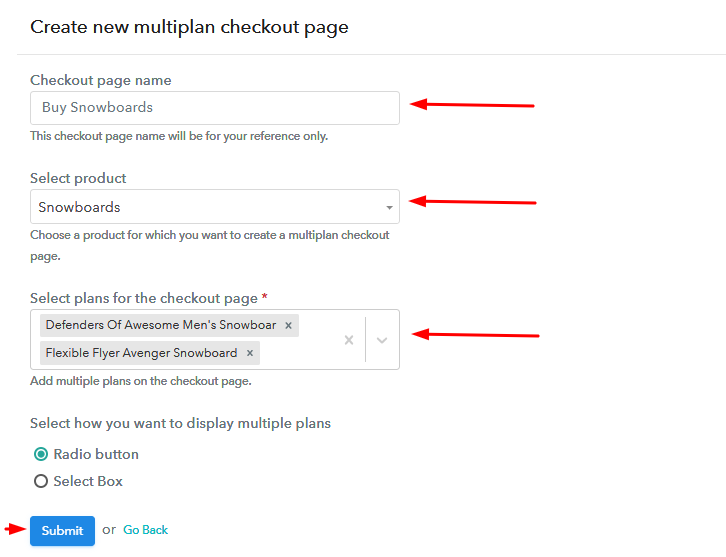
(b) Add Plans to Sell Multiple Snowboards from Single Checkout Page

Add Plans to Sell Multiple Snowboards from Single Checkout Page

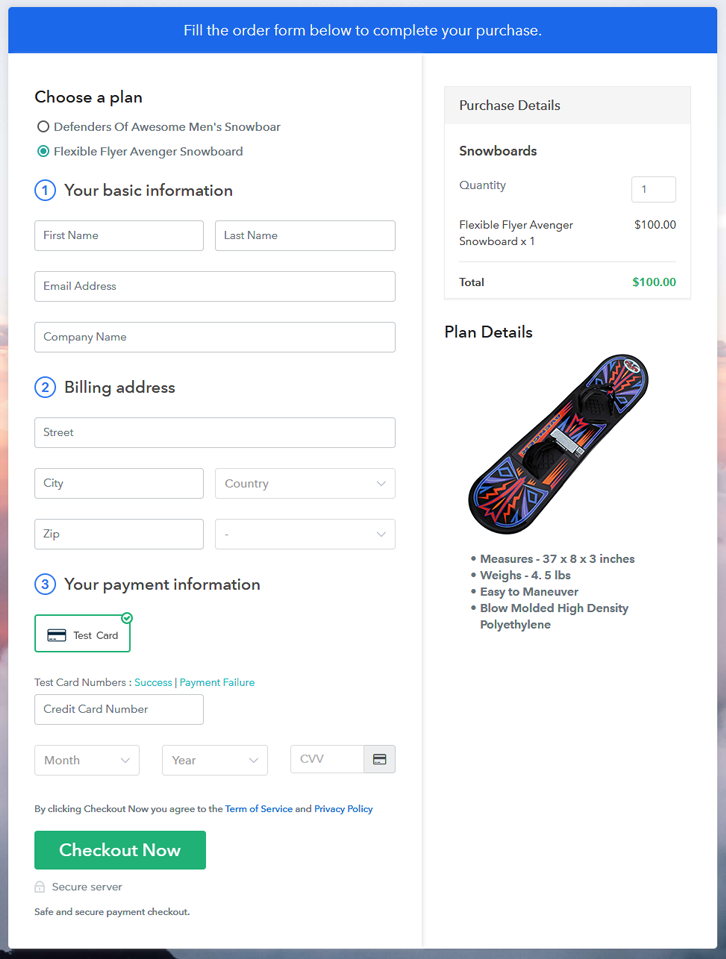
(c) Take a Look at the Checkout Page

Multiplan Checkout Page to Sell How to Sell Snowboards Online

Preview Checkout Page

Wrapping Up

That’s all for now!! Now you know how to start snowboards business online. Just follow the above mentioned 10 steps and you are good to go. So what are you waiting for? Simply log in to Pabbly Subscription Billing to start your online business journey in no time. Thank you!!

You May Also Like To Read –
How To Sell Security Gadgets Online | Step by Step (Free Method)

Ideal For: All the security gadget sellers, security solution shop owners, security gadget manufacturers, security instrument sellers, and other merchants can use this method to sell security gadgets online.

How To Sell Security Gadgets Online

Why Choose this Method to Sell Security Gadgets Online?

Unlike any other solution, this method allows you to:

  • List and sell your security gadgets for FREE. Absolutely no payment required.
  • No need to pay commission on any of your sale.
  • Multiple payment options like PayPal, Credit Card, etc to collect payment from a single place.
  • Sell one time or recurring subscriptions of your security gadgets.
  • Collect payments & sell products in any currency as per your requirement.
  • Give discounts on your products by offering special coupon codes.
  • Add sales commission agents to help you in selling security gadgets.

Get Pabbly Subscription Billing for Free

After food and clothing, the immediate priority for anyone is always securing themselves and their loved ones. According to the FBI in every 3.7 seconds, there is property theft, and this probability lowers by 33% if there are security gadgets installed in homes. But every home is different and therefore homeowners demand customized security solutions. So, as a manufacturer, the only possible way you can meet such variations and demands is if you start selling security gadgets online.

Now, in this article to sell security gadgets online, we will recommend an online tool called Pabbly Subscription Billing. Using this software you can create awesome checkout pages to list unlimited security gadgets and sell them online. Furthermore, you can collect payments in both offline and online modes. Other benefits include:

  • Instant Checkout Creation
  • Custom Domain
  • Custom Logo
  • Auto Email Alerts

So, let us start building our first checkout page with Pabbly Subscription Billing to sell security gadgets online.

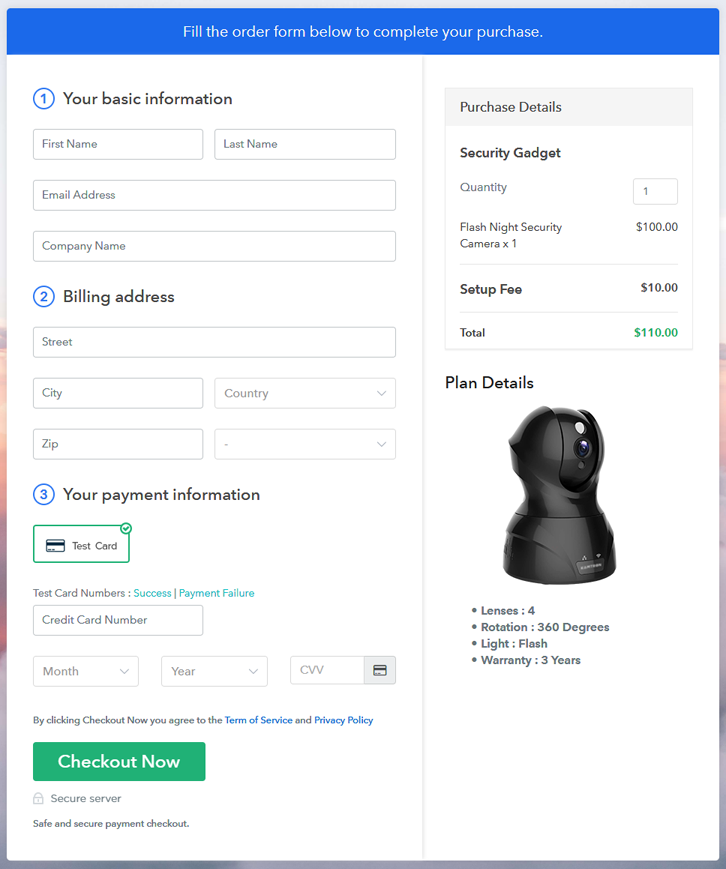
Final View of Checkout Page for your Security Gadgets Selling Business

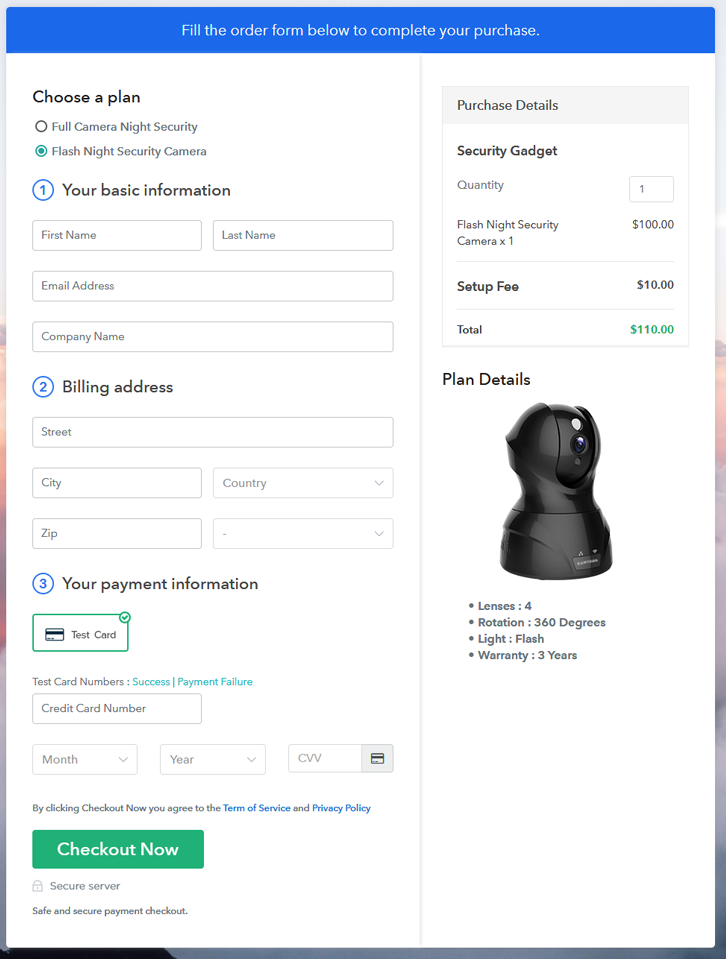
Checkout To Sell Security Gadgets Online

Preview Checkout Page

Step 1: Log in to Pabbly Subscription Billing

Signup

Check for Pabbly Subscription Billing in your browser. Now, click on the “Sign up Free“ button. You may fill all the mandated fields or simply sign in using your Gmail account.

Sign Up For Free!

Step 2: Select Subscription Billing

Access Subscription Billing

Step 3: Account Setup

Setup Account

Once you’re done click on the “Access Now” button of Pabbly Subscription Billing, a page will pop-up with details like company name, currency, and contact number. Next, you need to fill those details to go on.

Step 4: Connect Payment Gateways & Start Security Gadgets Selling Business Online

Connect Payment GatewayUsing Pabbly Subscription Billing you can dry run the payment experience of a customer using dummy payment gateways. You can do this by clicking on the “Enable Test Payment” option. Furthermore, payment gateways like PayPal, Stripe, Razorpay can be easily integrated using the help of the manuals given below.

Step 5: Add Product for your Security Gadgets

Add Product

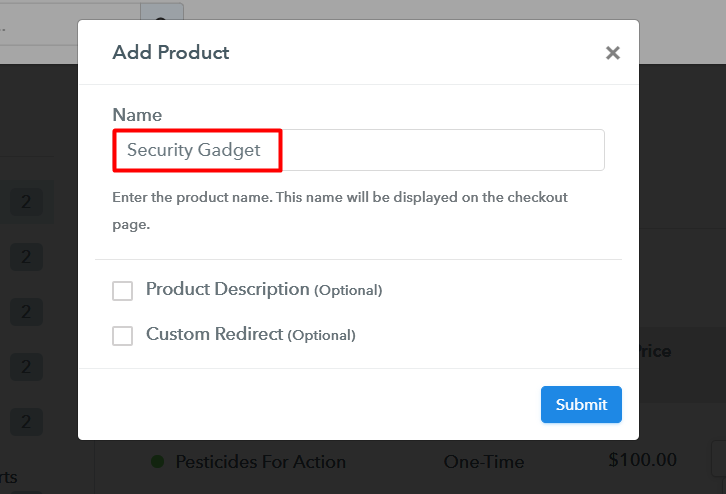
Let’s start to add the products. Also, beneath the  “Enable Payments” segment there is the “Add your product” section click on it. Furthermore, this will generate a dialog box with a blue button “Add New Product”. Click on it.

Also, you have to add the required product title, in this case, it is ‘security gadgets’.

Add product To Sell Security Gadgets Online

Fill out all the details like the name of the product and voila your product is created.

Note: Here you can add all the products related to the similar category by creating plans for each of them.

Step 6: Add Plans 

Now let’s create plans for different kinds of security gadgets available in your store.

(a) Select Add New Plan

Add Plan

(b) Specify the Plan & Pricing Details

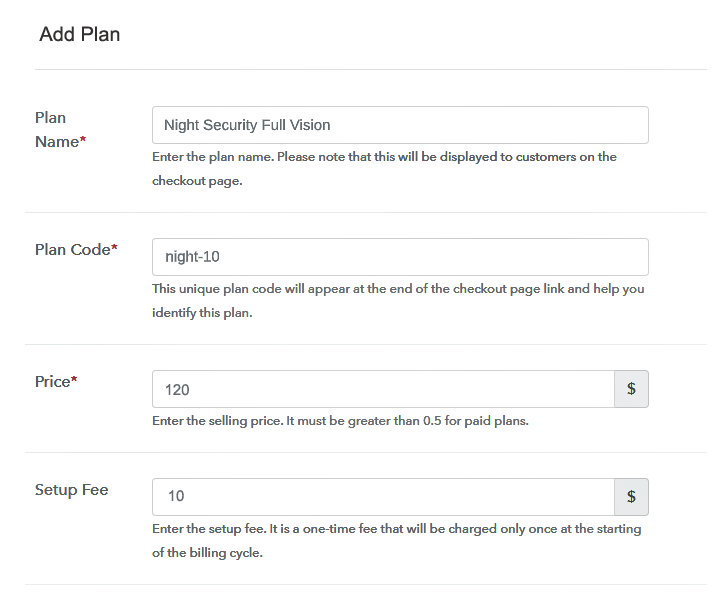
Add Plan To Sell Security Gadgets Online

In the plan page, here you have to fill in details like plan name, code, price, setup fees.

Now scroll down, and in the section below you can see the choice to change the billing models like one-time payment, recurring, etc.

(c) Add Image & Description of Security Gadgets

Add Description To Sell Security Gadgets Online

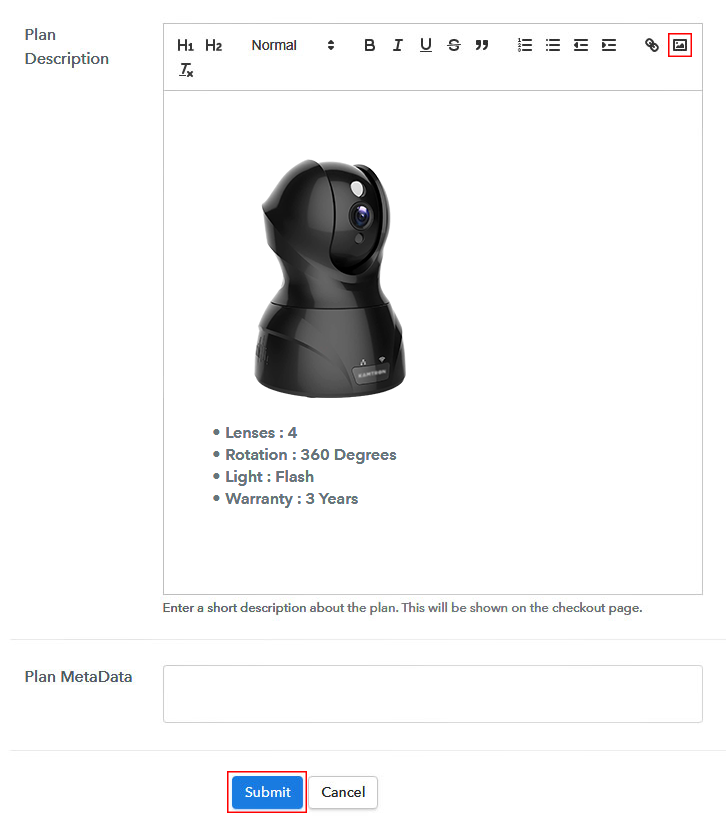
Now, let’s take some amazing pics of your security gadgets and upload it by clicking the image button.

Furthermore, give some information about your security gadgets like the warranty, night vision features, lenses and then press the “Submit” button.

With the same methods, you can list more products.

Step 7: Share your Checkout Page

Share Checkout Page on Social Media

Pabbly Subscription Billing gives three options for digital marketing.

  • First, share your checkout page on Twitter & Facebook by just pressing the respective buttons.
  • Likewise, you can always share the checkout pages via email and SMS.
  • Also, you can create buttons on your webpage and paste the checkout links on it. Or you can place it on any anchor text on your website, so the users will be redirected to the checkout page.

Step 8: Preview Checkout Page

Follow up the recommended steps to preview the checkout page:

(a) Click on the View Button

View Checkout Plan

(b) Take a Look at the Checkout Page

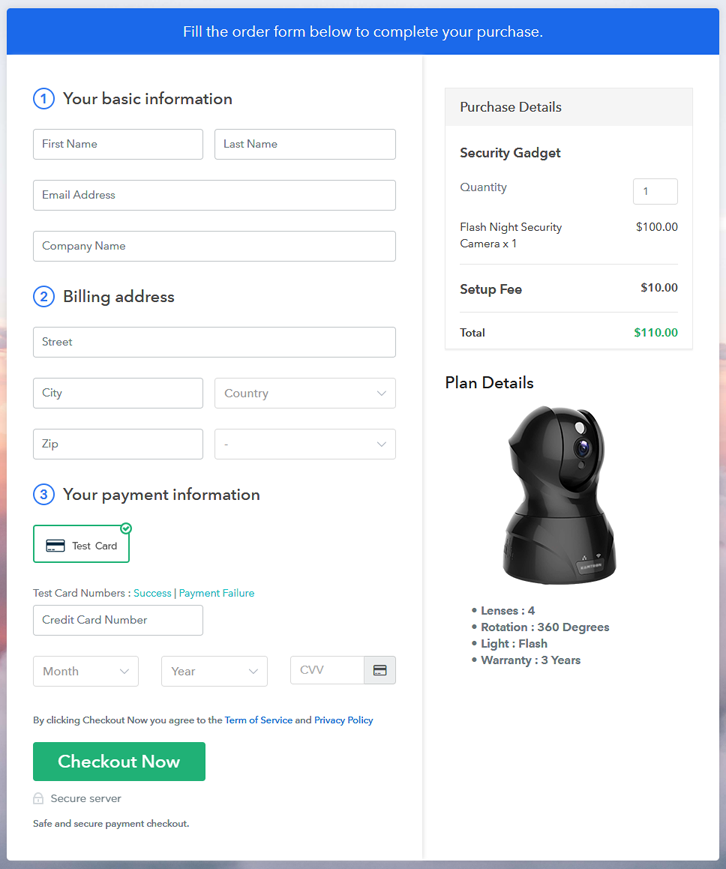
Checkout To Sell Security Gadgets Online

Step 9: Embed Checkout Page in Site & Sell Online

Embed Checkout Page on Website

Also just copy the link and add the checkout page to sell security gadgets at any suitable place on your WordPress site.

(a) Edit the Page & Paste the Copied Link

Embed Checkout Page on Website

Further, paste the plan link of the security gadgets on a text editor of the WordPress dashboard.

(b) Save & Publish the Checkout Page

Save_and_Publish

Next, click the “Publish” button, after making changes.

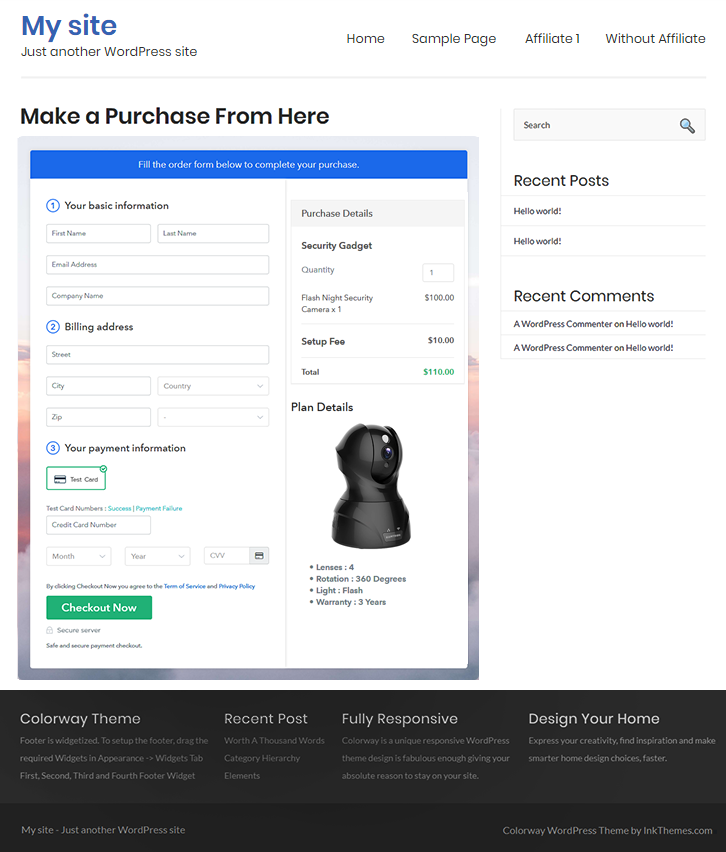
(c) Check out the Final Look of your Checkout Page on WordPress Site

Wordpress To Sell Security Gadgets Online

Step 10: Multiplan Checkout Page

Note: In case you want to sell multiple products via a single checkout page, you can create a multi-plan checkout page otherwise skip this step.

(a) Click on Add Mutiplan Checkout

Multiplan Checkout

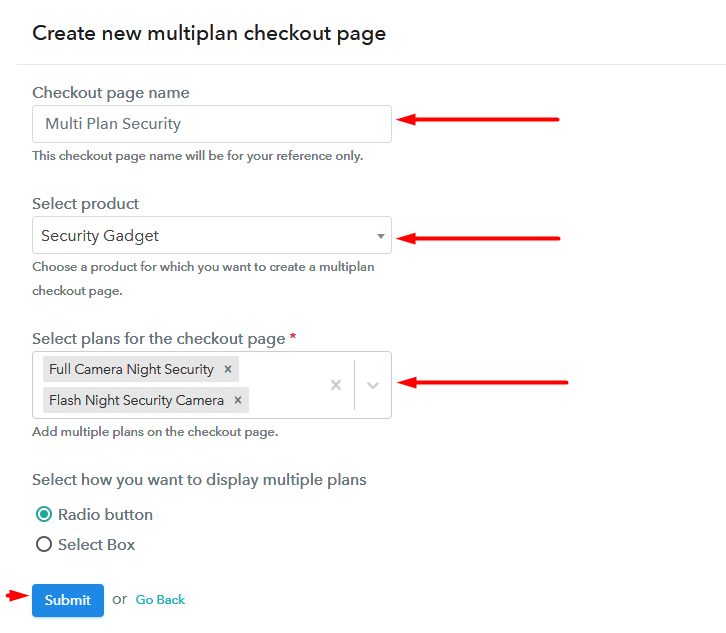
(b) Add Plans to Sell Multiple Security Gadgets from Single Checkout Page

Multiplan To Sell Security Gadgets Online

(c) Take a Look at the Checkout Page

Multiplan To Sell Security Gadgets Online

Preview Checkout Page

Wrapping Up

The checkout page you created, to start selling security gadgets is just a baby step into the world of e-commerce. With incredible features in Pabbly Subscription Billing, you will surely be able to dominate the online market. But, for now, if you have any queries and inputs, please write down in the comment section below. Thank You!!

You May Also Like To Read –
 

How to Sell Foam Sprays Online | Step by Step (Free Method)

How to Sell Foam Sprays Online

Ideal For: All the foam spray manufacturers, foam spray sellers, foam spray dealers, foam spray suppliers, foam spray shop owners, and other merchants can use this method to sell foam sprays online.

How To Sell Foam Sprays Online

Why Choose this Method to Sell Foam Sprays Online?

Unlike any other solution, this method allows you to:

  • List and sell your foam sprays for FREE. Absolutely no payment required.
  • No need to pay commission on any of your sales.
  • Multiple payment options like PayPal, Credit Card, etc to collect payment from a single place.
  • Sell one time or recurring subscriptions of your foam sprays.
  • Collect payments & sell products in any currency as per your requirement.
  • Give discounts on your products by offering special coupon codes.
  • Add sales commission agents to help you in selling foam sprays online.

Get Pabbly Subscription Billing for Free

Foam sprays are widely used in building construction to provide thermal insulation and minimize air infiltration. Its essentiality is the main reason why foam sprays business never goes down. So, if you have a foam spray business, then it is the right time for you to take it online. Want to know why?

Well, this is a digital age, where people prefer buying things online because it is very convenient for them. As they don’t have to go outside and it will be delivered on their doorstep in no time.

Moreover, this step will help you get a hike in business revenue. As, you will be selling foam sprays online and this will led you to get orders from all around the world. Thus, to take your foam spray business online, you will need a tool that can help you with all the business needs.

Therefore, we would like to suggest you Pabbly Subscription Billing as one of the best online software. Using this you can create amazing checkout pages of your foam sprays and share it on websites, social media platforms, etc. Now, let me take you the 10 easy steps you need to follow for creating a checkout page online.

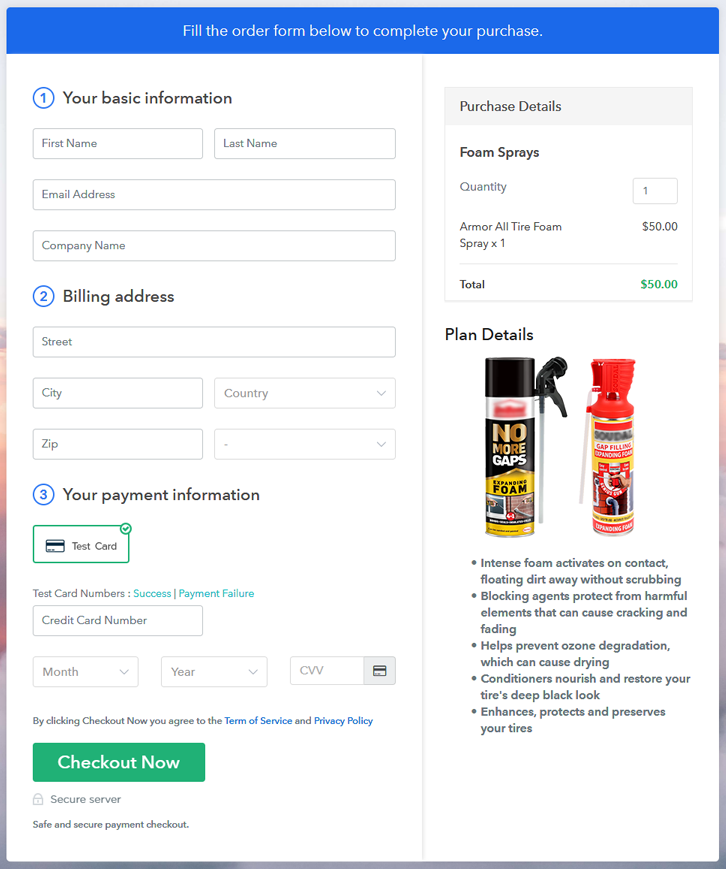
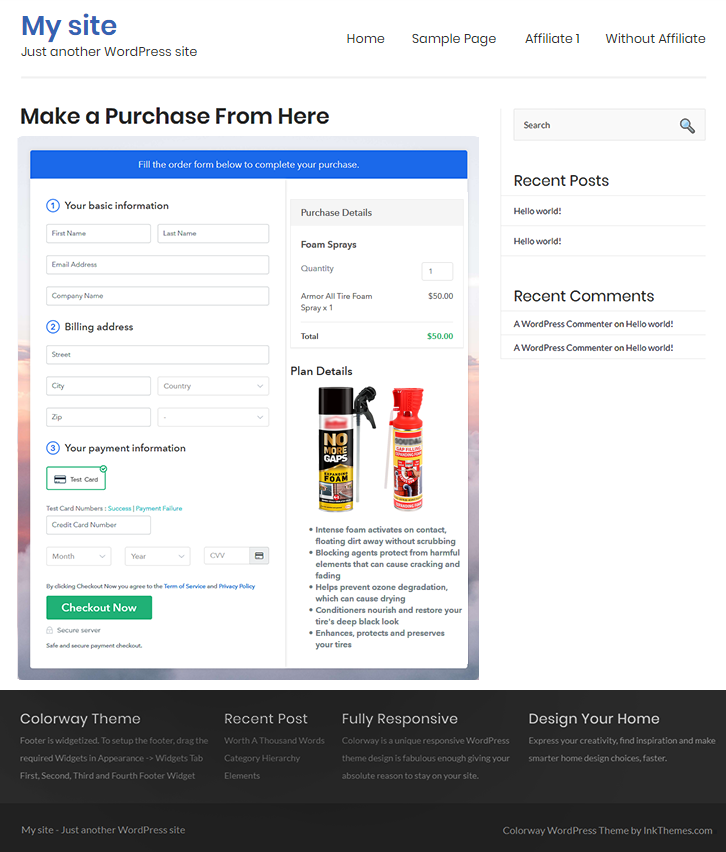
Final View of Checkout Page for Your Foam Sprays Selling Business

Final View of Checkout Page for Your Foam Sprays Selling Business

Preview Checkout Page

Step 1: Log in to Pabbly Subscription Billing

Signup

The process starts by visiting the Pabbly Subscription Billing in your browser. Later, hit the “Sign up Free“ button. Afterwards, either manually filled out the details or sign in using your Gmail account.

Sign Up For Free!

Step 2: Select Subscription Billing

Access Subscription Billing

Step 3: Account Setup

Setup Account

Once you hit on the “Access Now” button of the software, a page will open up. That will ask you to fill the fields like company name, select currency, and phone number. Enter all those details in order to continue creating a checkout page for foam sprays.

Step 4: Connect Payment Gateways & Start Foam Sprays Selling Business Online

Connect Payment Gateway

Afterward, we are going to specify the details regarding payment procedures using a “Test Payment Gateway”. Here, I am going to give a brief detail on the checkout page payment process for the foam sprays with the help of a test payment gateway. Apart from that, this tool offers various payment gateways such as PayPal, Stripe, etc. Further, below are the payment integration guides to help you out.

Step 5: Add Product for Your Foam Sprays

Add Product

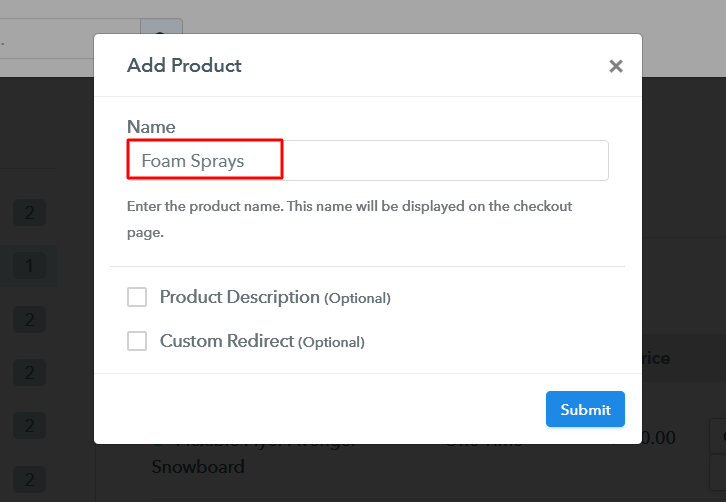
Additionally, add the name, which in our case is “Foam Sprays”. Here you can specify the type & write a short description of the foam sprays to catch the customer’s attention.

Add Product To Sell Foam Sprays Online

Moreover, just fill out all those details and your product is created.

Note: Here you can add all the products related to the similar category by creating plans for each of them.

Step 6: Add Plans 

Let’s cast light on plans for different kinds of foam sprays available in your store.

(a) Select Add New Plan

Add Plan

(b) Specify the Plan & Pricing Details

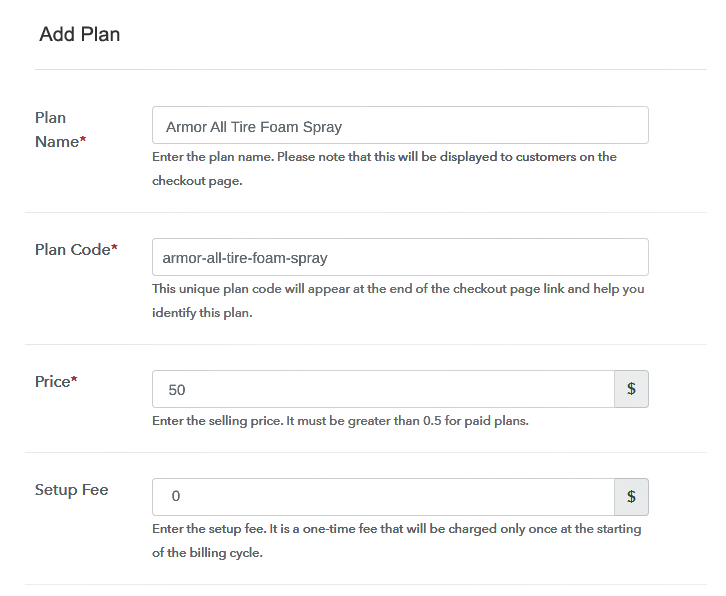
Specify the Plan and Pricing to Sell Foam Sprays Online

The next thing to do is fill all the details of the foam sprays like plan name, code, price, set-up fee, and much more to continue.

(c) Add Image & Description of Foam Sprays

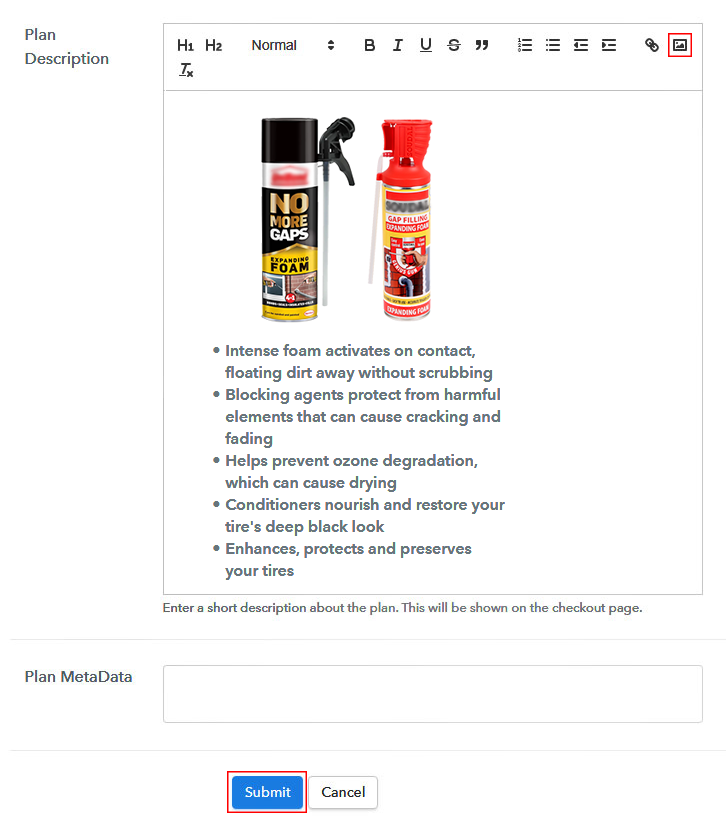
Add Image & Description of Foam Sprays

Next, give a brief description of foam sprays with bullets, images, links, etc.

Afterward, press the “Submit” button to add the foam sprays on the checkout page.

Eventually, add multiple plans along with types of foam sprays in your product list which you want to sell online.

Step 7: Share your Checkout Page

Share Checkout Page on Social Media

  • Moreover, share the checkout page of the foam sprays on social media accounts like Facebook & Twitter.
  • Also, you can share the direct link of the foam sprays checkout page with your customers with the help of SMS or email marketing.
  • Not only that, but you can also embed the provided plan link of the foam sprays in the buttons or any anchor text on your website.

Step 8: Preview Checkout Page

Follow up the recommended steps to preview the checkout page:

(a) Click on the View Button

View Checkout Plan

(b) Take a Look at the Checkout Page

Final View of Checkout Page for Your Foam Sprays Selling Business

Step 9: Embed Checkout Page in Site & Sell Foam Sprays Online

Embed Checkout Page on Website

Just copy the link and add the checkout page to sell foam sprays online at any proper place on your WordPress site.

(a) Edit the Page & Paste the Copied Link

Embed Checkout Page on Website

Further, paste the plan link on a text editor of the WordPress dashboard.

(b) Save & Publish the Checkout Page

Save_and_Publish

Next, click the “Publish” button, after making changes.

(c) Check out the Final Look of your Checkout Page on WordPress Site

Final Look of your Checkout Page on WordPress Site

Step 10: Multiplan Checkout Page

Note: In case you want to sell multiple products via a single checkout page, you can create a multi-plan checkout page otherwise skip this step.

(a) Click on Add Mutiplan Checkout

Multiplan Checkout

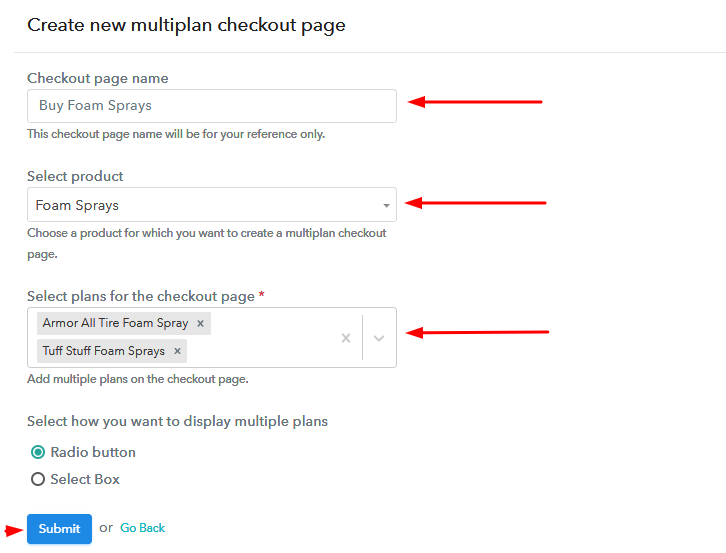
(b) Add Plans to Sell Multiple Foam Sprays from Single Checkout Page

Add Plans to Sell Multiple Foam Sprays from Single Checkout Page

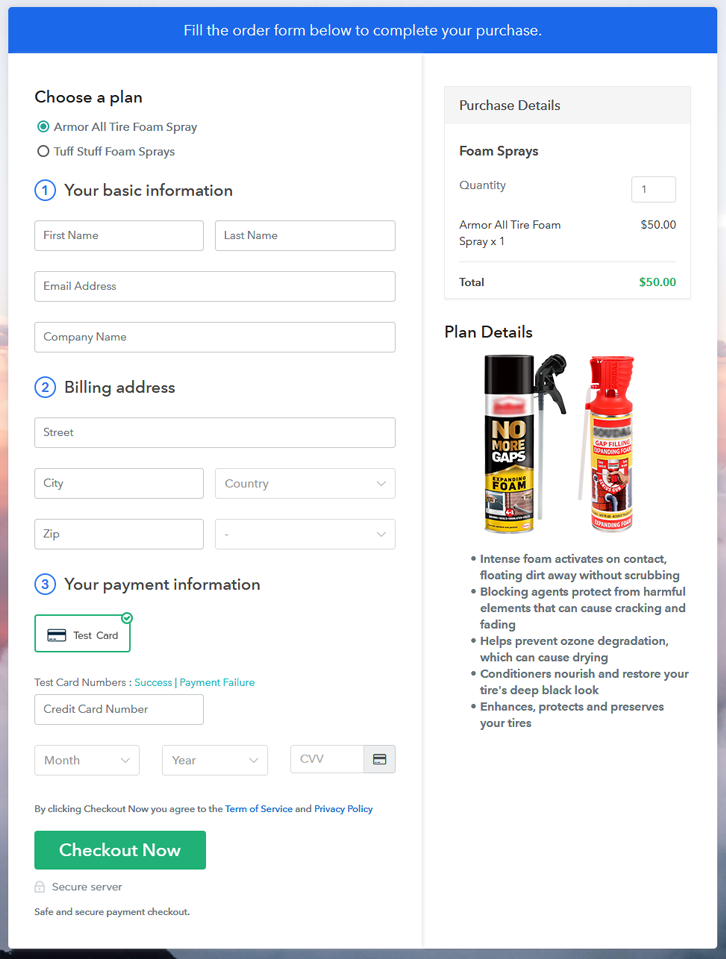
(c) Take a Look at the Checkout Page

Multiplan Checkout Page to Sell How to Sell Foam Sprays Online

Preview Checkout Page

Wrapping Up

Alright! Now you know how easy it is to start your own foam sprays business online. Simply log in to Pabbly Subscription Billing and start your own journey of online business in no time. Just follow all the mentioned steps and you’re ready to roll. So, go ahead and try this software. Thank You!!

You May Also Like To Read –