How to Sell Weed Killer Online | Step by Step (Free Method)

How to Sell Weed Killer Online

Ideal For: All the weed killer manufacturers, weed killer sellers, retail weed killer shop owners, and other merchants can use this method to take their weed killer selling business online.
How to Sell Weed Killer Online

Why Choose this Method to Sell Weed Killer Online?

Unlike any other solution, this method allows you to:

  • List and sell your weed killer for FREE. Absolutely no payment required.
  • No need to pay commission on any of your sale.
  • Multiple payment options like PayPal, Credit Card, etc to collect payment from a single place.
  • Sell one time or recurring subscriptions of your weed killer.
  • Collect payments & sell products in any currency as per your requirement.
  • Give discounts on your products by offering special coupon codes.
  • Add sales commission agents to help you in selling weed killer online.

Get Pabbly Subscription Billing for Free

Herbicides or weed killer are substances that are used to control unwanted plants while leaving the desired crop relatively unharmed. If you are willing to extend your reach to a greater audience by selling weed killer online than maybe we can tell you how.

In this blog, I’ve given a complete explanation of the checkout page creation to sell weed killers online. A checkout page can help you start weed killer business online in the following ways.

  • Checkout page helps you display your product information beautifully such as image, description, pricing etc.
  • It allows you to collect payments securely
  • You can offer coupons to your customers
  • Sell unlimited products worldwide
  • Apply global taxes easily
  • Accept one-time/recurring payments
  • Automate billing and invoicing
    And much more…

Apart from all the functionalities & advantages, you can share the plan checkout pages over various social media and link sharing channels like Facebook, Twitter, WhatsApp, emails, SMS etc. Also, you can embed the checkout pages within buttons, anchor texts, post/pages of websites.

Final View of Checkout Page for your Weed Killer Selling Business
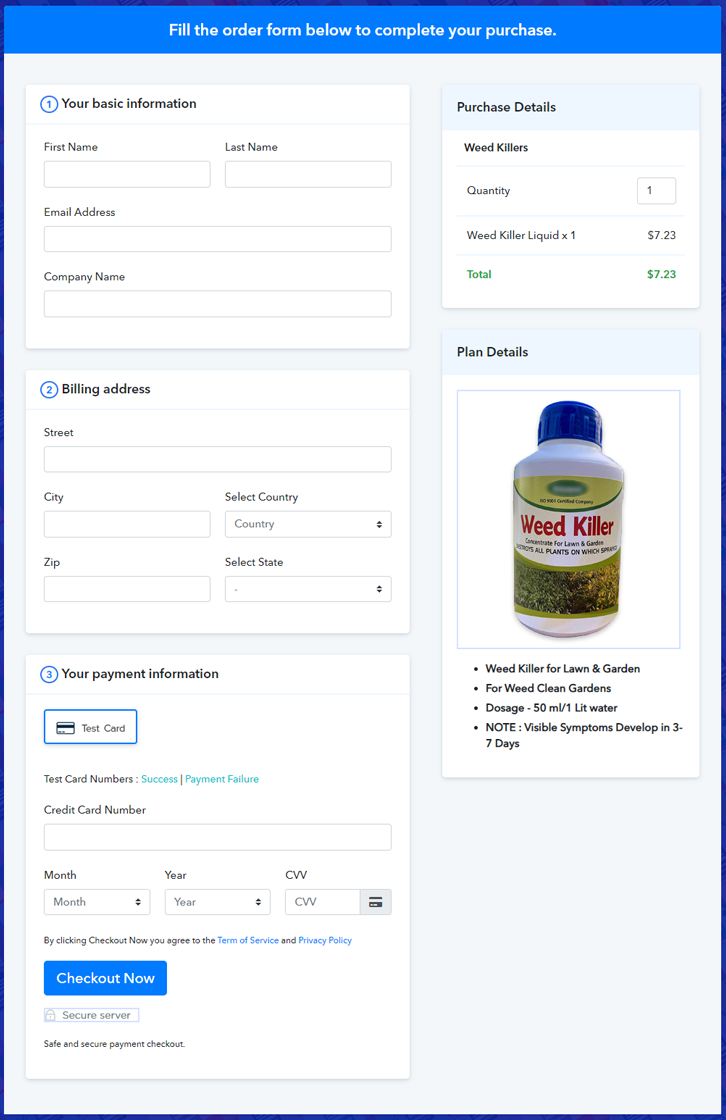
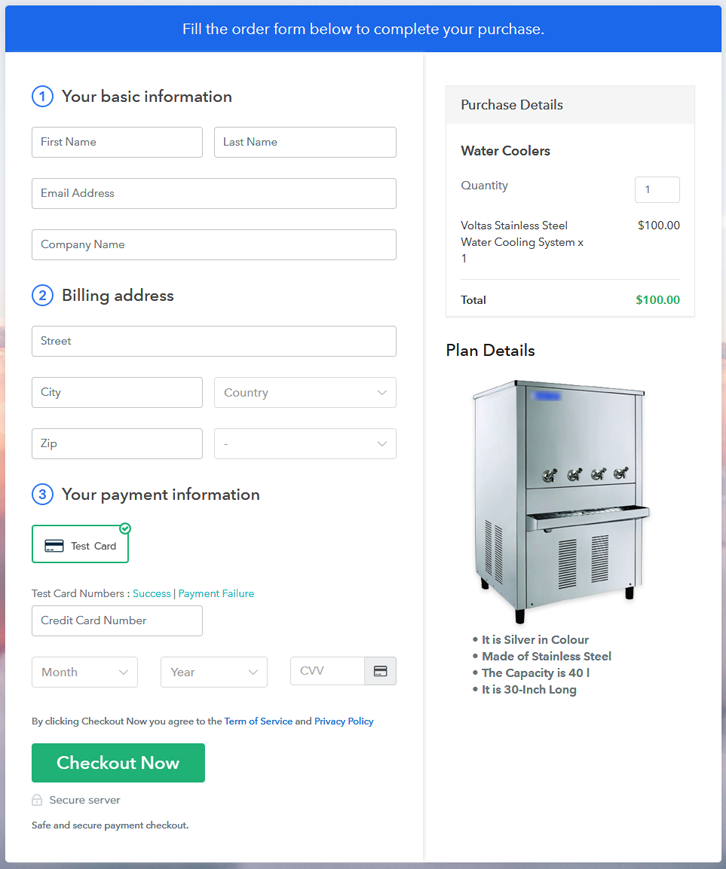
Checkout Page Preview to Sell Weed Killer Online

Preview Checkout Page

Step 1: Log in to Pabbly Subscription Billing
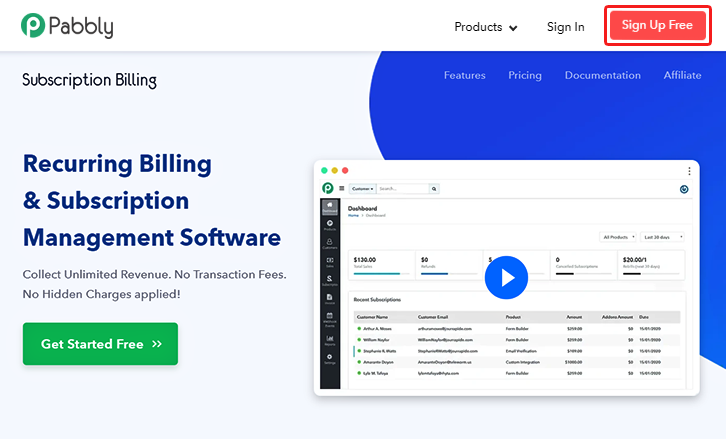
Signup

Begin by visiting, Pabbly Subscription Billing and click on the ‘Sign Up Free‘ button there. On the registration page, use an existing Gmail account of do manual sign-up to get into the system.

Sign Up For Free!

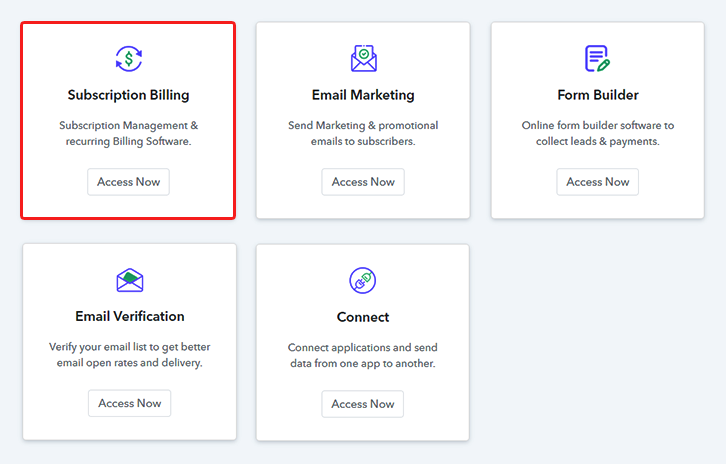
Step 2: Select Subscription Billing

Access Subscription Billing

Step 3: Account Setup
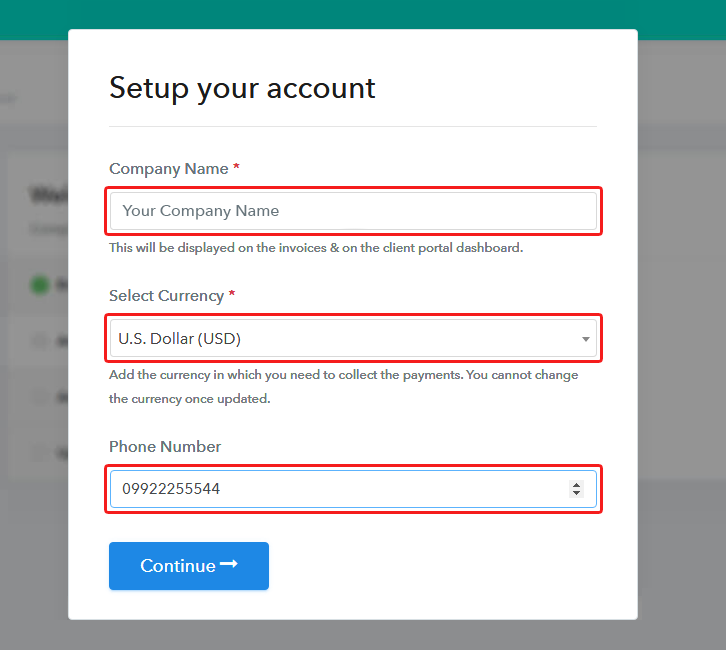
Setup Account

Next, you’ll be asked to provide some company details such as a company name, a phone number and a currency choice. Quickly, fill in the details asked and hit ‘Continue’ on this pop-up.

Step 4: Connect Payment Gateways & Start Weed Killer Selling Business Online
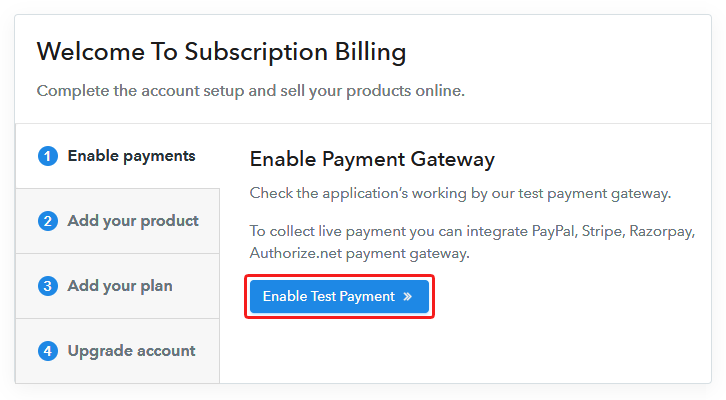
Connect Payment Gateway

In this step, you’ll need to make a choice for selecting a payment gateway to collect payments afterwards. You can also enable the test payments option for testing but remember to integrate a gateway from the following choices available with their integration guides.

Step 5: Add Product for your Weed Killer
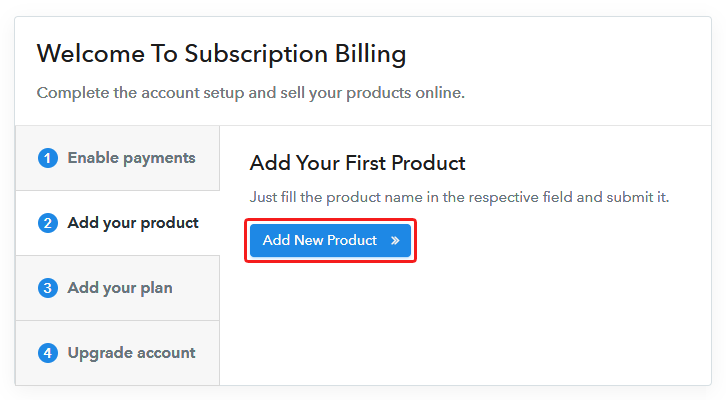
Add Product

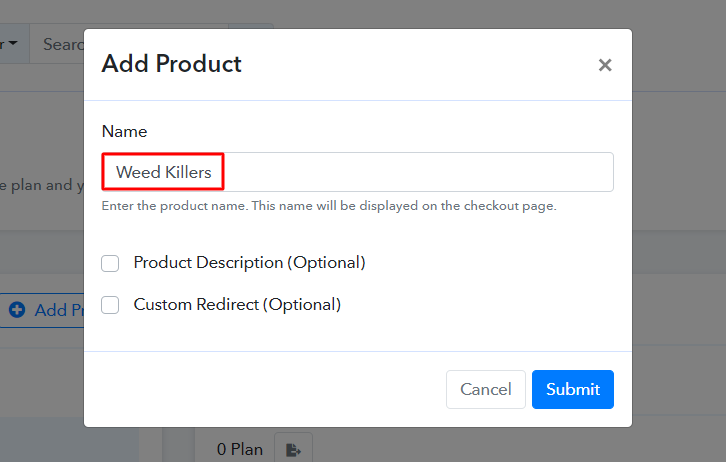
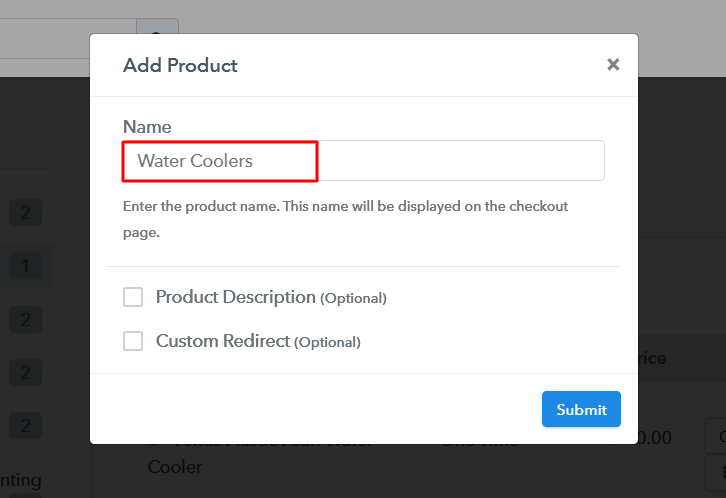
After the system settings upto step 4, in this step, you can start adding a product. For this, click on the ‘Add New Product’ button & name the product. We will be adding plans to sell afterwaords under these products.

Add Product to Sell Weed Killer Online

Fill all the required weed killer product details and hit ‘Submit’.

Note: Here you can add all the products related to the similar category by creating plans for each of them.

Step 6: Add Plans 

In this step, you can add plans under any product that you have created for the different types of weed killer available in your store.

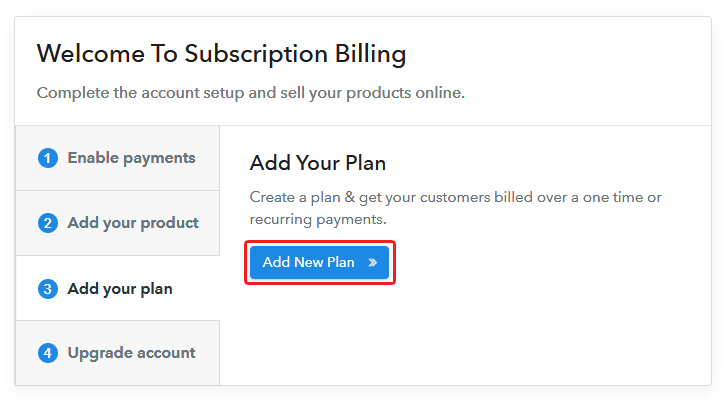
(a) Select Add New Plan

Add Plan

(b) Specify the Plan & Pricing Details
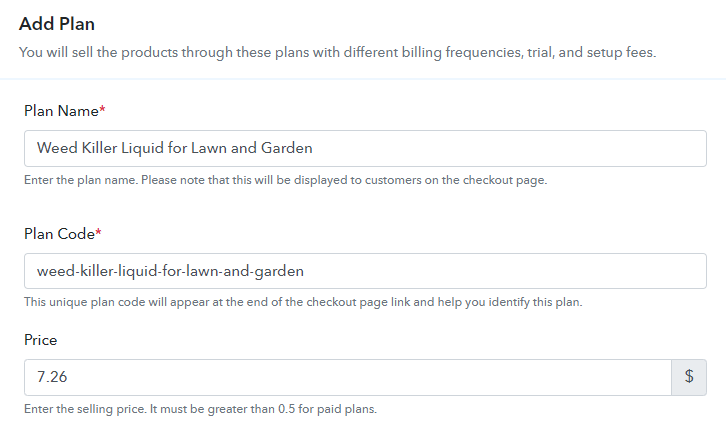
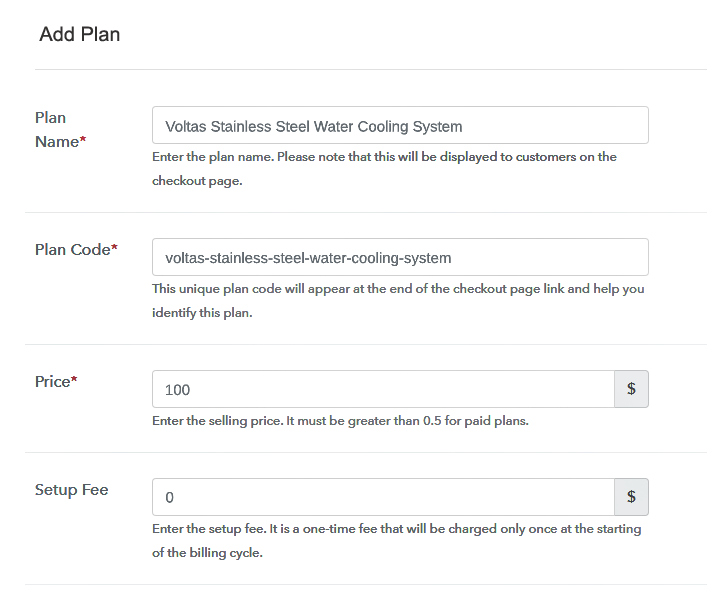
Add Plan to Sell Weed Killer Online

Name the plan as your item name and set the other details such as pricing, billing cycle etc.

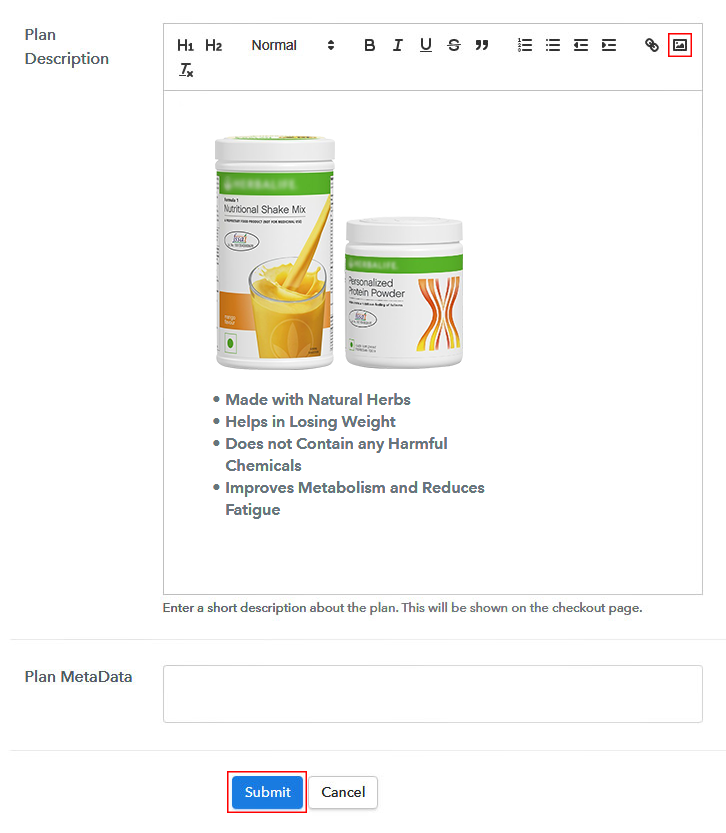
(c) Add Image & Description of Weed Killer
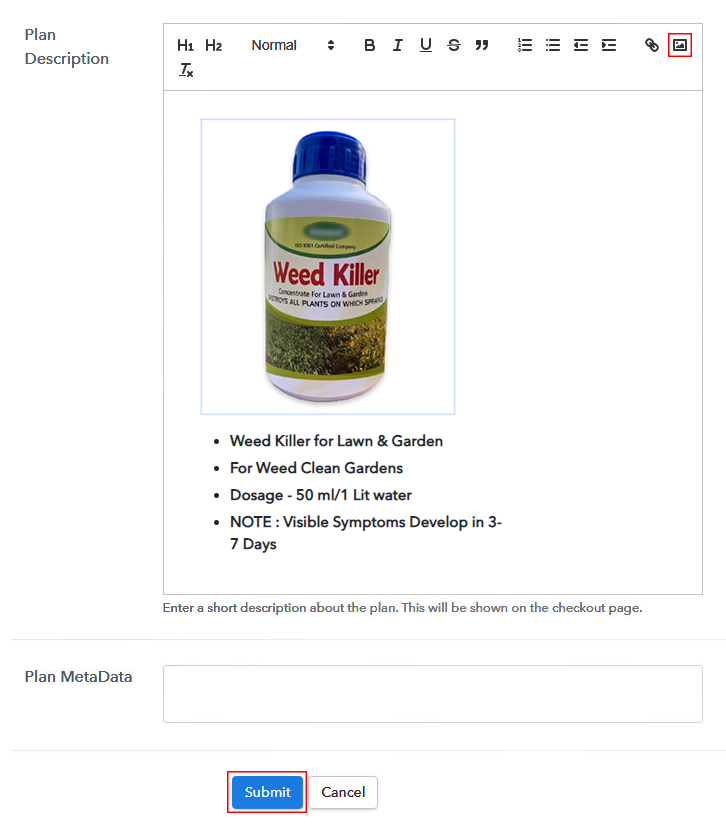
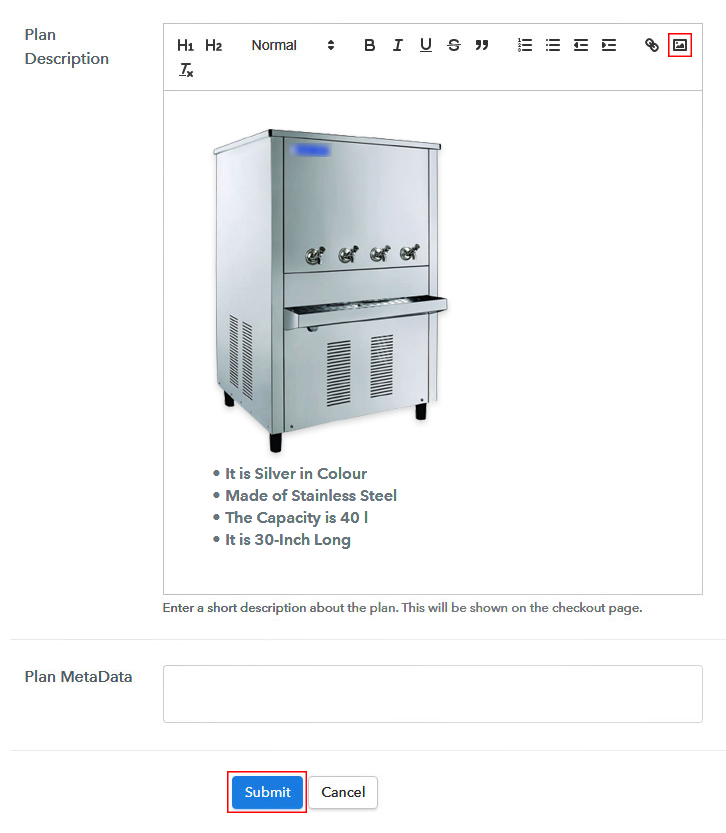
Add Image & Description to Sell Weed Killer Online

To put a picture in the checkout page’s display. Fill the plan description fields. Also, you can display some description of the weed killer.

Submit this plan page and a checkout page will be generated to sell weed killer online.

Likewise, you can add other weed killer products too.

Step 7: Share your Checkout Page

Share Checkout Page on Social Media

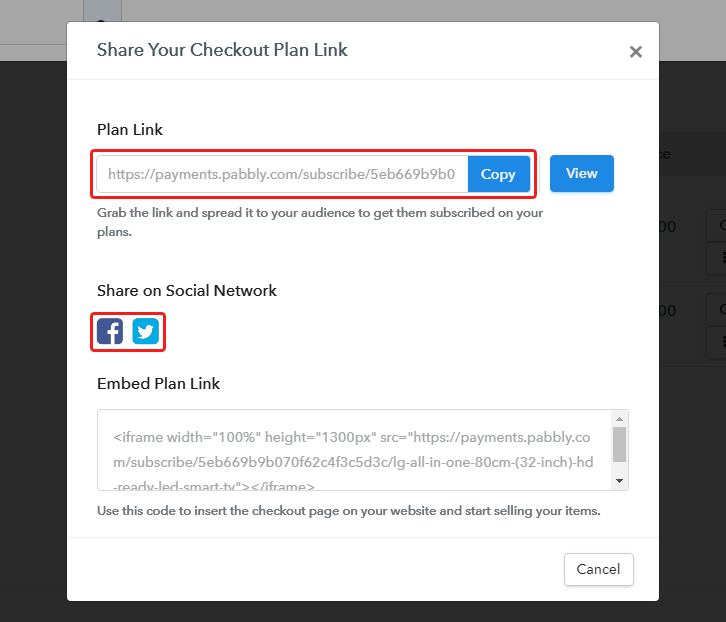
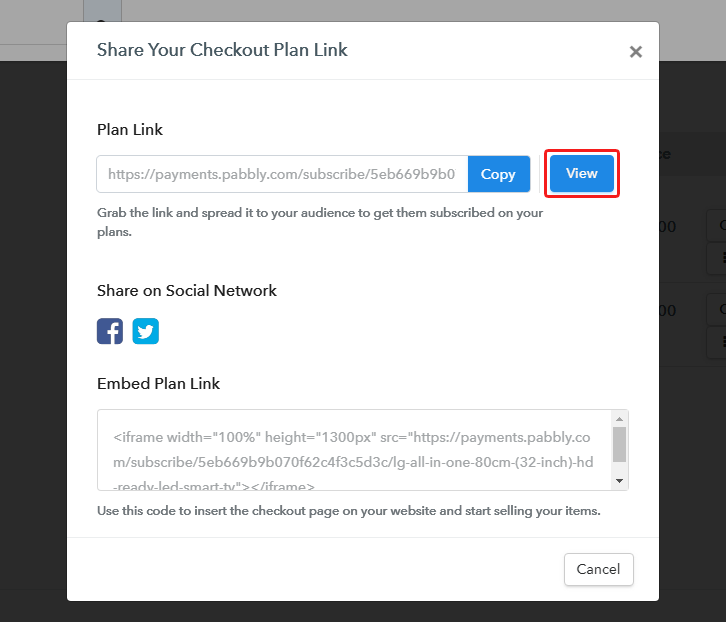
To sell a weed killer online, you can share a checkout page or embed it somewhere else.

  • You can directly share the plan over Facebook & Twitter using the sharing buttons
  • Or you can simply share the plan link of a checkout page on the other link sharing channels like emails and SMS.
  • Also, you can link the plan with the buttons & texts of a website or app to redirect a buyer over the payment’s page

Step 8: Preview Checkout Page

Follow up the recommended steps to preview the checkout page:

(a) Click on the View Button

View Checkout Plan

(b) Take a Look at the Checkout Page

Checkout Page Preview to Sell Weed Killer Online

Step 9: Embed Checkout Page in Site & Sell Weed Killer Online
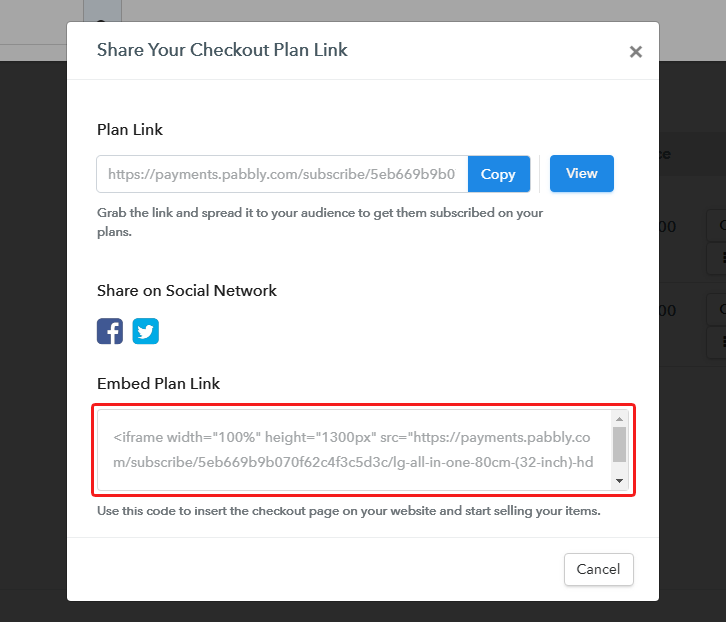
Embed Checkout Page on Website

Just copy the link and add the checkout page to sell weed killer online at any preferable place on your WordPress site.

(a) Edit the Page & Paste the Copied Link
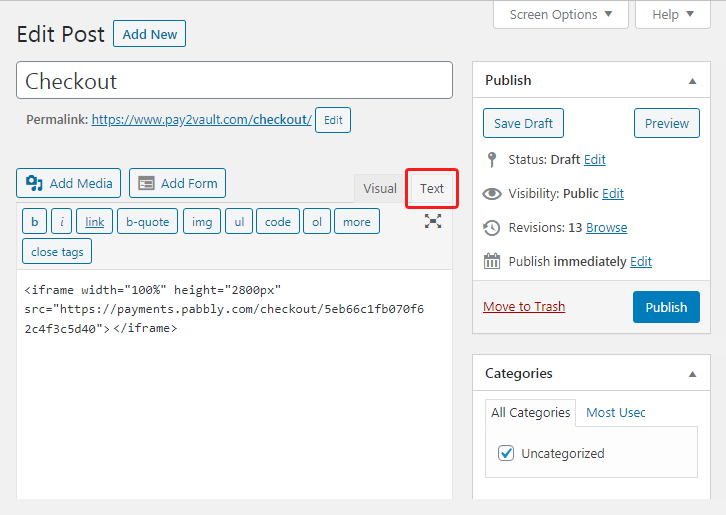
Embed Checkout Page on Website

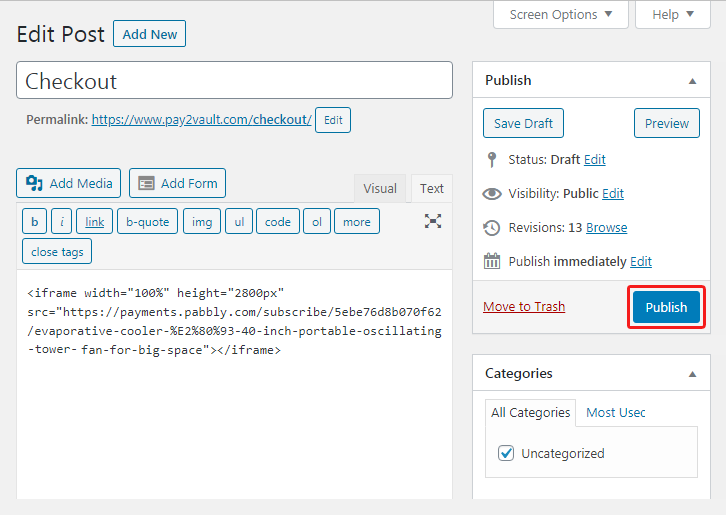
Further, paste the plan link on a text editor of the WordPress dashboard.

(b) Save & Publish the Checkout Page

Save_and_Publish

Next, click the “Publish” button, after making changes.

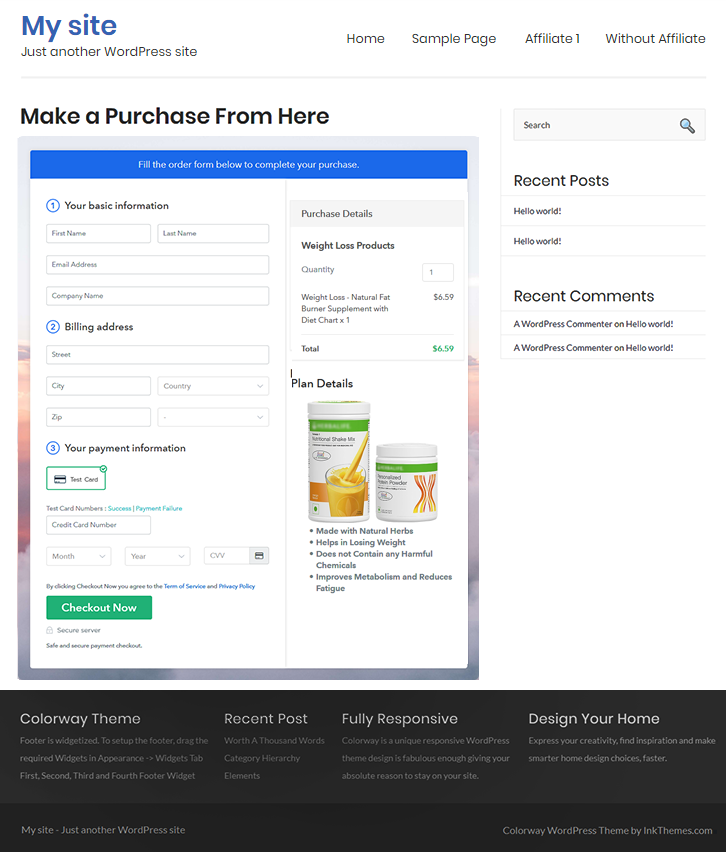
(c) Check out the Final Look of your Checkout Page on WordPress Site
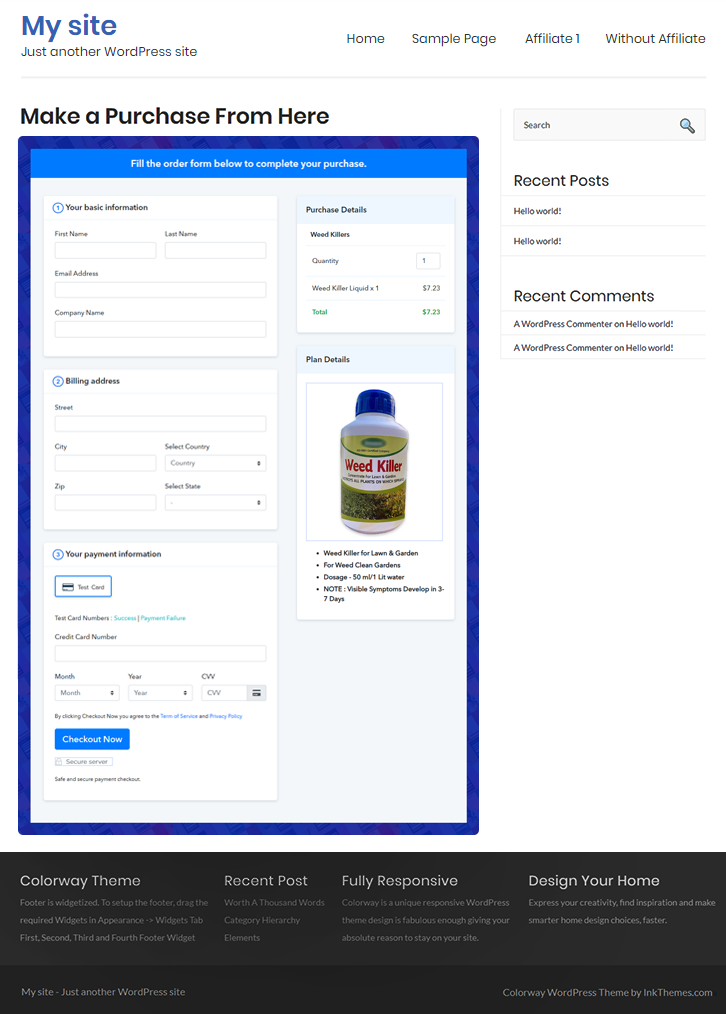
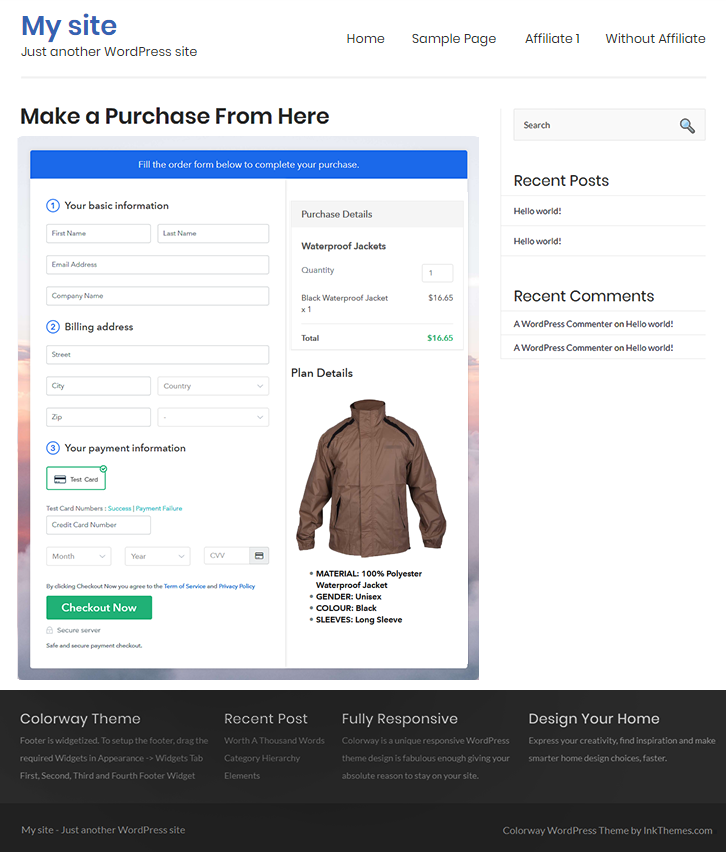
Checkout Page On WordPress Site to Sell Weed Killer Online

Step 10: Multiplan Checkout Page

Note: In case you want to sell multiple products via a single checkout page, you can create a multi-plan checkout page otherwise skip this step.

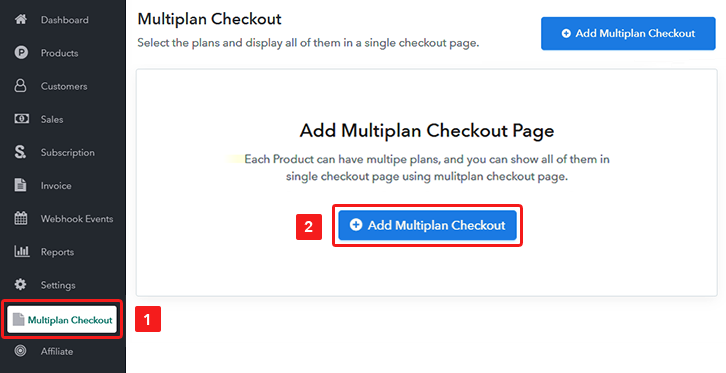
(a) Click on Add Mutiplan Checkout

Multiplan Checkout

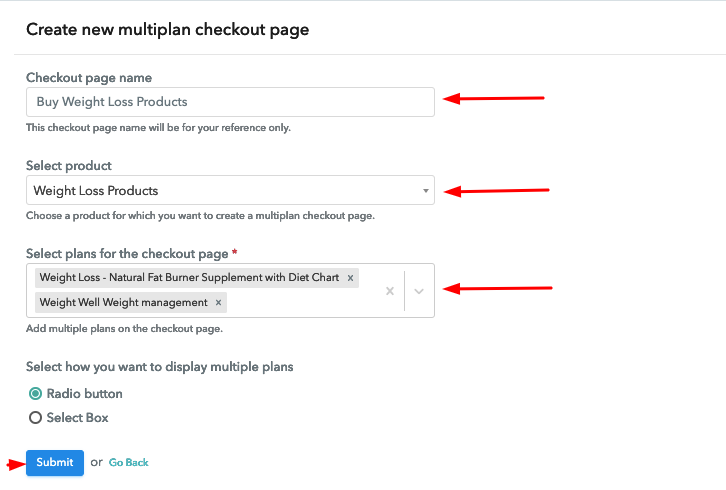
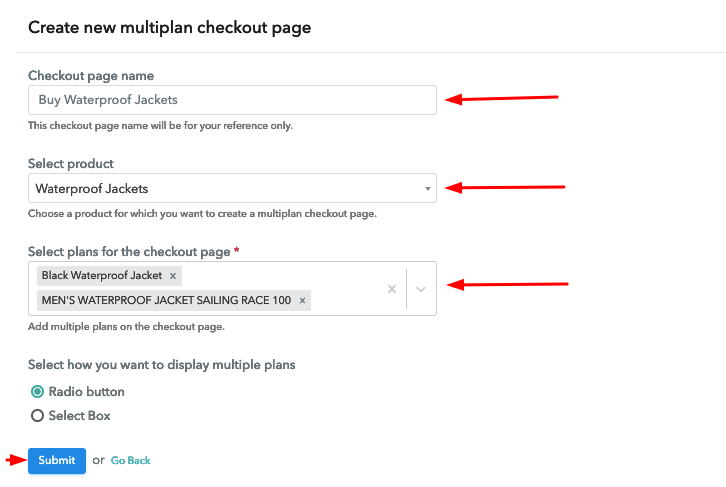
(b) Add Plans to Sell Multiple Weed Killer from Single Checkout Page
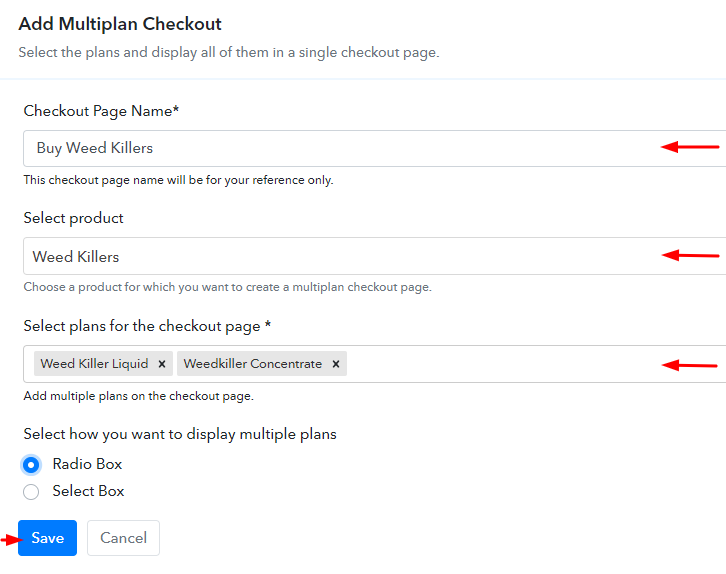
Create Multiplan Checkout Page to Sell Weed Killer Online

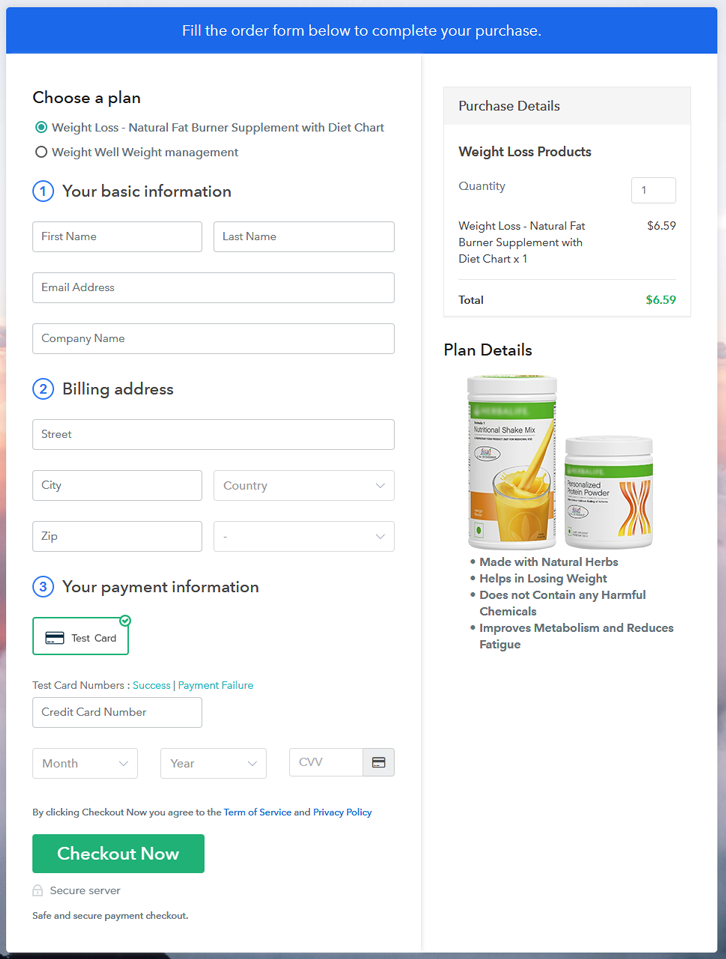
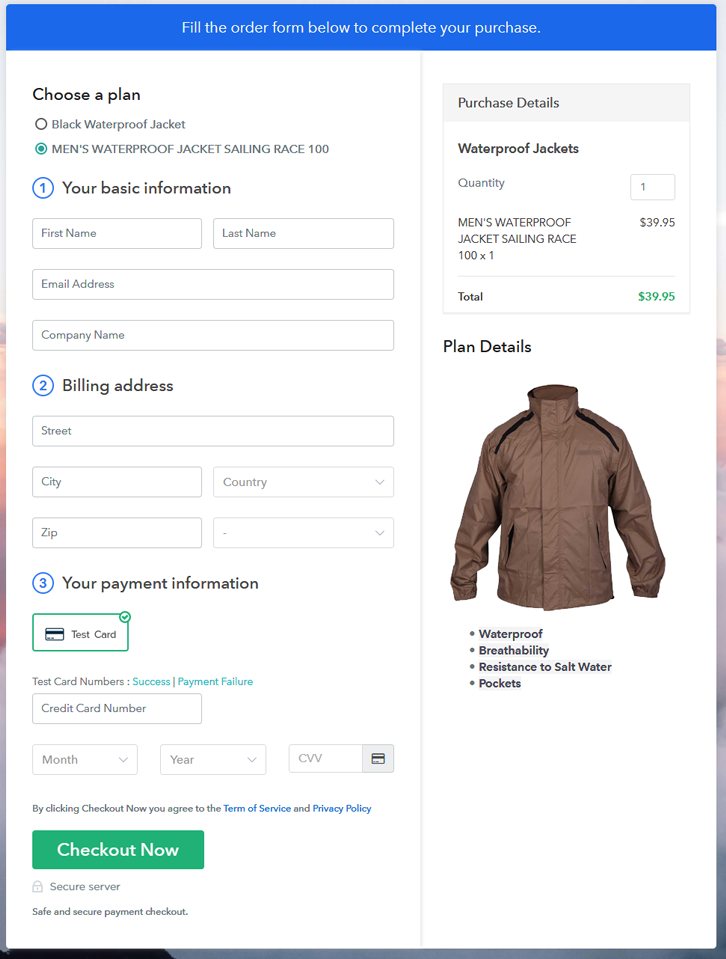
(c) Take a Look at the Checkout Page
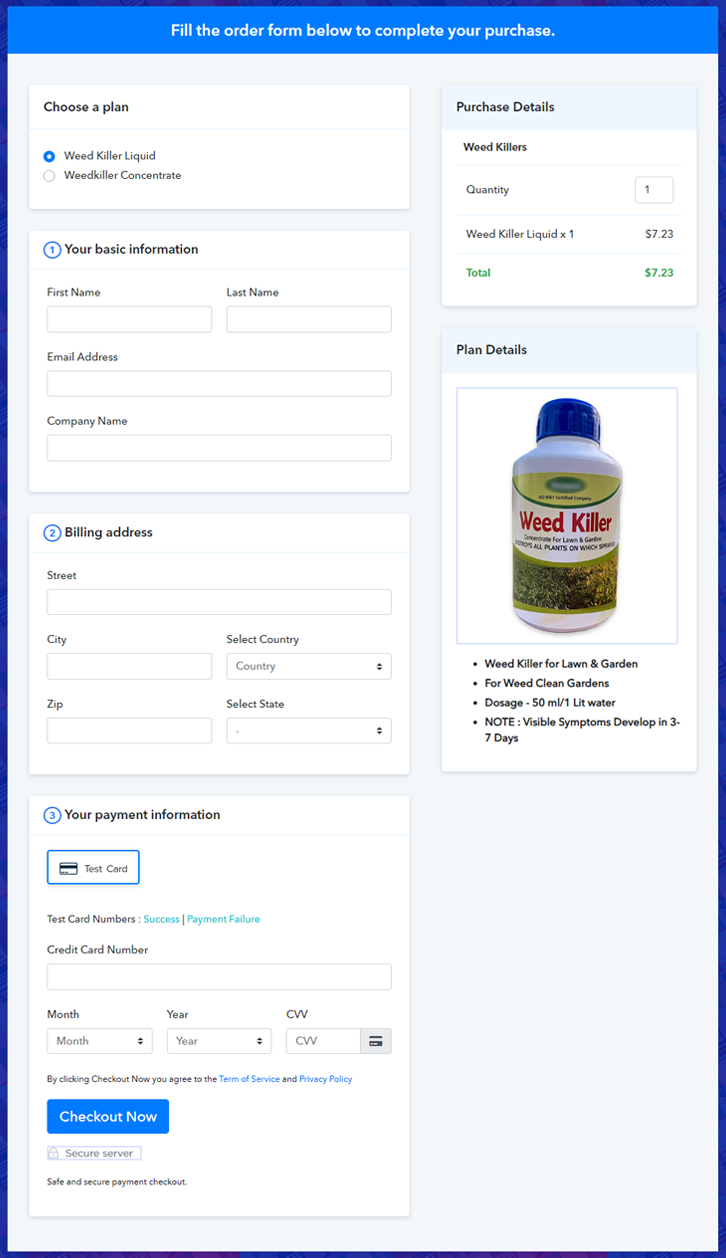
Multiplan Checkout Page to Sell Weed Killer Online

Preview Checkout Page

Wrapping Up

This was all about “How to sell weed killer online?’. The process is very simple and you can easily implement it by yourself. Also, it is pretty scalable as there is no limit over product sales. Moreover, you’ll get to choose among the multiple gateway options such as PayPal, Stripe, Razorpay etc.

You May Also Like To Read –
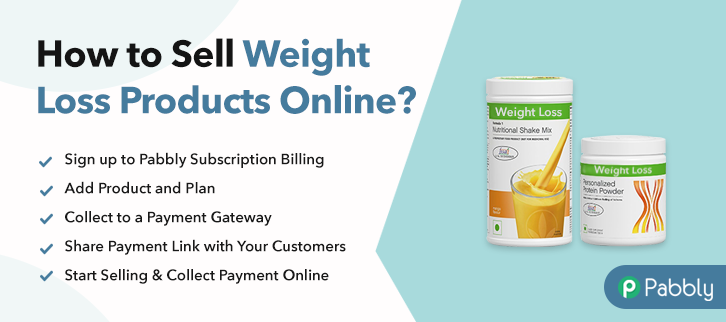
How to Sell Weight Loss Products Online | Step by Step (Free Method)

How to Sell Weight Loss Products Online

Ideal For: All the health and wellness stores, supplement manufacturers, supplement wholesalers, supplement wholesale distributors, and other sellers can use this method to take their weight loss products selling business online.

How to Sell Weight Loss Products Online

Why Choose this Method to Sell Weight Loss Products Online?

Unlike any other solution, this method allows you to:

  • List and sell your weight loss products for FREE. Absolutely no payment required.
  • No need to pay commission on any of your sales.
  • Multiple payment options like PayPal, Credit Card, etc to collect payment from a single place.
  • Sell one time or recurring subscriptions of your weight loss products.
  • Collect payments & sell products in any currency as per your requirement.
  • Give discounts on your products by offering special coupon codes.
  • Add sales commission agents to help you in selling weight loss products online.

Get Pabbly Subscription Billing for Free

Obesity is one of the most common problems these days, all thanks to junk food and an unhealthy lifestyle but people who care about their health are willing to lose weight with the help of weight loss products. Hence, if you sell weight loss products then consider taking your business online.

If people can access your weight loss products online and get them delivered to their doorsteps from all over the world then you can earn great profit. Therefore, today we have brought to you a fantastic service that allows you to sell weight loss products online for free which is Pabbly Subscription Billing. You can easily create checkout pages on this platform for your products and share their links on online platforms and start collecting payments through them.

Also, you get unlimited access to its other amazing features for your online business like easy payment collection, easy invoicing, unlimited listing of products, discount coupons creation, etc.

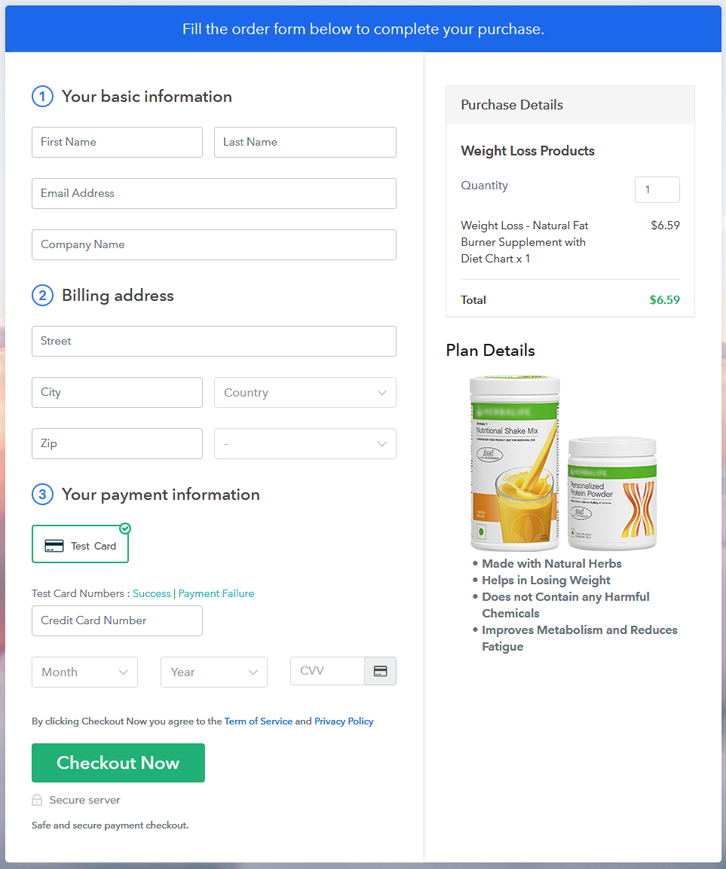
Final View of Checkout Page for your Weight Loss Products Selling Business

Preview Checkout Page

Preview Checkout Page

Step 1: Log in to Pabbly Subscription Billing

Signup

Let’s start with visiting Pabbly Subscription Billing website and then click on the “Sign Up Free” button. On clicking the button, the signup page will open where you can create your account with your Gmail account or manually enter your details.

Sign Up For Free!

Step 2: Select Subscription Billing

Access Subscription Billing

Step 3: Account Setup

Setup Account

After finishing the signup process, now you have to fill up your company details i.e. company name, currency, and contact number in the appeared dialogue box.

Step 4: Connect Payment Gateways & Start Weight Loss Products Selling Business Online

Connect Payment Gateway

Once the account setup is done, here, the payment collection process is explained by enabling the ‘Test Payment’ mode. Thereafter, you can connect other payment gateways such as Stripe, Razorpay, etc of your choice. The complete integration guides for payment gateways are given below-

Step 5: Add Product for your Weight Loss Products

Add Product

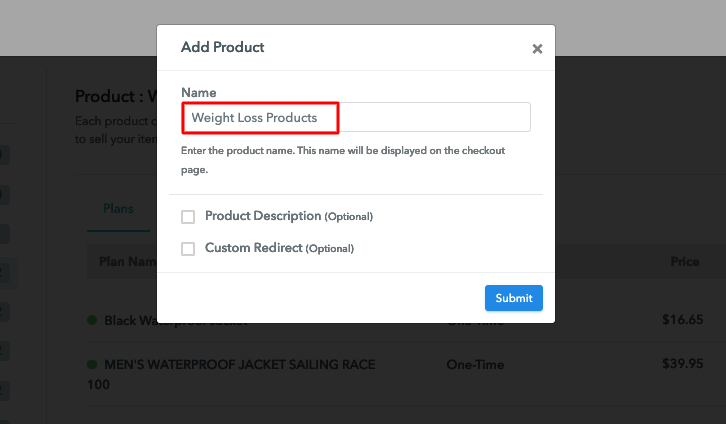
Moving to this step, you have to add your first product. You can add weight loss products of different types for instance supplements, dietary powders, etc.

Sell Weight Loss Products Online Product Name

Add all other types of weight loss products in the same product by creating different plans.

Note: Here you can add all the products related to the similar category by creating plans for each of them.

Step 6: Add Plans 

Let’s get started and create plans for different categories of weight loss products that you want to sell

(a) Select Add New Plan

Add Plan

(b) Specify the Plan & Pricing Details

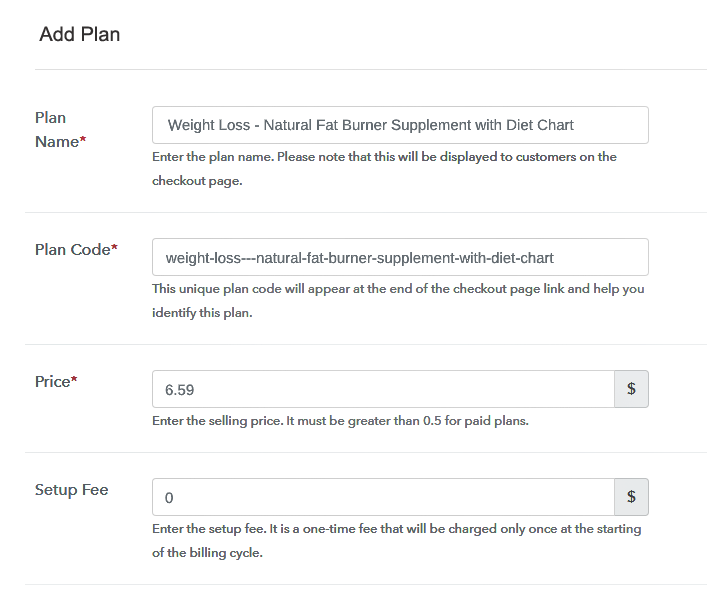
Sell Weight Loss Products Online Details

On clicking the “Add New Plan” button, you will reach to the plan page, here you have to fill up the plan details such as plan name, code, billing cycle, price, etc.

(c) Add Image & Description of Weight Loss Products

Sell Weight Loss Products Online Image

Also, you can write a description of the weight loss products that you want to sell along with the product links, images, etc, and then click on the “Submit” button to add your plan.

You can create more plans for all the weight loss products in a similar manner.

Step 7: Share your Checkout Page

Share Checkout Page on Social Media

Reach to a large number of customers by following the below steps:

  • Share your checkout page on social media like Facebook and Twitter.
  • Also, copy the mentioned link and send it to your customers via SMS or emails directly.
  • Embed your plan link to your website so that your customers can be landed on the checkout page directly.

Step 8: Preview Checkout Page

Follow up the recommended steps to preview the checkout page:

(a) Click on the View Button

View Checkout Plan

(b) Take a Look at the Checkout Page

Preview Checkout Page

Step 9: Embed Checkout Page in Site & Sell Weight Loss Products Online

Embed Checkout Page on Website

Just copy the provided plan embedding link and embed the checkout page to your WordPress site.

(a) Edit the Page & Paste the Copied Link

Embed Checkout Page on Website

Further, paste the plan link on a text editor of the WordPress dashboard.

(b) Save & Publish the Checkout Page

Save_and_Publish

Next, click the “Publish” button, after making changes.

(c) Check out the Final Look of your Checkout Page on WordPress Site

Sell Weight Loss Products Online W

Step 10: Multiplan Checkout Page

Note: In case you want to sell multiple products via a single checkout page, you can create a multi-plan checkout page otherwise skip this step.

(a) Click on Add Mutiplan Checkout

Multiplan Checkout

(b) Add Plans to Sell Multiple Weight Loss Products from Single Checkout Page

Sell Weight Loss Products Online Multi Details

(c) Take a Look at the Checkout Page

Sell Weight Loss Products Online Muti

Preview Checkout Page

Wrapping Up

Good job! You are a fast learner. Now, that you have learned how to sell weight loss products online via creating checkout pages, it will be easy for you to set up your online store on Pabbly Subscription Billing. Therefore, don’t waste any more time and start creating checkout pages to sell your products online.
For further queries or suggestions, please leave your comments down.

You May Also Like To Read –
How to Sell Window Shutters Online | Step by Step (Free Method)

How to Sell Window Shutters Online

Ideal For: All the window shutter manufactures, window shutter sellers, window shutter dealers, window shutter suppliers, window shutter shop owners and other merchants can use this method to sell window shutters online.

How to Sell Window Shutters Online

Why Choose this Method to Sell Window Shutters Online?

Unlike any other solution, this method allows you to:

  • List and sell your window shutters for FREE. Absolutely no payment required.
  • No need to pay commission on any of your sales.
  • Multiple payment options like PayPal, Credit Card, etc to collect payment from a single place.
  • Sell one time or recurring subscriptions of your window shutters.
  • Collect payments & sell products in any currency as per your requirement.
  • Give discounts on your products by offering special coupon codes.
  • Add sales commission agents to help you in selling window shutters online.

Get Pabbly Subscription Billing for Free

In our day to day life, online shopping has become such an easy task due to selling things online. All you need to do is list up your things and you are good to go. Consequently, you must be searching for ways that how you can sell window shutters online.

Subsequently, selling goods online has become a significant task for small & large businesses. Therefore, we would like to recommend Pabbly Subscription Billing which is a great software to take your window shutter business online.

This tool lets you create astonishing checkout pages for selling window shutters online which can be shared on social media accounts, websites, etc. So, now let me give you some of the reasons why it is the best tool for selling window shutters online.

  • List various window shutters in a single checkout page
  • Add tax and delivery charges as per customer’s location
  • Offer discount and coupon codes to consumers
  • Collect money in both online and offline mode

Now, let’s get started by creating our checkout page using Pabbly Subscription Billing to sell window shutters online.

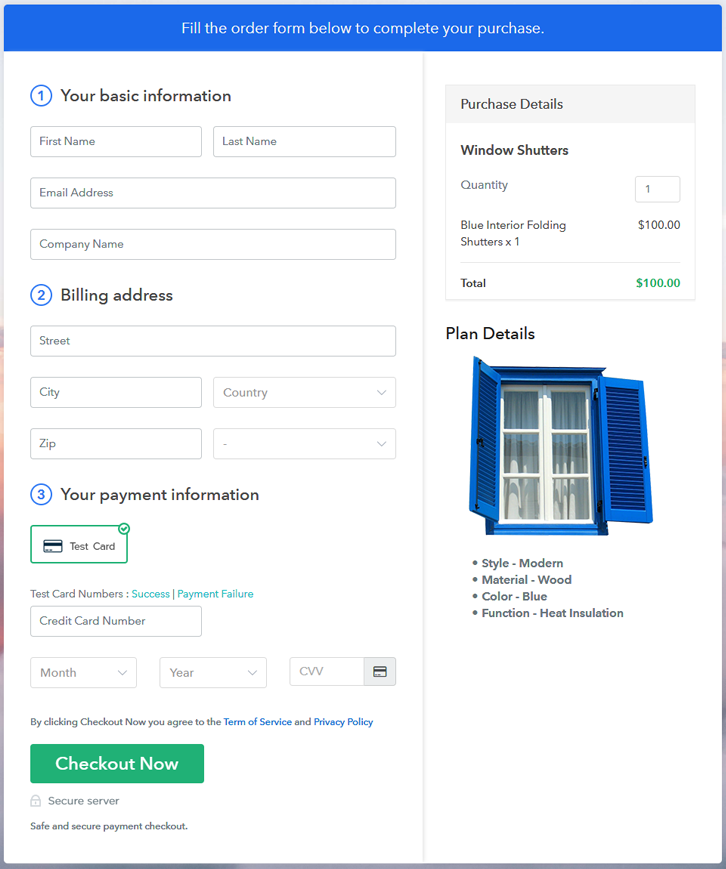
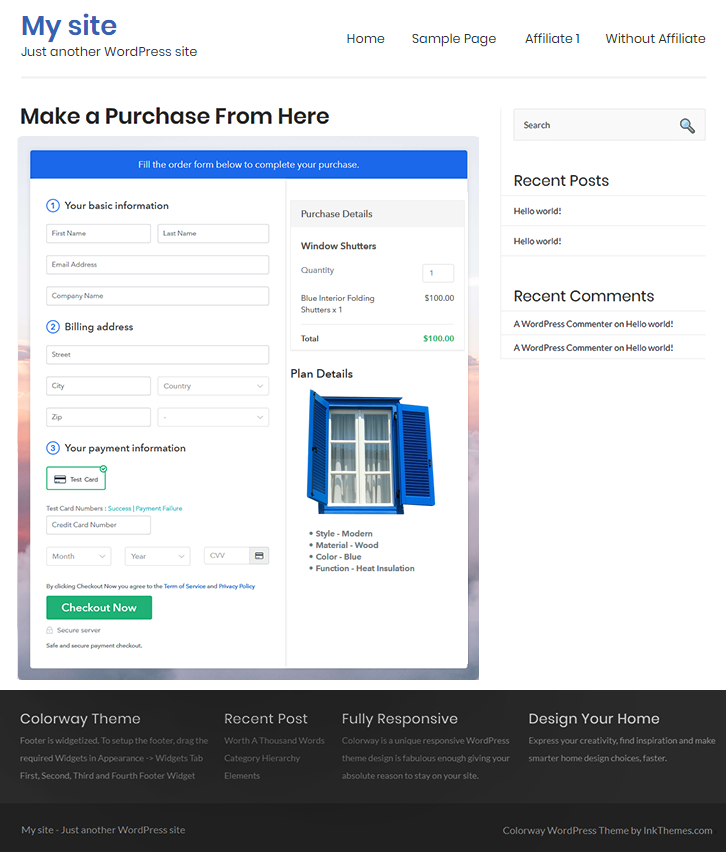
Final View of Checkout Page for your Window Shutters Selling Business

Final View of Checkout Page for your Window Shutters Selling Business

Preview Checkout Page

Step 1: Log in to Pabbly Subscription Billing

Signup

First, go to Pabbly Subscription Billing and after you open their website just press on “Sign up Free“. Now, here you have two options that are, either you can sign in using your Gmail account or else you can fill in the required fields like name, email, etc, and tap on the “Sign Up” button.

Sign Up For Free!

Step 2: Select Subscription Billing

Access Subscription Billing

Step 3: Account Setup

Setup Account

A dialog box will pop up asking you to fill out the company details like name, currency, phone number, etc, Once you complete filling up the details just press the blue “Continue” button in order to complete the entire process.

Step 4: Connect Payment Gateways & Start Window Shutters Selling Business Online

Connect Payment Gateway

Now, in order to ensure the payment process, you need to test the whole payment experience with the help of a dummy payment gateway in Pabbly Subscription Billing.

Moreover, you can also integrate with a ton of payment gateways such as Razorpay, PayPal, Authorize.net, etc. Just go through the articles that are mentioned below in order to integrate with your preferred payment gateway like PayPal, Stripe, etc. For instance, here I am going to enable the test payment option to continue the process.

Step 5: Add Product for your Window Shutters

Add Product

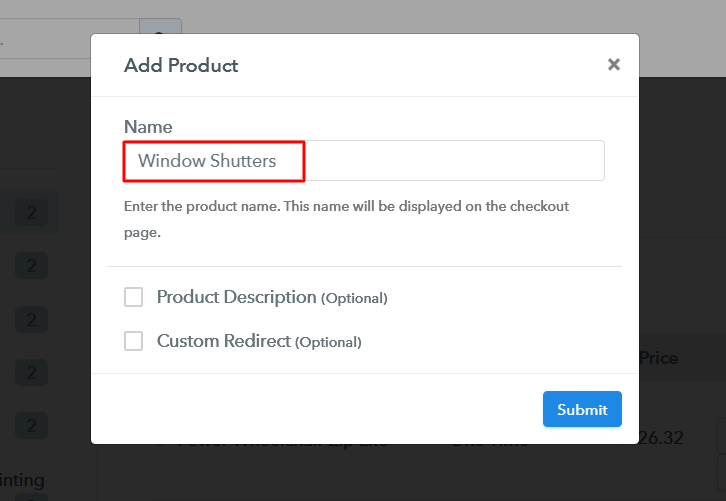
Plus, add the name, which in our case is “Window Shutters”. Here you can specify the type and write a short description of the window shutters too.

Add Product To Sell Window Shutters Online

Moreover, just fill out all those details and your product is created.

Note: Here you can add all the products related to the similar category by creating plans for each of them.

Step 6: Add Plans 

Let’s reveal plans for different kinds of window shutters available in your store.

(a) Select Add New Plan

Add Plan

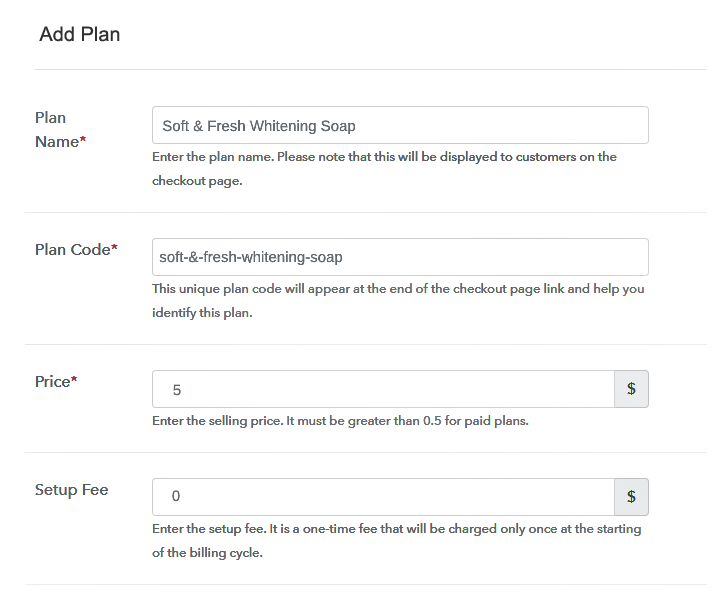
(b) Specify the Plan & Pricing Details

Specify the Plan and Pricing to Sell Window Shutters Online

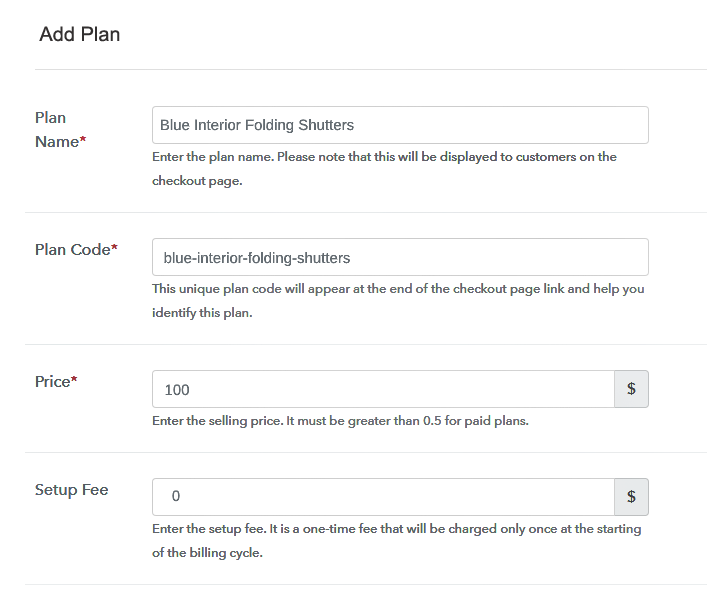
The subsequent thing to do is fill all the details of the window shutters like plan name, code, price, set-up fee, and much more to continue.

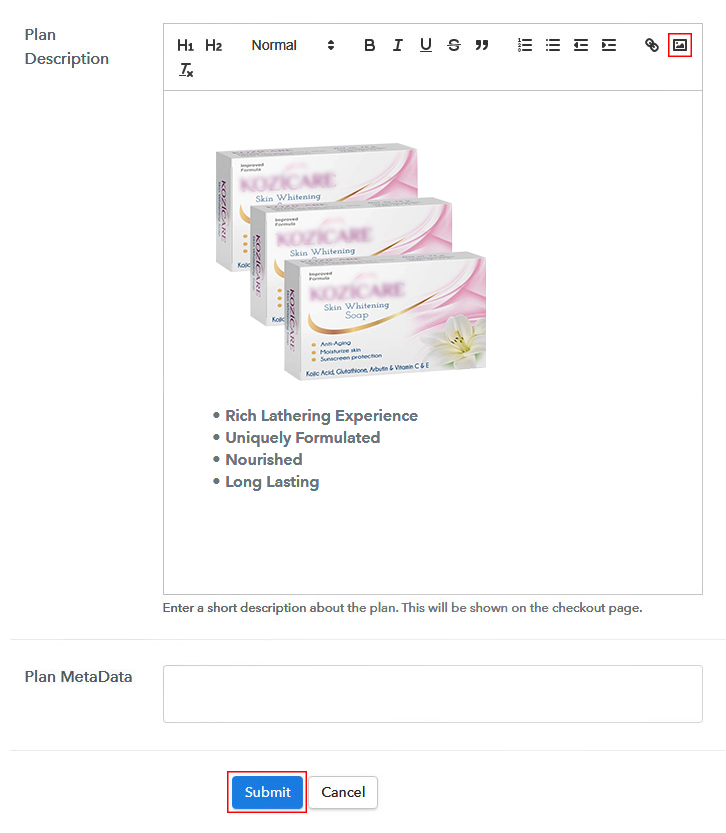
(c) Add Image & Description of Window Shutters

Add Image & Description of Window Shutters

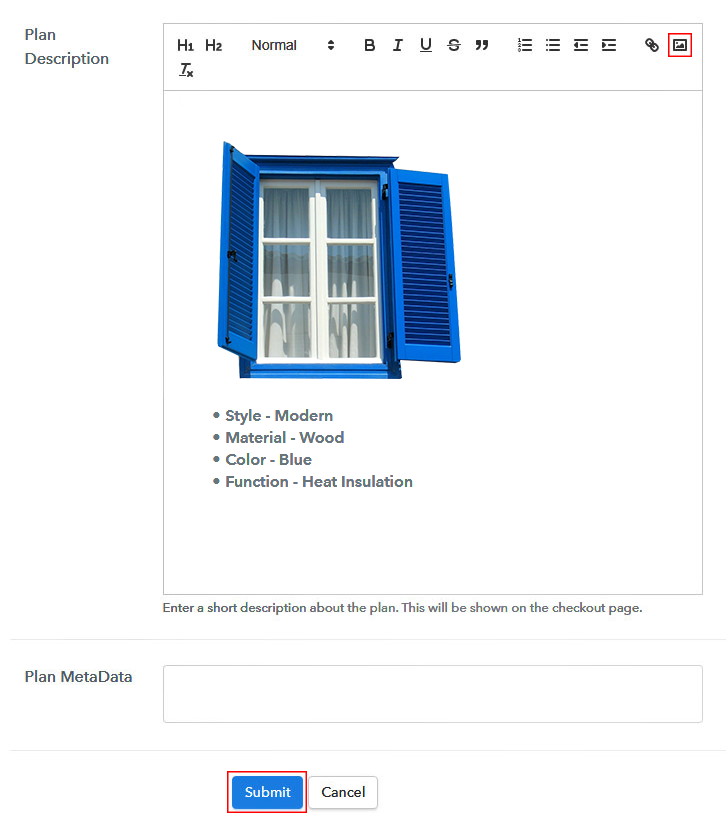
Subsequently, paste the image of the window shutters you wish to sell online.

Further, provide some product information of the window shutters in bullet points like material used, designs, etc.

Once you fillup the information, just tap on the “Submit” button.

Step 7: Share your Checkout Page

Share Checkout Page on Social Media

  • In order to increase sales of your products i.e, window shutter, you can share the checkout page on Twitter & Facebook by just pressing the respective buttons.
  • Moreover, you can also emails and SMS the checkout page link to your customers.
  • Further, add the provided plan link in the buttons or any anchor text on your website in order to redirect users to the checkout page.

Step 8: Preview Checkout Page

Follow up the recommended steps to preview the checkout page:

(a) Click on the View Button

View Checkout Plan

(b) Take a Look at the Checkout Page

Final View of Checkout Page for your Window Shutters Selling Business

Step 9: Embed Checkout Page in Site & Sell Window Shutters Online

Embed Checkout Page on Website

Just copy the link and add the checkout page to sell window shutters online at any proper place on your WordPress site.

(a) Edit the Page & Paste the Copied Link

Paste Link in Text Editor

Further, paste the plan link of window shutters on a text editor of the WordPress dashboard.

(b) Save & Publish the Checkout Page

Save_and_Publish

Next, click the “Publish” button, after making changes.

(c) Check out the Final Look of your Checkout Page on WordPress Site

Embed Checkout Page in Site & Sell Window Shutters Online

Step 10: Multiplan Checkout Page

Note: In case you want to sell multiple products via a single checkout page, you can create a multi-plan checkout page otherwise skip this step.

(a) Click on Add Mutiplan Checkout

Multiplan Checkout

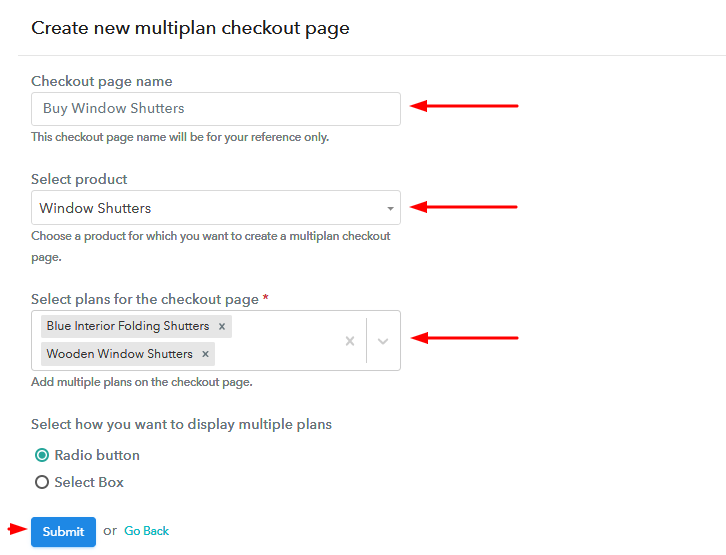
(b) Add Plans to Sell Multiple Window Shutters from Single Checkout Page

Add Plans to Sell Multiple Window Shutters from Single Checkout Page

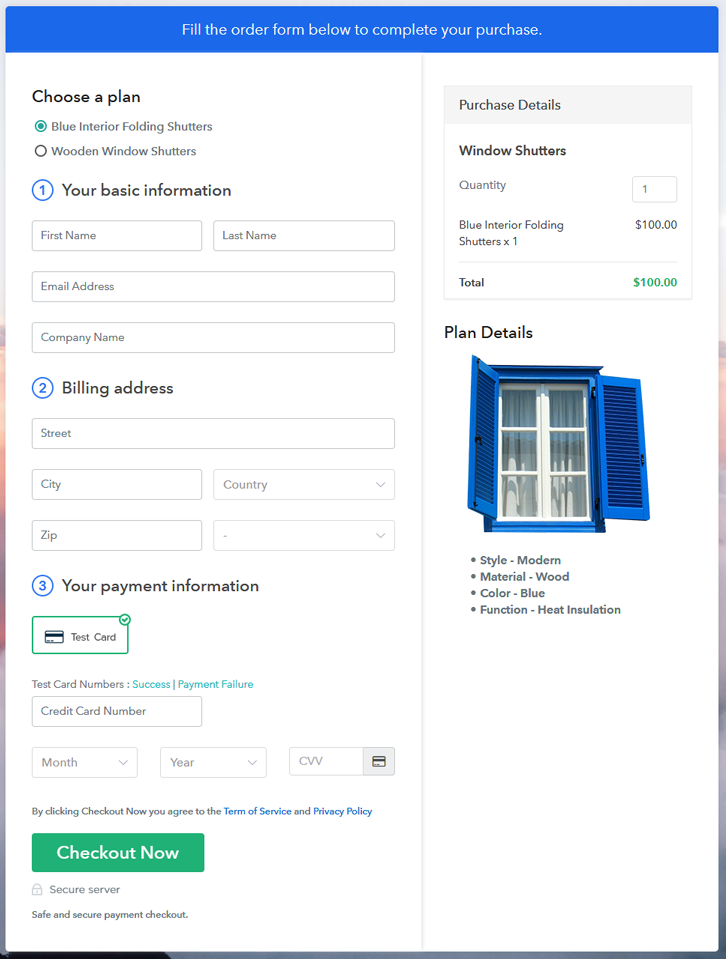
(c) Take a Look at the Checkout Page

Multiplan Checkout Page to Start Window Shutters Business Online

Preview Checkout Page

Wrapping Up

There you go! See, how easy it is to start window shutters business online with the help of Pabbly Subscription Billing software. Simply go through all the steps that are mentioned above and set up your window shutter business effortlessly. Don’t wait anymore, try this software out and let us know about your experience in the comment section below.

You May Also Like To Read –
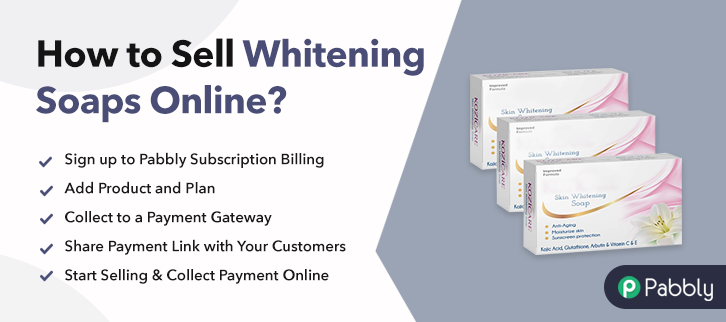
How to Sell Whitening Soaps Online | Step by Step (Free Method)

Ideal For: All the whitening soap manufacturers, whitening soap sellers, whitening soap dealers, whitening soap suppliers, bathroom essential shop owners and other merchants can use this method to sell whitening soaps online.

How to Sell Whitening Soaps Online

Why Choose this Method to Sell Whitening Soaps Online?

Unlike any other solution, this method allows you to:

  • List and sell your whitening soaps for FREE. Absolutely no payment required.
  • No need to pay commission on any of your sales.
  • Multiple payment options like PayPal, Credit Card, etc to collect payment from a single place.
  • Sell one time or recurring subscriptions of your whitening soaps.
  • Collect payments & sell products in any currency as per your requirement.
  • Give discounts on your products by offering special coupon codes.
  • Add sales commission agents to help you in selling whitening soaps online.

Get Pabbly Subscription Billing for Free

Whitening soaps are one of the pillar of the cosmetic industry. According to the Future Market Insights report, the global skin lightening products market is manifesting growth at a CAGR of 8%. Not just this, people are leaning towards a company which is using natural ingredients. So, giving all this a thought, it would be suitable to start whitening soaps business online.

You must be wondering what benefits online whitening soaps store might bring. So here we are pulling curtains from some of the incredible benefits like no middle man, global audience, no opening time restriction. Above all, it has a lower set up cost compared to offline stores. And, you can take advantage of all these using software named Pabbly Subscription Billing. The software can assist you in starting your store online.  Using the tool you can sell whitening soaps online with the help of checkout pages. Other than this, it has some distinct features like:

  • Unlimited Coupon Codes/ Discounts
  • One Time Or Recurring Billing
  • Various Payment Options

Now, let’s get started creating a checkout page for selling whitening soaps online with the help of this tool.

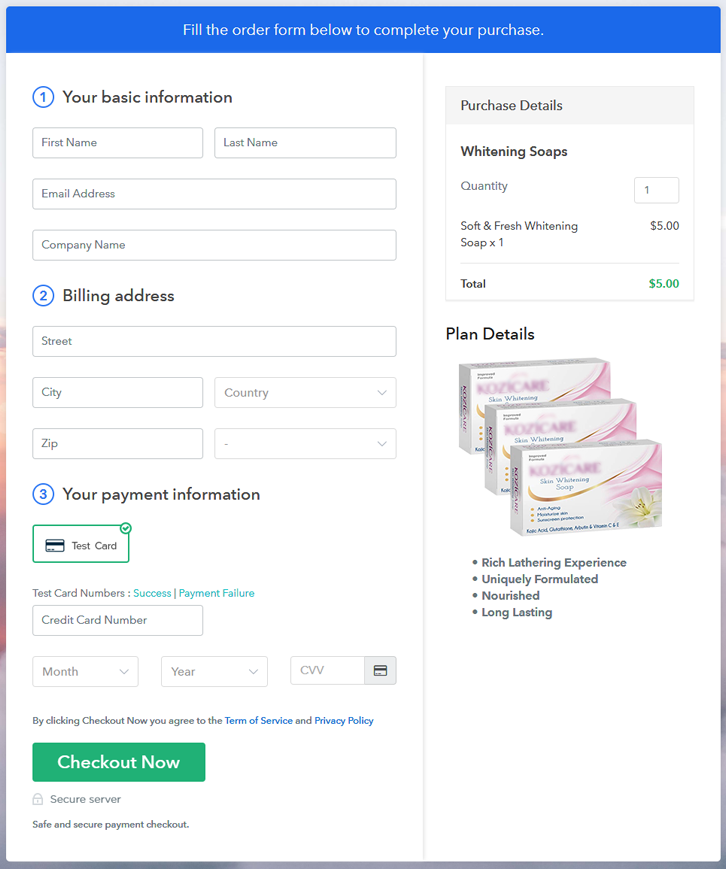
Final View of Checkout Page for your Whitening Soaps Selling Business

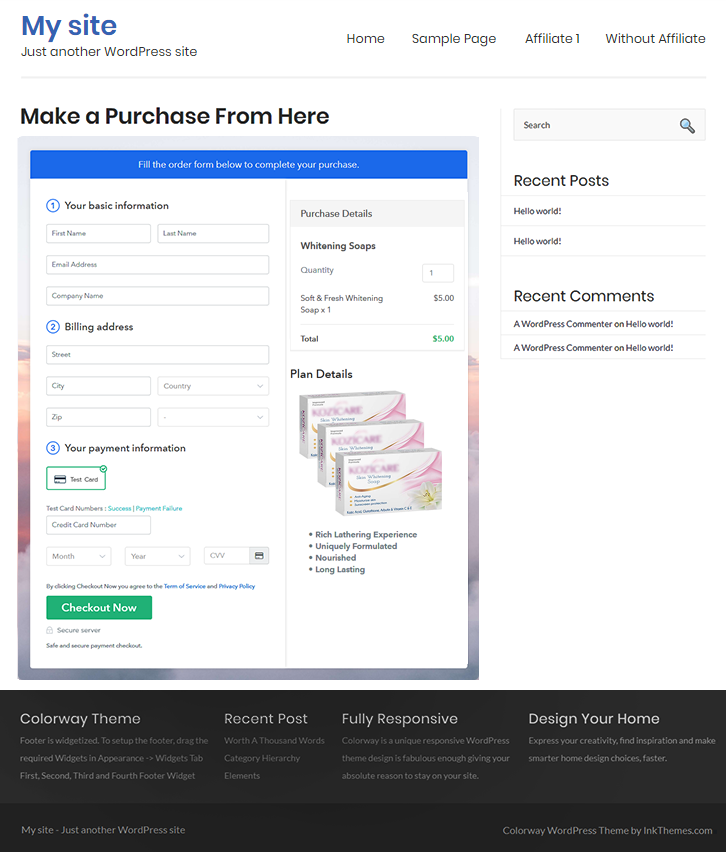
Checkout Page to Sell Whitening Soaps Online

Preview Checkout Page

Step 1: Log in to Pabbly Subscription Billing

Signup

Start the process for creating a checkout page for whitening soaps by visiting the Pabbly Subscription Billing in your browser. After that, click on the “Sign up Free“ button. Furthermore, either manually filled out the details or sign in using your Gmail account.

Sign Up For Free!

Step 2: Select Subscription Billing

Access Subscription Billing

Step 3: Account Setup

Setup Account

Besides, after clicking on the “Access Now” button of the software, a page will open with fields like company name, select currency, and phone number. Simply fill out those details to continue creating a checkout page for whitening soaps.

Step 4: Connect Payment Gateways & Start Whitening Soaps Selling Business Online

Connect Payment Gateway

The consequent step is to earning information about payment procedures using a “Test Payment Gateway”. Here, we will explain the checkout page process for the whitening soaps with the help of a test payment gateway. Besides this, the tool offers various payment gateways such as PayPal, Stripe, etc. Moreover, below are the payment integration guides to help you out.

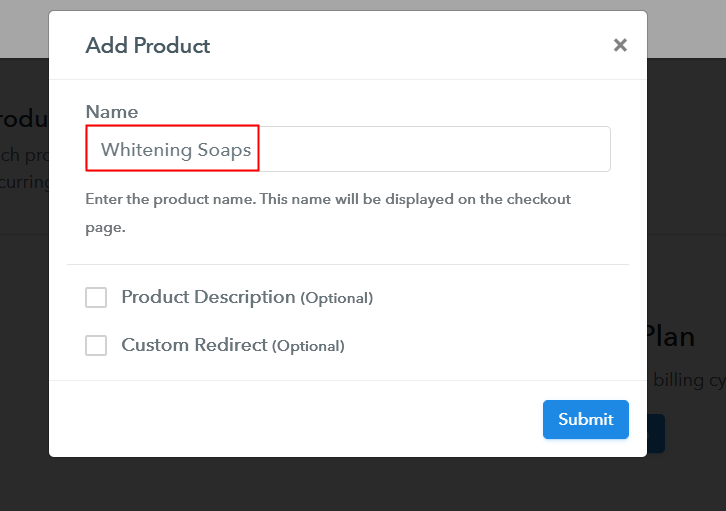
Step 5: Add Product for your Whitening Soaps

Add Product

Additionally, add the name, which in our case is “Whitening Soaps”. Here you can specify the type like skin whitening soaps, lightening soaps, etc. Further, write a short description of the whitening soaps to seize the customer’s attention.

Add Product to Start Selling Whitening Soaps Online

Moreover, just fill out all those details, and your product for whitening soaps is created.

Note: Here you can add all the products related to the similar category by creating plans for each of them.

Step 6: Add Plans 

Let’s expose plans for different kinds of whitening soaps available in your store.

(a) Select Add New Plan

Add Plan

(b) Specify the Plan & Pricing Details

Specify the Plan and Pricing to Sell Whitening Soaps Online

The next thing to do is fill all the details of the whitening soaps like plan name, code, price, set-up fee, and much more to continue.

(c) Add Image & Description of Whitening Soaps

Add Image & Description to Sell Whitening Soaps Online

Furthermore, write a brief description of the whitening soaps using bullets, images, etc, to bring original buyers to the checkout page.

Next, click on the “Submit” button to add the whitening soaps on the checkout page.

Finally, you can add multiple plans and kinds of whitening soaps in your product list which you want to sell online.

Step 7: Share your Checkout Page

Share Checkout Page on Social Media

  • Moreover, share the checkout page of the whitening soaps on social media accounts like Facebook & Twitter to grab the customer’s attention.
  • Also, you can share the direct link of the whitening soaps checkout page with your customers via SMS or email marketing.
  • Additionally, embed the provided plan link of the whitening soaps in the buttons or any anchor text on your website.

Step 8: Preview Checkout Page

Further, follow up on the recommended steps to preview the checkout page for whitening soaps:

(a) Click on the View Button

View Checkout Plan

(b) Take a Look at the Checkout Page

Checkout Page to Sell Whitening Soaps Online

Step 9: Embed Checkout Page in Site & Sell Whitening Soaps Online

Embed Checkout Page on Website

Additionally, simply copy the link and add the checkout page to sell whitening soaps online at any proper place on your WordPress site.

(a) Edit the Page & Paste the Copied Link

Paste Link in Text Editor

Moreover, paste the plan link of whitening soaps on a text editor of the WordPress dashboard.

(b) Save & Publish the Checkout Page

Save_and_Publish

Further, click on the “Publish” button, after making changes.

(c) Check out the Final Look of your Checkout Page on WordPress Site

Final Look of your Checkout Page to Sell Whitening Soaps Online

Step 10: Multiplan Checkout Page

Note: In case you want to sell multiple products via a single checkout page, you can create a multi-plan checkout page otherwise skip this step.

(a) Click on Add Mutiplan Checkout

Multiplan Checkout

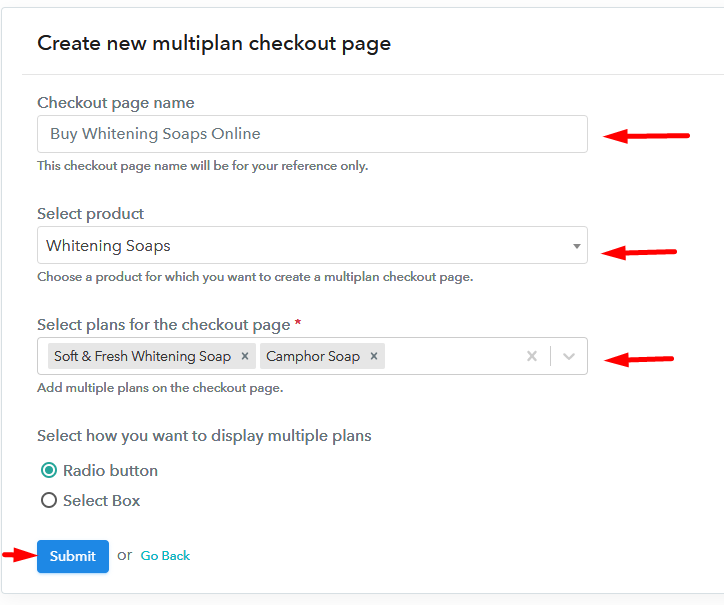
(b) Add Plans to Sell Multiple Whitening Soaps from Single Checkout Page

Add Multiple Products to Start Selling Whitening Soaps Online

(c) Take a Look at the Checkout Page

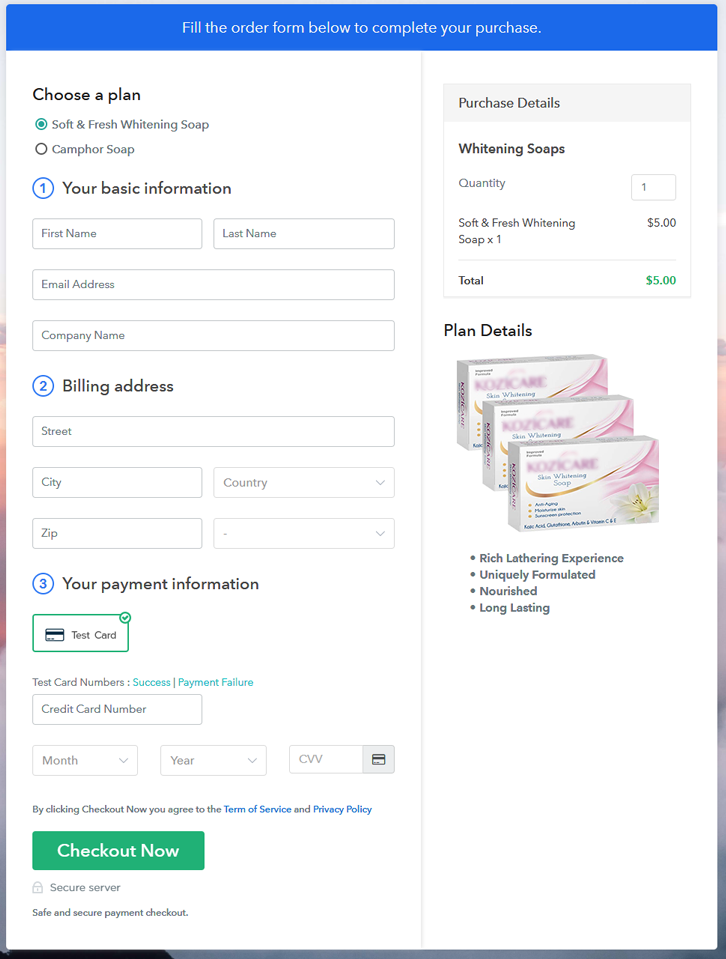
Multiplan Checkout Page to Sell Whitening Soaps Online

Preview Checkout Page

Wrapping Up

Alright! Whitening soaps are much more than hygienic items, it carries benefits like protection from sunburn, free radicals, etc. So starting a whitening soaps business is a suitable idea. Now you know how simple is to sell whitening soaps online using Pabbly Subscription Billing software. Just pass through all the contrived steps and nothing else.

So, don’t delay anymore, try this software out.

You May Also Like To Read –
How to Sell Wedding Tents Online | Step by Step (Free Method)

How to Sell Wedding Tents Online

Ideal For: All the wedding tent manufacturers, wedding tent sellers, wedding tent dealers, wedding tent suppliers, tent shop owners and other merchants can use this method to sell wedding tents online.

How to Sell Wedding Tents Online

Why Choose this Method to Sell Wedding Tents Online?

Unlike any other solution, this method allows you to:

  • List and sell your wedding tents for FREE. Absolutely no payment required.
  • No need to pay commission on any of your sales.
  • Multiple payment options like PayPal, Credit Card, etc to collect payment from a single place.
  • Sell one time or recurring subscriptions of your wedding tents.
  • Collect payments & sell products in any currency as per your requirement.
  • Give discounts on your products by offering special coupon codes.
  • Add sales commission agents to help you in selling wedding tents online.

Get Pabbly Subscription Billing for Free

Colorful wedding tents provide the wedding with a whole new outlook. Wedding tents can illuminate the venue radiantly which is why the demands of wedding tents never go down. Having an offline store for selling tents is okay but isn’t it be great if you start selling wedding tents online. It is actually and you’ll be thrilled to know the benefits of online stores.

The very first perk of starting wedding tents business online is, the whole world is just a click away from you. Second, it has minimal set-up cost compared to traditional stores. Third, it is free from the middleman so you don’t have to share your profit. Now that we got your attention so we would like to suggest software named Pabbly Subscription Billing that can help you start your own wedding tents business online.

The software allows you to create amazing checkout for selling wedding tents online. Other than this it is swamped with features like:

  • Infinite Discount & Coupons
  • Revenue Tracking
  • One Time and Recurring Billing

Subsequently, now let me show you 10 easy steps that you need to follow for creating checkout pages for selling wedding tents online.

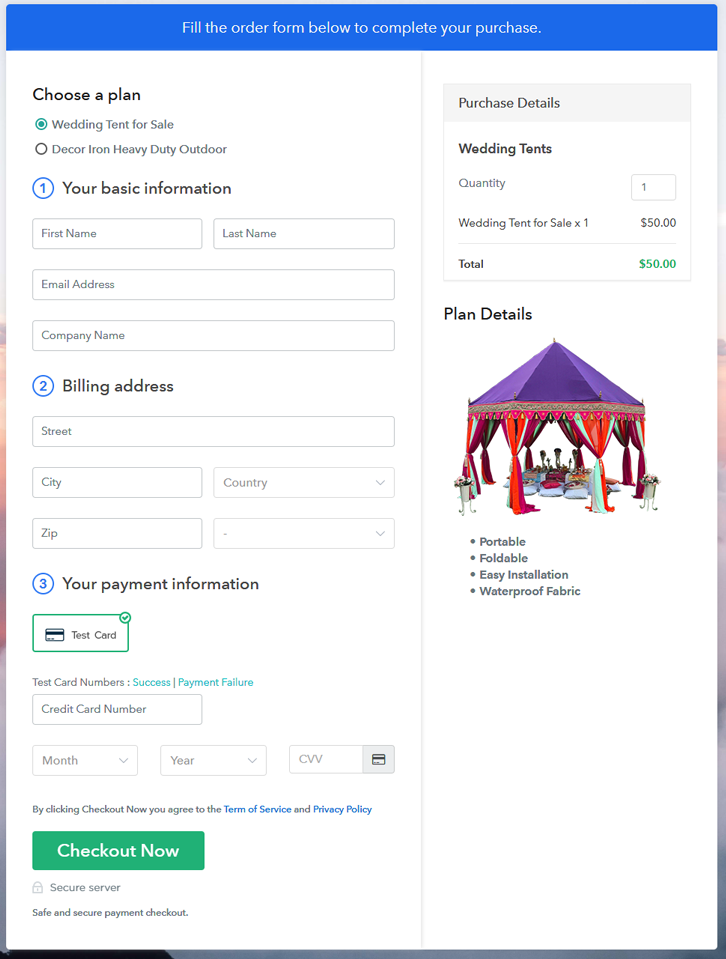
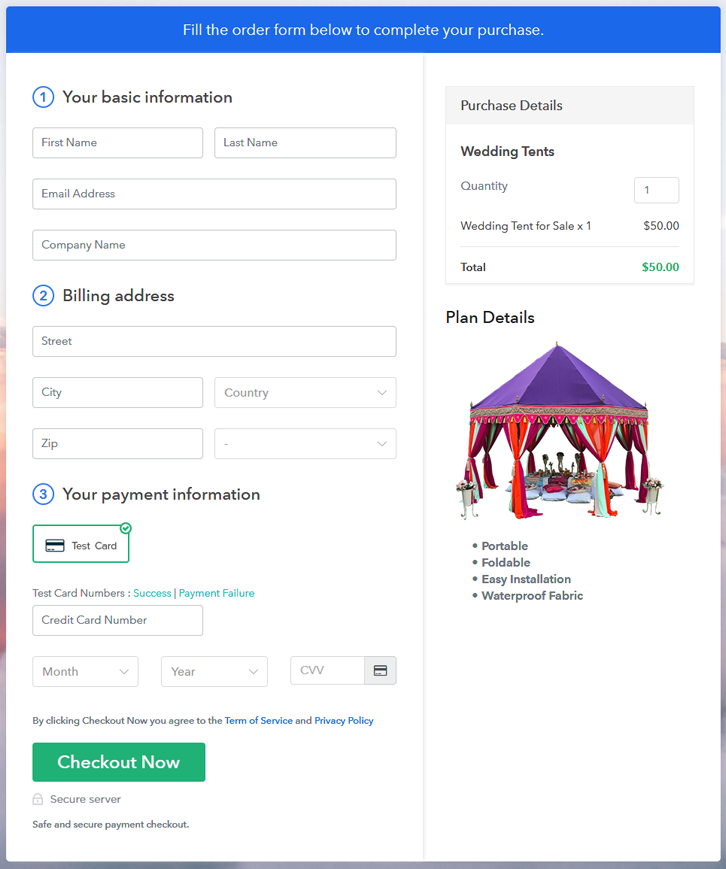
Final View of Checkout Page for your Wedding Tents Selling Business

Multiplan Checkout Page to Sell Wedding Tents Online

Preview Checkout Page

Step 1: Log in to Pabbly Subscription Billing

Signup

Start the process for creating a checkout page for wedding tents by visiting the Pabbly Subscription Billing in your browser. After that, click on the “Sign up Free“ button. Furthermore, either manually filled out the details or sign in using your Gmail account.

Sign Up For Free!

Step 2: Select Subscription Billing

Access Subscription Billing

Step 3: Account Setup

Setup Account

Besides, after clicking on the “Access Now” button of the software, a page will open with fields like company name, select currency, and phone number. Simply fill out those details to continue creating a checkout page for wedding tents.

Step 4: Connect Payment Gateways & Start Wedding Tents Selling Business Online

Connect Payment Gateway

The consequent step is to earning information about payment procedures using a “Test Payment Gateway”. Here, we will explain the checkout page process for the wedding tents with the help of a test payment gateway. Besides this, the tool offers various payment gateways such as PayPal, Stripe, etc. Moreover, below are the payment integration guides to help you out.

Step 5: Add Product for your Wedding Tents

Add Product

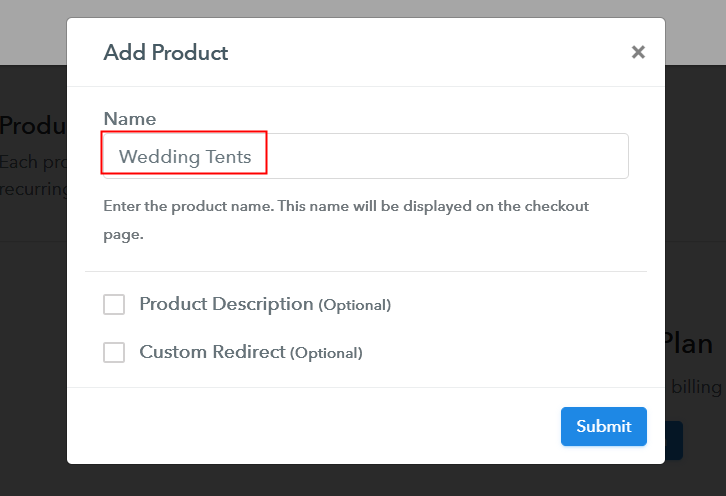
Additionally, add the name, which in our case is “Wedding Tents”. Here you can specify the type like pole tent, stretch tent, etc. Further, write a short description of the wedding tents to grab the shopper’s attention.

Add Product to Start Selling Wedding Tents Online

Moreover, just fill out all those details, and your product for wedding tents is created.

Note: Here you can add all the products related to the similar category by creating plans for each of them.

Step 6: Add Plans 

Let’s expose plans for different kinds of wedding tents available in your store.

(a) Select Add New Plan

Add Plan

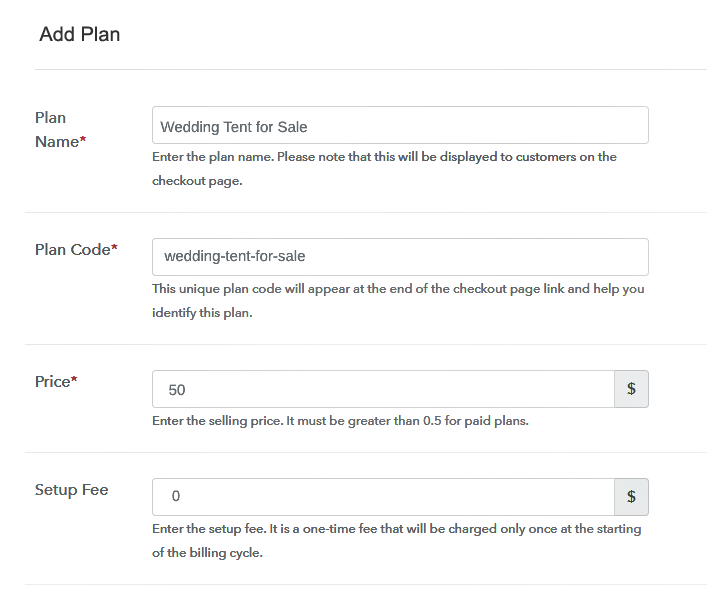
(b) Specify the Plan & Pricing Details

Specify the Plan and Pricing to Sell Wedding Tents Online

The next thing to do is fill all the details of the wedding tents like plan name, code, price, set-up fee, and much more to continue.

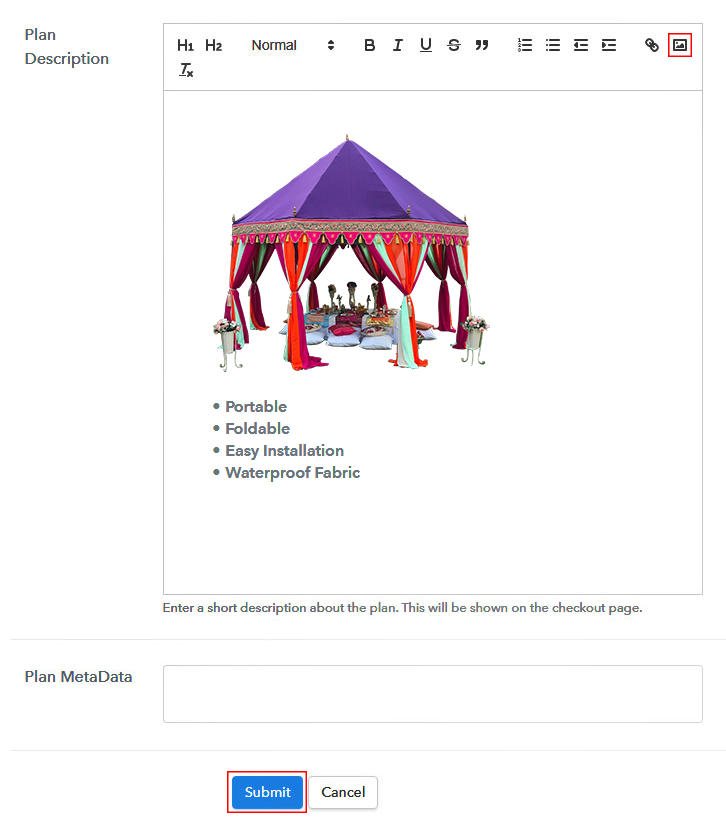
(c) Add Image & Description of Wedding Tents

Add Image & Description to Sell Wedding Tents Online

Furthermore, write a brief description of the wedding tents using bullets, images, etc, to bring original buyers to the checkout page.

Next, click on the “Submit” button to add the wedding tents on the checkout page.

Finally, you can add multiple plans and kinds of wedding tents in your product list which you want to sell online.

Step 7: Share your Checkout Page

Share Checkout Page on Social Media

  • Moreover, share the checkout page of the wedding tents on social media accounts like Facebook & Twitter to grab the customer’s attention.
  • Also, you can share the direct link of the wedding tents checkout page with your customers via SMS or email marketing.
  • Additionally, embed the provided plan link of the wedding tents in the buttons or any anchor text on your website.

Step 8: Preview Checkout Page

Further, follow up on the recommended steps to preview the checkout page for wedding tents:

(a) Click on the View Button

View Checkout Plan

(b) Take a Look at the Checkout Page

Checkout Page to Sell Wedding Tents Online

Step 9: Embed Checkout Page in Site & Sell Wedding Tents Online

Embed Checkout Page on Website

Additionally, simply copy the link and add the checkout page to sell wedding tents online at any proper place on your WordPress site.

(a) Edit the Page & Paste the Copied Link

Paste Link in Text Editor

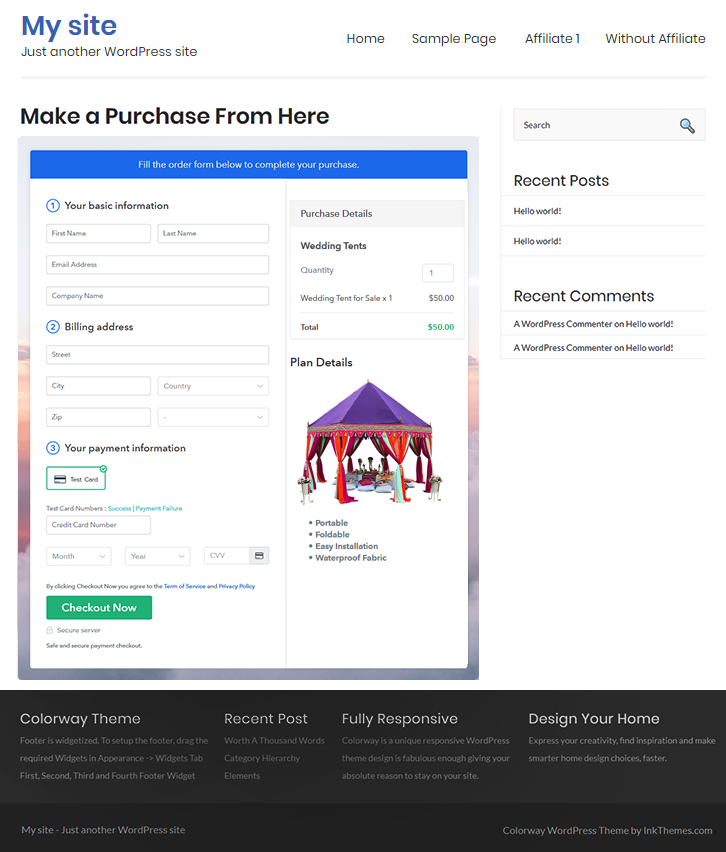
Moreover, paste the plan link of wedding tents on a text editor of the WordPress dashboard.

(b) Save & Publish the Checkout Page

Save_and_Publish

Further, click on the “Publish” button, after making changes.

(c) Check out the Final Look of your Checkout Page on WordPress Site

Final Look of your Checkout Page to Sell Wedding Tents Online

Step 10: Multiplan Checkout Page

Note: In case you want to sell multiple products via a single checkout page, you can create a multi-plan checkout page otherwise skip this step.

(a) Click on Add Mutiplan Checkout

Multiplan Checkout

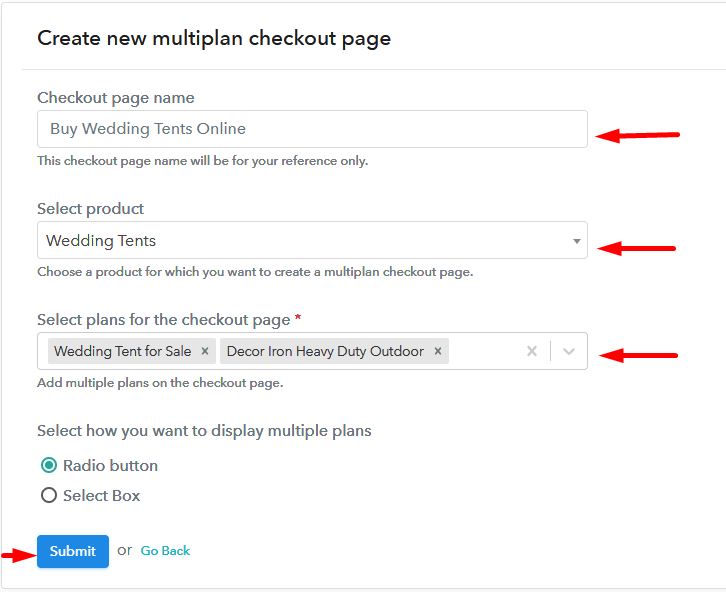
(b) Add Plans to Sell Multiple Wedding Tents from Single Checkout Page

Add Multiple Products to Start Selling Wedding Tents Online

(c) Take a Look at the Checkout Page

Multiplan Checkout Page to Sell Wedding Tents Online

Preview Checkout Page

Wrapping Up

Tada! We have deceptively answered all the requisite steps to starting wedding tents selling business online. And don’t just count on us, try this software Pabbly Subscription Billing and raise your sales of wedding tents business. Moreover, it is packed with incredible features like several billing models, revenue tracking, and much more.

So, what are you waiting for? Go and try this software out

You May Also Like To Read –
How to Sell Waterproof Fabric Online | Step by Step (Free Method)

How to Sell Waterproof Fabric Online

Ideal For: All the waterproof fabric manufacturers, waterproof fabric suppliers, fabric stores, fabric shops, fabric wholesalers, and other sellers can use this method to take their waterproof fabric selling business online.

How to Sell Waterproof Fabric Online

Why Choose this Method to Sell Waterproof Fabric Online?

Unlike any other solution, this method allows you to:

  • List and sell your waterproof fabric for FREE. Absolutely no payment required.
  • No need to pay commission on any of your sales.
  • Multiple payment options like PayPal, Credit Card, etc to collect payment from a single place.
  • Sell one time or recurring subscriptions of your waterproof fabric.
  • Collect payments & sell products in any currency as per your requirement.
  • Give discounts on your products by offering special coupon codes.
  • Add sales commission agents to help you in selling waterproof fabric online.

Get Pabbly Subscription Billing for Free

Waterproof fabric will always be in demand as it is used in so many products such as footwear, table covers, bed covers, etc. Hence, selling waterproof fabric online will give you an increased profit for your business.

Now the question is, which service to choose for the online business. Pabbly Subscription Billing is your answer, as its checkout page, is very helpful in collecting one-time or recurring payments. You just have to create checkout pages for your waterproof fabric that you want to sell and share their links on social media and other online platforms so that your customers can make purchases directly through them.

Apart from the checkout page, Pabbly Subscription Billing also provides a  free platform to start your online waterproof fabric selling business with various great features:

  • Collect one-time or recurring payments via online or offline modes for waterproof fabric
  • Generate and share invoices with customers of waterproof fabric automatically
  • Add and sell unlimited waterproof fabric
  • Generate unlimited revenue

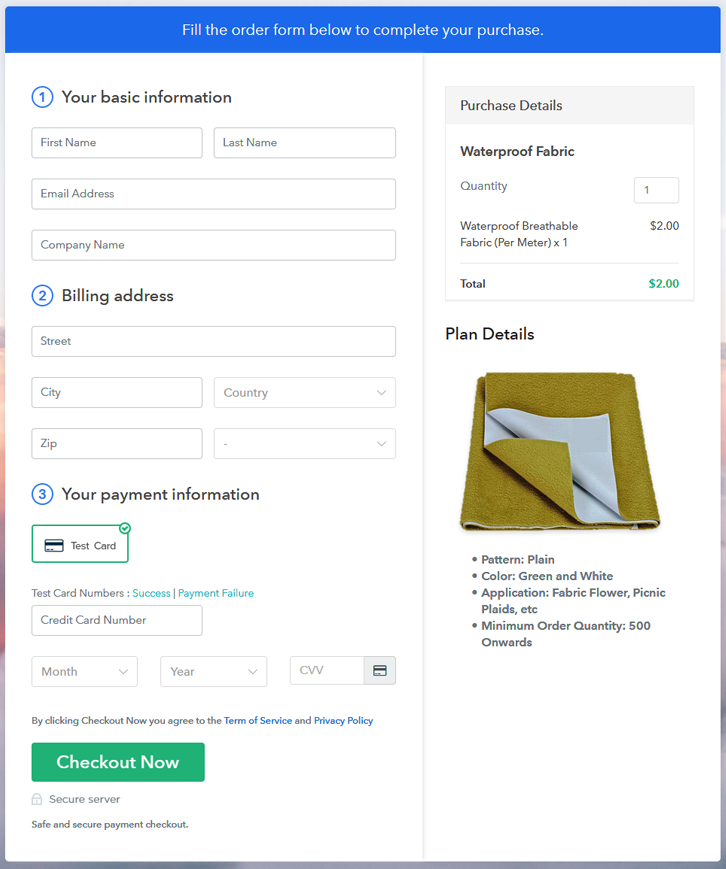
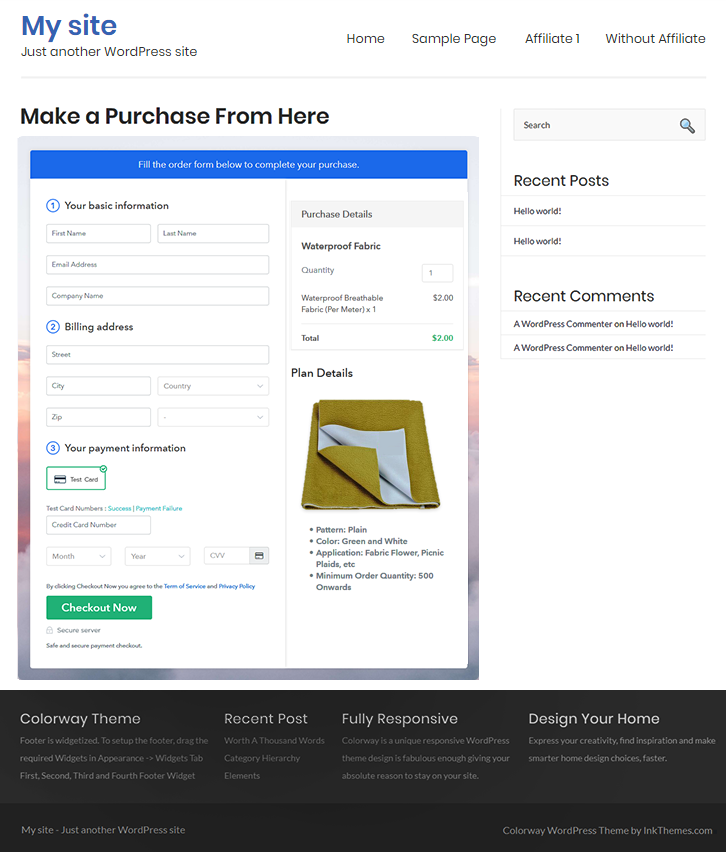
Final View of Checkout Page for your Waterproof Fabric Selling Business

Preview Checkout Page

Preview Checkout Page

Step 1: Log in to Pabbly Subscription Billing

Signup

In the first step, you have to visit Pabbly Subscription Billing website and then click on the “Sign Up Free” button. On clicking the button, you will reach to the signup page, where you can create your account automatically with your Gmail or manually enter your details.

Sign Up For Free!

Step 2: Select Subscription Billing

Access Subscription Billing

Step 3: Account Setup

Setup Account

Once the signup process is completed, now fill up your company details i.e. company name, currency, and contact number in the appeared dialogue box.

Step 4: Connect Payment Gateways & Start Waterproof Fabric Selling Business Online

Connect Payment Gateway

Moving forward to this step, we have described the payment collection process by enabling the ‘Test Payment’ mode. You can also use and check this mode before proceeding further for an error-free payment collection experience. Later, you have to connect other payment gateways such as PayPal, Stripe, etc of your choice. The complete integration guides for payment gateways are provided below-

Step 5: Add Product for your Waterproof Fabric

Add Product

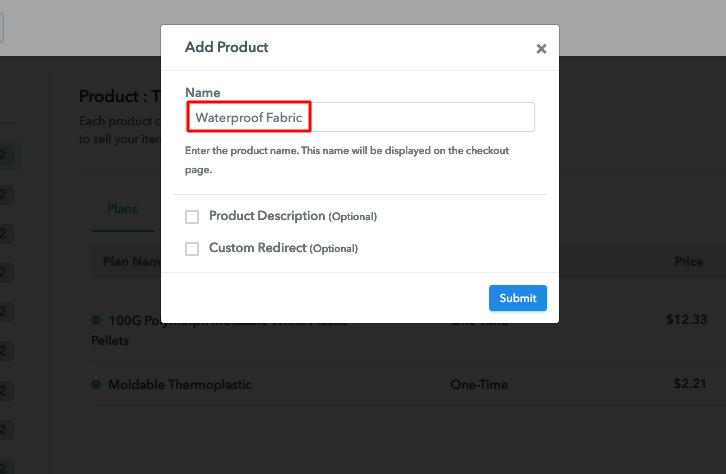
After the payment mode is enabled, then you have to add your first product. You can add the waterproof fabric of different categories for example nylon, polyesters, etc.

Sell Waterproof Fabric Online Product Name

Add all other types of waterproof fabric in the same product by creating different plans.

Note: Here you can add all the products related to the similar category by creating plans for each of them.

Step 6: Add Plans 

Let’s rollout plans for different kinds of waterproof fabric available in your store.

(a) Select Add New Plan

Add Plan

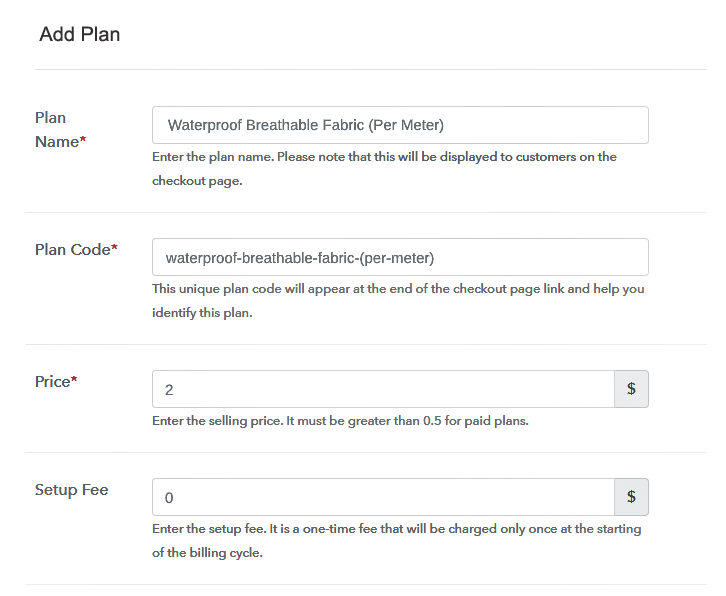
(b) Specify the Plan & Pricing Details

Sell Waterproof Fabric Online Details

On clicking add new plan, you will be redirected to the plan page. Here, you will have to fill the plan details such as plan name, code, billing cycle, price, etc.

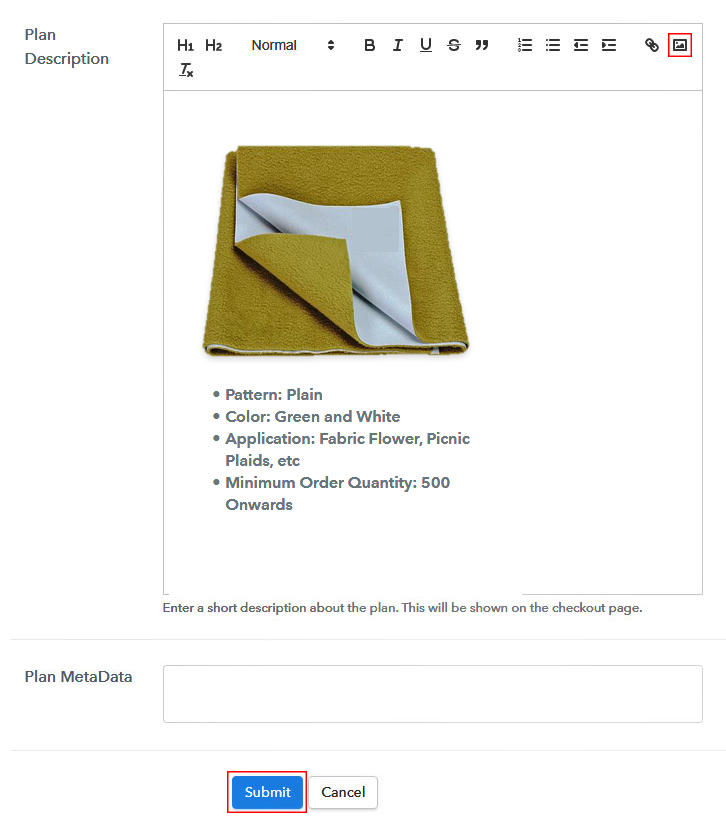
(c) Add Image & Description of Waterproof Fabric

Sell Waterproof Fabric Online Image

Also, you can add a description of the waterproof fabric that you want to sell along with the product links, images, etc, and then click on the “Submit” button to add your plan.

You can create more plans for all the waterproof fabric in a similar manner.

Step 7: Share your Checkout Page

Share Checkout Page on Social Media

Grab more number of customers by following the given steps:

  • Share your checkout page on social media like Facebook and Twitter.
  • Copy the mentioned link and send it to your customers through SMS or emails directly.
  • Embed your plan link to your website so that your customers can be landed on the checkout page directly.

Step 8: Preview Checkout Page

Follow up the recommended steps to preview the checkout page:

(a) Click on the View Button

View Checkout Plan

(b) Take a Look at the Checkout Page

Preview Checkout Page

Step 9: Embed Checkout Page in Site & Sell Waterproof Fabric Online

Embed Checkout Page on Website

Just copy the provided plan embedding link and embed the checkout page to your WordPress site to sell waterproof fabric online.

(a) Edit the Page & Paste the Copied Link

Embed Checkout Page on Website

Further, paste the plan link on a text editor of the WordPress dashboard.

(b) Save & Publish the Checkout Page

Save_and_Publish

Next, click the “Publish” button, after making changes.

(c) Check out the Final Look of your Checkout Page on WordPress Site

Sell Waterproof Fabric Online W

Step 10: Multiplan Checkout Page

Note: In case you want to sell multiple products via a single checkout page, you can create a multi-plan checkout page otherwise skip this step.

(a) Click on Add Mutiplan Checkout

Multiplan Checkout

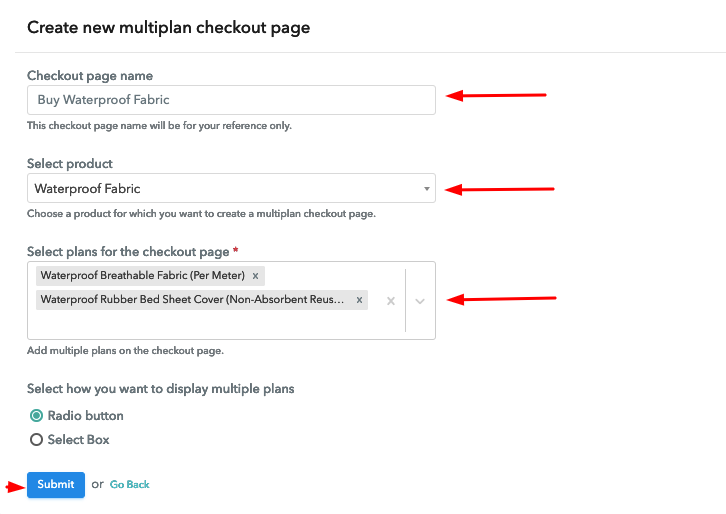
(b) Add Plans to Sell Multiple Waterproof Fabric from Single Checkout Page

Sell Waterproof Fabric Online Multi Details

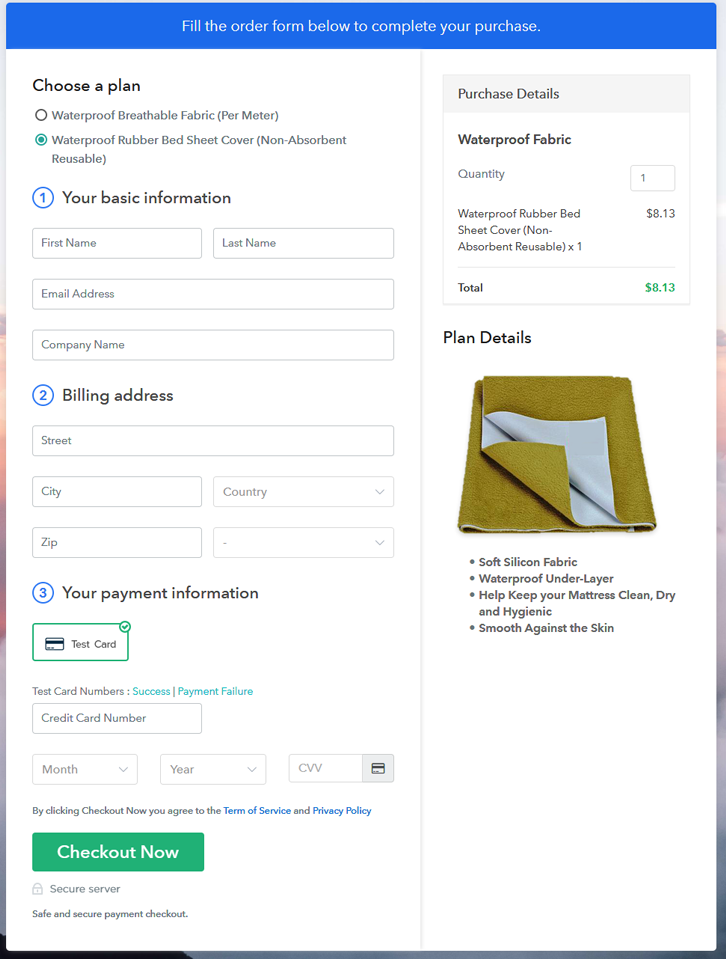
(c) Take a Look at the Checkout Page

Sell Waterproof Fabric Online M

Preview Checkout Page

Wrapping Up

In the end, we hope that this blog was helpful for you in starting your waterproof fabric selling business online. Pabbly Subscription Billing is an amazing service to start an online business as its free, easy to use, offers so many great features such as invoicing, payment collection, checkout pages, and so much more. So start building up your online business for free by creating checkout pages. For further queries or suggestions, please write down your comments.

You May Also Like To Read –
How to Sell Waterproof Jackets Online | Step by Step (Free Method)

How to Sell Waterproof Jackets Online

Ideal For: All the waterproof jacket brands, waterproof jacket manufacturers, jacket wholesalers, jacket suppliers, and other sellers can use this method to take their waterproof jackets selling business online.

How to Sell Waterproof Jackets Online

Why Choose this Method to Sell Waterproof Jackets Online?

Unlike any other solution, this method allows you to:

  • List and sell your waterproof jackets for FREE. Absolutely no payment required.
  • No need to pay commission on any of your sales.
  • Multiple payment options like PayPal, Credit Card, etc to collect payment from a single place.
  • Sell one time or recurring subscriptions of your waterproof jackets.
  • Collect payments & sell products in any currency as per your requirement.
  • Give discounts on your products by offering special coupon codes.
  • Add sales commission agents to help you in selling waterproof jackets online.

Get Pabbly Subscription Billing for Free

People realize the importance of waterproof jackets when they get stuck in the pouring rain without it. Owning a waterproof jacket is more than a fashion statement, its one of the essentials. Hence, if you are a waterproof jackets seller then why not take your business to online platforms. By selling waterproof jackets online you can broaden your customer radar and people can buy your waterproof jackets from anywhere on the globe.

For selling waterproof jackets online, you just have to create checkout pages for your waterproof jackets and share their links on online platforms and people can start purchasing through them. Hence, to create checkout pages for your online business, today we have brought to you a free service and that is Pabbly Subscription Billing.

Pabbly Subscription Billing also offers you so many great and helpful features other than the checkout page:

  • Add and sell unlimited waterproof jackets online
  • Share invoices of different jackets automatically with the buyers
  • Create discount coupons for your buyers
  • Collect one-time and recurring payments for your waterproof jackets

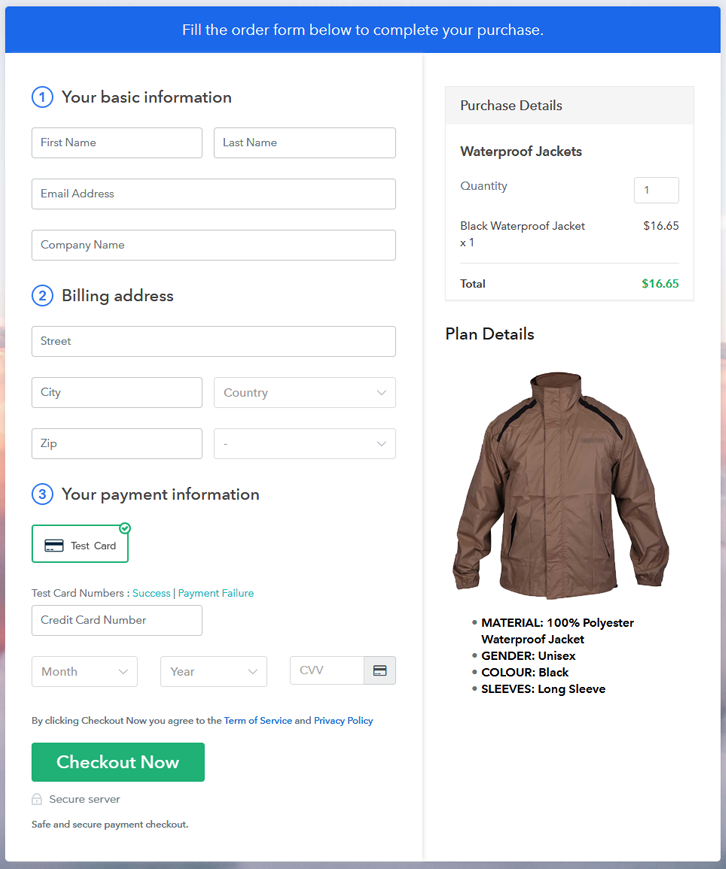
Final View of Checkout Page for your Waterproof Jackets Selling Business

Preview Checkout Page

Preview Checkout Page

Step 1: Log in to Pabbly Subscription Billing

Signup

You have to begin with visiting Pabbly Subscription Billing website and then click on the “Sign Up Free” button. On clicking the button, you will reach to the signup page, where you can create your account in mere seconds with Gmail or manually enter your details.

Sign Up For Free!

Step 2: Select Subscription Billing

Access Subscription Billing

Step 3: Account Setup

Setup Account

After completing the signup process, you have to fill up your company details i.e. company name, currency, and contact number in the appeared dialogue box.

Step 4: Connect Payment Gateways & Start Waterproof Jackets Selling Business Online

Connect Payment Gateway

In this step, the payment collection process is explained by enabling the ‘Test Payment’ mode. Subsequently, you can connect with other payment gateways such as PayPal, Razorpay, etc whichever you prefer. The complete integration guides for payment gateways are provided below-

Step 5: Add Product for your Waterproof Jackets

Add Product

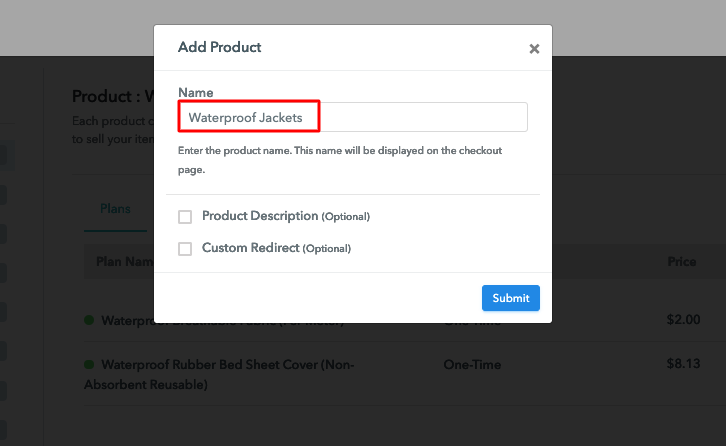
Once the payment mode is enabled, then you have to add your first product. You can add waterproof jackets of different categories such as active fit jackets, relaxed fit jackets, etc.

Sell Waterproof Jackets Online Product Name

Add all other types of waterproof jackets in the same product by creating different plans.

Note: Here you can add all the products related to the similar category by creating plans for each of them.

Step 6: Add Plans 

Let’s create plans for different kinds of waterproof jackets available in your store.

(a) Select Add New Plan

Add Plan

(b) Specify the Plan & Pricing Details

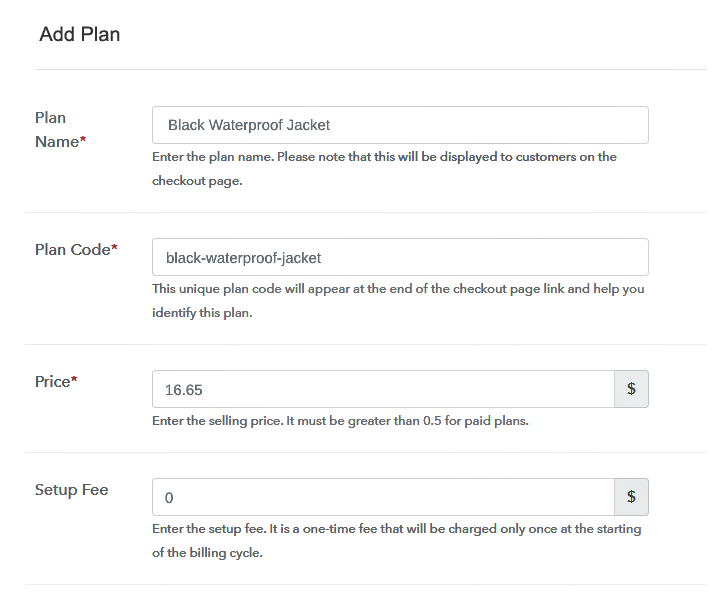
Sell Waterproof Jackets Online Details

After clicking “Add New Plan” button, you will land on the plan page, here you will have to fill the plan details such as plan name, code, billing cycle, price, etc.

(c) Add Image & Description of Waterproof Jackets

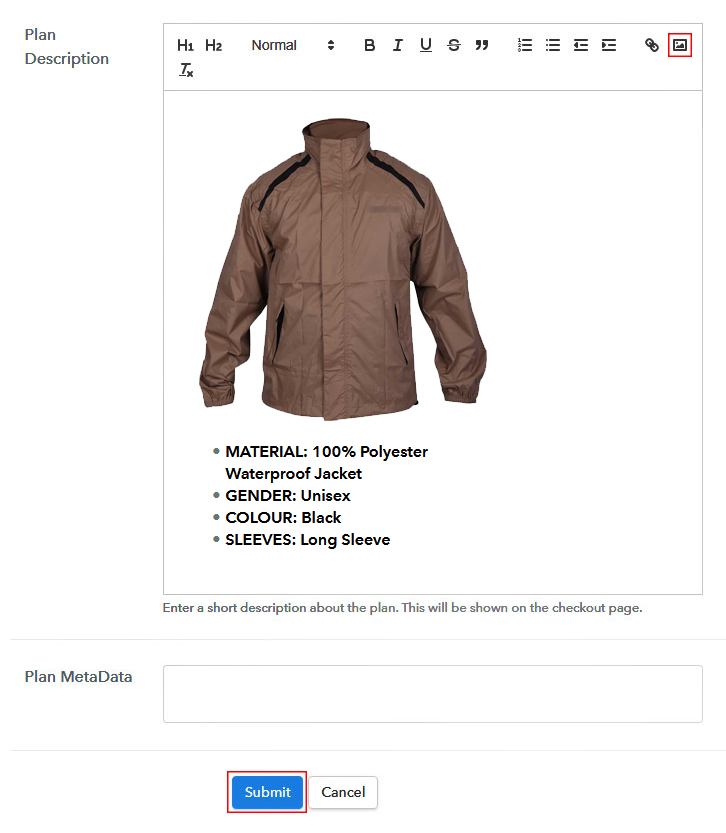
Sell Waterproof Jackets Online Image

Also, you can write down a description of the waterproof jackets that you want to sell along with the product links, images, etc, and then click on the “Submit” button to add your plan.

You can create more plans for all the waterproof jackets likewise.

Step 7: Share your Checkout Page

Share Checkout Page on Social Media

Improve your online sales by following the below steps:

  • Share your checkout page on social media such as Facebook and Twitter.
  • Also, copy the mentioned link and send it to your customers through SMS or emails directly.
  • Embed your plan link to your website so that your customers can be landed on the checkout page directly.

Step 8: Preview Checkout Page

Follow up the recommended steps to preview the checkout page:

(a) Click on the View Button

View Checkout Plan

(b) Take a Look at the Checkout Page

Preview Checkout Page

Step 9: Embed Checkout Page in Site & Sell Waterproof Jackets Online

Embed Checkout Page on Website

Simply copy the provided plan embedding link and embed the checkout page to your WordPress site to sell waterproof jackets online.

(a) Edit the Page & Paste the Copied Link

Embed Checkout Page on Website

Further, paste the plan link on a text editor of the WordPress dashboard.

(b) Save & Publish the Checkout Page

Save_and_Publish

Next, click the “Publish” button, after making changes.

(c) Check out the Final Look of your Checkout Page on WordPress Site

Sell Waterproof Jackets Online W

Step 10: Multiplan Checkout Page

Note: In case you want to sell multiple products via a single checkout page, you can create a multi-plan checkout page otherwise skip this step.

(a) Click on Add Mutiplan Checkout

Multiplan Checkout

(b) Add Plans to Sell Multiple Waterproof Jackets from Single Checkout Page

Sell Waterproof Jackets Online Multi Details

(c) Take a Look at the Checkout Page

Sell Waterproof Jackets Online M

Preview Checkout Page

Wrapping Up

Unquestionably, now we think that after reading this blog it’s going to be very easy and trouble-free for you to start your waterproof jackets selling online business with Pabbly Subscription Billing.

With this service, you can sell unlimited jackets, generate unlimited revenue, and all this without paying any transaction fees. Thus, now start selling your waterproof jackets online without any barriers. For further queries or suggestions, please write to us.

You May Also Like To Read –
How to Sell Volleyballs Online | Step by Step (Free Method)

How to Sell Volleyballs Online

Ideal For: All the volleyball manufacturers, volleyball sellers, volleyball dealers, volleyball suppliers, sports shop owners, and other merchants can use this method to sell volleyballs online.

How to Sell Volleyballs Online

Why Choose this Method to Sell Volleyballs Online?

Unlike any other solution, this method allows you to:

  • List and sell your volleyballs for FREE. Absolutely no payment required.
  • No need to pay commission on any of your sales.
  • Multiple payment options like PayPal, Credit Card, etc to collect payment from a single place.
  • Sell one time or recurring subscriptions of your volleyballs.
  • Collect payments & sell products in any currency as per your requirement.
  • Give discounts on your products by offering special coupon codes.
  • Add sales commission agents to help you in selling volleyballs online.

Get Pabbly Subscription Billing for Free

In this digital age, everyone is looking out for ways to sell things online. Besides, selling volleyball online can turn out to be a great opportunity for people who want to increase their business revenue. So, in order to take your volleyball business online, you will need a tool that can help you with all the business needs.

Hence, we would like to suggest you Pabbly Subscription Billing as one of the best online software. The tool allows you to create an amazing checkout page for selling volleyballs online and share it on websites, social media platforms, or via emails, SMS. Further, below are its highlighted features:

  • Various Billing Models
  • Professional Invoices
  • Multiple Payment Gateways

Now, without wasting any of your time, let me take you to the 10 easy steps you need to follow for creating a checkout page to sell volleyballs online.

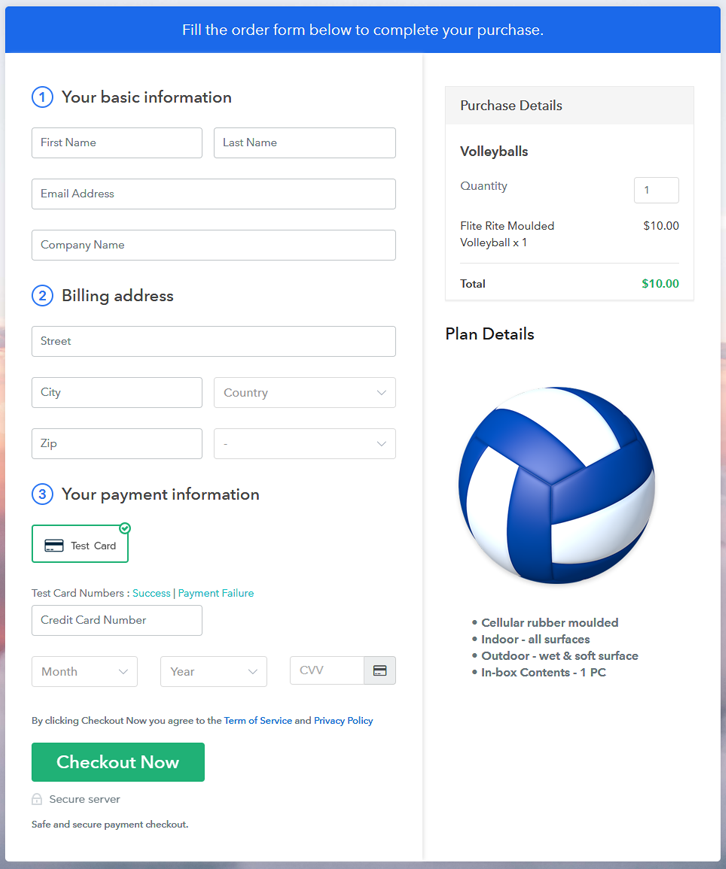
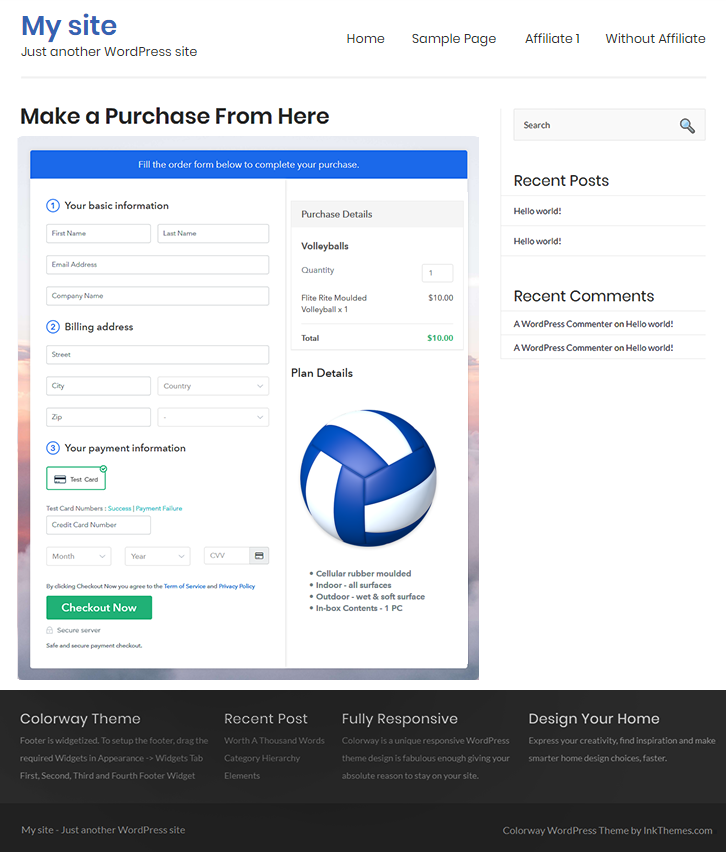
Final View of Checkout Page for your Volleyballs Selling Business

Final View of Checkout Page for your Volleyballs Selling Business

Preview Checkout Page

Step 1: Log in to Pabbly Subscription Billing

Signup

The process starts by visiting the Pabbly Subscription Billing in your browser. Later, hit the “Sign up Free“ button. Afterward, you can either manually fill out the details or else sign in using your Gmail account.

Sign Up For Free!

Step 2: Select Subscription Billing

Access Subscription Billing

Step 3: Account Setup

Setup Account

Once you hit on the “Access Now” button of the software, a page will open up. That will ask you to fill the fields like company name, select currency, and phone number. Enter all those details in order to continue creating a checkout page for volleyballs.

Step 4: Connect Payment Gateways & Start Volleyballs Selling Business Online

Connect Payment Gateway

Eventually, we are going to specify the details regarding payment procedures using a “Test Payment Gateway”. Here, I am going to give a brief detail on the checkout page payment process for the volleyballs with the help of a test payment gateway. Apart from that, this tool offers various payment gateways such as PayPal, Stripe, etc. Further, below are the payment integration guides to help you out.

Step 5: Add Product for your Volleyballs

Add Product

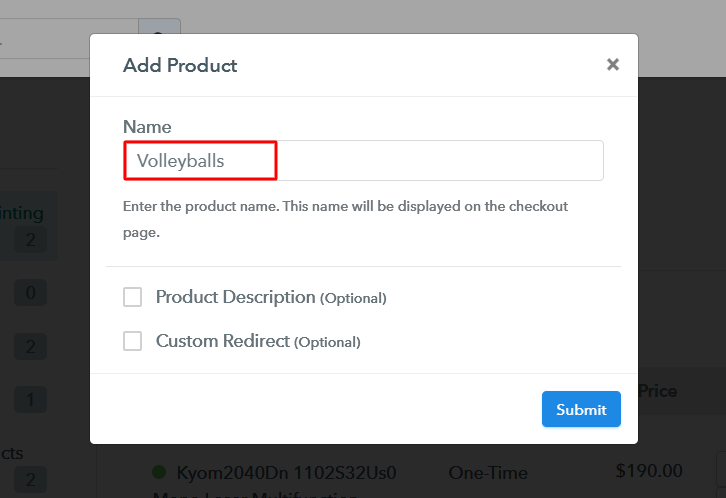
Additionally, add the name, which in our case is “Volleyballs”. Here you can specify the type & write a short description of the volleyballs to catch the customer’s attention.

Add Product to Start Selling Volleyballs Online

Moreover, just fill out all those details and your product is created.

Note: Here you can add all the products related to the similar category by creating plans for each of them.

Step 6: Add Plans 

Let’s cast light on plans for different kinds of volleyballs available in your store.

(a) Select Add New Plan

Add Plan

(b) Specify the Plan & Pricing Details

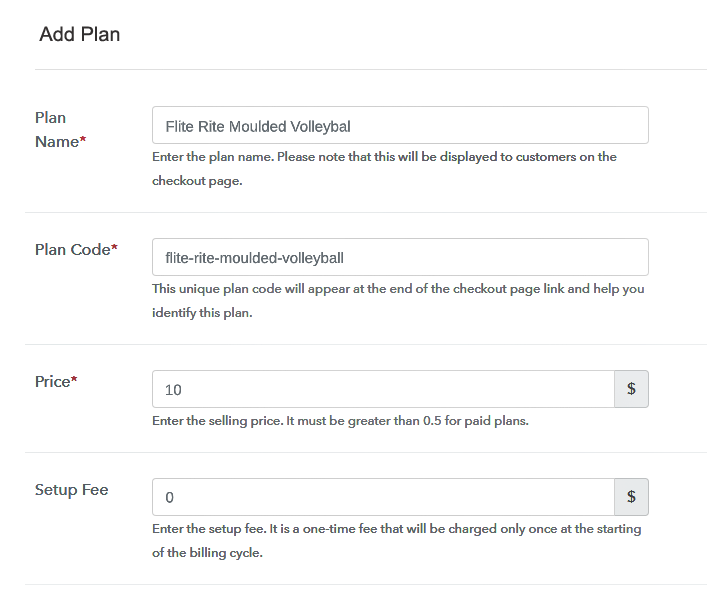
Specify the Plan and Pricing to Sell Volleyballs Online

The next thing to do is fill all the details of the volleyballs like plan name, code, price, set-up fee, and much more to continue.

(c) Add Image & Description of Volleyballs

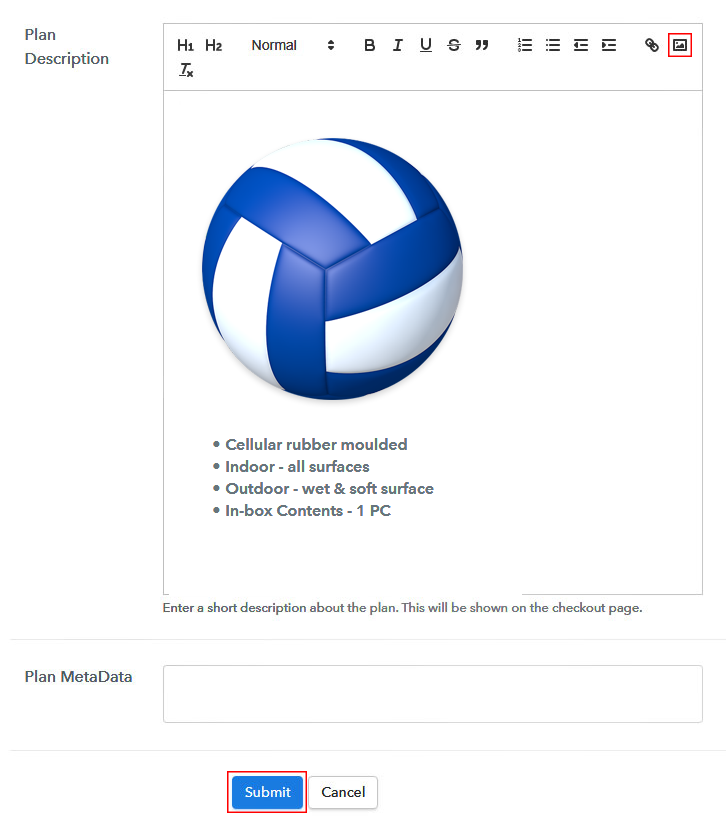
Add Image & Description of Volleyballs

Next, give a brief description of volleyballs with bullets, images, links, etc.

Afterward, press the “Submit” button to add the volleyballs on the checkout page.

Eventually, add multiple plans along with types of volleyballs in your product list which you want to sell online.

Step 7: Share your Checkout Page

Share Checkout Page on Social Media

  • Moreover, share the checkout page of the volleyballs on social media accounts like Facebook & Twitter.
  • Also, you can share the direct link of the volleyball’s checkout page with your customers with the help of SMS or email marketing.
  • Not only that, but you can also embed the provided plan link of the volleyballs in the buttons or any anchor text on your website.

Step 8: Preview Checkout Page

Follow up the recommended steps to preview the checkout page:

(a) Click on the View Button

View Checkout Plan

(b) Take a Look at the Checkout Page

Final View of Checkout Page for your Volleyballs Selling Business

Step 9: Embed Checkout Page in Site & Sell Volleyballs Online

Embed Checkout Page on Website

Just copy the link and add the checkout page to sell Volleyballs online at any proper place on your WordPress site.

(a) Edit the Page & Paste the Copied Link

Embed Checkout Page on Website

Further, paste the plan link on a text editor of the WordPress dashboard.

(b) Save & Publish the Checkout Page

Save_and_Publish

Next, click the “Publish” button, after making changes.

(c) Check out the Final Look of your Checkout Page on WordPress Site

Final Look of your Checkout Page to Sell Volleyballs Online

Step 10: Multiplan Checkout Page

Note: In case you want to sell multiple products via a single checkout page, you can create a multi-plan checkout page otherwise skip this step.

(a) Click on Add Mutiplan Checkout

Multiplan Checkout

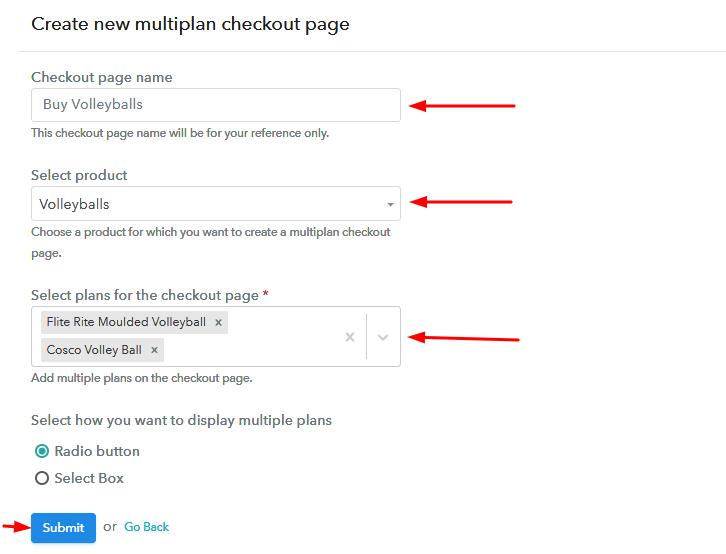
(b) Add Plans to Sell Multiple Volleyballs from Single Checkout Page

Add Plans to Sell Multiple Volleyballs from Single Checkout Page

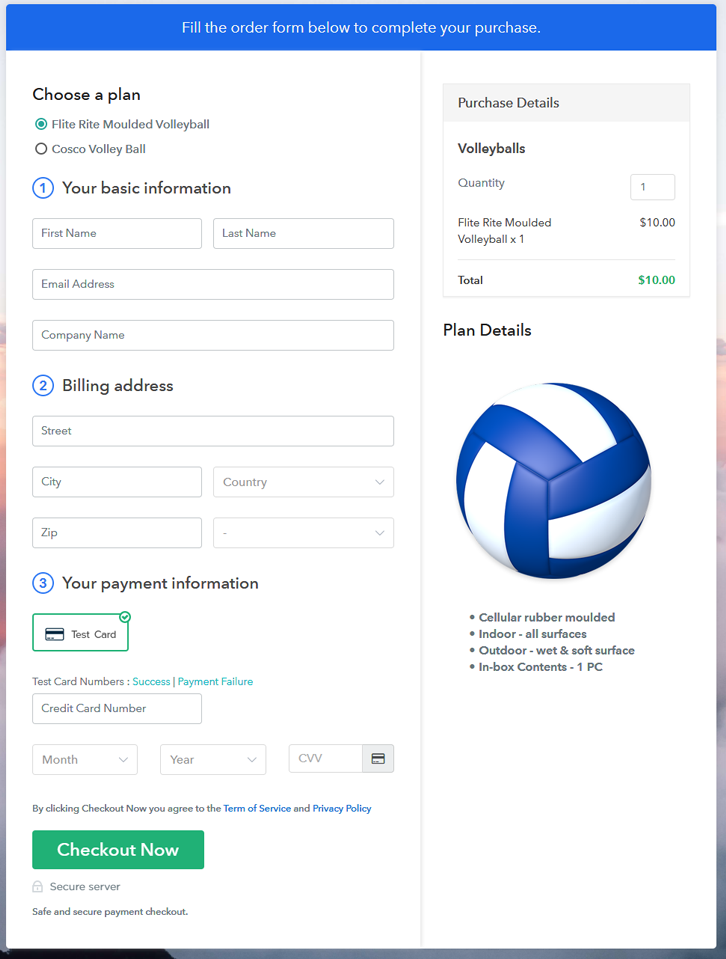
(c) Take a Look at the Checkout Page

Multiplan Checkout Page to Sell Volleyballs Online

Preview Checkout Page

Wrapping Up

Alright! Now you know how easy it is to start your own volleyballs business online. Simply log in to Pabbly Subscription Billing and start your own journey of online business in no time. Just follow all the mentioned steps and you’re ready to roll.

Moreover, if you have any queries, just write to us in the comment section below. We will get back to you as soon as possible. So, go ahead and try this software. Thank You!!

You May Also Like To Read –
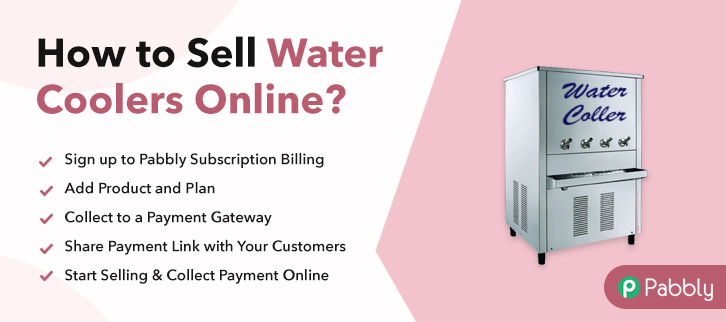
How to Sell Water Coolers Online | Step by Step (Free Method)

Ideal For: All the water cooler manufactures, water cooler sellers, water cooler dealers, water cooler suppliers, water cooler shop owners and other merchants can use this method to sell water coolers online.

How to sell water coolers online

Why Choose this Method to Sell Water Coolers Online?

Unlike any other solution, this method allows you to:

  • List and sell your water coolers for FREE. Absolutely no payment required.
  • No need to pay commission on any of your sales.
  • Multiple payment options like PayPal, Credit Card, etc to collect payment from a single place.
  • Sell one time or recurring subscriptions of your water coolers.
  • Collect payments & sell products in any currency as per your requirement.
  • Give discounts on your products by offering special coupon codes.
  • Add sales commission agents to help you in selling water coolers online.

Get Pabbly Subscription Billing for Free

Who doesn’t love drinking chilled water? I guess everyone. That is the reason why water coolers are widely used in the home, restaurants, etc & never go out of business. Also, providing water cooler directly to the buyer’s home in few clicks can be a great initiative for your business. Henceforth, you must be looking for ways that how you can sell water coolers online.

Consequently, selling goods online has become a very significant task for big & small businesses. Hence, we would like to recommend Pabbly Subscription Billing which is a great software to take your water cooler business online.

This tool lets you create astonishing checkout pages for selling water cooler online which can be shared on social media accounts, websites, etc. So, here let me give you some of the reasons why it is the best tool for selling water coolers online.

  • List various water coolers in a single checkout page
  • Add tax and delivery charges as per customer’s location
  • Offer discount and coupon codes to consumers
  • Collect money in both online and offline mode

Now, let’s move on to the 10 easy steps for creating checkout pages to sell water coolers online.

Final View of Checkout Page for your Water Coolers Selling Business

Final View of Checkout Page for your Water Coolers Selling Business

Preview Checkout Page

Step 1: Log in to Pabbly Subscription Billing

Signup

First, go to Pabbly Subscription Billing and after you open their website just press on “Sign up Free“. Now, here you have two options that are, either you can sign in using your Gmail account or else you can fill in the required fields like name, email, etc, and tap on the “Sign Up” button.

Sign Up For Free!

Step 2: Select Subscription Billing

Access Subscription Billing

Step 3: Account Setup

Setup Account

A dialog box will pop up asking you to fill out the company details like name, currency, phone number, etc, Once you complete filling up the details just press the blue “Continue” button in order to complete the entire process.

Step 4: Connect Payment Gateways & Start Water Coolers Selling Business Online

Connect Payment Gateway

Now, in order to ensure the payment process, you need to test the whole payment experience with the help of a dummy payment gateway in Pabbly Subscription Billing.

Moreover, you can also integrate with a ton of payment gateways such as Razorpay, PayPal, Authorize.net, etc. Just go through the articles that are mentioned below in order to integrate with your preferred payment gateway like PayPal, Stripe, etc. For instance, here I am going to enable the test payment option to continue the process.

Step 5: Add Product for your Water Coolers

Add Product

Plus, add the name, which in our case is “Water Coolers”. Here you can specify the type and write a short description of the water coolers too.

Add Product To Sell Water Coolers Online

Moreover, just fill out all those details and your product is created.

Note: Here you can add all the products related to the similar category by creating plans for each of them.

Step 6: Add Plans 

Let’s reveal plans for different kinds of water coolers available in your store.

(a) Select Add New Plan

Add Plan

(b) Specify the Plan & Pricing Details

Specify the Plan and Pricing to Sell Water Coolers Online

The subsequent thing to do is fill all the details of the water coolers like plan name, code, price, set-up fee, and much more to continue.

(c) Add Image & Description of Water Coolers

Add Image & Description of Water Coolers

Subsequently, paste the image of the water coolers you wish to sell online.

Further, provide some product information of the water coolers in bullet points like the voltage, compressor, etc.

Once you fillup the information, just tap on the “Submit” button.

Step 7: Share your Checkout Page

Share Checkout Page on Social Media

  • In order to increase sales of your products i.e, water coolers, you can share the checkout page on Twitter & Facebook by just pressing the respective buttons.
  • Moreover, you can also emails and SMS the checkout page link to your customers.
  • Further, add the provided plan link in the buttons or any anchor text on your website in order to redirect users to the checkout page.

Step 8: Preview Checkout Page

Follow up the recommended steps to preview the checkout page:

(a) Click on the View Button

View Checkout Plan

(b) Take a Look at the Checkout Page

Final View of Checkout Page for your Water Coolers Selling Business

Step 9: Embed Checkout Page in Site & Sell Water Coolers Online

Embed Checkout Page on Website

Just copy the link and add the checkout page to sell water coolers online at any proper place on your WordPress site.

(a) Edit the Page & Paste the Copied Link

Paste Link in Text Editor

Further, paste the plan link of water coolers on a text editor of the WordPress dashboard.

(b) Save & Publish the Checkout Page

Save_and_Publish

Next, click the “Publish” button, after making changes.

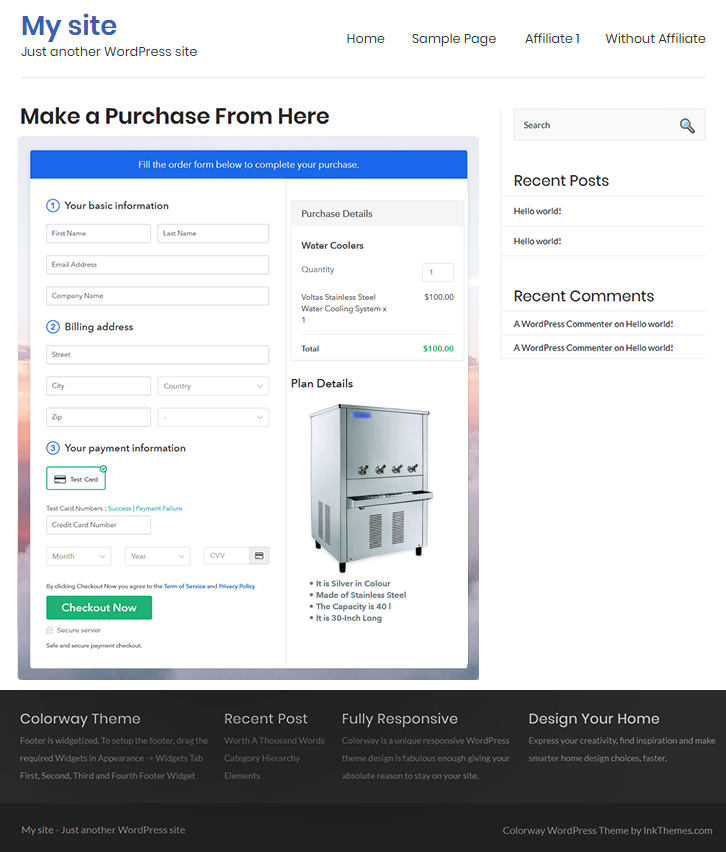
(c) Check out the Final Look of your Checkout Page on WordPress Site

Embed Checkout Page in Site & Sell Water Coolers Online

Step 10: Multiplan Checkout Page

Note: In case you want to sell multiple products via a single checkout page, you can create a multi-plan checkout page otherwise skip this step.

(a) Click on Add Mutiplan Checkout

Multiplan Checkout

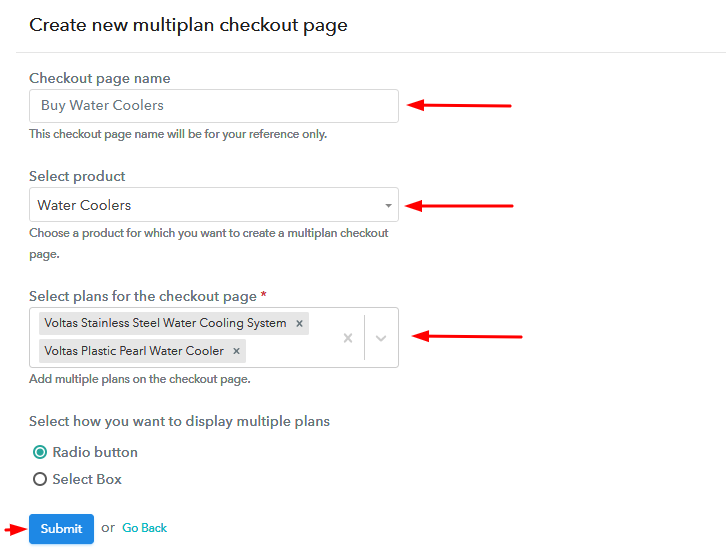
(b) Add Plans to Sell Multiple Water Coolers from Single Checkout Page

Add Plans to Sell Multiple Water Coolers from Single Checkout Page

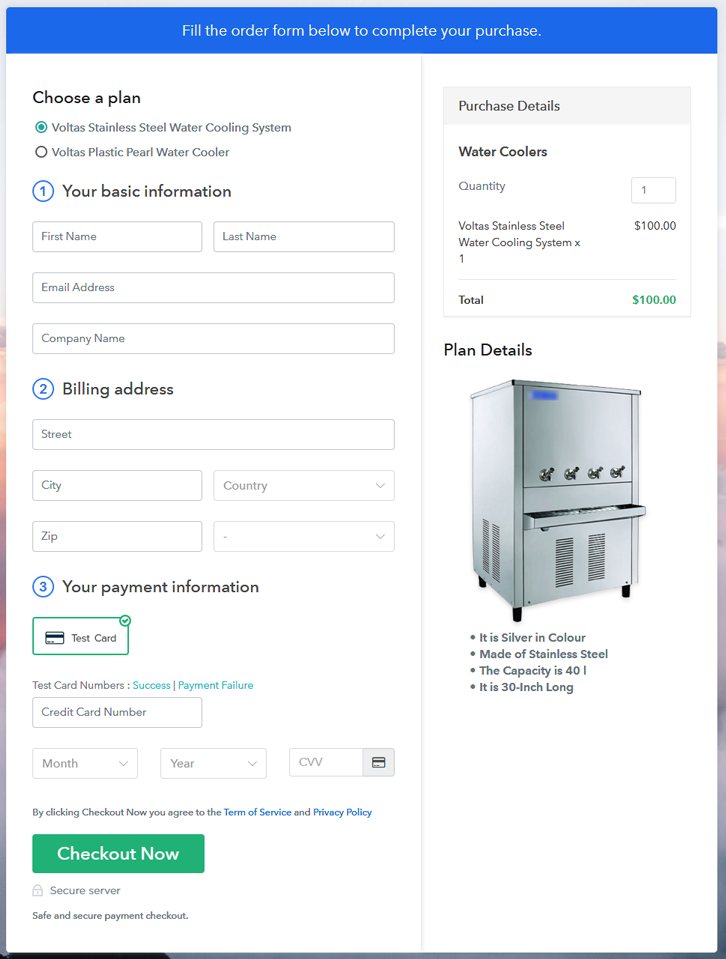
(c) Take a Look at the Checkout Page

Multiplan Checkout Page to Start Water Coolers Business Online

Preview Checkout Page

Wrapping Up

In conclusion, Pabbly Subscription Billing makes it a whole lot easier to start your online business. It is free, easy to use, and comes with so many great features like tax management, online billing, invoice, etc. That’s why you should start considering taking your water coolers business online. Besides, any business is easy with the help of Pabbly Subscription Billing. Just follow all the 10 easy steps mentioned above and voila! Your business is set in no time.

You May Also Like To Read –
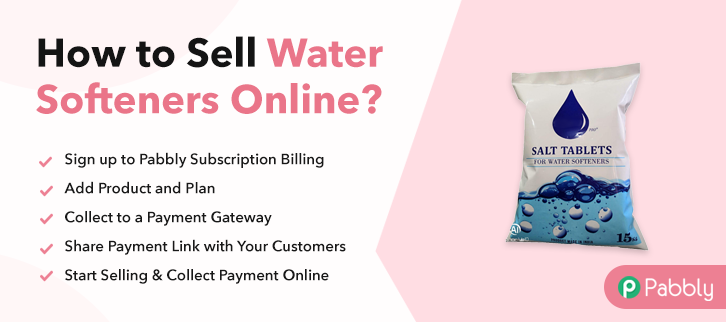
How to Sell Water Softeners Online | Step by Step (Free Method)

How to Sell Water Softeners Online

Ideal For: All the water softener manufacturers, water softener sellers, water softener dealers, water softener suppliers, water purifier shop owners and other merchants can use this method to sell water softeners online.

How to Sell Water Softeners Online

Why Choose this Method to Sell Water Softeners Online?

Unlike any other solution, this method allows you to:

  • List and sell your water softeners for FREE. Absolutely no payment required.
  • No need to pay commission on any of your sales.
  • Multiple payment options like PayPal, Credit Card, etc to collect payment from a single place.
  • Sell one time or recurring subscriptions of your water softeners.
  • Collect payments & sell products in any currency as per your requirement.
  • Give discounts on your products by offering special coupon codes.
  • Add sales commission agents to help you in selling water softeners online.

Get Pabbly Subscription Billing for Free

The most common problem homeowners faced on a daily basis is water quality problems. This is the reason why they use water softeners to removes minerals that generate water hardness. Water is an essential element used in almost every purpose like cooking, bathing, etc. So starting water softeners selling business is a not a dull idea.

By selling water softeners online, one can easily sell boost the sales by offering discounts and coupon codes to customers. Plus you can also keep track of customer’s interests. And you can take benefit from all such things using software Pabbly Subscription Billing. The software allows you to build a checkout page for selling water softeners online. Not just this, you can share direct links of water softeners checkout with your customers and collect payment through the link itself. It also offers flexibility to embed plan link on your website page.

Now, without any ado let’s get started creating a checkout page for selling water softeners online with the help of this tool.

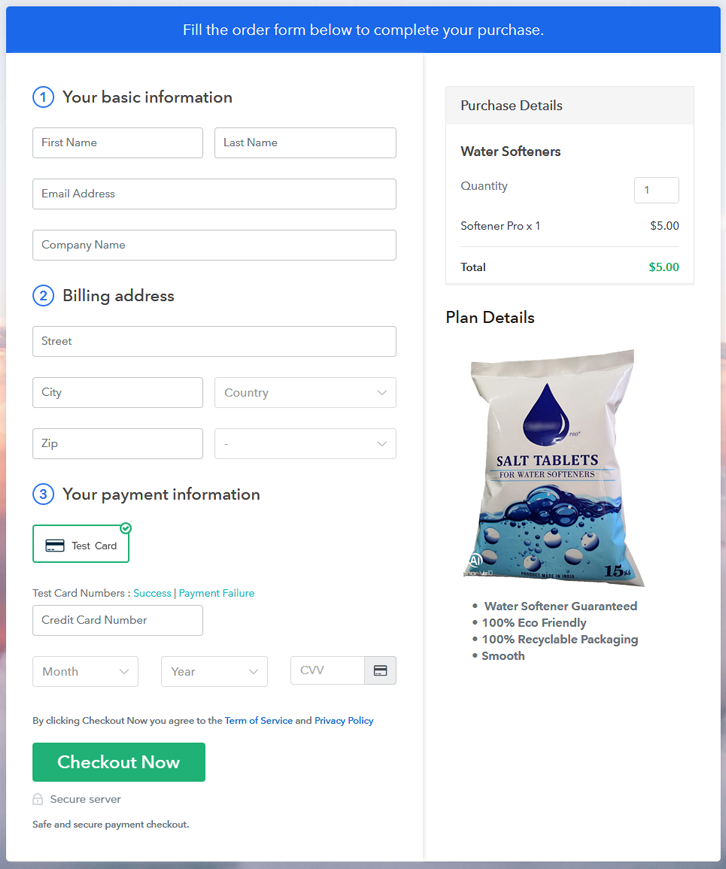
Final View of Checkout Page for your Water Softeners Selling Business

Checkout Page to Sell Water Softeners Online

Preview Checkout Page

Step 1: Log in to Pabbly Subscription Billing

Signup

Start the process for creating a checkout page for water softeners by visiting the Pabbly Subscription Billing in your browser. After that, click on the “Sign up Free“ button. Furthermore, either manually filled out the details or sign in using your Gmail account.

Sign Up For Free!

Step 2: Select Subscription Billing

Access Subscription Billing

Step 3: Account Setup

Setup Account

Besides, after clicking on the “Access Now” button of the software, a page will open with fields like company name, select currency, and phone number. Simply fill out those details to continue creating a checkout page for water softeners.

Step 4: Connect Payment Gateways & Start Water Softeners Selling Business Online

Connect Payment Gateway

The consequent step is to earning information about payment procedures using a “Test Payment Gateway”. Here, we will explain the checkout page process for the water softeners with the help of a test payment gateway. Besides this, the tool offers various payment gateways such as PayPal, Stripe, etc. Moreover, below are the payment integration guides to help you out.

Step 5: Add Product for your Water Softeners

Add Product

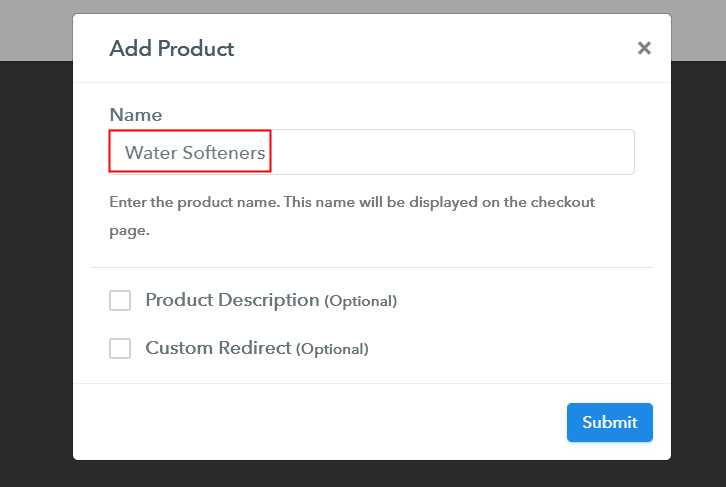
Additionally, add the name, which in our case is “Water Softeners”. Here you can specify the type like salt-free water softeners, ion exchange water softeners, etc. Further, write a short description of the water softeners to grab the shopper’s attention.

Add Product to Start Selling Water Softeners Online

Moreover, just fill out all those details, and your product for water softeners is created.

Note: Here you can add all the products related to the similar category by creating plans for each of them.

Step 6: Add Plans 

Let’s expose plans for different kinds of water softeners available in your store.

(a) Select Add New Plan

Add Plan

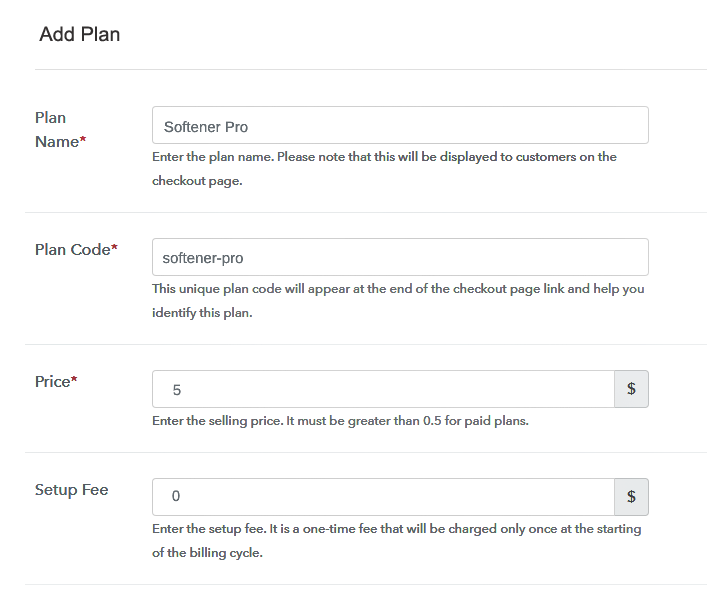
(b) Specify the Plan & Pricing Details

Specify the Plan and Pricing to Sell Water Softeners Online

The next thing to do is fill all the details of the water softeners like plan name, code, price, set-up fee, and much more to continue.

(c) Add Image & Description of Water Softeners

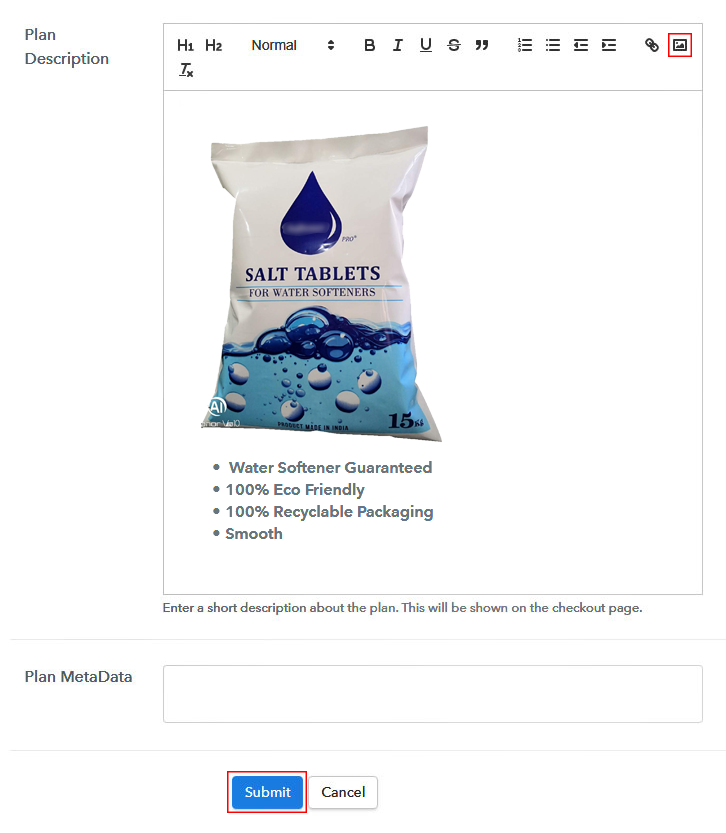
Add Image & Description to Sell Water Softeners Online

Furthermore, write a brief description of the water softeners using bullets, images, etc, to bring original buyers to the checkout page.

Next, click on the “Submit” button to add the water softeners on the checkout page.

Finally, you can add multiple plans and kinds of water softeners in your product list which you want to sell online.

Step 7: Share your Checkout Page

Share Checkout Page on Social Media

  • Moreover, share the checkout page of the water softeners on social media accounts like Facebook & Twitter to grab the customer’s attention.
  • Also, you can share the direct link of the water softener’s checkout page with your customers via SMS or email marketing.
  • Additionally, embed the provided plan link of the water softeners in the buttons or any anchor text on your website.

Step 8: Preview Checkout Page

Further, follow up on the recommended steps to preview the checkout page for water softeners:

(a) Click on the View Button

View Checkout Plan

(b) Take a Look at the Checkout Page

Checkout Page to Sell Water Softeners Online

Step 9: Embed Checkout Page in Site & Sell Water Softeners Online

Embed Checkout Page on Website

Additionally, simply copy the link and add the checkout page to sell water softeners online at any proper place on your WordPress site.

(a) Edit the Page & Paste the Copied Link

Paste Link in Text Editor

Moreover, paste the plan link of water softeners on a text editor of the WordPress dashboard.

(b) Save & Publish the Checkout Page

Save_and_Publish

Further, click on the “Publish” button, after making changes.

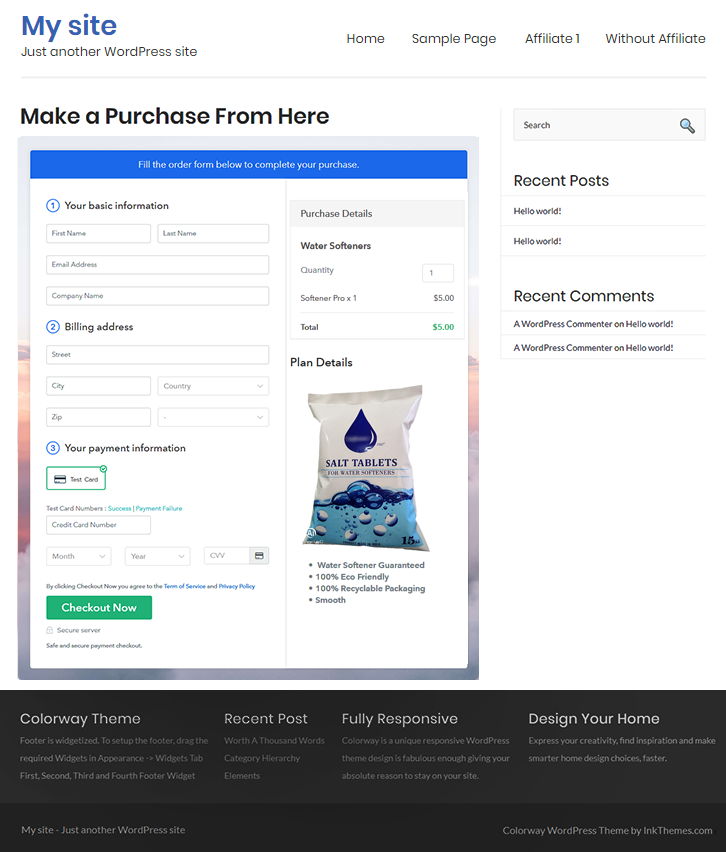
(c) Check out the Final Look of your Checkout Page on WordPress Site

Final Look of your Checkout Page to Sell Water Softeners Online

Step 10: Multiplan Checkout Page

Note: In case you want to sell multiple products via a single checkout page, you can create a multi-plan checkout page otherwise skip this step.

(a) Click on Add Mutiplan Checkout

Multiplan Checkout

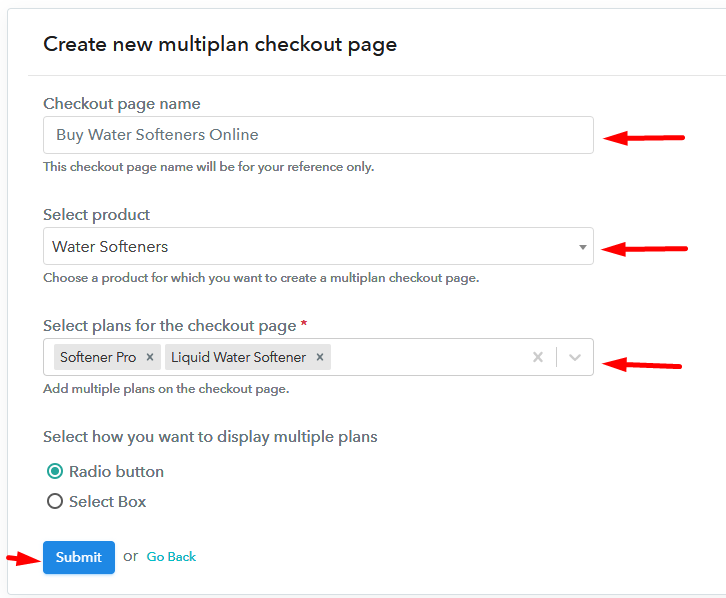
(b) Add Plans to Sell Multiple Water Softeners from Single Checkout Page

Add Multiple Products to Start Selling Water Softeners Online

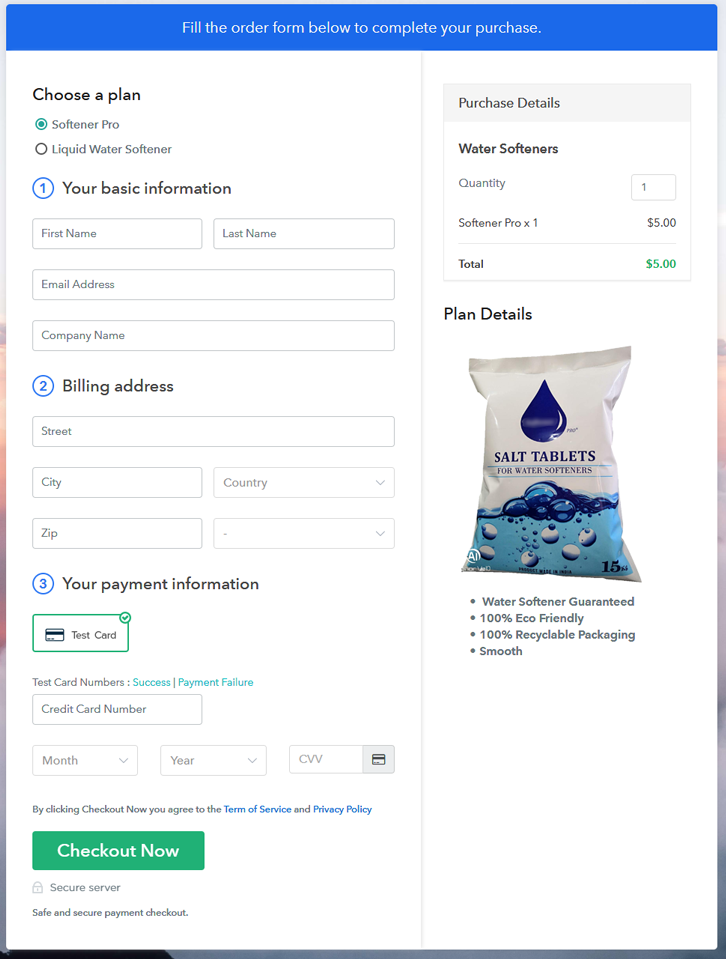
(c) Take a Look at the Checkout Page

Multiplan Checkout Page to Sell Water Softeners Online

Preview Checkout Page

Wrapping Up

There you have it! This is our outcome on “how to sell water softeners online” using Pabbly Subscription Billing software. You can headstart the water softeners business online easily with the help of this tool. Just follow all the aforementioned steps and you’re good to go.

So, don’t be hard on yourself, try this software out and let us what you think about it in the comments section.

You May Also Like To Read –