How to Sell Sportswear Online | Step by Step (Free Method)

How to Sell Sportswear Online

Ideal For: All the sportswear shops, sportswear stores, sportswear wholesalers, sportswear suppliers, sportswear retailers, and other sellers can use this method to take their sportswear selling business online.
How to Sell Sportswear Online

Why Choose this Method to Sell Sportswear Online?

Unlike any other solution, this method allows you to:

  • List and sell your sportswear for FREE. Absolutely no payment required.
  • No need to pay commission on any of your sales.
  • Multiple payment options like PayPal, Credit Card, etc to collect payment from a single place.
  • Sell one time or recurring subscriptions of your sportswear.
  • Collect payments & sell products in any currency as per your requirement.
  • Give discounts on your products by offering special coupon codes.
  • Add sales commission agents to help you in selling sportswear online.

Get Pabbly Subscription Billing for Free

Not only people who are involved in sports but other people can also be seen wearing sportswear on a daily and casual basis now. Therefore, to keep up with the trends of e-commerce you should consider taking your sportswear selling business online.

Taking your business online will earn you extra profit as well as more customers as people can buy your sportswear online from all over the world just by swiping on their phones. Hence, today we have brought you a fantastic service that allows you to sell sportswear online for free which is Pabbly Subscription Billing. You can easily create checkout pages on this service for your sportswear and share their links on online platforms and start collecting payments through those checkout pages.

Also, you get unlimited access to its amazing features:

  • Collect one-time or recurring payments of your sportswear
  • Create and share invoices automatically with buyers
  • Add and sell unlimited sportswear
  • Create discount coupons for your buyers

Final View of Checkout Page for your Sportswear Selling Business
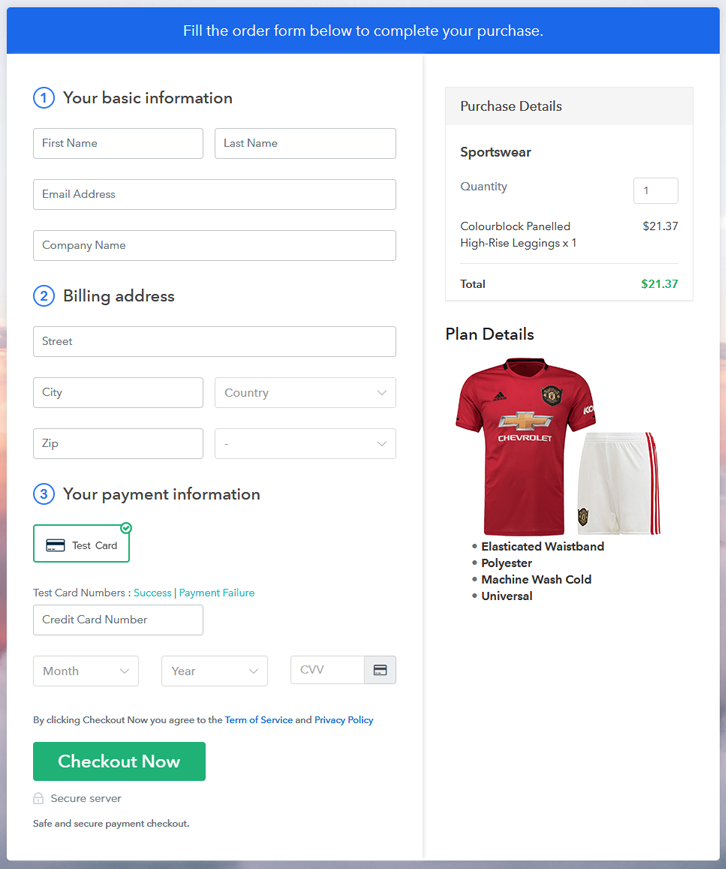
Preview Checkout Page

Preview Checkout Page

Step 1: Log in to Pabbly Subscription Billing
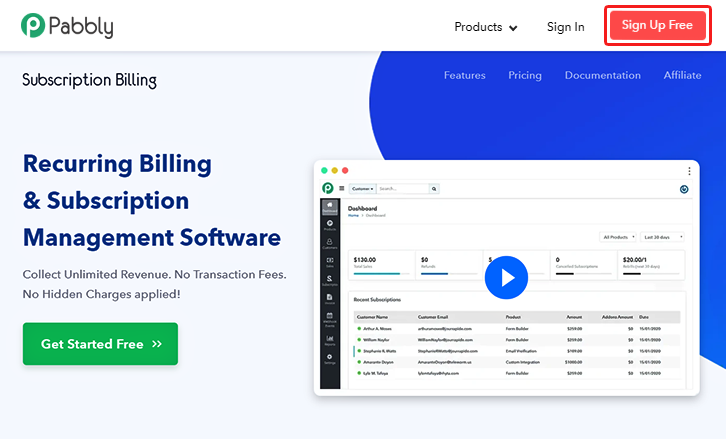
Signup

Visit Pabbly Subscription Billing website and then click on the “Signup Free” button. On clicking the button the signup page will appear, where you can create an account for free via Gmail or you can also enter your details manually.

Sign Up For Free!

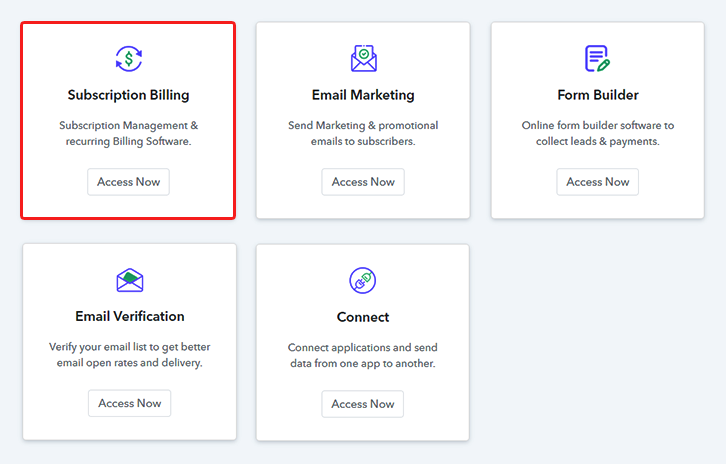
Step 2: Select Subscription Billing

Access Subscription Billing

Step 3: Account Setup
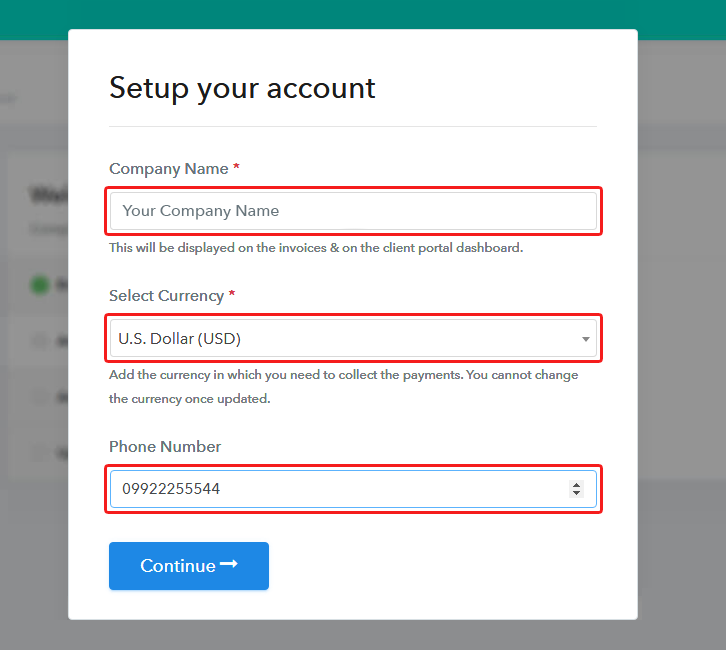
Setup Account

After finishing the signup process, now you have to fill up your company details, i.e, company name, currency, and phone number in the given dialogue box.

Step 4: Connect Payment Gateways & Start Sportswear Selling Business Online
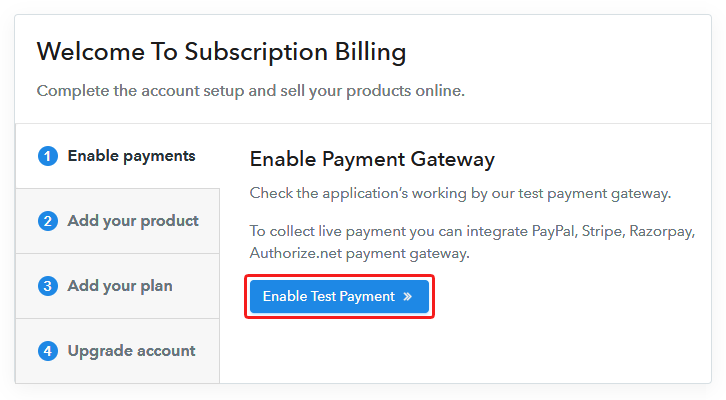
Connect Payment Gateway

Pabbly Subscription Billing provides a “Test Payment” mode to make the payment collection process error-free for the sellers. You can also enable and check it before moving any further. Thereafter, you have to connect with the other payment gateways such as PayPal, Stripe, etc whichever you prefer. The complete payment gateways integration guides are given below-

Step 5: Add Product for your Sportswear
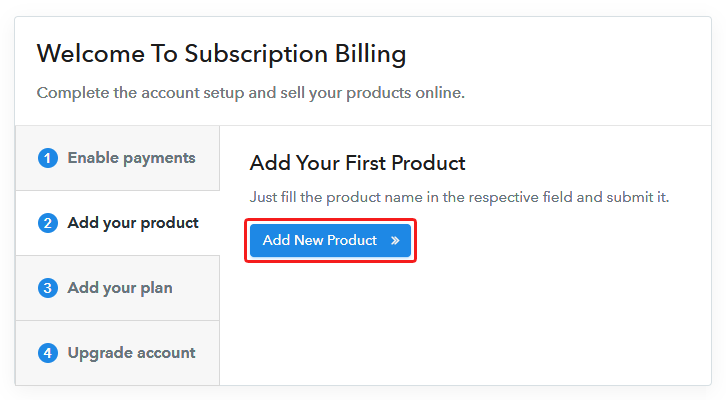
Add Product

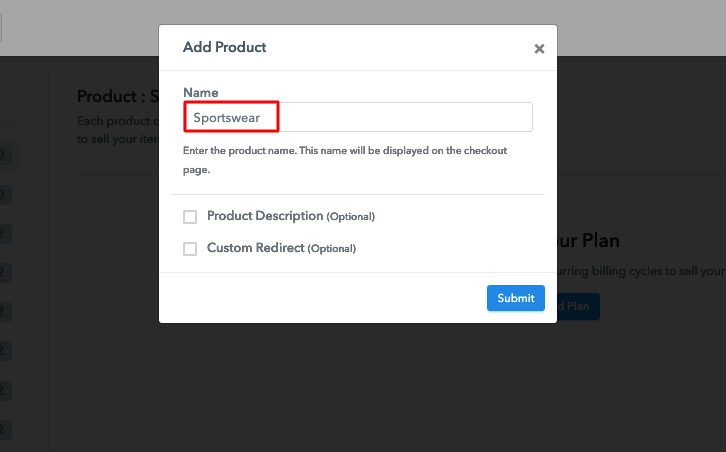
Moving to this step, you have to add your first product. You can add sportswear of different categories for instance jerseys, shorts, etc.

Sell Sportswear Online Product Name

Add all other types of sportswear in the same product by creating different plans.

Note: Here you can add all the products related to the similar category by creating plans for each of them.

Step 6: Add Plans 

Let’s rollout plans for different kinds of sportswear available in your store.

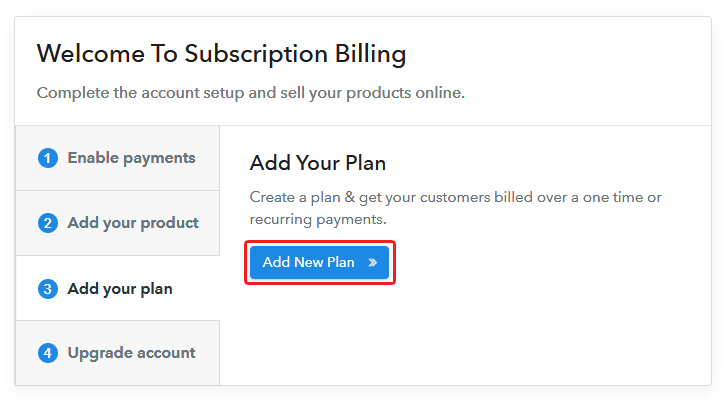
(a) Select Add New Plan

Add Plan

(b) Specify the Plan & Pricing Details
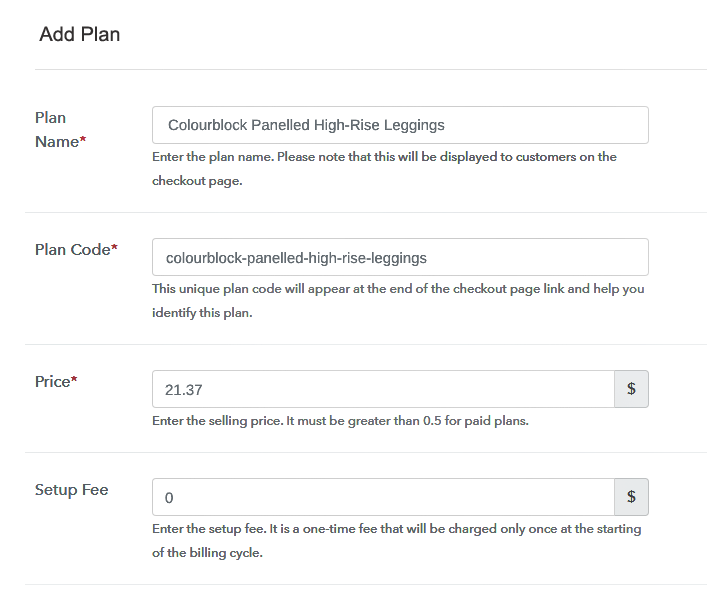
Sell Sportswear Online Details

On clicking add new plan, you will reach to the plan page, here you will have to fill the plan details such as plan name, code, billing cycle, price, etc.

(c) Add Image & Description of Sportswear
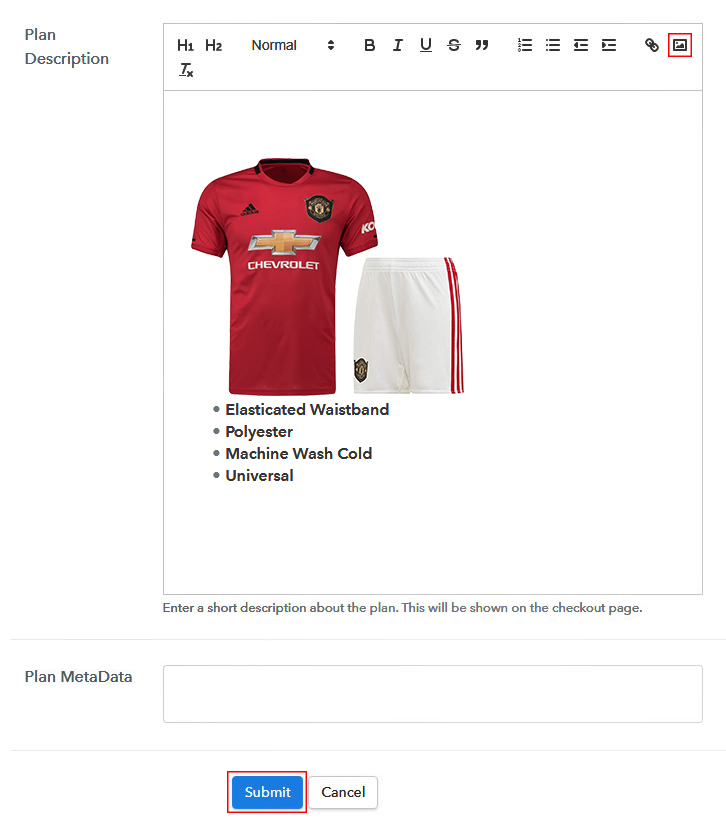
Sell Sportswear Online Image

Also, you can write a description of the sportswear that you want to sell along with the product links, images, etc, and click on the “Submit” button to add your plan.

You can create more plans for all the sportswear in a similar manner.

Step 7: Share your Checkout Page

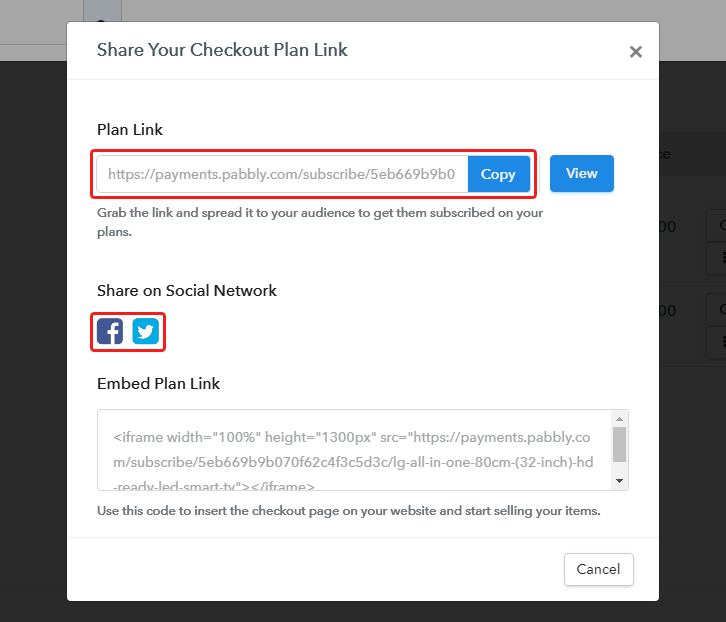
Share Checkout Page on Social Media

Reach to a large number of people by following the below steps:

  • Share your checkout page on social media like Facebook and Twitter.
  • Also, copy the mentioned link and send it to your customers through SMS or emails directly.
  • Embed your plan link to your website so that your customers can be landed on the checkout page directly.

Step 8: Preview Checkout Page

Follow up the recommended steps to preview the checkout page:

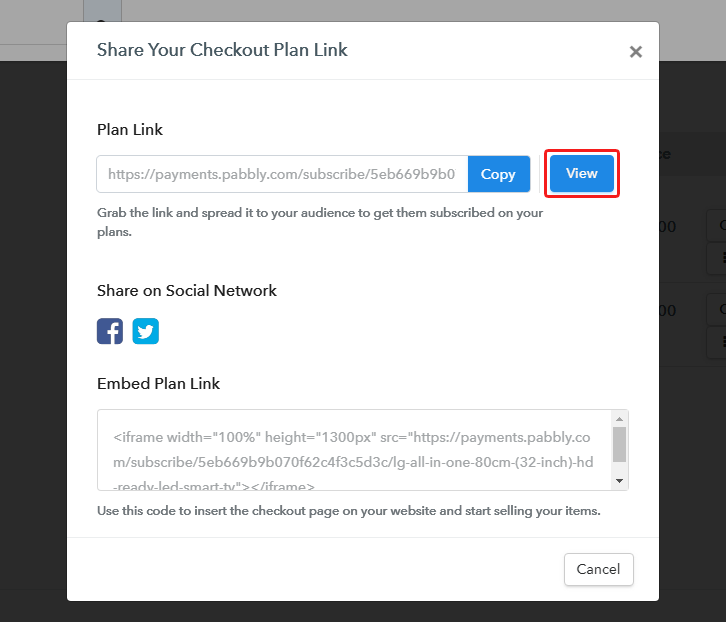
(a) Click on the View Button

View Checkout Plan

(b) Take a Look at the Checkout Page

Preview Checkout Page

Step 9: Embed Checkout Page in Site & Sell Sportswear Online
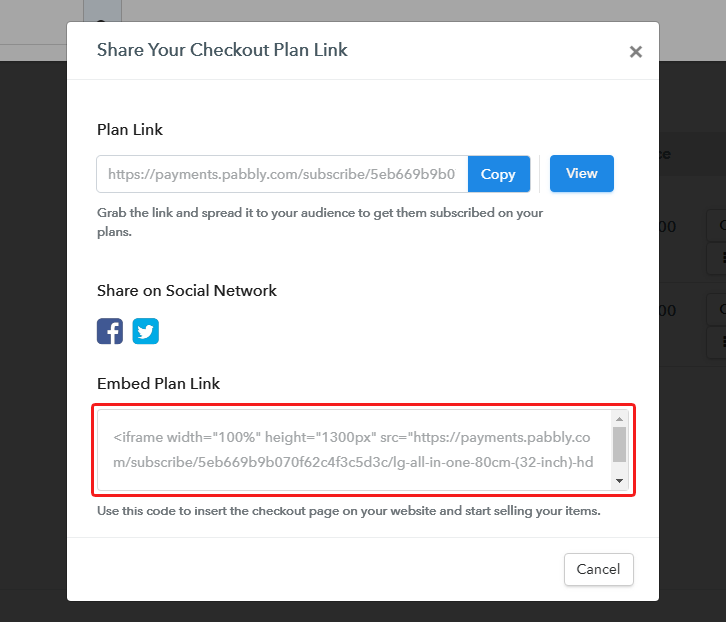
Embed Checkout Page on Website

Just copy the provided plan embedding link and embed the checkout page to your WordPress site to sell sportswear online.

(a) Edit the Page & Paste the Copied Link
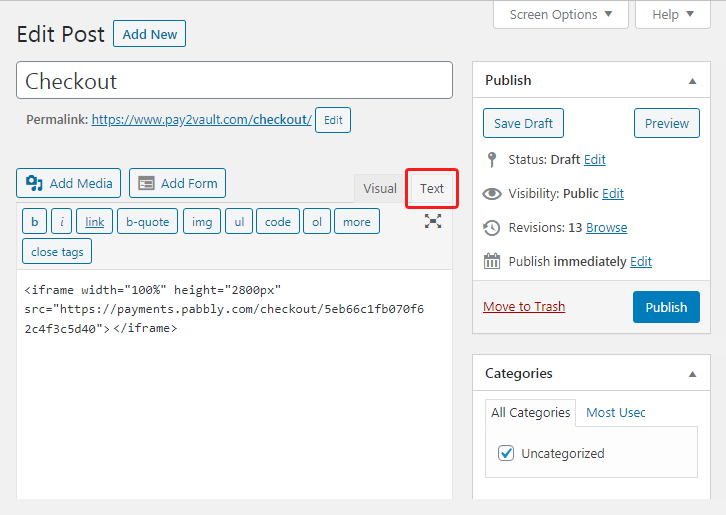
Embed Checkout Page on Website

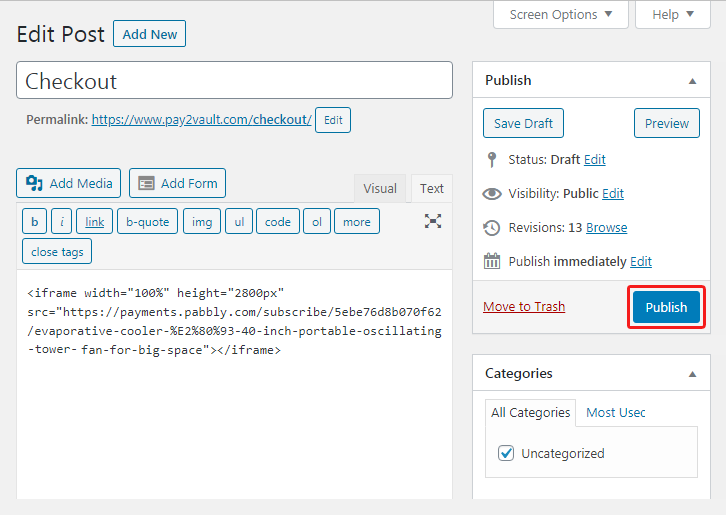
Further, paste the plan link on a text editor of the WordPress dashboard.

(b) Save & Publish the Checkout Page

Save_and_Publish

Next, click the “Publish” button, after making changes.

(c) Check out the Final Look of your Checkout Page on WordPress Site
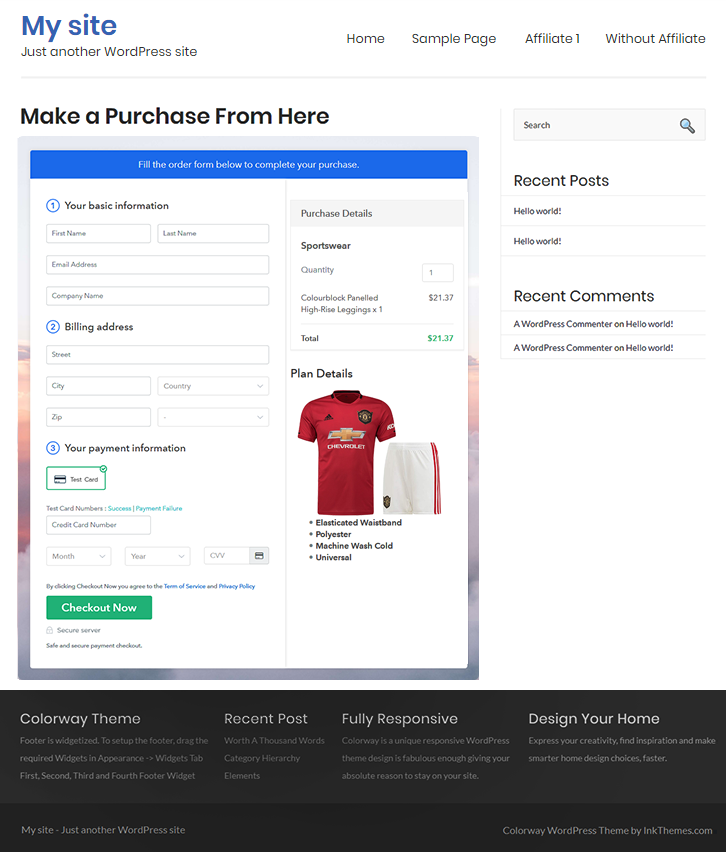
Sell Sportswear Online W

Step 10: Multiplan Checkout Page

Note: In case you want to sell multiple products via a single checkout page, you can create a multi-plan checkout page otherwise skip this step.

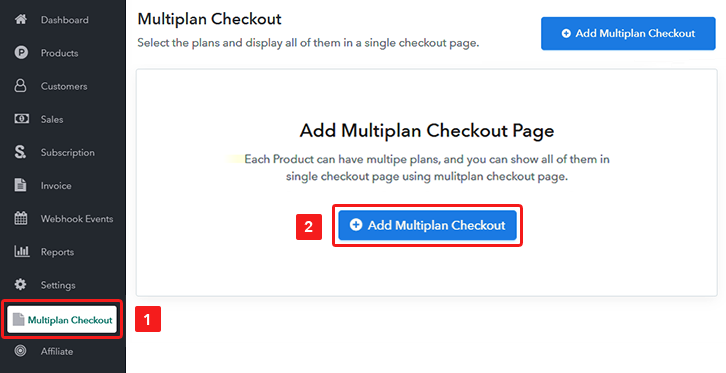
(a) Click on Add Mutiplan Checkout

Multiplan Checkout

(b) Add Plans to Sell Multiple Sportswear from Single Checkout Page
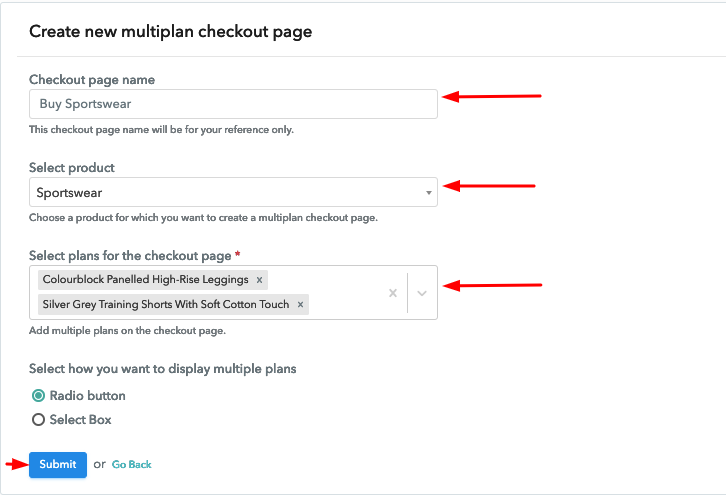
Sell Sportswear Online Multi Details

(c) Take a Look at the Checkout Page

Sell Sportswear Online M

Preview Checkout Page

Wrapping Up

To conclude, now you can start selling sportswear online easily without any investment, all thanks to Pabbly Subscription Billing. This amazing service offers you so many beneficial features for free like easy invoicing, discount coupons creation, listing of unlimited products, and plans, checkout pages, and the list is long. Hence, without any more wait signup and start selling now.
For further queries or suggestions, please write to us.

You May Also Like To Read –

How to Sell Snowboards Online | Step by Step (Free Method)

How to Sell Snowboards Online

Ideal For: All the snowboard manufacturers, snowboard sellers, snowboard dealers, snowboard suppliers, snowboard makers, and other merchants can use this method to sell snowboards online.

How to Sell Snowboards Online

Why Choose this Method to Sell Snowboards Online?

Unlike any other solution, this method allows you to:

  • List and sell your snowboards for FREE. Absolutely no payment required.
  • No need to pay commission on any of your sales.
  • Multiple payment options like PayPal, Credit Card, etc to collect payment from a single place.
  • Sell one time or recurring subscriptions of your snowboards.
  • Collect payments & sell products in any currency as per your requirement.
  • Give discounts on your products by offering special coupon codes.
  • Add sales commission agents to help you in selling snowboards online.

Get Pabbly Subscription Billing for Free

Snowboard are loved by youth, children and almost everyone as snowboarding is one of the most popular sport. Hence, there is no doubt that people will love to buy it online as it will save their time and hassle of picking the one by visiting every single shop in their locality. Besides, online shops offer them varieties which quite hard to find in local stores.

Thus, if you are searching for ways to start your snowboards business online then this is the right place. Because, here we have a perfect software suggestion for you i.e, Pabbly Subscription Billing that can help you to sell snowboards online without any hassle.

Using this tool, you can create beautiful checkout pages in no time. Along with that, this software also gives you the flexibility to share those checkout pages link on your websites, social media accounts, or through SMS, email marketing. Now, let me take you through the 10 easy steps that you need to follow for creating amazing checkout pages online using this software.

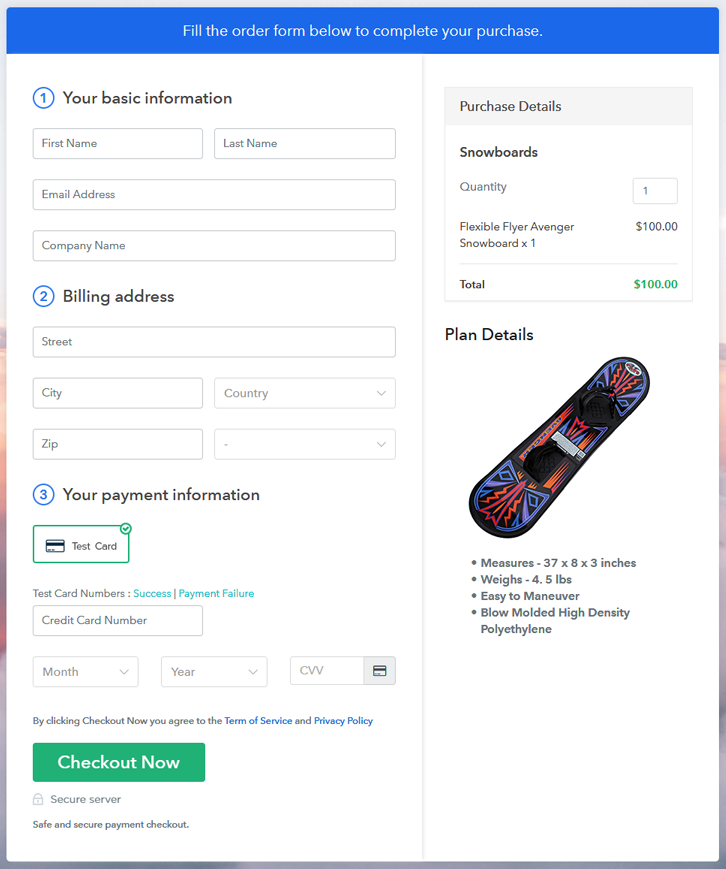
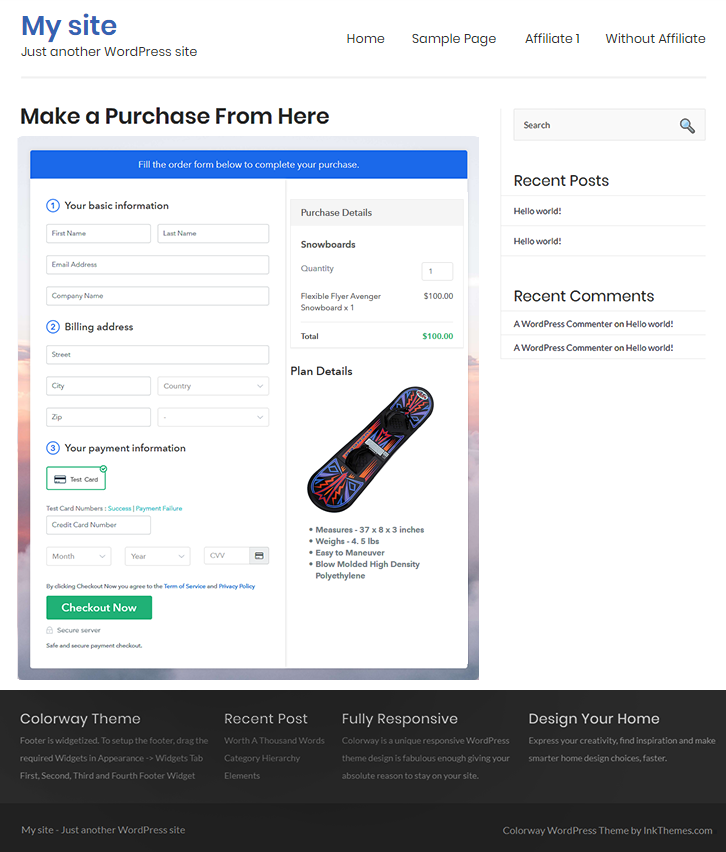
Final View of Checkout Page for your Snowboards Selling Business

Final View of Checkout Page for your Snowboards Selling Business

Preview Checkout Page

Step 1: Log in to Pabbly Subscription Billing

Signup

First of all, we start the process by visiting the Pabbly Subscription Billing website. After that, we hit the “Sign up Free“ button. And later, fill out the details either manually or else sign in via Google account.

Sign Up For Free!

Step 2: Select Subscription Billing

Access Subscription Billing

Step 3: Account Setup

Setup Account

Once you press the “Access Now” button, a page will pop up where you need to fill up the fields like company name, select currency, and phone number. Enter all the details in order to continue creating a checkout page for snowboards.

Step 4: Connect Payment Gateways & Start Snowboards Selling Business Online

Connect Payment Gateway

Eventually, its time to specify the details associated with the payment procedures. Here, I am going to provide a brief detail on the checkout page payment process for the snowboards using a “Test Payment Gateway”. Plus, this tool provides multiple payment gateways like PayPal, Stripe, etc. Further, beneath are their respective payment integration guides to assist you further.

Step 5: Add Product for your Snowboards

Add Product

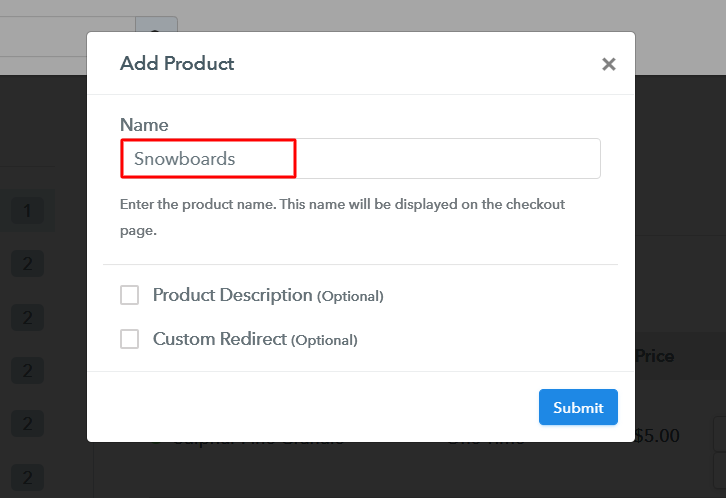
Add the name, that is “Snowboards” and designate the variety along with a short summary of the snowboards to catch the buyer’s attention.

Add Product To Sell Snowboards Online

Moreover, just fill out all those details and your product is created.

Note: Here you can add all the products related to the similar category by creating plans for each of them.

Step 6: Add Plans 

Let’s cast light on plans for different kinds of snowboards available in your store.

(a) Select Add New Plan

Add Plan

(b) Specify the Plan & Pricing Details

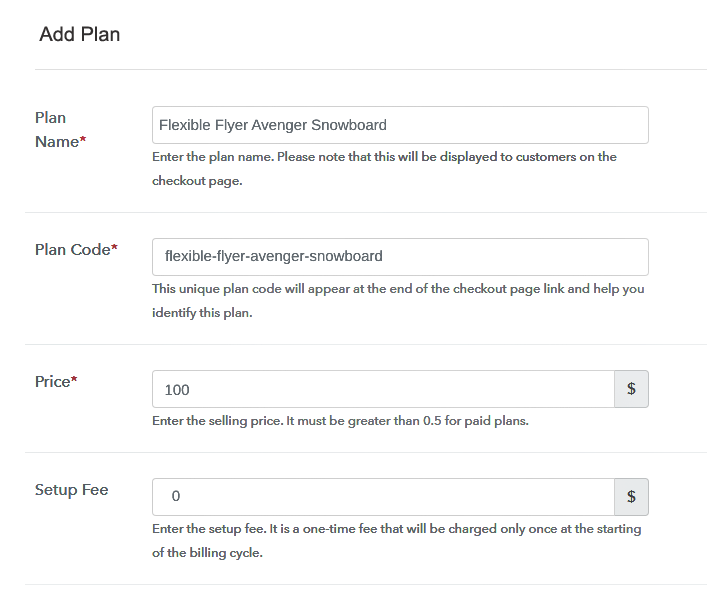
Specify the Plan & Pricing Details to Sell Snowboards Online

The succeeding step is to fill all the details of the snowboards like plan name, code, price, set-up fee, and much more to continue.

(c) Add Image & Description of Snowboards

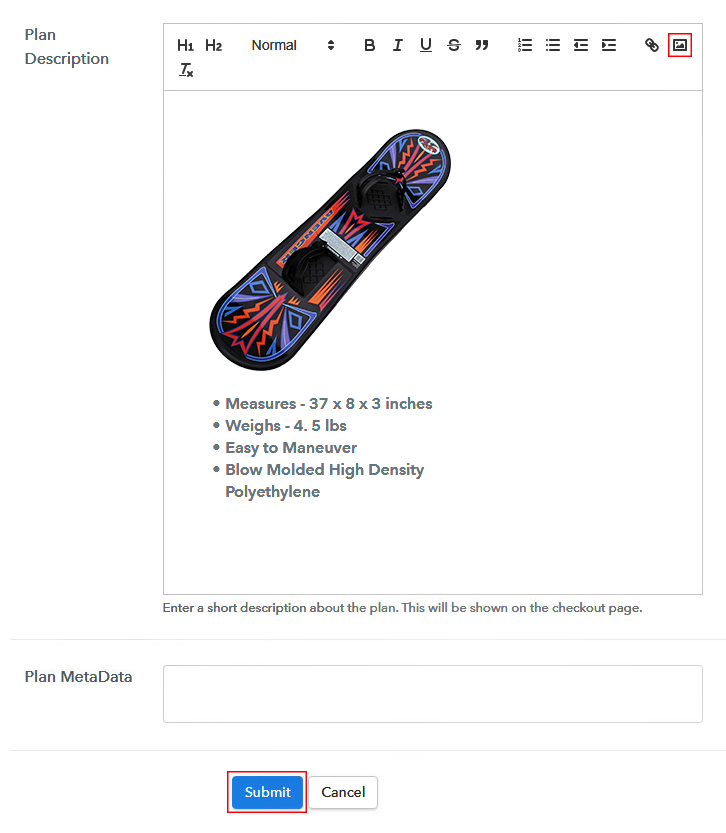
Add Image & Description of Snowboards

Following the former step, now give a concise classification of snowboards with the help of bullets, images, links, etc.

Hereafter, press the “Submit” button in order to add the snowboards on the checkout page.

Sequentially, now its time to add multiple plans along with diverse categories of snowboards in your product list that you wish to sell online.

Step 7: Share your Checkout Page

Share Checkout Page on Social Media

  • Furthermore, share the checkout page of the snowboards on social media platforms like Facebook & Twitter with the help of their individual buttons.
  • Also, share the snowboards checkout page link with your customers directly using SMS or email marketing.
  • Including that, you can also embed the provided plan link of the snowboards in the buttons or any anchor text on your website.

Step 8: Preview Checkout Page

Follow up the recommended steps to preview the checkout page:

(a) Click on the View Button

View Checkout Plan

(b) Take a Look at the Checkout Page

Final View of Checkout Page for your Snowboards Selling Business

Step 9: Embed Checkout Page in Site & Sell Snowboards Online

Embed Checkout Page on Website

Just copy the link and add the checkout page to sell snowboards online at any proper place on your WordPress site.

(a) Edit the Page & Paste the Copied Link

Embed Checkout Page on Website

Further, paste the plan link on a text editor of the WordPress dashboard.

(b) Save & Publish the Checkout Page

Save_and_Publish

Next, click the “Publish” button, after making changes.

(c) Check out the Final Look of your Checkout Page on WordPress Site

Final Look of your Checkout Page on WordPress Site

Step 10: Multiplan Checkout Page

Note: In case you want to sell multiple products via a single checkout page, you can create a multi-plan checkout page otherwise skip this step.

(a) Click on Add Mutiplan Checkout

Multiplan Checkout

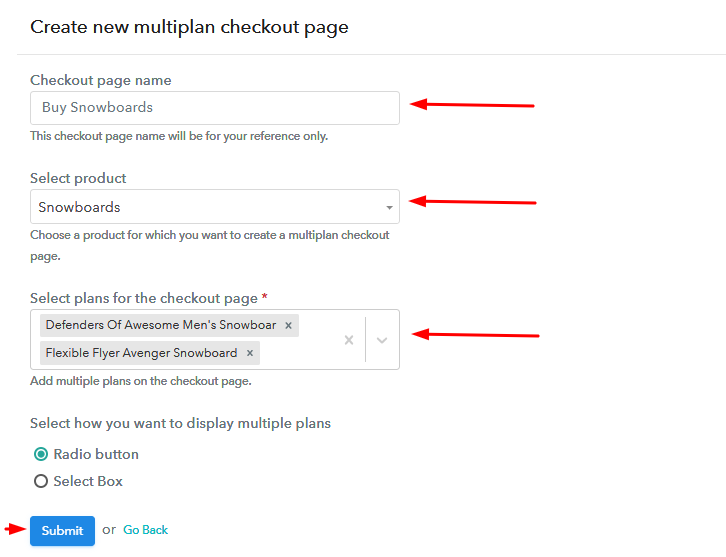
(b) Add Plans to Sell Multiple Snowboards from Single Checkout Page

Add Plans to Sell Multiple Snowboards from Single Checkout Page

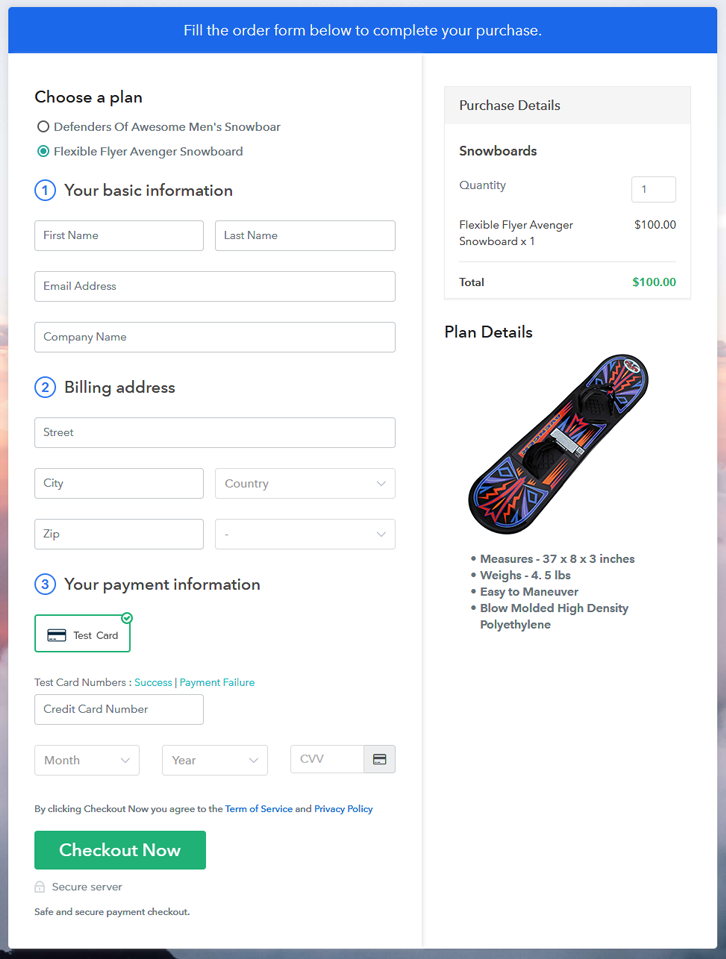
(c) Take a Look at the Checkout Page
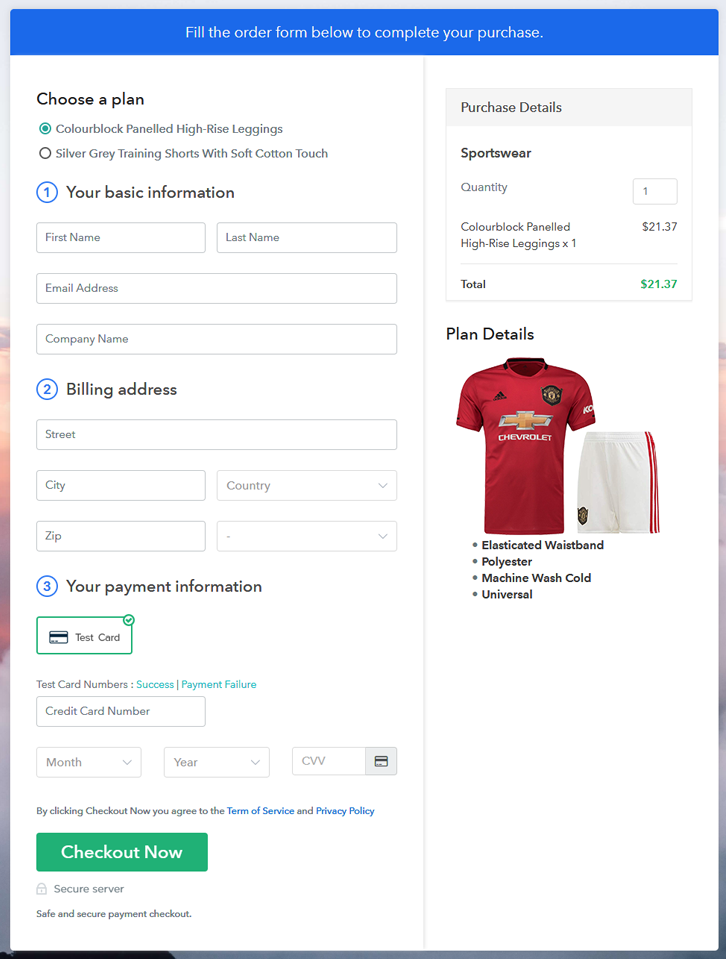
Multiplan Checkout Page to Sell How to Sell Snowboards Online

Preview Checkout Page

Wrapping Up

That’s all for now!! Now you know how to start snowboards business online. Just follow the above mentioned 10 steps and you are good to go. So what are you waiting for? Simply log in to Pabbly Subscription Billing to start your online business journey in no time. Thank you!!

You May Also Like To Read –
How to Sell Speakers Online | Step by Step (Free Method)

How to Sell Speakers Online

Ideal For: All the speaker manufacturers, speaker sellers, speaker dealers, speaker suppliers, gadget shop owners and other merchants can use this method to sell speakers online.

How to Sell Speakers Online

Why Choose this Method to Sell Speakers Online?

Unlike any other solution, this method allows you to:

  • List and sell your speakers for FREE. Absolutely no payment required.
  • No need to pay commission on any of your sales.
  • Multiple payment options like PayPal, Credit Card, etc to collect payment from a single place.
  • Sell one time or recurring subscriptions of your speakers.
  • Collect payments & sell products in any currency as per your requirement.
  • Give discounts on your products by offering special coupon codes.
  • Add sales commission agents to help you in selling speakers online.

Get Pabbly Subscription Billing for Free

Music enthusiasts can’t live without music and to feel every beat they preferred speakers. This is why there is a surplus demand for speakers. So, if you have the slightest thought of starting your own speakers’ business online then it is the right time.

Believe us selling speakers online is not rocket science one can do it easily with the help of proper tools. And, there are a wide variety of software in the market but we are recommending amazing software none other than Pabbly Subscription Billing. Using this tool you can sell your speakers online and other house sound equipment for money instantly.  Along with that, it keeps you on top of the customer’s needs like revenue tracking, sales, etc. With the help of its checkout page, you can sell single or multiple speakers with ease. Also, the checkout page can be embedded on websites or you can share direct links via any social media with your prospects.

Other than this, it has some remarkable features like:

  • Custom Domains
  • Various Billing Models
  • Professional Invoices

Now, let’s get started creating a checkout page for selling speakers online with the help of this tool.

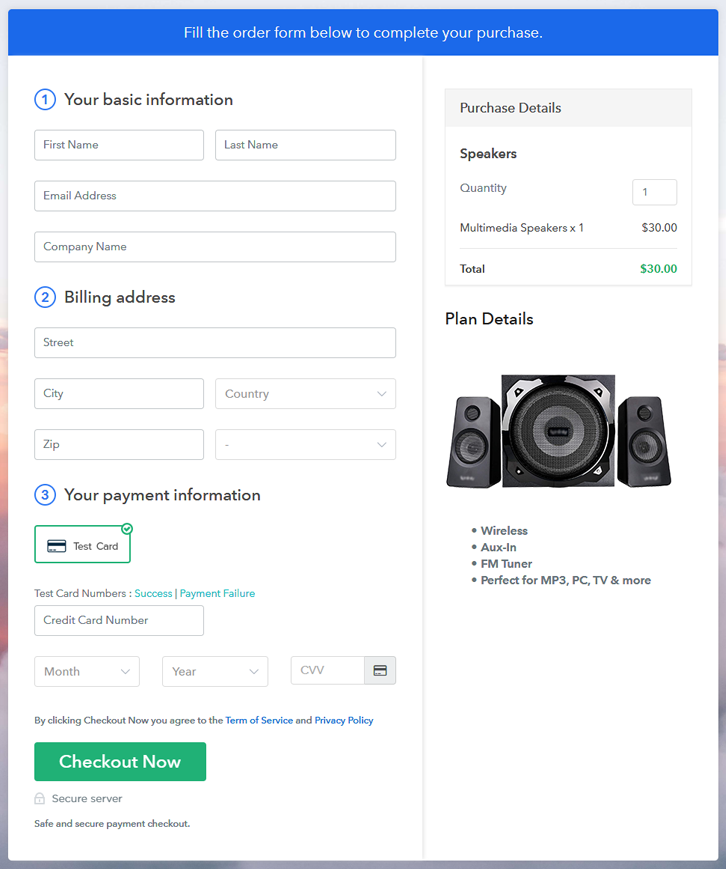
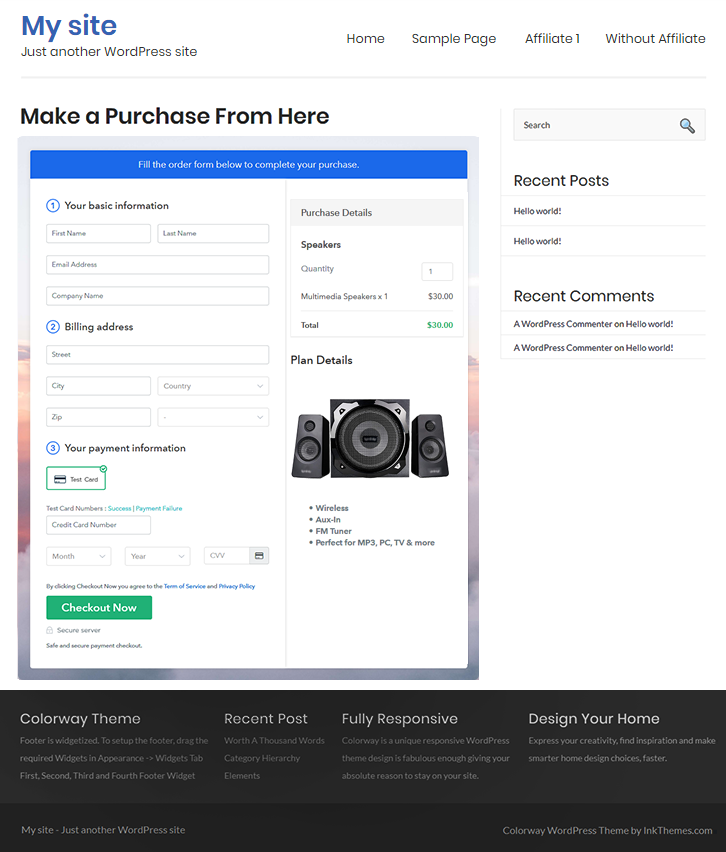
Final View of Checkout Page for your Speakers Selling Business

Checkout Page to Sell Speakers Online

Preview Checkout Page

Step 1: Log in to Pabbly Subscription Billing

Signup

Start the process for creating a checkout page for speakers by visiting the Pabbly Subscription Billing in your browser. After that, click on the “Sign up Free“ button. Moreover, either manually filled out the details or sign in using your Gmail account.

Sign Up For Free!

Step 2: Select Subscription Billing

Access Subscription Billing

Step 3: Account Setup

Setup Account

Besides, after clicking on the “Access Now” button of the software, a page will open with fields like company name, select currency, and phone number. Simply fill out those details to continue creating a checkout page for speakers.

Step 4: Connect Payment Gateways & Start Speakers Selling Business Online

Connect Payment Gateway

The consequent step is to earning information about payment procedures using a “Test Payment Gateway”. Here, we will explain the checkout page process for the speakers with the help of a test payment gateway. Besides this, the tool offers various payment gateways such as PayPal, Stripe, etc. Moreover, below are the payment integration guides to help you out.

Step 5: Add Product for your Speakers

Add Product

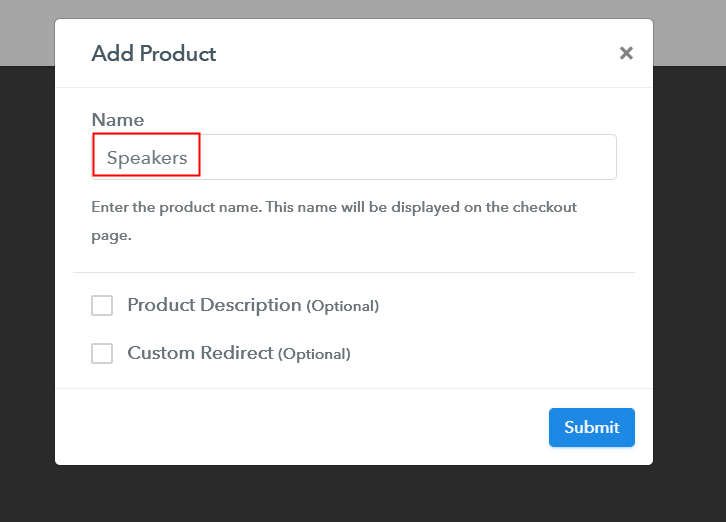
Additionally, add the name, which in our case is “Speakers”. Here you can specify the type like soundbars, wall/ceiling speakers, etc. Further, write a short description of the speakers to seize the customer’s attention.

Add Product to Start Selling Speakers Online

Moreover, just fill out all those details, and your product for speakers is created.

Note: Here you can add all the products related to the similar category by creating plans for each of them.

Step 6: Add Plans 

Let’s expose plans for different kinds of speakers available in your store.

(a) Select Add New Plan

Add Plan

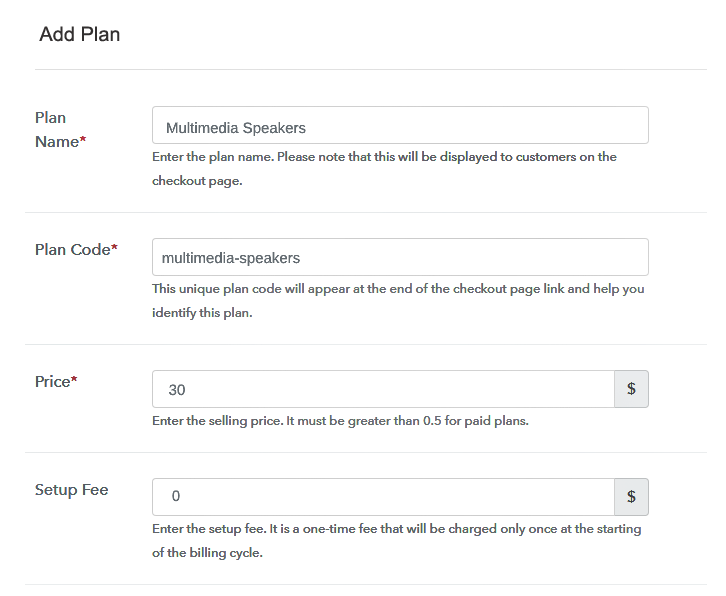
(b) Specify the Plan & Pricing Details

Specify the Plan and Pricing to Sell Speakers Online

The next thing to do is fill all the details of the speakers like plan name, code, price, set-up fee, and much more to continue.

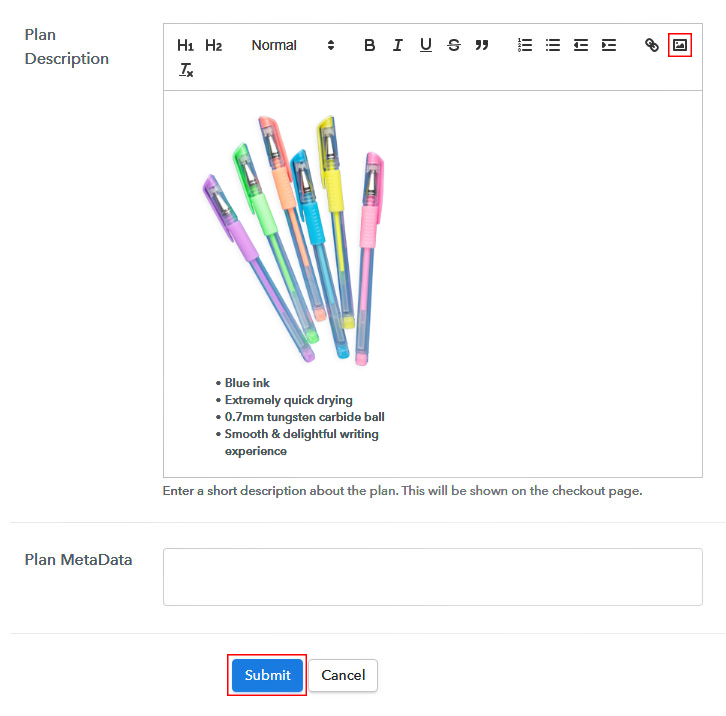
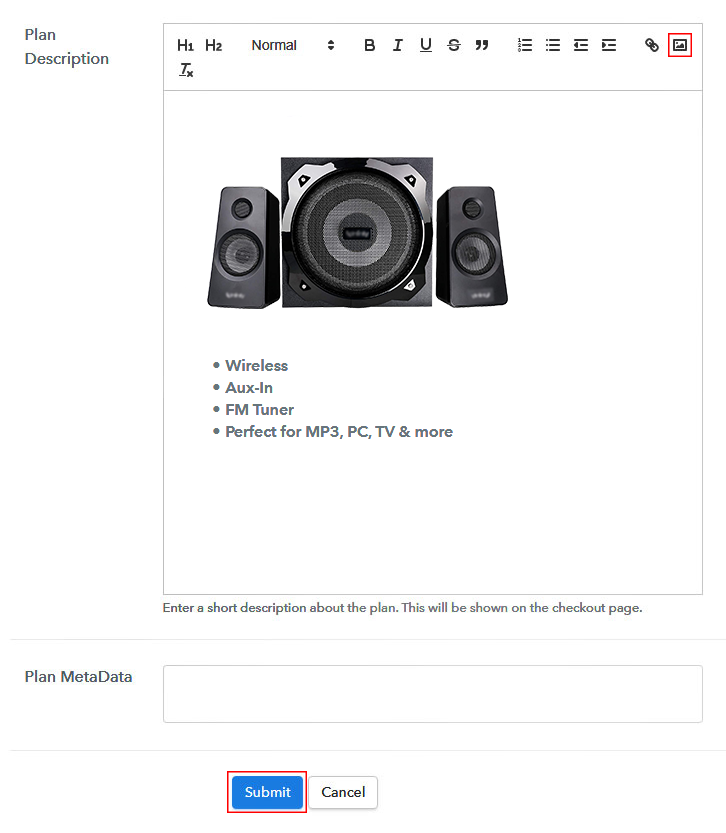
(c) Add Image & Description of Speakers

Add Image & Description to Sell Speakers Online

Furthermore, write a brief description of the speakers using bullets, images, etc, to bring original buyers to the checkout page.

Next, click on the “Submit” button to add the speakers on the checkout page.

Finally, you can add multiple plans and kinds of speakers in your product list which you want to market online.

Step 7: Share your Checkout Page

Share Checkout Page on Social Media

  • Moreover, share the checkout page of the speakers on social media accounts like Facebook & Twitter to grab the customer’s attention.
  • Also, you can share the direct link of the speaker’s checkout page with your customers via SMS or email marketing.
  • Additionally, embed the provided plan link of the speakers in the buttons or any anchor text on your website.

Step 8: Preview Checkout Page

Follow up the recommended steps to preview the checkout page for speakers:

(a) Click on the View Button

View Checkout Plan

(b) Take a Look at the Checkout Page

Checkout Page to Sell Speakers Online

Step 9: Embed Checkout Page in Site & Sell Speakers Online

Embed Checkout Page on Website

Just copy the link and add the checkout page to sell speakers online at any proper place on your WordPress site.

(a) Edit the Page & Paste the Copied Link

Paste Link in Text Editor

Further, paste the plan link of speakers on a text editor of the WordPress dashboard.

(b) Save & Publish the Checkout Page

Save_and_Publish

Next, click the “Publish” button, after making changes.

(c) Check out the Final Look of your Checkout Page on WordPress Site

Final Look of your Checkout Page to Sell Speakers Online

Step 10: Multiplan Checkout Page

Note: In case you want to sell multiple products via a single checkout page, you can create a multi-plan checkout page otherwise skip this step.

(a) Click on Add Mutiplan Checkout

Multiplan Checkout

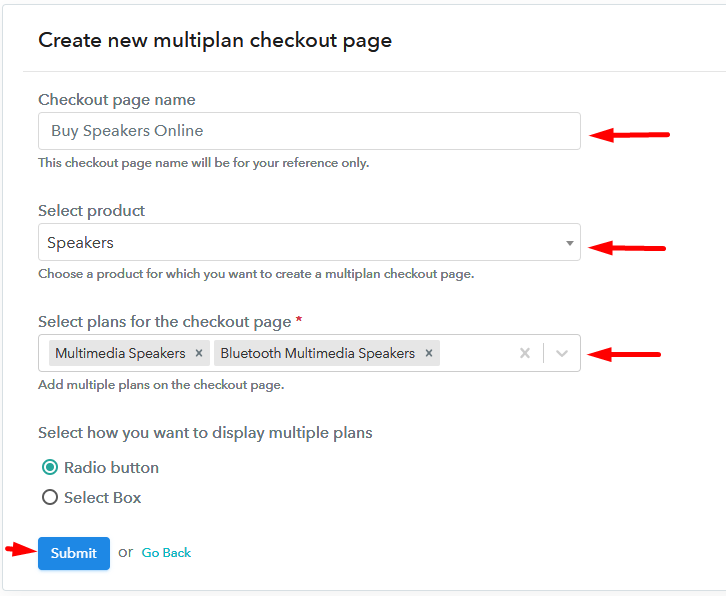
(b) Add Plans to Sell Multiple Speakers from Single Checkout Page

Add Multiple Products to Start Selling Speakers Online

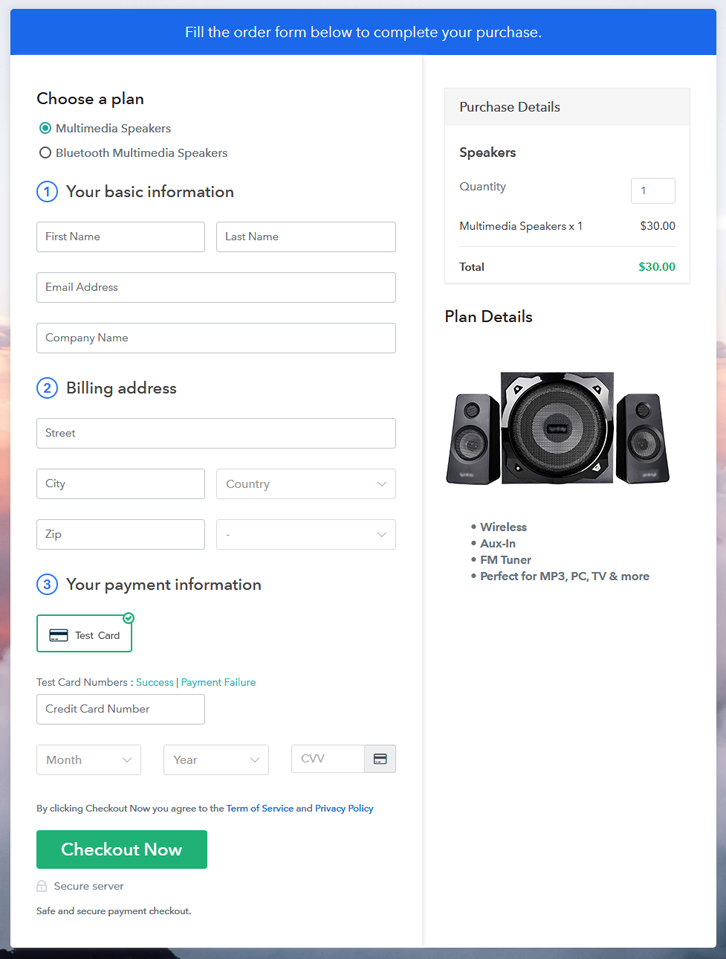
(c) Take a Look at the Checkout Page

Multiplan Checkout Page to Sell Speakers Online

Preview Checkout Page

Wrapping Up

That’s it! When comes to music, we all are audiophiles this is why there is a wide variety of speakers available in the market. So starting your own speaker’s business online is not a bad idea. Using Pabbly Subscription Billing one can sell speakers online without any difficulty. All you have to do is follow all the above-mentioned steps to create a checkout page for speakers.

You May Also Like To Read –
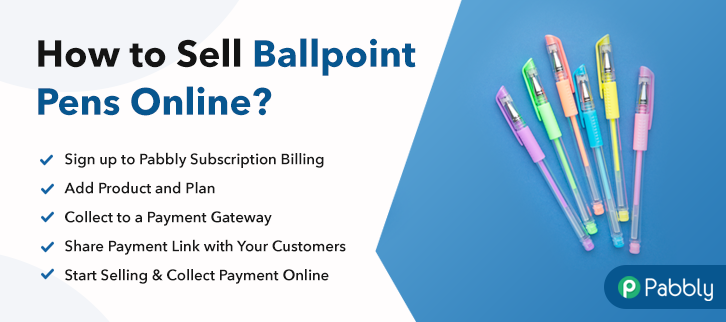
How to Sell Ballpoint Pens Online | Step by Step (Free Method)

How To Sell Ballpoint Pens

Ideal For: All pen manufacturer, stationary owners, pen sellers, ballpoint pen dealers, shopkeepers and other merchants can use this method to sell ballpoint pens online.

How To Sell Ballpoint Pens

Why Choose this Method To Sell Ballpoint Pens Online?

Unlike any other solution, this method allows you to:

  • List and sell your ballpoint pens for FREE. Absolutely no payment required.
  • No need to pay commission on any of your sale.
  • Multiple payment options like PayPal, Credit Card, etc to collect payment from a single place.
  • Sell one time or recurring subscriptions of your ballpoint pens.
  • Collect payments & sell products in any currency as per your requirement.
  • Give discounts on your products by offering special coupon codes.
  • Add sales commission agents to help you in selling ballpoint pens online.

Get Pabbly Subscription Billing for Free

Are you wondering what is the best way to sell a pen? In this article, we’ll be offering you a procedure on how to sell pens online. Whether you want to sell a ballpoint pen, ink pen, Caran d’Ache pen, or a Visconti pen, we’ll guide you effortlessly to sell pens online through checkout pages.

A pen is one of the most important and popular things that everyone uses in everyday life, from children to businessmen. But for selling pens there are plethora of software available in the market so it is difficult to choose the best & affordable one. Therefore to help you out here we have an amazing software suggestion for you i.e, Pabbly Subscription Billing that can help you set up an online store easily. With this, you can create unlimited products & plans checkout pages that bind customer’s attention and you can even collect unlimited online payments through it. Some of its other remarkable features include:

  • Generate Invoices
  • Manage & Record Payments
  • Track Revenue
  • Custom Domains
  • Tax Management

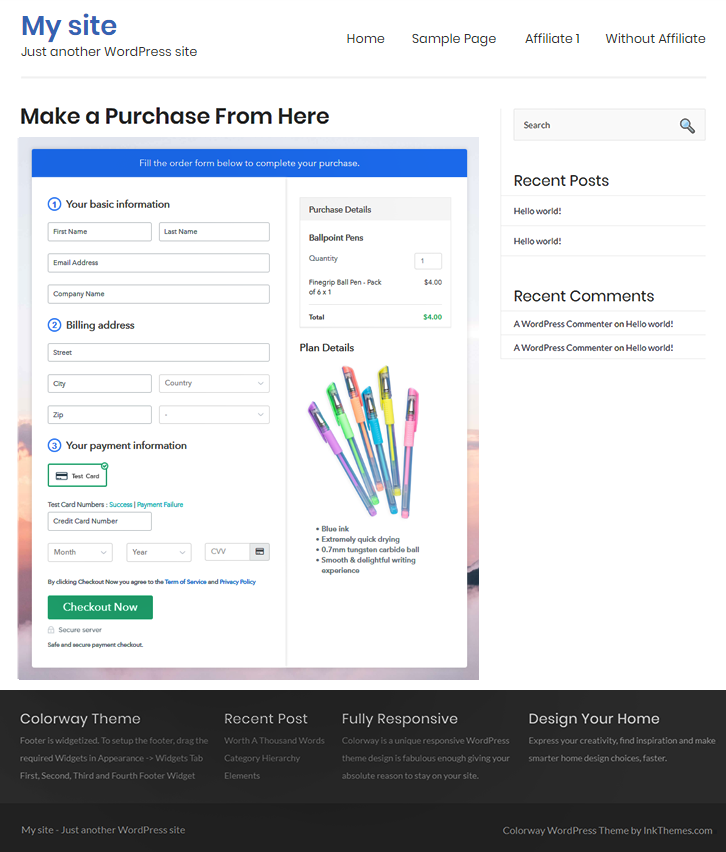
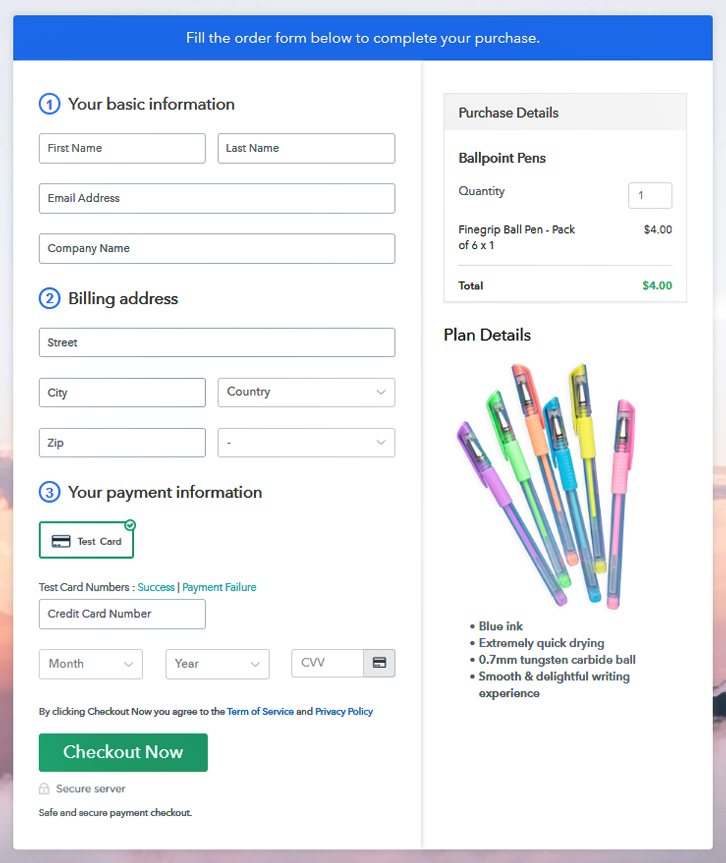
Final View of Checkout Page For Your Ballpoint Pens Selling Business

Preview Checkout Page - Sell Ballpoint Pens

Preview Checkout Page

Step 1: Log in to Pabbly Subscription Billing

Signup

Let’s begin the process of creating a checkout page by visiting the Pabbly Subscription Billing website. All you need to do is sign up on the software using your Google account or fill in the email ID manually.

Sign Up For Free!

Step 2: Select Subscription Billing

Access Subscription Billing

Step 3: Account Setup

Setup Account

Now clicking on the “Access Now” button of subscription billing and filled out the company details like company name, select currency, and phone number.

Step 4: Connect Payment Gateways & Start Ballpoint Pens Selling Business Online

Connect Payment Gateway

Complete the account setup by enabling the test payment option. Pabbly Subscription Billing offers “Test Payment Gateway” for beginners to check the payment. Besides this, the tool offers various payment gateways such as PayPal, Stripe, etc. Further, below are the payment integration guides to help you out.

Step 5: Add Product For Your Ballpoint Pens

Add Product

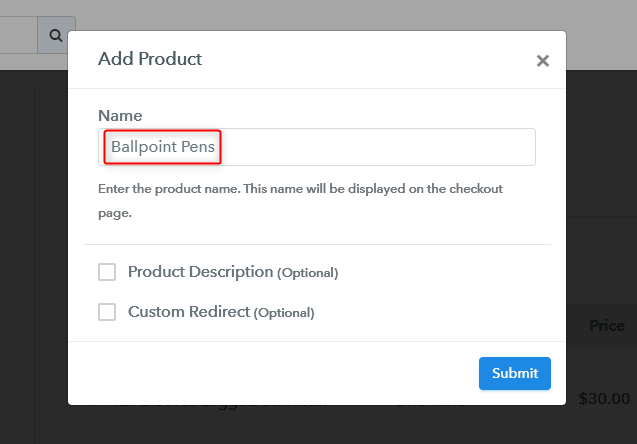
Momentarily, add the product name and details about the ballpoint pens. Also, you can add numerous types of pens according to a category like a ball pen, gel pen, ink pen, and much more.

Add Product - Sell Ballpoint Pens Online

Just fill out all those details and your product for ballpoint pens is created.

Note: Here you can add all the products related to the similar category by creating plans for each of them.

Step 6: Add Plans 

Let’s rollout plans for different kinds of ballpoint pens available in your store.

(a) Select Add New Plan

Add Plan

(b) Specify the Plan & Pricing Details

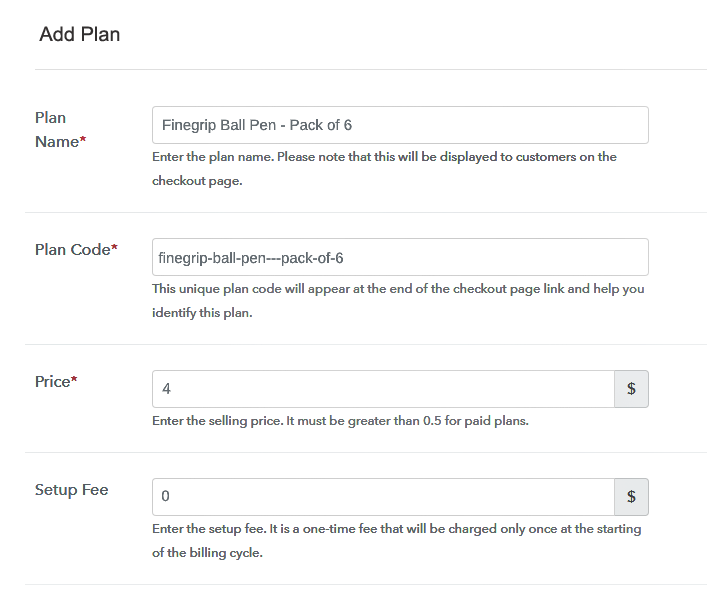
Add Plan

In this step, fill the plan details that you want to show on your checkout page like plan name, price, set-up fees, etc.

(c) Add Image & Description of Ballpoint Pens

Add Plan Description - Sell Ball Pens Online

After that, you can also add the product image in the checkout page and write some description about your pens. Hit the “Submit” button after adding all the details. Furthermore, it offers multiple options for customizing the text like bullets, images, links, italic & bold text, etc.

Besides, it lets you add unlimited plans for different types of products according to your requirement.

Step 7: Share your Checkout Page

Share Checkout Page on Social Media

  • You can directly share the checkout page link with your customers through emails and SMS.
  • Share the plan link of ballpoint pens on your social media accounts like Facebook & Twitter.
  • Additionally, embed the checkout page on your website or in buttons.

Step 8: Preview Checkout Page

Follow up the recommended steps to preview the checkout page:

(a) Click on the View Button

View Checkout Plan

(b) Take a Look at the Checkout Page

Preview Checkout Page - Sell Ballpoint Pens

Step 9: Embed Checkout Page in Site & Sell Sportswear Online

Embed Checkout Page on Website

Following these steps, now just copy the link and add it at any proper place on your WordPress site.

(a) Edit the Page & Paste the Copied Link

Embed Checkout Page on Website

Further, paste the plan link on a text editor of the WordPress dashboard.

(b) Save & Publish the Checkout Page

Save_and_Publish

Next, click the “Publish” button, after making changes.

(c) Check out the Final Look of your Checkout Page on WordPress Site

Preview Checkout Page on WordPress

Step 10: Multiplan Checkout Page

Note: In case you want to sell multiple products via a single checkout page, you can create a multi-plan checkout page otherwise skip this step.

(a) Click on Add Mutiplan Checkout

Multiplan Checkout

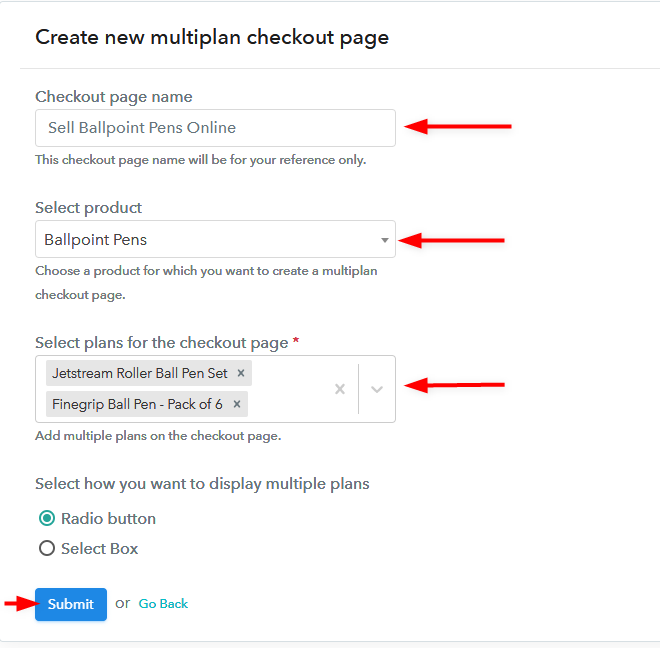
(b) Add Plans to Sell Multiple Ballpoint Pens from Single Checkout Page

Create Multiplan Checkout Page - Start Selling Ball Pens

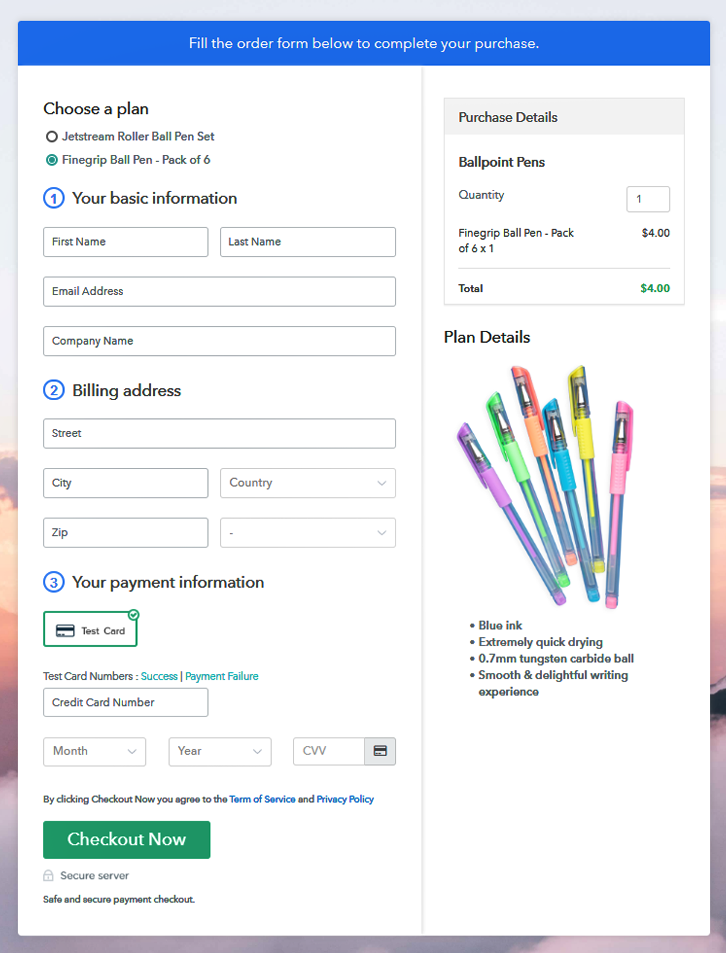
(c) Take a Look at the Checkout Page

Preview Multiplan Checkout Page - Best Ballpoint Pen

Preview Checkout Page

Wrapping Up

That’s it! Here, in this article, we’ll provide you a step by step procedure to sell ballpoint pens online via Pabbly Subscription Billing software. So just go through the steps and start selling pens online and collect unlimited payments.

If you have any queries, just write to us in the comment section below.

You May Also Like To Read –
How to Sell Syringes Online | Step by Step (Free Method)

How to Sell Syringes Online

Ideal For: All the syringe manufacturers, syringe sellers, retail syringe shop owners, and other merchants can use this method to take their syringes selling business online.

How to Sell Syringes Online

Why Choose this Method to Sell Syringes Online?

Unlike any other solution, this method allows you to:

  • List and sell your syringes for FREE. Absolutely no payment required.
  • No need to pay commission on any of your sale.
  • Multiple payment options like PayPal, Credit Card, etc to collect payment from a single place.
  • Sell one time or recurring subscriptions of your syringes.
  • Collect payments & sell products in any currency as per your requirement.
  • Give discounts on your products by offering special coupon codes.
  • Add sales commission agents to help you in selling syringes online.

Get Pabbly Subscription Billing for Free

Syringes are use-and-through medical devices that are used more frequently. Around 18 billion syringe units are sold worldwide every year. So, we can say the sales stats are enough to start syringes business online.

Well, in this blog I’m going to discuss a process of creating checkout pages to sell syringes online. This process is very simple as well as fast and can help you start selling syringes in no time.

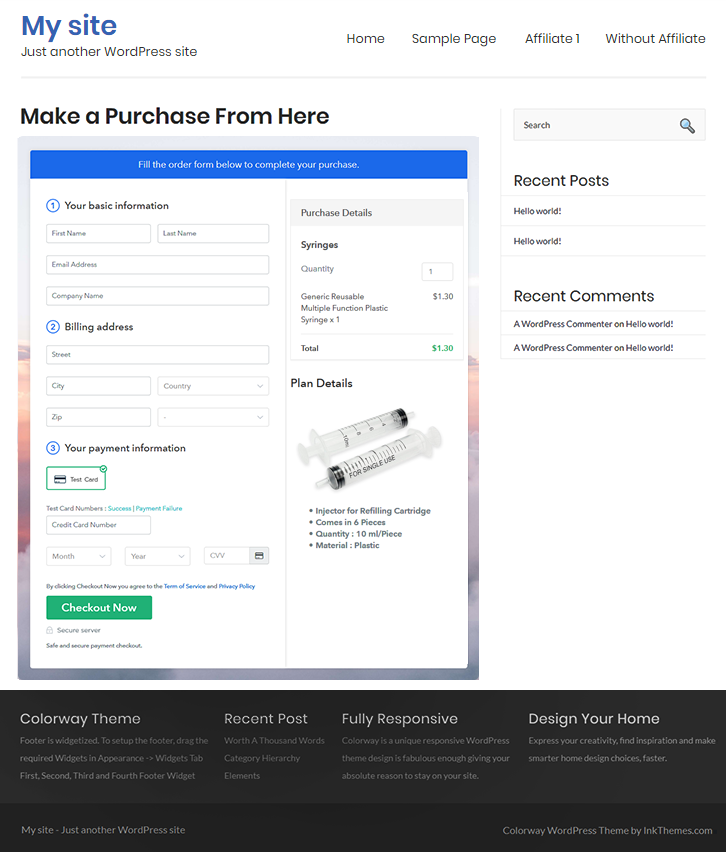
Using the checkout pages you can showcase your syringes, information about it, its price etc and collect payments. All you need to do is create a checkout page and then share it on any social media or link sharing platforms. Also, you can embed the checkout page on the buttons, texts, posts, and pages of a website.

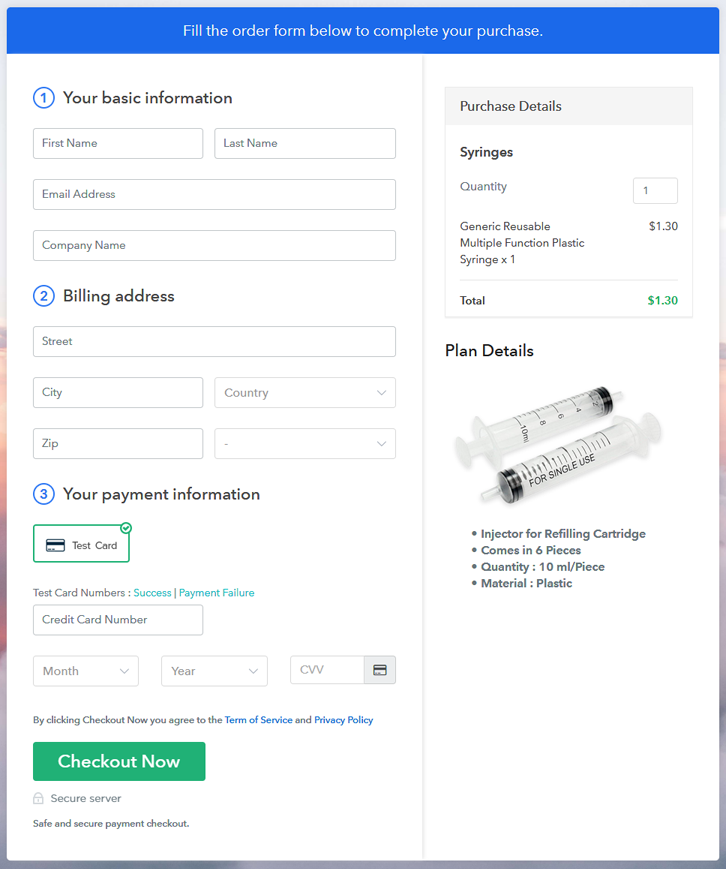
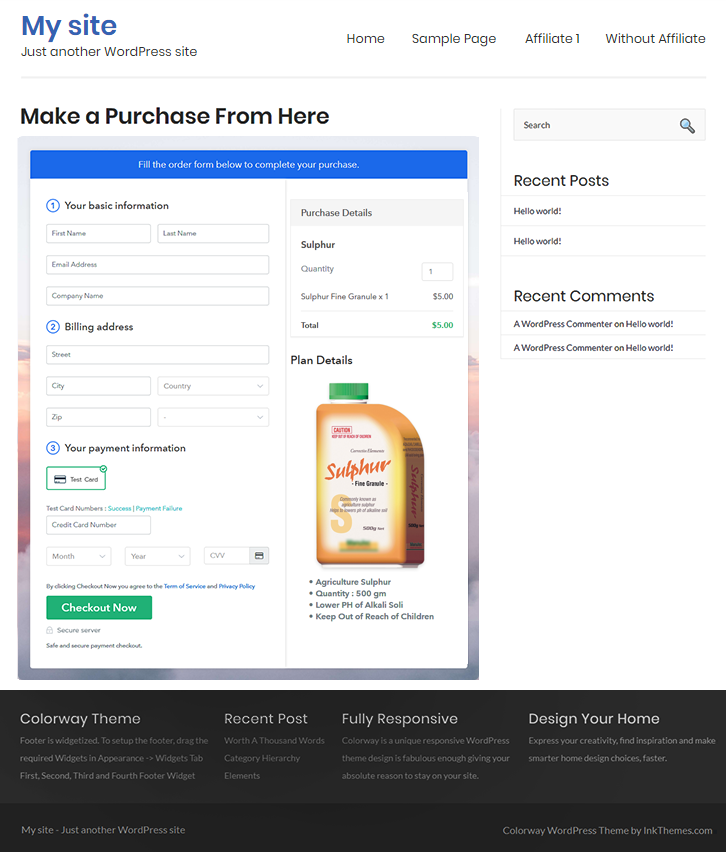
Final View of Checkout Page for your Syringes Selling Business

Checkout Page Preview to Sell Sulphur Online

Preview Checkout Page

Step 1: Log in to Pabbly Subscription Billing

Signup

Firstly, visit Pabbly Subscription Billing & click on the ‘Sign Up Free‘ button. On the next page redirect, either use a Gmail account or sign-up manually by filling out the form availble.

Sign Up For Free!

Step 2: Select Subscription Billing

Access Subscription Billing

Step 3: Account Setup

Setup Account

In the next pop-up window, you have to fill your company details such as a company name, the currency you want to handle & a phone number. Fill in the required details quickly & click on the ‘Continue’ button.

Step 4: Connect Payment Gateways & Start Syringes Selling Business Online

Connect Payment Gateway

Next is integrating a payment gateway to collect payments. There is an alternate option to enable a test payment mode just to get aware of the system. But, you’ll need to select as well as integrate a payment method from the following options to start collecting actual payments.

Step 5: Add Product For Your Syringes

Add Product

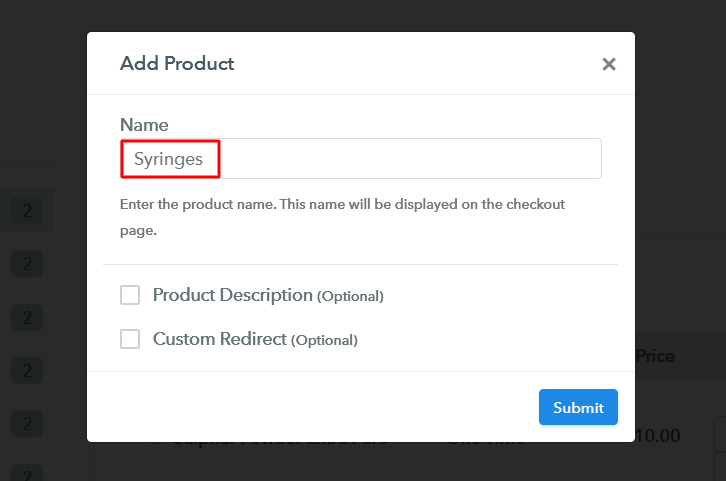
All the system settings are done up till now and you can start adding products. Click on the ‘Add New Product’ button and then mention a name for the syringe category & other product details.

Add Product to Sell Syringes Online

Submit this page and a product will be appended in the list.

Note: Here you can add all the products related to the similar category by creating plans for each of them.

Step 6: Add Plans 

Now, let’s start adding plans for the different types of syringes available in your store.

(a) Select Add New Plan

Add Plan

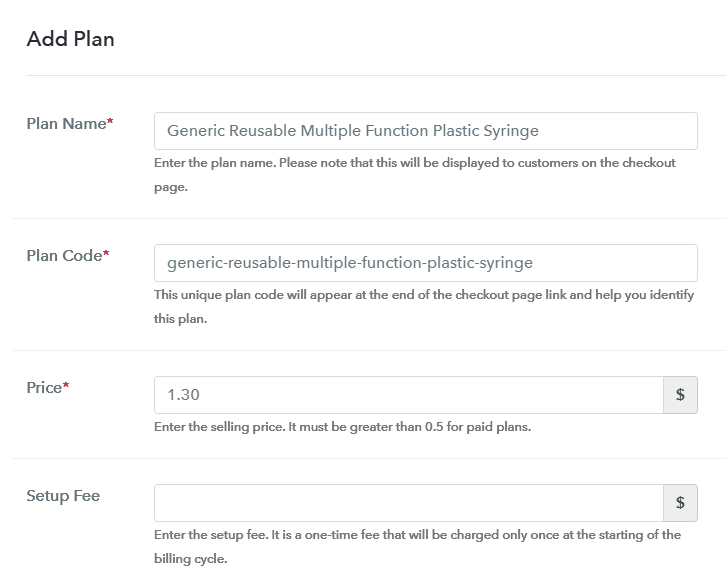
(b) Specify the Plan & Pricing Details

Add Plan to Sell Syringes Online

You can specify a syringe name to sell, its code, pricing and other details in the plan description page.

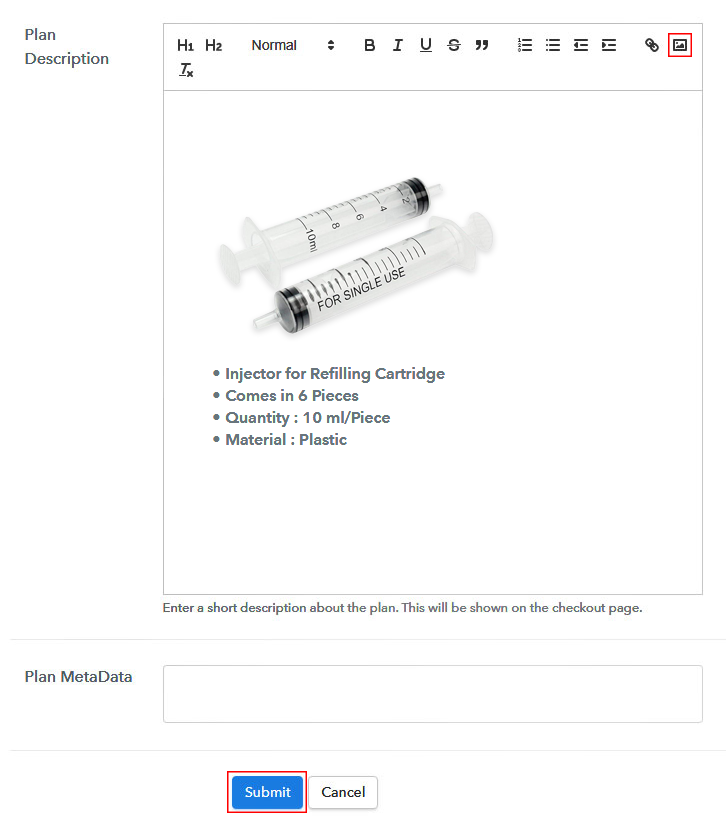
(c) Add Image & Description of Syringe

Add Image & Description to Sell Syringes Online

Additionally, you can also insert an image of the syringe & some description related to it.

Once you click submit onto this page a plan will be added and a checkout page is created automatically.

In a similar manner, you can add other syringes as well.

Step 7: Share your Checkout Page

Share Checkout Page on Social Media

To share a checkout page with your clients and collect payments there are three different ways.

  • First, you can click on the socials icons available to share the checkout page on Facebook & Twitter
  • Second, you can share the plan link URL with your buyers over all the other social media platforms like SMS, WhatsApp, emails etc.
  • Third, you can link the plan link URL within the buttons and text anchors of any website or app to redirect a customer over the payment checkout pages

Step 8: Preview Checkout Page

Follow up the recommended steps to preview the checkout page:

(a) Click on the View Button

View Checkout Plan

(b) Take a Look at the Checkout Page

Checkout Page Preview to Sell Sulphur Online

Step 9: Embed Checkout Page in Site & Sell Syringes Online

Embed Checkout Page on Website

Just copy the link and add the checkout page to sell syringes online at any preferable place on your WordPress site.

(a) Edit the Page & Paste the Copied Link

Embed Checkout Page on Website

Further, paste the plan link on a text editor of the WordPress dashboard.

(b) Save & Publish the Checkout Page

Save_and_Publish

Next, click the “Publish” button, after making changes.

(c) Check out the Final Look of your Checkout Page on WordPress Site

Checkout Page On WordPress Site to Sell Syringes Online

Step 10: Multiplan Checkout Page

Note: In case you want to sell multiple products via a single checkout page, you can create a multi-plan checkout page otherwise skip this step.

(a) Click on Add Mutiplan Checkout

Multiplan Checkout

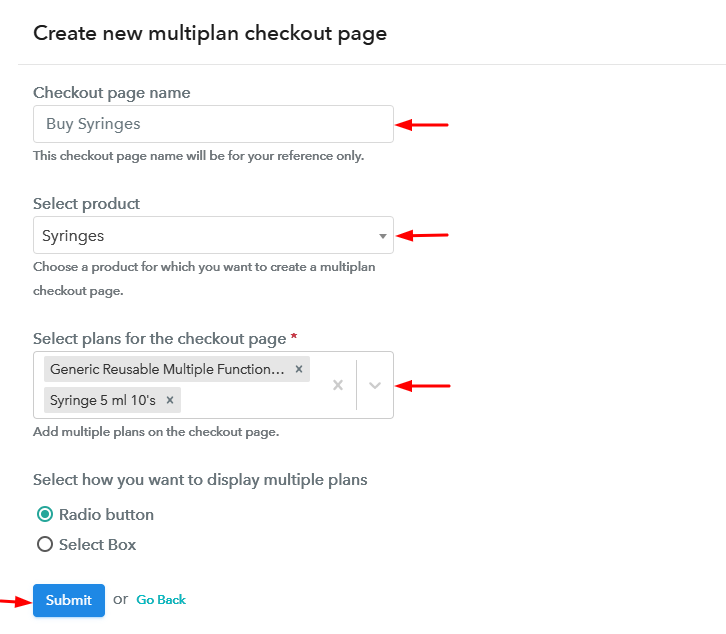
(b) Add Plans to Sell Multiple Syringes from Single Checkout Page

Create Multiplan Checkout to Sell Syringes Online

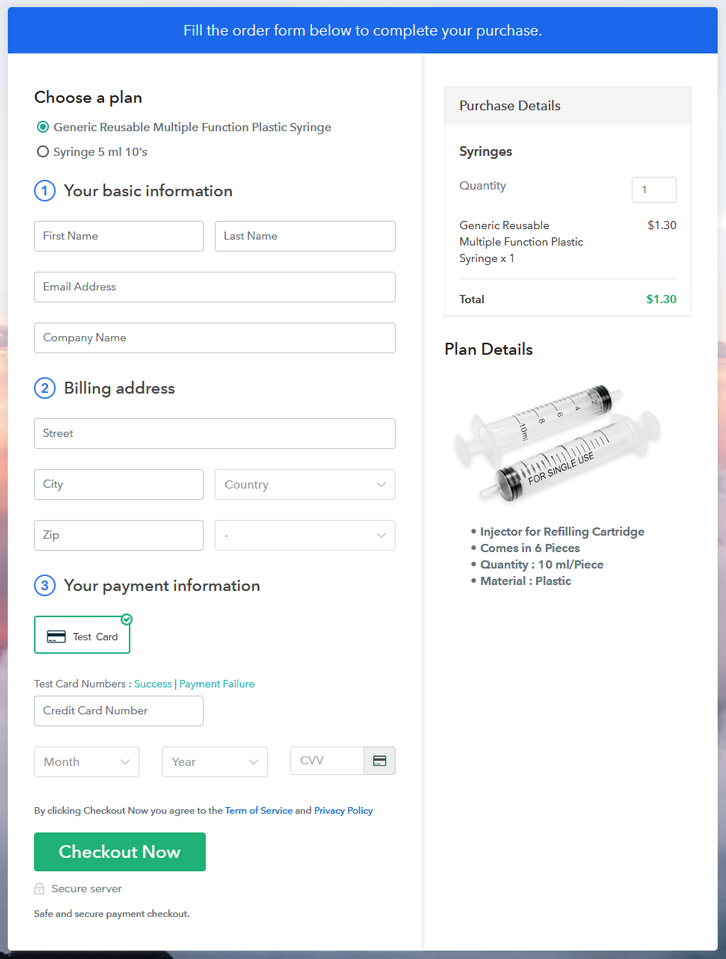
(c) Take a Look at the Checkout Page

Multiplan Checkout Page to Sell Syringes Online

Preview Checkout Page

Wrapping Up

This was my take on ‘how to sell syringes online’. Both the small as well as large business can use this service to start syringes business online and become a player in the market. As the management suits all syringe selling needs.

I personally like the multicurrency & multiple gateways options of Pabbly subscription Billing service. Do comment your feedback over this procedure in the comment section below.

You May Also Like To Read –
How to Sell Sulphur Online | Step by Step (Free Method)

How to Sell Sulphur Online

Ideal For: All the sulphur manufacturers, sulphur sellers, retail sulphur shop owners, and other merchants can use this method to take their sulphur selling business online.

How to Sell Sulphur Online

Why Choose this Method to Sell Sulphur Online?

Unlike any other solution, this method allows you to:

  • List and sell your sulphur for FREE. Absolutely no payment required.
  • No need to pay commission on any of your sale.
  • Multiple payment options like PayPal, Credit Card, etc to collect payment from a single place.
  • Sell one time or recurring subscriptions of your sulphur.
  • Collect payments & sell products in any currency as per your requirement.
  • Give discounts on your products by offering special coupon codes.
  • Add sales commission agents to help you in selling sulphur online.

Get Pabbly Subscription Billing for Free

Sulphur is been used in agriculture and lab material from a very long time and most of its forms (like pure powdered) are pretty hard to find. And if you are planning to sell sulphur online then we can tell you a faster way.

There is this service named Pabbly Subscription Billing which is found pretty amazing for both small and large businesses. All you need to do max is to create checkout pages for selling sulphur online with this service and share/embed it on as many platforms as you like to and the service will take care of the rest of the management.

Benefits of using this service:

  • Sell sulphur online globally
  • Keep track of all the payments & items availability
  • Accept multiple currencies easily
  • Sell unlimited products
  • Collect online/offline payments
    And much more…

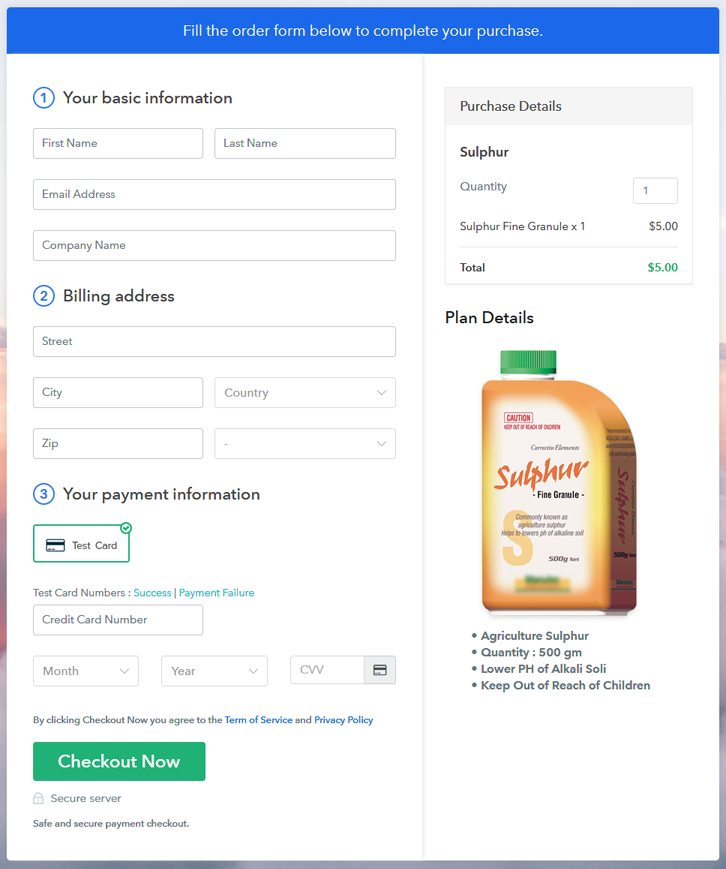
Final View of Checkout Page for your Sulphur Selling Business

Checkout Page Preview to Sell Sulphur Online

Preview Checkout Page

Step 1: Log in to Pabbly Subscription Billing

Signup

To get started with selling sulphur online using checkout pages, first, go to the Pabbly Subscription Billing site & then click on ‘Sign Up Free‘. On the registration page, you can either use an existing Gmail Id or can manually fill in the form to sign-in.

Sign Up For Free!

Step 2: Select Subscription Billing

Access Subscription Billing

Step 3: Account Setup

Setup Account

In the third step, you’ll be asked to fill in your company details. Quickly feed all the information and click on the ‘Continue’.

Step 4: Connect Payment Gateways & Start Sulphur Selling Business Online

Connect Payment Gateway

Now, you’ll need to integrate a payment gateway method to collect payments. Either you can use the ‘Enable Test Payment’ option here (for testing only) or you can select a gateway from the following options. Also, integration guides are linked here for your reference.

Step 5: Add Product for your Sulphur

Add Product

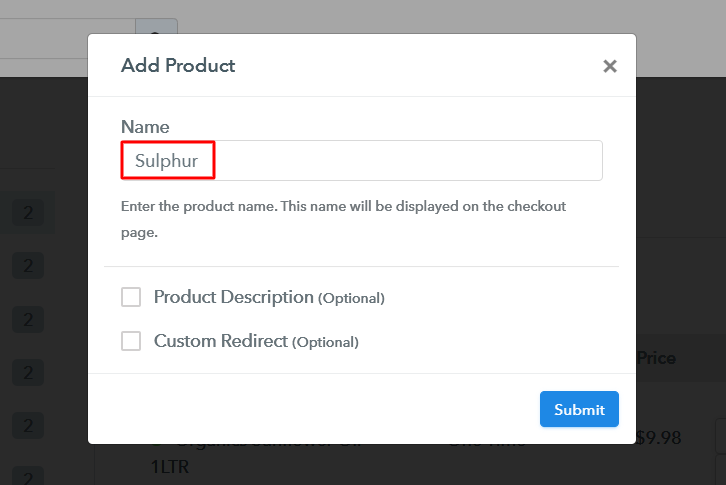
Next, we’ll create products and name a product much as per a category of sulphur products. We’ll add plans to these products afterwards.

Add Product to Sell Sulphur Online

Fill all the essential product details & strike ‘Submit’ here.

Note: Here you can add all the products related to the similar category by creating plans for each of them.

Step 6: Add Plans 

Now, let’s start adding plans for the various sulphur products available in your store.

(a) Select Add New Plan

Add Plan

(b) Specify the Plan & Pricing Details

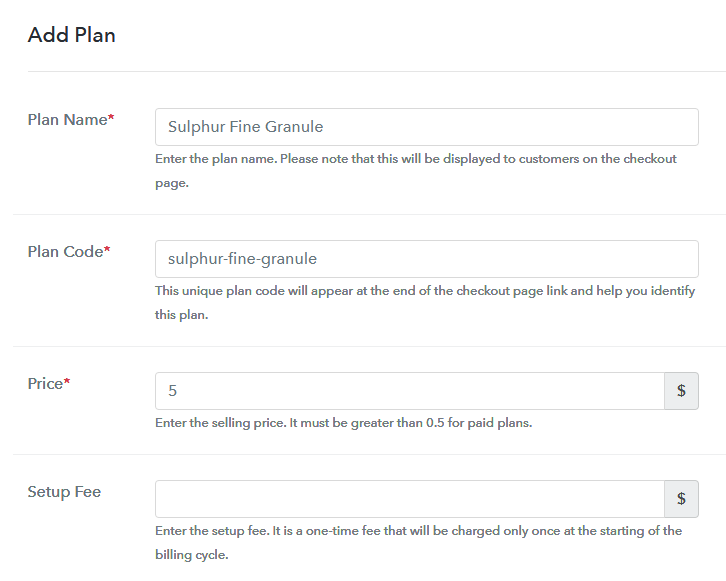
Add Plan to Sell Sulphur Online

You can mention the name, price and other details of a sulphur product in this plan details page.

(c) Add Image & Description of Sulphur

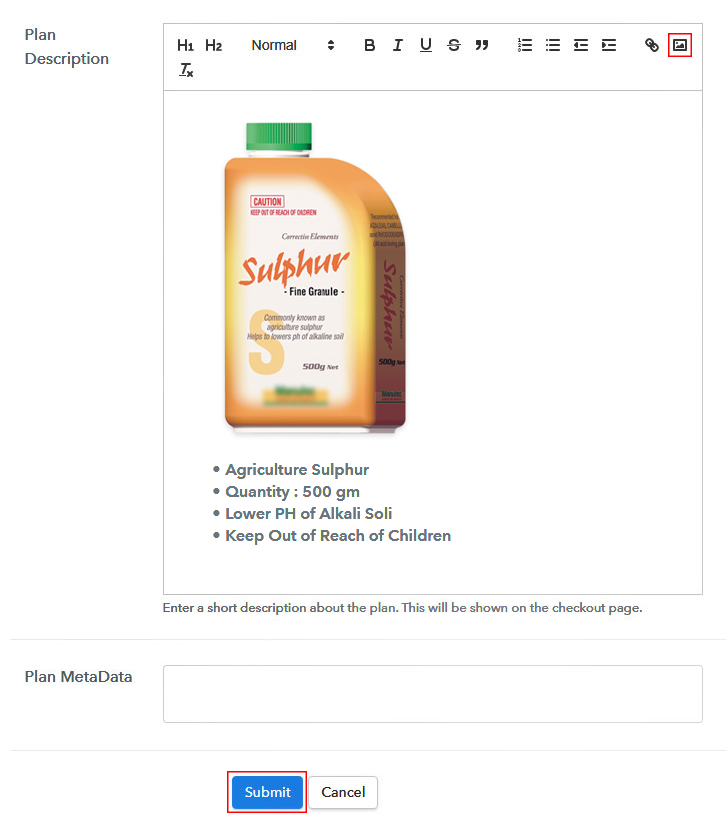
Add Image & Description to Sell Sulphur Online

Moreover, if you want to display an image with some descriptive feature of the sulphur product you can mention it here under ‘Plan Description’.

Click the ‘Submit’ button and a plan will be launched to sell sulphur online.

Moreover, you can add other sulphur plans by repeating this process.

Step 7: Share your Checkout Page

Share Checkout Page on Social Media

To start sulphur business online, you can share a checkout page and bring customers on the payments page. There are three ways to do so.

  • First, you can share the plan link URL on all the social media & link sharing channels like SMS, emails, WhatsApp etc
  • Second, you can tap the Facebook or Twitter sharing buttons to directly share a checkout page over there platforms
  • Third, you can redirect a customer on the checkout pages by linking the plan link with buttons & text anchors for a website or app

Step 8: Preview Checkout Page

Follow up the recommended steps to preview the checkout page:

(a) Click on the View Button

View Checkout Plan

(b) Take a Look at the Checkout Page

Checkout Page Preview to Sell Sulphur Online

Step 9: Embed Checkout Page in Site & Sell Sulphur Online

Embed Checkout Page on Website

Just copy the link and add the checkout page to sell sulphur online at any preferable place on your WordPress site.

(a) Edit the Page & Paste the Copied Link

Embed Checkout Page on Website

Further, paste the plan link on a text editor of the WordPress dashboard.

(b) Save & Publish the Checkout Page

Save_and_Publish

Next, click the “Publish” button, after making changes.

(c) Check out the Final Look of your Checkout Page on WordPress Site

Checkout Page On WordPress Site to Sell Sulphur Online

Step 10: Multiplan Checkout Page

Note: In case you want to sell multiple products via a single checkout page, you can create a multi-plan checkout page otherwise skip this step.

(a) Click on Add Mutiplan Checkout

Multiplan Checkout

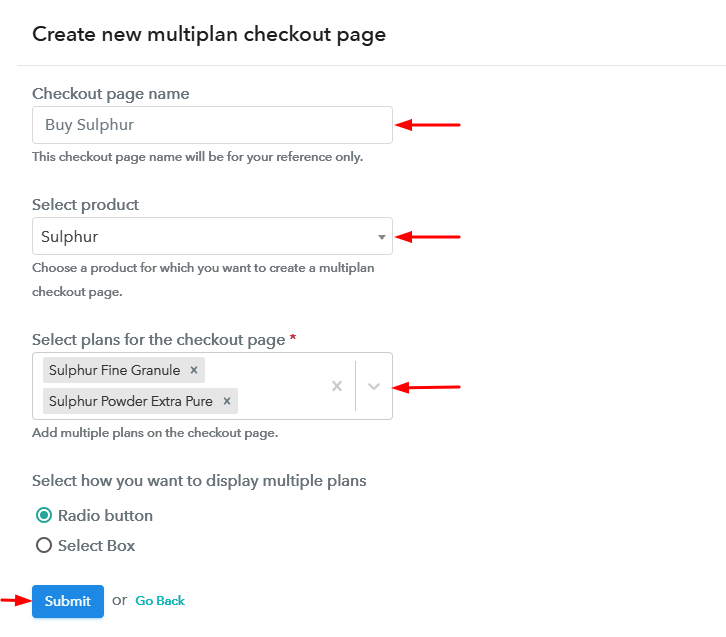
(b) Add Plans to Sell Multiple Sulphur from Single Checkout Page

Create Multiplan Checkout to Sell Sulphur Online

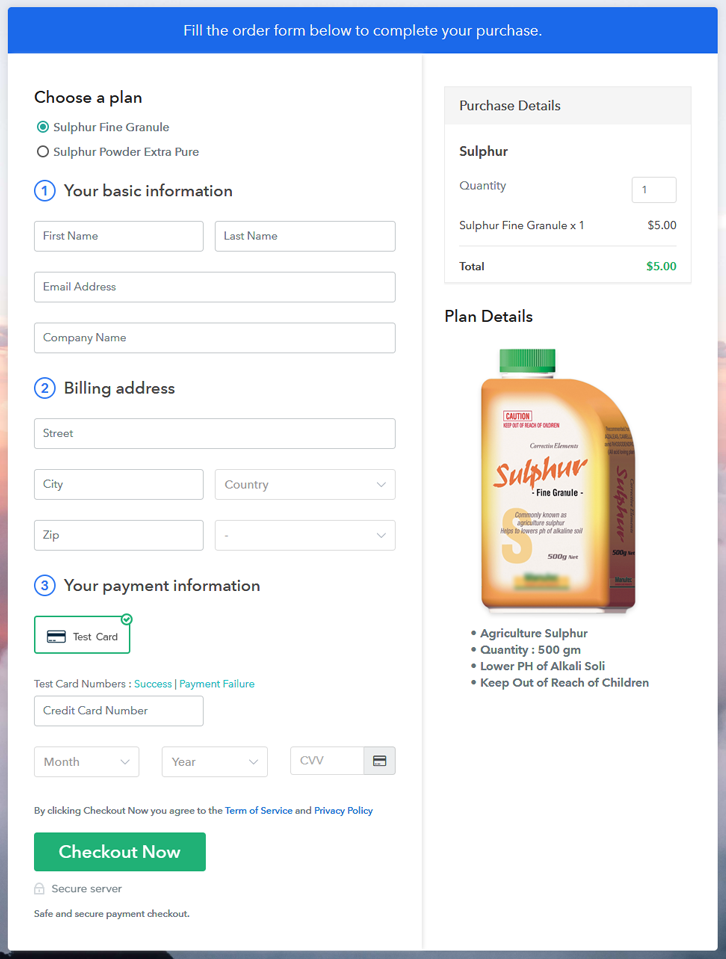
(c) Take a Look at the Checkout Page

Multiplan Checkout Page to Sell Sulphur Online

Preview Checkout Page

Wrapping Up

This was the entire procedure for creating checkout pages to sell sulphur online. As you can see by yourself that the process is very simple and even a non-techy person can follow them easily. Apart from all that, you can accept any currency, keep track of the revenue from the dashboard and can sell unlimited products worldwide.

You May Also Like To Read –
How to Sell Safety Helmets Online | Step by Step (Free Method)

How to Sell Safety Helmets Online

Ideal For: All the helmet manufacturers, safety item sellers, safety helmet dealers, safety equipment suppliers, and other merchants can use this method to sell safety helmets online.

How to Sell Safety Helmets Online

Why Choose this Method to Sell Safety Helmets Online?

Unlike any other solution, this method allows you to:

  • List and sell your safety helmets for FREE. Absolutely no payment required.
  • No need to pay commission on any of your sales.
  • Multiple payment options like PayPal, Credit Card, etc to collect payment from a single place.
  • Sell one time or recurring subscriptions of your safety helmets.
  • Collect payments & sell products in any currency as per your requirement.
  • Give discounts on your products by offering special coupon codes.
  • Add sales commission agents to help you in selling safety helmets online.

Get Pabbly Subscription Billing for Free

Better late than never is a reason why people take moments to wear helmets. Every year how many lives are saved just because of helmets. Whether industrial workers or factory operators, safety helmets have become a compulsory accessory to wear which is why there is a colossal demand for helmets.  But that demand can’t be fulfilled alone by conventional stores. So, it is better to start a safety helmets business online.

By starting safety helmets business online, you can sell your product all across the globe, Plus, online stores are free from constraints like holidays, weekends and all. Most importantly, with every new day, there is a hope of gaining new customers. Isn’t it amazing? Yes, and you must have given the slightest thought of your own store. Gladly, we have a software named Pabbly Subscription Billing that can help you build your own safety helmets store. The software lets you create a checkout page for selling safety helmets online. Some of its exciting features involve:

  • Generate Invoices
  • Track Revenue
  • Custom Domains

Now, without any ado let’s create a checkout page for selling safety helmets online using this tool.

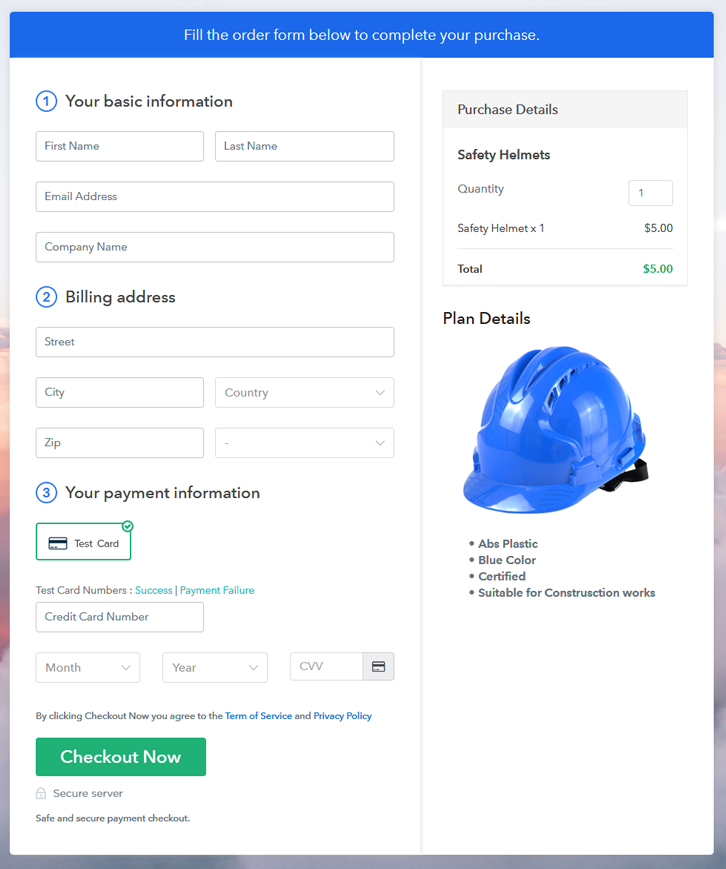
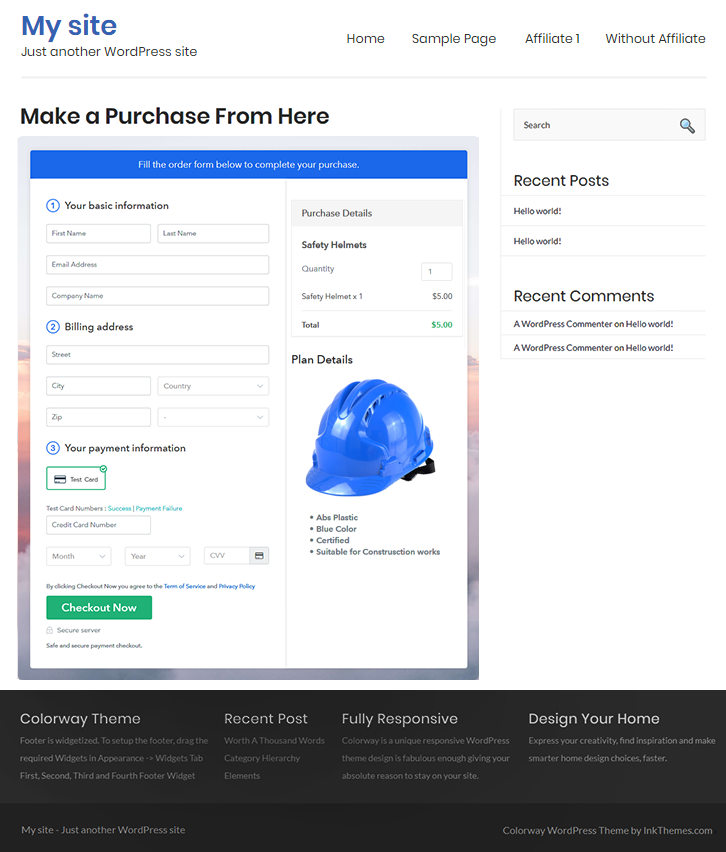
Final View of Checkout Page for your Safety Helmets Selling Business

Checkout Page to Sell Safety Helmets Online

Preview Checkout Page

Step 1: Log in to Pabbly Subscription Billing

Signup

Start the process for creating a checkout page for safety helmets by visiting the Pabbly Subscription Billing in your browser. After that, click on the “Sign up Free“ button. Moreover, either manually filled out the details or sign in using your Gmail account.

Sign Up For Free!

Step 2: Select Subscription Billing

Access Subscription Billing

Step 3: Account Setup

Setup Account

Also, after clicking on the “Access Now” button of the software, a page will open with fields like company name, select currency, and phone number. Just fill out those details to continue creating a checkout page for safety helmets.

Step 4: Connect Payment Gateways & Start Safety Helmets Selling Business Online

Connect Payment Gateway

The subsequent step is to achieving information about payment procedures using a “Test Payment Gateway”. Here, we will describe the checkout page process for the safety helmets with the help of a test payment gateway. Besides this, the tool offers various payment gateways such as PayPal, Stripe, etc. Further, below are the payment integration guides to help you out.

Step 5: Add Product for your Safety Helmets

Add Product

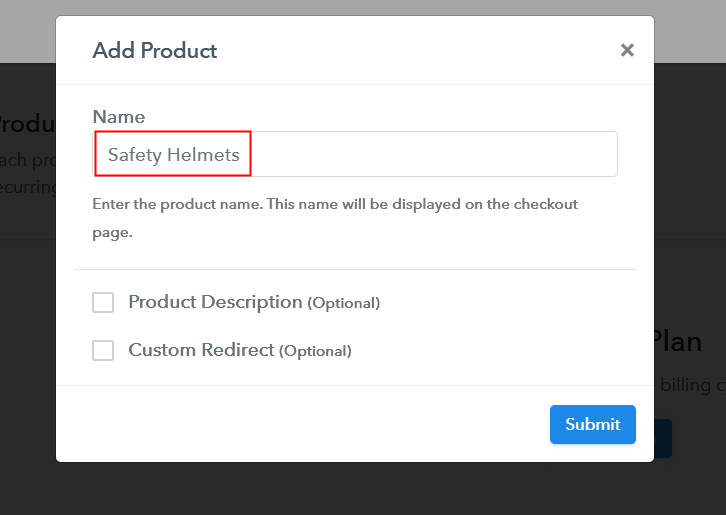
Additionally, add the name, which in our case is “Safety Helmets”. Here you can specify the type like industrial safety helmets, vehicle helmets, etc. Further, write a short description of the safety helmets to capture the shopper’s attention.

Add Product to Start Selling Safety Helmets Online

Moreover, just fill out all those details and your product for safety helmets is created.

Note: Here you can add all the products related to the similar category by creating plans for each of them.

Step 6: Add Plans 

Further, let’s reveal plans for different kinds of safety helmets available in your store.

(a) Select Add New Plan

Add Plan

(b) Specify the Plan & Pricing Details

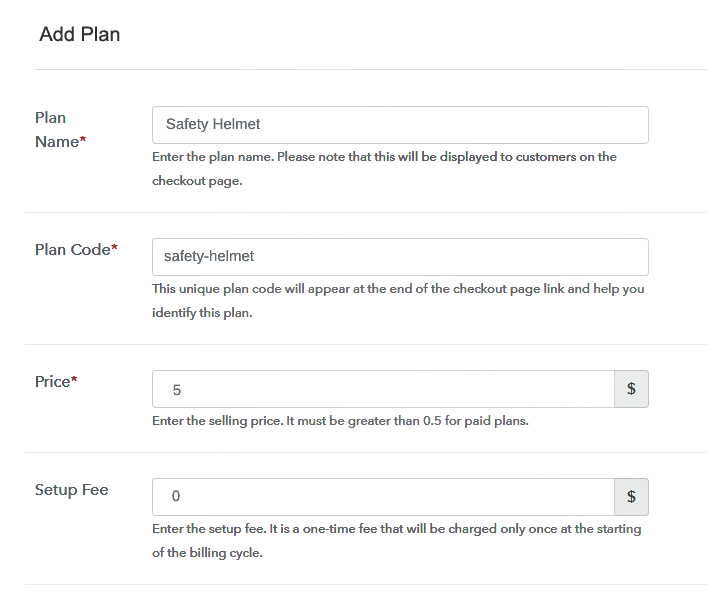
Specify the Plan and Pricing to Sell Safety Helmets Online

Subsequently, the next thing to do is fill all the details of the safety helmets like plan name, code, price, set-up fee, and much more to continue.

(c) Add Image & Description of Safety Helmets

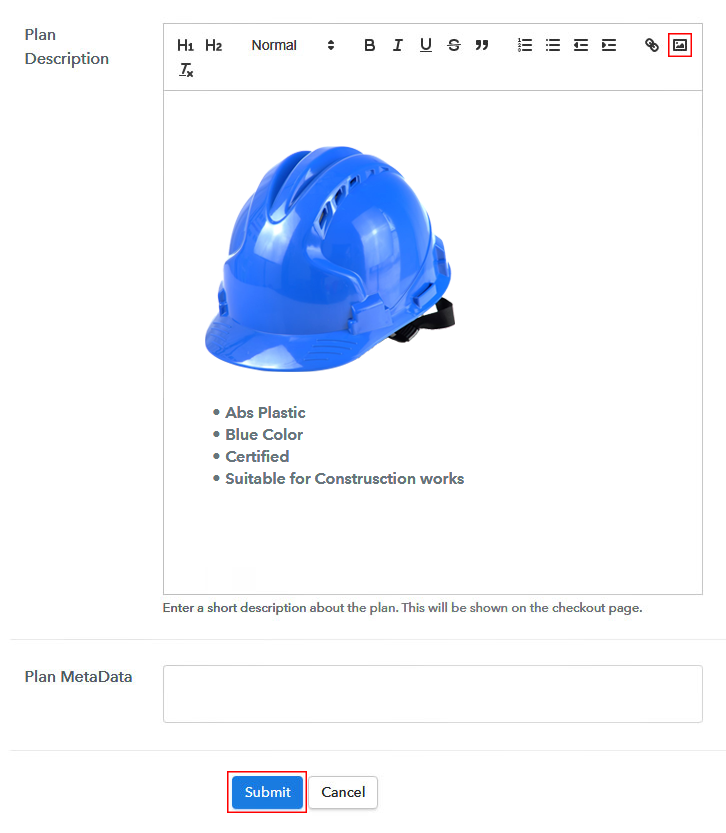
Add Image & Description to Sell Safety Helmets Online

Furthermore, write a brief description of the safety helmets using bullets, images, etc, to bring original buyers to the checkout page.

Next, click on the “Submit” button to add the safety helmets on the checkout page.

Finally, you can add multiple plans and kinds of safety helmets in your product list which you want to market online.

Step 7: Share your Checkout Page

Share Checkout Page on Social Media

  • Moreover, share the checkout page of the safety helmets on social media accounts like Facebook & Twitter to grab the customer’s attention.
  • Also, you can share the direct link of the safety helmet’s checkout page with your customers via SMS or email marketing.
  • Additionally, embed the provided plan link of the safety helmets in the buttons or any anchor text on your website.

Step 8: Preview Checkout Page

Follow up the recommended steps to preview the checkout page for safety helmets:

(a) Click on the View Button

View Checkout Plan

(b) Take a Look at the Checkout Page

Checkout Page to Sell Safety Helmets Online

Step 9: Embed Checkout Page in Site & Sell Safety Helmets Online

Embed Checkout Page on Website

Moreover, just copy the link and add the checkout page to sell safety helmets online at any proper place on your WordPress site.

(a) Edit the Page & Paste the Copied Link

Paste Link in Text Editor

Further, paste the plan link of safety helmets on a text editor of the WordPress dashboard.

(b) Save & Publish the Checkout Page

Save_and_Publish

Next, click the “Publish” button, after making changes.

(c) Check out the Final Look of your Checkout Page on WordPress Site

Final Look of your Checkout Page to Sell Safety Helmets Online

Step 10: Multiplan Checkout Page

Note: In case you want to sell multiple products via a single checkout page, you can create a multi-plan checkout page otherwise skip this step.

(a) Click on Add Mutiplan Checkout

Multiplan Checkout

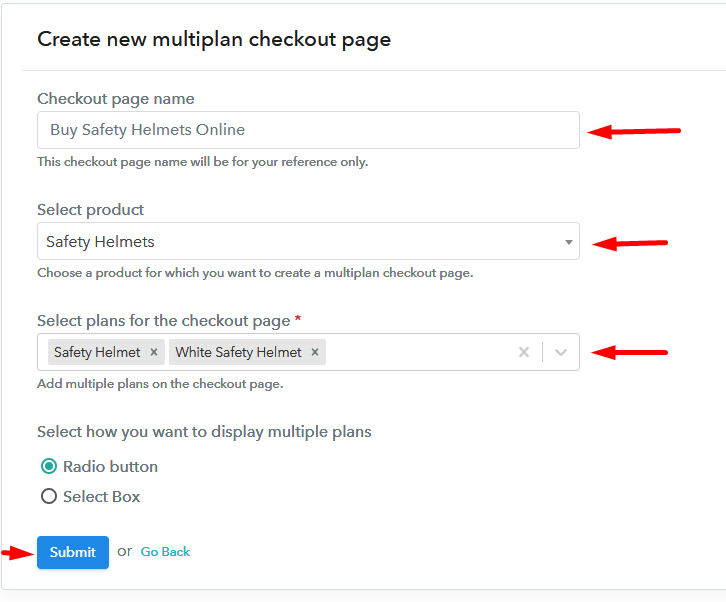
(b) Add Plans to Sell Multiple Safety Helmets from Single Checkout Page

Add Multiple Products to Start Selling Safety Helmets Online

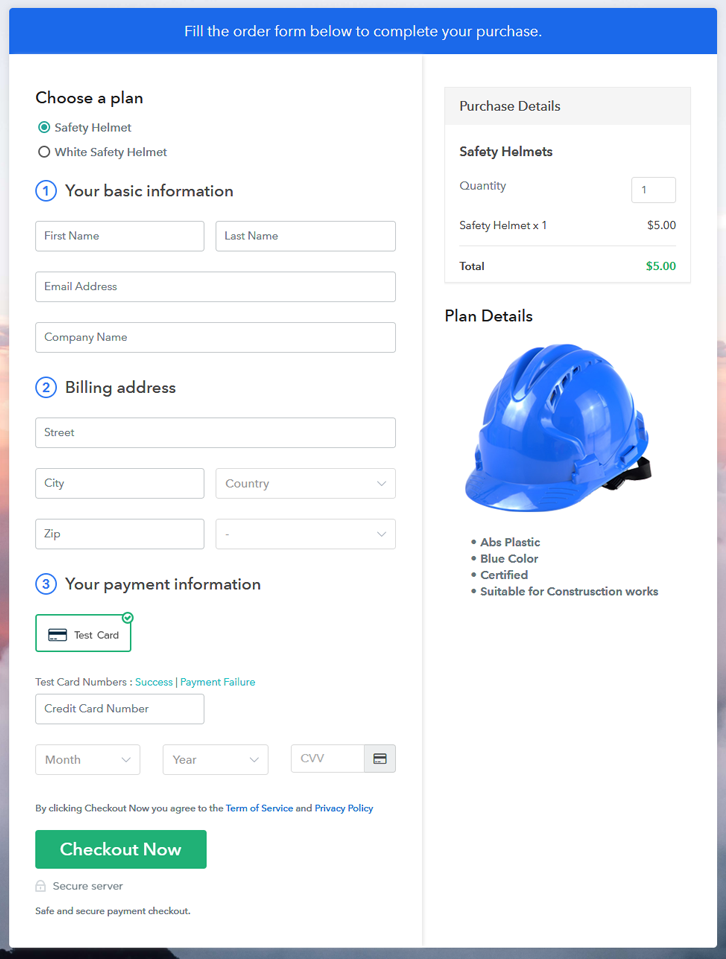
(c) Take a Look at the Checkout Page

Multiplan Checkout Page to Sell Safety Helmets Online

Preview Checkout Page

Wrapping Up

Thus, we are concluding this blog with a thought that you must have attained the wisdom of beginning your own safety helmets business using Pabbly Subscription Billing software. Safety helmets block you from all kinds of scalp injuries, this is why people opt for safety helmets. And, selling safety helmets online with the help of software is very much easy.

So, don’t dwell anymore, go, and try your hands on the software.

You May Also Like To Read –
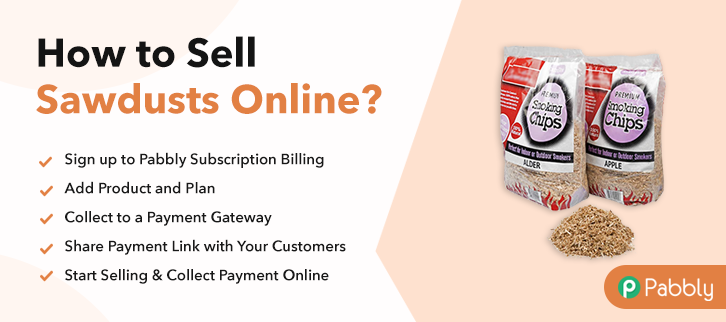
How to Sell Sawdusts Online | Step by Step (Free Method)

How to Sell Sawdusts Online

Ideal For: All the sawdust manufacturers, sawdust sellers, sawdust dealers, sawdust suppliers, sawdust traders, and other merchants can use this method to sell sawdusts online.

How to Sell Sawdusts Online

Why Choose this Method to Sell Sawdusts Online?

Unlike any other solution, this method allows you to:

  • List and sell your sawdusts for FREE. Absolutely no payment required.
  • No need to pay commission on any of your sales.
  • Multiple payment options like PayPal, Credit Card, etc to collect payment from a single place.
  • Sell one time or recurring subscriptions of your sawdusts.
  • Collect payments & sell products in any currency as per your requirement.
  • Give discounts on your products by offering special coupon codes.
  • Add sales commission agents to help you in selling sawdusts online.

Get Pabbly Subscription Billing for Free

Sawdusts is widely used by people in soil manure, craftwork, furniture fix, etc. Thus, if you have sawdusts offline store or else you know how to generate sawdusts then you can easily start a business out of it by selling sawdusts online.

By taking your business online, you can reach out to the global audience and sell sawdusts worldwide. Additionally, online stores provide many opportunities like better marketing, revenue, improved sales, etc.

Therefore, here we are recommending the amazing software named Pabbly Subscription Billing that can really be a big help. The software lets you build an amazing checkout page for selling sawdusts online. Plus, it keeps you on top of assets, bills, purchases. Also, offers ways to obtain recurring or one-time payment through its checkout page.

Some of its impressive features include:

  • Generate Invoices
  • Track Revenue
  • Custom Domains

Now, without any ado let’s create a checkout page for selling sawdusts online using this tool.

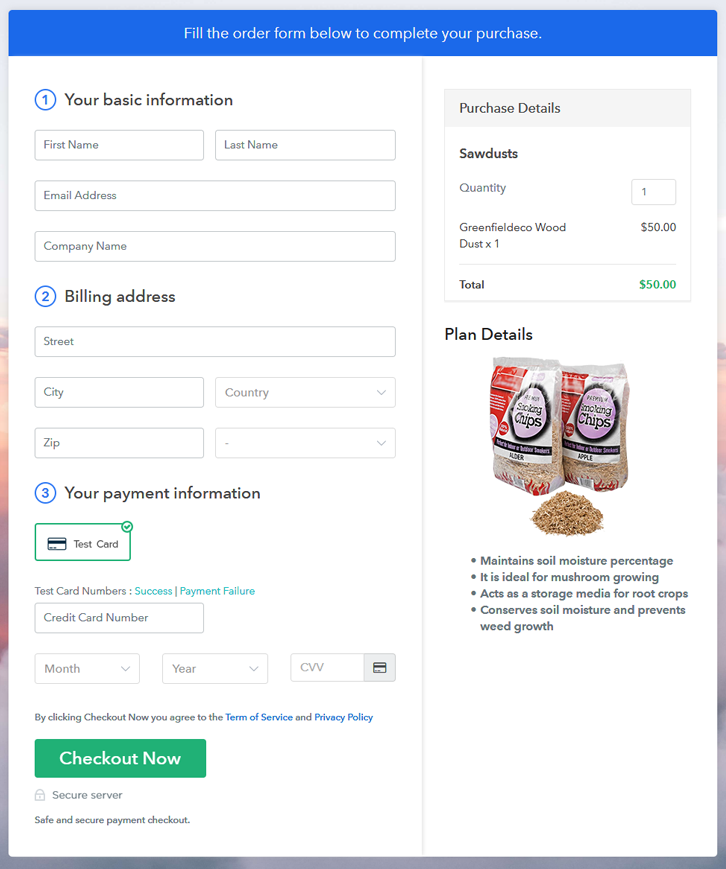
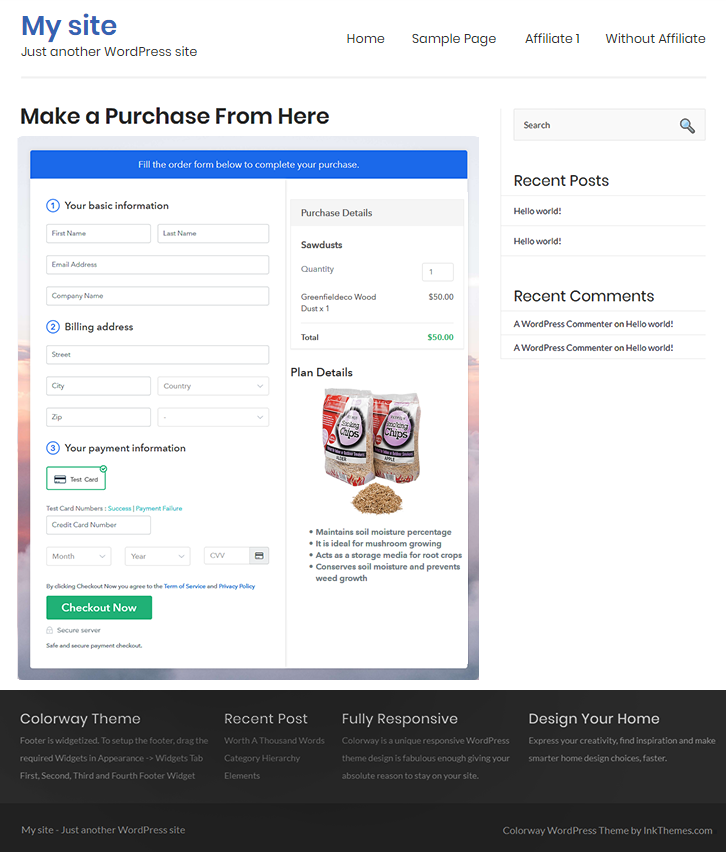
Final View of Checkout Page for your Sawdusts Selling Business

Final View of Checkout Page for your Sawdusts Selling Business

Preview Checkout Page

Step 1: Log in to Pabbly Subscription Billing

Signup

Start the process for creating a checkout page for sawdusts by visiting the Pabbly Subscription Billing in your browser. After that, click on the “Sign up Free“ button. Furthermore, either manually filled out the details or sign in using your Gmail account.

Sign Up For Free!

Step 2: Select Subscription Billing

Access Subscription Billing

Step 3: Account Setup

Setup Account

Also, after clicking on the “Access Now” button of the software, a page will open with fields like company name, select currency, and phone number. Just fill out those details to continue creating a checkout page for sawdusts.

Step 4: Connect Payment Gateways & Start Sawdusts Selling Business Online

Connect Payment Gateway

The following step is to attaining awareness about payment procedures using a “Test Payment Gateway”. Here, we will describe the checkout page process for the sawdust with the help of a test payment gateway. Besides this, the tool offers various payment gateways such as PayPal, Stripe, etc. Further, below are the payment integration guides to help you out.

Step 5: Add Product for your Sawdusts

Add Product

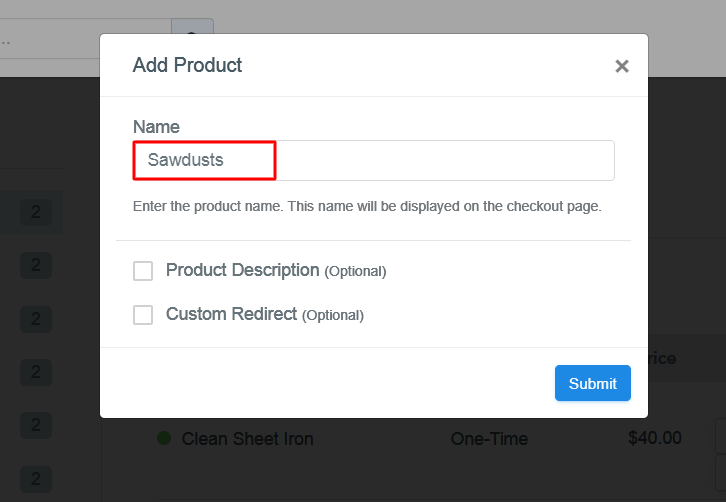
Additionally, add the name, which in our case is “Sawdusts”. Here you can specify the type and give a short description of the sawdusts to seize the customer’s attention.

Add Product To Sell Sawdusts Online

Moreover, just fill out all those details and your product for sawdusts is created.

Note: Here you can add all the products related to the similar category by creating plans for each of them.

Step 6: Add Plans 

Let’s display plans for different kinds of sawdusts available in your store.

(a) Select Add New Plan

Add Plan

(b) Specify the Plan & Pricing Details

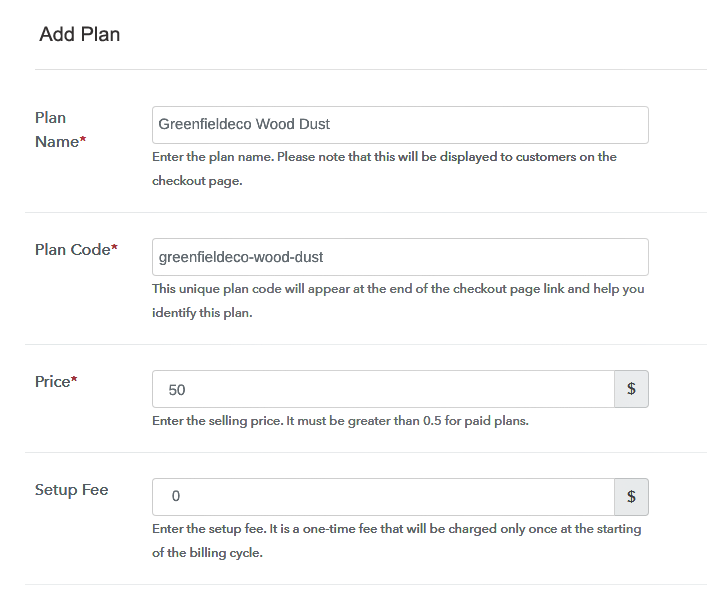
Specify the Plan and Pricing to Sell Sawdusts Online

The next thing to do is fill all the details of the sawdusts like plan name, code, price, set-up fee, and much more to continue.

(c) Add Image & Description of Sawdusts

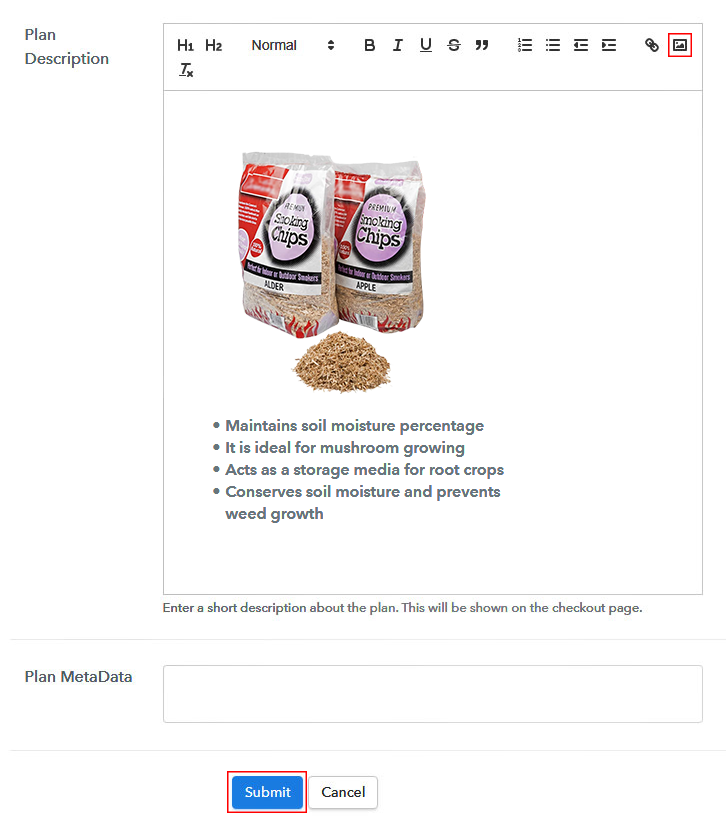
Add Image & Description of Sawdusts

Furthermore, write a brief description of the sawdusts using bullets, images, etc, to bring original buyers to the checkout page.

Next, click on the “Submit” button to add the sawdusts on the checkout page.

Finally, you can add multiple plans and kinds of sawdusts in your product list which you want to market online.

Step 7: Share your Checkout Page

Share Checkout Page on Social Media

  • Moreover, share the checkout page of the sawdusts on social media accounts like Facebook & Twitter to grab the customer’s attention.
  • Also, you can share the direct link of the sawdust’s checkout page with your customers via SMS or email marketing.
  • Additionally, embed the provided plan link of the sawdusts in the buttons or any anchor text on your website.

Step 8: Preview Checkout Page

Follow up the recommended steps to preview the checkout page for sawdusts:

(a) Click on the View Button

View Checkout Plan

(b) Take a Look at the Checkout Page

Final View of Checkout Page for your Sawdusts Selling Business

Step 9: Embed Checkout Page in Site & Sell Sawdusts Online

Embed Checkout Page on Website

Just copy the link and add the checkout page to sell sawdusts online at any proper place on your WordPress site.

(a) Edit the Page & Paste the Copied Link

Paste Link in Text Editor

Further, paste the plan link of sawdusts on a text editor of the WordPress dashboard.

(b) Save & Publish the Checkout Page

Save_and_Publish

Next, click the “Publish” button, after making changes.

(c) Check out the Final Look of your Checkout Page on WordPress Site

Final Look of your Checkout Page on WordPress Site

Step 10: Multiplan Checkout Page

Note: In case you want to sell multiple products via a single checkout page, you can create a multi-plan checkout page otherwise skip this step.

(a) Click on Add Mutiplan Checkout

Multiplan Checkout

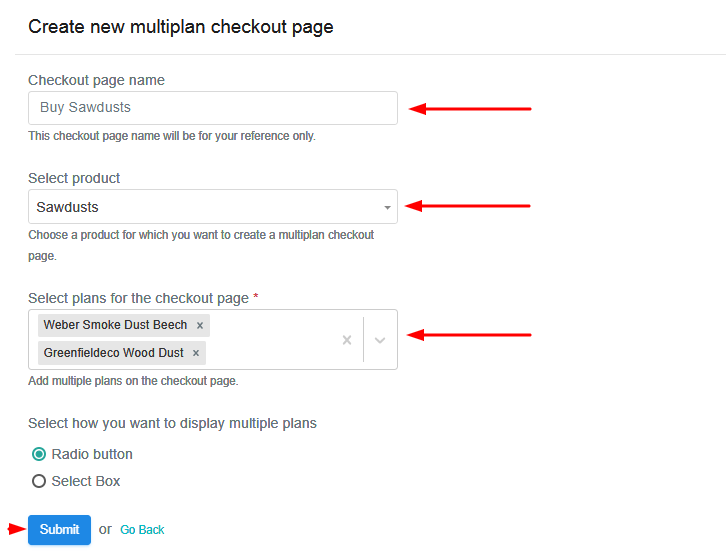
(b) Add Plans to Sell Multiple Sawdusts from Single Checkout Page

Add Plans to Sell Multiple Sawdusts from Single Checkout Page

(c) Take a Look at the Checkout Page

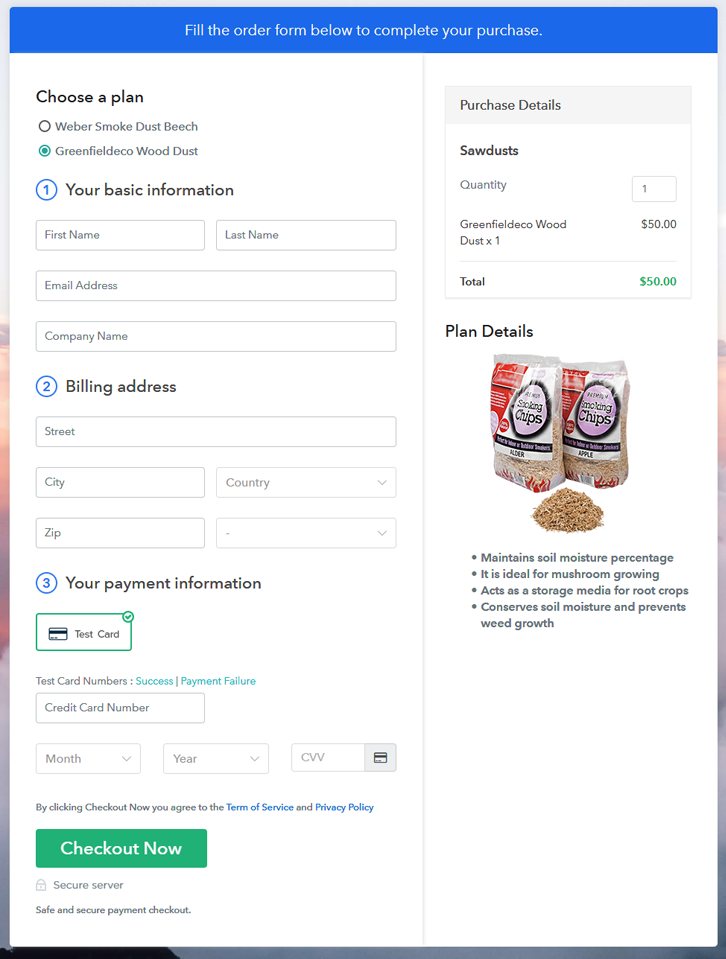
Multiplan Checkout Page to Start Sawdusts Business Online

Preview Checkout Page

Wrapping Up

Hereby, we are concluding this blog with a thought that you must have gained the knowledge of starting your own sawdusts business using Pabbly Subscription Billing software. So go ahead and start selling sawdusts online with the help of this amazing software. And if you have any queries, don’t forget to mention it in the comment section below.

You May Also Like To Read –
How to Sell School Supplies Online | Step by Step (Free Method)

How To Sell School Supplies Online

Ideal For: All the stationary manufacturers, school stationary sellers, school supply dealers, stationary suppliers, and other merchants can use this method to sell school supplies online.

How To Sell School Supplies Online

Why Choose this Method to Sell School Supplies Online?

Unlike any other solution, this method allows you to:

  • List and sell your school supplies for FREE. Absolutely no payment required.
  • No need to pay commission on any of your sales.
  • Multiple payment options like PayPal, Credit Card, etc to collect payment from a single place.
  • Sell one time or recurring subscriptions of your school supplies.
  • Collect payments & sell products in any currency as per your requirement.
  • Give discounts on your products by offering special coupon codes.
  • Add sales commission agents to help you in selling school supplies online.

Get Pabbly Subscription Billing for Free

The excitement for school supplies never goes down. Buying new pens, books and notebooks bring a curve on student’s faces. This is exactly why with the arrival of new sessions, the stores start preparing themselves for markets. But most of the time parents preferred to purchase the stationaries online which is exactly you should start school supplies business online.

Ordinary stores possess limited stocks and choices whereas in online stores puts you on top of the stocks, invoices, revenue, and much more. Furthermore, an online store brings better cashflow as it grants exemptions for agile payments. Also, your store is open to the whole world. Luckily, we came across a software named Pabbly Subscription Billing that lets you start your own school supplies business online. This tool lets you build an amazing checkout page for selling school supplies online. Other than this, it has remarkable features like

  • Infinite Discount & Coupons
  • Revenue Tracking
  • One Time and Recurring Billing

Subsequently, now let me show you 10 easy steps that you need to follow for creating checkout pages for selling school supplies online.

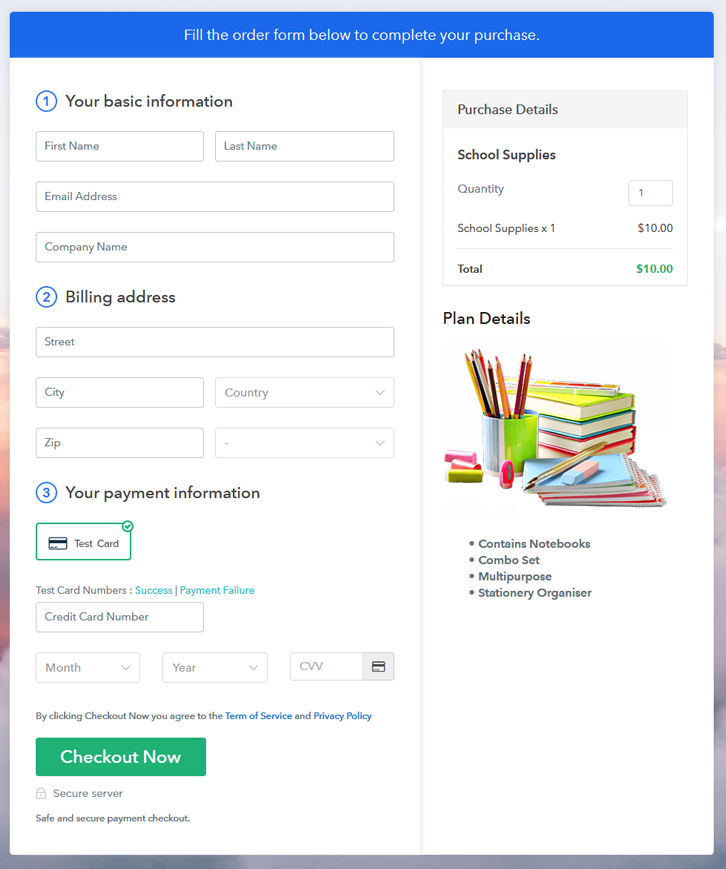
Final View of Checkout Page for your School Supplies Selling Business

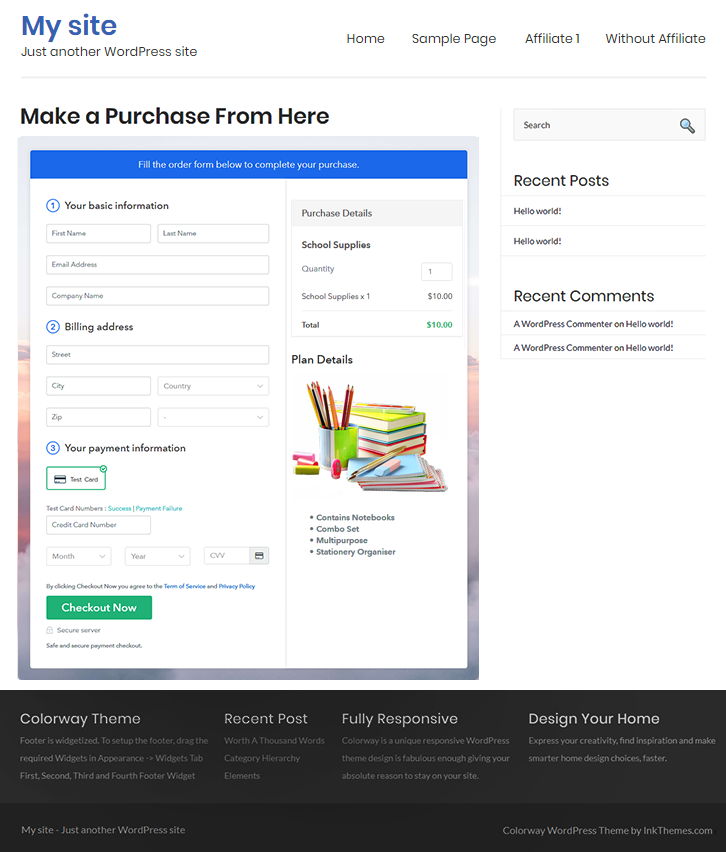
Checkout Page to Sell School Supplies Online

Preview Checkout Page

Step 1: Log in to Pabbly Subscription Billing

Signup

Start the process for creating a checkout page for school supplies by visiting the Pabbly Subscription Billing in your browser. After that, click on the “Sign up Free“ button. Moreover, either manually filled out the details or sign in using your Gmail account.

Sign Up For Free!

Step 2: Select Subscription Billing

Access Subscription Billing

Step 3: Account Setup

Setup Account

Also, after clicking on the “Access Now” button of the software, a page will open with fields like company name, select currency, and phone number. Just fill out those details to continue creating a checkout page for school supplies.

Step 4: Connect Payment Gateways & Start School Supplies Selling Business Online

Connect Payment Gateway

The subsequent step is to achieving information about payment procedures using a “Test Payment Gateway”. Here, we will describe the checkout page process for the school supplies with the help of a test payment gateway. Besides this, the tool offers various payment gateways such as PayPal, Stripe, etc. Further, below are the payment integration guides to help you out.

Step 5: Add Product for your School Supplies

Add Product

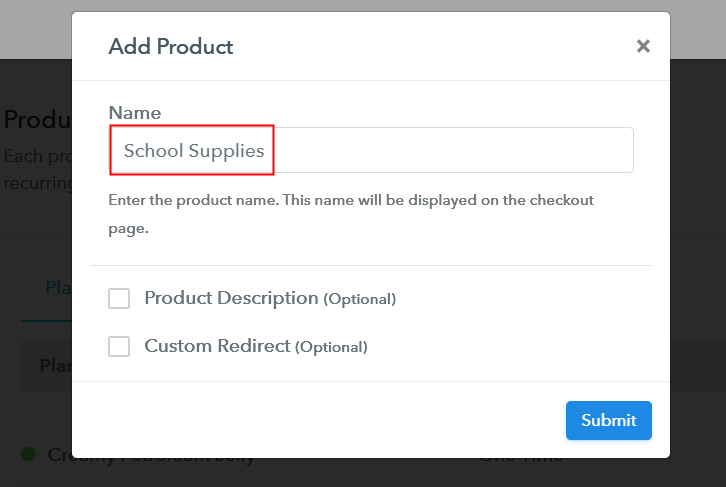
Additionally, add the name, which in our case is “School Supplies”. Here you can specify the type like basic school supplies, classroom supplies, etc. Further, write a short description of the school supplies to captivate the buyer’s attention.

Add Product to Start Selling School Supplies Online

Moreover, just fill out all those details and your product for school supplies is created.

Note: Here you can add all the products related to the similar category by creating plans for each of them.

Step 6: Add Plans 

Further, let’s reveal plans for different kinds of school supplies available in your store.

(a) Select Add New Plan

Add Plan

(b) Specify the Plan & Pricing Details

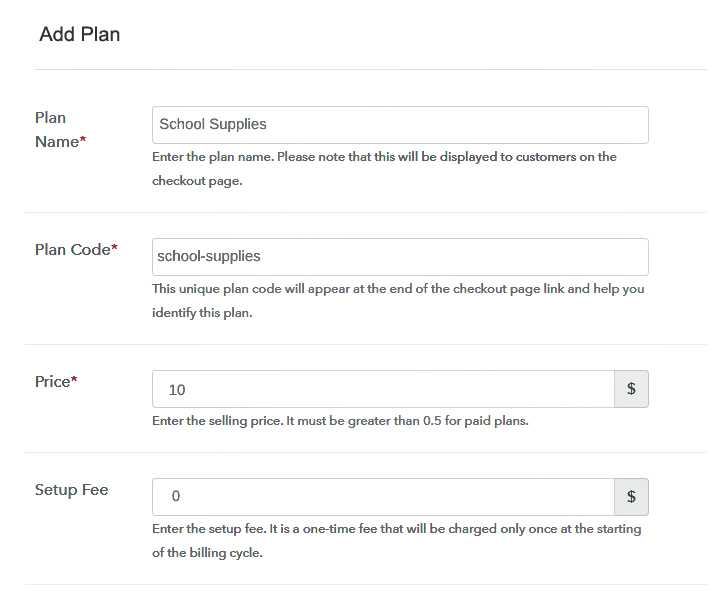
Specify the Plan and Pricing to Sell School Supplies Online

Subsequently, the next thing to do is fill all the details of the school supplies like plan name, code, price, set-up fee, and much more to continue.

(c) Add Image & Description of School Supplies

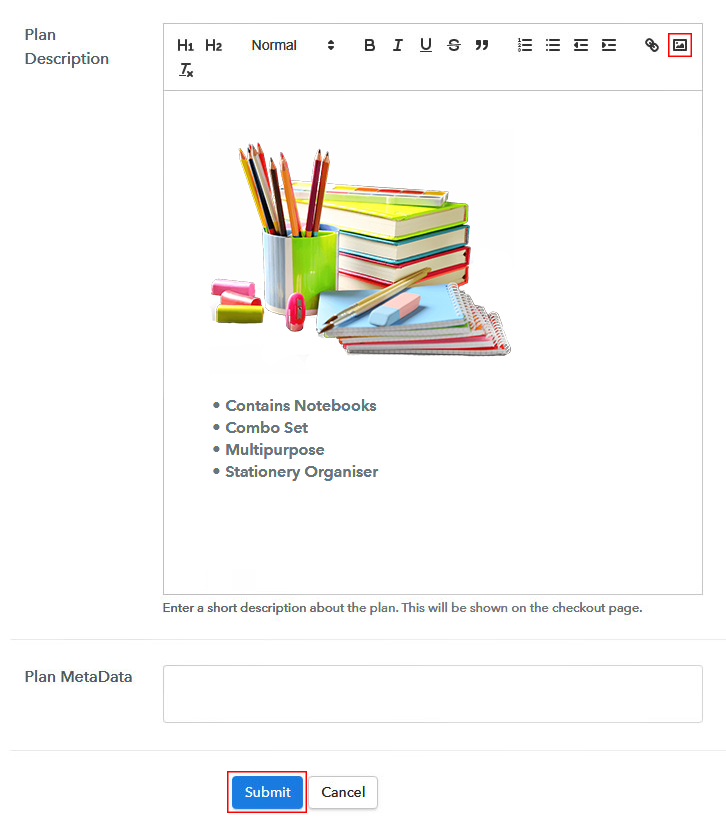
Add Image & Description to Sell School Supplies Online

Furthermore, write a brief description of the school supplies using bullets, images, etc, to bring original buyers to the checkout page.

Next, click on the “Submit” button to add the school supplies on the checkout page.

Finally, you can add multiple plans and kinds of school supplies in your product list which you want to market online.

Step 7: Share your Checkout Page

Share Checkout Page on Social Media

  • Moreover, share the checkout page of the school supplies on social media accounts like Facebook & Twitter to grab the customer’s attention.
  • Also, you can share the direct link of the school supplies checkout page with your customers via SMS or email marketing.
  • Additionally, embed the provided plan link of the school supplies in the buttons or any anchor text on your website.

Step 8: Preview Checkout Page

Follow up the recommended steps to preview the checkout page for school supplies:

(a) Click on the View Button

View Checkout Plan

(b) Take a Look at the Checkout Page

Checkout Page to Sell School Supplies Online

Step 9: Embed Checkout Page in Site & Sell School Supplies Online

Embed Checkout Page on Website

Moreover, just copy the link and add the checkout page to sell school supplies online at any proper place on your WordPress site.

(a) Edit the Page & Paste the Copied Link

Paste Link in Text Editor

Further, paste the plan link of school supplies on a text editor of the WordPress dashboard.

(b) Save & Publish the Checkout Page

Save_and_Publish

Next, click the “Publish” button, after making changes.

(c) Check out the Final Look of your Checkout Page on WordPress Site

Final Look of your Checkout Page to Sell School Supplies Online

Step 10: Multiplan Checkout Page

Note: In case you want to sell multiple products via a single checkout page, you can create a multi-plan checkout page otherwise skip this step.

(a) Click on Add Mutiplan Checkout

Multiplan Checkout

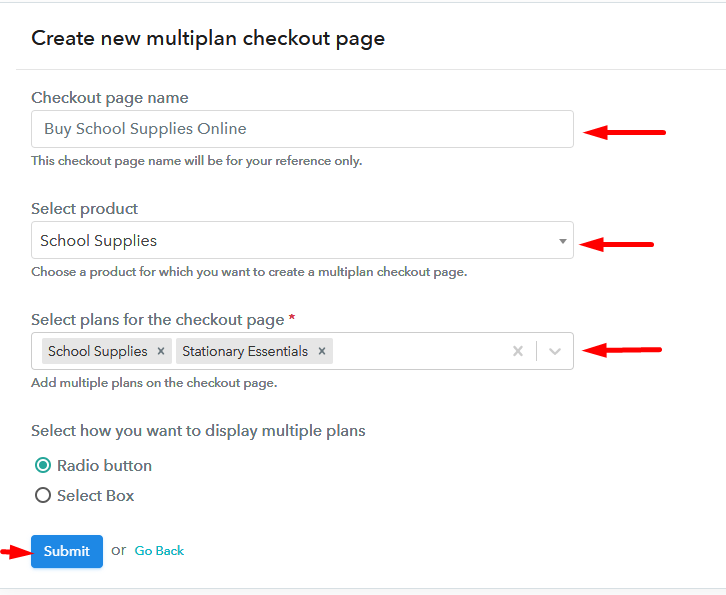
(b) Add Plans to Sell Multiple School Supplies from Single Checkout Page

Specify the Plan and Pricing to Sell School Supplies Online

(c) Take a Look at the Checkout Page

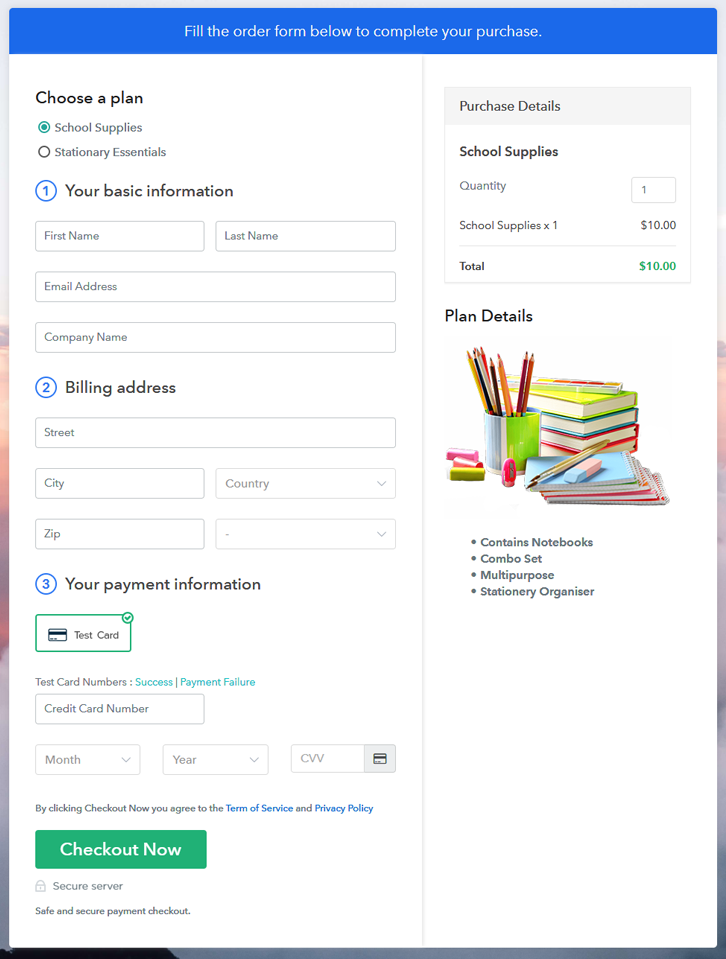
Multiplan Checkout Page to Sell School Supplies Online

Preview Checkout Page

Wrapping Up

Alright! With the starting of new sessions, school supplies come in demand and that demands never go off throughout the year. So starting a school supplies business is the best idea. Now you know how easy is to sell school supplies online using Pabbly Subscription Billing software. Simply pass through all the maneuvered steps and nothing else.

So, don’t anticipate anymore, try this software out.

You May Also Like To Read –
How to Sell Sugarcanes Online | Step by Step (Free Method)

Ideal For: All the farmers, fruit sellers, fruits and vegetables suppliers, fruits and vegetables shops, and other sellers can use this method to take their sugarcanes selling business online.

How to Sell Sugarcanes Online

Why Choose this Method To Sell Sugarcanes Online?

Unlike any other solution, this method allows you to:

  • List and sell your sugarcanes for FREE. Absolutely no payment required.
  • No need to pay commission on any of your sales.
  • Multiple payment options like PayPal, Credit Card, etc to collect payment from a single place.
  • Sell one time or recurring subscriptions of your sugarcanes.
  • Collect payments & sell products in any currency as per your requirement.
  • Give discounts on your products by offering special coupon codes.
  • Add sales commission agents to help you in selling sugarcanes online.

Get Pabbly Subscription Billing for Free

The sugar mills’ profit has been constantly growing over the past few years and is measured to continue to grow into the coming years. So, if you sell sugarcanes and you really want to boost up your business then let’s take your sugarcanes selling business online.

Because of the online sugarcanes selling business, you can easily expand your business worldwide and record a difference in your customer range. To start your online business you need only one service and that is Pabbly Subscription Billing which offers a completely free platform. With this software you can create enticing checkout pages free of cost and share them on online platforms and users can buy your sugarcanes directly through them.

In addition to checkout pages, you also get unlimited access to its amazing features for free:

  • Add and sell unlimited sugarcanes
  • Sell sugarcanes in wholesale or retail
  • Share invoices of your sugarcanes with customers automatically
  • Collect one-time or recurring payments of sugarcanes

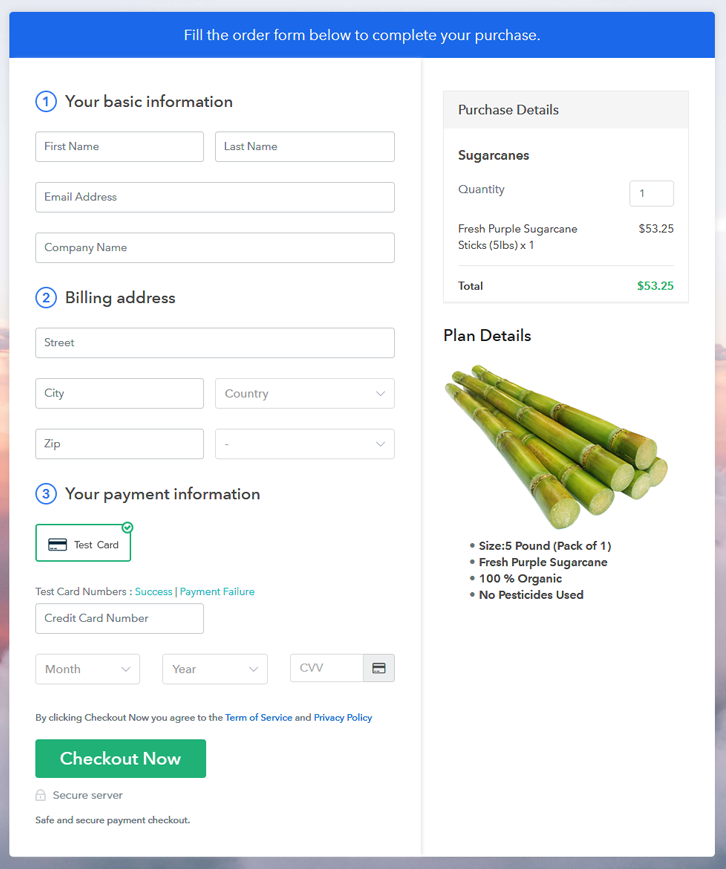
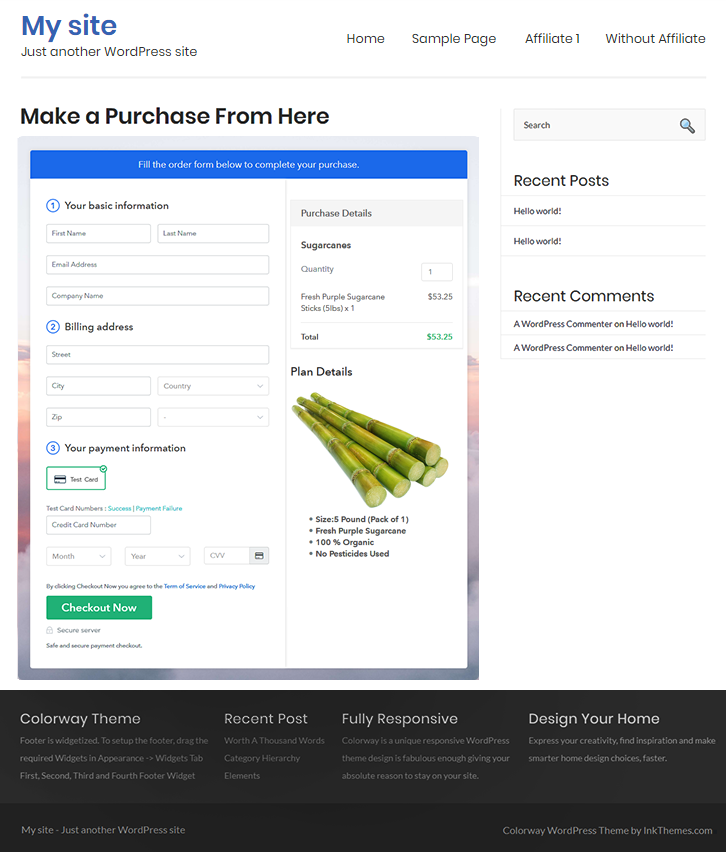
Final View of Checkout Page for your Sugarcanes Selling Business

Preview Checkout Page

Preview Checkout Page

Step 1: Log in to Pabbly Subscription Billing

Signup

Visit Pabbly Subscription Billing website then click on the “Sign Up Free” button. On clicking the button, the signup page will appear, where you can create your account with your Gmail or you can also manually enter your details.

Sign Up For Free!

Step 2: Select Subscription Billing

Access Subscription Billing

Step 3: Account Setup

Setup Account

Once the signup process is finished, now you have to fill up your company details i.e. company name, currency, and contact number in the dialogue box.

Step 4: Connect Payment Gateways & Start Sugarcanes Selling Business Online

Connect Payment Gateway

Further, here, the payment collection process is explained by enabling the ‘Test Payment’ mode. Afterwards, you can connect other payment gateways such as PayPal, Stripe, etc whichever that you like. The complete integration guide for payment gateways is provided below-

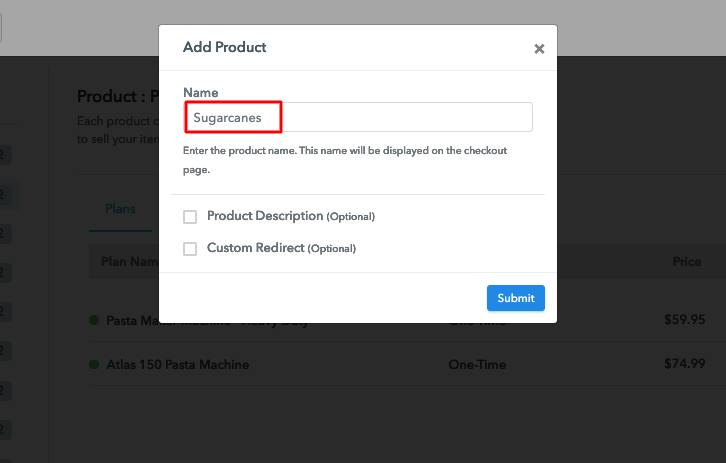
Step 5: Add Product for your Sugarcanes

Add Product

After the payment mode is enabled, now you have to add your first product. You can add sugarcanes of different types such as organic sugarcanes, purple sugarcanes, etc.

Sell Sugarcanes Online Product Name

Likewise, add all other types of sugarcanes in the same product by creating different plans.

Note: Here you can add all the products related to the similar category by creating plans for each of them.

Step 6: Add Plans 

Let’s create plans for different kinds of sugarcanes that you want to sell.

(a) Select Add New Plan

Add Plan

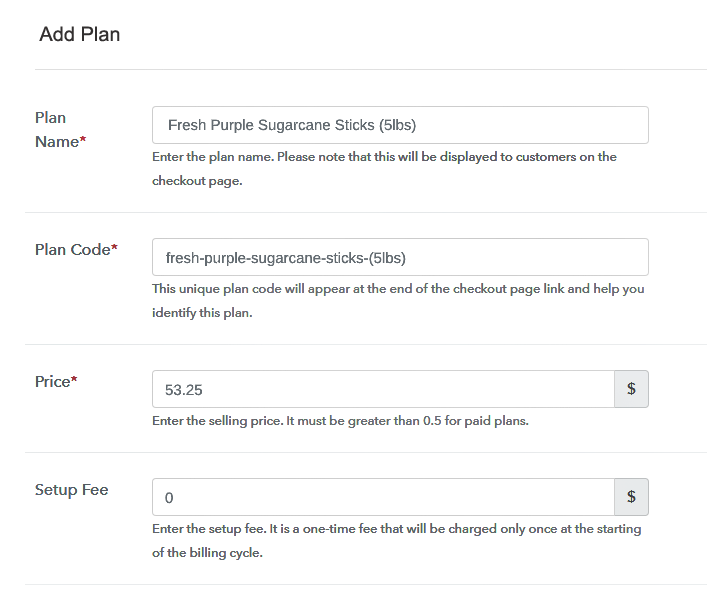
(b) Specify the Plan & Pricing Details

Sell Sugarcanes Online Details

Once you click add new plan, you will reach to the plan page, here you will have to fill the plan details such as plan name, code, billing cycle, price, etc.

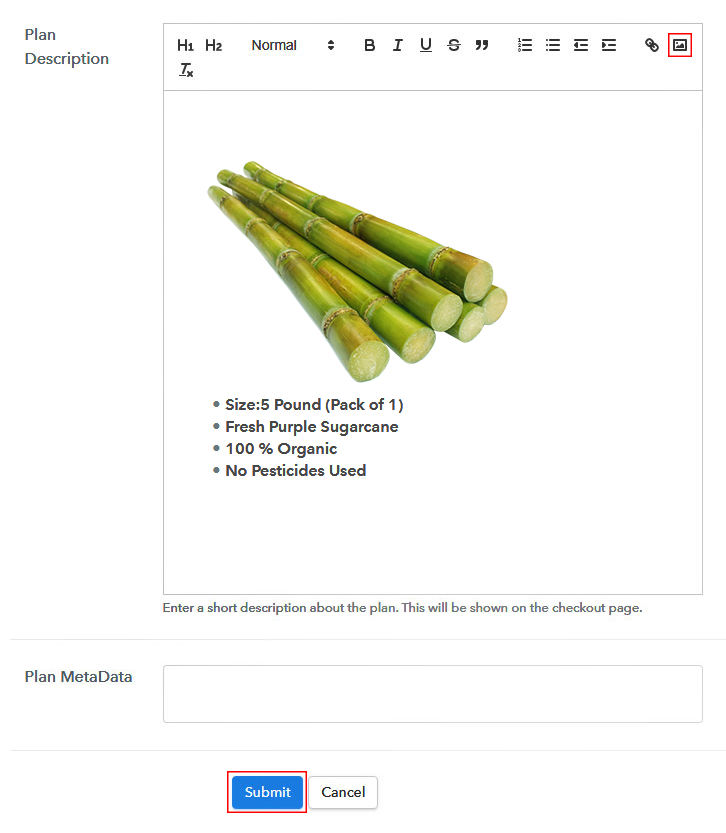
(c) Add Image & Description of Sugarcanes

Sell Sugarcanes Online Image

Also, write a description of the sugarcanes that you want to sell along with the product links, images, etc, and click on the “Submit” button to add your plan.

You can create more plans for all the sugarcanes similarly.

Step 7: Share your Checkout Page

Share Checkout Page on Social Media

Follow these steps and increase your sales:

  • Share your checkout page on social media like Facebook and Twitter.
  • Further, copy the mentioned link and send it to your customers through SMS or emails directly.
  • You can also embed your plan link to your website so that your customers can be landed on the checkout page directly.

Step 8: Preview Checkout Page

Follow up the recommended steps to preview the checkout page:

(a) Click on the View Button

View Checkout Plan

(b) Take a Look at the Checkout Page

Preview Checkout Page

Step 9: Embed Checkout Page in Site & Sell Sell Sugarcanes Online

Embed Checkout Page on Website

Just copy the provided plan embedding link and embed the checkout page to your WordPress site to sell sugarcanes online.

(a) Edit the Page & Paste the Copied Link

Embed Checkout Page on Website

Further, paste the plan link on a text editor of the WordPress dashboard.

(b) Save & Publish the Checkout Page

Save_and_Publish

Next, click the “Publish” button, after making changes.

(c) Check out the Final Look of your Checkout Page on WordPress Site

Sell Sugarcanes Online W

Step 10: Multiplan Checkout Page

Note: In case you want to sell multiple products via a single checkout page, you can create a multi-plan checkout page otherwise skip this step.

(a) Click on Add Mutiplan Checkout

Multiplan Checkout

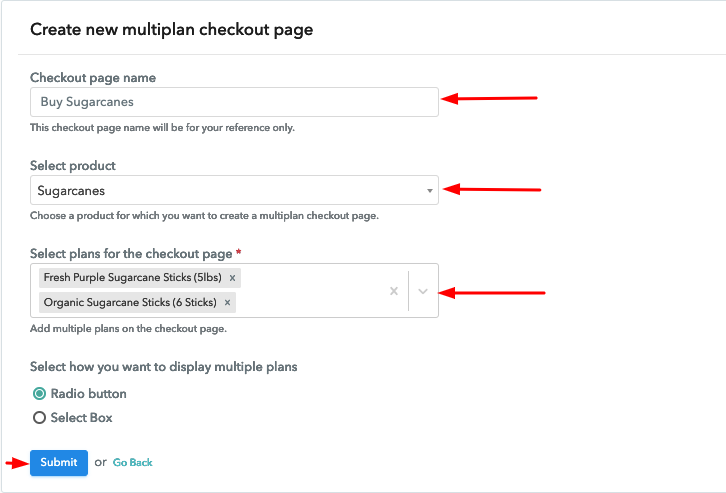
(b) Add Plans to Sell Multiple Sugarcanes from Single Checkout Page

Sell Sugarcanes Online Multi Details

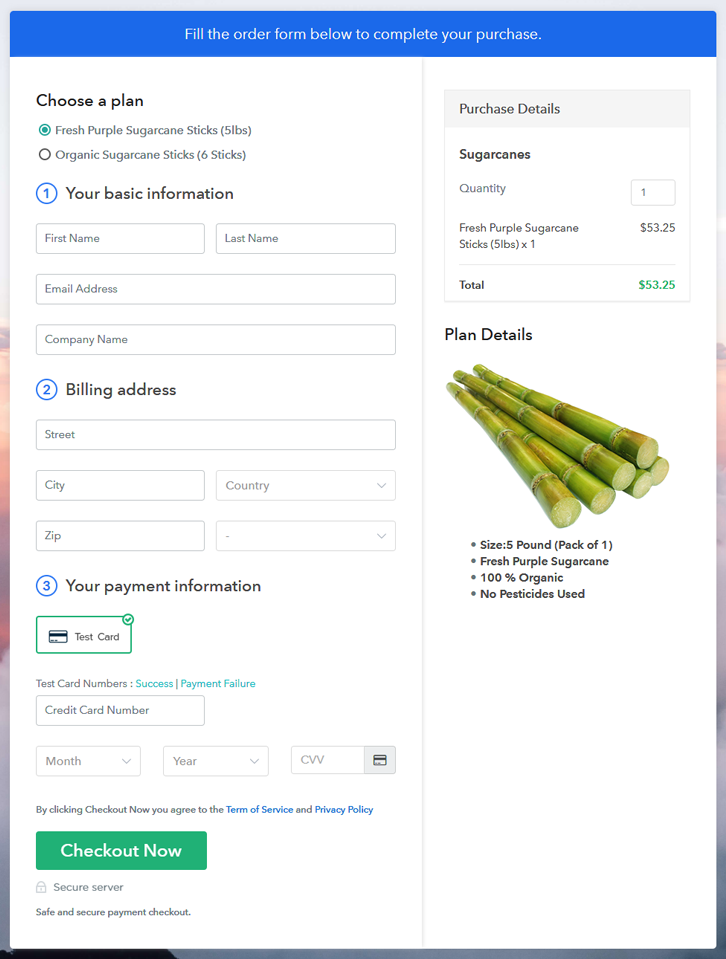
(c) Take a Look at the Checkout Page

Sell Sugarcanes Online M

Preview Checkout Page

Wrapping Up

Lastly, Pabbly Subscription Billing is your answer to all your problems related to selling sugarcanes online. With this service, you can sell unlimited sugarcanes, share invoices, collect payments, and so much more without even paying anything. Hence, stop worrying and start selling sugarcanes online now.
For further queries or suggestions, please write to us.

You May Also Like To Read –