How to Sell Homemade Chocolates Online | Step by Step (Free Method)

How to Sell Homemade Chocolates Online

Ideal For: All the homemade chocolate manufacturers, homemade chocolate sellers, retail homemade chocolate shop owners, and other merchants can use this method to take their homemade chocolates selling business online.
How to Sell Homemade Chocolates Online

Why Choose this Method to Sell Homemade Chocolates Online?

Unlike any other solution, this method allows you to:

  • List and sell your homemade chocolates for FREE. Absolutely no payment required.
  • No need to pay commission on any of your sale.
  • Multiple payment options like PayPal, Credit Card, etc to collect payment from a single place.
  • Sell one time or recurring subscriptions of your homemade chocolates.
  • Collect payments & sell products in any currency as per your requirement.
  • Give discounts on your products by offering special coupon codes.
  • Add sales commission agents to help you in selling homemade chocolates online.

Get Pabbly Subscription Billing for Free

Almost everyone loves chocolates, they are very nutritious and also have many health benefits like it is a powerful source of antioxidants, it reduces Heart disease risk etc. So, if you are planning to sell homemade chocolates online then you are adding one more choice for the buyers.

It’s not always very easy to start a business online but using Pabbly Subscription Billing you can instantly start homemade chocolates business online. It allows you to create product checkout pages easily and you can share your homemade chocolate details like its ingredients, a picture, pricing etc along with collecting payments through these pages.

Some Peculiarities of using this service:

  • You can keep track of all payments and item availability
  • Collect offline/offline payments
  • Offer discounts & coupons to your customers
  • Apply global taxes easily
  • Sell unlimited products online
    And much more…

To start selling homemade chocolates online, you can either embed a page on WordPress posts/pages or in any other sites’s buttons & text anchors. Moreover, you can also share every checkout page over different social media channels like WhatsApp, SMS, emails, Twitter, Facebook etc.

Final View of Checkout Page for your Homemade Chocolates Selling Business
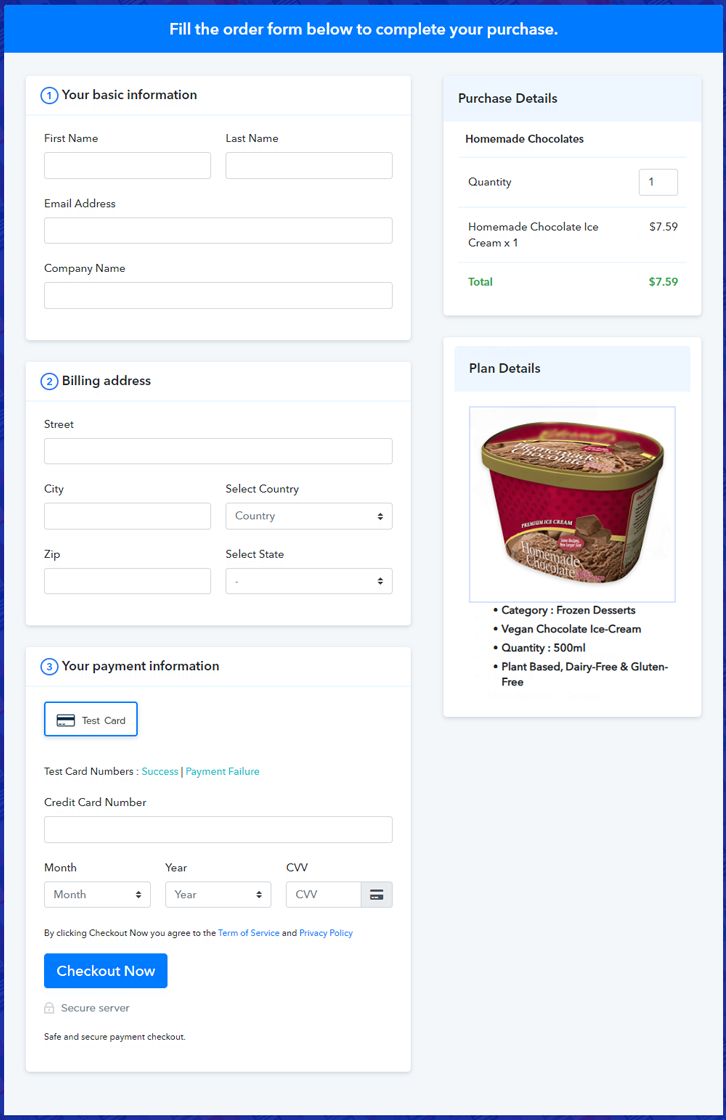
Checkout Page Preview to Sell Homemade Chocolates Online

Preview Checkout Page

Step 1: Log in to Pabbly Subscription Billing
Signup

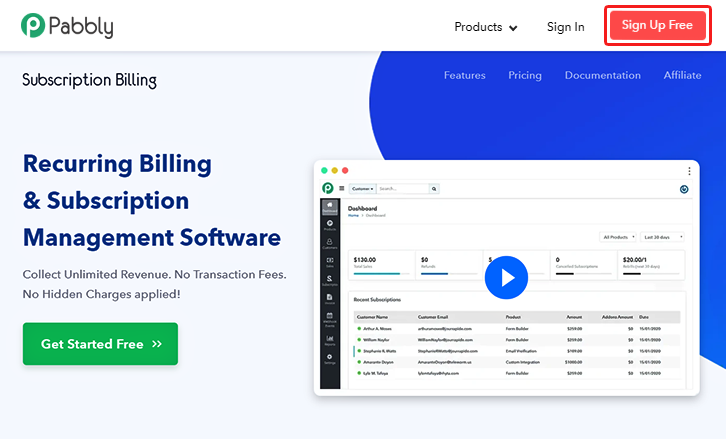
Initiate the procedure by visiting Pabbly Subscription Billing official website & hit the ‘Sign Up Free‘ button there. On the sign-up page, use a Gmail ID or do manual registration by filling out the few form fields given.

Sign Up For Free!

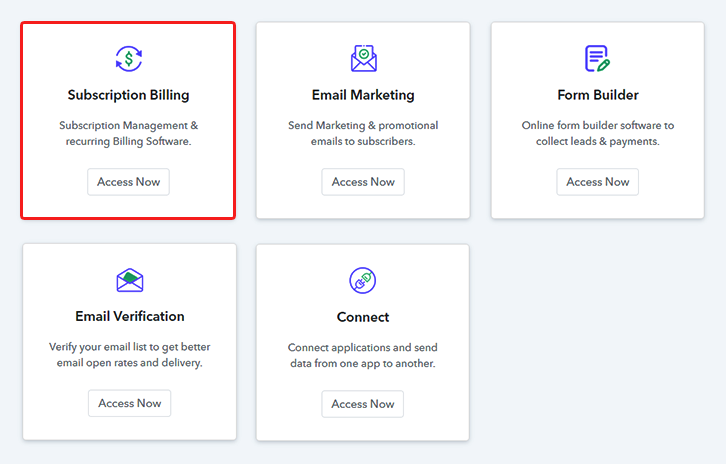
Step 2: Select Subscription Billing

Access Subscription Billing

Step 3: Account Setup
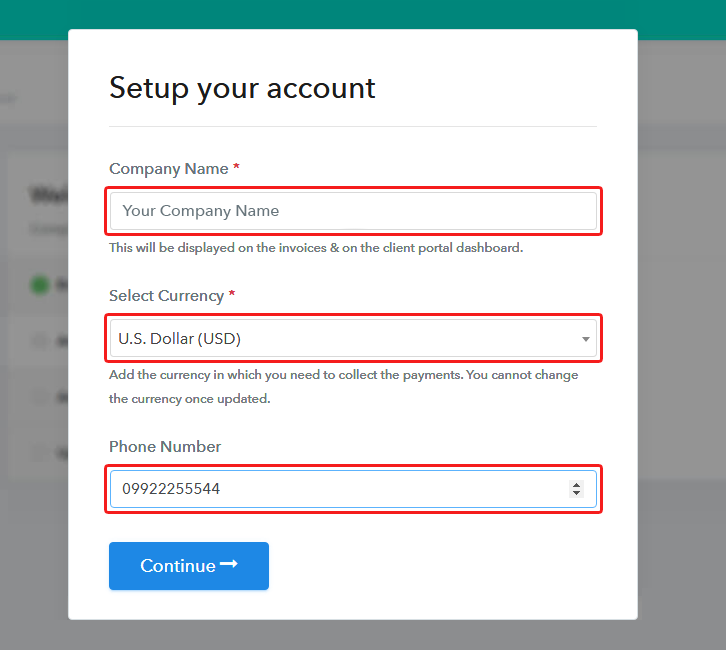
Setup Account

In the next pop-up pane, fill in the company details demanded such as your company name, phone number & currency.

Step 4: Connect Payment Gateways & Start Homemade Chocolates Selling Business Online
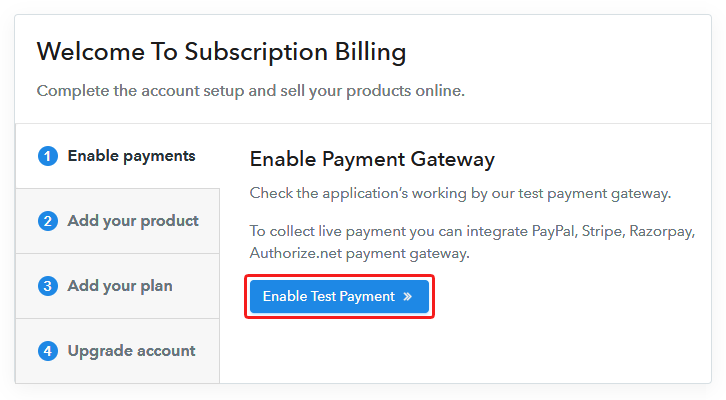
Connect Payment Gateway

Next, to prepare this system for collecting payments, you’ve to integrate a payment gateway for selling homemade chocolates afterwards. Here, you can also enable the alternate option of the test payment method for testing the functionality though. Although you must integrate a payment method from the following picks (with integration guides) to accept successful payments.

Step 5: Add Product for your Homemade Chocolates
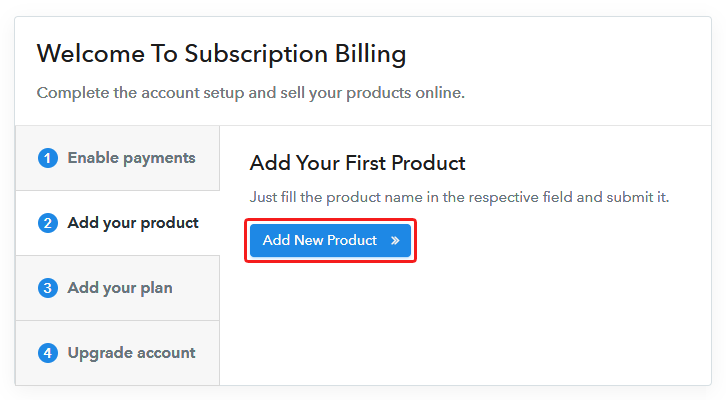
Add Product

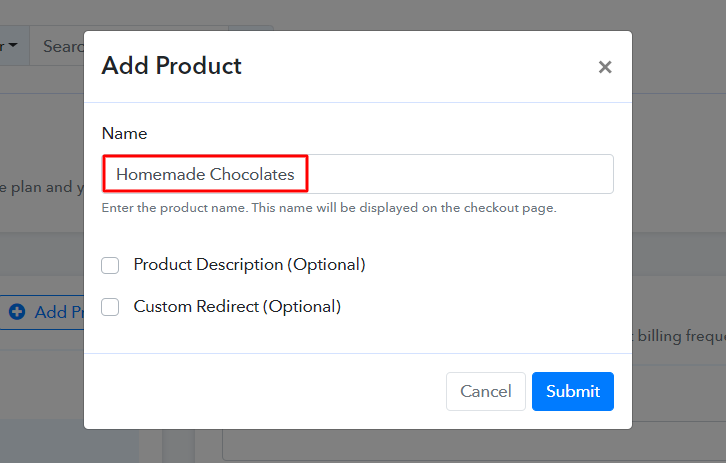
Now, add a homemade chocolate category as a product by clicking on the ‘Add New Product’ button. We’ll add homemade chocolates (items) to sell as plans within this product in the succeeding step.

Add Product to Sell Homemade Chocolates Online

Fill the required homemade chocolate product details and strike submit.

Note: Here you can add all the products related to the similar category by creating plans for each of them.

Step 6: Add Plans 

In this step, we’ll add plans for various kinds of homemade chocolates available in your store.

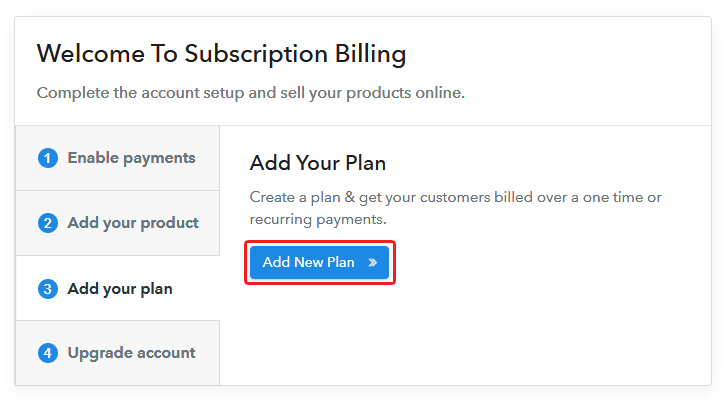
(a) Select Add New Plan

Add Plan

(b) Specify the Plan & Pricing Details
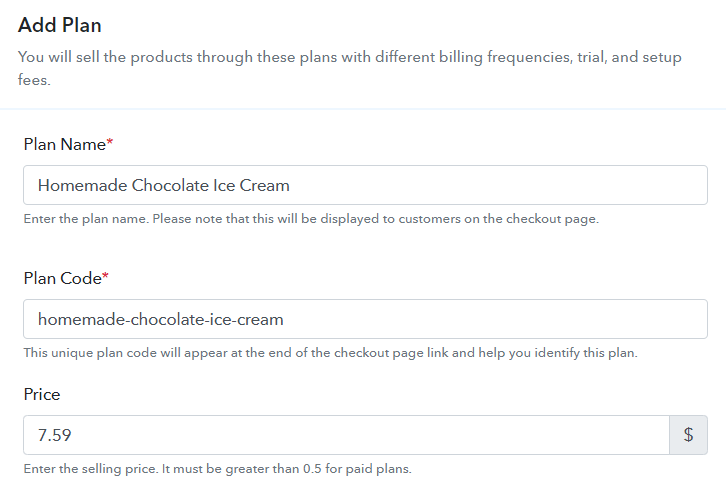
Add Plan to Sell Homemade Chocolates Online

You can name the homemade chocolate that you wanna sell and mention the other details like code, price, and set billing cycle etc in the pan details page.

(c) Add Image & Description of Homemade Chocolates
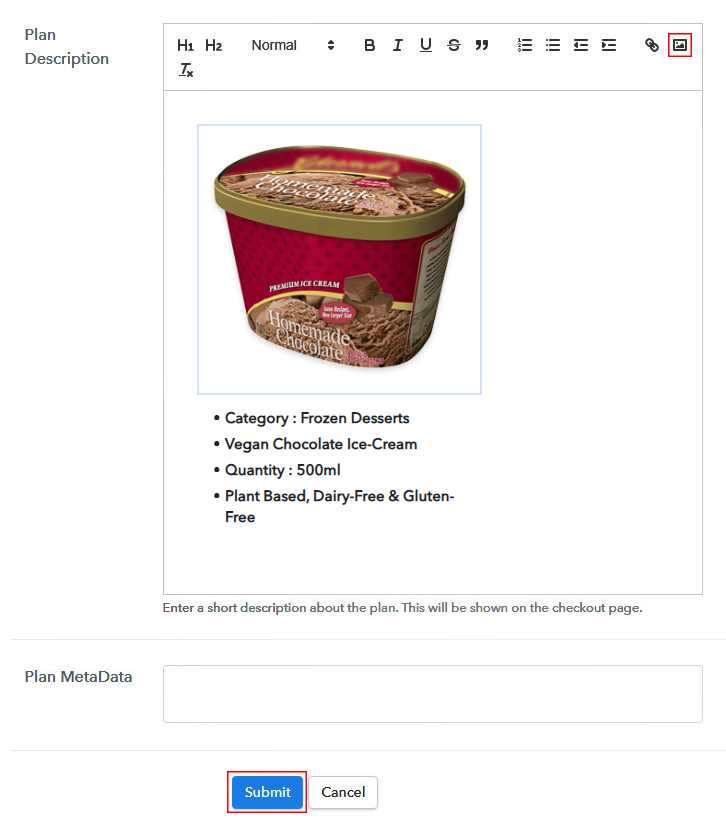
Add Image & Description to Sell Homemade Chocolates Online

You can also insert an image & some description of the homemade chocolate for your customer’s reference.

Click the ‘Submit’ button in here once you are done and a checkout page will be created instantly to sell homemade chocolates online.

Similarly, you can add other homemade chocolate plans too.

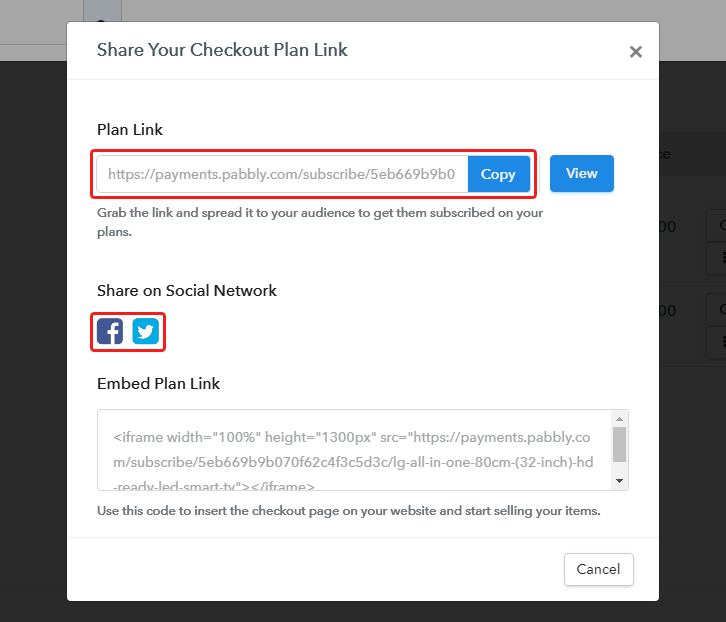
Step 7: Share your Checkout Page

Share Checkout Page on Social Media

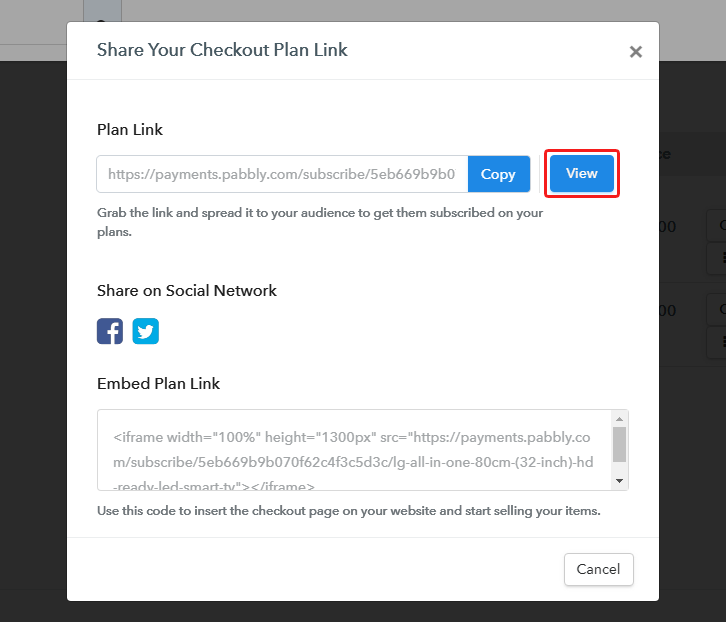
Now, to sell homemade chocolates online, you’ll need to share/embed a plan checkout page.

  • You can share a checkout page on Facebook & Twitter directly
  • Or you can share the plan link over the other link sharing platforms like emails, messages, WhatsApp etc
  • Lastly, you can embed the plan link within the text anchors & buttons of any site to redirect a customer on the payment’s pages

Step 8: Preview Checkout Page

Follow up the recommended steps to preview the checkout page:

(a) Click on the View Button

View Checkout Plan

(b) Take a Look at the Checkout Page

Checkout Page Preview to Sell Homemade Chocolates Online

Step 9: Embed Checkout Page in Site & Sell Homemade Chocolates Online
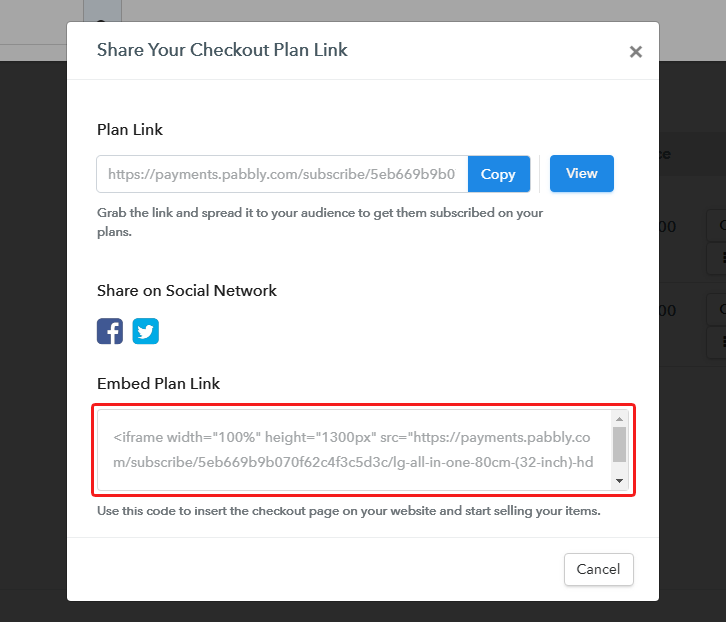
Embed Checkout Page on Website

Just copy the link and add the checkout page to sell homemade chocolates online at any preferable place on your WordPress site.

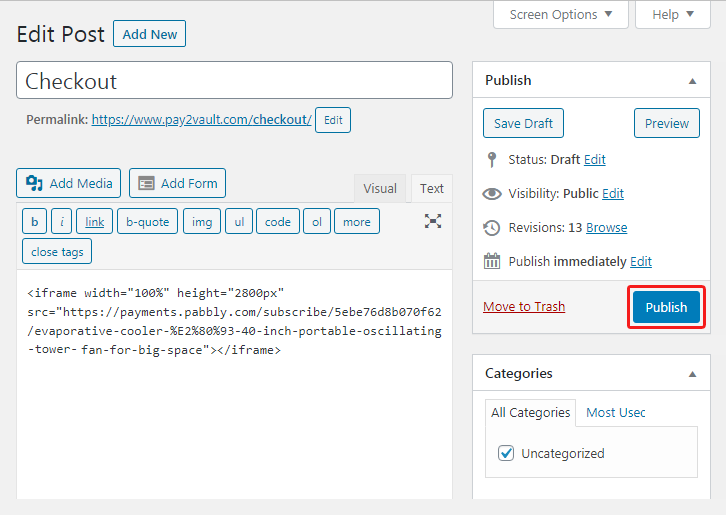
(a) Edit the Page & Paste the Copied Link
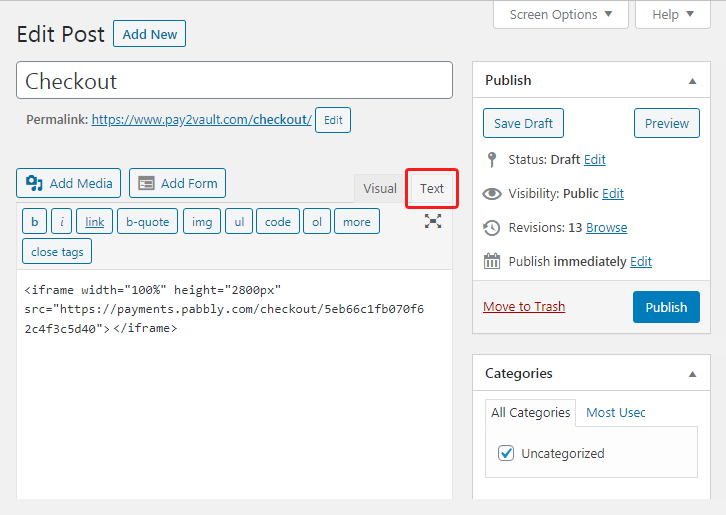
Embed Checkout Page on Website

Further, paste the plan link on a text editor of the WordPress dashboard.

(b) Save & Publish the Checkout Page

Save_and_Publish

Next, click the “Publish” button, after making changes.

(c) Check out the Final Look of your Checkout Page on WordPress Site
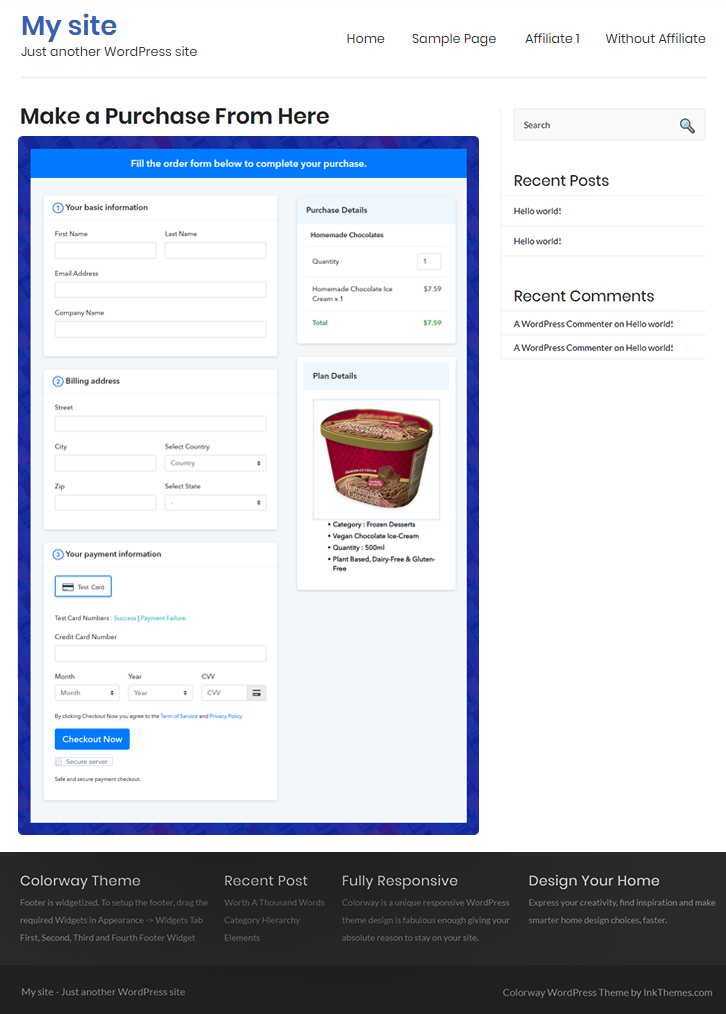
Checkout Page On WordPress Site to Sell Homemade Chocolates Online

Step 10: Multiplan Checkout Page

Note: In case you want to sell multiple products via a single checkout page, you can create a multi-plan checkout page otherwise skip this step.

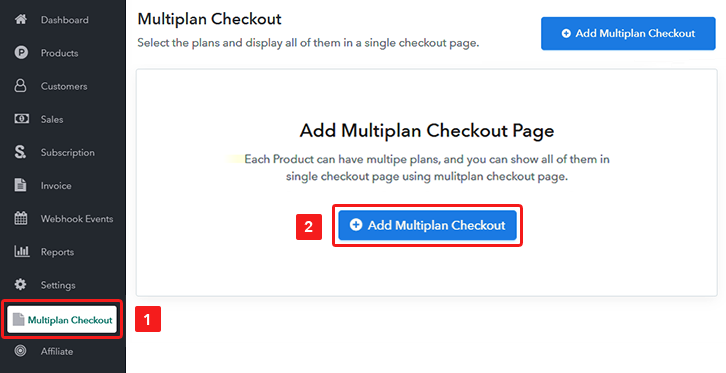
(a) Click on Add Mutiplan Checkout

Multiplan Checkout

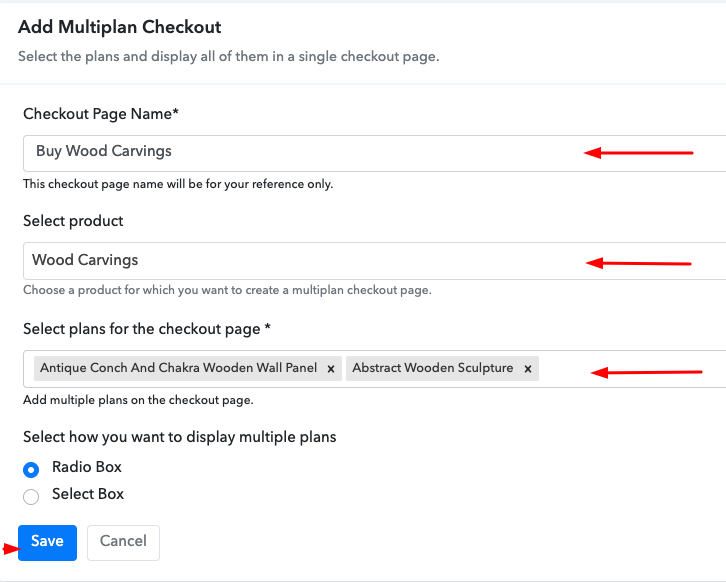
(b) Add Plans to Sell Multiple Homemade Chocolates from Single Checkout Page
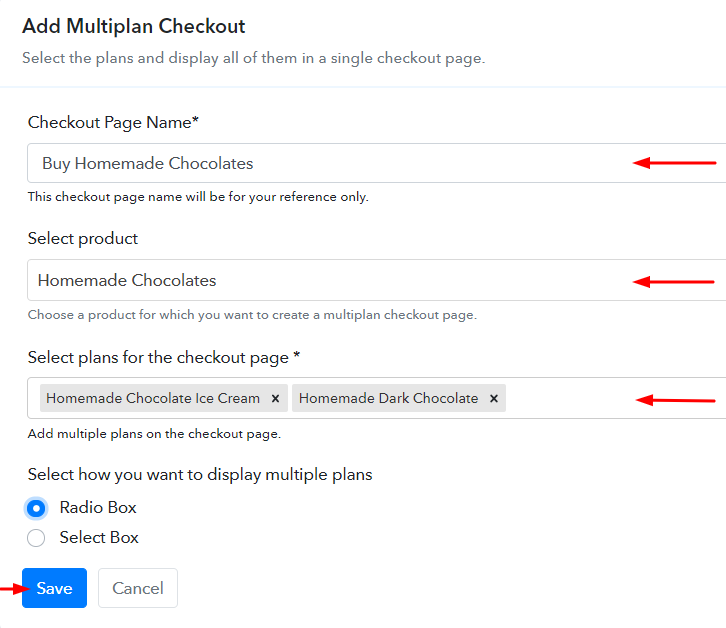
Create Multiplan Checkout to Sell Homemade Chocolates Online

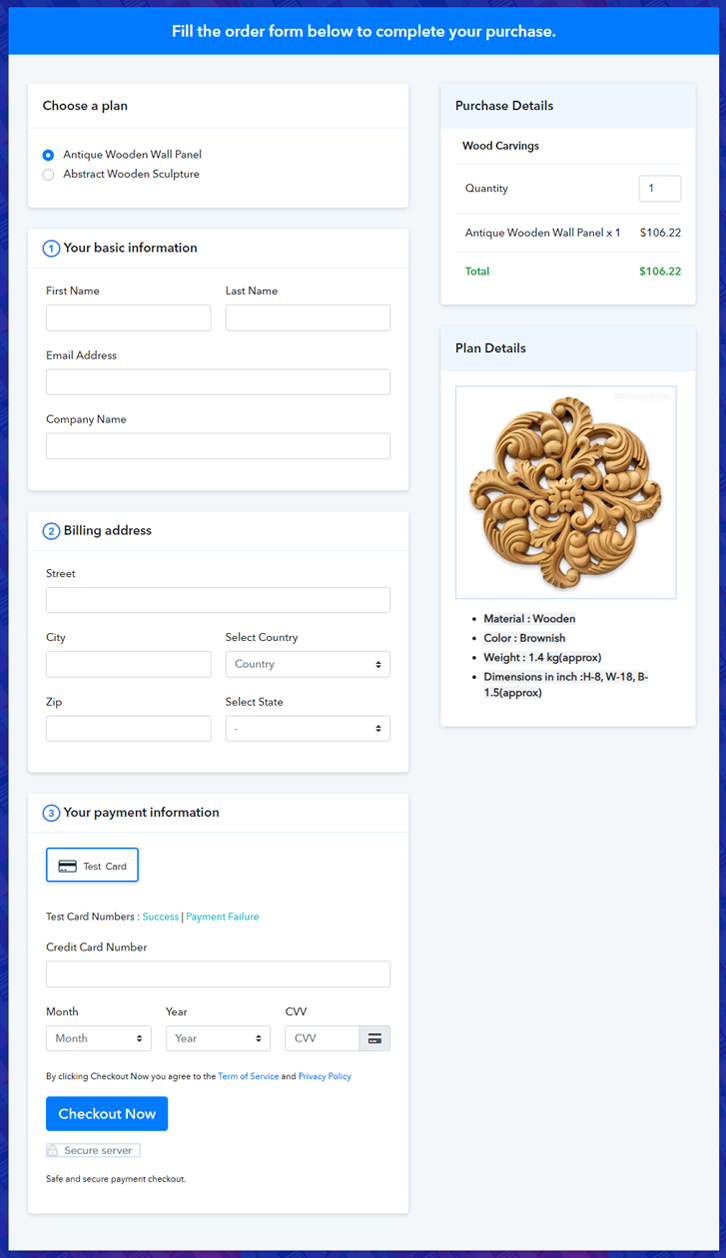
(c) Take a Look at the Checkout Page
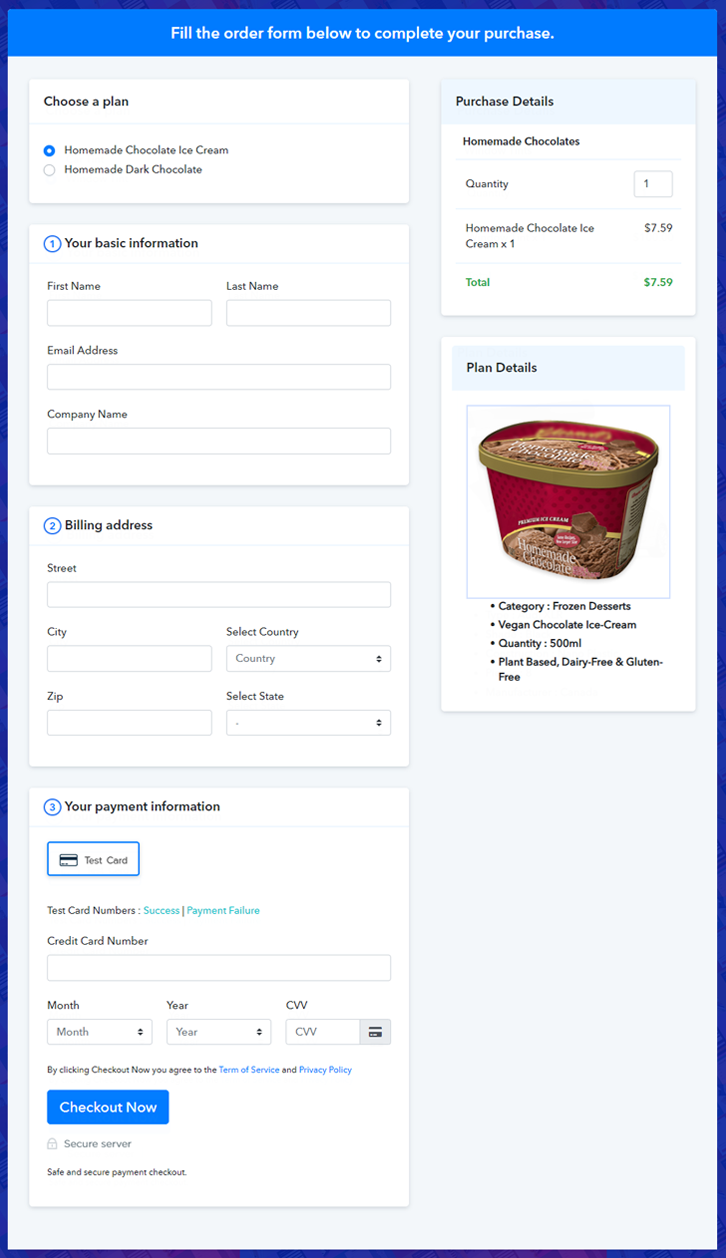
Multiplan Checkout Page to Sell Homemade Chocolates Online

Preview Checkout Page

Wrapping Up

This was all about the checkout page creation & how to sell homemade chocolates online. Well, to start homemade chocolates business online, you’ll need to carry out these 10 simple steps and share the checkout pages with your audience over multiple channels.

Additionally, the Pabbly subscription Billing dashboard will help you manage as well as track the sales and items availability.

You May Also Like To Read –
How to Sell Wound Dressing Kits Online | Step by Step (Free Method)

How to Sell Wound Dressing Kits Online

Ideal For: All the medical stores, medical shops, first aid kit manufacturers, and other sellers can use this method to take their wound dressing kits selling business online.

How to Sell Wound Dressing Kits Online

Why Choose this Method to Sell Wound Dressing Kits Online?

Unlike any other solution, this method allows you to:

  • List and sell your wound dressing kits for FREE. Absolutely no payment required.
  • No need to pay commission on any of your sales.
  • Multiple payment options like PayPal, Credit Card, etc to collect payment from a single place.
  • Sell one time or recurring subscriptions of your wound dressing kits.
  • Collect payments & sell products in any currency as per your requirement.
  • Give discounts on your products by offering special coupon codes.
  • Add sales commission agents to help you in selling wound dressing kits online.

Get Pabbly Subscription Billing for Free

A wound dressing kit is an essential part of everyday life. No one knows what is going to happen in the next couple of minutes so one should be prepared all the time with a wound dressing kit. Not only in homes but wound dressing kits can be found in every place like offices, schools, etc. Therefore, if you want to expand your wound dressing kits selling business to online platforms, then keep on reading.

Now there are many online services on which you can sell wound dressing kits online, but we are recommending you an awesome and free software called Pabbly Subscription Billing. The edge of using Pabbly Subscription Billing over any other services is that you can sell unlimited wound dressing kits online, without paying a single penny for transaction fees. Also, you can access its other great features:

  • Unlimited Products Listing
  • Create and offer Unlimited Coupons, Plans & Discount
  • Generate Unlimited Revenues on wound dressing kits
  • Manage all your products at one place with ease

So, without wasting any more time lets create your first checkout page with Pabbly Subscription Billing to sell wound dressing kits online.

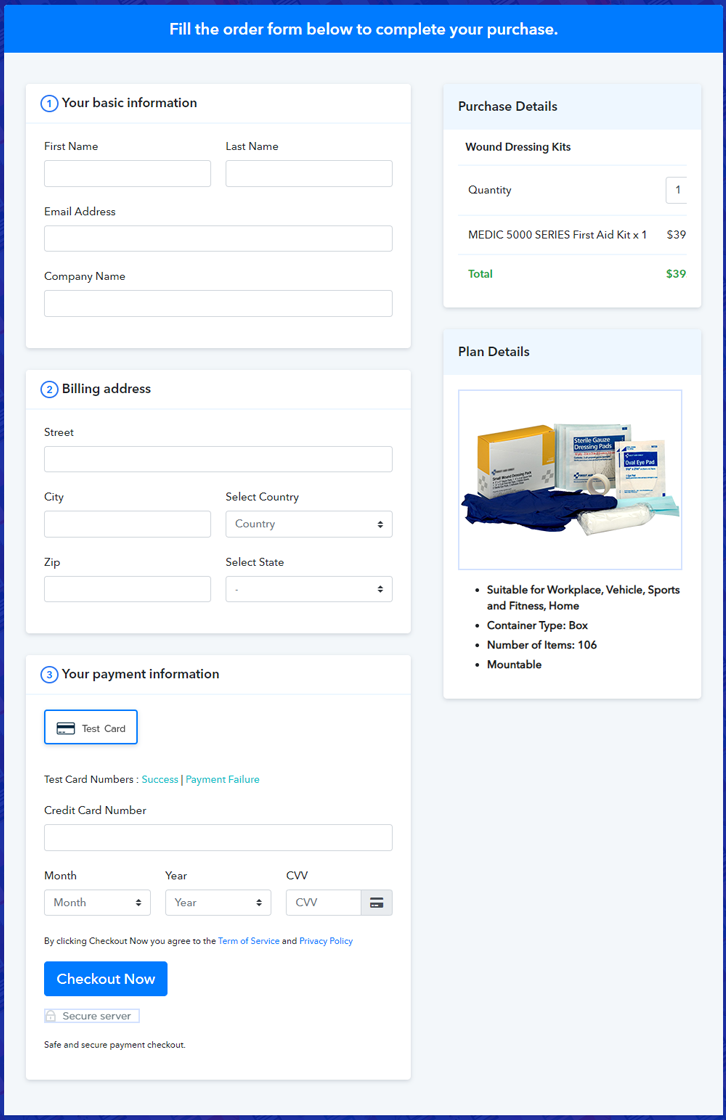
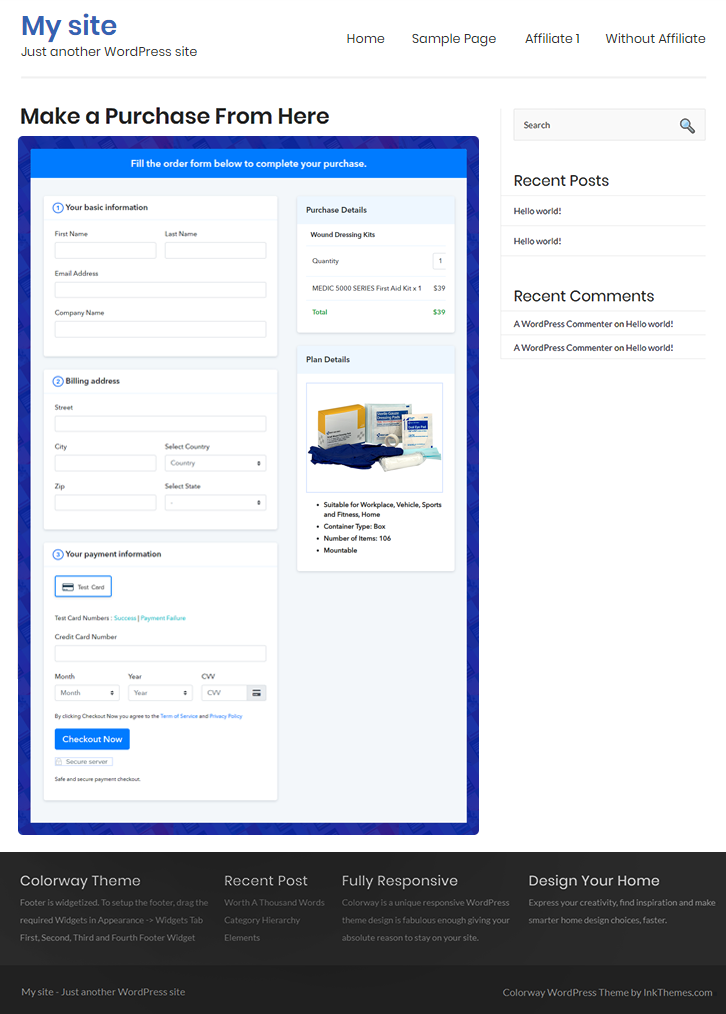
Final View of Checkout Page for your Wound Dressing Kits Selling Business

Preview Checkout Page

Preview Checkout Page

Step 1: Log in to Pabbly Subscription Billing

Signup

Start with visiting Pabbly Subscription Billing website and then click on the “Sign Up Free” button. On clicking the button, you will be redirected to the signup page, where you can create your account directly with your Gmail account or you can manually enter your account details.

Sign Up For Free!

Step 2: Select Subscription Billing

Access Subscription Billing

Step 3: Account Setup

Setup Account

In this step, you have to fill up your company details i.e. company name, currency, and contact number in the dialogue box.

Step 4: Connect Payment Gateways & Start Wound Dressing Kits Selling Business Online

Connect Payment Gateway

After completing the previous step, next, we are explaining to you the payment collection process by enabling the ‘Test Payment’ mode. Before proceeding further you can also enable it and check how the payment collection process works. Subsequently, you have to connect other payment gateways of your priority such as PayPal, Stripe, etc. The complete integration guides for payment gateways are provided below –

Step 5: Add Product for your Wound Dressing Kits

Add Product

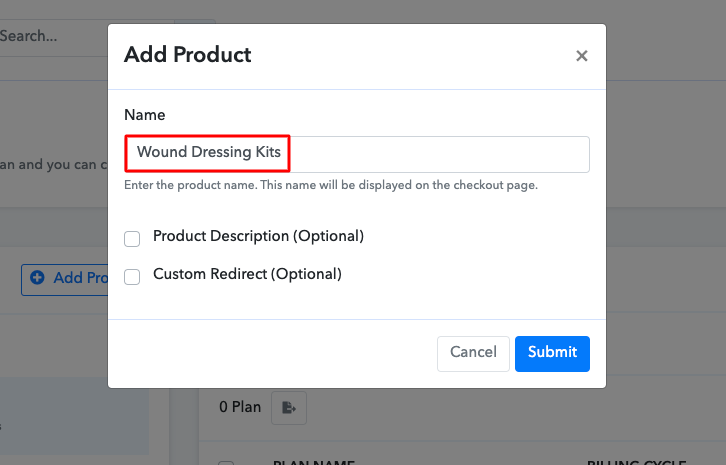
Moving forward to this step, now you have to add your first product. You can add wound dressing kits of different types, for instance, emergency first aid kits, professional first aid kits, etc.

Sell Wound Dressing Kits Online Product Name

Similarly, add all other types of wound dressing kits in the same product by creating different plans.

Note: Here you can add all the products related to the similar category by creating plans for each of them.

Step 6: Add Plans 

Let’s create plans for different kinds of wound dressing kits available in your store.

(a) Select Add New Plan

Add Plan

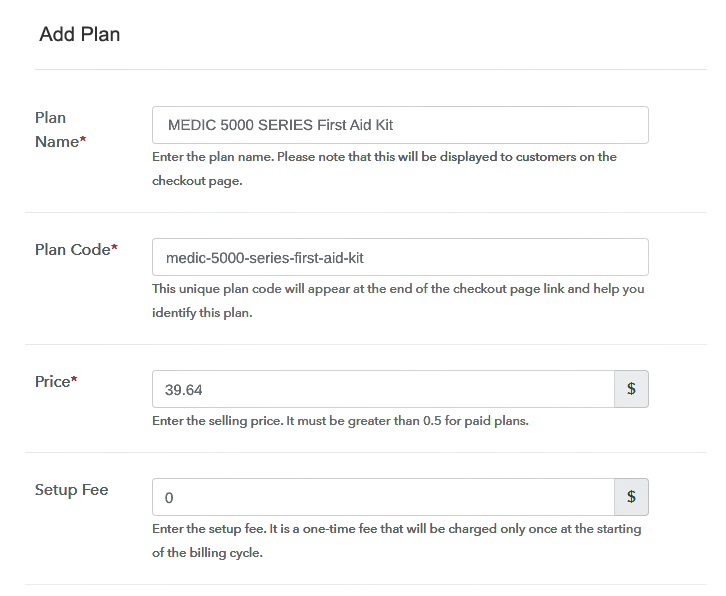
(b) Specify the Plan & Pricing Details

Sell Wound Dressing Kits Online Details

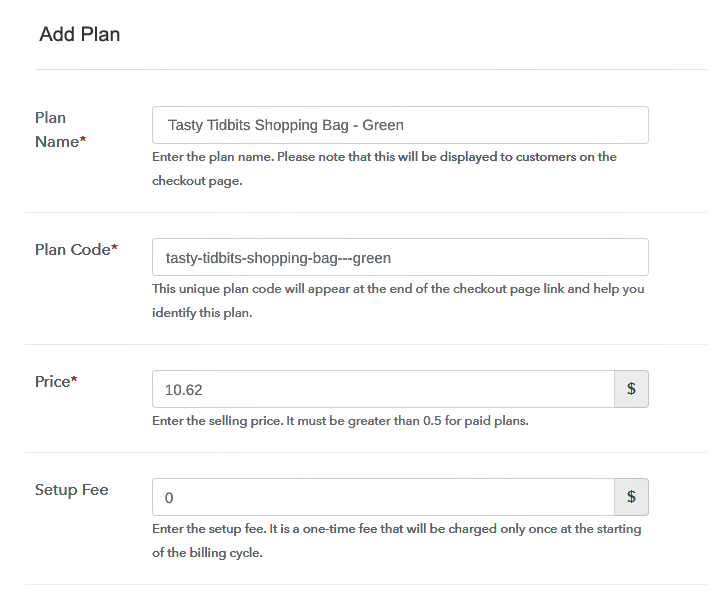
On clicking add new plan, you will land on the plan page, here you have to fill the plan details such as plan name, code, billing cycle, price, etc of wound dressing kits.

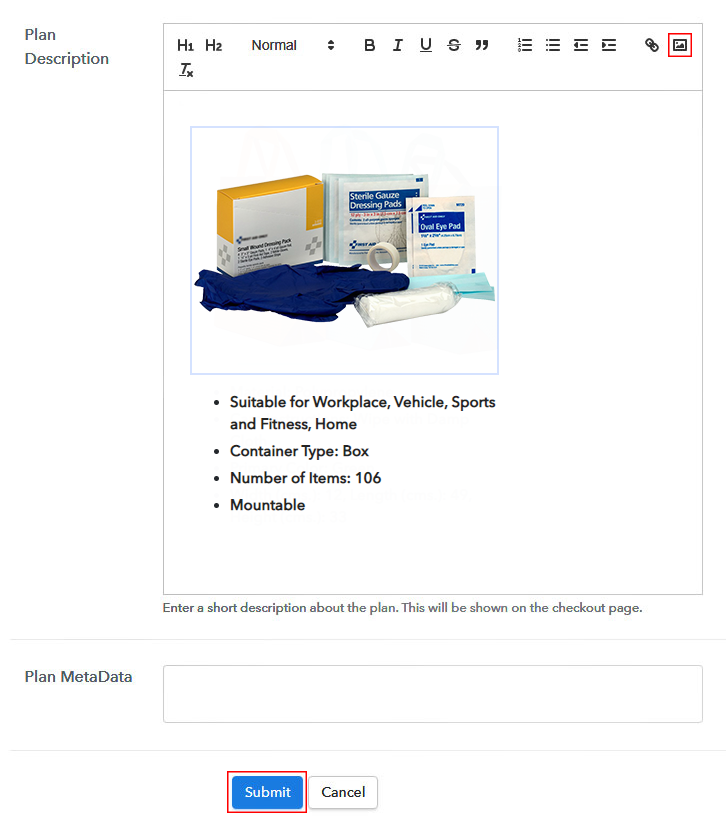
(c) Add Image & Description of Wound Dressing Kits

Sell Wound Dressing Kits Online Image

Further, you can write a description of the wound dressing kits that you want to sell along with the product links, images, etc, and click on the “Submit” button to add your plan.

You can create more plans for all the other wound dressing kits similarly.

Step 7: Share your Checkout Page

Share Checkout Page on Social Media

To boost up your sales online, you need to follow the given steps:

  • Share your checkout page on social media like Facebook and Twitter.
  • You can also copy the mentioned link and send it to your customers through SMS or emails directly.
  • Further, embed your plan link to your website so that your customers can be landed on the checkout page directly.

Step 8: Preview Checkout Page

Follow up the recommended steps to preview the checkout page:

(a) Click on the View Button

View Checkout Plan

(b) Take a Look at the Checkout Page

Preview Checkout Page

Step 9: Embed Checkout Page in Site & Sell Wound Dressing Kits Online

Embed Checkout Page on Website

Simply copy the provided plan embedding link and embed the checkout page to your WordPress site to sell wound dressing kits online.

(a) Edit the Page & Paste the Copied Link

Embed Checkout Page on Website

Further, paste the plan link on a text editor of the WordPress dashboard.

(b) Save & Publish the Checkout Page

Save_and_Publish

Next, click the “Publish” button, after making changes.

(c) Check out the Final Look of your Checkout Page on WordPress Site

Sell Wound Dressing Kits Online W

Step 10: Multiplan Checkout Page

Note: In case you want to sell multiple products via a single checkout page, you can create a multi-plan checkout page otherwise skip this step.

(a) Click on Add Mutiplan Checkout

Multiplan Checkout

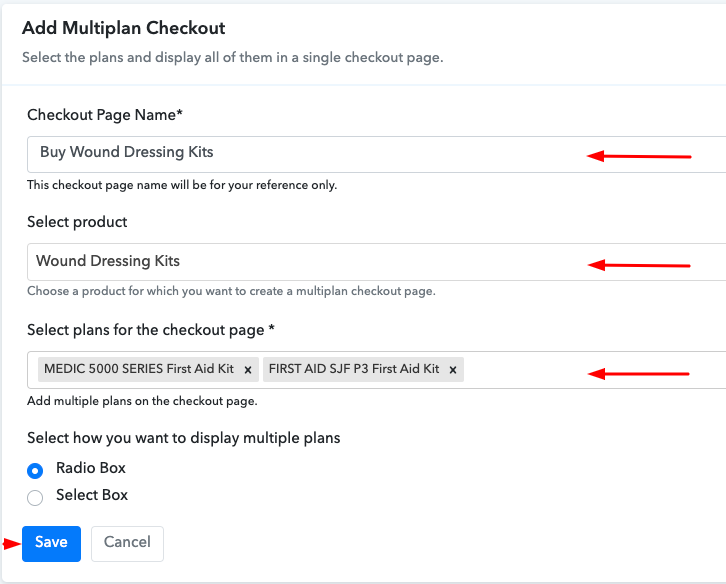
(b) Add Plans to Sell Multiple Wound Dressing Kits from Single Checkout Page

Sell Wound Dressing Kits Online Multi Details

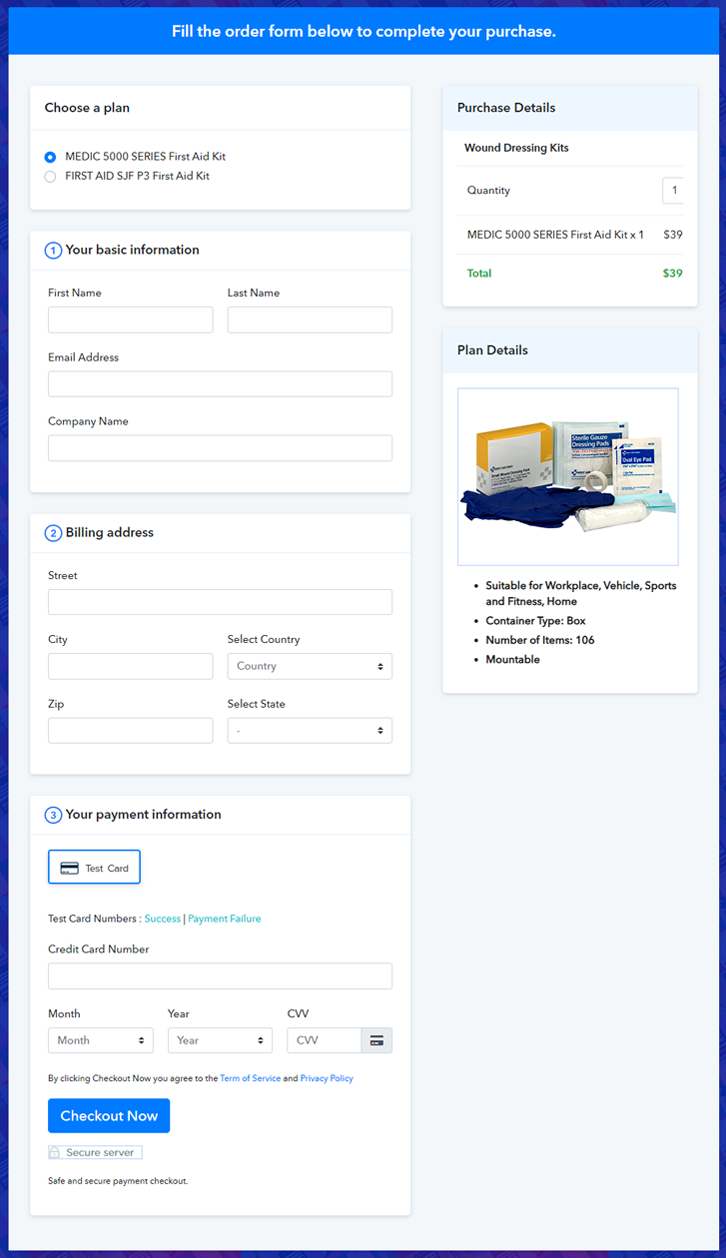
(c) Take a Look at the Checkout Page

Sell Wound Dressing Kits Online M

Preview Checkout Page

Wrapping Up

Now that you have seen for yourself how you can sell wound dressing kits online via creating checkout pages, it should be easy for you to set up your online store on Pabbly Subscription Billing. Hence, start creating checkout pages for your products and sell unlimited wound dressing kits online for free. For further queries or suggestions, please write down your comments.

You May Also Like To Read –
How to Sell Woven Shopping Bags Online | Step by Step (Free Method)

How to Sell Woven Shopping Bags Online

Ideal For: All the bag stores, bag shops, diyers, woven bag manufacturers, and other sellers can use this method to take their woven shopping bags selling online business.

How to Sell Woven Shopping Bags Online

Why Choose this Method to Sell Woven Shopping Bags Online?

Unlike any other solution, this method allows you to:

  • List and sell your woven shopping bags for FREE. Absolutely no payment required.
  • No need to pay commission on any of your sales.
  • Multiple payment options like PayPal, Credit Card, etc to collect payment from a single place.
  • Sell one time or recurring subscriptions of your woven shopping bags.
  • Collect payments & sell products in any currency as per your requirement.
  • Give discounts on your products by offering special coupon codes.
  • Add sales commission agents to help you in selling woven shopping bags online.

Get Pabbly Subscription Billing for Free

Woven shopping bags are so in right now because of the eco-friendly materials that are used to make them. These bags don’t harm nature, and it’s handy to carry them anywhere, and is you sell these bags then let’s take your business to online platforms to spread the use of these wonderful bags.

Other than caring about nature, there are many more advantages of selling woven shopping bags online like no setup cost, building customer lists from all over the world, easy product management. Thinking about all this it is appropriate to start selling woven shopping bags online. Now, the question is how to start your online business? So, here we have a free software named Pabbly Subscription Billing that can help you.

The software allows you to create attractive checkout pages for selling woven shopping bags online. Apart from checkout pages it also offers very valuable features for your online business such as sell single and multiple products from a single checkout page, sell unlimited bags online, share invoices automatically, customer management, and so much more.

Now, let’s concentrate on creating a checkout page for selling woven shopping bags online using this service.

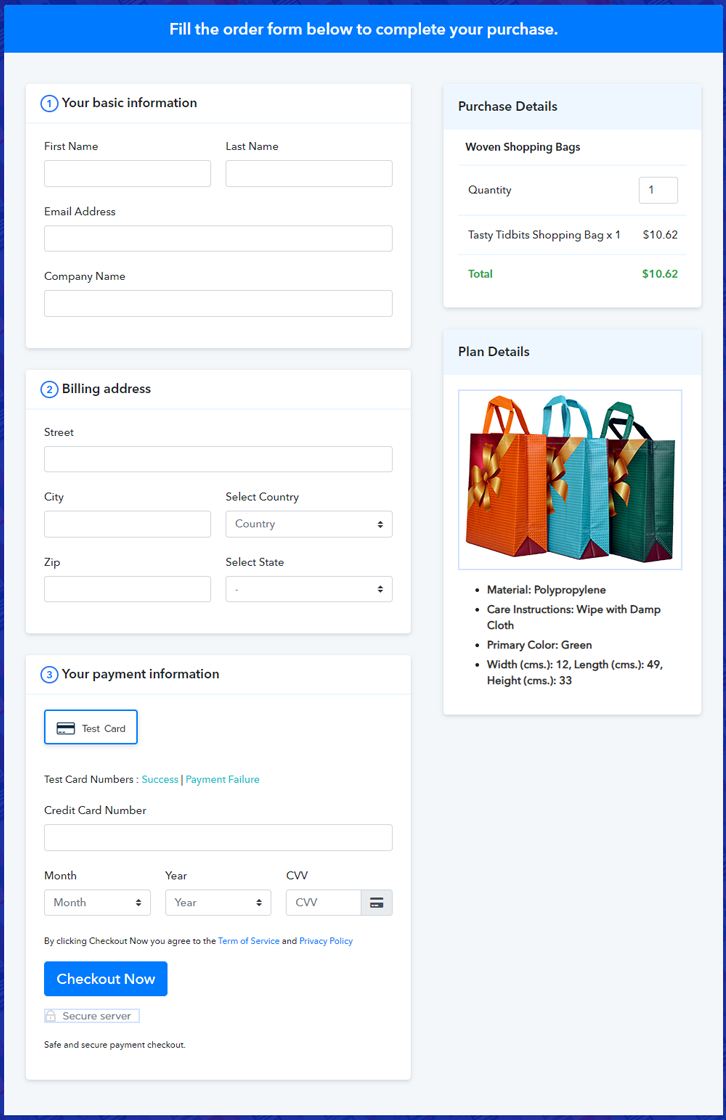
Final View of Checkout Page for your Woven Shopping Bags Selling Business

Preview Checkout Page

Preview Checkout Page

Step 1: Log in to Pabbly Subscription Billing

Signup

In the first step, visit Pabbly Subscription Billing website and click on the “Sign Up Free” button. After clicking the button, the signup page will open, where you can create your account quickly with your Gmail account or manually enter your details.

Sign Up For Free!

Step 2: Select Subscription Billing

Access Subscription Billing

Step 3: Account Setup

Setup Account

Once the signup process is finished, now fill up your company details i.e. company name, currency, and contact number in the dialogue box.

Step 4: Connect Payment Gateways & Start Woven Shopping Bags Selling Business Online

Connect Payment Gateway

To offer sellers a fault-free payment collection experience, Pabbly Subscription Billing consists of a “Test Payment” mode. Here, the payment collection process is shown by enabling the ‘Test Payment’ mode. You can also enable it and check for yourself how the payment collection process works.

Thereafter, you can connect with other payment gateways that you prefer such as PayPal, Stripe, etc. The complete integration guides for payment gateways are provided below.

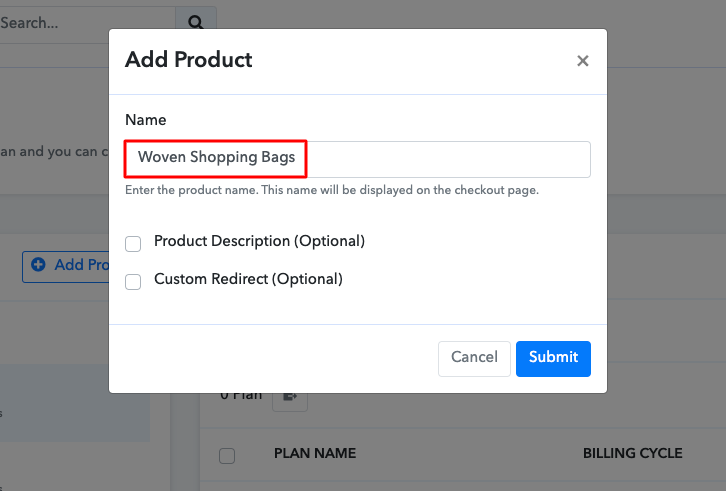
Step 5: Add Product for your Woven Shopping Bags

Add Product

Moving on to this step, you have to add your first product. You can add woven shopping bags of different categories like jute bags, straw bags, etc.

Sell Woven Shopping Bags Online Product Name

Add all other types of woven shopping bags in the same product by creating different plans.

Note: Here you can add all the products related to the similar category by creating plans for each of them.

Step 6: Add Plans 

Let’s get started and create plans for different categories of woven shopping bags that you want to sell

(a) Select Add New Plan

Add Plan

(b) Specify the Plan & Pricing Details

Sell Woven Shopping Bags Online Details

Once you click on the “Add New Plan” button, you will land on the plan page. Here, you will have to fill the plan details such as plan name, code, billing cycle, price, etc.

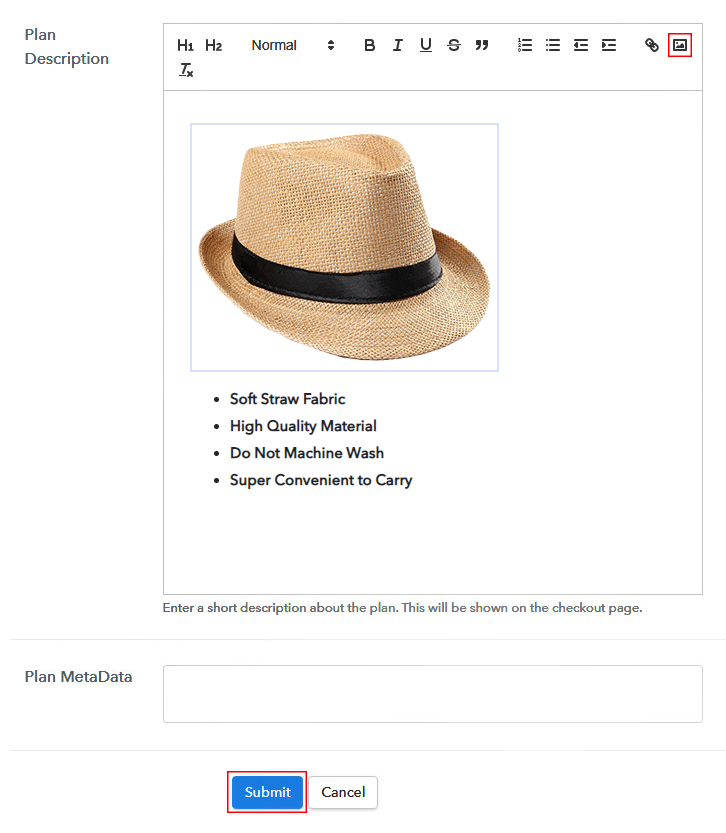
(c) Add Image & Description of Woven Shopping Bags

Sell Woven Shopping Bags Online Image

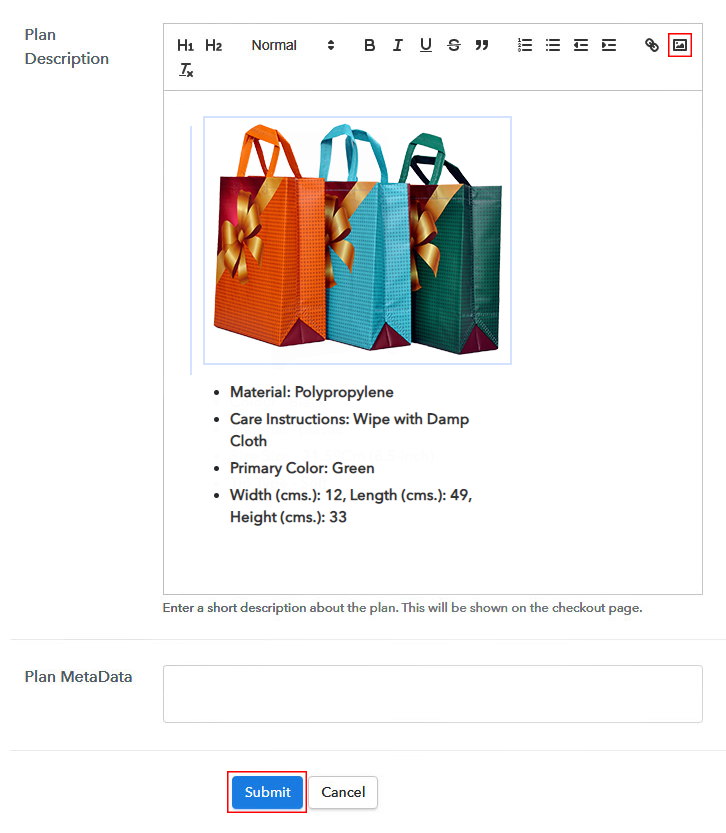
Also, you can write down a description of the woven shopping bags that you want to sell along with the product links, images, etc, and click on the “Submit” button to add your plan.

You can create more plans for all the other woven shopping bags similarly.

Step 7: Share your Checkout Page

Share Checkout Page on Social Media

Reach to a large number of buyers by following the below steps:

  • Share your checkout page on social media like Facebook and Twitter.
  • Also, copy the mentioned link and send it to your customers through SMS or emails directly.
  • Embed your plan link to your website so that your customers can be landed on the checkout page directly.

Step 8: Preview Checkout Page

Follow up the recommended steps to preview the checkout page:

(a) Click on the View Button

View Checkout Plan

(b) Take a Look at the Checkout Page

Preview Checkout Page

Step 9: Embed Checkout Page in Site & Sell Woven Shopping Bags Online

Embed Checkout Page on Website

Simply copy the provided plan embedding link and embed the checkout page to your WordPress site to sell woven shopping bags online.

(a) Edit the Page & Paste the Copied Link

Embed Checkout Page on Website

Further, paste the plan link on a text editor of the WordPress dashboard.

(b) Save & Publish the Checkout Page

Save_and_Publish

Next, click the “Publish” button, after making changes.

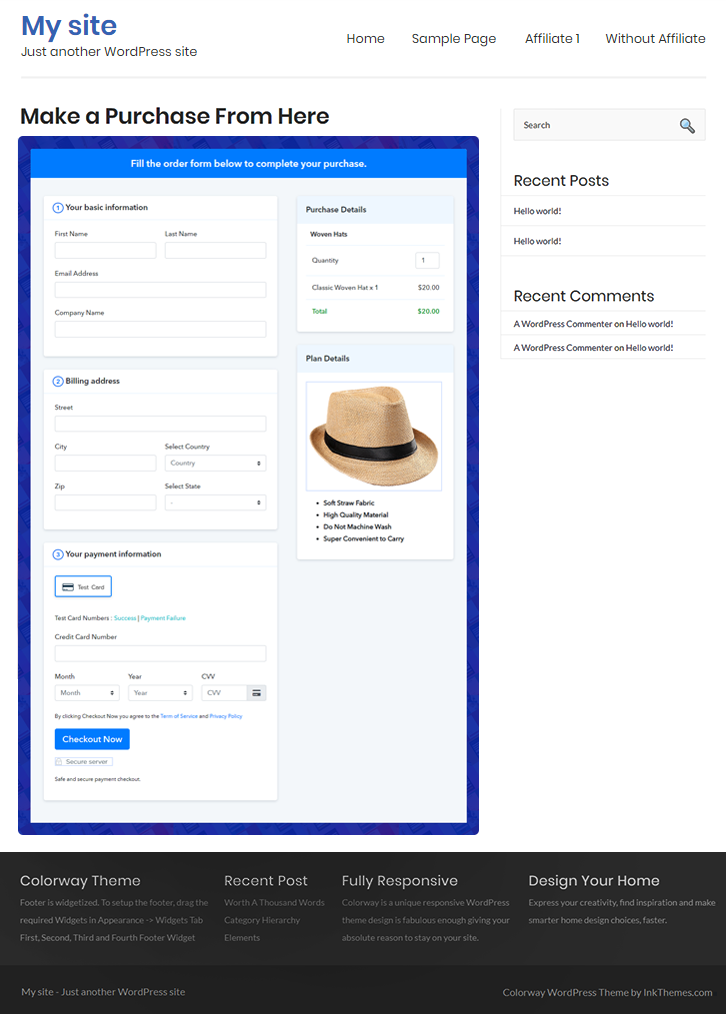
(c) Check out the Final Look of your Checkout Page on WordPress Site

Sell Woven Shopping Bags Online W

Step 10: Multiplan Checkout Page

Note: In case you want to sell multiple products via a single checkout page, you can create a multi-plan checkout page otherwise skip this step.

(a) Click on Add Mutiplan Checkout

Multiplan Checkout

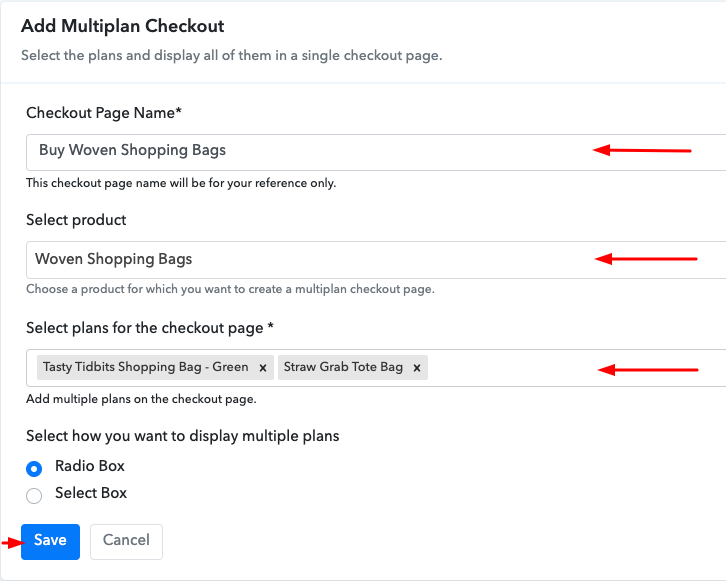
(b) Add Plans to Sell Multiple Woven Shopping Bags from Single Checkout Page

Sell Woven Shopping Bags Online Multi Details

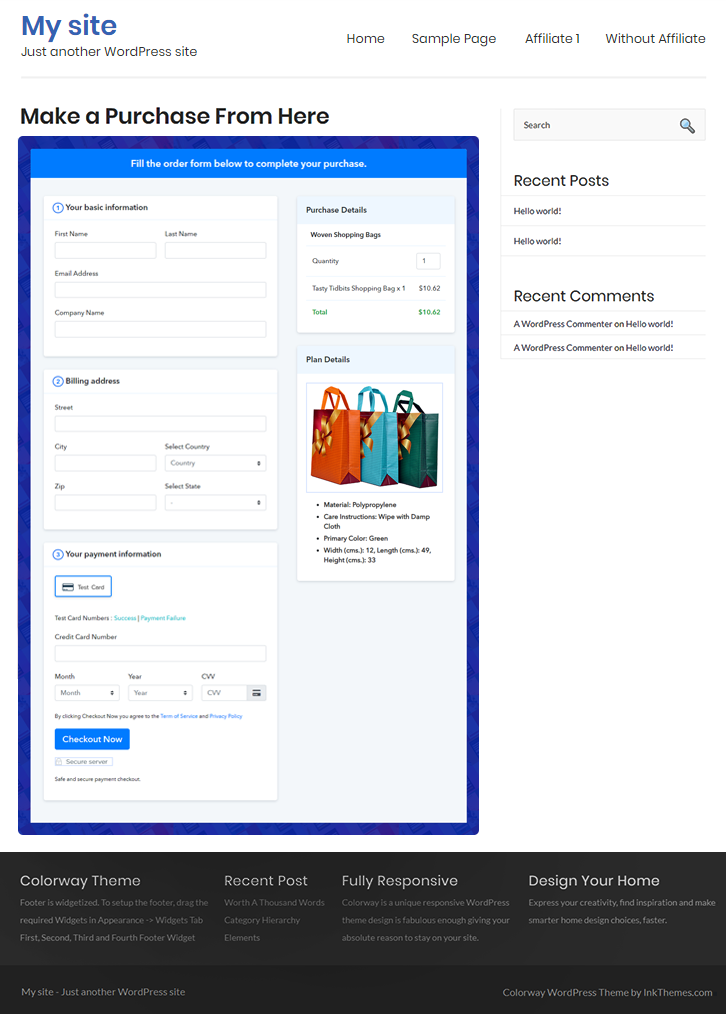
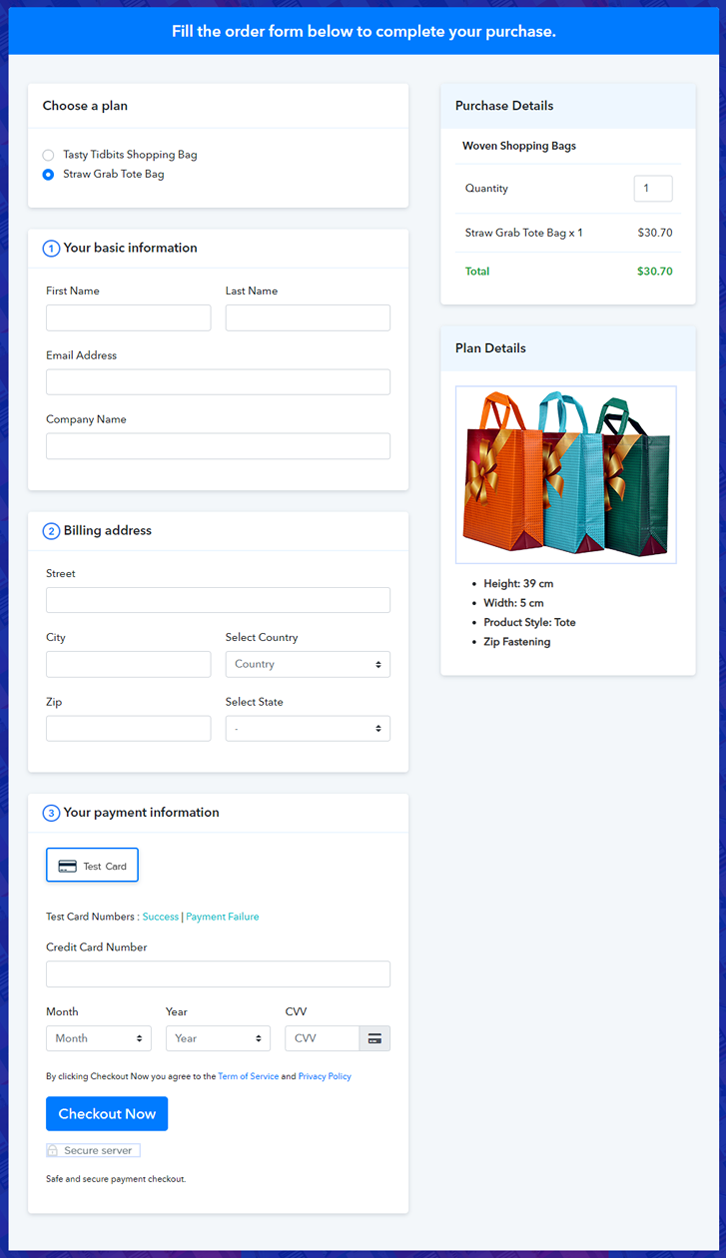
(c) Take a Look at the Checkout Page

Sell Woven Shopping Bags Online M

Preview Checkout Page

Wrapping Up

So this was our take on how to sell woven shopping bags online, and this is the easiest and fastest method to set up your online store. Now that you have learned the complete process of creating checkout pages for your products, there’s nothing that can stop you from achieving your goals. Sell unlimited woven shopping bags from Pabbly Subscription Billing and generate unlimited revenue. All the best for your future. If you have any doubts, please note them down.

You May Also Like To Read –
How to Sell Woven Hats Online | Step by Step (Free Method)

How to Sell Woven Hats Online

Ideal For: All the woven hat manufacturers, woven hat sellers, woven hat dealers, woven hat suppliers, hat shop owners and other merchants can use this method to sell woven hats online.

How to Sell Woven Hats Online

Why Choose this Method to Sell Woven Hats Online?

Unlike any other solution, this method allows you to:

  • List and sell your woven hats for FREE. Absolutely no payment required.
  • No need to pay commission on any of your sales.
  • Multiple payment options like PayPal, Credit Card, etc to collect payment from a single place.
  • Sell one time or recurring subscriptions of your woven hats.
  • Collect payments & sell products in any currency as per your requirement.
  • Give discounts on your products by offering special coupon codes.
  • Add sales commission agents to help you in selling woven hats online.

Get Pabbly Subscription Billing for Free

Woven hats never go out of fashion, apart from a season people love to wear woven hats. Not to forget how much dedication and hard work it requires to prepare woven hats. And asking for a better price for your hard work is not too much. So if you’re the one who is thinking of starting your own woven hats store online then you’re the right place.

In this blog post, we are going to discuss all the perks of starting woven hats business online. The very first benefit is online stores are free from a middleman, this means you will get the honest amount of your hard work. Also, there is no opening time restriction. Okay, so now we have your attention we would like to suggest software named Pabbly Subscription Billing that can assist you in starting woven hats store online.

With the help of this software, one can sell woven hats online through checkout pages without any difficulty. Also, you can keep an eye on the customer’s interests. Okay, so now we would like to show you the process of creating checkout pages for selling woven hats online.

Final View of Checkout Page for your Woven Hats Selling Business

Checkout Page to Sell Woven Hats Online

Preview Checkout Page

Step 1: Log in to Pabbly Subscription Billing

Signup

Start the process for creating a checkout page for woven hats by visiting the Pabbly Subscription Billing in your browser. After that, click on the “Sign up Free“ button. Furthermore, either manually filled out the details or sign in using your Gmail account.

Sign Up For Free!

Step 2: Select Subscription Billing

Access Subscription Billing

Step 3: Account Setup

Setup Account

Besides, after clicking on the “Access Now” button of the software, a page will open with fields like company name, select currency, and phone number. Simply fill out those details to continue creating a checkout page for woven hats.

Step 4: Connect Payment Gateways & Start Woven Hats Selling Business Online

Connect Payment Gateway

The consequent step is to earning information about payment procedures using a “Test Payment Gateway”. Here, we will explain the checkout page process for the woven hats with the help of a test payment gateway. Besides this, the tool offers various payment gateways such as PayPal, Stripe, etc. Moreover, below are the payment integration guides to help you out.

Step 5: Add Product for your Woven Hats

Add Product

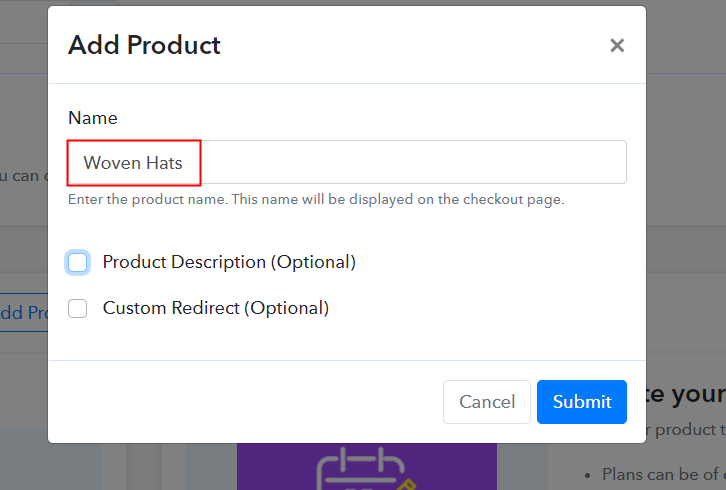
Additionally, add the name, which in our case is “Woven Hats”. Here you can specify the type like conical hats, buntal hats, etc. Further, write a short description of the woven hats to seize the customer’s attention.

Add Product to Start Selling Woven Hats Online

Moreover, just fill out all those details, and your product for woven hats is created.

Note: Here you can add all the products related to the similar category by creating plans for each of them.

Step 6: Add Plans 

Let’s expose plans for different kinds of woven hats available in your store.

(a) Select Add New Plan

Add Plan

(b) Specify the Plan & Pricing Details

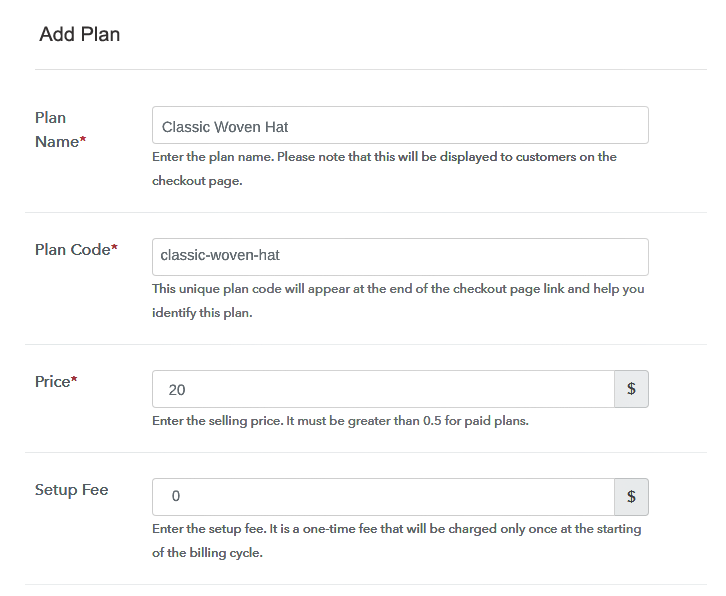
Specify the Plan and Pricing to Sell Woven Hats Online

The next thing to do is fill all the details of the woven hats like plan name, code, price, set-up fee, and much more to continue.

(c) Add Image & Description of Woven Hats

Add Image & Description to Sell Woven Hats Online

Furthermore, write a brief description of the woven hats using bullets, images, etc, to bring original buyers to the checkout page.

Next, click on the “Submit” button to add the woven hats on the checkout page.

Finally, you can add multiple plans and kinds of woven hats in your product list which you want to sell online.

Step 7: Share your Checkout Page

Share Checkout Page on Social Media

  • Moreover, share the checkout page of the woven hats on social media accounts like Facebook & Twitter to grab the customer’s attention.
  • Also, you can share the direct link of the woven hat’s checkout page with your customers via SMS or email marketing.
  • Additionally, embed the provided plan link of the woven hats in the buttons or any anchor text on your website.

Step 8: Preview Checkout Page

Further, follow up on the recommended steps to preview the checkout page for woven hats:

(a) Click on the View Button

View Checkout Plan

(b) Take a Look at the Checkout Page

Checkout Page to Sell Woven Hats Online

Step 9: Embed Checkout Page in Site & Sell Woven Hats Online

Embed Checkout Page on Website

Additionally, simply copy the link and add the checkout page to sell woven hats online at any proper place on your WordPress site.

(a) Edit the Page & Paste the Copied Link

Paste Link in Text Editor

Moreover, paste the plan link of woven hats on a text editor of the WordPress dashboard.

(b) Save & Publish the Checkout Page

Save_and_Publish

Further, click on the “Publish” button, after making changes.

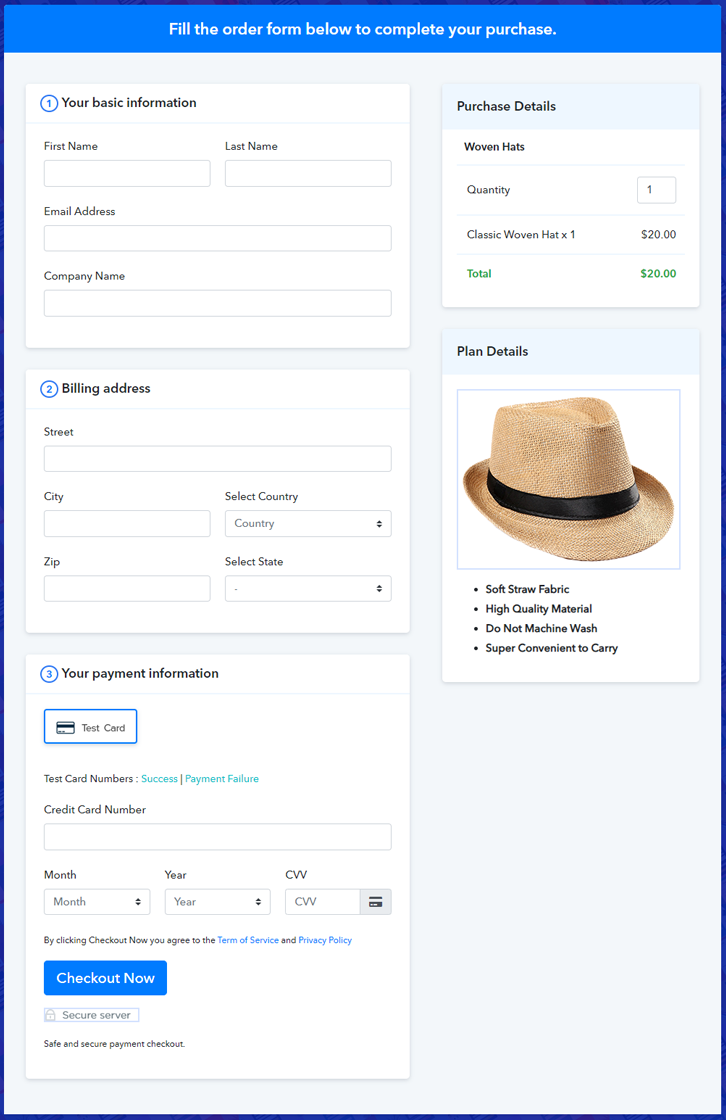
(c) Check out the Final Look of your Checkout Page on WordPress Site

Final Look of your Checkout Page to Sell Woven Hats Online

Step 10: Multiplan Checkout Page

Note: In case you want to sell multiple products via a single checkout page, you can create a multi-plan checkout page otherwise skip this step.

(a) Click on Add Mutiplan Checkout

Multiplan Checkout

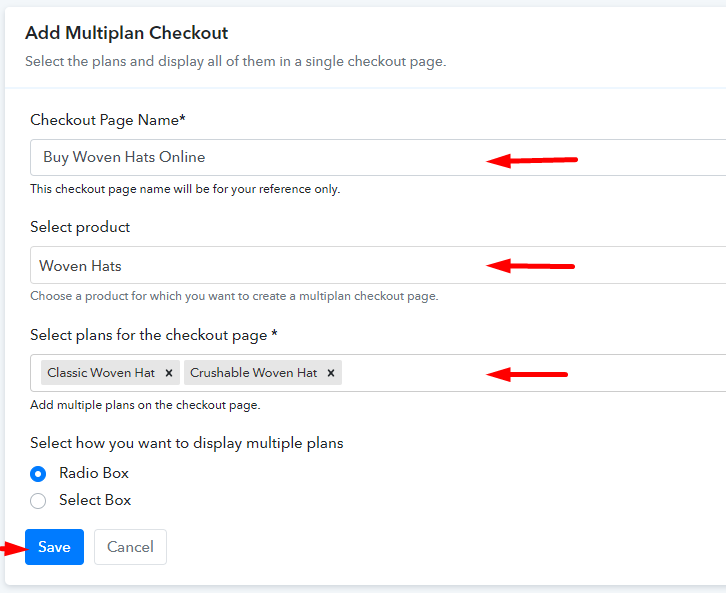
(b) Add Plans to Sell Multiple Woven Hats from Single Checkout Page

Add Multiple Products to Start Selling Woven Hats Online

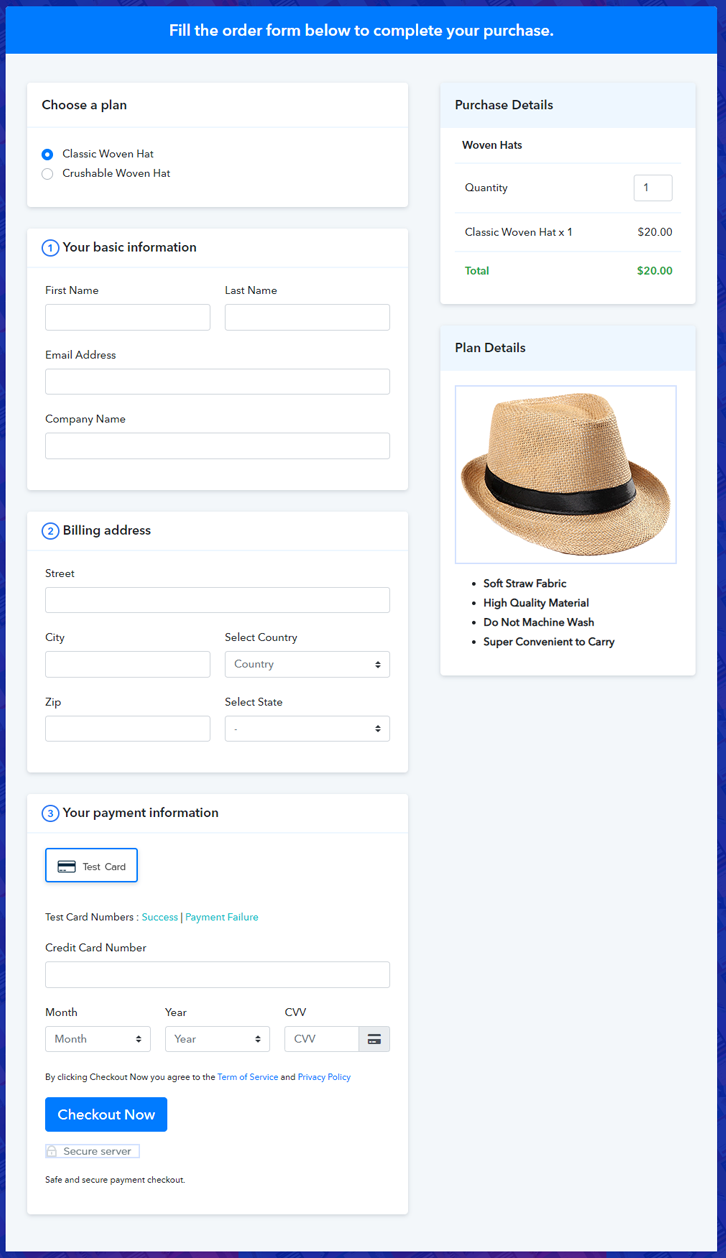
(c) Take a Look at the Checkout Page

Multiplan Checkout Page to Sell Woven Hats Online

Preview Checkout Page

Wrapping Up

That’s it! We have deceptively answered all the needed steps to starting woven hats selling business online. Using the Pabbly Subscription Billing software one can easily start woven hats business without any difficulty. The tool saved all of us from an overwhelming process of starting any business. Plus it is packed with features like several billing modules, revenue tracking, and much more.

So, what’s a delay now? Go and try this software out.

You May Also Like To Read –
How to Sell Writing Pads Online | Step by Step (Free Method)

How to Sell Writing Pads Online

Ideal For: All the writing pad manufactures, writing pad sellers, writing pad dealers, writing pad suppliers, writing pad shop owners and other merchants can use this method to sell writing pads online.

How to Sell Writing Pads Online

Why Choose this Method to Sell Writing Pads Online?

Unlike any other solution, this method allows you to:

  • List and sell your writing pads for FREE. Absolutely no payment required.
  • No need to pay commission on any of your sales.
  • Multiple payment options like PayPal, Credit Card, etc to collect payment from a single place.
  • Sell one time or recurring subscriptions of your writing pads.
  • Collect payments & sell products in any currency as per your requirement.
  • Give discounts on your products by offering special coupon codes.
  • Add sales commission agents to help you in selling writing pads online.

Get Pabbly Subscription Billing for Free

Writing pads are nowadays in demand as they are portable and can store huge data in themselves. So gone are the days where you have to keep records in book and have to take it everywhere you go.  That is the reason why writing pads are widely used by people in home, offices, shops, everywhere and never goes out of demand. Hence, if you own a writing pad store, then it’s the right time for you to expand your business by starting writing pads business online. Because it will help you boost your sales by taking orders from the global audience.

Therefore, here we would like to suggest amazing software i.e, Pabbly Subscription Billing that can help you in starting your own writing pad business online. This tool lets you create marvelous checkout pages for selling writing pads online. Some of its amazing features involve:

  • List various writing pads in a single checkout page
  • Add tax and delivery charges as per customer’s location
  • Offer discount and coupon codes to consumers
  • Collect money in both online and offline mode
  • Share checkout pages link on social media websites

So, let’s get started by creating our checkout page using Pabbly Subscription Billing to sell writing pads online.

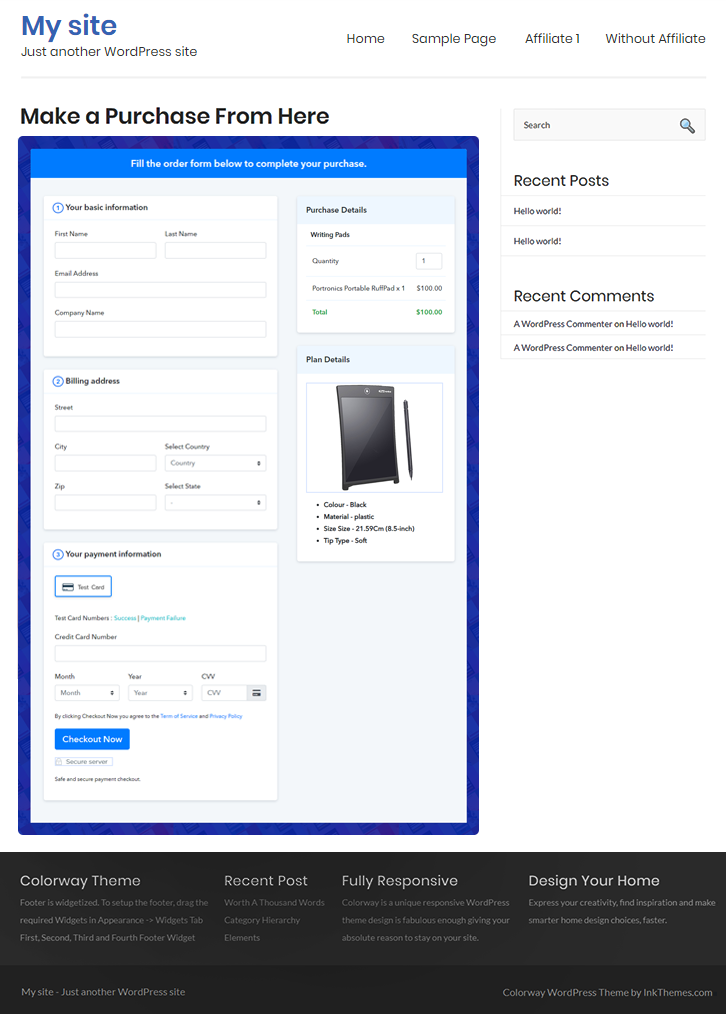
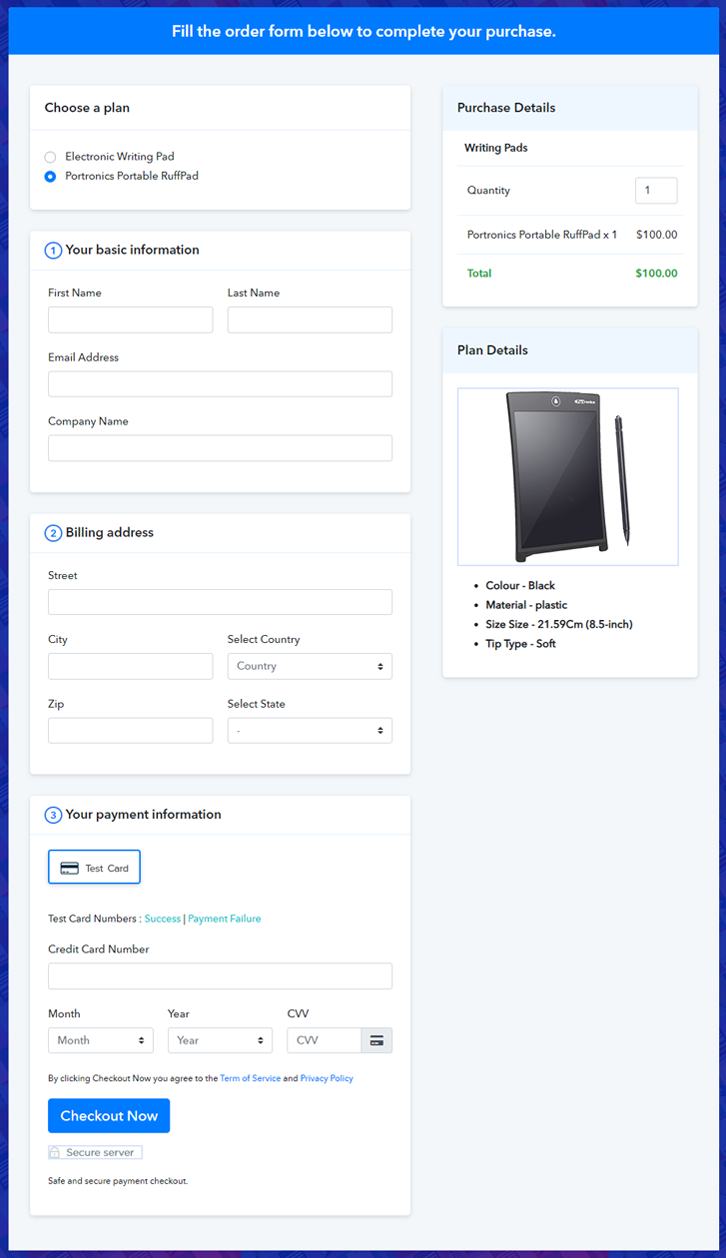
Final View of Checkout Page for your Writing Pads Selling Business

Final View of Checkout Page for your Writing Pads Selling Business

Preview Checkout Page

Step 1: Log in to Pabbly Subscription Billing

Signup

Begin the process for creating a checkout page for writing pads by visiting the Pabbly Subscription Billing in your browser. After that, click on the “Sign up Free“ button. Moreover, either manually filled out the details or sign in using your Gmail account.

Sign Up For Free!

Step 2: Select Subscription Billing

Access Subscription Billing

Step 3: Account Setup

Setup Account

Furthermore, after pressing on the “Access Now” button of the software, a page will open with fields like company name, select currency, and phone number. Just fill out those details to continue creating a checkout page for writing pads.

Step 4: Connect Payment Gateways & Start Writing Pads Selling Business Online

Connect Payment Gateway

The following step is to understand the whole payment procedures using a “Test Payment Gateway”. Here, we will describe the checkout page process for the writing pads with the help of a test payment gateway. Apart from this, the tool offers various payment gateways such as PayPal, Stripe, etc. Furthermore, below are the payment integration guides to help you further.

Step 5: Add Product for your Writing Pads

Add Product

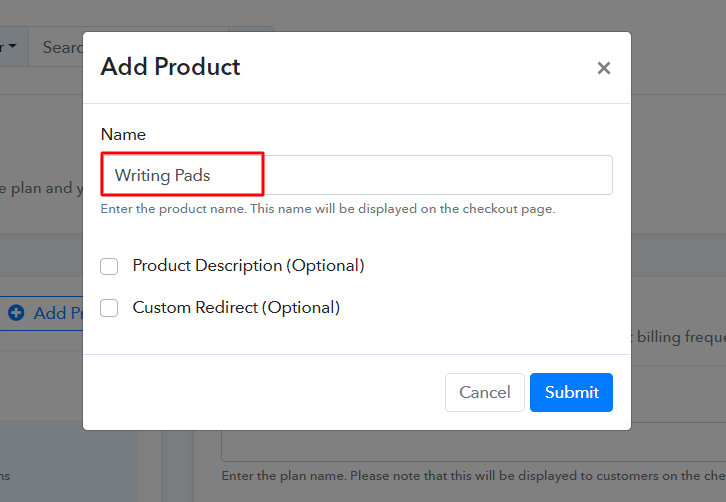
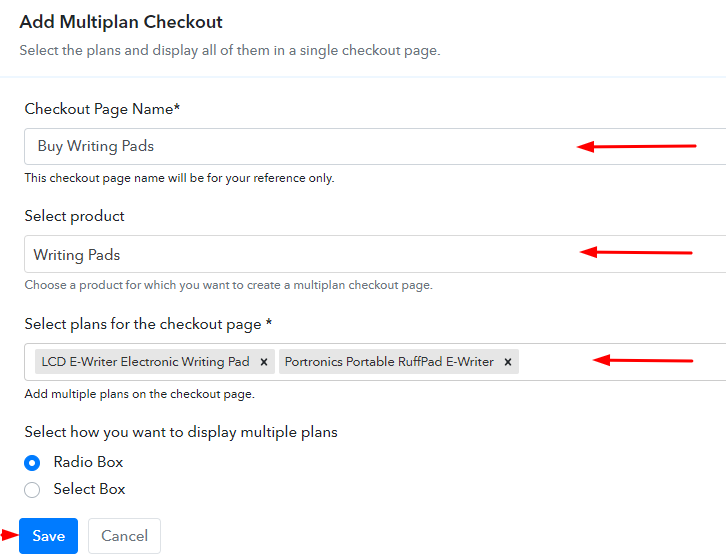
Plus, add the name, which in our case is “Writing Pads”. Here you can specify the type and write a short description of the writing pads too.

Add Product To Sell Writing Pads Online

Moreover, just fill out all those details and your product is created.

Note: Here you can add all the products related to the similar category by creating plans for each of them.

Step 6: Add Plans 

Let’s reveal plans for different kinds of writing pads available in your store.

(a) Select Add New Plan

Add Plan

(b) Specify the Plan & Pricing Details

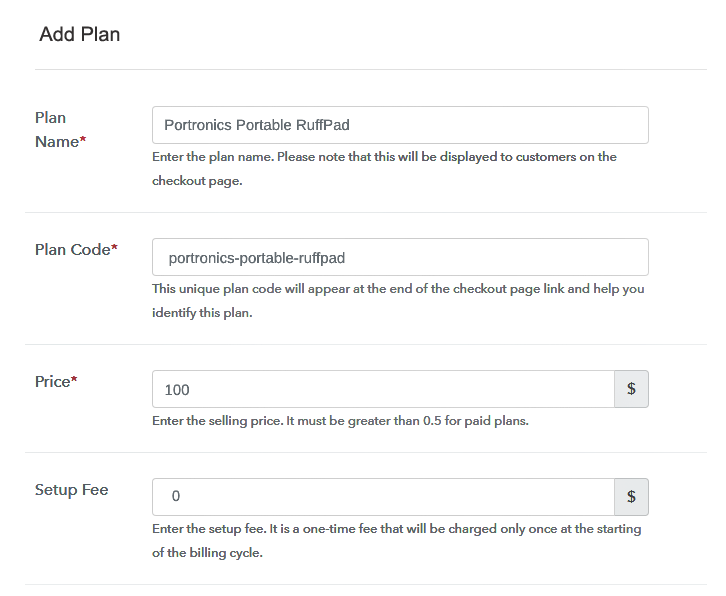
Specify the Plan and Pricing to Sell Writing Pads Online

The subsequent thing to do is fill all the details of the writing pads like plan name, code, price, set-up fee, and much more to continue.

(c) Add Image & Description of Writing Pads

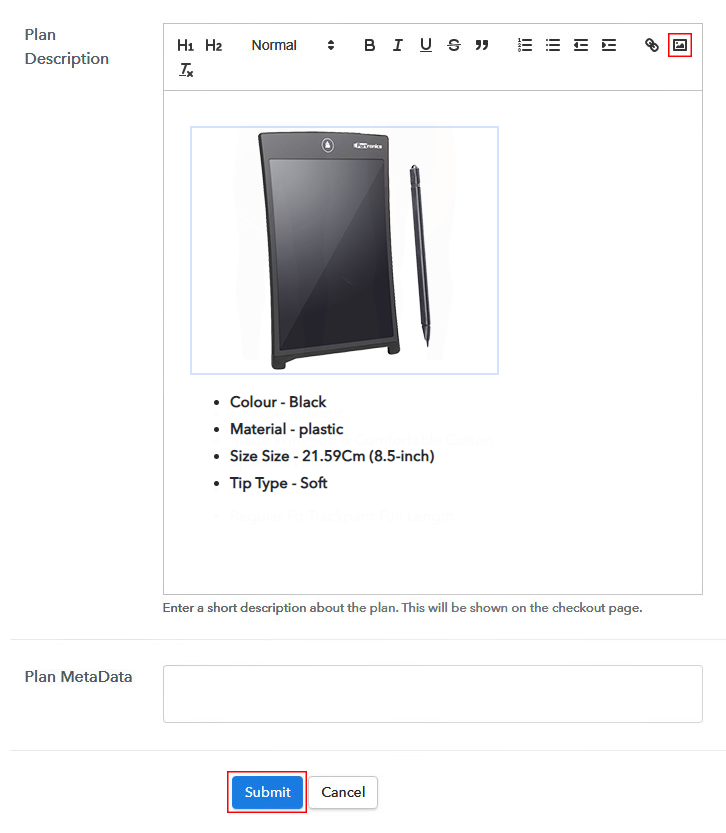
Add Image & Description of Writing Pads

Furthermore, it is necessary to write a brief description of the writing pads using bullets, images, etc, to bring original buyers to the checkout page.

Next, click on the “Submit” button to add the writing pads on the checkout page.

Finally, you can add multiple plans and kinds of writing pads in your product list which you want to sell online.

Step 7: Share your Checkout Page

Share Checkout Page on Social Media

  • Moreover, share the checkout page of the writing pads on social media accounts like Facebook & Twitter to grab the customer’s attention.
  • Also, you can share the direct link of the writing pad’s checkout page with your customers via SMS or email marketing.
  • Additionally, embed the provided plan link of the writing pads in the buttons or any anchor text on your website.

Step 8: Preview Checkout Page

Follow up the recommended steps to preview the checkout page:

(a) Click on the View Button

View Checkout Plan

(b) Take a Look at the Checkout Page

Final View of Checkout Page for your Writing Pads Selling Business

Step 9: Embed Checkout Page in Site & Sell Writing Pads Online

Embed Checkout Page on Website

Just copy the link and add the checkout page to sell writing pads online at any proper place on your WordPress site.

(a) Edit the Page & Paste the Copied Link

Paste Link in Text Editor

Further, paste the plan link of writing pads on a text editor of the WordPress dashboard.

(b) Save & Publish the Checkout Page

Save_and_Publish

Next, click the “Publish” button, after making changes.

(c) Check out the Final Look of your Checkout Page on WordPress Site

Embed Checkout Page in Site & Sell Writing Pads Online

Step 10: Multiplan Checkout Page

Note: In case you want to sell multiple products via a single checkout page, you can create a multi-plan checkout page otherwise skip this step.

(a) Click on Add Mutiplan Checkout

Multiplan Checkout

(b) Add Plans to Sell Multiple Writing Pads from Single Checkout Page

Add Plans to Sell Multiple Writing Pads from Single Checkout Page

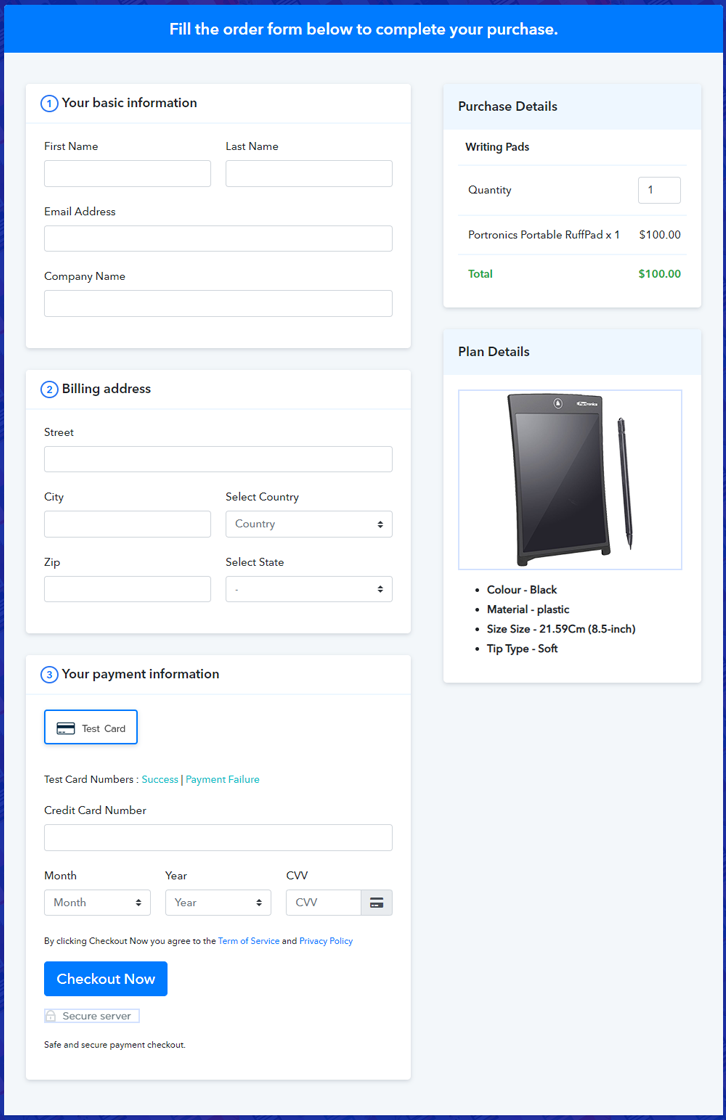
(c) Take a Look at the Checkout Page

Multiplan Checkout Page to Sell How to Sell Writing Pads Online

Preview Checkout Page

Wrapping Up

There you go! See, how easy it is to start writing pads business online with the help of Pabbly Subscription Billing software. Simply go through all the steps that are mentioned above and set up your writing pad business effortlessly. Don’t wait anymore, try this software out and let us know about your experience in the comment section below.

You May Also Like To Read –
How to Sell Work Tables Online | Step by Step (Free Method)

How to Sell Work Tables Online

Ideal For: All the work table manufacturers, work table sellers, work table dealers, work table suppliers, furniture shop owners, and other merchants can use this method to sell work tables online.

How to Sell Work Tables Online

Why Choose this Method to Sell Work Tables Online?

Unlike any other solution, this method allows you to:

  • List and sell your work tables for FREE. Absolutely no payment required.
  • No need to pay commission on any of your sales.
  • Multiple payment options like PayPal, Credit Card, etc to collect payment from a single place.
  • Sell one time or recurring subscriptions of your work tables.
  • Collect payments & sell products in any currency as per your requirement.
  • Give discounts on your products by offering special coupon codes.
  • Add sales commission agents to help you in selling work tables online.

Get Pabbly Subscription Billing for Free

In every single office, household, having a work table is a must as they are widely used for working and keeping official stuff organized. That is the reason why, work tables business never goes down. So, if you have a work table business, then it is the right time for you to take it online. Want to know why?

Well, this is a digital age, where people prefer buying things online, especially that are huge as work tables. Because it is very convenient for them and they don’t have to go outside and it will be delivered on their doorstep without any hassle.

Besides, by taking this step you will get a hike in business revenue. As, you will be selling work tables online and this will led you to get orders from all around the world. Thus, to take your work table business online, you will need a tool that can help you with all the business needs.

Therefore, we would like to advise you Pabbly Subscription Billing as one of the best online software. Using this you can create amazing checkout pages of your work tables and share it on websites, social media accounts, or via emails, SMS. Now, without wasting any of your time, let me take you through the 10 easy steps that you need to follow for creating a checkout page to sell work tables online.

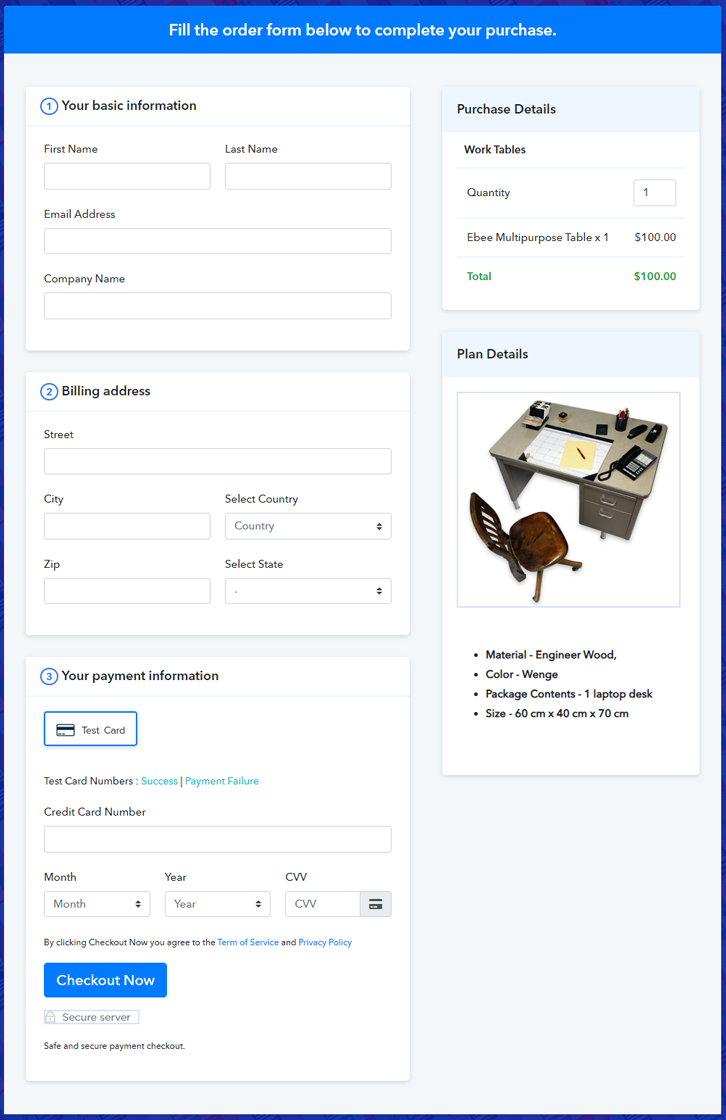
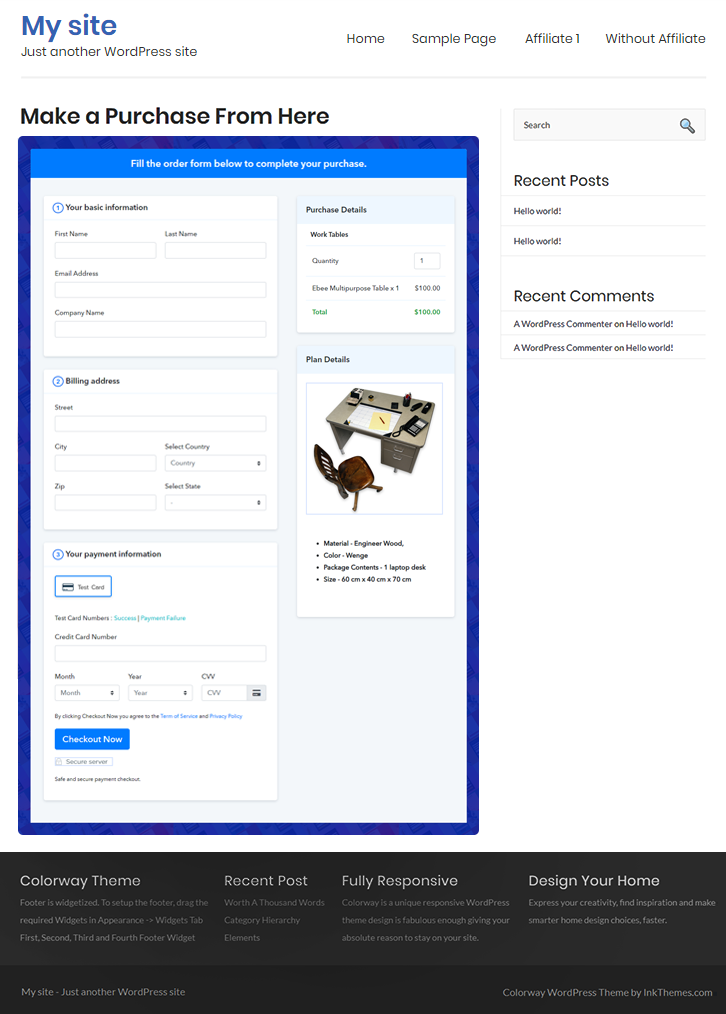
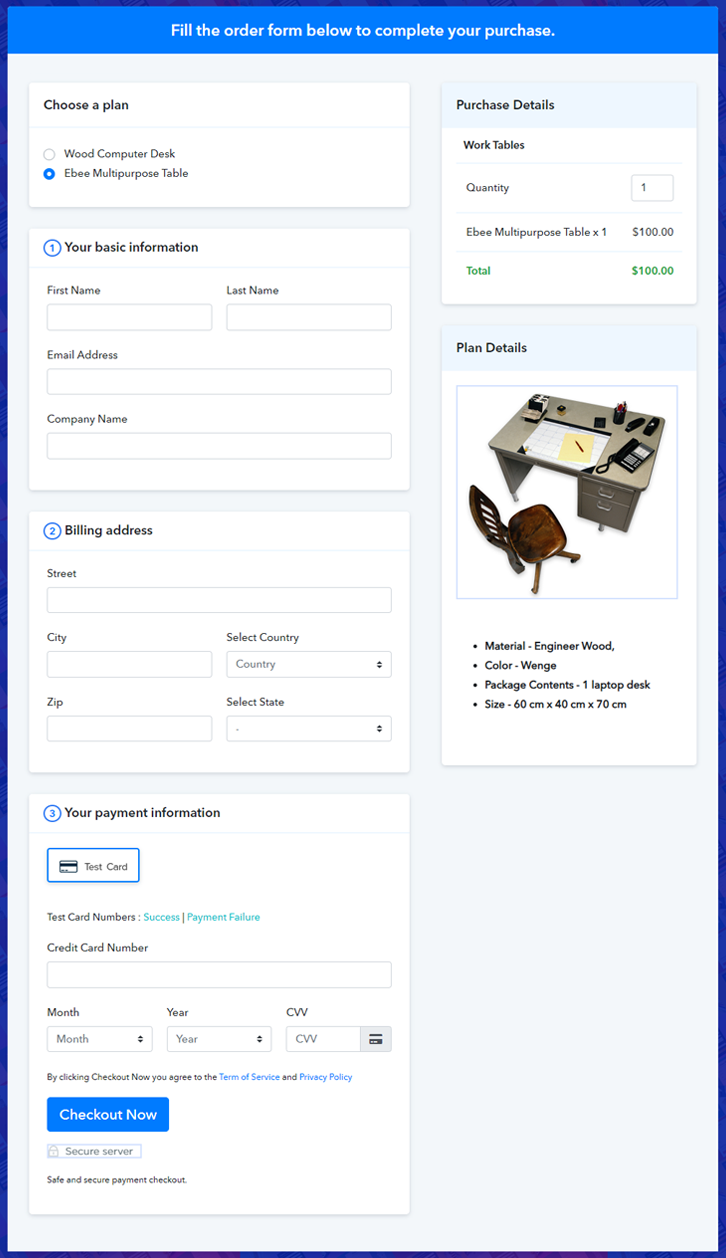
Final View of Checkout Page for Your Work Tables Selling Business

Final View of Checkout Page for Your Work Tables Selling Business

Preview Checkout Page

Step 1: Log in to Pabbly Subscription Billing

Signup

The process starts by visiting the Pabbly Subscription Billing in your browser. Later, hit the “Sign up Free“ button. Afterwards, either manually filled out the details or sign in using your Gmail account.

Sign Up For Free!

Step 2: Select Subscription Billing

Access Subscription Billing

Step 3: Account Setup

Setup Account

Once you hit on the “Access Now” button of the software, a page will open up. That will ask you to fill the fields like company name, select currency, and phone number. Enter all those details in order to continue creating a checkout page for work tables.

Step 4: Connect Payment Gateways & Start Work Tables Selling Business Online

Connect Payment Gateway

Afterward, we are going to specify the details regarding payment procedures using a “Test Payment Gateway”. Here, I am going to give a brief detail on the checkout page payment process for the work tables with the help of a test payment gateway. Apart from that, this tool offers various payment gateways such as PayPal, Stripe, etc. Further, below are the payment integration guides to help you out.

Step 5: Add Product for Your Work Tables

Add Product

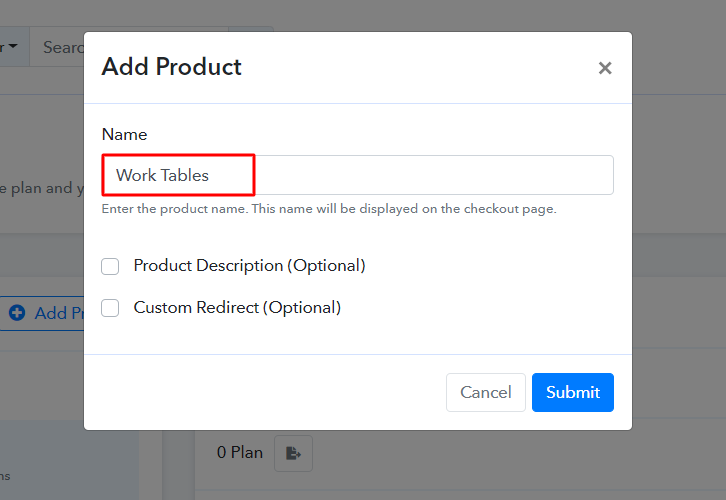
Additionally, add the name, which in our case is “Work Tables”. Here you can specify the type & write a short description of the work tables to catch the customer’s attention.

Add Product to Start Selling Work Tables Online

Moreover, just fill out all those details and your product is created.

Note: Here you can add all the products related to the similar category by creating plans for each of them.

Step 6: Add Plans 

Let’s cast light on plans for different kinds of work tables available in your store.

(a) Select Add New Plan

Add Plan

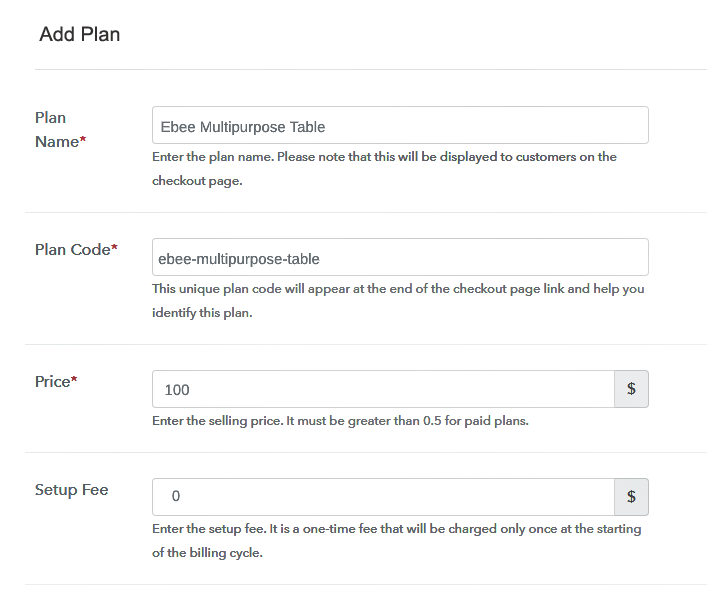
(b) Specify the Plan & Pricing Details

Specify the Plan and Pricing to Sell Work Tables Online

The next thing to do is fill all the details of the work tables like plan name, code, price, set-up fee, and much more to continue.

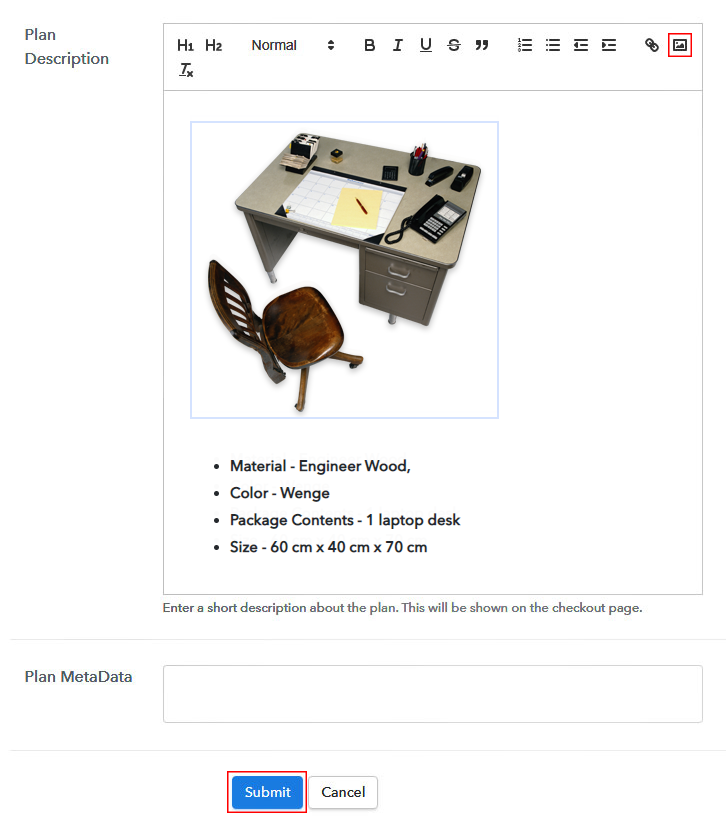
(c) Add Image & Description of Work Tables

Add Image & Description to Sell Work Tables Online

Next, give a brief description of work tables with bullets, images, links, etc.

Afterward, press the “Submit” button to add the work tables on the checkout page.

Eventually, add multiple plans along with types of work tables in your product list which you want to sell online.

Step 7: Share your Checkout Page

Share Checkout Page on Social Media

  • Moreover, share the checkout page of the work tables on social media accounts like Facebook & Twitter.
  • Also, you can share the direct link of the work tables checkout page with your customers with the help of SMS or email marketing.
  • Not only that, but you can also embed the provided plan link of the work tables in the buttons or any anchor text on your website.

Step 8: Preview Checkout Page

Follow up the recommended steps to preview the checkout page:

(a) Click on the View Button

View Checkout Plan

(b) Take a Look at the Checkout Page

Final View of Checkout Page for Your Work Tables Selling Business

Step 9: Embed Checkout Page in Site & Sell Work Tables  Online

Embed Checkout Page on Website

Just copy the link and add the checkout page to sell work tables online at any proper place on your WordPress site.

(a) Edit the Page & Paste the Copied Link

Embed Checkout Page on Website

Further, paste the plan link on a text editor of the WordPress dashboard.

(b) Save & Publish the Checkout Page

Save_and_Publish

Next, click the “Publish” button, after making changes.

(c) Check out the Final Look of your Checkout Page on WordPress Site

Embed Checkout Page in Site & Sell Work Tables Online

Step 10: Multiplan Checkout Page

Note: In case you want to sell multiple products via a single checkout page, you can create a multi-plan checkout page otherwise skip this step.

(a) Click on Add Mutiplan Checkout

Multiplan Checkout

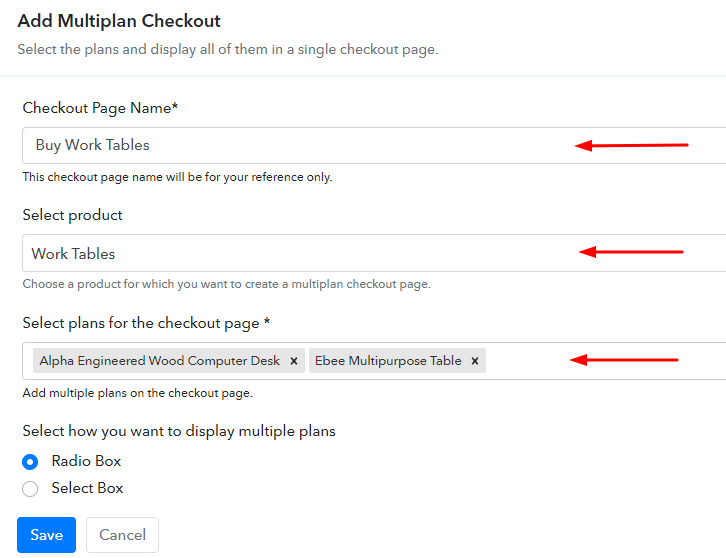
(b) Add Plans to Sell Multiple Work Tables from Single Checkout Page

Add Plans to Sell Multiple Work Tables from Single Checkout Page

(c) Take a Look at the Checkout Page

Multiplan Checkout Page to Sell How to Sell Work Tables Online

Preview Checkout Page

Wrapping Up

Alright! Now you know how easy it is to start your own work tables business. Simply log in to Pabbly Subscription Billing and start your own journey of online business in no time. Just follow all the mentioned steps and you’re ready to roll. So, go ahead and try this software. Thank You!!

You May Also Like To Read –

How to Sell Wooden Art Online | Step by Step (Free Method)

How to Sell Wooden Art Online

Ideal For: All the wooden art manufacturers, wooden art sellers, wooden art dealers, wooden art suppliers, art shop owners and other merchants can use this method to sell wooden art online.

How to Sell Wooden Art Online

Why Choose this Method to Sell Wooden Art Online?

Unlike any other solution, this method allows you to:

  • List and sell your wooden art for FREE. Absolutely no payment required.
  • No need to pay commission on any of your sales.
  • Multiple payment options like PayPal, Credit Card, etc to collect payment from a single place.
  • Sell one time or recurring subscriptions of your wooden art.
  • Collect payments & sell products in any currency as per your requirement.
  • Give discounts on your products by offering special coupon codes.
  • Add sales commission agents to help you in selling wooden art online.

Get Pabbly Subscription Billing for Free

Wooden art is the way to connect ourself from our roots and tradition. It requires a lot of effort and time to prepare wooden art. This is exactly why people love to hang wooden art in their homes. So, if you have a wooden art gallery then without wasting any more time you should start selling wooden arts online.

By selling wooden arts online, you can sell your art to people from all across the globe. Not only this, but you can also create a digital portfolio of your wooden art. Furthermore, the setup cost of starting an online business is low. So, now the real problem is how to start an online wooden art store. Luckily we have a solution for this too in the name of Pabbly Subscription Billing.

The software allows you to build amazing checkout page for selling wooden art online. Other than this it is swamped with features like:

  • Unlimited Discount & Coupons
  • Revenue Tracking
  • One Time and Recurring Billing

Subsequently, now let me show you 10 easy steps that you need to follow for creating checkout pages for selling wooden art online.

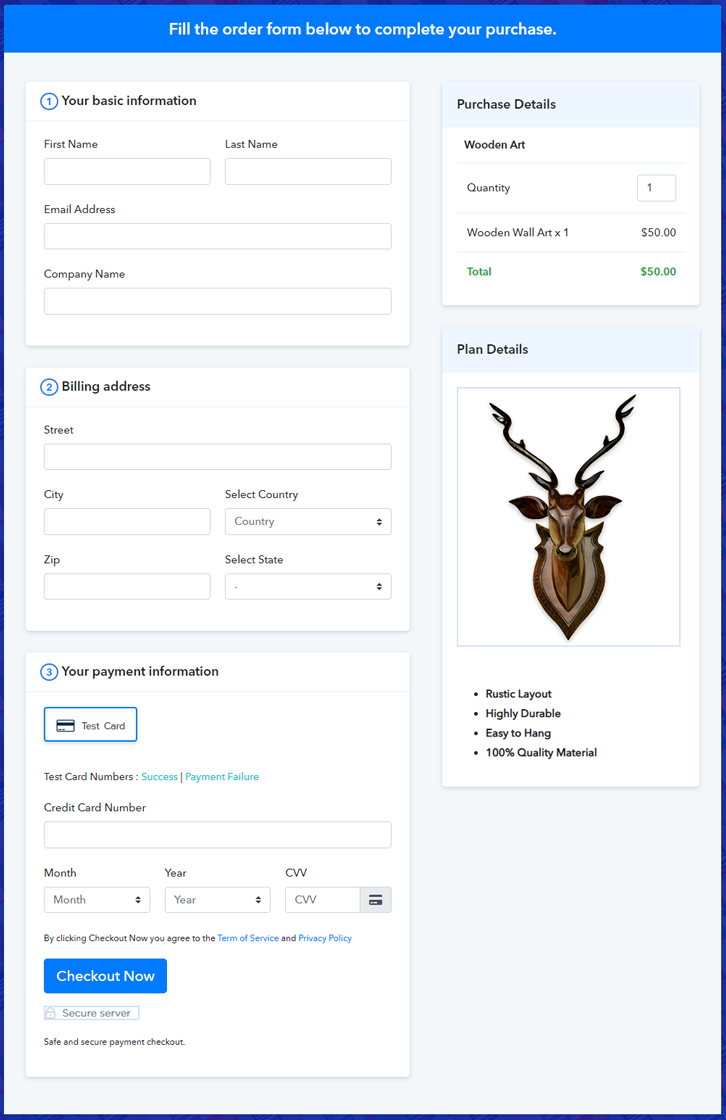
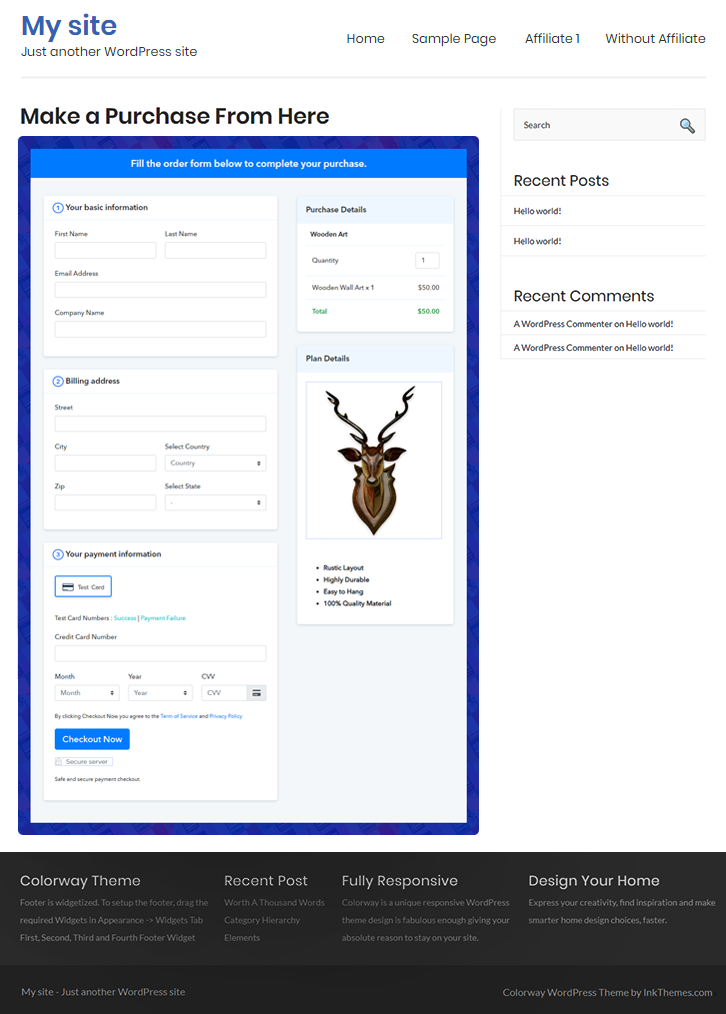
Final View of Checkout Page for your Wooden Art Selling Business

Checkout Page to Sell Wooden Art Online

Preview Checkout Page

Step 1: Log in to Pabbly Subscription Billing

Signup

Start the process for creating a checkout page for wooden art by visiting the Pabbly Subscription Billing in your browser. After that, click on the “Sign up Free“ button. Furthermore, either manually filled out the details or sign in using your Gmail account.

Sign Up For Free!

Step 2: Select Subscription Billing

Access Subscription Billing

Step 3: Account Setup

Setup Account

Besides, after clicking on the “Access Now” button of the software, a page will open with fields like company name, select currency, and phone number. Simply fill out those details to continue creating a checkout page for wooden art.

Step 4: Connect Payment Gateways & Start Wooden Art Selling Business Online

Connect Payment Gateway

The consequent step is to earning information about payment procedures using a “Test Payment Gateway”. Here, we will explain the checkout page process for the wooden art with the help of a test payment gateway. Besides this, the tool offers various payment gateways such as PayPal, Stripe, etc. Moreover, below are the payment integration guides to help you out.

Step 5: Add Product for your Wooden Art

Add Product

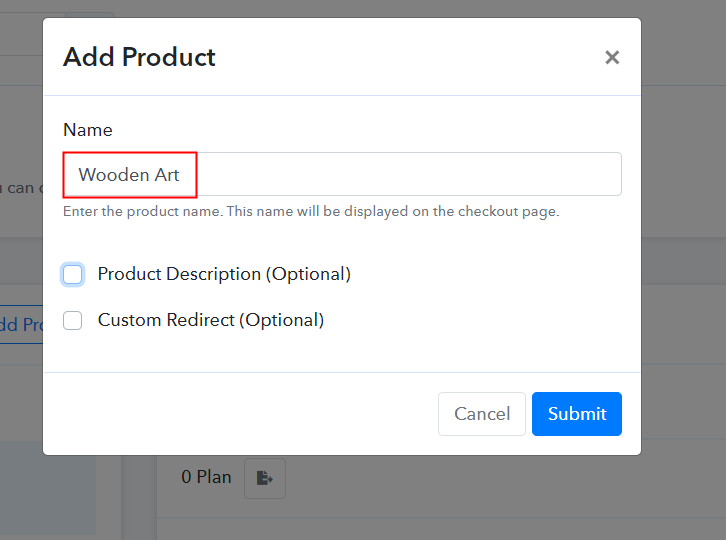
Additionally, add the name, which in our case is “Wooden Art”. Here you can specify the type like wooden wall art, traditional wooden art, etc. Further, write a short description of the wooden art to grab the shopper’s attention.

Add Product to Start Selling Wooden Art Online

Moreover, just fill out all those details, and your product for wooden art is created.

Note: Here you can add all the products related to the similar category by creating plans for each of them.

Step 6: Add Plans 

Let’s expose plans for different kinds of wooden art available in your store.

(a) Select Add New Plan

Add Plan

(b) Specify the Plan & Pricing Details

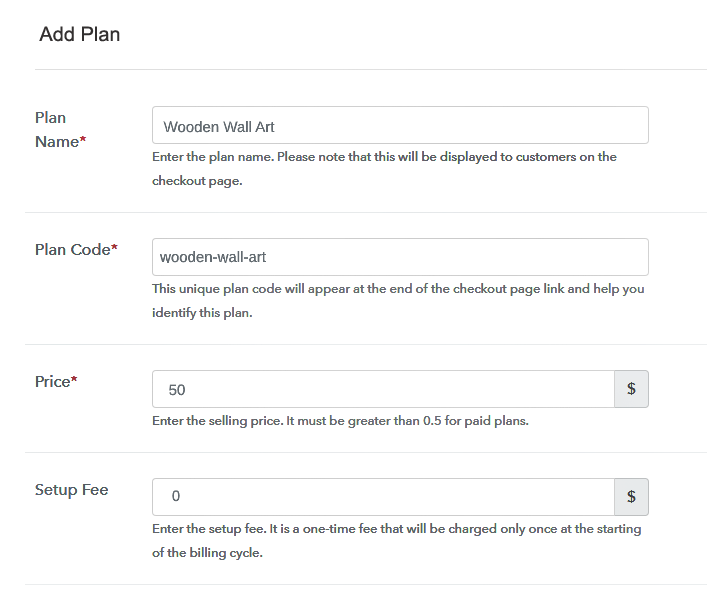
Specify the Plan and Pricing to Sell Wooden Art Online

The next thing to do is fill all the details of the wooden art like plan name, code, price, set-up fee, and much more to continue.

(c) Add Image & Description of Wooden Art

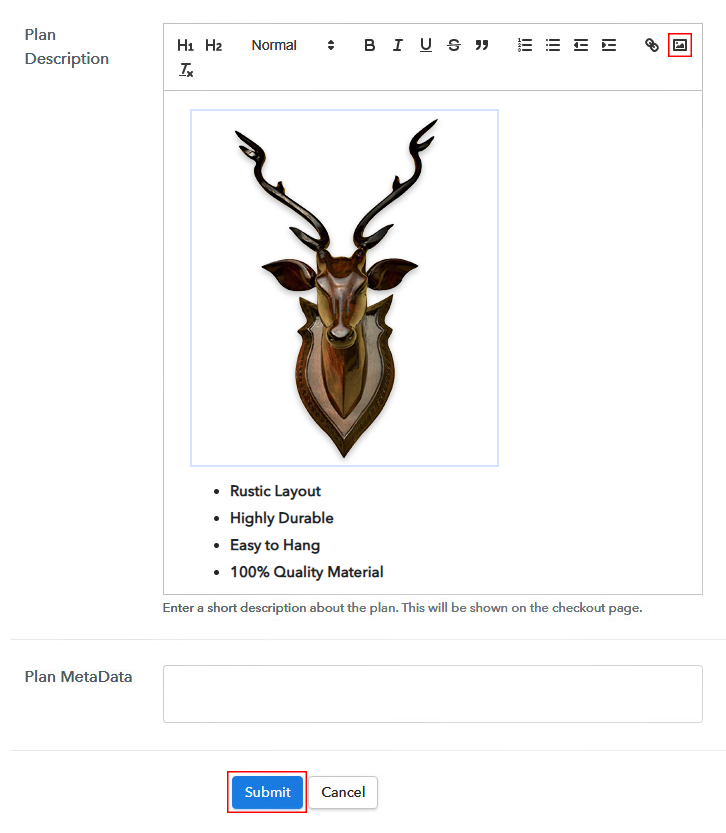
Add Image & Description to Sell Wooden Art Online

Furthermore, write a brief description of the wooden art using bullets, images, etc, to bring original buyers to the checkout page.

Next, click on the “Submit” button to add the wooden art on the checkout page.

Finally, you can add multiple plans and kinds of wooden art in your product list which you want to sell online.

Step 7: Share your Checkout Page

Share Checkout Page on Social Media

  • Moreover, share the checkout page of the wooden art on social media accounts like Facebook & Twitter to grab the customer’s attention.
  • Also, you can share the direct link of the wooden art checkout page with your customers via SMS or email marketing.
  • Additionally, embed the provided plan link of the wooden art in the buttons or any anchor text on your website.

Step 8: Preview Checkout Page

Further, follow up on the recommended steps to preview the checkout page for wooden art:

(a) Click on the View Button

View Checkout Plan

(b) Take a Look at the Checkout Page

Checkout Page to Sell Wooden Art Online

Step 9: Embed Checkout Page in Site & Sell Wooden Art Online

Embed Checkout Page on Website

Additionally, simply copy the link and add the checkout page to sell wooden art online at any proper place on your WordPress site.

(a) Edit the Page & Paste the Copied Link

Paste Link in Text Editor

Moreover, paste the plan link of wooden art on a text editor of the WordPress dashboard.

(b) Save & Publish the Checkout Page

Save_and_Publish

Further, click on the “Publish” button, after making changes.

(c) Check out the Final Look of your Checkout Page on WordPress Site

Final Look of your Checkout Page to Sell Wooden Art Online

Step 10: Multiplan Checkout Page

Note: In case you want to sell multiple products via a single checkout page, you can create a multi-plan checkout page otherwise skip this step.

(a) Click on Add Mutiplan Checkout

Multiplan Checkout

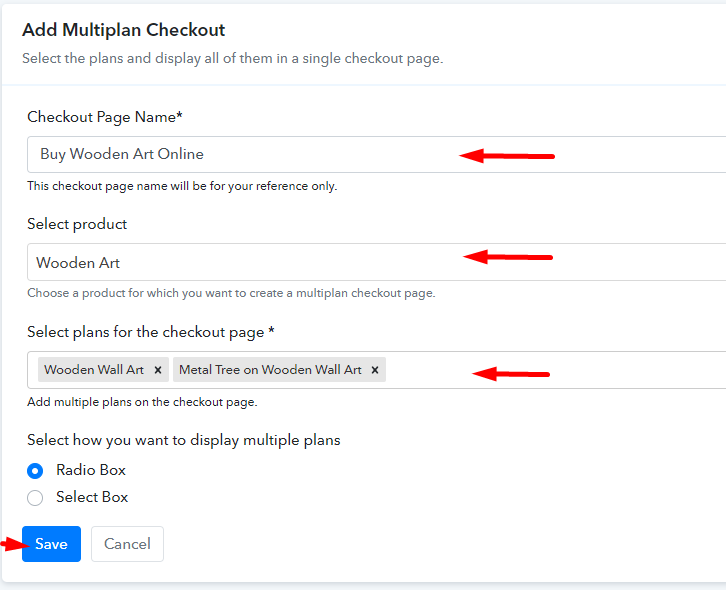
(b) Add Plans to Sell Multiple Wooden Art from Single Checkout Page

Add Multiple Products to Start Selling Wooden Art Online

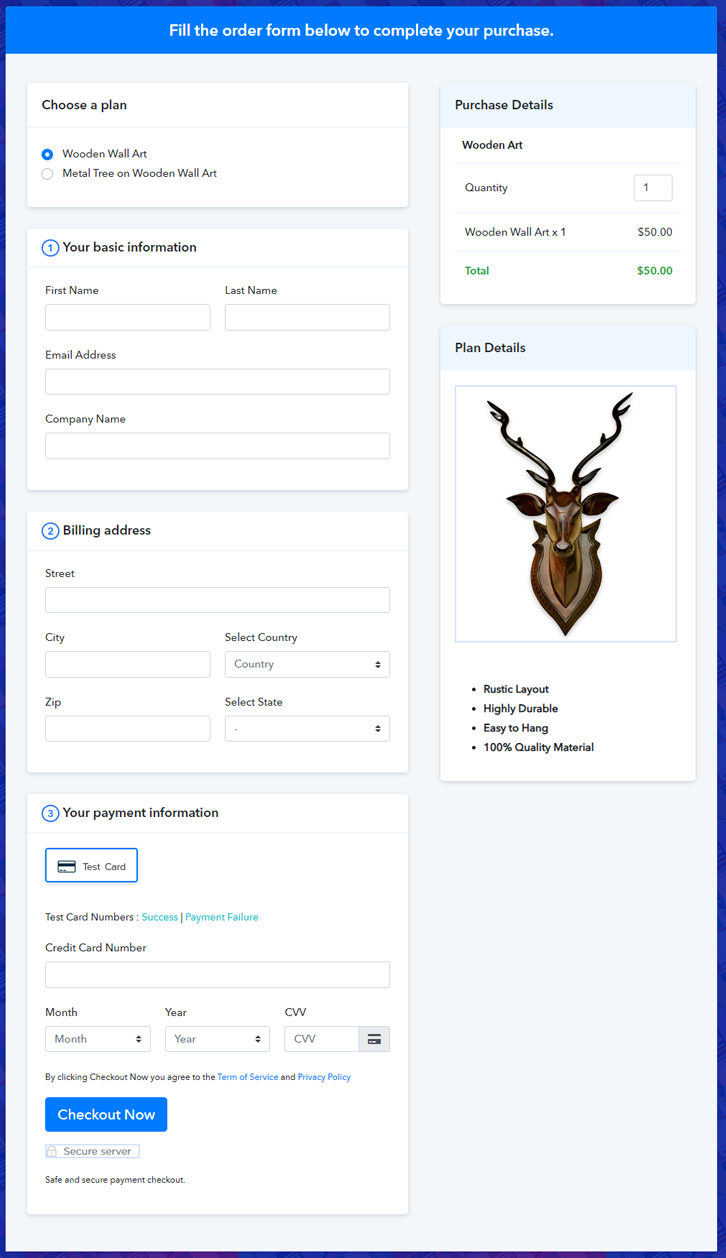
(c) Take a Look at the Checkout Page

Multiplan Checkout Page to Sell Wooden Art Online

Preview Checkout Page

Wrapping Up

There you have it! This is our outcome on “how to sell wooden art online” using Pabbly Subscription Billing software. You can headstart the wooden art business online easily with the help of this tool. Simply follow all the aforesaid steps and you’re good to go.

So, what are you waiting for? Go and try this amazing software out.

You May Also Like To Read –
How to Sell Wood Carvings Online | Step by Step (Free Method)

How to Sell Wood Carvings Online

Ideal For: All the wood carving stores, wood carving shops, wood carving artists, home decor stores, home decor retailers, and other sellers can use this method to take their wood carvings selling business online.

How to Sell Wood Carvings Online

Why Choose this Method to Sell Wood Carvings Online?

Unlike any other solution, this method allows you to:

  • List and sell your wood carvings for FREE. Absolutely no payment required.
  • No need to pay commission on any of your sales.
  • Multiple payment options like PayPal, Credit Card, etc to collect payment from a single place.
  • Sell one time or recurring subscriptions of your wood carvings.
  • Collect payments & sell products in any currency as per your requirement.
  • Give discounts on your products by offering special coupon codes.
  • Add sales commission agents to help you in selling wood carvings online.

Get Pabbly Subscription Billing for Free

Wood carvings give homes & offices an elegant look and people are keen to decorate their homes with carved sculptures or wooden mirrors. So if you want to take your wood carvings business online, you are in the right place.

To start wood carvings business online we’ll be going to discuss the best method i.e, Pabbly Subscription Billing. You have to create checkout pages for the wood carvings that you want to sell and the checkout pages will show the product to buyers and you can accept payments through it.

Well, there are other features of this service for your online business:

  • Sell single & multiple items on checkout pages
  • Collect secure online & offline payments of wood carvings
  • Automated invoicing of wood carvings through emails
  • Unlimited product & plan creation to sell unlimited wood carvings

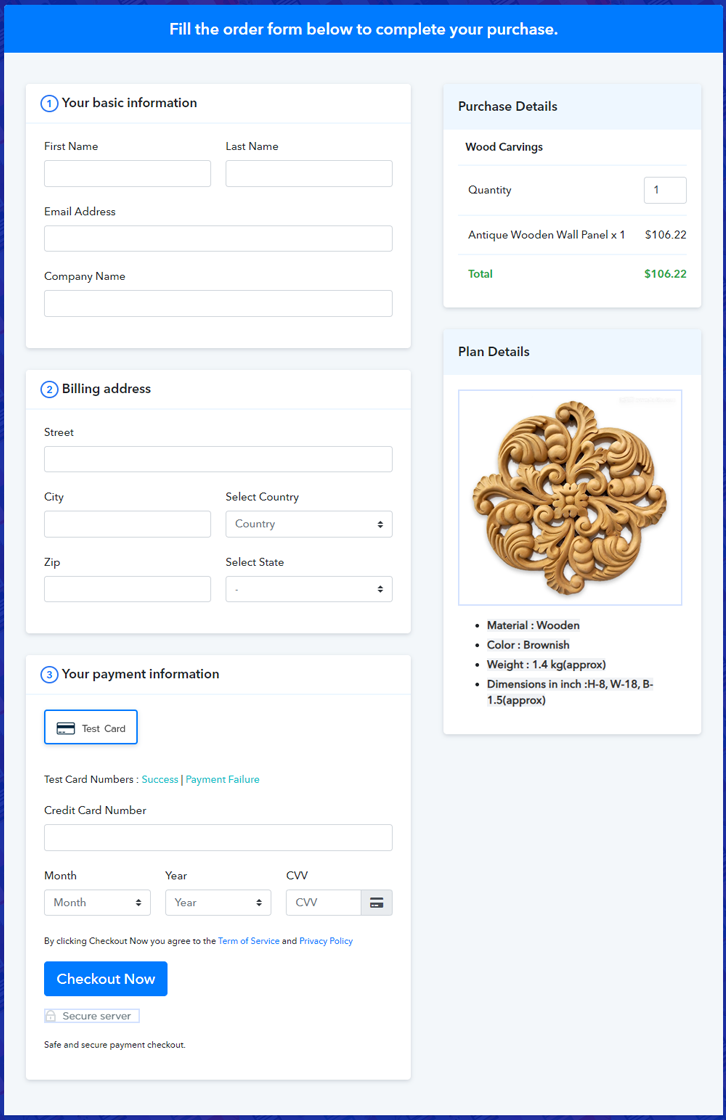
Final View of Checkout Page for your Wood Carvings Selling Business

Preview Checkout Page

Preview Checkout Page

Step 1: Log in to Pabbly Subscription Billing

Signup

You have to begin the process by visiting Pabbly Subscription Billing. Then on the website find the “Sign Up Free” button and click on it. On the next page, you can either sign-in using Google or you can also create an account on the platform by filling out your information manually.

Sign Up For Free!

Step 2: Select Subscription Billing

Access Subscription Billing

Step 3: Account Setup

Setup Account

Once the signup process is finished, now you have to fill up your company details i.e. company name, currency, and contact number in the dialogue box.

Step 4: Connect Payment Gateways & Start Wood Carvings Selling Business Online

Connect Payment Gateway

At this step of the process, you’ll need to connect a payment gateway to sell wood carvings online. For this, the step by step integration guides are given below for multiple gateways & you can pick any one of them. Here in this blog, I’m enabling the ‘Test Payment’ option to go explain to you how the payment collection process works.

Step 5: Add Product for your Wood Carvings

Add Product

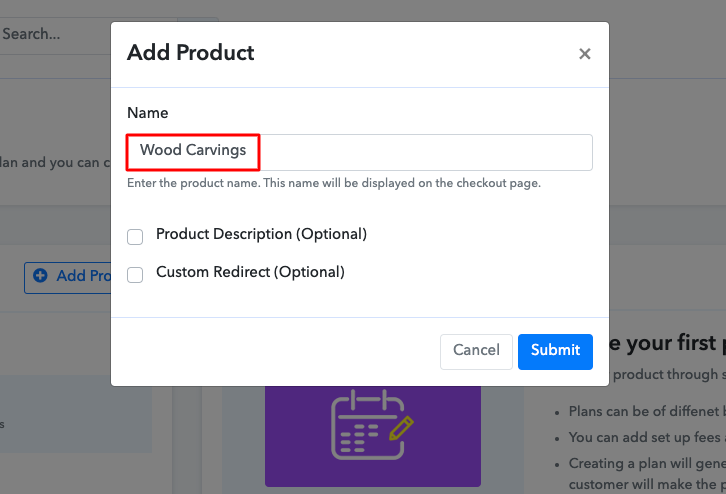
Now in this step, we’ll be adding products to sell wood carvings online. For this, click the ‘Add New Product’ button & specify a product name, like carved sculptures, carved boxes, etc.

Sell Wood Carvings Online Product Name

Likewise, add all other types of wood carvings in the same product by creating different plans.

Note: Here you can add all the products related to the similar category by creating plans for each of them.

Step 6: Add Plans 

Let’s rollout plans for different kinds of wood carvings available in your store.

(a) Select Add New Plan

Add Plan

(b) Specify the Plan & Pricing Details

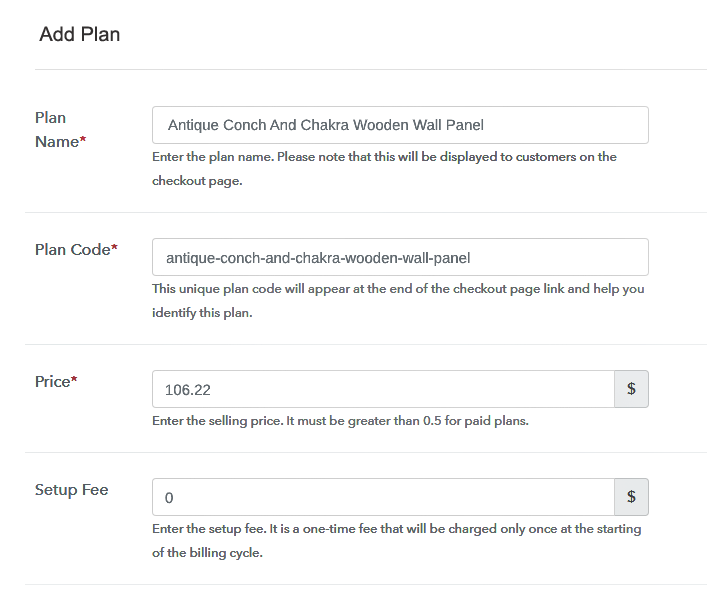
Sell Wood Carvings Online Details

Specify the plan details like wood carving’s name, code, it’s pricing, etc as per the product that you want to sell online.

(c) Add Image & Description of Wood Carvings

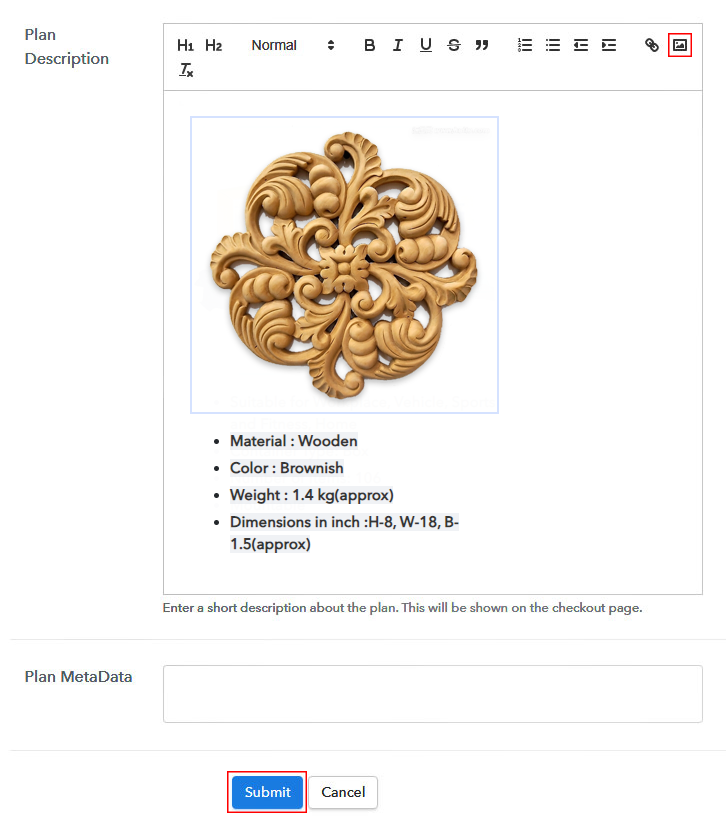
Sell Wood Carvings Online Image

Also, write a description of the wood carvings that you want to sell along with the product links, images, etc, and click on the “Submit” button to add your plan.

You can create more plans for all the wood carvings similarly.

Step 7: Share your Checkout Page

Share Checkout Page on Social Media

Increase your sales of wood carvings online by following the below steps:

  • Share your checkout page on social media like Facebook and Twitter.
  • Further, copy the mentioned link and send it to your customers through SMS or emails directly.
  • You can also embed your plan link to your website so that your customers can be landed on the checkout page directly.

Step 8: Preview Checkout Page

Follow up the recommended steps to preview the checkout page:

(a) Click on the View Button

View Checkout Plan

(b) Take a Look at the Checkout Page

Preview Checkout Page

Step 9: Embed Checkout Page in Site & Sell Wood Carvings Online

Embed Checkout Page on Website

Just copy the provided plan embedding link and embed the checkout page to your WordPress site to sell wood carvings online.

(a) Edit the Page & Paste the Copied Link

Embed Checkout Page on Website

Further, paste the plan link on a text editor of the WordPress dashboard.

(b) Save & Publish the Checkout Page

Save_and_Publish

Next, click the “Publish” button, after making changes.

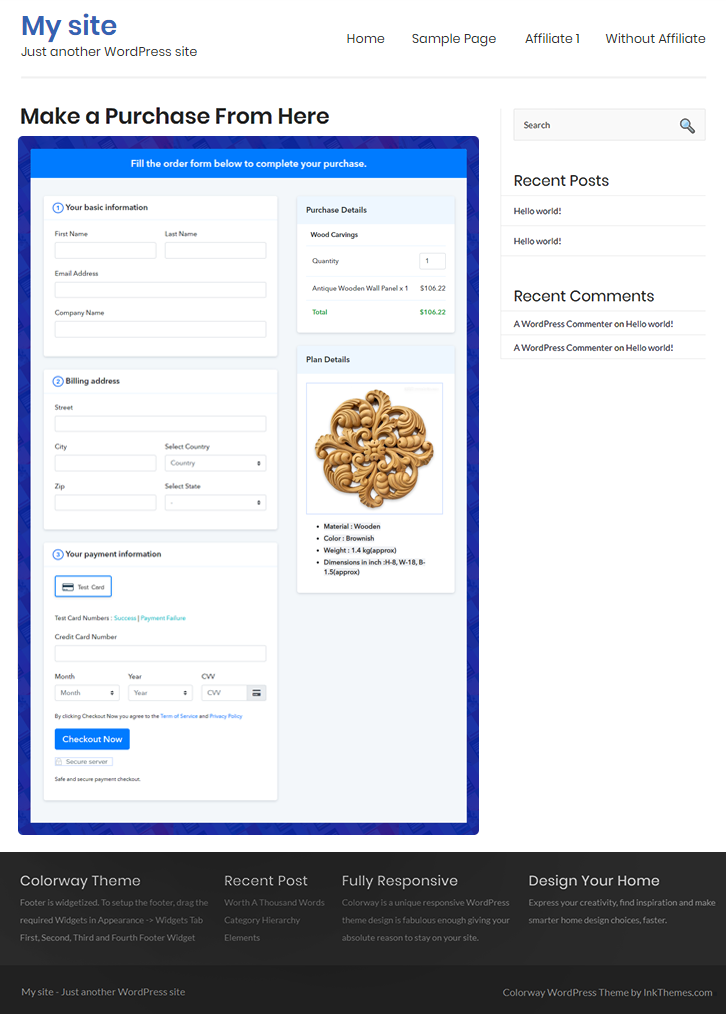
(c) Check out the Final Look of your Checkout Page on WordPress Site

Sell Wood Carvings Online W

Step 10: Multiplan Checkout Page

Note: In case you want to sell multiple products via a single checkout page, you can create a multi-plan checkout page otherwise skip this step.

(a) Click on Add Mutiplan Checkout

Multiplan Checkout

(b) Add Plans to Sell Multiple Wood Carvings from Single Checkout Page

Sell Wood Carvings Online Multi Details

(c) Take a Look at the Checkout Page

Sell Wood Carvings Online M

Preview Checkout Page

Wrapping Up

This was the complete procedure to sell wood carvings online and I hope this could be helpful for your online business. You can use multiple trustworthy payment gateway options for the payment collection process. Also, there is no selling limit on your products. Now you can start creating checkout pages for yourself to start your online business. Good luck to start wood carvings selling business online, sell unlimited products using this service.

You May Also Like To Read –
How to Sell Wooden Drums Online | Step by Step (Free Method)

How to Sell Wooden Drums Online

Ideal For: All the wooden drum manufacturers, wooden drum sellers, wooden drum dealers, wooden drum suppliers, drum shop owners and other merchants can use this method to sell wooden drums online.

How to Sell Wooden Drums Online

Why Choose this Method to Sell Wooden Drums Online?

Unlike any other solution, this method allows you to:

  • List and sell your wooden drums for FREE. Absolutely no payment required.
  • No need to pay commission on any of your sales.
  • Multiple payment options like PayPal, Credit Card, etc to collect payment from a single place.
  • Sell one time or recurring subscriptions of your wooden drums.
  • Collect payments & sell products in any currency as per your requirement.
  • Give discounts on your products by offering special coupon codes.
  • Add sales commission agents to help you in selling wooden drums online.

Get Pabbly Subscription Billing for Free

Do you know beating wooden drums has some health benefits too like it aligns your body and mind with the natural world? Yes, you must have been aware of that, plus it also offers relaxation. This is why there is a huge uprise in the selling of wooden drums by homeowners, professionals, etc. Having an offline wooden drum selling store is good but there is no harm in selling wooden drums online.

According to the Transparency Market Research report, the global cable wood drum market is anticipated to expand at a CAGR of 4% in upcoming years. Also, there are many perks like a global audience, no middleman, and much more. And you can possess your own wooden drum store with the help of Pabbly Subscription Billing software. The software keeps you on top of stocks, revenues, customer invoices, etc. Plus, it allows you to build a checkout page for selling wooden drums online. Through checkout page one can easily connect payment without any difficulty.

Now let’s cast light on the 10 easy steps that you need to follow for creating checkout pages for selling wooden drums online.

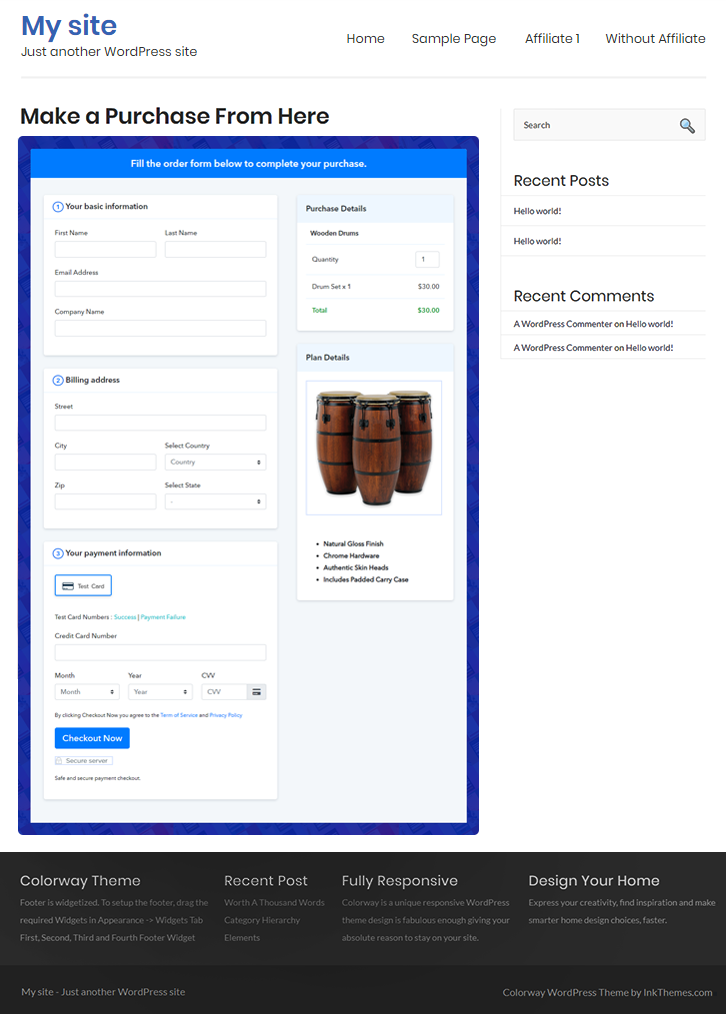
Final View of Checkout Page for your Wooden Drums Selling Business

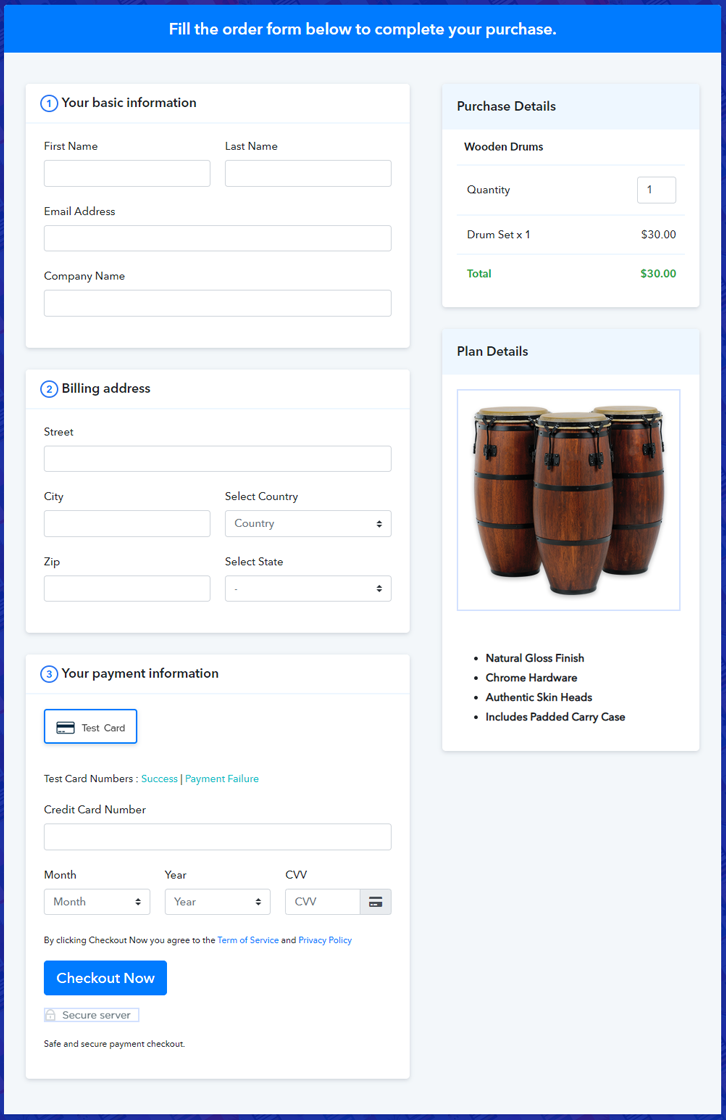
Checkout Page to Sell Wooden Drums Online

Preview Checkout Page

Step 1: Log in to Pabbly Subscription Billing

Signup

Start the process for creating a checkout page for wooden drums by visiting the Pabbly Subscription Billing in your browser. After that, click on the “Sign up Free“ button. Furthermore, either manually filled out the details or sign in using your Gmail account.

Sign Up For Free!

Step 2: Select Subscription Billing

Access Subscription Billing

Step 3: Account Setup

Setup Account

Besides, after clicking on the “Access Now” button of the software, a page will open with fields like company name, select currency, and phone number. Simply fill out those details to continue creating a checkout page for wooden drums.

Step 4: Connect Payment Gateways & Start Wooden Drums Selling Business Online

Connect Payment Gateway

The consequent step is to earning information about payment procedures using a “Test Payment Gateway”. Here, we will explain the checkout page process for the wooden drums with the help of a test payment gateway. Besides this, the tool offers various payment gateways such as PayPal, Stripe, etc. Moreover, below are the payment integration guides to help you out.

Step 5: Add Product for your Wooden Drums

Add Product

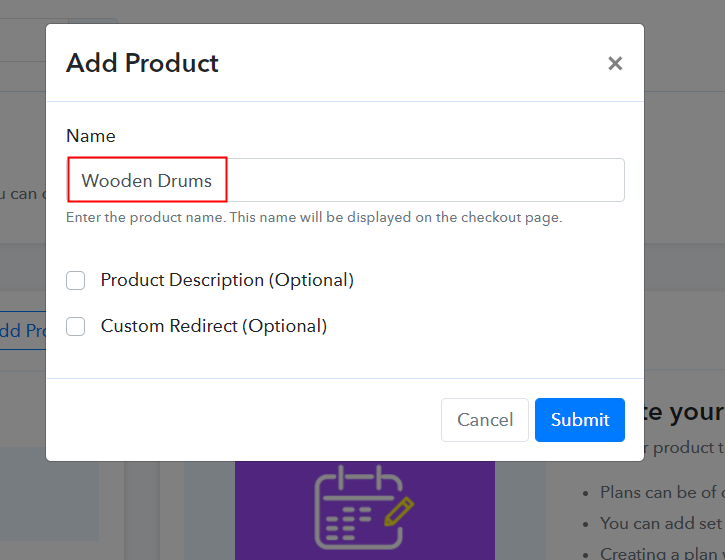
Additionally, add the name, which in our case is “Wooden Drums”. Here you can specify the type like cable drums, bass drums, etc. Further, write a short description of the wooden drums to grab the shopper’s attention.

Add Product to Start Selling Wooden Drums Online

Moreover, just fill out all those details, and your product for wooden drums is created.

Note: Here you can add all the products related to the similar category by creating plans for each of them.

Step 6: Add Plans 

Let’s expose plans for different kinds of wooden drums available in your store.

(a) Select Add New Plan

Add Plan

(b) Specify the Plan & Pricing Details

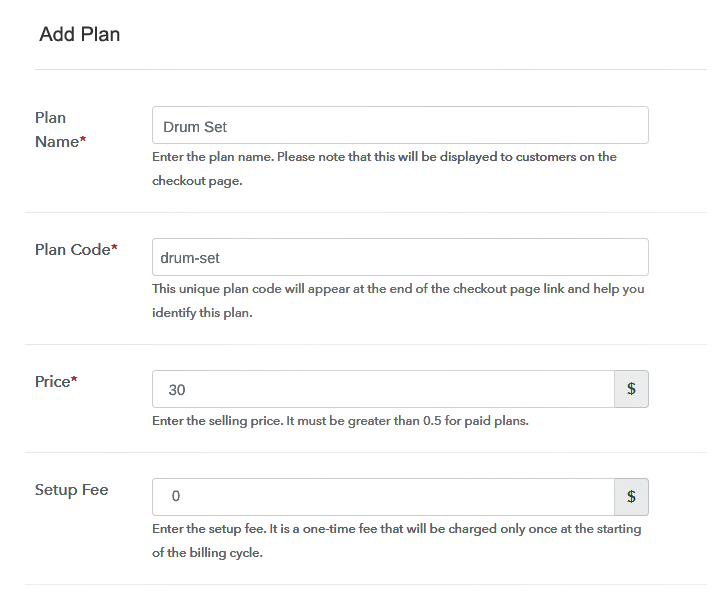
Specify the Plan and Pricing to Sell Wooden Drums Online

The next thing to do is fill all the details of the wooden drums like plan name, code, price, set-up fee, and much more to continue.

(c) Add Image & Description of Wooden Drums

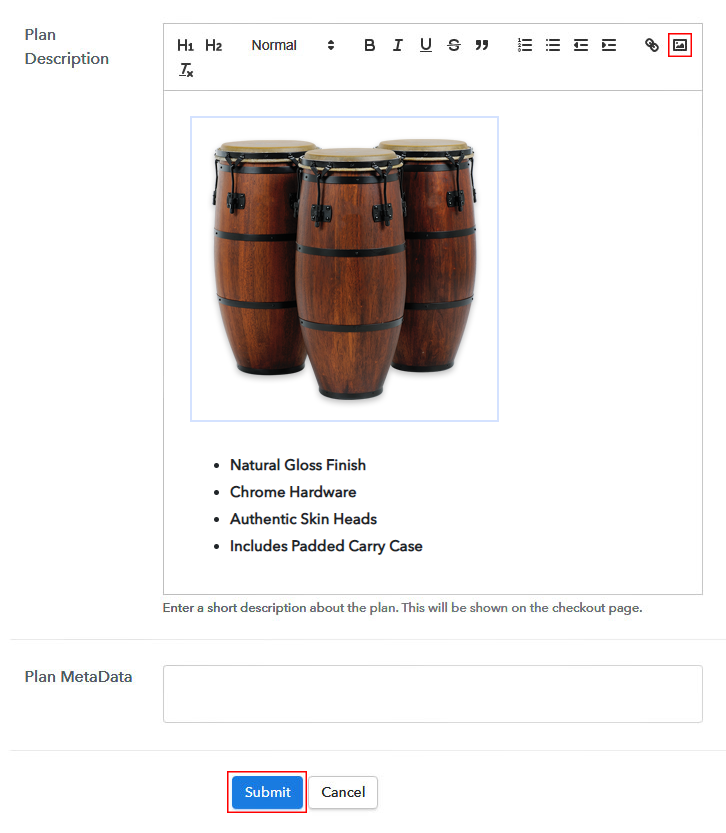
Add Image & Description to Sell Wooden Drums Online

Furthermore, write a brief description of the wooden drums using bullets, images, etc, to bring original buyers to the checkout page.

Next, click on the “Submit” button to add the wooden drums on the checkout page.

Finally, you can add multiple plans and kinds of wooden drums in your product list which you want to sell online.

Step 7: Share your Checkout Page

Share Checkout Page on Social Media

  • Moreover, share the checkout page of the wooden drums on social media accounts like Facebook & Twitter to grab the customer’s attention.
  • Also, you can share the direct link of the wooden drum’s checkout page with your customers via SMS or email marketing.
  • Additionally, embed the provided plan link of the wooden drums in the buttons or any anchor text on your website.

Step 8: Preview Checkout Page

Further, follow up on the recommended steps to preview the checkout page for wooden drums:

(a) Click on the View Button

View Checkout Plan

(b) Take a Look at the Checkout Page

Checkout Page to Sell Wooden Drums Online

Step 9: Embed Checkout Page in Site & Sell Wooden Drums Online

Embed Checkout Page on Website

Additionally, simply copy the link and add the checkout page to sell wooden drums online at any proper place on your WordPress site.

(a) Edit the Page & Paste the Copied Link

Paste Link in Text Editor

Moreover, paste the plan link of wooden drums on a text editor of the WordPress dashboard.

(b) Save & Publish the Checkout Page

Save_and_Publish

Further, click on the “Publish” button, after making changes.

(c) Check out the Final Look of your Checkout Page on WordPress Site

Final Look of your Checkout Page to Sell Wooden Drums Online

Step 10: Multiplan Checkout Page

Note: In case you want to sell multiple products via a single checkout page, you can create a multi-plan checkout page otherwise skip this step.

(a) Click on Add Mutiplan Checkout

Multiplan Checkout

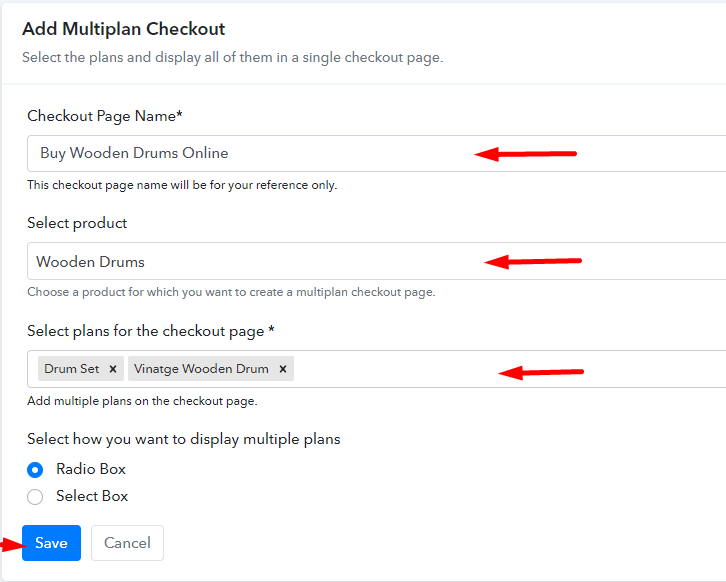
(b) Add Plans to Sell Multiple Wooden Drums from Single Checkout Page

Add Multiple Products to Start Selling Wooden Drums Online

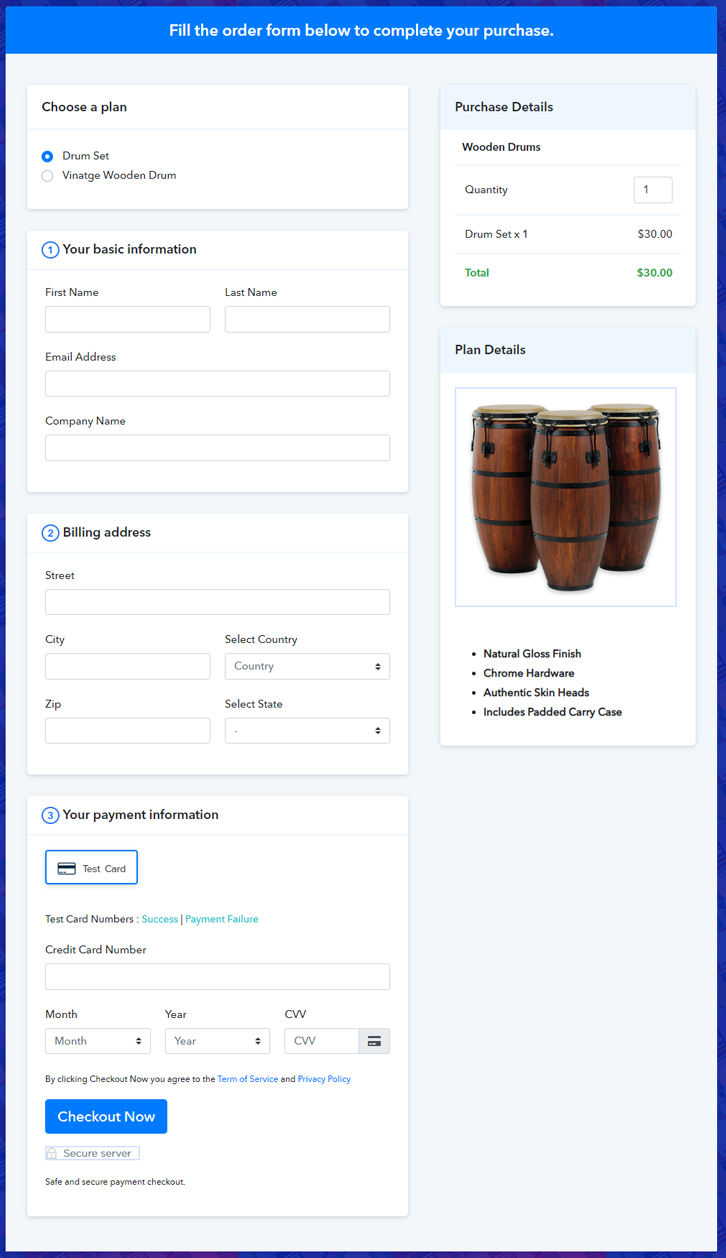
(c) Take a Look at the Checkout Page

Multiplan Checkout Page to Sell Wooden Drums Online

Preview Checkout Page

Wrapping Up

Alright! Wooden drums are higher than musical items, it brings bonuses like deep relaxation, personal transformation, etc. So starting a wooden drums business is a suitable idea. And now you’re aware that how simple is to sell wooden drums using Pabbly Subscription Billing software. Simply follow all the contrived steps and nothing else.

So, don’t dawdle anymore, try this software out.

You May Also Like To Read –
How to Sell Window Blinds Online | Step by Step (Free Method)

How to Sell Window Blinds Online

Ideal For: All the window blinds manufacturers, window blinds sellers, retail window blinds shop owners, and other merchants can use this method to take their window blinds selling business online.

How to Sell Window Blinds Online

Why Choose this Method to Sell Window Blinds Online?

Unlike any other solution, this method allows you to:

  • List and sell your window blinds for FREE. Absolutely no payment required.
  • No need to pay commission on any of your sale.
  • Multiple payment options like PayPal, Credit Card, etc to collect payment from a single place.
  • Sell one time or recurring subscriptions of your window blinds.
  • Collect payments & sell products in any currency as per your requirement.
  • Give discounts on your products by offering special coupon codes.
  • Add sales commission agents to help you in selling window blinds online.

Get Pabbly Subscription Billing for Free

Window blinds are widely used in corporate offices, houses, industries etc. And this business is having a scalar growth over the years so, we can say that expanding in this business is fruitful. And if you are planning to enter into the business to sell window blinds online then we can give you a head start by being fast.

You can definitely use a selling service like Pabbly Subscription Billing for selling window blinds online. This service allows you to create checkout pages to showcase your product, share it with your customers and accept payments through them.

Moreover, there are many other advantages of using this service like you’ll get a centralized dashboard to track the sales and availability of your product. You can even automate the billing & invoicing. And you can collect unlimited revenue by selling window blinds online as there is no revenue limit.

Final View of Checkout Page for your Window Blinds Selling Business

Checkout Page Preview to Sell Window Blinds Online

Preview Checkout Page

Step 1: Log in to Pabbly Subscription Billing

Signup

Visit Pabbly Subscription Billing and on the website, locate ‘Sign Up Free‘ button & click it. On the sign-up page, make use of a Gmail ID or do manual registration to get started with the process of selling window blinds online.

Sign Up For Free!

Step 2: Select Subscription Billing

Access Subscription Billing

Step 3: Account Setup

Setup Account

In the above pop-up window, fill in your company name, phone number & pick a currency in which you wanna deal to complete the set-up.

Step 4: Connect Payment Gateways & Start Window Blinds Selling Business Online

Connect Payment Gateway

Next, to prepare the system for secure payments, you’ve to integrate a payment gateway for selling window blinds afterwards. there is one more option to skip the gateway setup for testing the functionality first. You can enable the test payment mode. But remember to integrate a payment method from the following choices available with their integration guides.

Step 5: Add Product for your Window Blinds

Add Product

Now, add a product by clicking on the ‘Add New Product’ button. You can add products like roller, wooden, verticle, blackout etc. We’ll add window blinds (items) to sell as plans within this product in the succeeding step.

Add Product to Sell Window Blinds Online

Fill the required window blinds product details and then click submit button.

Note: Here you can add all the products related to the similar category by creating plans for each of them.

Step 6: Add Plans 

Now, let’s start adding different items for various kinds of window blinds available in your store.

(a) Select Add New Plan

Add Plan

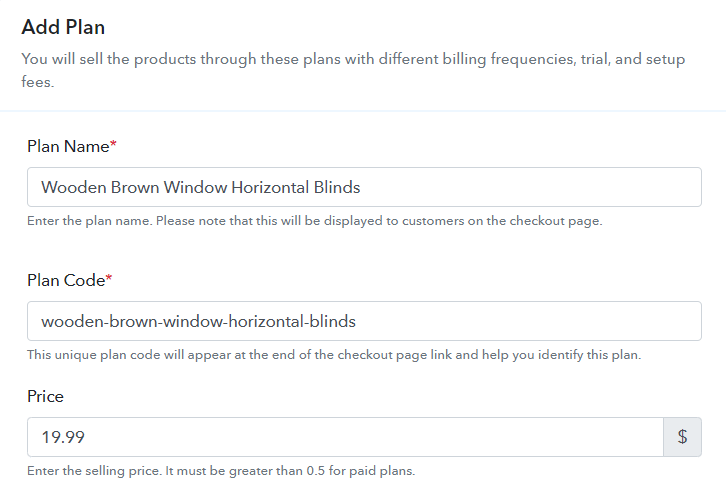
(b) Specify the Plan & Pricing Details

Add Plan to Sell Window Blinds Online

You can write a name, code, price, and set billing cycle etc details of the window blinds that you wanna sell.

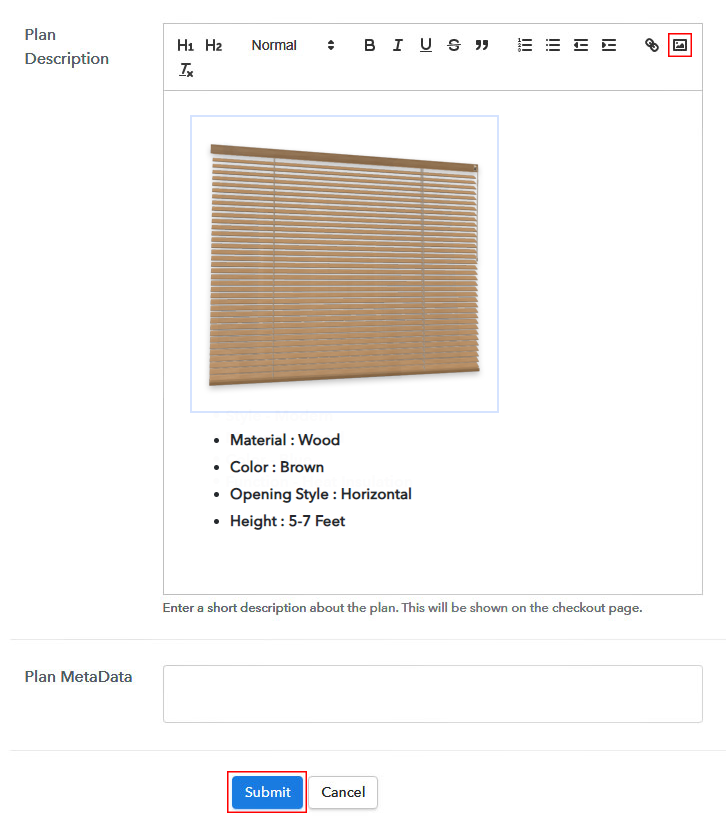
(c) Add Image & Description of Window Blinds

Add Image & Description to Sell Window Blinds Online

Also, you can embed an image with some description of the window blinds for your customer’s reference.

Click the ‘Submit’ button on this page & a checkout page will be created immediately to sell window blinds online.

Similarly, you can add other window blinds plans too.

Step 7: Share your Checkout Page

Share Checkout Page on Social Media

Now, to sell window blinds online, you’ll need to share/embed a created plan checkout page somewhere. For this, you can do the following:

  • Share a checkout page directly on Facebook & Twitter using the given buttons
  • Or share the plan link over any other link sharing platforms such as emails, WhatsApp, SMS etc
  • Lastly, you can also embed the plan link within the text & button of a website to redirect a customer on the payment pages

Step 8: Preview Checkout Page

Follow up the recommended steps to preview the checkout page:

(a) Click on the View Button

View Checkout Plan

(b) Take a Look at the Checkout Page

Checkout Page Preview to Sell Window Blinds Online

Step 9: Embed Checkout Page in Site & Sell Window Blinds Online

Embed Checkout Page on Website

Just copy the link and add the checkout page to sell window blinds online at any preferable place on your WordPress site.

(a) Edit the Page & Paste the Copied Link

Embed Checkout Page on Website

Further, paste the plan link on a text editor of the WordPress dashboard.

(b) Save & Publish the Checkout Page

Save_and_Publish

Next, click the “Publish” button, after making changes.

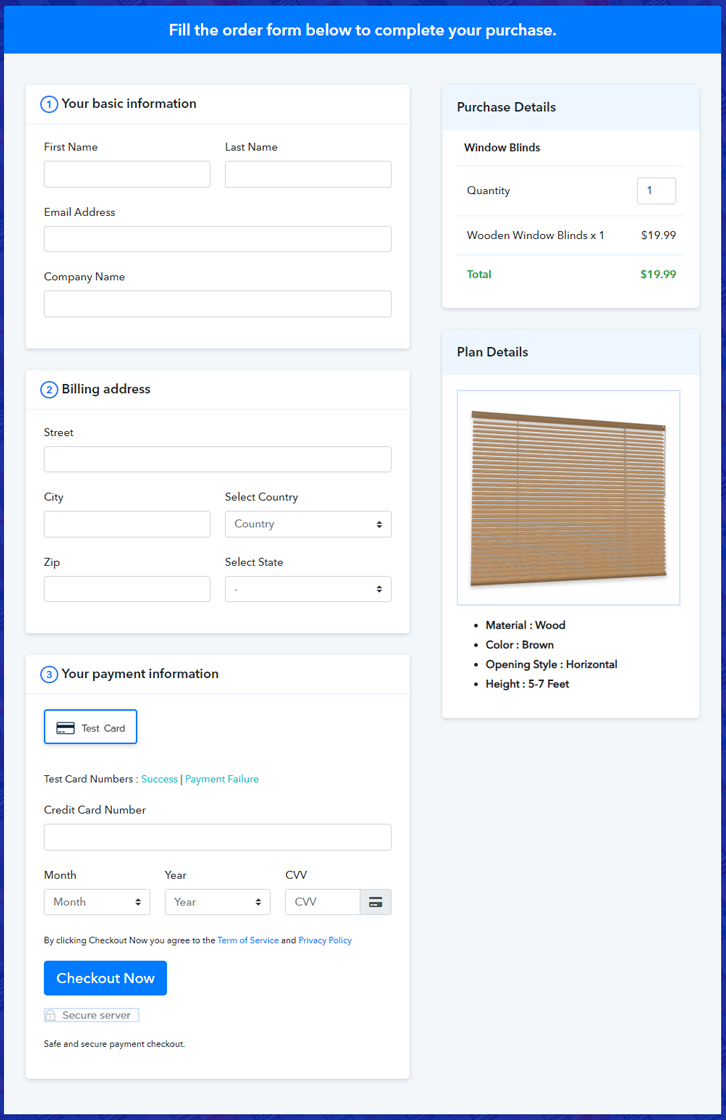
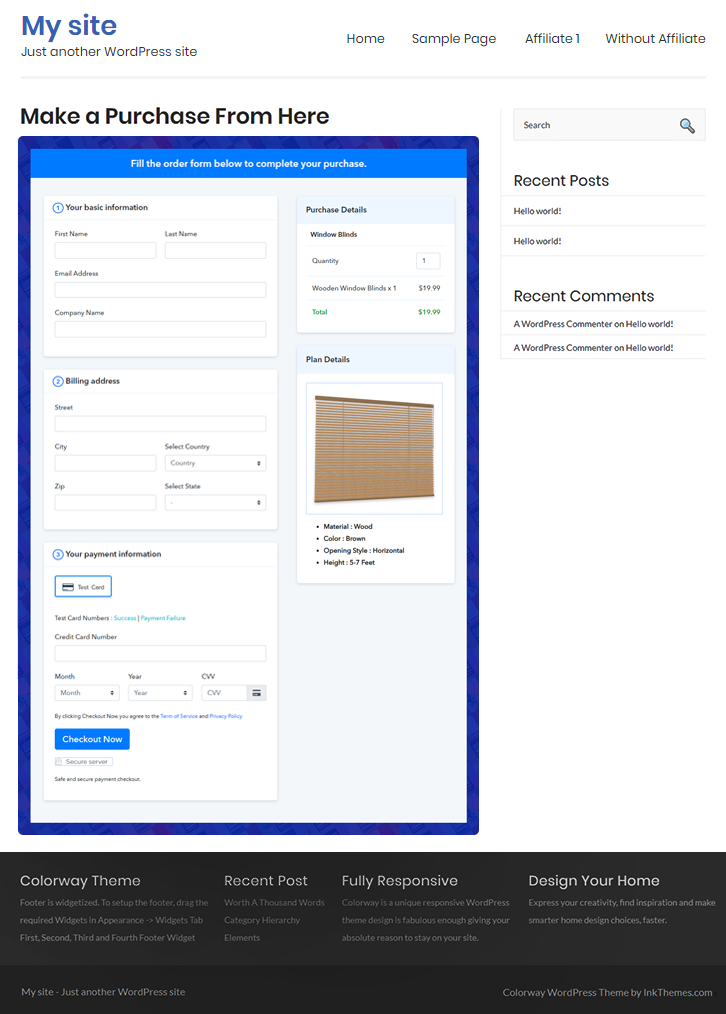
(c) Check out the Final Look of your Checkout Page on WordPress Site

Checkout Page On WordPress Site to Sell Window Blinds Online

Step 10: Multiplan Checkout Page

Note: In case you want to sell multiple products via a single checkout page, you can create a multi-plan checkout page otherwise skip this step.

(a) Click on Add Mutiplan Checkout

Multiplan Checkout

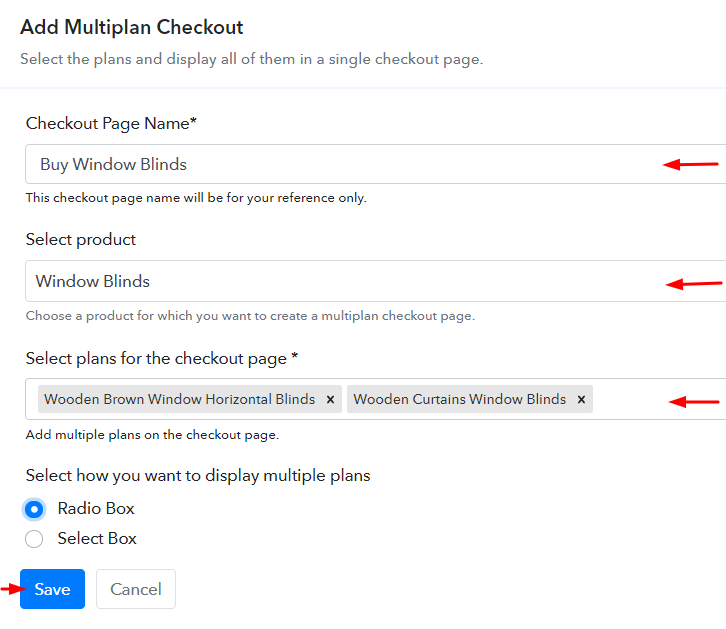
(b) Add Plans to Sell Multiple Window Blinds from Single Checkout Page

Create Multiplan Checkout Page to Sell Window Blinds Online

(c) Take a Look at the Checkout Page

Multiplan Checkout Page to Sell Window Blinds Online

Preview Checkout Page

Wrapping Up

This was my take on the checkout page creation process & ‘How to sell window blinds online?’. To start window blinds business online, you’ll need to carry out these 10 simple steps & share the checkout page with your possible audience.

Moreso, the Pabbly subscription Billing dashboard will help you manage & track the sales and items availability. Also, it enables you to automate the billing and invoicing processes.

You May Also Like To Read –